![[Mod] bemoty](../../../data/avatars/users/50554.png) [Mod] bemoty
[Mod] bemoty
- bemoty
- bemoty
- Europe/Vienna
- Yes
- No
 WEB-862
![[Mojang] Web Team](../../../data/avatars/users/10122.svg)
 MC-120297
 MCPE-27567
![[Mojang] Georgii Gavrichev](../../../data/avatars/users/22428.png)

![[Mojang] Nathan Adams](../../../data/assets/gravatar/dinnerbone.png)
 REALMS-1142
 MCD-100
 Low
Low Normal


 MCL-5329






















Invalid report.
Bitte unterlasse solche Tickets.
Yep, there's indeed a gap.
Thanks for your report.
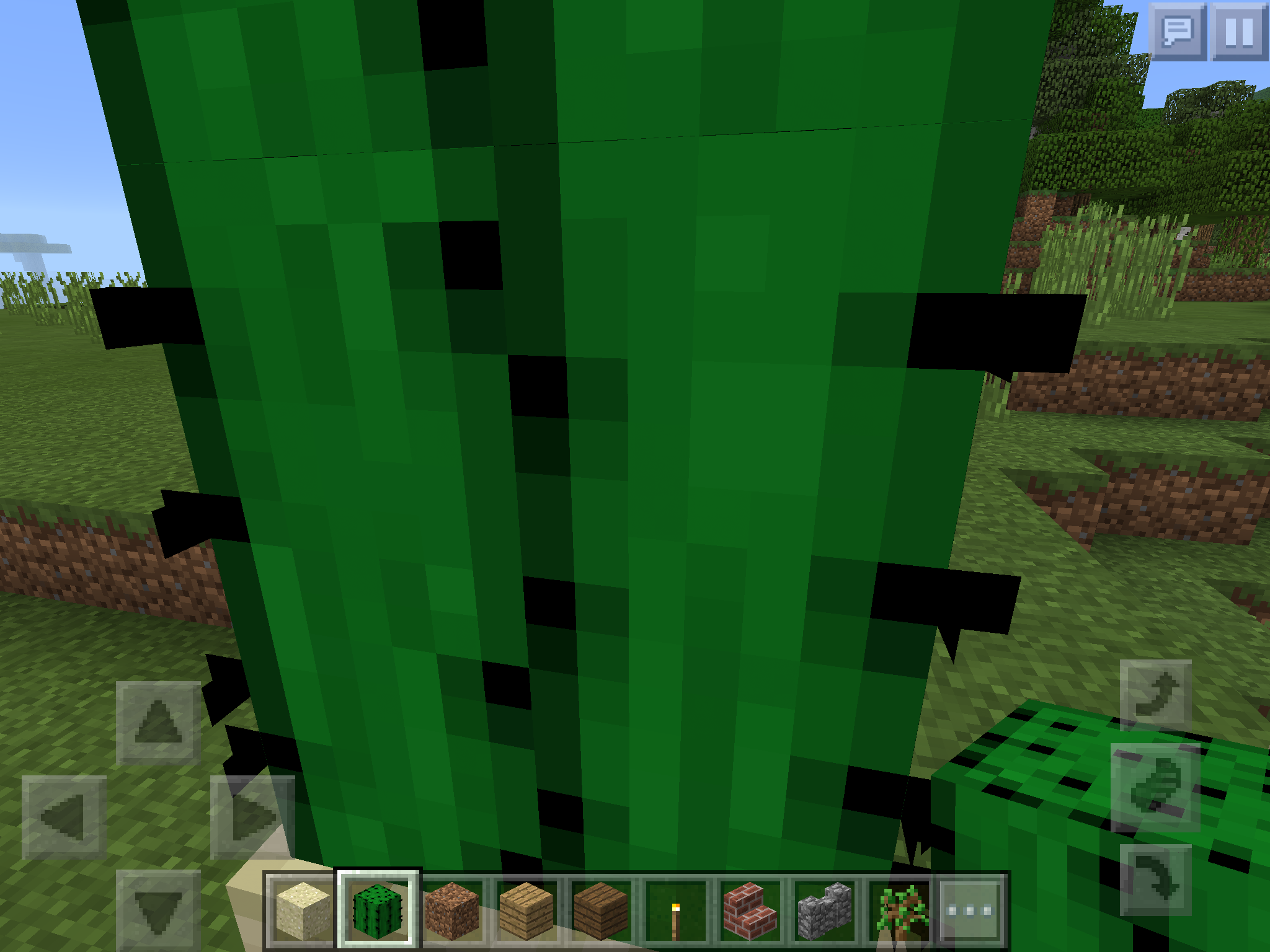
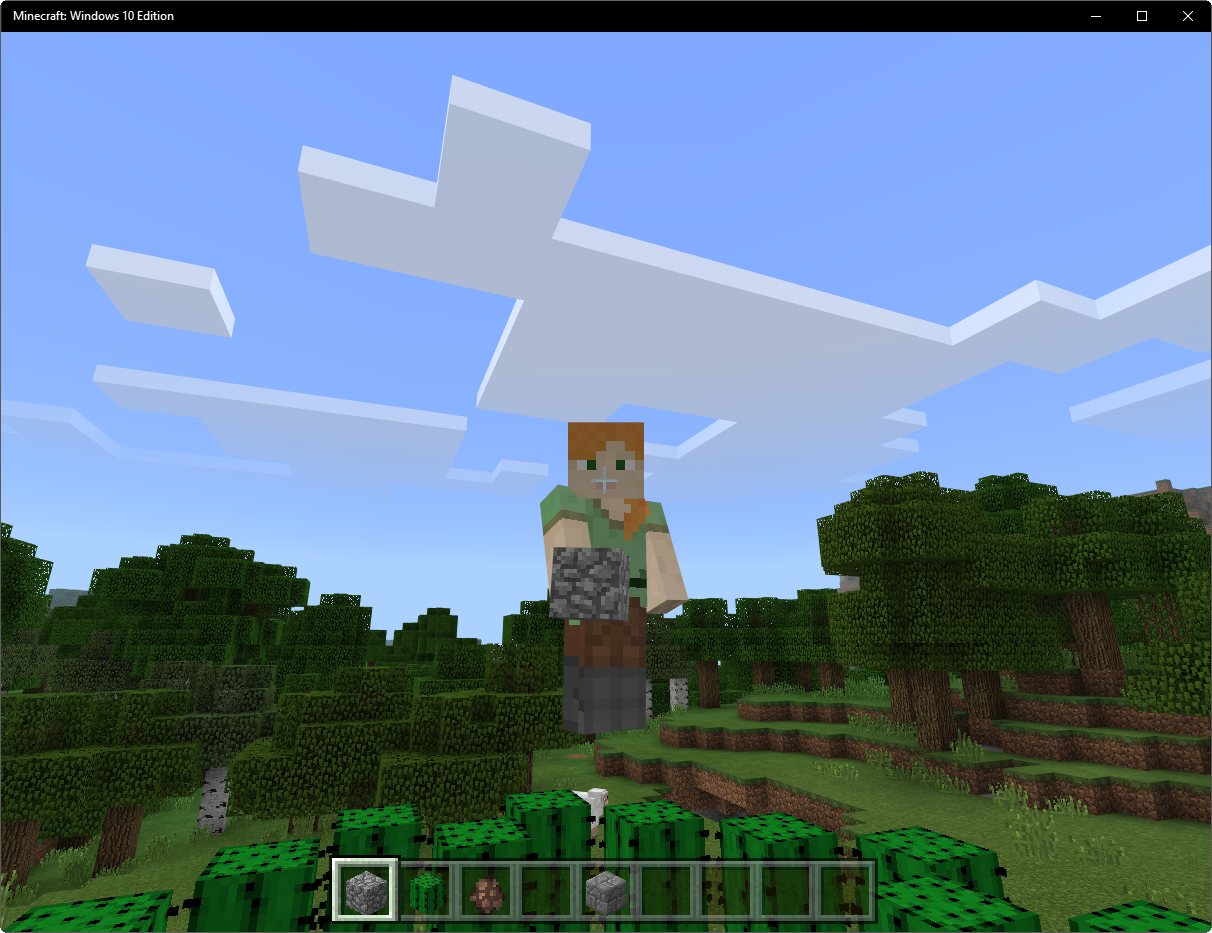
Cactus has a 1 pixel gap betweenthe top and the bottom of the cactusThere is a 1 pixel gap between cactus blocks
Invalid
Could you please add a screenshot?
Everything works fine for me.
Duplicate of MCPE-15144
Duplicate of
MC-90855
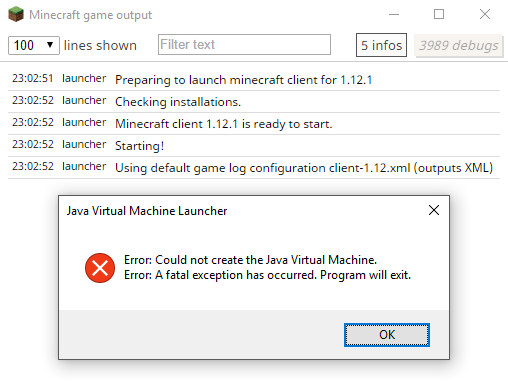
This is a technical support issue. Mojira is for bug reports only.
For technical support please visit the Mojang Support Center.
Please attach the crash report from .minecraft/crash-reports/crash-<DATE>-client.txt.
Otherwise Mojira moderators cannot diagnose this issue.
This is a technical support issue. Mojira is for bug reports only.
For technical support please visit the Mojang Support Center.
It won't let you choose 1.10 because bug reports are only accepted in the newest version of Minecraft.
Please update your game and re-create this ticket if the bug still occurs in the newest version.
(Seven months later ..)
Possible duplicate ofMC-91136.
Workaround: Press F3 + A to reload all chunks when this issue appears .
Please attach the crash report. (.minecraft/crash-reports/crash-<DATE>-client.txt)
Otherwise Mojira moderators cannot diagnose this issue.
(Since your Minecraft has already crashed, you don't need to force a new crash report.)
Have you already tried to reload all chunks with F3 + A?
Maybe this solves the issue.

This is an account issue. Mojira is for bug reports only.
For account issues please visit the Mojang Support Center.
Could not reproduce in vanilla 1.10.2.
Cannot reproduce. Are you sure you are using the newest version of Minecraft?
->MC-82824
I am able to pick up items in both creative and survival mode ..
Could not reproduce in vanilla 1.10.2.
Cannot reproduce in newest Minecraft version.
Are you still not able to press "Save and quit to title" without the game crashing?
If so, please force a crash by pressing F3 + C for 10 seconds and attach the crash report here, so we can investigate this behaviour.
Cannot reproduce in vanilla 1.10.2.
Are you sure you are using the newest version of Minecraft?
Can confirm.
Still no duration in 16w33a.
16w32a.png
16w32a: Still doesn't work for me.
Fixed in 16w32a.
Can confirm.
This only happens with English (US) selected, every other language works.
Can confirm.
However, it has always been possible to interact with a fence regardless of which item/block the player holding. I don't know what the sense of that is because after my knowledge, a lead is the only item which really does something by right clicking a fence with it.
Can confirm for 16w33a.
Oops, fail.
Yep, it get's updated when the corresponding player joins the server.

Please attach the crash report (minecraft/crash-reports/crash-<DATE>-client.txt), otherwise we cannot diagnose this issue.
Can confirm.
Does 16w32a really hate Ender Dragons that much? D:
relates to
relates to
relates to
Is there a new version of this ticket? Can confirm for MC 1.12.1.
Can confirm for MC 1.12.1.
Cannot reproduce. (Build: 421475)
Can confirm for MC 1.12.1.
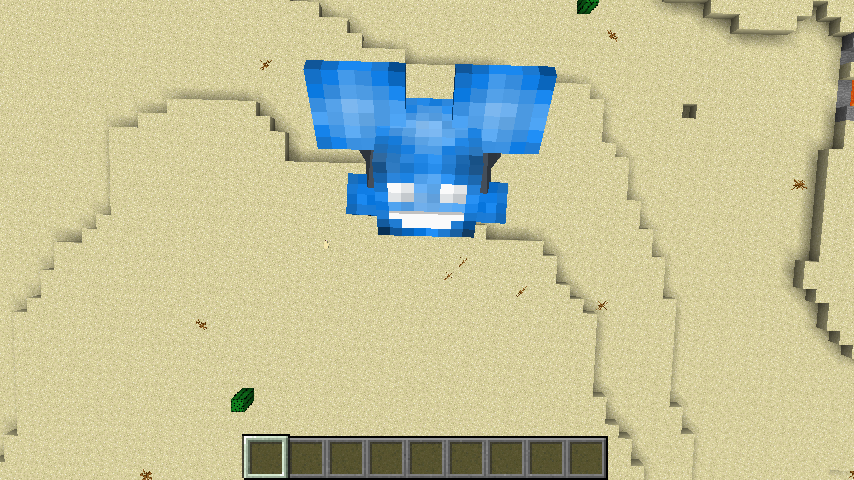
To do this properly, put any kind of helmet on, then go in ThirdPerson(Second View), then you have to move your mouse up and down to get at an angle and then you will see a line of what the color of the helmet is. For Example, if it were to be a Diamond Helm., then the line will be blue. Picture is provided in the attachment.Also, the settings are in the attachments too! -
When the player is in third person mode (looking at itself) and looks down in a certain angle (pitch), a glitchy line which may be in the color of the helmet will show up beneath the players head. This happens with any type of helmet (leather, gold, iron, chain, diamond). Also, lines may show up in different lengths.
IMPORTANT: This issue depends on the player's FOV; on different FOV levels, different lines will show up on different angles. Also, this issue doesn't really follow a pattern. Sometimes a line shows up, sometimes it doesn't. This bug can be reproduced by putting on a helmet and moving the mouse cursor up and down for a while on different FOV levels. Sooner or later a glitchy line will show up.
Microsoft Windows [Version 10.0.15063]
Intel(R) Core(TM) i5-3570K CPU @ 3.40GHz
64-bit operating system, x64-based processor; 8.00 GB RAM
NVIDIA GeForce GT 630; GeForce Game Ready Driver Version 382.53
Line with a helmet onGraphical issue affecting helmets (Glitchy lines)
When the player is in third person mode (looking at itself) and looks down in a certain angle (pitch), a glitchy line which may be in the color of the helmet will show up beneath the players head. This happens with any type of helmet (leather, gold, iron, chain, diamond). Also, lines may show up in different lengths.
IMPORTANT: Th
is issuedependson the player's FOV; on different FOV levels, different lines will show up on different angles. Also, this issue doesn't really follow a pattern. Sometimes a line shows up, sometimes it doesn't. This bug can be reproduced by putting on a helmet and moving the mouse cursor up and down for a while on different FOV levels. Sooner or later a glitchy line will show up.When the player is in third person mode (looking at itself) and looks down in a certain angle (pitch), a glitchy line which may be in the color of the helmet will show up beneath the players head. This happens with any type of helmet (leather, gold, iron, chain, diamond). Also, lines may show up in different lengths.
IMPORTANT: The lines show up depending on the player's FOV and if there are blocks in front of the player (looking down in F5 mode with a block in front of the player will bring the camera closer to the player's head); on different FOV levels, different lines will show up on different angles. Also, this issue doesn't really follow a pattern. Sometimes a line shows up, sometimes it doesn't. This bug can be reproduced by putting on a helmet and moving the mouse cursor up and down for a while on different FOV levels. Sooner or later a glitchy line will show up.
Microsoft Windows [Version 10.0.15063]
Intel(R) Core(TM) i5-3570K CPU @ 3.40GHz
64-bit operating system, x64-based processor; 8.00 GB RAM
NVIDIA GeForce GT 630; GeForce Game Ready Driver Version 382.53Microsoft Windows [Version 10.0.15063]
Intel(R) Core(TM) i5-3570K CPU @ 3.40GHz, 3.50 GHz
64-bit operating system, x64-based processor; 8.00 GB RAM
NVIDIA GeForce GT 630; GeForce Game Ready Driver Version 385.28
Java Version 8 Update 144 (64-bit)
When the player is in third person mode (looking at itself) and looks down in a certain angle (pitch), a glitchy line which may be in the color of the helmet will show up beneath the players head. This happens with any type of helmet (leather, gold, iron, chain, diamond). Also, lines may show up in different lengths.
IMPORTANT: The lines show up depending on the game-window size, the player's FOV and if there are blocks in front of the player (looking down in F5 mode with a block in front of the player will bring the camera closer to the player's head); on different FOV levels, different lines will show up on different angles. Also, this issue doesn't really follow a pattern. Sometimes a line shows up, sometimes it doesn't. This bug can be reproduced by putting on a helmet and moving the mouse cursor up and down for a while on different FOV levels. Sooner or later a glitchy line will show up.
When the player is in third person mode (looking at itself)
and looksdown in a certain angle (pitch), a glitchy line which may be in the color of the helmet will show up beneath the players head. This happens with any type of helmet (leather, gold, iron, chain, diamond). Also, lines may show up in different lengths.IMPORTANT: The lines show up depending on the game-window size, the player's FOV and if there are blocks in front of the player (looking down in F5 mode with a block in front of the player will bring the camera closer to the player's head); on different FOV levels, different lines will show up on different angles. Also, this issue doesn't really follow a pattern. Sometimes a line shows up, sometimes it doesn't. This bug can be reproduced by putting on a helmet and moving the mouse cursor up and down for a while on different FOV levels. Sooner or later a glitchy line will show up.
When the player is in third person mode (looking at itself), is wearing a helmet or/and the player's hat layer is activated, and is looking up/down in a certain angle (pitch/veritcal angle), a glitchy line which may be in the color of the helmet/hat layer will show up beneath the players head. This happens with any type of helmet (leather, gold, iron, chain, diamond). Also, lines may show up in different lengths.
IMPORTANT: The lines show up depending on the game-window size, the player's FOV and if there are blocks in front of the player (looking down in F5 mode with a block in front of the player will bring the camera closer to the player's head); on different FOV levels, different lines will show up on different angles. Also, this issue doesn't really follow a pattern. Sometimes a line shows up, sometimes it doesn't. This bug can be reproduced by putting on a helmet and moving the mouse cursor up and down for a while on different FOV levels. Sooner or later a glitchy line will show up.
Microsoft Windows [Version 10.0.15063]
Intel(R) Core(TM) i5-3570K CPU @ 3.40GHz, 3.50 GHz
64-bit operating system, x64-based processor; 8.00 GB RAM
NVIDIA GeForce GT 630; GeForce Game Ready Driver Version 385.28
JavaVersion 8 Update 144(64-bit)Microsoft Windows [Version 10.0.15063]
Intel(R) Core(TM) i5-3570K CPU @ 3.40GHz, 3.50 GHz
64-bit operating system, x64-based processor; 8.00 GB RAM
NVIDIA GeForce GT 630; GeForce Game Ready Driver Version 385.28
Java 1.8.0_144-b01 (64-bit)
Microsoft Windows [Version 10.0.15063]
Intel(R) Core(TM) i5-3570K CPU @ 3.40GHz, 3.50 GHz
64-bit operating system, x64-based processor; 8.00 GB RAM
NVIDIA GeForce GT 630; GeForce Game Ready Driver Version 385.28
Java 1.8.0_144-b01 (64-bit)Microsoft Windows [Version 10.0.15063]
Intel(R) Core(TM) i5-3570K CPU @ 3.40GHz, 3.40 GHz
64-bit operating system, x64-based processor; 8.00 GB RAM
NVIDIA GeForce GT 630; GeForce Game Ready Driver Version 385.28
Java 1.8.0_144-b01 (64-bit)
Graphical issue affecting helmets (Glitchy lines)Glitchy lines below player head model caused by second head layer or helmet
Duplicate of
MC-108?
Cannot reproduce in MC 1.12.1, fixed?
This doesn't sound like a bug to me.
If you believe this would be an useful feature, please suggest it here.
Cannot reproduce.
Cannot reproduce.
Cannot reproduce in MC 1.12.1. (64 pixels on the left, 64 pixels the right -> centered)
/summon Shulker ~ ~ ~ {NoAI:1,CustomName:"---.---"}/tp <x> <y> <z> -180 90 (coordinates on top of the Shulker)
This is definitely intended.
The bug
The link to the guide Verifying whether your account is paid which is listed on the Minecraft Hopper guides page links to a non-existent page. (404)
The link to the guide Verifying whether your account is paid which is listed on the Minecraft Hopper guides page links to a non-existent page.
(404)
Duplicate of
MC-9194
I was making a fun contraption with zombies. I then decided to summon a zombie with the attribute "generic.followRange". I used the following command:
/summon Zombie ~ ~2 ~ {Attributes:[{Name:generic.followRange,Base:2048}]}I used a 2048 which according to the wiki is the max. My game then froze, and a couple seconds later crashed. I joined back and it crashed again. I then switch to the snapshot (14w25b) and I was able to get back on the world but however everything was frozen besides myself. The game again crashed a few moments later and now whenever I join the world no matter what version it crashes.
What I expected to happen was...:
The zombie to spawn with the attribute as necessary.What actually happened was...:
My game froze then crashed.Steps to Reproduce:
1. Run the command you see above in a command block in snapshot 14w25b.
2. Game should crash (as mine did)I tested this a second time on a newly generated world and my game once again froze although I could still move my character.
Here is a crash report from 1.7.9
---- Minecraft Crash Report ---- // I let you down. Sorry :( Time: 6/23/14 11:44 PM Description: Ticking entity java.lang.RuntimeException: Already decorating!! at ahz.a(SourceFile:21) at aht.a(SourceFile:364) at aio.a(SourceFile:74) at aqt.a(SourceFile:162) at mr.a(SourceFile:166) at apw.a(SourceFile:781) at mr.c(SourceFile:101) at mr.d(SourceFile:114) at aha.e(SourceFile:310) at ahq.<init>(SourceFile:30) at aha.a(SourceFile:2198) at vu.a(SourceFile:91) at up.a(SourceFile:41) at ui.a(SourceFile:70) at sv.bm(SourceFile:420) at su.e(SourceFile:1321) at sv.e(SourceFile:295) at yf.e(SourceFile:25) at yp.e(SourceFile:189) at su.h(SourceFile:1208) at sv.h(SourceFile:171) at yf.h(SourceFile:30) at yp.h(SourceFile:245) at aha.a(SourceFile:1367) at ms.a(SourceFile:480) at aha.g(SourceFile:1345) at aha.h(SourceFile:1252) at ms.h(SourceFile:365) at net.minecraft.server.MinecraftServer.v(SourceFile:522) at net.minecraft.server.MinecraftServer.u(SourceFile:453) at bvj.u(SourceFile:117) at net.minecraft.server.MinecraftServer.run(SourceFile:369) at li.run(SourceFile:628) A detailed walkthrough of the error, its code path and all known details is as follows: --------------------------------------------------------------------------------------- -- Head -- Stacktrace: at ahz.a(SourceFile:21) at aht.a(SourceFile:364) at aio.a(SourceFile:74) at aqt.a(SourceFile:162) at mr.a(SourceFile:166) at apw.a(SourceFile:781) at mr.c(SourceFile:101) at mr.d(SourceFile:114) at aha.e(SourceFile:310) at ahq.<init>(SourceFile:30) at aha.a(SourceFile:2198) at vu.a(SourceFile:91) at up.a(SourceFile:41) at ui.a(SourceFile:70) at sv.bm(SourceFile:420) at su.e(SourceFile:1321) at sv.e(SourceFile:295) at yf.e(SourceFile:25) at yp.e(SourceFile:189) at su.h(SourceFile:1208) at sv.h(SourceFile:171) at yf.h(SourceFile:30) at yp.h(SourceFile:245) at aha.a(SourceFile:1367) at ms.a(SourceFile:480) at aha.g(SourceFile:1345) -- Entity being ticked -- Details: Entity Type: Zombie (yp) Entity ID: 1272329 Entity Name: Zombie Entity's Exact location: 146.50, 64.00, -49.50 Entity's Block location: World: (146,64,-50), Chunk: (at 2,4,14 in 9,-4; contains blocks 144,0,-64 to 159,255,-49), Region: (0,-1; contains chunks 0,-32 to 31,-1, blocks 0,0,-512 to 511,255,-1) Entity's Momentum: 0.00, -0.08, 0.00 Stacktrace: at aha.h(SourceFile:1252) at ms.h(SourceFile:365) -- Affected level -- Details: Level name: Mob defence testing All players: 1 total; [mv['stidder'/1265298, l='Mob defence testing', x=126.57, y=64.00, z=-48.95]] Chunk stats: ServerChunkCache: 1163 Drop: 0 Level seed: 2395711507764008389 Level generator: ID 01 - flat, ver 0. Features enabled: true Level generator options: 2;7,59x1,3x3,2;1;stronghold,biome_1,village,decoration,dungeon,lake,mineshaft,lava_lake Level spawn location: World: (71,4,-42), Chunk: (at 7,0,6 in 4,-3; contains blocks 64,0,-48 to 79,255,-33), Region: (0,-1; contains chunks 0,-32 to 31,-1, blocks 0,0,-512 to 511,255,-1) Level time: 220564 game time, 16000 day time Level dimension: 0 Level storage version: 0x04ABD - Anvil Level weather: Rain time: 89123 (now: false), thunder time: 143514 (now: false) Level game mode: Game mode: creative (ID 1). Hardcore: false. Cheats: true Stacktrace: at net.minecraft.server.MinecraftServer.v(SourceFile:522) at net.minecraft.server.MinecraftServer.u(SourceFile:453) at bvj.u(SourceFile:117) at net.minecraft.server.MinecraftServer.run(SourceFile:369) at li.run(SourceFile:628) -- System Details -- Details: Minecraft Version: 1.7.9 Operating System: Windows 7 (amd64) version 6.1 Java Version: 1.8.0_05, Oracle Corporation Java VM Version: Java HotSpot(TM) 64-Bit Server VM (mixed mode), Oracle Corporation Memory: 312988624 bytes (298 MB) / 1607467008 bytes (1533 MB) up to 6681526272 bytes (6372 MB) JVM Flags: 2 total; -XX:HeapDumpPath=MojangTricksIntelDriversForPerformance_javaw.exe_minecraft.exe.heapdump -Xmx7G AABB Pool Size: 0 (0 bytes; 0 MB) allocated, 0 (0 bytes; 0 MB) used IntCache: cache: 0, tcache: 0, allocated: 12, tallocated: 94 Profiler Position: N/A (disabled) Vec3 Pool Size: 0 (0 bytes; 0 MB) allocated, 0 (0 bytes; 0 MB) used Player Count: 1 / 8; [mv['stidder'/1265298, l='Mob defence testing', x=126.57, y=64.00, z=-48.95]] Type: Integrated Server (map_client.txt) Is Modded: Probably not. Jar signature remains and both client + server brands are untouched.And here is one from the snapshot 14w25b
---- Minecraft Crash Report ---- // Everything's going to plan. No, really, that was supposed to happen. Time: 6/23/14 11:46 PM Description: Ticking entity java.lang.RuntimeException: Already decorating at amt.a(SourceFile:25) at amm.a(SourceFile:397) at ani.a(SourceFile:85) at azy.a(SourceFile:178) at ot.a(SourceFile:175) at ayv.a(SourceFile:1015) at ot.c(SourceFile:104) at ot.d(SourceFile:117) at alu.b(SourceFile:273) at amj.<init>(SourceFile:36) at alu.a(SourceFile:2407) at yc.a(SourceFile:67) at ws.a(SourceFile:47) at wk.a(SourceFile:75) at uw.bz(SourceFile:448) at uv.f(SourceFile:1402) at uw.f(SourceFile:315) at abj.f(SourceFile:40) at acf.f(SourceFile:186) at uv.j(SourceFile:1270) at uw.j(SourceFile:194) at abj.j(SourceFile:45) at acf.j(SourceFile:244) at alu.a(SourceFile:1425) at ou.a(SourceFile:549) at alu.g(SourceFile:1403) at alu.i(SourceFile:1308) at ou.i(SourceFile:422) at net.minecraft.server.MinecraftServer.w(SourceFile:578) at net.minecraft.server.MinecraftServer.v(SourceFile:506) at coe.v(SourceFile:132) at net.minecraft.server.MinecraftServer.run(SourceFile:422) at java.lang.Thread.run(Unknown Source) A detailed walkthrough of the error, its code path and all known details is as follows: --------------------------------------------------------------------------------------- -- Head -- Stacktrace: at amt.a(SourceFile:25) at amm.a(SourceFile:397) at ani.a(SourceFile:85) at azy.a(SourceFile:178) at ot.a(SourceFile:175) at ayv.a(SourceFile:1015) at ot.c(SourceFile:104) at ot.d(SourceFile:117) at alu.b(SourceFile:273) at amj.<init>(SourceFile:36) at alu.a(SourceFile:2407) at yc.a(SourceFile:67) at ws.a(SourceFile:47) at wk.a(SourceFile:75) at uw.bz(SourceFile:448) at uv.f(SourceFile:1402) at uw.f(SourceFile:315) at abj.f(SourceFile:40) at acf.f(SourceFile:186) at uv.j(SourceFile:1270) at uw.j(SourceFile:194) at abj.j(SourceFile:45) at acf.j(SourceFile:244) at alu.a(SourceFile:1425) at ou.a(SourceFile:549) at alu.g(SourceFile:1403) -- Entity being ticked -- Details: Entity Type: Zombie (acf) Entity ID: 1724 Entity Name: Zombie Entity's Exact location: 146.50, 64.00, -48.50 Entity's Block location: 146.00,64.00,-49.00 - World: (146,64,-49), Chunk: (at 2,4,15 in 9,-4; contains blocks 144,0,-64 to 159,255,-49), Region: (0,-1; contains chunks 0,-32 to 31,-1, blocks 0,0,-512 to 511,255,-1) Entity's Momentum: 0.00, -0.08, 0.00 Entity's Rider: ~~ERROR~~ NullPointerException: null Entity's Vehicle: ~~ERROR~~ NullPointerException: null Stacktrace: at alu.i(SourceFile:1308) at ou.i(SourceFile:422) -- Affected level -- Details: Level name: Mob defence testing All players: 1 total; [ox['stidder'/1771, l='Mob defence testing', x=126.57, y=64.00, z=-48.95]] Chunk stats: ServerChunkCache: 1162 Drop: 0 Level seed: 2395711507764008389 Level generator: ID 01 - flat, ver 0. Features enabled: true Level generator options: 2;7,59x1,3x3,2;1;stronghold,biome_1,village,decoration,dungeon,lake,mineshaft,lava_lake Level spawn location: 71.00,4.00,-42.00 - World: (71,4,-42), Chunk: (at 7,0,6 in 4,-3; contains blocks 64,0,-48 to 79,255,-33), Region: (0,-1; contains chunks 0,-32 to 31,-1, blocks 0,0,-512 to 511,255,-1) Level time: 220593 game time, 16000 day time Level dimension: 0 Level storage version: 0x04ABD - Anvil Level weather: Rain time: 89094 (now: false), thunder time: 143485 (now: false) Level game mode: Game mode: creative (ID 1). Hardcore: false. Cheats: true Stacktrace: at net.minecraft.server.MinecraftServer.w(SourceFile:578) at net.minecraft.server.MinecraftServer.v(SourceFile:506) at coe.v(SourceFile:132) at net.minecraft.server.MinecraftServer.run(SourceFile:422) at java.lang.Thread.run(Unknown Source) -- System Details -- Details: Minecraft Version: 14w25b Operating System: Windows 7 (amd64) version 6.1 Java Version: 1.8.0_05, Oracle Corporation Java VM Version: Java HotSpot(TM) 64-Bit Server VM (mixed mode), Oracle Corporation Memory: 255673200 bytes (243 MB) / 906493952 bytes (864 MB) up to 14316732416 bytes (13653 MB) JVM Flags: 2 total; -XX:HeapDumpPath=MojangTricksIntelDriversForPerformance_javaw.exe_minecraft.exe.heapdump -Xmx15G IntCache: cache: 0, tcache: 0, allocated: 0, tallocated: 0 Profiler Position: N/A (disabled) Player Count: 1 / 8; [ox['stidder'/1771, l='Mob defence testing', x=126.57, y=64.00, z=-48.95]] Type: Integrated Server (map_client.txt) Is Modded: Probably not. Jar signature remains and both client + server brands are untouched.And here is the last one from when I generated the new world:
---- Minecraft Crash Report ---- // Don't be sad. I'll do better next time, I promise! Time: 6/24/14 12:16 AM Description: Ticking entity java.lang.RuntimeException: Already decorating at amt.a(SourceFile:25) at amm.a(SourceFile:397) at amy.a(SourceFile:143) at bad.a(SourceFile:482) at ot.a(SourceFile:175) at ayv.a(SourceFile:1015) at ot.c(SourceFile:104) at ot.d(SourceFile:117) at alu.b(SourceFile:273) at alu.f(SourceFile:268) at alu.q(SourceFile:698) at ayb.a(SourceFile:25) at ayc.a(SourceFile:53) at ayc.apply(SourceFile:50) at ayd.a(SourceFile:67) at ayd.a(SourceFile:94) at atj.k(SourceFile:81) at atj.c(SourceFile:53) at ayv.a(SourceFile:670) at alu.d(SourceFile:287) at bbo.b(SourceFile:20) at amt.a(SourceFile:232) at amt.a(SourceFile:49) at amm.a(SourceFile:397) at amy.a(SourceFile:143) at bad.a(SourceFile:482) at ot.a(SourceFile:175) at ayv.a(SourceFile:1015) at ot.c(SourceFile:104) at ot.d(SourceFile:117) at alu.b(SourceFile:273) at amj.<init>(SourceFile:36) at alu.a(SourceFile:2407) at yc.a(SourceFile:67) at ws.a(SourceFile:47) at wk.a(SourceFile:75) at uw.bz(SourceFile:448) at uv.f(SourceFile:1402) at uw.f(SourceFile:315) at abj.f(SourceFile:40) at acf.f(SourceFile:186) at uv.j(SourceFile:1270) at uw.j(SourceFile:194) at abj.j(SourceFile:45) at acf.j(SourceFile:244) at alu.a(SourceFile:1425) at ou.a(SourceFile:549) at alu.g(SourceFile:1403) at alu.i(SourceFile:1308) at ou.i(SourceFile:422) at net.minecraft.server.MinecraftServer.w(SourceFile:578) at net.minecraft.server.MinecraftServer.v(SourceFile:506) at coe.v(SourceFile:132) at net.minecraft.server.MinecraftServer.run(SourceFile:422) at java.lang.Thread.run(Unknown Source) A detailed walkthrough of the error, its code path and all known details is as follows: --------------------------------------------------------------------------------------- -- Head -- Stacktrace: at amt.a(SourceFile:25) at amm.a(SourceFile:397) at amy.a(SourceFile:143) at bad.a(SourceFile:482) at ot.a(SourceFile:175) at ayv.a(SourceFile:1015) at ot.c(SourceFile:104) at ot.d(SourceFile:117) at alu.b(SourceFile:273) at alu.f(SourceFile:268) at alu.q(SourceFile:698) at ayb.a(SourceFile:25) at ayc.a(SourceFile:53) at ayc.apply(SourceFile:50) at ayd.a(SourceFile:67) at ayd.a(SourceFile:94) at atj.k(SourceFile:81) at atj.c(SourceFile:53) at ayv.a(SourceFile:670) at alu.d(SourceFile:287) at bbo.b(SourceFile:20) at amt.a(SourceFile:232) at amt.a(SourceFile:49) at amm.a(SourceFile:397) at amy.a(SourceFile:143) at bad.a(SourceFile:482) at ot.a(SourceFile:175) at ayv.a(SourceFile:1015) at ot.c(SourceFile:104) at ot.d(SourceFile:117) at alu.b(SourceFile:273) at amj.<init>(SourceFile:36) at alu.a(SourceFile:2407) at yc.a(SourceFile:67) at ws.a(SourceFile:47) at wk.a(SourceFile:75) at uw.bz(SourceFile:448) at uv.f(SourceFile:1402) at uw.f(SourceFile:315) at abj.f(SourceFile:40) at acf.f(SourceFile:186) at uv.j(SourceFile:1270) at uw.j(SourceFile:194) at abj.j(SourceFile:45) at acf.j(SourceFile:244) at alu.a(SourceFile:1425) at ou.a(SourceFile:549) at alu.g(SourceFile:1403) -- Entity being ticked -- Details: Entity Type: Zombie (acf) Entity ID: 15912 Entity Name: Zombie Entity's Exact location: -143.50, 65.00, 257.50 Entity's Block location: -144.00,65.00,257.00 - World: (-144,65,257), Chunk: (at 0,4,1 in -9,16; contains blocks -144,0,256 to -129,255,271), Region: (-1,0; contains chunks -32,0 to -1,31, blocks -512,0,0 to -1,255,511) Entity's Momentum: 0.00, -0.08, 0.00 Entity's Rider: ~~ERROR~~ NullPointerException: null Entity's Vehicle: ~~ERROR~~ NullPointerException: null Stacktrace: at alu.i(SourceFile:1308) at ou.i(SourceFile:422) -- Affected level -- Details: Level name: New World All players: 0 total; [] Chunk stats: ServerChunkCache: 14626 Drop: 585 Level seed: 7227146229540588600 Level generator: ID 00 - default, ver 1. Features enabled: true Level generator options: Level spawn location: -140.00,64.00,256.00 - World: (-140,64,256), Chunk: (at 4,4,0 in -9,16; contains blocks -144,0,256 to -129,255,271), Region: (-1,0; contains chunks -32,0 to -1,31, blocks -512,0,0 to -1,255,511) Level time: 652 game time, 652 day time Level dimension: 0 Level storage version: 0x04ABD - Anvil Level weather: Rain time: 108133 (now: false), thunder time: 97713 (now: false) Level game mode: Game mode: survival (ID 0). Hardcore: false. Cheats: false Stacktrace: at net.minecraft.server.MinecraftServer.w(SourceFile:578) at net.minecraft.server.MinecraftServer.v(SourceFile:506) at coe.v(SourceFile:132) at net.minecraft.server.MinecraftServer.run(SourceFile:422) at java.lang.Thread.run(Unknown Source) -- System Details -- Details: Minecraft Version: 14w25b Operating System: Windows 7 (amd64) version 6.1 Java Version: 1.8.0_05, Oracle Corporation Java VM Version: Java HotSpot(TM) 64-Bit Server VM (mixed mode), Oracle Corporation Memory: 686110648 bytes (654 MB) / 3391094784 bytes (3234 MB) up to 14316732416 bytes (13653 MB) JVM Flags: 2 total; -XX:HeapDumpPath=MojangTricksIntelDriversForPerformance_javaw.exe_minecraft.exe.heapdump -Xmx15G IntCache: cache: 0, tcache: 0, allocated: 13, tallocated: 95 Profiler Position: N/A (disabled) Player Count: 0 / 8; [] Type: Integrated Server (map_client.txt) Is Modded: Probably not. Jar signature remains and both client + server brands are untouched.The bug
This bug occurs when the attribute generic.followRange is set higher than a specific threshold. I already got this bug to work with 2048, 1000, 500 and 250 – it may be possible to reproduce it with lower values too, though.
Basically, as soon as an entity with a "broken follow range" is spawned and finds an entity within that follow range (even if that entity is the player itself), the game will freeze, internally. This means that you can actually move and destroy/place blocks but cannot interact with entities or tile entities. Also, you cannot use items or commands and experience huge lag spikes.
As soon as you try to exit the world (any method seems to trigger this, even if you try to cause a debug crash by pressing F3 + C for 10 seconds) the game freezes completely. After I manage to close the freezed window, I just get a message from the launcher telling me that the game has crashed, but no crash report is generated, unfortunately.
How to reproduce
It seems like this can be reproduced with every mob which targets a specific entity or block in a specific occasion. This therefore also happens when punching passive mobs with the Panic AI enabled as this will cause the mob to target a random block within its follow range. However, the easiest way to reproduce this is to spawn a zombie with a villager next to it since this will definitely trigger the bug.
/summon Zombie ~ ~2 ~ {Attributes:[{Name:generic.followRange,Base:2048}]}I used 2048 as the follow range because it is the max value which can be used according to the wiki, even though I've been able to spawn mobs with higher values, too. (These also triggered the bug)
What's really interesting about this is that I've never been able to render my test world corrupted when I reproduced this bug. When I re-join the test world after the crash, the spawned entity is gone and it's just like nothing ever happened. That's actually contrary to what the previous reporter said. They stated that the mob remained in their world and they couldn't re-join the world because it instantly crashed their client.
The attached crash reports were posted by the previous reporter. I can't get the game to crash like this anymore for some reason. I also can't get the game to output a crash report in earlier versions (such as 1.7.9).
M
SWindows7 Home Premium 64-bit SP1
AMD A10-6800K APU with Radeon HD Graphics, 16.0GB RAM, AMD Radeon HD 8670D
JavaVersion: 1.8.0_05Microsoft Windows [Version 10.0.15063]
Intel(R) Core(TM) i5-3570K CPU @ 3.40GHz, 3.40 GHz
64-bit operating system, x64-based processor; 8.00 GB RAM
NVIDIA GeForce GT 630; GeForce Game Ready Driver Version 385.28
Java 1.8.0_144-b01 (64-bit)
CRASH:java.lang.RuntimeException: Already decoratinggeneric.followRange attribute causes java.lang.RuntimeException
The bug
This bug occurs when the attribute generic.followRange is set higher than a specific threshold. I already got this bug to work with 2048, 1000, 500 and 250 – it may be possible to reproduce it with lower values too, though.
Basically, as soon as an entity with a "broken follow range" is spawned and finds an entity within that follow range (even if that entity is the player itself), the game will freeze, internally. This means that
youcan actually move and destroy/place blocks but cannot interact with entities or tile entities. Also,youcannot use items or commands and experience huge lag spikes.As soon as
youtry to exit the world (any method seems to trigger this, even ifyoutry to cause a debug crash by pressing F3 + C for 10 seconds) the game freezes completely. AfterI manage to close the freezed window, I just get a message from the launchertellingme that the game has crashed, but no crash report is generated, unfortunately.How to reproduce
It seems like this can be reproduced with every mob which targets a specific entity or block in a specific occasion. This therefore also happens when punching passive mobs with the Panic AI enabled as this will cause the mob to target a random block within its follow range. However, the easiest way to reproduce this is to spawn a zombie with a villager next to it since this will definitely trigger the bug.
/summon Zombie ~ ~2 ~ {Attributes:[{Name:generic.followRange,Base:2048}]}I used 2048 as the follow range because it is the max value which can be used according to the wiki, even though I've been able to spawn mobs with higher values, too. (These also triggered the bug)
What's really interesting about this is that I've never been able to render my test world corrupted when I reproduced this bug. When I re-join the test world after the crash, the spawned entity is gone and it's just like nothing ever happened. That's actually contrary to what the previous reporter said. They stated that the mob remained in their world and they couldn't re-join the world because it instantly crashed their client.
The attached crash reports were posted by the previous reporter. I can't get the game to crash like this anymore for some reason. I also can't get the game to output a crash report in earlier versions (such as 1.7.9).
The bug
This bug occurs when the attribute generic.followRange is set higher than a specific threshold. I already got this bug to work with 2048, 1000, 500 and 250 – it may be possible to reproduce it with lower/higher values too, though.
Basically, as soon as an entity with a "broken follow range" is spawned and finds an entity within that follow range (even if that entity is the player itself), the game will freeze, internally. This means that I can actually move and destroy/place blocks but cannot interact with entities or tile entities. Also, I cannot use items or commands and experience huge lag spikes.
As soon as I try to exit the world (any method seems to trigger this, even if I try to cause a debug crash by pressing F3 + C for 10 seconds) the game freezes completely. After the game window finally closes down, the launcher just shows me a message which tells me that the game has crashed, but no crash report is generated, unfortunately.
How to reproduce
It seems like this can be reproduced with every mob which targets a specific entity or block in a specific occasion. This therefore also happens when punching passive mobs with the Panic AI enabled as this will cause the mob to target a random block within its follow range. However, the easiest way to reproduce this is to spawn a zombie with a villager next to it since this will definitely trigger the bug.
/summon Zombie ~ ~2 ~ {Attributes:[{Name:generic.followRange,Base:2048}]}I used 2048 as the follow range because it is the max value which can be used according to the wiki, even though I've been able to spawn mobs with higher values, too. (These also triggered the bug)
What's really interesting about this is that I've never been able to render my test world corrupted when I reproduced this bug. When I re-join the test world after the crash, the spawned entity is gone and it's just like nothing ever happened. That's actually contrary to what the previous reporter said. They stated that the mob remained in their world and they couldn't re-join the world because it instantly crashed their client.
The attached crash reports were posted by the previous reporter. I can't get the game to crash like this anymore for some reason. I also can't get the game to output a crash report in earlier versions (such as 1.7.9).
The bug
This bug occurs when the attribute generic.followRange is set higher than a specific threshold. I already got this bug to work with 2048, 1000, 500 and 250 – it may be possible to reproduce it with lower/higher values too, though.
Basically, as soon as an entity with a "broken follow range" is spawned and finds an entity within that follow range (even if that entity is the player itself), the game will freeze, internally. This means that I can actually move and destroy/place blocks but cannot interact with entities or tile entities. Also, I cannot use items or commands and experience huge lag spikes.
As soon as I try to exit the world (any method seems to trigger this, even if I try to cause a debug crash by pressing F3 + C for 10 seconds) the game freezes completely. After the game window finally closes down, the launcher just shows me a message which tells me that the game has crashed, but no crash report is generated, unfortunately.
How to reproduce
It seems like this can be reproduced with every mob which targets a specific entity or block in a specific occasion. This therefore also happens when punching passive mobs with the Panic AI enabled as this will cause the mob to target a random block within its follow range. However, the easiest way to reproduce this is to spawn a zombie with a villager next to it since this will definitely trigger the bug.
/summonZombie ~ ~2 ~ {Attributes:[{Name:generic.followRange,Base:2048}]}I used 2048 as the follow range because it is the max value which can be used according to the wiki, even though I've been able to spawn mobs with higher values, too. (These also triggered the bug)
What's really interesting about this is that I've never been able to render my test world corrupted when I reproduced this bug. When I re-join the test world after the crash, the spawned entity is gone and it's just like nothing ever happened. That's actually contrary to what the previous reporter said. They stated that the mob remained in their world and they couldn't re-join the world because it instantly crashed their client.
The attached crash reports were posted by the previous reporter. I can't get the game to crash like this anymore for some reason. I also can't get the game to output a crash report in earlier versions (such as 1.7.9).
The bug
This bug occurs when the attribute generic.followRange is set higher than a specific threshold. I already got this bug to work with 2048, 1000, 500 and 250 – it may be possible to reproduce it with lower/higher values too, though.
Basically, as soon as an entity with a "broken follow range" is spawned and finds an entity within that follow range (even if that entity is the player itself), the game will freeze, internally. This means that I can actually move and destroy/place blocks but cannot interact with entities or tile entities. Also, I cannot use items or commands and experience huge lag spikes.
As soon as I try to exit the world (any method seems to trigger this, even if I try to cause a debug crash by pressing F3 + C for 10 seconds) the game freezes completely. After the game window finally closes down, the launcher just shows me a message which tells me that the game has crashed, but no crash report is generated, unfortunately.
How to reproduce
It seems like this can be reproduced with every mob which targets a specific entity or block in a specific occasion. This therefore also happens when punching passive mobs with the Panic AI enabled as this will cause the mob to target a random block within its follow range. However, the easiest way to reproduce this is to spawn a zombie with a villager next to it since this will definitely trigger the bug.
/summon zombie ~ ~2 ~ {Attributes:[{Name:generic.followRange,Base:2048}]}I used 2048 as the follow range because it is the max value which can be used according to the wiki, even though I've been able to spawn mobs with higher values, too. (These also triggered the bug)
What's really interesting about this is that I've never been able to render my test world corrupted when I reproduced this bug. When I re-join the test world after the crash, the spawned entity is gone and it's just like nothing ever happened. That's actually contrary to what the previous reporter said. They stated that the mob remained in their world and they couldn't re-join the world because it instantly crashed their client.
The attached crash reports were posted by the previous reporter. I can't get the game to crash like this anymore for some reason. I also can't get the game to output a crash report in earlier versions (such as 1.7.9).
generic.followRange attribute causes java.lang.RuntimeException/java.util.concurrent.ExecutionException
This can be resolved as fixed since villages no longer use gravel for their paths.
The bug
When a non-op player destroys a double plant within the spawn-protection area set in the server.properties file, the client of that player fails to place again both blocks and the correct type of the double plant which has been destroyed (the client always shows the texture of a peony). This causes a kind of weird looking graphical glitch.
How to reproduce
- Set up a Minecraft server. (the server jar for Minecraft version 1.12.1 can be downloaded here)
- Set the spawn-protection field in the server.properties file to something high. (16 by default)
- Join the server, find a double plant, and try to destroy it.
The bug
When a non-op player destroys a double plant within the spawn-protection area set in the server.properties file, the client of that player fails to place again both blocks and the correct type of the double plant which has been destroyed (the client always shows the texture of a peony
). This causes a kind of weird looking graphical glitch.How to reproduce
- Set up a Minecraft server. (the server jar for Minecraft version 1.12.1 can be downloaded here)
- Set the spawn-protection field in the server.properties file to something high. (16 by default)
- Make sure that you're not opped, but there has to be at least one opped player in ops.json. This is to make sure that spawn protection is active.
- Join the server, find a double plant, and try to destroy it.
The bug
When a non-op player destroys a double plant within the spawn-protection area set in the server.properties file, the client of that player fails to place again both blocks and the correct type of the double plant which has been destroyed (the client always shows the texture of a peony, see
MC-53439). This causes a kind of weird looking graphical glitch.How to reproduce
- Set up a Minecraft server. (the server jar for Minecraft version 1.12.1 can be downloaded here)
- Set the spawn-protection field in the server.properties file to something high. (16 by default)
- Make sure that you're not opped, but there has to be at least one opped player in ops.json. This is to make sure that spawn protection is active.
- Join the server, find a double plant, and try to destroy it.
Translation issues need to be fixed on Crowdin.
Please create an account there and suggest the correct translation for this string.https://crowdin.com/join
https://crowdin.com/translate/minecraft/9384/enus-fi#5159667
 Low
Lowis duplicated by
is duplicated by
Jumping on farmlandwon't becomedirt blockJumping on farmland doesn't turn it into a dirt block
Jumping over farmland won't do anything, it won't even drop the crops. This Is only happening since this build 1.2.0.18
This was working correctly in previous buildsUPDATE: Here is a video I shot on the latest build 1.2.0.22 where i prove this bug is still happening in Windows 10
Jumping on farmland won't do anything, it won't even drop the crops. This was working correctly before 1.2.0.18.
Here is a short video which shows how to reproduce this bug in version 1.2.0.22 on Windows 10.
https://youtu.be/Kj0Nx2dX1xg
Thank you for your report!
However, this issue has been temporarily closed as Awaiting Response.We do not have enough information to find the cause of this issue.
Please attach the crash report (minecraft/crash-reports/crash-<DATE>-client.txt) here.Once attached, the report will be reopened automatically.
Quick Links:
📓 Issue Guidelines – 💬 Community Support – 📧 Customer Support – 📖 Game Wiki
The leavesin the jungle remain without transparency on my device, even withthe "Beautiful Graphics" featureactive.Device: Sa
nsung - Android Galaxy Gran Duos - Jelly Bean - 4.2.2Below a photo:
Jungle leaves don't have transparency despite having the "Beautiful Graphics" feature enabled.
Device: Samsung - Android Galaxy Grand Duos - Jelly Bean - 4.2.2
minecraft PE not opening on ipad miniiPad Mini: Minecraft crashes/freezes on startup
The bug
When I open Minecraft Pocket Edition on my iPad Mini, the Mojang logo appears and then the screen turns white. After a while, the game crashes and I'm sent back to my home screen.
Original description:
several days after last update (ender?). Minecraft app would not open on ipad mini. showed Mojang logo on white screen, then goes back to desktop/home-screen on ipad.
Shulker shells dont show their colors in decoration inventory, llamas do a 360 head spin, vindicators axe isnt right placed in their hands, evokers dont attack you they just run away, hotbar disappears sometimes after seleting totem of undying.Shulker shells dont show their colors in decoration inventory
Chris Segrest You do not have to place a repeater directly next to the chest. This setup for example also works for me.
TrappedChestsWill Not CreateRedstoneEnergyTrapped chests don't emit Redstone energy
Trapped
ChestsDon'tPower RedstoneWires orAnyItems ThatCanBePoweredBy Redstone.Or in other words the trapped chestwon't workor power redstoneTrapped chests don't power Redstone wires or any block that can be powered by Redstone. In other words, the trapped chest doesn't work. Trapped chests are supposed to emit
Trapped chests don't power Redstone wires or any block that can be powered by Redstone. In other words, the trapped chest doesn't work.
Trapped chests are supposed to emit
Chets in transferred worlds(1.2.0.20 beta)Chests in transferred worlds
Can hit entitys while walkingCannot hit entities while walking
What exactly do you mean by "you are not able to hit entities"? Do you mean that you can't damage them while you are sprinting or that you stop sprinting when you hit them? Might be
MCPE-10973.
MC-118112(same/similar issue) has status as this being resolved yet one still cannot place torches or redstone torches on top of Jack o'Lanterns but can do so on pumpkins.
Code analysis by [Mod] bemoty can be found in link title
MC-118112(same/similar issue) has status as this being resolved yet one still cannot place torches or redstone torches on top of Jack o'Lanterns but can do so on pumpkins.
Code analysis by [Mod] bemoty can be found in
link title
MC-118112(same/similar issue) has status as this being resolved yet one still cannot place torches or redstone torches on top of Jack o'Lanterns but can do so on pumpkins.
Code analysis by [Mod] bemoty can be found in this comment.
Thank you for your report!
However, this issue is Invalid.This is a technical support issue; this site is for bug reports only. We do not have the resources to provide you with technical support.
Please contact the community support, linked below.Quick Links:
📓 Issue Guidelines – 💬 Community Support – 📧 Customer Support – 📖 Game Wiki
I created a world in survival and can't craft anything in it. I have wood (logs and planks I found in a bonus chest) and can't even build a workbench. The 2x2 crafting menu won't even let me turn my logs into planks anymore. Also, the recipe book won't show any recipes unless I specifically search for them with "All" enabled. There are no entries for "craftable".
I created a world in survival and can't craft anything in it. I have wood (logs and planks I found in a bonus chest) and can't even build a workbench. The 2x2 crafting menu won't even let me turn my logs into planks anymore. Also, the recipe book won't show any recipes unless I specifically search for them with "All" enabled. There are no entries for "craftable".
I created a world in survival and can't craft anything in it. I have wood (logs and planks I found in a bonus chest) and can't even build a workbench. The 2x2 crafting menu won't even let me turn my logs into planks anymore. Also, the recipe book won't show any recipes unless I specifically search for them with "All" enabled. There are no entries for "craftable".Helper EditThis appears to be an issue with custom crafting recipes which are loaded into the client when joining specific servers (e. g. Lifeboat) and remain after leaving the server for some reason.
A simple fix/workaround for this is to restart the game.
I created a world in survival and can't craft anything in it. I have wood (logs and planks I found in a bonus chest) and can't even build a workbench. The 2x2 crafting menu won't even let me turn my logs into planks anymore. Also, the recipe book won't show any recipes unless I specifically search for them with "All" enabled. There are no entries for "craftable".
Helper EditThis appears to be an issue with custom crafting recipes which are loaded into the client when joining specific servers (e. g. Lifeboat) and remain after leaving the server for some reason.
A simple fix/workaround for this is to restart the game.
I created a world in survival and can't craft anything in it. I have wood (logs and planks I found in a bonus chest) and can't even build a workbench. The 2x2 crafting menu won't even let me turn my logs into planks anymore. Also, the recipe book won't show any recipes unless I specifically search for them with "All" enabled. There are no entries for "craftable".
is duplicated by
Duplicate of / Related to
MCPE-25296.
Banner render bagBanner render bug
Block Conversion Failure withPowerdHoppers
can't sync worlds over 100mb. minecraft xbox one betaCrash: Can't convert large world files from Xbox One Console Edition to Bedrock Edition
Crash: Can't convert large world files from Xbox One Console Edition to BedrockEdition
Crash: Can't convert large world files from Xbox One Console Edition to Bedrock Edition
The bug
Whenever a player wearing a cape rides a pig moving at a velocity higher than stationary, the cape will glitch out and spin wildly around to random locations on the player's body.
Code analysis
Code analysis / fix by [Mod] bemoty can be found in this comment.

The bug
Entering the screen to add or edit a server on the multiplayer server list, two input boxes and several buttons appear. When clicking somewhere outside the input boxes and none of the buttons, the blinking cursor disappears. Then I pressed the TAB key and the cursor started blinking on both the name box and the address box at the same time and I could write in both boxes at the same time.
How to reproduce
- Click the "Multiplayer" button in the main menu
- Click "Add server" or select one previously added server and click "Edit server"
- Click somewhere on the dirt background
- Press the TAB key
- Start writing
Note: This bug did not happen before any 1.6 release
Code analysis
Code analysis by [Mod] bemoty can be found in this comment.
![[Mod] Asteraoth](../../../data/avatars/users/92886.png)
The bug
When I was testing the newest snapshot, I tried Spectator mode. I tried to sprint, and I saw sprint particles. The particles is only there if I'm flying on the ground. I'm not sure if other players can see that, but at least the player that's sprinting can see it.
As of snapshot 18w07a, sprint particles will continuously appear even when stationary. This doesn't occur in 18w20c anymore.
You can see this when the Particles setting is All or Decreased, but not Minimal.
Code analysis
Code analysis by [Mod] bemoty can be found in this comment (v2 fixes both MC-46417 and MC-94535).
![[Mod] Avoma](../../../data/avatars/users/86198.png)
The Bug:
The line spacing of text within all hover tooltips is larger between the first and second lines.
Steps to Reproduce:
- Print some hoverable text in chat by using the command provided below.
/tellraw @s {"text":"MC-118654","hoverEvent":{"action":"show_text","contents":"MC-118654\nMC-118654\nMC-118654\nMC-118654\nMC-118654"}} - Hold your mouse cursor over the text in order for a hover tooltip to be displayed.
- Look at the line spacing of the text within the hover tooltip.
Observed Behavior:
The line spacing of text within all hover tooltips is larger between the first and second lines.
Expected Behavior:
The line spacing of text within all hover tooltips would be equal across all lines.
Code Analysis:
Code analysis by [Mod] bemoty can be found in this comment.
![[Helper] Lord_Quadrato](../../../data/avatars/users/26105.png)
The Bug
When holding a cast fishing rod when switching to spectator mode, the rod remains cast.
Steps to Reproduce
- Obtain a fishing rod and cast it.
- Switch into spectator mode.
- Take note as to whether or not fishing rods remain cast when switching into spectator mode.
Observed Behavior
Fishing rods remain cast when switching into spectator mode.
Expected Behavior
Fishing rods would not remain cast when switching into spectator mode.
Code Analysis
Code analysis by [Mod] bemoty can be found in this comment.
The bug
When sprinting and flying at the same time, capes will "trail" behind you at a >90 degree angle, almost completely vertical. When turning, the cape will phase very awkwardly.
This also happens when the player has a high speed effect (however this only occurs outside the vanilla range for the speed effect).
Code analysis
Code analysis by [Mod] bemoty can be found in this comment.
The bug
When shooting normal arrows at endermen they will not get hit and they will teleport away. When shooting them with a spectral arrow they do the same but they will be marked with the spectral effect even though the arrow doesn't hit them. This also applies to the arrow of invisibility (and probably all other new arrows).
Shulker bullet / blaze(dispenser) fire charge also apply effect / fire to endermen.
Code analysis
Code analysis by [Mod] bemoty can be found in this comment.

The bug
The text fields for the customized world generation (page four) do not enable repeated events for the keyboard. What this means is that you cannot hold down for example backspace and remove the complete input. Instead you have to press a key every time you want to activate it. As far as I know this is the only GUI where it is not explicitly enabled (based on MCP 1.8).
Code analysis
Code analysis by [Mod] bemoty can be found in this comment.
The bug
When shooting a player with a bow with the flame enchantment and they block it with a shield, they take no damage but are still set on fire.
Code analysis
Code analysis by [Mod] bemoty in this comment.

The bug
As of snapshot 15w49a, if you shear a snow golem, you'll be able to remove his pumpkin and see his original face. But the pumpkin isn't dropped in a way that you can get it back.
Code analysis
Code analysis by [Mod] bemoty can be found in this comment.
The bug
Flying really close to the ground, but still over. (i.e 0,00001 blocks over the ground) you will emit walking particles whilst holding the sprint key.
How to reproduce
- Stand still in the air (levitating)
- /tp yourself 0.000001 over a block, i.e /tp ~ 75.00001 ~
- Start sprint-flying
Code analysis
Code analysis by [Mod] bemoty can be found in this comment.
The Bug
Endermen aren't supposed to be hit by projectiles, yet the fishing line "projectile" can hook him.
Steps to Reproduce
- Summon an enderman and obtain a fishing rod.
- Attempt to attach the bobber from the fishing rod to the endermen and as you do this, watch the behavior of the enderman closely.
Observed Behavior
Endermen can have fishing bobbers attached to them.
Expected Behavior
Endermen would not be able to have fishing bobbers attached to them, as fishing bobbers are considered as projectiles, and it's known that endermen attempt to avoid these when necessary, so it doesn't make much sense that they don't avoid fishing bobbers.
Code Analysis
Code analysis by [Mod] bemoty can be found in this comment.
![[Mod] markderickson](../../../data/avatars/users/18946.svg)
The bug
When a player named "deadmau5" sneaks or flies with an elytra (and rotates his head), his ears are offset.
How to reproduce
- Copy the latest version folder in the .minecraft\versions directory and append _custom to the copied name, resulting in for example 1.12-pre5_custom
- Delete the .jar file inside the folder
- Append _custom to the version .json file name as well
- Replace the content of the version .json file with the following
{ "id": "#VERSION#_custom", "time": "2038-01-19T03:14:07+00:00", "releaseTime": "2038-01-19T03:14:07+00:00", "type": "snapshot", "minecraftArguments": "--username deadmau5 --version ${version_name} --gameDir ${game_directory} --assetsDir ${assets_root} --assetIndex ${assets_index_name} --uuid 1e18d5ff643d45c8b50943b8461d8614 --accessToken ${auth_access_token} --userType ${user_type} --versionType ${version_type}", "inheritsFrom": "#VERSION#", "jar": "#VERSION#" } - Replace all occurrences of #VERSION# with the version id you created a copy of, for example 1.12-pre5
- Select this version in the launcher and start the game
- Switch to third person view (F5) and sneak
Code analysis
by [Mod] bemoty
The method net.minecraft.client.renderer.entity.layers.LayerDeadmau5Head.doRenderLayer() doesn't check if the to be rendered entity is sneaking. Thus, a simple way to fix the sneaking issue would be to add that specific check, which translates the ears a bit down. (I don't know the exact "sneak-shrink"-value, 0.25F is just an example!)
// ... if(entitylivingbaseIn.isSneaking()) { GlStateManager.translate(0F, 0.25F, 0F); } float f2 = 1.3333334F; GlStateManager.scale(1.3333334F, 1.3333334F, 1.3333334F); this.playerRenderer.getMainModel().renderDeadmau5Head(0.0625F); // ...
The fix I found for the elytra-flying issue is very similar to my proposed fix on MC-75279 – clamping the pitch of the ears does the job. Again, the values (-30F, -60F) are only examples, there may be other, way better values to use here.
// ... float f1 = entitylivingbaseIn.prevRotationPitch + (entitylivingbaseIn.rotationPitch - entitylivingbaseIn.prevRotationPitch) * partialTicks; GlStateManager.pushMatrix(); if(entitylivingbaseIn.isElytraFlying()) { f1 = MathHelper.clamp(f1, -60F, -30F); } // ...
Note: I do not own the username "deadmau5" neither do I know the person owning it personally. The attached screenshots were created by using "deadmau5" as username. The screenshots were taken for testing purposes.
The bug
Just when you're on a lily pad you see like if you aren't on the lily pad, you're floating. This could be fixed by either decreasing the size of the lily pad hitbox, or, preferably, thickening the lily pad's model.
How to reproduce
- Place a lily pad
- Stand on it
Code analysis
Code analysis by [Mod] bemoty can be found in this comment.
The bug
The check to see if the player's hearts should shake only takes into account the actual health bar, not any health granted by the absorption status effect.
Steps to Reproduce by [Mod] j_p_smith
- Ensure you are in survival or adventure mode:
/gamemode survival
- Disable natural regeneration:
/gamerule naturalRegeneration false
- Damage yourself by running the following command three times:
/effect give @s instant_damage
→
 Your health bar begins to shake
 - Give yourself the absorption status effect:
/effect give @s absorption
→
 Your health bar continues to shake, despite your total health being greater than 4
Code analysis
Code analysis by [Mod] bemoty can be found in this comment.
The bug
The swimming statistic only counts swimming in water, not lava. This is annoying for adventure maps, and also means that hunger will never decrease while the player is swimming or walking in lava.
Code analysis
Code analysis by [Mod] bemoty:
The following is based on a decompiled version of MC 1.12 using MCP 9.40pre-1.
The issue is that in the method net.minecraft.entity.player.EntityPlayer.addMovementStat() the if-statement for incrementing the SWIM_ONE_CM stat only checks if the player is in water and therefore doesn't increment the stat when the player is in lava. Thus a very, very simple fix is to add a check if the player is in lava (EntityPlayer.isInLava()) to the if-statement using the OR operator (||).
else if (this.isInWater() || this.isInLava()) { int j = Math.round(MathHelper.sqrt(p_71000_1_ * p_71000_1_ + p_71000_5_ * p_71000_5_) * 100.0F); if (j > 0) { this.addStat(StatList.SWIM_ONE_CM, j); this.addExhaustion(0.01F * (float)j * 0.01F); } }

[Mod] bemoty, it's closed as invalid and I can't find any other existing issues for this so I keep this open.
![[Mod] Urielsalis](../../../data/assets/gravatar/urielsalis.jpeg)
The Bug
Unlike any potion, splash potion, lingering potion or tipped arrow (outside of the ones with instant effects), the spectral arrow shows no duration of the potion effect, nor that it gives an effect.
Steps to Reproduce
- Give yourself a spectral arrow.
/give @s minecraft:spectral_arrow
- Open your inventory and hold your mouse cursor over it to display the item's tooltip.
- Look at the item's lore closely.
Observed Behavior
Spectral arrows do not display their potion effect along with its duration in its item's lore.
Expected Behavior
Spectral arrows would display their potion effect along with its duration in its item's lore.
Code Analysis
Code analysis by [Mod] bemoty can be found in this comment.
Update by [Mod] bemoty:
Summary:
When entering a nether portal, there is a very short lag before the loading screen appears.
Steps to Reproduce:
- Jump into a nether portal in creative mode and keep moving the mouse
Observed Results:
The game lags for a moment before the loading screen appears
Expected Results:
The loading screen appears instantly without lag.
Screenshots/Videos attached: No
Original Description:
When you enter the portal nether the player gets stuck and unable to move for a few seconds
![[Mod] tryashtar](../../../data/avatars/users/41963.png)
The bug
On the pause screen (Esc menu) and its subscreens the game and sounds are paused in singleplayer.
However, there are other UI screens which pause the game, but do not pause the sounds.
Affected screens
- command block screen
sign editing screen(WAI as perMC-261292)- book screen
- advancement screen (opened by pressing L)
How to reproduce
- Put a record in a jukebox
- Jump and right click a command block
→ The game will pause (you will stay in mid-air), but the music will keep playing
Code analysis (advancement screen)
By [Mod] bemoty can be found in this comment

The bug
Torches and redstone torches cannot be placed on top of a Jack o'Lantern but can be placed on pumpkin.
MC-118112 (same/similar issue) has status as this being resolved yet one still cannot place torches or redstone torches on top of Jack o'Lanterns but can do so on pumpkins.
Code analysis
Code analysis by [Mod] bemoty can be found in this comment.
The Bug:
The line spacing of text within all hover tooltips is larger between the first and second lines.
Steps to Reproduce:
- Print some hoverable text in chat by using the command provided below.
/tellraw @s {"text":"MC-118654","hoverEvent":{"action":"show_text","contents":"MC-118654\nMC-118654\nMC-118654\nMC-118654\nMC-118654"}} - Hold your mouse cursor over the text in order for a hover tooltip to be displayed.
- Look at the line spacing of the text within the hover tooltip.
- Take note as to whether or not the line spacing of text within all hover tooltips is larger between the first and second lines.
Observed Behavior:
The line spacing of text within all hover tooltips is larger between the first and second lines.
Expected Behavior:
The line spacing of text within all hover tooltips would be equal across all lines.
Code Analysis:
Code analysis by [Mod] bemoty can be found in this comment.
@[Mod] bemoty it looks like you partwise describe MC-113208. We do not know what exact problem Ricky John David Jenkins has / had and the message in user-63148 comment looks different from the one the problem you are describing likely produces, probably "The system cannot find the file specified." like MC-113208.
It is great that you took the time to do a code analysis though. Are you sure that the case you are describing is really happening?
![[Mod] Neko](../../../data/avatars/users/92901.png)
[Mod] bemoty, speed 4 is supported.
![[Mod] Michael Wobst](../../../data/avatars/users/37868.png)
[Mod] bemoty, ticket is yours now. Please update it accordingly.

[Mod] bemoty, the ticket is yours now =)
How to reproduce
In creative mode with cheats enabled:
- Summon a hopper minecart at your position by using the command provided below.
/summon minecraft:hopper_minecart ~ ~1 ~ {NoGravity:1b} - Give yourself an apple by using the command provided below.
/give @s minecraft:apple
- Notice how there's an apple in your inventory and an apple inside the hopper minecart.
Expected result
The player picks up the item, and the hopper minecart does not.
Actual result
Both the player and the hopper minecart pick up the item, duplicating it.
Suggestions
- Have the item entity determine when it can be picked up, and which entity/block entity to transfer its contents to
- When an entity/block entity attempts to pick up an item, make a temporary copy of the item stack, attempt to delete the item entity, and give up if the item entity is already deleted
- When any entity/block entity attempts to take an item from an item entity, make the operation atomic - do not allow any other attempts to interact with the item entity until the first attempt is complete
Unlisted video demonstrating the bug
Code analysis
The following is based on a decompiled version of Minecraft 1.12 using MCP 9.40pre-1. – [Mod] bemoty
The /give command puts the item specified in the second argument of the command into the inventory of the player specified in the first argument of the command. With that, it also summons a so called "fake item" with an infinite pickup delay (32767) and an age of 5999 at the position of the player. The issue here is that net.minecraft.tileentity.TileEntityHopper and net.minecraft.entity.item.EntityMinecartHopper don't check an item for its pickup delay, the Minecart with a hopper at the position of the player's head therefore captures the fake item, which it obviously shouldn't.
I managed to fix this bug by creating a public getter for the delayBeforeCanPickup field in the net.minecraft.entity.item.EntityItem class, adding a for-loop to check if the picked up item has a pickup delay other than 32767 to the captureDroppedItems() method of net.minecraft.entity.item.EntityMinecartHopper, and adding a simple if-statement to the already existing for-loop in the captureDroppedItems() method of net.minecraft.tileentity.TileEntityHopper.
public boolean captureDroppedItems() { // ... List<EntityItem> list = this.world.<EntityItem>getEntitiesWithinAABB(EntityItem.class, this.getEntityBoundingBox().expand(0.25D, 0.0D, 0.25D), EntitySelectors.IS_ALIVE); List<EntityItem> list2 = new ArrayList<EntityItem>(); for(EntityItem ei : list) { if(ei.getPickupDelay() != 32767) { list2.add(ei); } } if (!list2.isEmpty()) { TileEntityHopper.putDropInInventoryAllSlots((IInventory)null, this, list2.get(0)); } // ... }
public static boolean captureDroppedItems(IHopper hopper) { // ... for (EntityItem entityitem : getCaptureItems(hopper.getWorld(), hopper.getXPos(), hopper.getYPos(), hopper.getZPos())) { if(entityitem.getPickupDelay() != 32767) { if (putDropInInventoryAllSlots((IInventory)null, hopper, entityitem)) { return true; } } } // ... }
The bug & how to reproduce it
If a redstone clock powers command blocks with
- /recipe give @a *
- /recipe take @a *
in them the game crashes with following error-report:
Description: Unexpected error java.lang.ArithmeticException: / by zero at bjz.a(SourceFile:41) at bkc$a.a(SourceFile:115) at bkc.a(SourceFile:35) at bib.az(SourceFile:1025) at bib.a(SourceFile:419) at net.minecraft.client.main.Main.main(SourceFile:123) [...]
[15:21:49] [Server thread/INFO]: [@: Took 524 recipes from Gewinner413]
[15:21:49] [Server thread/INFO]: [@: Unlocked 524 recipes for Gewinner413]
[15:21:49] [Client thread/FATAL]: Unreported exception thrown!
java.lang.ArithmeticException: / by zero
at cgu.a(SourceFile:44) ~[1.13-pre5.jar:?]
at cgx$a.a(SourceFile:112) ~[1.13-pre5.jar:?]
at cgx.a(SourceFile:32) ~[1.13-pre5.jar:?]
at cep.c(SourceFile:810) ~[1.13-pre5.jar:?]
at cep.a(SourceFile:373) [1.13-pre5.jar:?]
at net.minecraft.client.main.Main.main(SourceFile:143) [1.13-pre5.jar:?]
The .zip file is the world that you can see on the picture with the setup. YouTube video showing the bug.
Code analysis
The following is based on a decompiled version of Minecraft 1.12.1 using MCP 9.40pre-1 with new mappings. Code analysis by [Mod] bemoty
The code line causing this exception to be thrown is (MCP line 43):
toastGui.getMinecraft().getRenderItem().renderItemAndEffectIntoGUI((EntityLivingBase)null, this.recipesOutputs.get((int)(delta / (5000L / (long)this.recipesOutputs.size()) % (long)this.recipesOutputs.size())), 8, 8);
The problem appears to be that the algorithm to determine which item of the item recipes the player receives should be shown in the recipe toast divides delta by zero whenever (long)this.recipesOutputs.size() is > 5000L.
this.recipesOutputs.get((int)(delta / (5000L / (long)this.recipesOutputs.size()) % (long)this.recipesOutputs.size()))
Forge team fixed this issue by simply rearranging arithmetic operations in order to make divisions by zero impossible (given that this.recipesOutputs.size() can never be zero):
toastGui.getMinecraft().getRenderItem().renderItemAndEffectIntoGUI((EntityLivingBase)null, this.recipesOutputs.get((int)(delta * (long)this.recipesOutputs.size() / 5000L % (long)this.recipesOutputs.size())), 8, 8);
![[Mod] violine1101](../../../data/avatars/users/92858.png)
Click on the links in [Mod] bemoty's message above to read tutorials on how to get a crash report or the launcher log. I'm sorry, but without a crash report or a launcher log, it is nearly impossible to analyze this issue and to fix it.

This relates to MC-75279, however that one was fixed in a previous update.
A similar issue is happening when sprinting & "flying" in creative mode underwater.
The cape is doing its usual animation, which doesn't really fit the environment.
See this comment by [Mod] bemoty for a summary of what causes this while flying.
To fix this, the cape renderer would have to make a difference for when the player is in the swimming animation and change the f2 value to keep the cape down to the player's body.
The bug
The game freezes because of being caught in an endless loop if splash text 231 (This message will never appear on the splash screen, isn't that weird?) is the only splash text in the splashes.txt file.
How to reproduce
- Download the attached resource pack
- Put the resource pack into the resource pack folder of Minecraft
- Start up Minecraft and activate the resource pack
- Restart Minecraft; the game will freeze as soon as it tries to load into the main menu
(Simply remove the resource pack from the resource pack folder to get Minecraft to work again)
Code analysis
The following code analysis is based on a decompiled version of Minecraft 1.12.2 using MCP 9.40pre-1 with new mappings.
[Mod] bemoty: The constructor of net.minecraft.client.gui.GuiMainMenu simply picks a random splash from the splashes.txt file until it finds one which doesn't have the Java hashCode() "125780783". So, if there is only one splash text in the splashes file and it has this hash code, the game will stay in a while(true)-loop forever. (or until the JVM process is killed, heh)
Suggested fix
Splash texts which should be ignored (like the one with hash code 125780783) should already be skipped when filling the list of splash texts from the text file. Then there is no loop needed when randomly picking a text from this list.

I add more information

[Mod] bemoty, since you set this ticket to "confirmed", can you please tell me what it's about? And can you provide a build that gets broken by this?

Confirmed for 1.13.1, but as [Mod] bemoty said, might be WAI.
Confirmed for 1.13.1.
I also agree with Ali M and [Mod] bemoty, this is most likely intended, if not setting the value of Math.clamp() to something higher than 0.0F like [Mod] bemoty said above, would be a good solution for this.

[Mod] bemoty you forgot to add affected versions.

This is a feature request.
see [Mod] bemoty comment: "" Fishing hooks can only attach to entities you can collide with or items ""
Can confirm.
Please attach the crash report from .minecraft/crash-reports/crash-<DATE>-client.txt.
Otherwise Mojira moderators cannot diagnose this issue.
Please attach more information to your bug report. (Crash report, System information ..) Otherwise Mojira moderators cannot diagnose your issue.
Also make sure to read the guidelines on how to write helpful bug reports.
This website is for issues related to the base unmodded Minecraft only. Mods invalidate your ticket, unless the behavior can be reproduced without mods ..
Also, this website is for issues related to the base unmodded Minecraft only. Mods invalidate your ticket, unless the behavior can be reproduced without mods.
1. Your game is outdated. Please update your game and only report bugs of the newest version of Minecraft.
2. This is a technical support issue. Mojira is for bug reports only. For technical support please visit the Mojang Support Center.
If you've already contacted the Customer Support, you may want to report this to the Realms Project section.
Please attach the crash report from .minecraft/crash-reports/crash-<DATE>-client.txt.
Otherwise Mojira moderators cannot diagnose this issue.
Please attach the crash report from .minecraft/crash-reports/crash-<DATE>-client.txt.
Otherwise Mojira moderators cannot diagnose this issue.
You should attach the crash report, not comment it. :'D
This is a technical support issue. Mojira is for bug reports only.
For technical support please visit the Mojang Support Center.
New Issue ->
REALMS-127This one can be resolved then.
This ticket is a duplicate of
MC-57930Have you already tried to allocate more RAM to Minecraft/Java?
If you don't know how to allocate more RAM:
-> In your Minecraft Launcher, click on "Edit Profile"
-> Tick off "JVM Arguments"
-> Paste this into the text box: "-Xmx4096M -Xms4096M" (That's 4GB)
Please attach the crash report from .minecraft/crash-reports/crash-<DATE>-client.txt.
Otherwise we cannot diagnose this issue.
Duplicate of
MC-57930Duplicate of
MC-69713Duplicate of
MC-212On the download site you can now only download the server file in .jar-Format.
> Fixed.
Then please attach the crash report. (.minecraft/crash-reports/crash-<DATE>-client.txt)
Otherwise we cannot diagnose this issue.
Still an issue in 1.10.2.
Please attach the crash report. (.minecraft/crash-reports/crash-<DATE>-client.txt).
Otherwise we cannot diagnose this issue.
Your game is outdated.
Please update your game and only report bugs of the newest version of Minecraft.
Can confirm for Minecraft 1.10.2.
If you try to feed a horse with all health points a golden carrot (gamemode really doesn't matter), your player character will be teleported, facing the same direction the horse is facing.
Video: https://youtu.be/Mysrt9Jbg4Y
Only happens with golden carrots.
If you try to reproduce the bug with golden apples, you will mount the horse instead. (.. works as intended)
The video is private.
Relates to
MC-9381Can confirm for 1.10.2.
Can confirm.
Can confirm for 1.10.2.
Seems to be fixed in 1.10.2.
Game doesn't crash anymore in 1.10.2.
Instead, this happens:
screenshot is attached
For me, the second slider in the first row says "Main Noise Scale Y".
This is a technical support issue. Mojira is for bug reports only.
For technical support please visit the Mojang Support Center.
Can confirm for 1.10.2.
Related to
MC-94502?Can confirm for 1.10.2.
Related to
MC-93531andMC-94499?Can confirm for 1.10.2.
Related to
MC-94502?Can confirm for 1.10.2.
Duplicate of
MC-104259Duplicate of
MCPE-14761Duplicate of
MC-10209Can confirm for 1.10.2.
Works as Intended?
->
MCPE-10384I don't know for sure, but doesn't that only apply to the PC/Java version of Minecraft?
I'm not sure either.
But I presume this works as intended?
->
MC-103502Can confirm for 0.15.4.
Also attached another screenshot.
Duplicate of MC-98310
This website is for issues related to the base unmodded Minecraft only. Mods/Tools like "Master for MCPE launcher" invalidate your ticket.
Duplicate of
MCPE-14585Duplicate of
MC-87248/MC-87353Can confirm.
Is there a difference between arrow.png and tipped_arrow.png? Because I really can't see it.
Duplicate of
MC-93243Can confirm for 16w32a.
Can confirm for 16w32a.
Can confirm for 16w32a.
Can confirm for 16w32a.
Can confirm for 1.10.2, 1.10.1, 1.10 & 16w32a.
Oops, sorry. Had a typo in my command. :'D
Works now!
Can confirm for 16w32a.
Can confirm for 16w32a.
Can confirm for 16w32a.
Can confirm for 16w32a.
Can confirm.
Also, I tried to summon multiple dragons with the proper DragonPhase tag but there still was only 1 boss bar.
Can confirm.
Can confirm.
Duplicate of
MC-105956Duplicate of
MC-105956Can confirm.
Still affects 16w32b.
Also affects 16w32b.
Can confirm for 16w32b.
Can confirm for 16w32b.
-> Most likely a duplicate of
MC-95629(MC-95629triggersMC-73066)Can confirm for 16w32b.
Can confirm for 16w32b.
Can confirm for 16w32b.
Still affects 16w32a and 16w32b.
Works As Intended ->
MC-5850Can confirm for 16w32b.
Also applies to other RTL languages. (eg. Arabic)
Can confirm for 16w32b.
Can confirm for 16w32b.
{Name:generic.attackDamage,Base:100}Command used:
/summon Shulker ~ ~ ~ {Attributes:[
]}
Works for me.
Is the type of fence crucial?
Works as intended?
According to the wiki, skeletons can only spawn on a cave spider in MCPE.
-> https://minecraft.gamepedia.com/Spider_Jockey
Can confirm for 16w32b.
Duplicate of
MC-341.Since
MC-341is older thanMC-2912,MC-2912can be resolved then. (I guess)Works for me.
Maybe your game is lagging. Try allocating more RAM.
Can confirm.
Still happens in 16w32b.
Can confirm for 16w33a.
Still happens in 16w33a.
Can confirm for 16w33a.
So is it intended or not?
Still affects 16w33a.
Still in 16w33a.
Still in 16w33a.
Can confirm for 16w33a.
Still in 16w33a.
Can confirm for 16w33a.
Duration still says "0:00" in 16w33a.
1. Worng project section. -> MCL
2. Cannot reproduce. Slow internet connection?
Confirmed for 1.11.2
Cannot reproduce in 1.11.2 by using /setblock nor by replacing the block manually. (Fixed?)
Confirmed for the output of crafting, the output of smelting and chest inventory. (1.11.2)
Confirmed for 1.11.2
Confirmed for 1.11.2
Confirmed for 1.11.2
Confirmed for 1.11.2
Confirmed for 1.11.2
Confirmed for 1.11.2
Confirmed for 1.11.2
Works for me.
OS: Microsoft Windows [Version 10.0.14393]
Launcher Version: 2.0.710-stage
Please link this comment in the description
The following is based on a decompiled version of Minecraft 1.12 using MCP 9.40 pre-1.
When a game pausing GUI is opened, for instance the ingame menu, sounds are paused manually with the method call net.minecraft.client.Minecraft.mcSoundHandler.pauseSounds();. However, when the button "L" is pressed, the loop to open the advancements menu doesn't perform this specific method call. Therefore, a simple solution to this problem would be to add the method call to the loop.
Still in Minecraft 1.12.
The following is based on a decompiled version of Minecraft 1.12 using MCP 9.40 pre-1.
Java automatically adds a dot at the end of the game directory path due to the java.io.File.getAbsolutePath() call which can return an absolute path which is also a canonical path, but also a path which is only absolute since a path can have multiple absolute paths. While this surely isn't the most elegant solution, one can easily get the ClickEvent to work by adding a one liner at the beginning of the net.minecraft.util.ScreenShotHelper.saveScreenshot() method.
As I'm currently unsure what exactly causes this problem, it might be worth trying to reproduce this bug on other operating systems.
EDIT: As Marcono1234 has already described here:
MC-113208; a way simpler solution would be to use file2.getCanonicalPath() instad of file2.getAbsolutePath().Can confirm for 1.12.
Marcono1234 So, I just tried to reproduce this bug in different versions and different game directories and for some reason I could only get it to work in my MCP game directory. Every other game directory (.minecraft / even a test folder on my desktop with dots in its name) works just fine. I get the following console output from eclipse using MCP:
[Client thread/ERROR]: Couldn't open link: Failed to open file:/C:/Users/bemoty/Desktop/mcp940-pre1/jars/./screenshots/2017-07-11_23.48.25.png. Error message: The system cannot find the file specified.
While this is indeed a different error message than @user-63148 received when trying to reproduce the bug, the message looks pretty much the same as the one in
MC-113208. After carefully examining the code I'm pretty certain that it's the dot in the absolute path causing this to happen since every other manually inserted path seems to work. The problem described here is pretty surely related toMC-113208.Are you sure the dot in the gameDir is causing these game functions to break? I just tried to reproduce the bug in game directories with dots at various different places in their names (also ./game-data) and I've not been able to reproduce it a single time.
When does the method call java.io.File.getAbsolutePath() actually return an absolute path which isn't a canonical path? Every canonical path is also an absolute path, but not the other way around.
Marcono1234 As I've already mentioned in my comment, I've also tried to reproduce it with dots in relative game directory paths, including "./game-data", but I still can't get it to work like that. The only occasion in which it didn't work for me was when I tried to reproduce it in MCP. Am I doing something wrong? Here's a video of me trying to reproduce the bug with "./test". (I also can't get it to work in 1.12.)
Also thanks for explaining the exact difference between an absolute and a canonical path again, I think I got it now. However, I still can't get my head
around why I can only get this to work inside of MCP.
I just checked the game directory path of the profile I created and it says C:\Users\bemoty\AppData\Roaming\.minecraft\test. Are you able to reproduce it in the new launcher? If not, this might actually be caused by the old launcher or, respectively, by starting the game manually without converting the absolute game directory path to a canonical one.
If this is the case, most users won't even notice this bug since they are using the normal Minecraft launcher which converts the path automatically. For occasions in which the game is started without converting the absolute game directory path to a canonical one before startup (ex. MCP) this should be fixed by replacing the getAbsolutePath() method with getCanonicalPath() though.
The following is based on a decompiled version of Minecraft 1.12 using MCP 9.40-pre1.
So, I've been trying to find out what exactly is causing this and after playing around a bit with the code of spectral arrows in Minecraft, I found out that the answer is pretty simple: Unlike tipped arrows, spectral arrows don't have a potion effect applied to them directly, so the game doesn't know that it should display the effects which the spectral arrow is causing and their duration in the item lore. (Glowing; ID: 24)
While this might not be the best solution, I found a way to fix this issue. Eventually, the item lore of spectral arrows will look like this:
First, I registered "glowing" as a new PotionType in the net.minecraft.potion.PotionType.registerPotionTypes() method because it wasn't registered there already for some reason. To do that, I added the following line somewhere in the method body before the invocation of REGISTRY.validateKey().
I think most of this line should be self-explanatory. However, I'm a bit unsure about the second argument in the constructor call of net.minecraft.potion.PotionEffect, a signed integer. The argument name says "durationIn", I don't exactly know what the default duration of a spectral arrow's glowing effect is though. In the class net.minecraft.entity.projectile.EntitySpectralArrow there is a private integer called "duration" with the default duration value of the potion effect applied to every entity hit by a spectral arrow. In the method declaration of arrowHit(...) in the same class the potion effect is indeed applied for the duration saved in this variable. However, if I use 200 instead of 1800 as the "durationIn" in the constructor call of net.minecraft.potion.PotionEffect, I get a duration of "0:01", which is—of course—not correct. So after a few tests 1800 just seemed like the most appropriate value for me.
The second thing I did was to copy the addInformation(...) method declaration in the net.minecraft.item.ItemTippedArrow class and paste it into the net.minecraft.item.ItemSpectralArrow class. I then added another line of code which adds the "glowing" potion effect to the ItemStack.
Since the spectral arrow is an extra item and can only have one potion effect, I think it's completely fine to add the potion effect in this "hotfix style". But, welp, very likely there is much more to consider than I know about. ^^ I hope this short code analysis helps though.
The following is based on a decompiled version of Minecraft 1.12 using MCP 9.40pre-1. (By the way, 1.12 should be marked as affected here)
The method net.minecraft.entity.player.EntityPlayerMP.setGameType() doesn't invoke the method net.minecraft.entity.player.EntityPlayerMP.fishEntity.handleHookRetraction() which removes the fish hook entity from the player's world and returns the amount of damage which should be applied to the fishing rod after its retraction.
A simple solution to this issue would be to add this specific method invocation to the setGameType() method.
if(this.fishEntity != null) checks if the player has casted a fish hook. Without this If-statement the game would throw a NullPointerException because it obviously can't remove a fishEntity that doesn't exist.
The following is based on a decompiled version of Minecraft 1.12 using MCP 9.40pre-1.
This happens because a fish hook doesn't do any damage to a non-player entity and therefore doesn't invoke the net.minecraft.entity.Entity.attackEntityFrom() method which makes an enderman teleport when it gets hit by a projectile. I created a method called hitByFishHook() in the net.minecraft.entity.monster.EntityEnderman class which makes the enderman teleport randomly (copied the code for that from the attackEntityFrom() method and checked if the enderman is invincible using the net.minecraft.util.DamageSource.generic damage source as it is the most fitting here IMO).
I then added some lines of code to the net.minecraft.entity.projectile.EntityFishHook.onUpdate() method, invoking the method I just created. This basically checks if the entity caught by the fish hook is an enderman and if it is, it will destroy the fish hook and teleport the enderman away.
As always, this might not be the best solution as it's basically just a small hotfix for this issue, but I think it gives one an idea of why this isn't working as intended and how it could be fixed.
The following is based on a decompiled version of Minecraft 1.12 using MCP 9.40pre-1. (Also, can confirm for Minecraft version 1.12 and 1.12.1)
The method responsible for capes being rendered on players' backs is net.minecraft.client.renderer.entity.layers.LayerCape.doRenderLayer(). In this method, there are a lot of different values which calculate a cape's physics on every game tick. The only two values which are important in this case are float f2 and float f3. f2 is the vertical rotation of the cape which starts from the player's back at 0 (positive Y/positive Pitch). This value has already been clamped by a Mojangster using a simple if-statement, so it can't be lower than zero (negative Y/negative Pitch) and therefore can't glitch through the player character when moving backwards.
if (f2 < 0.0F) { f2 = 0.0F; }f3 is the horizontal rotation of the cape, starting from the center of the players' backs. This value decrements when moving to the right (negative X/negative Yaw) and increments when moving to the left (positive X/positive Yaw). To stop the cape from glitching into the player character or detach from its anchor point, those two values need to be clamped in the between two values where the cape doesn't glitch out. (This also fixes
MC-5037)For f2 I used 0.0F as the minimum value so it doesn't glitch into the players body when the player's moving backwards (I basically just replaced the if-statement here) and 150.0F as the maximum value so it doesn't look like the cape extends from the player's head when the player's sprint-flying. After a few tests, I decided to use 20.0F and -20.0F as the bounds for f3 because it simply looked the best IMO. However, since this is only my opinion and therefore might not apply to everyone, please make sure to alter those values at your convenience.
This is how flying looks like with clamped values.
As always, this might not be the best solution for this issue but it might give one an idea of how it could be fixed.
This is still an issue in Minecraft 1.12 and 1.12.1.
Can confirm for 1.12 and 1.12.1.
Can confirm for Minecraft 1.12.1.
Based on MCP 9.40pre-1, repeated events can be enabled in this GUI by adding Keyboard.enableRepeatEvents(true); to the net.minecraft.client.gui.GuiCustomizeWorldScreen.initGui() method. Also, repeated events need to be deactivated in the net.minecraft.client.gui.GuiCustomizeWorldScreen.onGuiClose() method (which isn't yet implemented).
Even though this is a pretty simple and obvious fix, it might be worth adding it to the ticket's description.
Can confirm for MC 1.12.1.
Can confirm for MC 1.12.1.
Also, can confirm for MC 1.12 & 1.12.1.
Can confirm for 1.12.1.
Based on net.minecraft.entity.monster.EntityEnderman.attackEntityFrom(), endermans actually can get hit by arrows, they just instantly teleport away as soon as they receive damage from an indirect damage source (such as an projectile). Therefore, the method net.minecraft.entity.projectile.EntityArrow.arrowHit() is called even though it seems like the arrow didn't hit the enderman.
A simple fix would be to check if the entity hit by the arrow (both tipped & spectral arrow) is an enderman before applying potion effects to the hit entity in the aforementioned method.
All of this is based on MCP 9.40pre-1 using MC 1.12. Also, can confirm for 1.12.1 here.
Can confirm for 1.12.1.
Can confirm for 1.12.1.
This can be resolved as "Fixed", I've just approved the correct translation.
Duplicate of
MC-10755.Can confirm for MC 1.12.1.
Can confirm for 1.12.1.
Can't reproduce this in MC 1.12.1 after 10 tries using a 7x7 water pool.
Fixed? Bad luck? Can anyone else reproduce this in the newest version of Minecraft?
[Mod] Neko Oops? Why is
MC-12568resolved as a duplicate ofMC-10755then? Speed 3 is supported too then.Can confirm for Minecraft 1.12.1.
As Ali M has already said, I think this behavior is inteded. (also see Spectator#Flight)
The new flight speed is calculated based in the current flight speed plus Mouse.getEventDWheel() (which is 120 or –120 depending on if the wheel was spinned forwards or backwards.) multiplied by 0.005. -> current flight speed + (–/+120) * 0.005.
The code for calculating and setting the new flight speed in the method net.minecraft.client.Minecraft.runTickMouse() looks like this:
If it is not intended that the player stops moving completely when scrolling down too far, a simple solution would be to set the minimum value of the Math.clamp() function to something higher than 0.0F. (for example 0.01F)
Can confirm for MC 1.12.1.
Can confirm for 1.12.1.
Can confirm for 1.12.1.
Can confirm for 1.12.1.
Can confirm for 1.12.1.
Can confirm for MC 1.12.1.
Can confirm for MC 1.12.1.
Can confirm for MC 1.12.1.
Can confirm for MC 1.12.1. Anvil can't be dropped from higher than one block though.
Can confirm for MC 1.12.1.
Can confirm for MC 1.12.1.
Can confirm for MC 1.12.1.
Can confirm for MC 1.12.1.
Can confirm for MC 1.12.1.
This happens with all moving blocks. Falling sand & gravel for example is also affected.
Can confirm for 1.12.1.
Can confirm for MC 1.12.1.
{name:<name>}The name of the structure to be saved / loaded can be edited by using /blockdata ~ ~ ~
.
Can confirm for 1.12.1.
Can confirm for 1.12.1.
Can confirm for MC 1.12.1.
Can confirm for MC 1.12.1.
The following is based on MCP 9.40pre-1 using MC 1.12. (Can confirm for 1.12.1)
This is because there is no check in the net.minecraft.client.gui.GuiScreenAddServer.keyTyped() method if there is at least one focused text box. The game just assumes that there is one and invokes the setFocused(!isFocusedIn) method for both text boxes. As they both have no focus when the tab button is pressed in this case, isFocusedIn is false for both and they are set focused. This issue can be fixed by simply adding the missing check to the method. -> if(!this.serverNameField.isFocused() && !this.serverIPField.isFocused())
Can confirm for 1.12.1.
Can confirm for MC 1.12.1.
The following is based on a decompiled version of Minecraft 1.12 using MCP 9.40pre-1. (Can confirm for 1.12.1)
In the method net.minecraft.client.gui.GuiIngame.renderPlayerStats() there is a small piece of code which modifies the y-position of the player's hearts in the ingame GUI by a random integer between 0 and 2 every tick if the player's health falls below 4 (2 hearts). However, this does not include hearts added by the absorption effect. This issue can be fixed very easily by adding those hearts added by absorption to the if-statement (entityplayer.getAbsorptionAmount()).
Can confirm for 1.12.1.
Can confirm for MC 1.12.1.
Can confirm for MC 1.12.1.
Can confirm for MC 1.12.1. I thought effects with a level over 4 aren't supported though?
Can confirm for MC 1.12.1.
Can confirm for MC 1.12.1.
Can confirm for MC 1.12.1.
Can confirm for MC 1.12.1.
Can confirm for MC 1.12.1.
Can confirm for MC 1.12.1.
Can confirm for MC 1.12.1.
Can confirm for MC 1.12.1.
Can confirm for MC 1.12.1.
Can confirm for MC 1.12.1.
Can confirm for MC 1.12.1. This can be reproduced by revoking all current recipes from you (/recipe take @p *) and then picking up clay for example.
Can confirm for MC 1.12.1.
Can confirm for MC 1.12.1.
Can confirm for MC 1.12.1.
Can confirm for MC 1.12.1.
Can confirm for MC 1.12.1.
Can confirm for MC 1.12.1.
This only happens if the credits are interrupted by pressing the ESC key. When waiting until the end of the credits, you will be sent back to the main menu and the music will stop playing. → Can confirm for MC 1.12.1.
Still in MC 1.12.1, obviously.
Can confirm for MC 1.12.1.
Still in MC 1.12.1.
Can confirm for MC 1.12.1.
Can confirm for MC 1.12.1.
Can confirm for MC 1.12.1.
Can confirm for MC 1.12.1.
Can confirm for MC 1.12.1. (very slight jitter)
Can confirm for MC 1.12.1.
Can confirm for MC 1.12.1.
Can confirm for MC 1.12.1.
This also happens with the customized world type. Can confirm for MC 1.12.1.
MC saves the world with the name "World" if the name entered is null, so no crashes.
This is a duplicate of MC-91006.
Beds aren't listed as affected there though.
Can confirm for MC 1.12.1.