my skin does not appear in single player or multiplayer
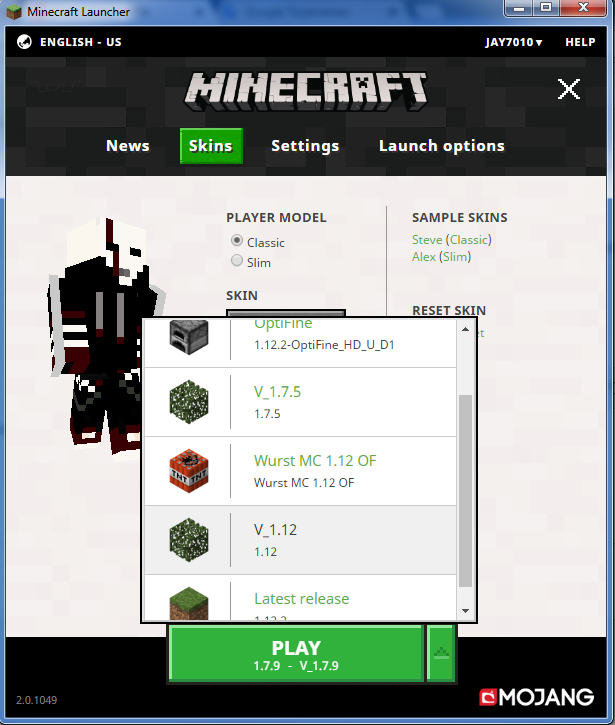
my minecraft launcher does not show my skin on singleplayer or multiplayer on version 1.7.5 - 1.12.2
but my friend noticed that I was wearing skin while playing multiplayer server.
please help me solve this problem.
I've tried to change from minecraft.net repeatedly, from the launcher is repeated, but still does not bring up my skin. just bring up the default steve skin
Environment
Windows 7 home premium service pack 1


Created Issue:
my skin does not appear in single player or multiplayer
my minecraft launcher does not show my skin on singleplayer or multiplayer on version 1.7.5 - 1.12.2
but my friend noticed that I was wearing skin while playing multiplayer server.
please help me solve this problem.
I've tried to change from minecraft.net repeatedly, from the launcher is repeated, but still does not bring up my skin. just bring up the default steve skinEnvironment
Windows 7 home premium service pack 1
Attachments2
![[Mod] bemoty](../../../data/avatars/users/50554.png)
 MCL-9489 →
  MC-131672
![[Bot] Arisa](../../../data/assets/gravatar/mustek2.png)
even i have just downloaded the minecraft launcher on new laptop maybe in few days.
Please attach the launcher_log.txt after starting a single player game and not having this skin.
how to handle it ?
You're using a modded version of Minecraft. Please switch to a vanilla profile, and check to see if the issue persists.
Something is blocking the access from your computer to the auth servers:
Thank you for your report!
However, this issue has been closed as a Invalid.
This is a technical support issue; this site is for bug reports only. We do not have the resources to provide you with technical support.
Please contact the community support, linked below.
Quick Links:
📓 Issue Guidelines – 💬 Community Support – 📧 Customer Support – 📖 Game Wiki
I never modify, it is also after I get my mistake tried various ways by tracing google. but still like that. how should i solve it? I do not understand its technical.
even i have just downloaded the minecraft launcher on new laptop maybe in few days.
Please contact the community support.