 MC-145438
Arrows and tridents spawned with /summon in a world spawn point too far from (0,0) causes game performance to plummet
The bug
If the world spawn point is too far from (0,0), summoning an arrow or trident in the air causes the game to lag incredibly (to basically unplayable ticks per second) until the arrow or trident hits a block.
How to reproduce
- Press Alt+F3 and watch the TPS graph
- Set the world spawn with /setworldspawn at (0,0)
- Run the command with either the given sound or any sound and observe that there is no TPS lag /summon arrow ~ ~50 ~ or /summon trident ~ ~50 ~
- Teleport to 1000 ~ 0 and set the world spawn at (1000, 0)
- Run the command, but only ONCE (just a few more will cause your game to stop running) /summon arrow ~ ~50 ~ or /summon trident ~ ~50 ~
- The further the world spawn is from (0,0), the worse the TPS lag


Created Issue:
Custom arrow SoundEvent causes ticks per second to decrease
Summoning a command with a custom SoundEvent that plays on impact causes the game to lag incredibly to basically unplayable ticks per second.
To test:
1. Press Alt+F3 and watch the TPS graph
2. Run the command with either the given sound or any sound, but only ONCE (just a few more will cause your game to stop running) /summon arrow ~ ~ ~ {SoundEvent:"minecraft:entity.zombie.attack_wooden_door"}
Custom arrow SoundEvent causesticks per second to decreaseCustom arrow SoundEvent causes game performance to plummet
![[Mojang] Cory Scheviak](../../../data/avatars/users/92893.png) [Mojang] Cory Scheviak
[Mojang] Cory ScheviakCustom arrow SoundEvent with a world spawn point too far from (0,0) causes game performance to plummet
Summoning acommandwith a custom SoundEvent that plays on impact causes the game to lag incredibly to basically unplayable ticks per second.
To test:
1. Press Alt+F3 and watch the TPS graph
2. Run the command with either the given sound or any sound, but only ONCE (just a few more will cause your game to stop running) /summon arrow ~ ~ ~ {SoundEvent:"minecraft:entity.zombie.attack_wooden_door"}If the world spawn point is too far from (0,0), summoning an arrow with a custom SoundEvent that plays on impact causes the game to lag incredibly to basically unplayable ticks per second.
To test:
- Press Alt+F3 and watch the TPS graph
- Set the world spawn with /setworldspawn at (0,0)
- Run the command with either the given sound or any sound and observe that there is no TPS lag {{/summon arrow ~ ~ ~ {SoundEvent:"minecraft:entity.zombie.attack_wooden_door"}
}}
- Teleport to 1000 ~ 0 and set the world spawn at (1000, 0)
- Run the command with either the given sound or any sound, but only ONCE (just a few more will cause your game to stop running) {{/summon arrow ~ ~ ~ {SoundEvent:"minecraft:entity.zombie.attack_wooden_door"}
}}
- The further the world spawn is from (0,0), the worse the TPS lag
If the world spawn point is too far from (0,0), summoning an arrow with a custom SoundEvent that plays on impact causes the game to lag incredibly to basically unplayable ticks per second.
To test:
- Press Alt+F3 and watch the TPS graph
- Set the world spawn with /setworldspawn at (0,0)
- Run the command with either the given sound or any sound and observe that there is no TPS lag
{{/summon arrow ~ ~ ~ {SoundEvent:"minecraft:entity.zombie.attack_wooden_door"}}}- Teleport to 1000 ~ 0 and set the world spawn at (1000, 0)
Run the command with either the given sound or any sound, but only ONCE (just a few more will cause your game to stop running) {{/summon arrow ~ ~ ~{SoundEvent:"minecraft:entity.zombie.attack_wooden_door"}}}- The further the world spawn is from (0,0), the worse the TPS lag
If the world spawn point is too far from (0,0), summoning an arrow with a custom SoundEvent that plays on impact causes the game to lag incredibly to basically unplayable ticks per second.
To test:
- Press Alt+F3 and watch the TPS graph
- Set the world spawn with /setworldspawn at (0,0)
- Run the command with either the given sound or any sound and observe that there is no TPS lag /summon arrow ~ ~ ~ {SoundEvent:"minecraft:entity.zombie.attack_wooden_door"}
- Teleport to 1000 ~ 0 and set the world spawn at (1000, 0)
- Run the command with either the given sound or any sound, but only ONCE (just a few more will cause your game to stop running) /summon arrow ~ ~ ~ {SoundEvent:"minecraft:entity.zombie.attack_wooden_door"}
- The further the world spawn is from (0,0), the worse the TPS lag
![[Mod] Asteraoth](../../../data/avatars/users/92886.png)
Custom arrow SoundEvent witha world spawn point too far from (0,0) causes game performance to plummet
If the world spawn point is too far from (0,0), summoning an arrow
with a custom SoundEvent that plays on impactcauses the game to lag incredibly to basically unplayable ticks per second.
To test:
- Press Alt+F3 and watch the TPS graph
- Set the world spawn with /setworldspawn at (0,0)
- Run the command with either the given sound or any sound and observe that there is no TPS lag /summon arrow ~ ~ ~ {SoundEvent:"minecraft:entity.zombie.attack_wooden_door"}
- Teleport to 1000 ~ 0 and set the world spawn at (1000, 0)
- Run the command with either the given sound or any sound, but only ONCE (just a few more will cause your game to stop running) /summon arrow ~ ~ ~ {SoundEvent:"minecraft:entity.zombie.attack_wooden_door"}
- The further the world spawn is from (0,0), the worse the TPS lag
If the world spawn point is too far from (0,0), summoning an arrow causes the game to lag incredibly to basically unplayable ticks per second.
To test:
- Press Alt+F3 and watch the TPS graph
- Set the world spawn with /setworldspawn at (0,0)
- Run the command with either the given sound or any sound and observe that there is no TPS lag /summon arrow
- Teleport to 1000 ~ 0 and set the world spawn at (1000, 0)
- Run the command with either the given sound or any sound, but only ONCE (just a few more will cause your game to stop running) /summon arrow
- The further the world spawn is from (0,0), the worse the TPS lag
If the world spawn point is too far from (0,0), summoning an arrow causes the game to lag incredibly to basically unplayable ticks per second.
To test:
- Press Alt+F3 and watch the TPS graph
Set the world spawn with /setworldspawn at (0,0)- Run the command with either the given sound or any sound and observe that there is no TPS lag /summon arrow
- Teleport to 1000 ~ 0 and set the world spawn at (1000, 0)
- Run the command
with either the given sound or any sound, but only ONCE (just a few more will cause your game to stop running) /summonarrow- The further the world spawn is from (0,0), the worse the TPS lag
The bug
If the world spawn point is too far from (0,0), summoning an arrow or trident in the air causes the game to lag incredibly (to basically unplayable ticks per second) until the arrow or trident hits a block.
How to reproduce
- Press Alt+F3 and watch the TPS graph
- Set the world spawn with /setworldspawn at (0,0)
- Run the command with either the given sound or any sound and observe that there is no TPS lag /summon arrow ~ ~50 ~ or /summon trident ~ ~50 ~
- Teleport to 1000 ~ 0 and set the world spawn at (1000, 0)
- Run the command, but only ONCE (just a few more will cause your game to stop running) /summon arrow ~ ~50 ~ or /summon trident ~ ~50 ~
- The further the world spawn is from (0,0), the worse the TPS lag
Arrows and tridents spawned with /summon in a world spawn point too far from (0,0) causes game performance to plummet
![[Mojang] Adrian Östergård](../../../data/assets/gravatar/nighter.jpeg) [Mojang] Cory Scheviak
[Mojang] Cory Scheviak![[Mojang] Nathan Adams](../../../data/assets/gravatar/dinnerbone.png) [Mojang] Nathan Adams
[Mojang] Nathan Adams![[Bot] Piston](../../../data/avatars/users/31202.png)
Can't reproduce - can you check your hard drive usage when you play the sound?
Cannot reproduce either.
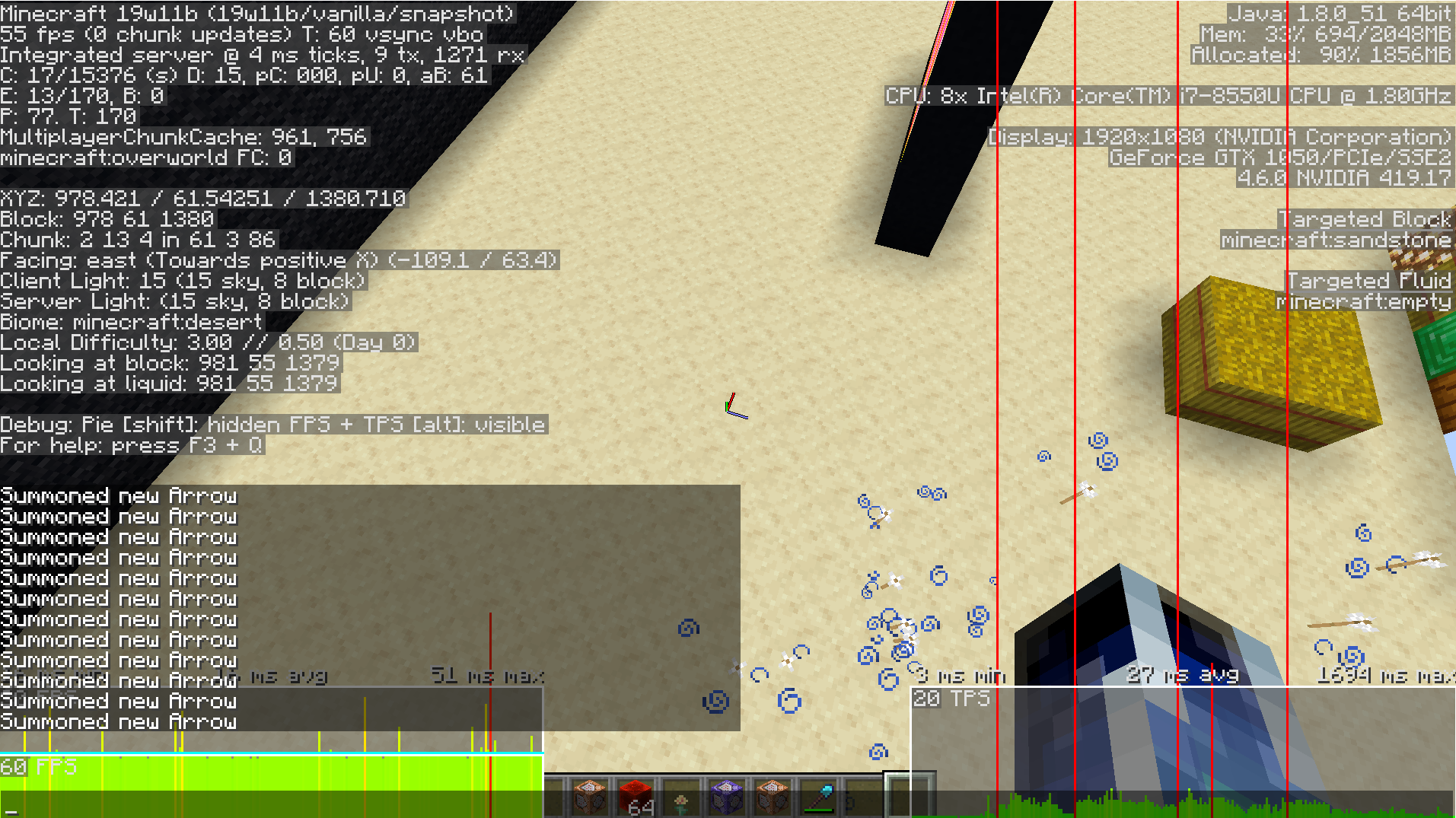
Apparently this is only happen on a certain test world of mine. I'm currently trying to see what is causing it. I disabled datapacks and resource packs to see if they were the issue but they were not. I attached a picture showing it happening. Still investigating.
I attached my level.dat file. This is the only thing that needs to be in the world file before I open the world, and the bug will happen.
Found the issue, it has to do with how far the world spawn point is from (0,0), quite odd
I can confirmed.
I edited your bug report. I hope you do not mind
Thanks! Had no idea it was just arrows in general, that's not good xP
Seems to be better in 19w11b. Onnowhere, would you say that this issue is fixed?
It's "better" but not really fixed at all. It still spikes the TPS and freezes the TPS until it finishes which sometimes takes several seconds. I attached an updated image.