 MC-145813
Chunks past a certain point (multiplayer cache?) fail to load when client render distance is less than server view distance.
The only way to work around this is to set the client render distance greater than server view distance, and reconnect. F3+A or just changing the render distance after the fact do not help.
There are no errors on the server command line.
There are lots of errors like this on the client game output screen (19w11a):
02:05:15 dgb Client thread warn Ignoring chunk since it's not in the view range: 16, -21
There are lots of errors like this on the client command line (19w11b):
[0316/133139:INFO:GameCallbacks.cpp(198)] game/dga (Client thread) warn Ignoring chunk since it's not in the view range: -9, 6
Steps to reproduce (tested to work with 19w12b also):
- Start a new world on vanilla 19w12b server with unmodified configuration. (start any vanilla 19w12b server with view distance greater than 2)
- Join with a vanilla 19w12b client with render distance set to 2.
- Walk ~100 blocks in any direction. (Walk at least (MultiplayerChunkCache ^ 0.5 + 1) * 8 blocks along either X or Z axis)
You will seemingly stand on nothing now. Logging out and reconnecting allows you to load the same amount of chunks from this point to any direction.
Logs for both client and server are included. Note that all of the "fell out of the world" messages are results of the kill command on server command line, not falling down.
I can confirm that the server sends chunks too far away when client render distance is less than the server's, only for the client to discard them, and it won't re-send them when the client would actually need them.
Full example:
- both server and client are vanilla 19w11b.
- client render distance: 2
- server view distance: 10
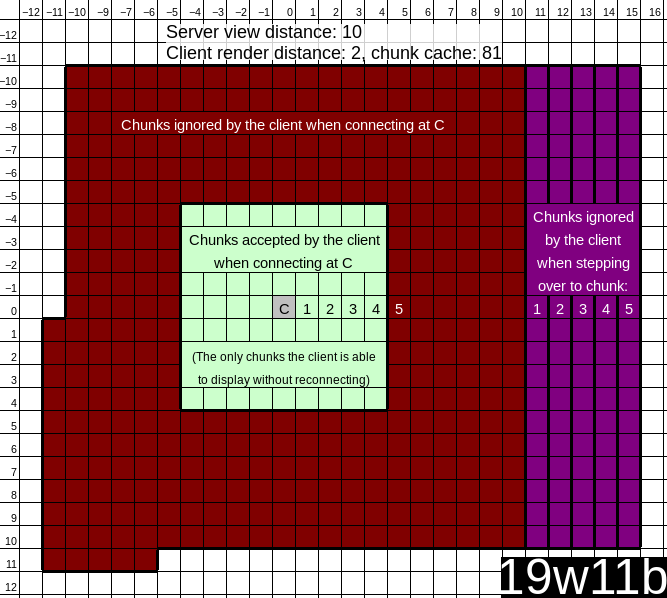
Connected to the server standing in chunk [0, 0]
The client ignores chunks:
- [-11, 1] through [-11, 11]
- [-10, 11] through [-6, 11]
- [-10, -10] through [10, 10], except for a smaller square in it, [-4, -4] through [4, 4].
The smaller square not discarded, [-4, -4] through [4, 4], is the same size as the cache displayed on the f3 overlay:
MultiplayerChunkCache: 81, 81
When walking over to chunk [1, 0], the client ignores chunks [11, -10] through [11, 10] and discards [-4, -4] through [-4, 4] leaving MultiplayerChunkCache 81, 72
Same with walking (along X) to chunk (2, 3, 4, 5); ignoring X (12, 13, 14, 15); discarding X (-3, -2, -1, 0); chunks remaining in cache (63, 54, 45, 36).
Blocks in chunk [5, 0] are not rendered (entities are).
When stepping over the edge to the seemingly nonexistent chunk [5, 0], the client ignores chunks [15, -10] through [15, 10] and discards [0, -4] through [0, 4] leaving MultiplayerChunkCache 81, 36.
When "air walking" back over to chunk [4, 0], the client (again) ignores chunks ( [-7, 1] through [-7, 11] ) and ( [-6, -10] through [-6, 0] )
At this point chunks [-3, -4] through [0, 4] have been unloaded from the client and there is no way to load them either without reconnecting to the server (this includes the chunk I connected standing in, [0, 0]). F3 overlay shows MultiplayerChunkCache: 81, 36 now.
Environment
chro@Lovage ~ $ java -version
openjdk version "1.8.0_191"
OpenJDK Runtime Environment (IcedTea 3.10.0) (Gentoo icedtea-3.10.0)
OpenJDK 64-Bit Server VM (build 25.191-b12, mixed mode)
chro@Lovage ~ $ uname -a
Linux Lovage 4.20.0-gentoo.zstd-22 #2 SMP Mon Dec 31 11:37:37 EET 2018 x86_64 AMD Ryzen Threadripper 1950X 16-Core Processor AuthenticAMD GNU/Linux
Linked Issues
Attachments9


Created Issue:
New chunks (past server render distance?) fail to load when client render distance is less than server render distance.
The only way to work around this is to set the client render distance greater than server render distance, and reconnect. F3+A or just changing the render distance after the fact do not help.
There are no errors on the server command line.
There are lots of errors like this on the client game output screen:02:05:15 dgb Client thread warn Ignoring chunk since it's not in the view range: 16, -21
Steps to reproduce:
- Start a new world on vanilla 19w11a server with unmodified configuration.
- Join with a vanilla 19w11a client with render distance set to 2.
- Walk ~100 blocks in any direction.
You will seemingly stand on nothing now. Logging out and reconnecting allows you to load the same amount of chunks from this point to any direction.
Logs for both client and server are included. Note that all of the "fell out of the world" messages are results of the kill command on server command line, not falling down.
Environment
chro@Lovage ~ $ java -version
openjdk version "1.8.0_191"
OpenJDK Runtime Environment (IcedTea 3.10.0) (Gentoo icedtea-3.10.0)
OpenJDK 64-Bit Server VM (build 25.191-b12, mixed mode)
chro@Lovage ~ $ uname -a
Linux Lovage 4.20.0-gentoo.zstd-22 #2 SMP Mon Dec 31 11:37:37 EET 2018 x86_64 AMD Ryzen Threadripper 1950X 16-Core Processor AuthenticAMD GNU/Linux
Attachments6
![[Mod] Neko](../../../data/avatars/users/92901.png)

The only way to work around this is to set the client render distance greater than server render distance, and reconnect. F3+A or just changing the render distance after the fact do not help.
There are no errors on the server command line.
There are lots of errors like this on the client game output screen:02:05:15 dgb Client thread warn Ignoring chunk since it's not in the view range: 16, -21
Steps to reproduce:
- Start a new world on vanilla 19w11a server with unmodified configuration. (start any vanilla 19w11a server with render distance greater than 2)
- Join with a vanilla 19w11a client with render distance set to 2.
- Walk ~100 blocks in any direction.
You will seemingly stand on nothing now. Logging out and reconnecting allows you to load the same amount of chunks from this point to any direction.
Logs for both client and server are included. Note that all of the "fell out of the world" messages are results of the kill command on server command line, not falling down.
New chunks(past server render distance?)fail to load when client render distance is less than server render distance.Chunks past server render distance fail to load when client render distance is less than server render distance.
![[Mojang] Adrian Östergård](../../../data/assets/gravatar/nighter.jpeg)
![[Mojang] Bartosz Bok](../../../data/avatars/users/10122.svg) [Mojang] Bartosz Bok
[Mojang] Bartosz BokThe only way to work around this is to set the client render distance greater than server render distance, and reconnect. F3+A or just changing the render distance after the fact do not help.
There are no errors on the server command line.
There are lots of errors like this on the client game output screen:02:05:15 dgb Client thread warn Ignoring chunk since it's not in the view range: 16, -21
Steps to reproduce:
- Start a new world on vanilla 19w11a server with unmodified configuration. (start any vanilla 19w11a server with render distance greater than 2)
- Join with a vanilla 19w11a client with render distance set to 2.
- Walk ~100 blocks in any direction.
You will seemingly stand on nothing now. Logging out and reconnecting allows you to load the same amount of chunks from this point to any direction.
Logs for both client and server are included. Note that all of the "fell out of the world" messages are results of the kill command on server command line, not falling down.
The only way to work around this is to set the client render distance greater than server render distance, and reconnect. F3+A or just changing the render distance after the fact do not help.
There are no errors on the server command line.
There are lots of errors like this on the client game output screen (19w11a):02:05:15 dgb Client thread warn Ignoring chunk since it's not in the view range: 16, -21
There are lots of errors like this on the client command line (19w11b):
[0316/133139:INFO:GameCallbacks.cpp(198)] game/dga (Client thread) warn Ignoring chunk since it's not in the view range: -9, 6
Steps to reproduce (tested to work with 19w11b also):
- Start a new world on vanilla 19w11a server with unmodified configuration. (start any vanilla 19w11a server with render distance greater than 2)
- Join with a vanilla 19w11a client with render distance set to 2.
- Walk ~100 blocks in any direction.
You will seemingly stand on nothing now. Logging out and reconnecting allows you to load the same amount of chunks from this point to any direction.
Logs for both client and server are included. Note that all of the "fell out of the world" messages are results of the kill command on server command line, not falling down.
I can confirm that the server sends chunks too far away when client render distance is less than the server's, only for the client to discard them, and it won't re-send them when the client would actually need them.
Full example:
- both server and client are vanilla 19w11b.
- client render distance: 2
- server view distance: 10
Connected to the server standing in chunk [0, 0]
The client ignores chunks:
- [-11, 1] through [-11, 11]
- [-10, 11] through [-6, 11]
- [-10, -10] through [10, 10], except for a smaller square in it, [-4, -4] through [4, 4].
The smaller square not discarded, [-4, -4] through [4, 4], is the same size as the cache displayed on the f3 overlay:
MultiplayerChunkCache: 81, 81When walking over to chunk [1, 0], the client ignores chunks [11, -10] through [11, 10] and discards [-4, -4] through [-4, 4] leaving MultiplayerChunkCache 81, 72
Same with walking (along X) to chunk (2, 3, 4, 5); ignoring X (12, 13, 14, 15); discarding X (-3, -2, -1, 0); chunks remaining in cache (63, 54, 45, 36).
Blocks in chunk [5, 0] are not rendered (entities are).
When stepping over the edge to the seemingly nonexistent chunk [5, 0], the client ignores chunks [15, -10] through [15, 10] and discards [0, -4] through [0, 4] leaving MultiplayerChunkCache 81, 36.
When "air walking" back over to chunk [4, 0], the client (again) ignores chunks ( [-7, 1] through [-7, 11] ) and ( [-6, -10] through [-6, 0] )
At this point chunks [-3, -4] through [0, 4] have been unloaded from the client and there is no way to load them either without reconnecting to the server (this includes the chunk I connected standing in, [0, 0]). F3 overlay shows MultiplayerChunkCache: 81, 36 now.
Chunks pastserver render distancefail to load when client render distance is less than server render distance.Chunks past a certain point (multiplayer cache?) fail to load when client render distance is less than server render distance.
Full example 19w11b.png
![[Mojang] Nathan Adams](../../../data/assets/gravatar/dinnerbone.png)
The only way to work around this is to set the client render distance greater than server
renderdistance, and reconnect.F3+A or just changing the render distance after the fact do not help.
There are no errors on the server command line.
There are lots of errors like this on the client game output screen (19w11a):02:05:15 dgb Client thread warn Ignoring chunk since it's not in the view range: 16, -21
There are lots of errors like this on the client command line (19w11b):
[0316/133139:INFO:GameCallbacks.cpp(198)] game/dga (Client thread) warn Ignoring chunk since it's not in the view range: -9, 6
Steps to reproduce (tested to work with 19w1
1b also):
- Start a new world on vanilla 19w1
1aserver with unmodified configuration. (start any vanilla 19w11aserver withrenderdistance greater than 2)- Join with a vanilla 19w1
1aclient with render distance set to 2.- Walk ~100 blocks in any direction.
You will seemingly stand on nothing now. Logging out and reconnecting allows you to load the same amount of chunks from this point to any direction.
Logs for both client and server are included. Note that all of the "fell out of the world" messages are results of the kill command on server command line, not falling down.
I can confirm that the server sends chunks too far away when client render distance is less than the server's, only for the client to discard them, and it won't re-send them when the client would actually need them.
Full example:
- both server and client are vanilla 19w11b.
- client render distance: 2
- server view distance: 10
Connected to the server standing in chunk [0, 0]
The client ignores chunks:
- [-11, 1] through [-11, 11]
- [-10, 11] through [-6, 11]
- [-10, -10] through [10, 10], except for a smaller square in it, [-4, -4] through [4, 4].
The smaller square not discarded, [-4, -4] through [4, 4], is the same size as the cache displayed on the f3 overlay:
MultiplayerChunkCache: 81, 81When walking over to chunk [1, 0], the client ignores chunks [11, -10] through [11, 10] and discards [-4, -4] through [-4, 4] leaving MultiplayerChunkCache 81, 72
Same with walking (along X) to chunk (2, 3, 4, 5); ignoring X (12, 13, 14, 15); discarding X (-3, -2, -1, 0); chunks remaining in cache (63, 54, 45, 36).
Blocks in chunk [5, 0] are not rendered (entities are).
When stepping over the edge to the seemingly nonexistent chunk [5, 0], the client ignores chunks [15, -10] through [15, 10] and discards [0, -4] through [0, 4] leaving MultiplayerChunkCache 81, 36.
When "air walking" back over to chunk [4, 0], the client (again) ignores chunks ( [-7, 1] through [-7, 11] ) and ( [-6, -10] through [-6, 0] )
At this point chunks [-3, -4] through [0, 4] have been unloaded from the client and there is no way to load them either without reconnecting to the server (this includes the chunk I connected standing in, [0, 0]). F3 overlay shows MultiplayerChunkCache: 81, 36 now.The only way to work around this is to set the client render distance greater than server view distance, and reconnect. F3+A or just changing the render distance after the fact do not help.
There are no errors on the server command line.
There are lots of errors like this on the client game output screen (19w11a):02:05:15 dgb Client thread warn Ignoring chunk since it's not in the view range: 16, -21
There are lots of errors like this on the client command line (19w11b):
[0316/133139:INFO:GameCallbacks.cpp(198)] game/dga (Client thread) warn Ignoring chunk since it's not in the view range: -9, 6
Steps to reproduce (tested to work with 19w12b also):
- Start a new world on vanilla 19w12b server with unmodified configuration. (start any vanilla 19w12b server with view distance greater than 2)
- Join with a vanilla 19w12b client with render distance set to 2.
- Walk ~100 blocks in any direction. (Walk at least (MultiplayerChunkCache ^ 0.5 + 1) * 8 blocks along either X or Z axis)
You will seemingly stand on nothing now. Logging out and reconnecting allows you to load the same amount of chunks from this point to any direction.
Logs for both client and server are included. Note that all of the "fell out of the world" messages are results of the kill command on server command line, not falling down.
I can confirm that the server sends chunks too far away when client render distance is less than the server's, only for the client to discard them, and it won't re-send them when the client would actually need them.
Full example:
- both server and client are vanilla 19w11b.
- client render distance: 2
- server view distance: 10
Connected to the server standing in chunk [0, 0]
The client ignores chunks:
- [-11, 1] through [-11, 11]
- [-10, 11] through [-6, 11]
- [-10, -10] through [10, 10], except for a smaller square in it, [-4, -4] through [4, 4].
The smaller square not discarded, [-4, -4] through [4, 4], is the same size as the cache displayed on the f3 overlay:
MultiplayerChunkCache: 81, 81When walking over to chunk [1, 0], the client ignores chunks [11, -10] through [11, 10] and discards [-4, -4] through [-4, 4] leaving MultiplayerChunkCache 81, 72
Same with walking (along X) to chunk (2, 3, 4, 5); ignoring X (12, 13, 14, 15); discarding X (-3, -2, -1, 0); chunks remaining in cache (63, 54, 45, 36).
Blocks in chunk [5, 0] are not rendered (entities are).
When stepping over the edge to the seemingly nonexistent chunk [5, 0], the client ignores chunks [15, -10] through [15, 10] and discards [0, -4] through [0, 4] leaving MultiplayerChunkCache 81, 36.
When "air walking" back over to chunk [4, 0], the client (again) ignores chunks ( [-7, 1] through [-7, 11] ) and ( [-6, -10] through [-6, 0] )
At this point chunks [-3, -4] through [0, 4] have been unloaded from the client and there is no way to load them either without reconnecting to the server (this includes the chunk I connected standing in, [0, 0]). F3 overlay shows MultiplayerChunkCache: 81, 36 now.
Chunks past a certain point (multiplayer cache?) fail to load when client render distance is less than serverrenderdistance.Chunks past a certain point (multiplayer cache?) fail to load when client render distance is less than server view distance.
The only way to work around this is to set the client render distance greater than server view distance, and reconnect. F3+A or just changing the render distance after the fact do not help.
There are no errors on the server command line.
There are lots of errors like this on the client game output screen (19w11a):02:05:15 dgb Client thread warn Ignoring chunk since it's not in the view range: 16, -21
There are lots of errors like this on the client command line (19w11b):
[0316/133139:INFO:GameCallbacks.cpp(198)] game/dga (Client thread) warn Ignoring chunk since it's not in the view range: -9, 6
Steps to reproduce (tested to work with 19w12b also):
- Start a new world on vanilla 19w12b server with unmodified configuration. (start any vanilla 19w12b server with view distance greater than 2)
- Join with a vanilla 19w12b client with render distance set to 2.
- Walk ~100 blocks in any direction.
(Walk at least(MultiplayerChunkCache ^ 0.5 + 1) * 8blocks along either X or Z axis)You will seemingly stand on nothing now. Logging out and reconnecting allows you to load the same amount of chunks from this point to any direction.
Logs for both client and server are included. Note that all of the "fell out of the world" messages are results of the kill command on server command line, not falling down.
I can confirm that the server sends chunks too far away when client render distance is less than the server's, only for the client to discard them, and it won't re-send them when the client would actually need them.
Full example:
- both server and client are vanilla 19w11b.
- client render distance: 2
- server view distance: 10
Connected to the server standing in chunk [0, 0]
The client ignores chunks:
- [-11, 1] through [-11, 11]
- [-10, 11] through [-6, 11]
- [-10, -10] through [10, 10], except for a smaller square in it, [-4, -4] through [4, 4].
The smaller square not discarded, [-4, -4] through [4, 4], is the same size as the cache displayed on the f3 overlay:
MultiplayerChunkCache: 81, 81When walking over to chunk [1, 0], the client ignores chunks [11, -10] through [11, 10] and discards [-4, -4] through [-4, 4] leaving MultiplayerChunkCache 81, 72
Same with walking (along X) to chunk (2, 3, 4, 5); ignoring X (12, 13, 14, 15); discarding X (-3, -2, -1, 0); chunks remaining in cache (63, 54, 45, 36).
Blocks in chunk [5, 0] are not rendered (entities are).
When stepping over the edge to the seemingly nonexistent chunk [5, 0], the client ignores chunks [15, -10] through [15, 10] and discards [0, -4] through [0, 4] leaving MultiplayerChunkCache 81, 36.
When "air walking" back over to chunk [4, 0], the client (again) ignores chunks ( [-7, 1] through [-7, 11] ) and ( [-6, -10] through [-6, 0] )
At this point chunks [-3, -4] through [0, 4] have been unloaded from the client and there is no way to load them either without reconnecting to the server (this includes the chunk I connected standing in, [0, 0]). F3 overlay shows MultiplayerChunkCache: 81, 36 now.The only way to work around this is to set the client render distance greater than server view distance, and reconnect. F3+A or just changing the render distance after the fact do not help.
There are no errors on the server command line.
There are lots of errors like this on the client game output screen (19w11a):02:05:15 dgb Client thread warn Ignoring chunk since it's not in the view range: 16, -21
There are lots of errors like this on the client command line (19w11b):
[0316/133139:INFO:GameCallbacks.cpp(198)] game/dga (Client thread) warn Ignoring chunk since it's not in the view range: -9, 6
Steps to reproduce (tested to work with 19w12b also):
- Start a new world on vanilla 19w12b server with unmodified configuration. (start any vanilla 19w12b server with view distance greater than 2)
- Join with a vanilla 19w12b client with render distance set to 2.
- Walk ~100 blocks in any direction. (Walk at least (MultiplayerChunkCache ^ 0.5 + 1) * 8 blocks along either X or Z axis)
You will seemingly stand on nothing now. Logging out and reconnecting allows you to load the same amount of chunks from this point to any direction.
Logs for both client and server are included. Note that all of the "fell out of the world" messages are results of the kill command on server command line, not falling down.
I can confirm that the server sends chunks too far away when client render distance is less than the server's, only for the client to discard them, and it won't re-send them when the client would actually need them.
Full example:
- both server and client are vanilla 19w11b.
- client render distance: 2
- server view distance: 10
Connected to the server standing in chunk [0, 0]
The client ignores chunks:
- [-11, 1] through [-11, 11]
- [-10, 11] through [-6, 11]
- [-10, -10] through [10, 10], except for a smaller square in it, [-4, -4] through [4, 4].
The smaller square not discarded, [-4, -4] through [4, 4], is the same size as the cache displayed on the f3 overlay:
MultiplayerChunkCache: 81, 81When walking over to chunk [1, 0], the client ignores chunks [11, -10] through [11, 10] and discards [-4, -4] through [-4, 4] leaving MultiplayerChunkCache 81, 72
Same with walking (along X) to chunk (2, 3, 4, 5); ignoring X (12, 13, 14, 15); discarding X (-3, -2, -1, 0); chunks remaining in cache (63, 54, 45, 36).
Blocks in chunk [5, 0] are not rendered (entities are).
When stepping over the edge to the seemingly nonexistent chunk [5, 0], the client ignores chunks [15, -10] through [15, 10] and discards [0, -4] through [0, 4] leaving MultiplayerChunkCache 81, 36.
When "air walking" back over to chunk [4, 0], the client (again) ignores chunks ( [-7, 1] through [-7, 11] ) and ( [-6, -10] through [-6, 0] )
At this point chunks [-3, -4] through [0, 4] have been unloaded from the client and there is no way to load them either without reconnecting to the server (this includes the chunk I connected standing in, [0, 0]). F3 overlay shows MultiplayerChunkCache: 81, 36 now.
![[Bot] Piston](../../../data/avatars/users/31202.png)
So I noticed that comments somehow deviated from initial description, so starting from next snapshot, before this gets reopened, please check following:
- Are chunks re-appearing up after F3+A? -> It's (probably unreported) bug related just to chunk rendering.
- Is it impossible to teleport? Does client just hang after disconnect attempt? -> Yes, it's this bug, can be reopened.
- Are chunks showing after a while, while server is showing information about missing ticks? -> It's probably
MC-138114, but that issue has also become catch-all for all kinds of chunk issues. Let's keep it only about performance. - Are chunks re-appearing after teleporting more than view distance? -> It's actually
MC-145813(client-side only issue). - Are chunks re-appearing after disconnect and connect? -> Also
MC-145813. - Is the only way to get chunk to generate to restart server? -> Please create new issue and if possible, attach launcher logs (since this may be non-crashing exception on server)
My original wording "New chunks..." made it seem like this had something to do with the chunks being just generated on the server. This is not the case as this seems to happen with every configuration and every world, given that the client has a lower render distance than the server.
Copied my code analysis from
MC-138114:Why is this reopened when the snapshot isn’t even out yet?
Because I realized it's not fully fixed yet.