 MC-162222
The debug pie shows everywhere you go
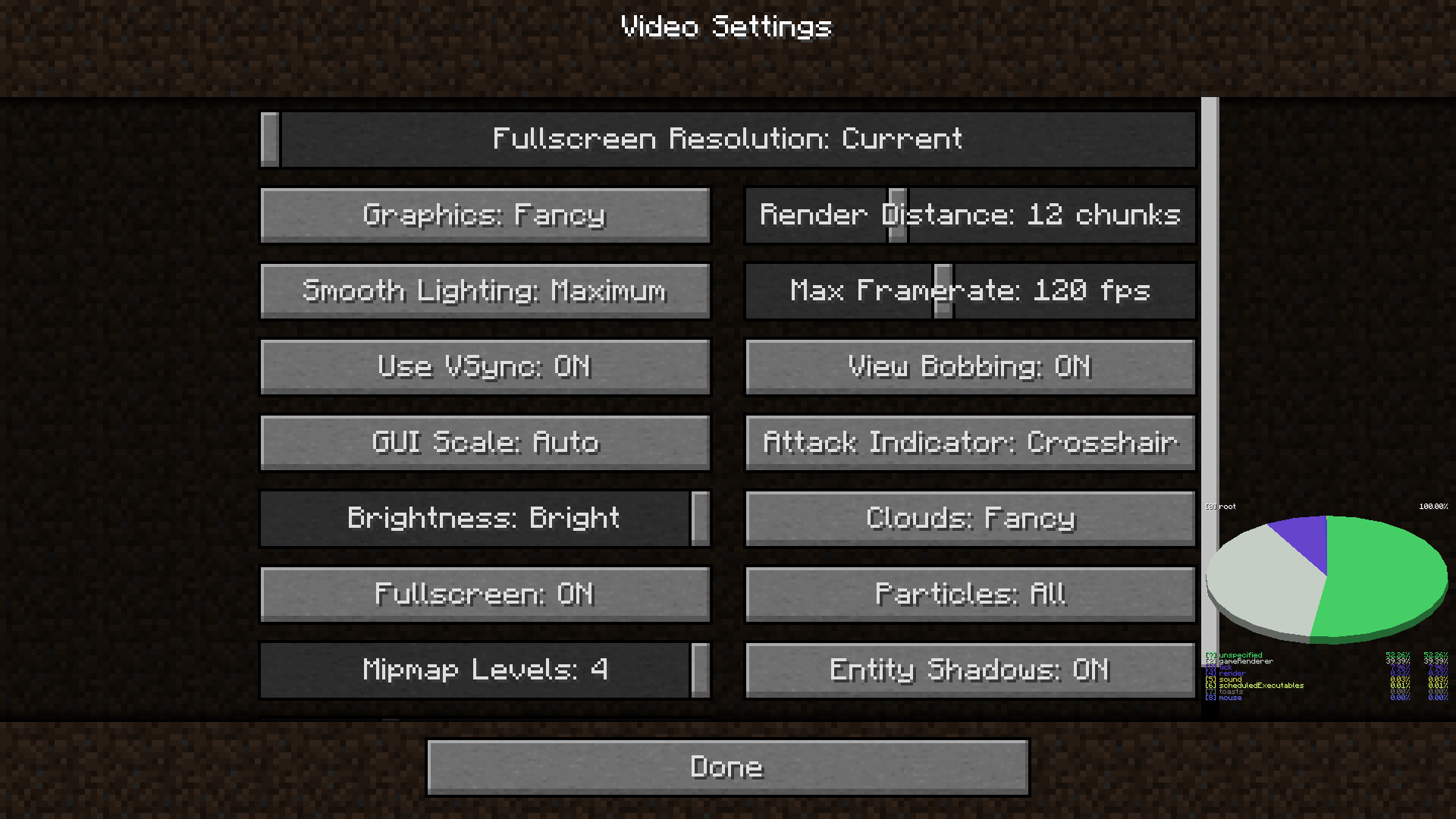
When you press shift + F3 the debug pie will show up in the debug screen. But when you press Esc to pause, the pie will show up even in the options menu!
How to reproduce:
- Enter a world.
- Press Shift + F3.
- Press Esc.
- Go to the options menu and do whatever.
What I expected to happen was:
The debug pie would disappear along with the whole debug screen and everything in the world.
What actually happened was:
The debug pie wouldn't disappear when I got in the options menu.
Linked Issues
Attachments1
![[Mod] ManosSef](../../../data/avatars/users/61702.png)
Created Issue:
The debug pie shows everywhere you go
When you press shift + F3 the debug pie will show up in the debug screen. But when you press Esc to pause, the pie will show up even in the options menu!
How to reproduce:
- Enter a world in 19w39a.
- Press Shift + F3.
- Press Esc.
- Go to the options menu and do whatever.
What I expected to happen was:
The debug pie would disappear along with the whole debug screen and everything in the world.
What actually happened was:
The debug pie wouldn't disappear when I got in the options menu.
Attachments1
When you press shift + F3 the debug pie will show up in the debug screen. But when you press Esc to pause, the pie will show up even in the options menu!
How to reproduce:
- Enter a world
in 19w39a.- Press Shift + F3.
- Press Esc.
- Go to the options menu and do whatever.
What I expected to happen was:
The debug pie would disappear along with the whole debug screen and everything in the world.
What actually happened was:
The debug pie wouldn't disappear when I got in the options menu.
![[Mod] violine1101](../../../data/avatars/users/92858.png)
duplicates
I will never upload a good issue that hasn't been reported already 😭😭😭😭😭😭😭😭😭😭!
Thank you for your report!
We're actually already tracking this issue in
MC-147987, so I resolved and linked this ticket as a duplicate.However, that ticket has already been resolved. That means that this is not considered a bug and won't be fixed. Please do not leave a comment on the linked ticket.
If you haven't already, you might like to make use of the search feature in the future to see if the issue has already been reported.
Quick Links:
📓 Issue Guidelines – 💬 Community Support – 📧 Customer Support – 📖 Game Wiki