![[Mod] violine1101](../../../data/avatars/users/92858.png) [Mod] violine1101
[Mod] violine1101
- violine1101
- violine1101
- Europe/Berlin
- Yes
- No
 MC-50349
 Normal
 MCPE-9177
 MCL-3892
![[Mojang] Searge (Michael Stoyke)](../../../data/assets/gravatar/searge.png)

![[Mojang] Felix Jones](../../../data/avatars/users/40484.png)
![[Mojang] Nathan Adams](../../../data/assets/gravatar/dinnerbone.png)
![[Mojang] Grum (Erik Broes)](../../../data/assets/gravatar/grum.png)
 WEB-984
![[Mojang] Web Team](../../../data/avatars/users/10122.svg)
![[Mojang] Jeb (Jens Bergensten)](../../../data/assets/gravatar/jeb.jpeg)


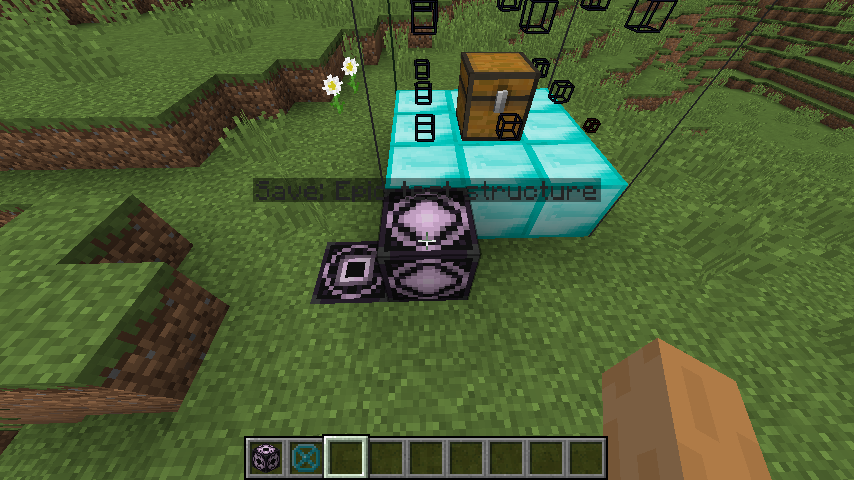


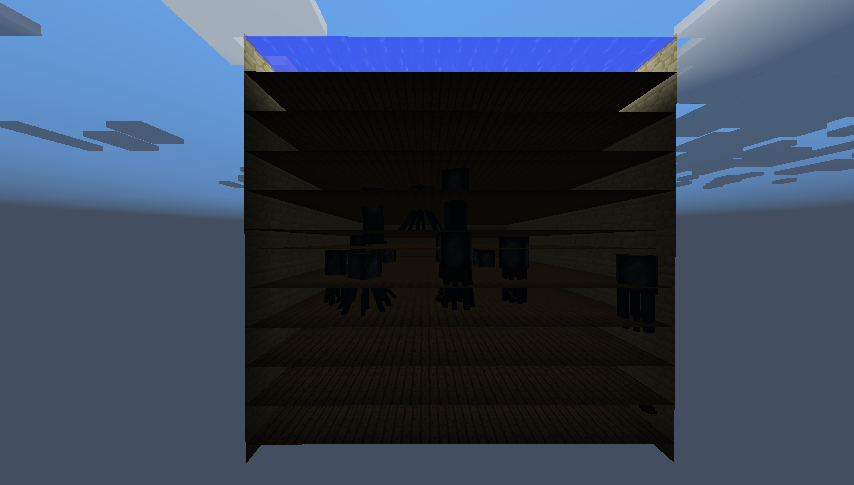


Even when connected, Iron bars render their top/bottom texture. See on screenshots below.
Even when connected, Iron bars render their top/bottom texture. See on screenshots below.
Even when connected, Iron bars render their top/bottom texture. See on screenshots below.
Seems to not being fixed in 14w10c.
Iron Bars are renderedwrongwhen connectedIron Bars are rendered incorrectly when connected
is duplicated by
relates to
 Important
I was playing around a bit with right-to-left languages (although I do not speak them), and I noticed that additional lines of tooltips (p.g. attributes) are unformatted because the formatting sequence (p.g. §7 for gray) is at the end of a line rather than at the beginning.
What I expect to "happen" is:
Additional lines on tooltips should look exactly like in all other languages, but in unicode font and right-to-left instead of left-to-right.
What actually "happens" is:
The additional lines aren't in gray color and have a visible formatting sequence §7 at the end. This does not apply to untranslated text (p.g. "When in main hand" in Persian). Also, the text doesn't quite fit onto the tooltip.
The first line of the tooltip (the item name) always is correctly formatted.Affected languages are:
- Arabic (ar_SA)
- Persian (fa_IR)
- Hebrew (he_IL)
(Well, those are all right-to-left languages available in Minecraft)
How to reproduce:
- Open Minecraft.
- Go to the language options and change your language to either Arabic, Persian or Hebrew.
- Open a world.
- Switch to Creative mode.
- Open your Creative inventory.
- Open the Combat or Tools tab.
- Hover over a weapon or a tool.
- Look at that crazy tooltip.
- Cry because languages are evil.
(I hope this description was accurate enough. Also, you can skip the last step if you want.)
Attachments:
- hebrew_tooltip.png – Example of unformatted tooltip in Hebrew writing system
- arabic_tooltip.png – Example of unformatted tooltip in Arabic writing system
About this report:
I searched for possible duplicates for about an hour and didn't find any, what surprised me because this bug is pretty fatal. I'm really sorry if I overlooked one and posted another duplicate report
Also, this is not a translation issue, because formatting sequences like §7 aren't translated at Crowdin but are hardcoded.
Tags (so others can find this report more easily):
corrupted tooltip, formatting sequence, paragraph, arabic, hebrew, persian, right to left, rtl, bidirectional
I was playing around a bit with right-to-left languages (although I do not speak them), and I noticed that additional lines of tooltips (p.g. attributes) are unformatted because the formatting sequence (p.g. §7 for gray) is at the end of a line rather than at the beginning.
What I expect to "happen" is:
Additional lines on tooltips should look exactly like in all other languages, but in unicode font and right-to-left instead of left-to-right.
What actually "happens" is:
The additional lines aren't in gray color and have a visible formatting sequence §7 at the end. This does not apply to untranslated text (p.g. "When in main hand" in Persian). Also, the text doesn't quite fit onto the tooltip.
The first line of the tooltip (the item name) always is correctly formatted.
AdditionallyAffected languages are:
- Arabic (ar_SA)
- Persian (fa_IR)
- Hebrew (he_IL)
(Well, those are all right-to-left languages available in Minecraft)
How to reproduce:
- Open Minecraft.
- Go to the language options and change your language to either Arabic, Persian or Hebrew.
- Open a world.
- Switch to Creative mode.
- Open your Creative inventory.
- Open the Combat or Tools tab.
- Hover over a weapon or a tool.
- Look at that crazy tooltip.
- Cry because languages are evil.
(I hope this description was accurate enough. Also, you can skip the last step if you want.)
Attachments:
- hebrew_tooltip.png – Example of unformatted tooltip in Hebrew writing system
- arabic_tooltip.png – Example of unformatted tooltip in Arabic writing system
About this report:
I searched for possible duplicates for about an hour and didn't find any, what surprised me because this bug is pretty fatal. I'm really sorry if I overlooked one and posted another duplicate report
Also, this is not a translation issue, because formatting sequences like §7 aren't translated at Crowdin but are hardcoded.

I was playing around a bit with right-to-left languages (although I do not speak them), and I noticed that additional lines of tooltips (p.g. attributes) are unformatted because the formatting sequence (p.g. §7 for gray) is at the end of a line rather than at the beginning.
What I expect to "happen" is:
Additional lines on tooltips should look exactly like in all other languages, but in unicode font and right-to-left instead of left-to-right.
What actually "happens" is:
The additional lines aren't in gray color and have a visible formatting sequence §7 at the end. This does not apply to untranslated text (p.g. "When in main hand" in Persian). Also, the text doesn't quite fit onto the tooltip.
The first line of the tooltip (the item name) always is correctly formatted.
AdditionallyAffected languages are:
- Arabic (ar_SA)
- Persian (fa_IR)
- Hebrew (he_IL)
(Well, those are all right-to-left languages available in Minecraft)
How to reproduce:
- Open Minecraft.
- Go to the language options and change your language to either Arabic, Persian or Hebrew.
- Open a world.
- Switch to Creative mode.
- Open your Creative inventory.
- Open the Combat or Tools tab.
- Hover over a weapon or a tool.
- Look at that crazy tooltip.
- Cry because languages are evil.
(I hope this description was accurate enough. Also, you can skip the last step if you want.)
Attachments:
- hebrew_tooltip.png – Example of unformatted tooltip in Hebrew writing system
- arabic_tooltip.png – Example of unformatted tooltip in Arabic writing system
About this report:
I searched for possible duplicates for about an hour and didn't find any, what surprised me because this bug is pretty fatal. I'm really sorry if I overlooked one and posted another duplicate report
Also, this is not a translation issue, because formatting sequences like §7 aren't translated at Crowdin but are hardcoded.
I was playing around a bit with right-to-left languages (although I do not speak them), and I noticed that additional lines of tooltips (p.g. attributes) are unformatted because the formatting sequence (p.g. §7 for gray) is at the end of a line rather than at the beginning.
What I expect to "happen" is:
Additional lines on tooltips should look exactly like in all other languages, but in unicode font and right-to-left instead of left-to-right.
What actually "happens" is:
The additional lines aren't in gray color and have a visible formatting sequence §7 at the end. This does not apply to untranslated text (p.g. "When in main hand" in Persian). Also, the text doesn't quite fit onto the tooltip.
The first line of the tooltip (the item name) always is correctly formatted.
Additionally, the lines of the tootips are left aligned but should be right aligned.Affected languages are:
- Arabic (ar_SA)
- Persian (fa_IR)
- Hebrew (he_IL)
(Well, those are all right-to-left languages available in Minecraft)
How to reproduce:
- Open Minecraft.
- Go to the language options and change your language to either Arabic, Persian or Hebrew.
- Open a world.
- Switch to Creative mode.
- Open your Creative inventory.
- Open the Combat or Tools tab.
- Hover over a weapon or a tool.
- Look at that crazy tooltip.
- Cry because languages are evil.
(I hope this description was accurate enough. Also, you can skip the last step if you want.)
Attachments:
- hebrew_tooltip.png – Example of unformatted tooltip in Hebrew writing system
- arabic_tooltip.png – Example of unformatted tooltip in Arabic writing system
About this report:
I searched for possible duplicates for about an hour and didn't find any, what surprised me because this bug is pretty fatal. I'm really sorry if I overlooked one and posted another duplicate report
Also, this is not a translation issue, because formatting sequences like §7 aren't translated at Crowdin but are hardcoded.
I was playing around a bit with right-to-left languages (although I do not speak them), and I noticed that additional lines of tooltips (p.g. attributes) are unformatted because the formatting sequence (p.g. §7 for gray) is at the end of a line rather than at the beginning.
What I expect to "happen" is:
Additional lines on tooltips should look exactly like in all other languages, but in unicode font and right-to-left instead of left-to-right.
What actually "happens" is:
The additional lines aren't in gray color and have a visible formatting sequence §7 at the end. This does not apply to untranslated text (p.g. "When in main hand" in Persian). Also, the text doesn't quite fit onto the
tooltip.
The first line of the tooltip (the item name) always is correctly formatted.
Additionally, the lines of the tootips are left aligned but should be right aligned.Affected languages are:
- Arabic (ar_SA)
- Persian (fa_IR)
- Hebrew (he_IL)
(Well, those are all right-to-left languages available in Minecraft)
How to reproduce:
- Open Minecraft.
- Go to the language options and change your language to either Arabic, Persian or Hebrew.
- Open a world.
- Switch to Creative mode.
- Open your Creative inventory.
- Open the Combat or Tools tab.
- Hover over a weapon or a tool.
- Look at that crazy tooltip.
- Cry because languages are evil.
(I hope this description was accurate enough. Also, you can skip the last step if you want.)
Attachments:
- hebrew_tooltip.png – Example of unformatted tooltip in Hebrew writing system
- arabic_tooltip.png – Example of unformatted tooltip in Arabic writing system
About this report:
I searched for possible duplicates for about an hour and didn't find any, what surprised me because this bug is pretty fatal. I'm really sorry if I overlooked one and posted another duplicate report
Also, this is not a translation issue, because formatting sequences like §7 aren't translated at Crowdin but are hardcoded.
I was playing around a bit with right-to-left languages (although I do not speak them), and I noticed that additional lines of tooltips (p.g. attributes) are unformatted because the formatting sequence (p.g. §7 for gray) is at the end of a line rather than at the beginning.
What I expect to "happen" is:
Additional lines on tooltips should look exactly like in all other languages, but in unicode font and right-to-left instead of left-to-right.
What actually "happens" is:
The additional lines aren't in gray color and have a visible formatting sequence §7 at the end. This does not apply to untranslated text (p.g. "When in main hand" in Persian). Also, the text of most tooltips doesn't quite fit onto them.
The first line of the tooltip (the item name) always is correctly formatted.
Additionally, the lines of the tootips are left aligned but should be right aligned.A similar bug occurs at the world selection menu: if a version is outdated, the third line of a world description begins with o and if a version is newer than the one you're running at the moment, it starts with c.
Affected languages are:
- Arabic (ar_SA)
- Persian (fa_IR)
- Hebrew (he_IL)
(Well, those are all right-to-left languages available in Minecraft)
How to reproduce:
- Open Minecraft.
- Go to the language options and change your language to either Arabic, Persian or Hebrew.
- Open a world.
- Switch to Creative mode.
- Open your Creative inventory.
- Open the Combat or Tools tab.
- Hover over a weapon or a tool.
- Look at that crazy tooltip.
- Cry because languages are evil.
(I hope this description was accurate enough. Also, you can skip the last step if you want.)
Attachments:
- hebrew_tooltip.png – Example of unformatted tooltip in Hebrew writing system
- arabic_tooltip.png – Example of unformatted tooltip in Arabic writing system
About this report:
I searched for possible duplicates for about an hour and didn't find any, what surprised me because this bug is pretty fatal. I'm really sorry if I overlooked one and posted another duplicate report
Also, this is not a translation issue, because formatting sequences like §7 aren't translated at Crowdin but are hardcoded.
Still in 16w35a.
Still in 16w42a.
Still in 16w41a.
Still in 16w38a.
is duplicated by
is duplicated by
Put your operating system (Windows 7, Windows XP, OSX) and Java version if you know it here
Still in 16w42a.
Still in 16w41a.
Still in 16w39b.
Still in 16w38a.
Still in 16w35a.
Still in 16w33a
Still in 1.10
Still in 1.10-pre1
Confirmed for 1.9.2
Still in 16w20a
Still in 1.9.4
relates to
relates to
 Low
Lowrelates to
Still in 16w42a.
Still in 16w41a.
Still in 16w39b.
Still in 16w38a.
Still in 16w35a.
discovered while testing
relates to
discovered while testing
relates to
is duplicated by
is duplicated by
is duplicated by
Still in 16w42a.
Still in 16w41a.
Still in 16w39b.
Still in 16w38a.
Still in 16w35a.
Still in 16w33a.
is duplicated by
is duplicated by
Still in 16w42a.
Still in 16w41a.
Still in 16w39b.
Still in 16w38a.
Still in 16w35a.
Still in 16w33a
Still in 1.10
Still in 1.10-pre1
Still in 16w21a and 16w21b
Still in 16w20a
Still in 1.9.4
relates to
Still in 16w42a.
Still in 16w41a.
Still in 16w39b.
Still in 16w38a.
Still in 16w35a.
Still in 16w33a
Still in 1.10
Still in 1.10-pre1
Still in 16w21a and 16w21b
Still in 1.9.4 and 16w20a
is duplicated by
Still in 16w42a.
Still in 16w41a.
Still in 16w39b.
Still in 16w38a.
Still in 16w35a.
Still in 16w33a
Still in 1.10
Still in 1.10-pre1
Still in 16w21a and 16w21b
Still in 16w20a
Still in 1.9.4
Confirmed for 15w49b.
Confirmed for 15w47c.
is duplicated by
relates to
Still in 16w42a.
Still in 16w41a.
Still in 16w38a.
Still in 16w35a.
Still in 16w33a
Still in 1.10
Still in 1.10-pre1
Still in 16w21a and 16w21b
Still in 16w20a
Still in 1.9.4
Still in 1.10-pre1
Still in 1.10
Still in 16w33a
Still in 16w35a.
Still in 16w38a.
And it's still in 16w42a.
Helper EditFor the issue that occurs after (re-)opening a world, see
MC-102403WorkaroundIf this issue occurs, press F3+T ingame to reload all resources.
Music tracks will, either in the title screen or in-game, play overtop of eachother. This has been reported with:
- Ambient tracks
- Title-screen background music
Still in 16w42a.
Still in 16w41a.
Still in 16w38a.
Still in 16w35a.
Still in 16w33a
Still in 1.10-pre1
Still in 16w42a.
Still in 16w41a.
Still in 16w38a.
Still in 16w35a.
Still in 16w33a
Still in 1.10
Still in 1.10-pre1
Several breakable items don't play a sound and don't show the particle effect when they break.
Table of breakable items:
Item Breaking sound & particles Break method Shovels Hit mob, till, block-breaking (as of 16w43a) Pickaxes Hit mob, block-breaking (as of 16w43a) Axes Hit mob, block-breaking (as of 16w43a) Hoes Hit mob, till Swords Hit mob Shears Shear sheep Bow Shoot Shield Damaged when blocking Fishing Rod Reel in (item, block, mob) Flint and Steel Set fire Carrot on a Stick Can't break ( MC-1)05049- Armor (helmet, chestplate, leggings, boots) Damaged when wearing Elytra Gliding Comment by user me - 17/Aug/13:
Item breaking sounds of all types are triggered client-side when the game damages and breaks an item, but the server also detects the same conditions to tell other clients to play the item breaking sound.
For example, when you mine a block of stone with your pick, the client realizes that you've broken a block, then damages the client-side version of the pick. The client then realizes that the pick has no durability remaining and plays the break animation and sound. When the server realizes that you've mined the piece of stone, it also damages the server-side version of your pick and detects that you've broken your pick, so it sends packets telling other clients (but not your client) to play the item breaking sound at your location.
With armor, the game damages the armor when it calculates the protection that it gives. However, these calculations are only done server side, so the client never tries to damage its own armor--it just updates the player's inventory according to the server's inventory-change packets, and as such never plays the armor breaking sound and animation.I assume that similar issues cause hoes, fishing rods, and carrots on sticks not to play their item breaking sounds as well.
Several breakable items don't play a sound and don't show the particle effect when they break.
Table of breakable items:
Item Breaking sound & particles Break method Shovels Hit mob, till, block-breaking (as of 16w43a) Pickaxes Hit mob, block-breaking (as of 16w43a) Axes Hit mob, block-breaking (as of 16w43a) Hoes Hit mob, till Swords Hit mob Shears Shear sheep Bow Shoot Shield Damaged when blocking Fishing Rod Reel in (item, block, mob) Flint and Steel Set fire Carrot on a Stick Can't break ( MC-112630)- Armor (helmet, chestplate, leggings, boots) Damaged when wearing Elytra Gliding Comment by user me - 17/Aug/13:
Item breaking sounds of all types are triggered client-side when the game damages and breaks an item, but the server also detects the same conditions to tell other clients to play the item breaking sound.
For example, when you mine a block of stone with your pick, the client realizes that you've broken a block, then damages the client-side version of the pick. The client then realizes that the pick has no durability remaining and plays the break animation and sound. When the server realizes that you've mined the piece of stone, it also damages the server-side version of your pick and detects that you've broken your pick, so it sends packets telling other clients (but not your client) to play the item breaking sound at your location.
With armor, the game damages the armor when it calculates the protection that it gives. However, these calculations are only done server side, so the client never tries to damage its own armor--it just updates the player's inventory according to the server's inventory-change packets, and as such never plays the armor breaking sound and animation.I assume that similar issues cause hoes, fishing rods, and carrots on sticks not to play their item breaking sounds as well.

Mobs are supposed to be spawned randomly (especially in the dark). If you don't want to set your difficulty to peaceful, try to enlighten your big creations.
Most likely works as intended.
relates to
relates to
This should be in MC project, not in MCL. Also, please attach a crash report so we can diagnose your issue.
Give yourself a written_book with the following command :
{\"selector\":\"@p\"}
/give @p written_book 1 0 {pages:[""],title:"",author:""}
Open it. You will see your name written at the top.
Now, clear your inventory and give you back this book.
Then, before right-clicking it, place it (using F key, or drag&drop) in your offhand.
Open it. You will see "@p" the first time. Close and reopen it again. This time you will see your name.
This issue concern also @a, @e, @r... and scores display.
Give yourself a written_book with the following command :
/give @p written_book 1 0 {pages:["{\"selector\":\"@p\"}"],title:"",author:""}Open it. You will see your name written at the top.
Now, clear your inventory and give you back this book.
Then, before right-clicking it, place it (using F key, or drag&drop) in your offhand.
Open it. You will see "@p" the first time. Close and reopen it again. This time you will see your name.
This issue concern also @a, @e, @r... and scores display.
is duplicated by
is duplicated by
is duplicated by
is duplicated by
relates to
is duplicated by
is duplicated by
is duplicated by
is duplicated by
is duplicated by
This works as intended. If a hopper is locked, it won't pass its items to another hopper but it can still accept items. So, the first hopper should be locked in order to avoid the item being transferred.
Double chests spanning a chunk border can disappearwhen looking at another chest's lockDouble chests spanning a chunk border can disappear visually

@[Mod] violine1101: Already done.
@iamanai I see what you mean, but [Mod] violine1101 is right. Non-resizable windows just always have the small buttons (I tested with other applications), so it's not some bug (and the window doesn't 'think' it's maximized).

[Mod] violine1101 we can't say that without the crash report
[Mod] violine1101 how can you tell, there is no crash report attached
again, please attach the crash report

(sorry if meta)
[Mod] violine1101 I assume those modded clients (e.g. Forge+MCPatcher) in which it does not occur do matter in that regard as it might help codereaders to figure out the MC Vanilla issue.
[Mod] violine1101 That's an april fool version LOL 
Max Foxhunter [Mod] violine1101 Thank you, you two! }=)

[Mod] violine1101, it's now included in MC-1874
@[Mod] violine1101: I don't understand, you're not the reporter of this ticket?
1. It's [Mod] violine1101 not SunCat user-f2760
2. Just checking!!!!!
[Mod] violine1101 Thank you, I'll make sure to add it to the list in time 
My problem is that I was/am already at the character limit, I'd need way more space to show up and describe all the GUI issues.. I already tried to reduce the info before, but I'm still too close to the limit.
Shortly after I created this post, the board got revamped, and I don't know whether the character limit also got (positively) affected.
If you know anything about it, I'd be happy to know
If not, if the same character limit is still there, I'll have to create and then insert more text-on-graphics to save on typed characters and being able to show the totality of the GUI issue.
I also have yet to look into all the new 1.12 GUIs, and overall try to figure out viable solutions for a generalized, completely "OCD'd" / harmonized GUI where all pixel distances match perfectly with each other, across all GUIs, no matter their size, which isn't easy with so many graphics, but I'll get there someday I already got most pixel distances down (graphics for those already implemented), but I want to make sure I don't miss anything or provide wrong information.

As [Mod] violine1101 said, /fill ... destroy does not filter blocks. WAI, however that might be a feature request :/
![[Mod] bemoty](../../../data/avatars/users/50554.png)
I just checked and found out that item tooltips are indeed the reason for this if-statement.
I'll edit my comment, thanks. [Mod] violine1101
[Mod] violine1101 Okay, thanks for the info! (btw, not that it matters anymore, but the crash described in the description is not a graphics driver crash, I think they got mixed up because they both contained the incremental CMS message. The attached crash report is not uploaded by the reporter but by someone who thought he had the same issue but he really didn't)
[Mod] violine1101 sideways, not backwards.
How To Fix This Bug:
If you are experiencing this bug, it might be because your UTF-8 encoded file is encoded with a BOM. To fix this, I downloaded Notepad++, and from the top bar, clicked Encoding > Encode in UTF-8.
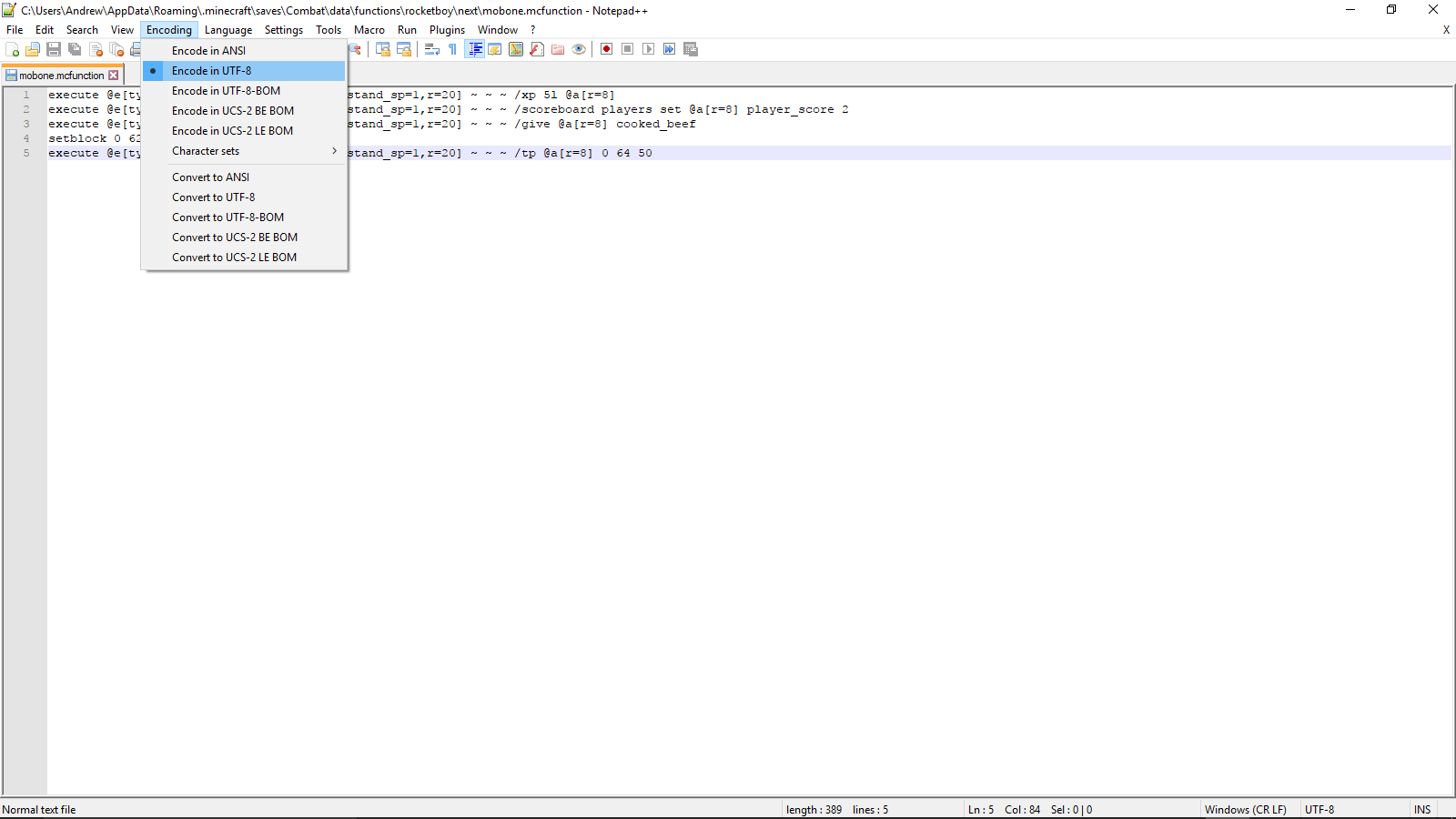
Special thanks to user-f2760 and [Mod] violine1101 for their help.
Original Bug Report:
So I was playing on one of my worlds that uses a lot of chain command blocks, when I heard about functions. Naturally, I wanted to try them out. I was able to get one of my chain commands to work, but for some reason, others don't the game seems to arbitrarily decide which functions to recognize. I always used /reload to load any changes I made, I always used UTF-8 encoding, and like I said earlier, I got one of my chain commands to work. However, some of my commands don't work, and I have no clue why. I have included the functions I have tried to use and screenshots of them working (or not) to help aid in this bug fixing. Thanks!
Edit:
After looking at the log file (thanks user-f2760), the error appeared to be that the mcfunction reader didn't believe that "execute" or "tellraw" were valid commands.
![[Mod] NeunEinser](../../../data/avatars/users/39263.png)
[Mod] violine1101 ẞ is available with a German keyboard layout using Alt Gr + Shift + ß 
![[Mod] Neko](../../../data/avatars/users/92901.png)
When you spawn, you will be next to a village that doesn't exist in 1.12.2. That village use the Savanna type, even if the biome is Ice Plains.
Duplicates MC-125047
Also, the different houses are above or slightly under the ground
Duplicates MC-125042
and a fountain with a water source that doesn't update, even if we remove or add a block next to it.
Now MC-125106
have a totally isolated library that is only partially generated (only a portion exists)
Most likely MC-125007 as [Mod] violine1101 said.
affect 1.12.2 too.
[Mod] violine1101
@violine1101
+violine1101
(I dont know how to reply you. sorry.)
[Mod] violine1101 You're right. Updated the suggested fix, thanks!

[Mod] violine1101 Is this how the texture is supposed to look like?
[Mod] violine1101 Might be intentional, one missing pixel just doesn't look like it belongs like that.

Still affects 18w10b, I'm not sure why the affected versions were edited. It's still unresolved and open, so I assume it's [Mod] violine1101's mistake. 
[Mod] violine1101 True, wouldn't have found the report either if I just searched for it. Recognized the issue though, as I've seen it already a few days ago
[Mod] violine1101 that I cannot confirm: I moved area effect clouds in 1.12 a lot.
can anyone mark this relates to MC-92759?[Mod] violine1101user-f2760

@[Mod] violine1101 OK, so may I use that ("dolphins don't save how long they have been out of water") as the description?
As @[Mod] violine1101 said, If you cannot find a crash report, please attach the full launcher log found in minecraft/launcher_log.txt.

[Mod] violine1101 No, actually when you are using the azerty keyboard layout, and you upgrade from 1.12.2 to 1.13, your controls get changed to the querty layout. So for example A gets changed into Q, Z gets changed into W etc.

[Mod] violine1101: Thanks a lot. I was able to reproduce now, I'll update this ticket when a new snapshot comes out.
Th bug
Villager's XP bar for trading will sometimes go past the GUI when you, I think, keep trading once they level up, but before the GUI updates with the level up.
How to reproduce
Video by [Mod] violine1101 demonstrating the issue: https://youtu.be/Lk7wV0AD19I
@[Mod] violine1101 Thanks! I didn't realize 0 is intended, so I just made up a plausible expected result.
The bug
If you pick up items while crafting, and then try to use these items in the crafting recipe, those items will disappear.
To reproduce
- Place a crafting table
- Fill your inventory with a random item that you won't use (for example, cobblestone), and leave seven slots free.
- Fill these seven slots with seven stacks of iron ingots
- Throw two stacks of iron ingots on the ground near the crafting table
- Switch into survival mode
- Shift-click onto the iron block recipe in the recipe book while interacting with the crafting table
- The crafting table now is ready to craft 49 iron ingots
- You pick up the remaining two stacks of iron ingots, and an additional 7 iron ingots were left in your inventory
- Shift-click onto the iron block recipe again
→ The two stacks of iron ingots will disappear and the crafting table now shows a non-functioning recipe
Videos
- Longer explanation by Emilia Lopez: video
- How to reproduce by [Mod] violine1101: Minecraft 19w14b 2019-04-10 15_00_17.mp4

![[Helper] Johnibur](../../../data/avatars/users/28381.png)
[Mod] violine1101 Mojang is currently aware of this issue and they answered that they are currently trying to improve portal code.
And I have posted a profiling dump for this issue in ticket MC-117914. And that's the ticket that has been directly addressed to Mojang. If fact, solving this issue for 1.14 means the old one will implicitly be fixed as well. The main goal was to attract Mojang's attention about the issue, which is done for now.
[Mod] violine1101 After I replied to you, I saw the related fixed bugpost, thus it seems very likely that this change is WaI (and was made possible due to removal of metadata and basically also block limit).
Thus it's fair to assume that you can close this bugpost accordingly as "WaI".
Thank you!

I changed the language, why did you mark my problem as solved? @[Mod] violine1101

I have a series of backups that have a before and after where 3 specific villagers were present in the first and missing in the second. It was about a 5hr AFK inbetween backups.
If you think this can help, let me know how can i get the zip files to you ?
Regard
Richard
PS: It is a Hardcore game.
On closer inspection, where there are villagers that have gone missing, there are also mine-carts missing. These 3 villagers were in a farm using the stacked hopper mine-carts to catch the farmed produce. In all 3 cases, both of the stacked hopper carts are missing too.
Other missing villagers were not in or near a cart.
Hope this helps
Richard
Here you go, Let me know if you need any guidance on the issue.
https://drive.google.com/open?id=1lRyUmc30HaugdLLYIKiZktRCpyUFcX2i
Best Regards
Hello
I have a problem with my minecraft account..
I cant launch the game, i watch every video on youtube every solution to that problem but nothing helps. when i press on "Play" the game crushed with one message "An unexpected issue occurred and the game has crashed. We're sorry for the inconvenience."
I add "launcher_log.txt"
[Mod] violine1101 said that -Xss1M This Java argument is causing the crash.
And ask to Reset the JVM arguments in the "Installations" tab. And i cant reset it... only if i delete something from that JVM argument its give me the possibility to reset it to the same argument. I did it but that didnt work the game still crash.
![[Mojang] Adrian Östergård](../../../data/assets/gravatar/nighter.jpeg)
[Mod] violine1101 - please split those into separate tickets.
[Mod] violine1101 could I know why tickets about custom textures and models often gets ignored?
Hey [Mod] violine1101, I have also submitted evidence in a Vanilla installation - please see the video labelled "vanilla video" where the issue is highlighted using the debugging pie chart.
I'll update the description to remove those videos to avoid any issues with this.
Please let me know if I should resubmit this issue instead.
[Mod] violine1101 what i should do next?

@[Mod] violine1101, it does not only affect the beta launcher, it also happens with the release version.
A simple 'yes' would have been sufficient.
As [Mod] violine1101 explained, the resolution of Awaiting Response merely means that this ticket is awaiting a response so that it can be worked on further.
What [Mod] violine1101 said.
The bug
When sand falls on very quickly moving pistons, it is continuously turned into a block and back into an entity again. This allows for plants that are placed on that block to grow very quickly (see MC-113809 and MC-165023)
To reproduce
Build the contraption from this video by [Mod] violine1101: https://youtu.be/TPklP6WZrLk
Video
Video by Ray showcasing a farm that can be built using this bug: https://youtu.be/mg93ldmI584
![[Mod] SPGoding](../../../data/avatars/users/44622.png)
The old ticket is not closed, you can still comment under it if you have further questions.
The bug mentioned by [Mod] violine1101 in your old issue is MC-160464. You can see how to resolve this bug in that issue.
Also, please keep in mind that Mojira is a bug tracker, not a Q&A community.
Thank you very much [Mod] violine1101
I thought at first it was some kind of side effect of fixing piston warping ("translocation"), but I checked the according fix versions as well as first occurrence for related bugposts to this one here, and it just does not line up perfectly. That being said, pistons were changed some, also during the 1.11 snapshots, so who knows.
Thank you again for keeping it open, as no Dev has resolved the mentioned other bugpost.
[Mod] violine1101 I ran out of chars (iirc 20.000 or so), so I already thought of making majorly graphics, to fit it all in.
While I do agree that splitting up would be easier to fix individually, the overall problem, that not a single GUI is "perfect", as in terms of regularly-used GUI pixel distances, remains.
Imo it would become worse, as, if just a single GUI would be adjusted, it may not be within those "perfect" GUI distances, as it should be, consequently, for all of them.
How about, if I would develop a "perfect GUI" pack, incl. headlines, so it could be adjusted easily?
Means: I would add text (e.g. "Inventory") onto the GUI graphics, so it would be easy to code the according text properly into its rightful position.
Of course, this would also apply to all GUI graphics, that I would rearrange them so that they would be balanced with regularly-used GUI distances.
As GUIs changed since then, I'll have to redo those graphics, but I think it would be the best solution, to just create a "perfect GUI" pack, one with headlines, so the Vanilla ones could be adjusted, and the other GUI pack without those headlines, so they could simply be used, in case Mr. Boerstra/Mojang would take them.

[Mod] violine1101 Did you make that world without modifying save files with external programs? I'm currently in the process of doing that by riding a Motion:[0.0,10.0,0.0] pig, but that takes about 42 hours to do. I'm currently 11819 km high.

I don't see any difference between 1.15.2 and 20w13a. Block animations continuing in the pause menu is intended, see MC-118001.
Now it seems like it is working like it is supposed to. Please close as WAI [Mod] violine1101, thanks!

To whom it may concern,
[Mod] violine1101 added a comment - 21/Apr/20 8:33 AM
Is this still an issue in 1.15.2 or later?
Yes, this is a major issue with Snapshot 20w18a, as seen in the screenshots I uploaded.
This is in Creative Mode on Windows 10 version 1909.
Please reopen this bug.
Thanks,
JAG
Dear, Bartosz Bok (Assignee),
[Mod] violine1101 (Last dev who responded), and whom else it may concern,
This is still a major Bug in Snapshot 20w18a, as shown in the pictures I just added to this report.
When player walks/ flies around to update their map(s), this Bug occurs.
My system/version is MC Java Snapshot 20w18a Windows 10 version 1909.
Please Have this Bug Re-Opened and maybe check it more thoroughly during that time. I'm not trying to be rude when I say that, its just that in my 3.5 years (and counting) of playing Minecraft, I've seen Bugs get fixed and thought to be long gone, resurface after a long time, or they somehow get added to new updates. I am not at all saying that you moderators and developers are bad, y'all are excellent at what you do. That's the truth. The fact is: No One Is Perfect (Except our Lord God Almighty ( If you believe in Him. No Offense if you don't.)) and it's just our nature for things like this to creep in sometimes.
Thank y'all for all that you do,
JAG
This comment is from report# MC-179858
Dear, Bartosz Bok (Assignee),
[Mod] violine1101 (Last dev who responded), and whom else it may concern,
This is still a major Bug in Snapshot 20w18a, as shown in the pictures I just added to this report.
When player walks/ flies around to update their map(s), this Bug occurs.
My system/version is MC Java Snapshot 20w18a Windows 10 version 1909.
Please Have this Bug Re-Opened and maybe check it more thoroughly during that time. I'm not trying to be rude when I say that, its just that in my 3.5 years (and counting) of playing Minecraft, I've seen Bugs get fixed and thought to be long gone, resurface after a long time, or they somehow get added to new updates. I am not at all saying that you moderators and developers are bad, y'all are excellent at what you do. That's the truth. The fact is: No One Is Perfect (Except our Lord God Almighty ( If you believe in Him. No Offense if you don't.)) and it's just our nature for things like this to creep in sometimes.
Thank y'all for all that you do,
JAG

[Mod] violine1101, I was able to recreate the described bug on 20w18a with gamerule mobGriefing set to true. The problem only occurs if the piglin starts going towards the gold from the upper level of the stairs.
[Mod] violine1101 I'm sorry, usually I comply with that and write it myself, but this here is not a mere discussion right now, but something more fundamental and adds to this bugpost, which is the prerequisite for adding comments.
BotPokey 1. As it'd make farming Wither skulls in this case potentially too easy and thus drop too large amounts of skulls. Hence I'd love to have the actual numbers. Would be sad if this gets fixed, but the resulting skull farms would be too OP and Mojang would revert it again, creating another outcry.
As for other types of flowers: Mojang simply could make all flowers spawn-proof to create a general "consistency" case for flowers.
2. The magmablock argument is imo invalid, as it's a completely different block and situation; the argument "mob X may spawn on block Z because it doesn't take damage from it" - if Mojang came up with it themself back then - was a nice candy they gave the tech community 4 years ago.
We've got a different situation now, Mojang is balancing, so you can't always use arguments from another block, situation and time, for anything that facilitates your farming.
[Mod] violine1101 Thanks you so much, it work again, thanks you thanks you thanks you !!!!!!
![[Helper] Lord_Quadrato](../../../data/avatars/users/26105.png)
[Mod] violine1101 randomTickSpeed doesn't affect cauldrons filling (MC-93820), so it shouldn't matter.

[Mod] violine1101, I think this is a separate issue, because I think that poweredbow meant that they do not raise their arms when targeting, not celebrating.
![[Helper] pine1needle](../../../data/avatars/users/41329.png)
[Mod] violine1101, perhaps what you remembered was MC-152291? You can invalidate and re-validate your respawn point as many times as you want before you die, but if you respawn while your spawn point is invalid, your spawn point will be permanently reset to world spawn. If your spawn point is permanently reset to world spawn, you must manually set it back to the bed or respawn anchor that you want.

I really appreciate the efforts by JellySquid and [Mojang] Gegy with their resource pack. I gave it a try, following the instructions posted by [Mod] violine1101 . My fps went from 8 to 13 with with an allocation 16 spike. My game play is still too laggy to play. It's crazy frustrating and I really miss how smooth things ran with 20w21a. I'm still hoping Mojang will official correct this issue. Based on the comments I guess I'll have to wait till the next Snapshot update to see if they fix it. What if they don't?

[Mod] violine1101 adicionou um comentário - Ontem
Did you buy the game on the Microsoft Store or on minecraftdungeons.net?
I bought minecraftdungeons.net

As [Mod] violine1101 said, MC-187449 was re-opened, so I think the "Fix version" for this (MC-56653) should be 20w22a, as that was the last version to have the WAI way of XP dropping

[Mod] violine1101's message in MC-165129:
This is an issue with the configuration of the PC. Either the firewall is incorrectly configured or some other network setting on the PC is not set correctly. If you need assistance, please contact the Community Support.
![[Mod] Greymagic27](../../../data/avatars/users/92875.png)
See the comment above from [Mod] violine1101

[Mod] violine1101 Somehow My World is Working Perfectly. Sorry For Inconvenience, but I promise there was an error as shown on the image.
I just updated my description and images with coordinates and seed included (ALL THE IMAGES ARE OF THE SAME SEED).
Very good day.

no no no ! [Mod] violine1101
The bug is still present
I alWays have it When I launch a multi party as described above
I have this bug since May 26 ... I can"t play With my friends ...
I just Wait a patch for this ...
![[Mod] Les3awe](../../../data/avatars/users/79847.png)
@[Mod] violine1101, I can always reproduce easily when players being on multiple blocks at once.
![[Mod] markderickson](../../../data/avatars/users/18946.svg)
Hi there!
This looks like a duplicate of MC-169433. (See the fix on that post in a comment by [Mod] violine1101.)
[Mod] violine1101 I was able to reproduce. (Though to note the Lightning Rod activating the TNT is intended since the rod gives of a redstone pulse when activated)

I akready know about the ticket MC-197538 in my report I was specially telling, that the bug I am reporting here IS NOT RESOLVED.
To be exact, this bug was already caused, by the changes made for MC-197538.
And linke I was writing in my report, this is NO duplecate, because I write about another problem.
So you should reopen this ticket, until the bug is realy resolved.
[Mod] violine1101 please reopen this issue until the detection ranges are fixed to the well known behavior.

[Mod] violine1101, MultiMC is cracked, like TLauncher.
[Mod] violine1101, it's not. I created a new ticket for them not sitting and eating bamboo - MC-206321.

[Mod] violine1101 Isn't it better to make a backup of the world then go to the directory the world is then enter in the folder backups and attach the backup file to here?
[Mod] violine1101, I still consider this as a complete inconsistency, so please reopen, because some pixels are incorrectly colored.
[Mod] violine1101 To answer your questions:
- At no time were there any other villagers or iron golems near the two affected cured villagers. (They were in an igloo a long way - several regions - away from any other villagers).
- I did repeatedly use two trades with this pair of farmers. However, in another village a long way away I had a 'control' pair of farmers I was also doing the exact same trades with. The difference was stark. The 'control' farmers consistently offered the trades at the baseline price or with a small discount. The cured farmers, after offering fantastic discounts for a short time, ended up charging double the baseline rate, and I simply stopped trading with them or even bothering to visit them.
It was the second point that motivated me to report this as a bug.

Just to let you know [Mod] violine1101 you forgot to add the "duplicates" link.
Please also keep mind that bug reports are only accepted in english. Some modarators like for example [Mod] violine1101 can speak german, but not all modarators can.

[Mod] violine1101 please don't undo Thommy's move
It's on the game team to add support for unicode character paths - based on the reporter the Minecraft Launcher seems to work fine
Hello! This looks to be a duplicate of MC-211308, which is caused by the fact that you have actually downgraded your world from a 1.17 snapshot to a 1.16 snapshot. See [Mod] violine1101's comment on that report for more information.
Hello! This looks to be a duplicate of MC-21138 and/or MC-211308.
1.16.5 Release Candidate 1 is essentially a downgrade from 20w51a. See [Mod] violine1101's comment on MC-211308 for more information.
This happened because you downgraded from the snapshot from the 1.17 update. See the comment by [Mod] violine1101 in MC-211308.
![[Mod] Avoma](../../../data/avatars/users/86198.png)
This report is a duplicate of MC-211308, and has happened because you have downgraded your world from 20w51a to 1.16.5-rc1. See the comment by [Mod] violine1101 on the parent link.
Hello! This looks to be a duplicate of MC-211308, which was resolved as Invalid. See [Mod] violine1101's comment on that ticket for more information.
This appears to be a duplicate of MC-211308, which is caused by downgrading your world. See [Mod] violine1101's comment on the parent ticket for further details.
Hello! 1.16.5 is actually a downgrade from 20w51a, and downgrading is not supported. See [Mod] violine1101's comment on MC-211308 for more information.
Hello! This looks to be a duplicate of MC-211308. You have essentially downgraded a 1.17 world to 1.16. See [Mod] violine1101's comment on that ticket for more information.
On a side note, a backup button will be introduced for downgrading worlds in a future version.
Hello! This looks to be a duplicate of MC-211308. You have essentially downgraded a 1.17 world to 1.16, and downgrading is not supported. See the comment by [Mod] violine1101 for more information regarding your issue.
This appears to be a duplicate of MC-211308, and has happened because you have downgraded your world and doing this is not supported. Please see [Mod] violine1101's, comment on the parent ticket for further details.
The appears to be a duplicate of MC-211308, which is caused by downgrading your minecraft version. Please see [Mod] violine1101's comment on the parent ticket for further details.
Please contact Community Support as [Mod] violine1101 said above.

@[Mod] violine1101 yes that would affect it.
works for me. I can shift click items into chests and my inventory.
Previously, there was a policy that obvious bugs that only occur in snapshots did not need to be private. The policy was explained in this message from the Mojira discord by [Mod] SPGoding and also in this message by [Mod] violine1101. Has that policy changed?
[Mod] violine1101 Thank you, will post it there then.
[Mod] violine1101 is this a "stronger" version of what was happening since 1.15? If so, could this be attached to this report as related? To be more specific, I'm talking about MC-70850
Confirmed for 21w06a. At least in 21w06a there is no desync unlike [Mod] violine1101 said. This must have been changed at some point. The flint and steal also uses duribiliy on server side as well as fire charge being consumed. Also note that the build hight limit was changed, meaning you now need to use Y level 319 instead of 255.
[Mod] violine1101 Looks very much like a ghost piston, just without slimeblocks. As the OP was on SMP, maybe some form of slight lag aided in creating a ghost piston.
@Brevort, as commented on MC-214883 by [Mod] violine1101 could you please provide screenshots or videos showing a comparison between the versions (ideally under the same circumstances to make sure the results are comparable)?
You also have created this report twice before. Please don't keep creating this report like [Mod] violine1101 said this is MC-204171 just because you talk about the slabs & stair versions doesn't make it different.
Can confirm in 21w07a. Alright thanks [Mod] violine1101.
I can confirm although, like [Mod] violine1101 said, this was the fix of MC-206113.
Duplicate of MC-213630, which is invalid. The recipe was changed. First you needed 9 ingots to craft one block, but in 20w46a was changed to only require 4 ingots. That is how you got more blocks. This is not a bug. See the comment by [Mod] violine1101 on that ticket.
Duplicate of MC-213630, which is invalid. The recipe was changed. First you needed 9 ingots to craft one block, but in 20w46a was changed to only require 4 ingots. That is how you got more blocks. This is not a bug. See the comment by [Mod] violine1101 on that ticket.
[Mod] violine1101 Actually a duplicate of MC-135973
[Mod] violine1101 Thanks for clearing that up, that's indeed absolutely confusing, any "normal" person would think that the last 4 digits indicate the progression of launcher versions.
That means, if the next launcher release version will yet again not have the other changes of the other Beta you mentioned (the one which is a 2.3, not a 2.2.x-launcher version) implemented, there'll be new reports of this bug.
Thank you again, also to [Mod] Greymagic27 for asking
You've only provided some of the information requested by [Mod] violine1101. Please attach the seed + coordinates of where this issue can be seen. Any screenshots or videos would be appreciated.
@[Mod] violine1101, if one language is resolved others will resolve too. They all use the same method to render properly, see Wikipedia
Duplicate of MC-231339 which was later resolved as invalid. Please see this comment by [Mod] violine1101 for more information.
@why do you need a full name, i'm fully agree with you. @[Mod] violine1101, If you still active i think that it would be a far more logical to do so.
I think there no reason why it doesnt need to be merged with MC-41808 and MC-159657, cause it litteraly the same bug, that affects just languages using that method to render properly, and has nothing to do with scripts of these languages.
[Mod] violine1101 Rewritten and clarified.
[Mod] violine1101 I think that is caused by MC-219200.
@[Mod] violine1101, there is a high probability that.
As already requested by [Mod] violine1101, please provide a video recording of this problem occurring while the F3 debug screen is enabled. This would greatly assist in helping us diagnose what the potential problem here may be.
This issue is being temporarily closed as Awaiting Response. Once the requested information has been delivered, the report will be reopened automatically.
Quick Links:
📓 Bug Tracker Guidelines – 💬 Community Support – 📧 Mojang Support
📓 Project Summary – ✍️ Feedback and Suggestions – 📖 Game Wiki
[Mod] violine1101 Console Edition didn't get the buzzy bees update. Not accepting the parity issue is unfair since this would mean all parity issues between java and console Edition would be invalid. It is better to just accept all parity issues between java and console edition and reopen this.
Confirmed and updated this ticket to exclusively mention ice, since as mentioned already by [Mod] violine1101, snow blocks are being tracked at MC-16132.
Honestly, the best way I can think of to fix this is height scaling of the toast and wrapping the text, or making the text scroll like on buttons, but both have downsides (inconsistent toast size or inconsistent time/text speed).
While [Mod] violine1101's comment istrue, it' s not a full fix as a LONG title would still flow out of the toast (and not show fully in the menu, see MC-166614).

[Mod] violine1101 Thanks bro!
The intrusion of chat into TAB information is quite disturbing. If it wasn't, I wouldn't have reported it!
Thanks, hopefully it will be fixed in 1.20.2
If I notice another bug, I'll report it!
Have a nice rest of the day and best regards!
![[Mod] j_p_smith](../../../data/avatars/users/92851.png)
Also, see [Mod] violine1101's comments on MC-231110.
See [Mod] violine1101's comments on MC-150096. In particular:
In order to replace / overwrite vanilla recipes, the files must be in the minecraft namespace... If the files are in separate namespaces, Minecraft seems to select nondeterministically which data pack's recipe to choose.
![[Mod] Jiingy](../../../data/avatars/users/91802.png)
That seed example is anecdotal, as there is always the chance you are just very lucky. As [Mod] violine1101 asked previously, are you able to point to a specific point in the code which would showcase these two generation features being linked together like the gravel and diamonds trick?
[Mod] violine1101 the files are infact generated. This is likely not worth the effort of fixing, considering the minimal benefit.
Can confirm in 1.20.3.
private void createSnowBlocks() { TextureMapping texture = TextureMapping.cube(Blocks.SNOW); ResourceLocation resourcelocation = ModelTemplates.CUBE_ALL.create(Blocks.SNOW_BLOCK, texture, this.modelOutput); this.blockStateOutput.accept(MultiVariantGenerator.multiVariant(Blocks.SNOW) .with(PropertyDispatch.property(BlockStateProperties.LAYERS) .generate((height) -> Variant.variant().with(VariantProperties.MODEL, height < 8 ? ModelLocationUtils.getModelLocation(Blocks.SNOW, "_height" + height * 2) : resourcelocation)) ) ); this.delegateItemModel(Blocks.SNOW, ModelLocationUtils.getModelLocation(Blocks.SNOW, "_height2")); this.blockStateOutput.accept(createSimpleBlock(Blocks.SNOW_BLOCK, resourcelocation)); }

[Mod] violine1101 I don't think so. MC-38022 is about translucency breaking at certain angles/distance. This has something to do with crossing chunk borders. They may be related but I'm not sure, someone with technical knowledge would need to investigate.
I just did a deep dive into MC-38022 to determine what it's about and there's very little chance it's the same issue.
To determine the default key, you can click the reset button in the UI. Could you try if the default key for opening the chat with a / was different for you before 1.13? What type of keyboard are you using? I'm using a German keyboard, so your layout might be different. Perhaps someone with a German keyboard like [Mod] violine1101, [Mod] NeunEinser or Fabian Röling can reproduce this.

[Mod] violine1101 It may take a few attempts to reproduce this bug, and I discovered this bug randomly and didn't really mean to do it so it may take a little time to pull it off. I haven't really tried this on version 1.20.4 but I'll try and reproduce this on 1.20.4 and see if it occurs.
Update: After many attempts I couldn't seem to reproduce this bug on 1.20.4 so it doesn't seem to affect that version, also to make reproduction easier make sure to run into the vine and climb the vine and teleport while doing that, then all of a sudden the bug might occur.
[Mod] violine1101 This issue doesn't seem to occur in the latest minecraft snapshot 1.20.5 pre-release 4, so this report can be closed now, but I'll keep trying to reproduce this and see if the bug occurs by any chance.
[Mod] violine1101 I believe he entered a command to produce this bug, because as you can tell, when he hits the shulker box it takes damage rather than breaking. Anyways please provide the command and all the necessary information to reproduce this ItDoBeMeAngus.
[Mod] violine1101 Yeah true, but something seems to differ, when I tried to reproduce this nothing happened.
![[Mod] turbo](../../../data/avatars/users/92867.png)
Please answer [Mod] violine1101's question. How is your ticket different from MC-157148?
I was able to reproduce this issue in 24w18a and this was likely a side effect of MC-271398 as already mentioned by [Mod] violine1101. However, in 24w19a, the problem has been fixed.
Would MC-271817 describe your issue? Based off the comment by [Mod] violine1101 in that report, this may be an issue with your firewall and java 21 version.
Are you still able to reproduce this issue? I am no longer able to in the latest version, 1.21 Pre-Release 4:
2024-06-07_17-58-53.mp4
I have tried this on all chunk builder settings, and tried to replicate the world shown in [Mod] violine1101's video. If you can still reproduce it, providing additional information to the report on how you did would be very helpful to determine if the behavior is no longer reproducable, or even fixed.
I can confirm this affects 1.21, similar to what [Mod] violine1101 said previously. The chime sound plays, but not the step sound.
horse_step_sounds_1-21.mp4
Since the report has not been touched since it was made originally, and the information is not entirely accurate, I would like to request ownership of it.
[Mod] violine1101 Okay, sounds good! I just didn't want to cause any additional confusion. Thanks!
This seems to be an issue similar to MC-207896
This report duplicates the following report: MC-262158 which was resolved as duplicate of MC-207896 so this most likely describes the same issue as all the mentioned reports. Check the Mojang Notice and see if that helps, and make sure to also restart you're launcher as [Mod] violine1101 has mentioned.
Mojang Notice
This issue is likely caused by using illegal or incompatible software, which are known to corrupt your hosts list by redirecting any Mojang authentification server address to their own illicit servers. To fix this, you need to remove any non-official software, then you need to fix your affected hosts file by doing the following:
On Windows
- Go to the Start Menu and locate notepad. Right click notepad and select Run as Administrator
- Press Ctrl and O on your keyboard, then enter %SystemRoot%\System32\drivers\etc\hosts as the "File name" and press "Open"
- Remove every line mentioning "Mojang" and hit save (Ctrl+S). (Example: https://imgur.com/qBb9vZA)
Pardalis Yeah that no longer works since MC-148613 was already fixed and is no longer relevant according to [Mod] violine1101
![[Mod] Jarl-Penguin](../../../data/avatars/users/92849.png)
Like [Mod] violine1101 mentioned, please attach a resource pack that can be used to reproduce the issue.
This issue is being temporarily resolved as Awaiting Response. Once the requested information has been delivered, the report will be reopened automatically.
Quick Links:
📓 Bug Tracker Guidelines – 💬 Community Support – 📧 Mojang Support (Technical Issues) – 📧 Microsoft Support (Account Issues)
📓 Project Summary – ✍️ Feedback and Suggestions – 📖 Game Wiki
@[Mod] violine1101 that's not really how I read it, or at least not the main point it tries to bring across in my understanding.
What this refers to how I understand it is, if you have this:
P B | B L - P
Where | and - is wire L is a lever, P is a sticky piston facing B, and B is s solid block, the update order will follow a fixed order related to cardinal directions, and the piston facing right might not win, depending on how you rotate the contraption.
This is because the update order of back front (right left / left right) is only implemented for wire and not for levers in this case.
Now, I am pretty sure that the person implementing this is aware of the issue, and this might be sth they prefer on the feedback site, I created this more to probe if they consider this a bug they definitely want to fix, or not. With experiments I find it harder to make this call, as it's by the nature of things in a state Mojang is also not happy with.
[Mod] violine1101 this bug is reported as MC-276979. but the reporter seems to met some formatting issues right now.
Seems to not being fixed in 14w10c.
It also happens outside of the Sign interface, but it doesn't happen if 'F2' isn't set as screenshot key.
(German keyboard layout, Windows 8.1, Minecraft 1.8)
Can someone update the description please?
EDIT: When changing to English (US) keyboard layout, MC doesn't take a screenshot when typing '<'. When changing to French (FR) or back to German (DE), it takes one.
2ND EDIT: Affected keyboard layouts are:
Belgian (BE), Catalan (ES), Croatian (HR), Danish (DA), Estonian (EE), Finnish (FI), French (FR), German (DE), Hungarian (HU), Icelandic (IS), Italian (IT), Luxembourgish (LU), Norwegian (NO), Portuguese (PT) and Spanish (ES)
And some more I didn't try, I guess.
3RD EDIT: It doesn't take a screenshot if 'Shift' or 'Control' ('AltGr' too) are pressed.
Confirmed for 1.8
@metarmask - I already wrote all keyboard layouts I found out that they are affected into the comments. Read the older comments to see them.
@Bob Dobbs: It might work on modded servers (Bukkit or Spigot p.g.), but in Vanilla it definitely is disabled.
@Jesper, Sonic and Matthew Messinger:
I agree that a MCP version is very different from Mojang's version of the code (and a Forge version even more), but I disagree that it is completely impossible for Mojang to fix this bug. And I think that the fix by Matthew might help Mojang by fixing this bug, although it is in the form of a Forge fork, so it actually was not unnecessary.
@Bob Dobbs and Early Reflections:
I tested it on two servers. One is pure-vanilla (Vanilla 1.8) and the other one is vanilla-like (Spigot 1.7.9 as far as I know, but you're able to join with 1.8). I can confirm that web links do not work on the pure-vanilla server and that they work on the Spigot server. So, it's a server-side problem because it works on non-vanilla servers. And - the http:// does not change anything. And if you still don't trust me, try it out in Singleplayer, there it also does not work.
Confirmed for 1.8.1.
Reminder: I also wrote some more details into the comments. Read the older comments to see them.
Hint: Change your screenshot key if you want to bypass this bug.
@Sonicwave That was another bug which got fixed in 1.8.2.
I can confirm that there are some glitches near the world border in 1.8.2-pre4 - see http://youtu.be/VKb2Ejb35ls.
First of all, Pistons are glitching depending on their distance to the world border. A piston at 1,000,000 / 1,000,000 moves a little bit when retracting - if it is directly near the world border, it goes crazy (see MC-70646). Also, near the world border, the sound stereo system seems not to work correctly what actually depends on where you stand, in which direction you look and where the sound is played from.
Please reopen.
Can confirm for Minecraft 1.8.1 as well as for 1.8.2-pre6. Reopen this issue please.
Reminder to avoid further comment duplicates: I wrote some more details into the comments. Read the older comments to see them.
I didn't specificly name your comment as duplicate and it's not really constructive to discuss about comment duplicates.
Also, I don't think that the system language has something to do with the system language, it's definitely an inputting issue.
The workaround only works temporary, you say? Maybe you're switching versions sometimes because when you switch to a version below 1.7, some controls get resetted, including the control to take a screenshot.
However, the issue description is very insufficient and it would be great if a mod would update the description or at least add a disclaimer because this issue has many duplicates and it is - at least in my opinion - important to fix.
Also confirmed for Minecraft 1.8.3.
Confirmed for 1.8.3.
Confirmed for 1.8.3.
Well, this is not a fix. It is a workaround.
Anyway, this bug did not occur before 1.8.2, so it is definitely not caused by the Launcher. If the MultiMC launcher "fixes" this, it propably modifies your Minecraft files.
Also notice: Other Launchers than the default Launcher are not supported. It is recommended to use the Minecraft Launcher provided by Mojang.
I just tested it - This bug also occurs if you only use one monitor.
It won't. If you are in fullscreen mode once and exit fullscreen mode again (via F11 or the options menu), the maximize button is disabled until you restart Minecraft, even if the fullscreen mode is not activated when Minecraft starts.
No, it won't work. I always have the option fullscreen in options.txt set to false. When I start Minecraft with the Launcher, Minecraft is not in fullscreen mode and I can maximize and restore the window as often as I want. But once I've pressed F11 or enabled fullscreen mode via the video settings and later pressed F11 again or disabled fullscreen mode via the video settings, I can't maximize the window anymore. If it still works for you then, that's strange.
I tried it and the maximize button was still disabled. Did you actually read my comment?
Try to open Minecraft and then go to Options → Video Settings and click on "Fullscreen" twice. Is your maximize button still enabled then?
As far as I know F11 and the setting does exactly the same. Anyway, you can try the same but use F11 instead of the setting, and it will disable the maximize button too.
Confirmed for 1.8.3 Singleplayer.
Just rename your sound event. You can't use spaces in it, Minecraft interprets the sound event as seperate parameters if its name has spaces in it.
Just remove the "category: music" tag, then it works.
For me, the following sounds.json works:
{ "custom.fare": { "sounds": [ { "name": "custom/fare", "stream": true } ] } }Make sure that your sounds.json is located at assets/minecraft/sounds.json and that your fare.ogg is located at assets/minecraft/sounds/custom/fare.ogg. Finally make sure that you have selected your resourcepack. If you already have, press F3+S ingame, which reloads all resources, including sounds. Now try again.
@Sophia Gardener: To turn off fullscreen on startup, go to your .minecraft folder and open the "options.txt" file. Then change "fullscreen=true" to "fullscreen=false", close Minecraft and save the "options.txt" file. After that, Minecraft shouldn't start in fullscreen mode anymore.
It is not possible that the versions 1.9+ and 1.8.1 are affected by this bug because they don't exist yet. Please remove them from affected versions.
From http://blog.ammaraskar.com/minecraft-vulnerability-advisory/
Update 2: The exact problem that caused this bug to go unpatched has been identified. Mojang attempted to implement a fix for this problem, however they did not test their fix against the proof of concept I provided, which still crashed the server perfectly fine. This, in combination with ignoring me when I asked for status updates twice led me to believe that Mojang had attempted no fix. In retrospect, a final warning before this full disclosure more recently was propbably in order. A combination of mis-communication and lack of testing led to this situation today, hopefully it can be a good learning experience.
Confirmed for 1.8.4.
Confirmed for 1.8.4. All step sounds should belong to the category "blocks".
I can also confirm this for 1.8.4. To reproduce, drop an item on the ground, then look straight up and notice that you won't hear any sound. It's really annoying if you know of this.
Juan Cruz, that doesn't work for me. I tried it with 1.8.6.
Confirmed for 15w33c.
So people with very slow internet connections (like me) who can't use the new launcher can't update anymore? I guess that isn't intended.
Oh wait, you mean I have to download it again via the browser? I guess that's alright. I just don't understand what's the reason for removing auto-update from the launcher.
I'm having the same problem without using a firewall or an antivirus program (got server response 200 which is a timeout). Because of this, I'm not able to play Minecraft anymore without using an old Minecraft version.
Here you go:
Because of the following line I thought 200 was a timeout, sorry.
For non-German speakers: "Das Zeitlimit für den Vorgang wurde erreicht." = "The time limit for the process has been reached."
Can confirm for 15w35b.
Can confirm. After reloading my world, all cobblestone and oak stairs and doors (even self-placed!) in the village disappeared (turned into air blocks) which is really annoying.
It's still in 0.12.1 (tested on both Android and Windows 10).
Confirmed for 15w39a.
Confirmed for 15w41b.
Confirmed for 15w44a.
This bug has been fixed in 0.13.0.
Confirmed for 15w49b.
It will be resolved in 1.9 (in fact, it is already in the 1.9 development versions). The only change in 1.8.9 was the Realms integration, so in 1.8.9 there were no bug fixes. There is no reason to reopen this issue since it is already fixed.
Confirmed for 16w03a
I do not think that this is the problem since the bug is also present in Windows 7 and Windows 8. It seems like only apps which are maximizable use the more quadratic close/restore/minimize buttons - It's the way how Windows 10 displays 'Single' (non-sizeable) windows.
Can confirm. It seems like the language list has not been updated at all: language names which have been changed on Crowdin have not been changed in the game, such as "Inglise (US)", which should rather be "Eesti (Eesti)" (Estonian).
Actually, the subtitles you named can already be translated on Crowdin. In the next language update, the translations will be in the game.
Also, the Potion items are actually translatable and translated in 1.9.
First of all, this is the Minecraft Launcher Bugtracker (MCL). For bugs with Minecraft itself, use the Minecraft Bugtracker (MC).
Second, you use mods. If you use mods and you encounter an issue, you sould not use this bugtracker in any way. Contact the creator of the mod instead.
Third, the bot removed the version "Future release - 1.7?" because the Launcher version 1.7 has not been released yet (it is at 1.6.61 or something like this at the moment). Since you cannot have versions of the launcher which have not been released to the public yet, you cannot mark those versions as affected by the bug you want to report.
So, in conclusion, this ticket is invalid. You're at the wrong place. As I said, contact the creator of that mod you want to use.
This bugtracker is for the Minecraft Launcher only (MCL). For the actual game, use the Minecraft bugtracker (MC). Also, try to search there if this bug already has been reported, I'm sure it is.
Duplicate of MC-32606.
Also, this bugtracker is for the Minecraft Launcher only (MCL). For the actual game, use the Minecraft bugtracker (MC).
Duplicate of MC-32606.
Also, this bugtracker is for the Minecraft Launcher only (MCL). For the actual game, use the Minecraft bugtracker (MC).
Duplicate of MC-32606 (probably).
Also, this bugtracker is for the Minecraft Launcher only (MCL). For the actual game, use the Minecraft bugtracker (MC).
Yes.
Your bug report is a duplicate of MC-32606.
Also, this bugtracker is for the Minecraft Launcher only (MCL). For the actual game, use the Minecraft bugtracker (MC).
Duplicate of MC-32606.
Also, this bugtracker is for the Minecraft Launcher only (MCL). For the actual game, use the Minecraft bugtracker (MC).
Duplicate of MC-98598.
Also, this bugtracker is for the Minecraft Launcher only (MCL). For the actual game, use the Minecraft bugtracker (MC).
user-f2760 Well, I should have put probably into my comment. But the bug description really sounds like
MC-32606, since many many others reported a similar issue with the same symptoms which had the same crash report. For example,MCL-4436,MCL-4438,MC-99329orMC-99417. But you're right, it could also be another bug.But anyway, this bug report is incomplete without a crash report.
Look at
MC-32606. There is a yellow-reddish box which says:If you are experiencing this issue after upgrading to 1.9, but did not for older versions of the game, the following instructions may solve the issue:
MC-32606, or seek assistance from the Mojang Support Center.Duplicate of
MC-32606(Intel Graphics Driver issue).Also, this bugtracker is for the Minecraft Launcher only (MCL). For the actual game, use the Minecraft bugtracker (MC).
Confirmed for 1.9. The bug is still in the game, I wonder why this ticket is not packed with thousands of duplicates.
Still in 1.9.1 and 1.9.2. Without using any mods. Mods aren't officially supported so it doesn't matter for this bug report whether there are mods which fix this bug.
Confirmed for Minecraft 1.RV-Pre1
I just realized that "chunks" and "fps" in the video settings can't be translated too. (1.9.2)
Can confirm for 1.9.2
Confirmed for 1.9.2
Confirmed for 1.9.2 and 16w14a.
@SunCat: I know, but JIRA was pretty buggy yesterday so I couldn't edit the Labels.
@Kumasasa: Added that to the report.
This is because this is the Launcher bugtracker, not the bugtracker of the actual game.
This is the Launcher bugtracker, not the bugtracker of the actual game.
Unable to download remote file. Check your internet connection/proxy settings.
This is a technical support issue, check your internet connection, proxy, firewall and antivirus. Use the Mojang Support Center if it still is not working.
Unable to download remote file. Check your internet connection/proxy settings.
This is a technical support issue, check your internet connection, proxy, firewall and antivirus. Use the Mojang Support Center if it still is not working.
Still in 1.9.4
Still in 1.9.4
Still in 1.9.4
Still in 1.9.4
Still in 1.9.4
Still in 1.9.4
Still in 1.9.4
Still in 1.9.4
Still in 1.9.4
The strings which have been added in 1.9.4
can't be translated on Crowdin either. Also, confirmed for 1.9.4.
Still in 1.9.4
Well, you have a point there, but this is not entirely a Crowdin issue.
Some of the strings which can't be translated can't be translated because they're hardcoded (such as "chunks" and "fps" in the video settings). And those which are already in the translation file for English have to be added to Crowdin manually by Jeb or another Mojang member. So, this bug report is about both the hardcoded translations as well as Mojang (sometimes) forgetting to update the translations over there at Crowdin.
Still in 1.9.4
Still in 1.9.4 and 16w20a
Still in 1.9.4 and 16w20a
Still in 16w20a
Still in 16w20a.
Also, if you till a grass path while standing on it, you'll be stuck in the ground.
Still in 16w20a
Still in 16w20a
Still in 16w20a
Still in 16w20a
Still in 16w20a
Try
/testfor @e[type=Item] {Item:{id:minecraft:sand,Damage:1s,Count:1b}}You have to put a b after any Count tag.
Try
/testfor @e[type=Item] {Item:{id:minecraft:sand,Damage:1s,Count:1b}}You have to put a b after any Count tag.
Also, this duplicates
MC-59035.Still in 16w21a and 16w21b
Still in 16w21a and 16w21b
Still in 16w21a and 16w21b
Still in 16w21a and 16w21b
Still in 16w21a
Still in 16w21a and 16w21b
Still in 16w21a and 16w21b
Still in 16w21a and 16w21b
Still in 16w21a and 16w21b
Still in 16w21a
Still in 16w21a and 16w21b
Still in 16w21a and 16w21b
Still in 16w21a and 16w21b
Still in 16w21a and 16w21b
Still in 16w21a and 16w21b
Still in 16w21a
Still in 16w21a and 16w21b
Can confirm.
Try
The NBT tag "Saddle" does not exist.
Duplicate of
MC-102511This is the bug tracker for the Launcher, not for the actual game.
This is the bug tracker for the Minecraft Launcher, not for the actual game.
Seems to be a network issue.
This is the bug tracker for the Minecraft Launcher, not for the actual game.
Still in 16w21b
Still in 16w21b
Still in 16w21b
Duplicate of
MC-91091Still in 16w21a and 16w21b
Most likely intended.
Confirmed for 16w21b in singleplayer. Also, no portal seems to be generated in the Nether when using this glitch. I suspect that the player's dimension is set to "Nether" directly after entering the portal, but their coordinates are set when the world has already been loaded. Also affects end portals, but you have to be really fast chrashing your game (I used Alt+F4).
Duplicate of
MC-297. Update your video card drivers to fix this bug.(user-f2760, you forgot to link the reports)
Wow! I did absolutely not know that! That's 5% of all duplicate reports. Well, sounds reasonable to not link them then.
Confirmed fix for 16w21b.
Still in 1.9.4 and 16w21b. This bug also occurs when being in F5 mode (third or second person's view) since the crosshair doesn't get drawn then either (see Marcono1234's code analysis).
This is a suggestion, not a bug. For suggestions, use http://www.reddit.com/r/minecraftsuggestions
This is the bugtracker for the Minecraft Launcher, not for the actual game. Also, this is a duplicate of
MC-102511and has already been fixed in 16w21b.Probably intended - values higher than 128 count as negative values with all potion effects: level 129 is -127, level 256 is -1.
Probably a network issue.
Not happening to me in 16w21b.
Still in 16w21b. Also works with golden carrots.
Relates to
MC-46445This looks like a duplicate of
MC-14051.This is the bug tracker for the Minecraft Launcher, not for the actual game. Also, a crash report is needed to diagnose your issue, so without a crash report, your ticket is incomplete.
I guess it is a network issue or a version's configuration file (json) is corrupted. But if it isn't, this belongs to the Minecraft Launcher bugtracker (MCL).
MC-101579is exactly the same issue: All skin files do not get downloaded.That is intended behaviour: The cursor should never leave Minecraft's fullscreen window. This bug report is about the Cursor actually being able to leave the fullscreen window, which should not be possible.
Incomplete without a crash report.
Same or similar error message as in
MC-40537andMC-75309.Which is a different issue. But that's no crash report, that's the launcher output. You find the crash report at C:\Users\Carol\AppData\Roaming\.minecraft\crash-reports. It probably has been reported to this bug tracker already, so search for it and you'll most likely find a solution very quickly.
Confirmed for 16w21b.
Please attach a crash report. You find crash reports at C:\Users\Admin\AppData\Roaming\.minecraft\crash-reports.
MC-97439andMC-97803.Confirmed for both 1.9.4 and 16w21b.
Duplicate of
MC-32606.Still in 16w21b
I guess this can be closed now, as it was probably caused by a corrupted file and is not an issue anymore.
Could you attach a screenshot and the launcher log please? Also, do other versions work?
Duplicate of
MC-93619.Still in 1.10-pre1
Still in 1.10-pre1
Still in 1.10-pre1
Still in 1.10-pre1
Still in 1.10-pre1
Still in 1.10-pre1
Still in 1.10-pre1
Still in 1.10-pre1
Still in 1.10-pre1
Still in 1.10-pre1
Still in 1.10-pre1
Still in 1.10-pre1
Still in 1.10-pre1
Still in 1.10-pre1
Still in 1.10-pre1
Still in 1.10-pre1
Still in 1.10-pre1
Still in 1.10-pre1
Still in 1.10-pre1
Still in 1.10-pre1
Works as intended. If the path would go through water, it is made of planks.
Do you have a Game Output tab or a Crash Report tab in the launcher?
Still in 1.10
Still in 1.10
Still in 1.10
Still in 1.10
Still in 1.10
Still in 1.10
Still in 1.10
Still in 1.10
Still in 1.10
Still in 1.10
Still in 1.10
Duplicate of
MC-32606.Still in 16w32b, try to destroy the upper part of a two-block plant with a sword in creative mode. Wrong particles.
Okay, didn't know that.
This bug seems to be fixed as of 16w33a. I'm not sure in which version it was fixed though.
Still in 16w33a
Still in 16w33a
Can't tell whether this bug is fixed in 16w33a since the message was moved to the action bar.
Still in 16w33a
Still in 16w33a
I guess you're referring to
MC-85134?Anyway, weirdly, the bug now occurs again. I guess I didn't test that properly enough. So, please reopen, still in 16w33a.
This is the bug tracker for the Minecraft Launcher, not for the actual game.