 MC-17757
Resource pack's/mcmeta's "frametime" is ignored when "time": 1
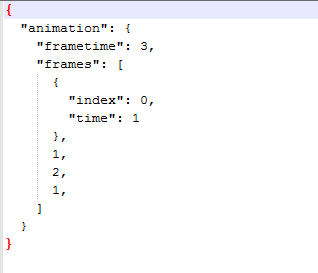
When "frametime" is used for an animation in a resource pack, it will be ignored if the argument (or whatever you call it) "time" is set to 1. For example: I set "frametime" to 3, but I have a frame that I want to be 1 tick long. So I add "time": 1.
What I expected to happen: all frames except the one I set to 1 tick long would be 3 ticks long.
What actually happened: All frames were the default 1 tick instead of the correct 3 ticks.
I will include a screenshot of my mcmeta. If you use it (with a 3 frame animation), all frames will be 1 tick long.
I'm not %100 sure if my explanation (as stated in the title) is correct, but it was the only way that I could explain it.
Edit: Added an example resource pack and updated the screenshot in the attachments. Place a piece if dirt and watch how all the frames are 1 tick long. WARNING: may be seizure inducing 
Edit 2: Oops turns out this has been fixed. Edited accordingly. It's the converter that is not converting timing files correctly.
Environment
windows 8, java 7
Attachments2


Created Issue:
mcmeta's "frametime" is ignored when "time": 1
When "frametime" is used for an animation in a resource pack, it will be ignored if the argument (or whatever you call it) "time" is set to 1. For example: I set "frametime" to 3, but I have a couple frames that I want to be 1 tick long. So I add "time": 1.
What I expected to happen: all frames except the ones I set to 1 tick long would be 3 ticks long.
What actually happened: All frames were the default 1 tick instead of the correct 3 ticks.
I will include a screenshot of my mcmeta. If you use it (with a 3 frame animation), all frames will be 1 tick long.
I'm not %100 sure if my explanation (as stated in the title) is correct, but it was the only way that I could explain it.
Environment
windows 8, java 7
Attachments1
shears.png
When "frametime" is used for an animation in a resource pack, it will be ignored if the argument (or whatever you call it) "time" is set to 1. For example: I set "frametime" to 3, but I have a couple frames that I want to be 1 tick long. So I add "time": 1.
What I expected to happen: all frames except the ones I set to 1 tick long would be 3 ticks long.
What actually happened: All frames were the default 1 tick instead of the correct 3 ticks.
I will include a screenshot of my mcmeta. If you use it (with a 3 frame animation), all frames will be 1 tick long.
I'm not %100 sure if my explanation (as stated in the title) is correct, but it was the only way that I could explain it.
Edit: Added an example resource pack and updated the screenshot in the attachments.
When "frametime" is used for an animation in a resource pack, it will be ignored if the argument (or whatever you call it) "time" is set to 1. For example: I set "frametime" to 3, but I have a
coupleframesthat I want to be 1 tick long. So I add "time": 1.What I expected to happen: all frames except the one
sI set to 1 tick long would be 3 ticks long.What actually happened: All frames were the default 1 tick instead of the correct 3 ticks.
I will include a screenshot of my mcmeta. If you use it (with a 3 frame animation), all frames will be 1 tick long.
I'm not %100 sure if my explanation (as stated in the title) is correct, but it was the only way that I could explain it.
Edit: Added an example resource pack and updated the screenshot in the attachments.
When "frametime" is used for an animation in a resource pack, it will be ignored if the argument (or whatever you call it) "time" is set to 1. For example: I set "frametime" to 3, but I have a frame that I want to be 1 tick long. So I add "time": 1.
What I expected to happen: all frames except the one I set to 1 tick long would be 3 ticks long.
What actually happened: All frames were the default 1 tick instead of the correct 3 ticks.
I will include a screenshot of my mcmeta. If you use it (with a 3 frame animation), all frames will be 1 tick long.
I'm not %100 sure if my explanation (as stated in the title) is correct, but it was the only way that I could explain it.
Edit: Added an example resource pack and updated the screenshot in the attachments.
When "frametime" is used for an animation in a resource pack, it will be ignored if the argument (or whatever you call it) "time" is set to 1. For example: I set "frametime" to 3, but I have a frame that I want to be 1 tick long. So I add "time": 1.
What I expected to happen: all frames except the one I set to 1 tick long would be 3 ticks long.
What actually happened: All frames were the default 1 tick instead of the correct 3 ticks.
I will include a screenshot of my mcmeta. If you use it (with a 3 frame animation), all frames will be 1 tick long.
I'm not %100 sure if my explanation (as stated in the title) is correct, but it was the only way that I could explain it.
Edit: Added an example resource pack and updated the screenshot in the attachments. Place a piece if dirt and watch how all the frames are 1 tick long. WARNING: may be seizure inducing
Resource pack's/mcmeta's "frametime" is ignored when "time": 1
![[Mojang] Grum (Erik Broes)](../../../data/assets/gravatar/grum.png)
When "frametime" is used for an animation in a resource pack, it will be ignored if the argument (or whatever you call it) "time" is set to 1. For example: I set "frametime" to 3, but I have a frame that I want to be 1 tick long. So I add "time": 1.
What I expected to happen: all frames except the one I set to 1 tick long would be 3 ticks long.
What actually happened: All frames were the default 1 tick instead of the correct 3 ticks.
I will include a screenshot of my mcmeta. If you use it (with a 3 frame animation), all frames will be 1 tick long.
I'm not %100 sure if my explanation (as stated in the title) is correct, but it was the only way that I could explain it.
Edit: Added an example resource pack and updated the screenshot in the attachments. Place a piece if dirt and watch how all the frames are 1 tick long. WARNING: may be seizure inducing
Edit 2: Still a bug in 13w24b. Although the attached dirt example is also being affected by a second bug...
When "frametime" is used for an animation in a resource pack, it will be ignored if the argument (or whatever you call it) "time" is set to 1. For example: I set "frametime" to 3, but I have a frame that I want to be 1 tick long. So I add "time": 1.
What I expected to happen: all frames except the one I set to 1 tick long would be 3 ticks long.
What actually happened: All frames were the default 1 tick instead of the correct 3 ticks.
I will include a screenshot of my mcmeta. If you use it (with a 3 frame animation), all frames will be 1 tick long.
I'm not %100 sure if my explanation (as stated in the title) is correct, but it was the only way that I could explain it.
Edit: Added an example resource pack and updated the screenshot in the attachments. Place a piece if dirt and watch how all the frames are 1 tick long. WARNING: may be seizure inducing
Edit 2:
Still a bug in 13w24b. Although the attached dirt example is also being affected by a second bug...When "frametime" is used for an animation in a resource pack, it will be ignored if the argument (or whatever you call it) "time" is set to 1. For example: I set "frametime" to 3, but I have a frame that I want to be 1 tick long. So I add "time": 1.
What I expected to happen: all frames except the one I set to 1 tick long would be 3 ticks long.
What actually happened: All frames were the default 1 tick instead of the correct 3 ticks.
I will include a screenshot of my mcmeta. If you use it (with a 3 frame animation), all frames will be 1 tick long.
I'm not %100 sure if my explanation (as stated in the title) is correct, but it was the only way that I could explain it.
Edit: Added an example resource pack and updated the screenshot in the attachments. Place a piece if dirt and watch how all the frames are 1 tick long. WARNING: may be seizure inducing
Edit 2: Oops turns out this has been fixed. Edited accordingly. It's the converter that is not converting timing files correctly.

Should work in 13w24b though there is another crashing issue
This is still a problem in 13w24b. My example isn't showing it though because of some other bug. I'll try to get the example "working" again.
Edit: scratch that. It was fixed. Sorry Grum Converter has some big bugs...
Is there some sort of a documentation on how that works? I tried it with mine and for some reason I managed by simply copying the original water/lava animations into all my other animations and with 24a I managed to get them all to work. However since 24b I only see the placeholder again and no matter what I change in my mcmeta is going to get it back working again. A documentation on that feature would be highly appreciated.
No documentation yet. I mostly figured it out by looking at what the converter spit out. I don't know why it's showing the placeholder... Some animations show the placeholder, and some work. I would report the placeholder bug, but I have no idea what is causing it...
Yeah I guessed as much :-P
I didn't wanna report anything, the last time I did that I was told off with a nice template/macro for not searching for the bug - which in my opinion still didn't exist. LOL Anyhow... I didn't like what the converter did because it screwed up the textures a bit (i.e. cobblestone suddenly had the brickstone texture) and I just sat down and converted everything manually and then started creating the mcmeta files from scratch by just copying the lava/water animations and edit them. But somehow that didn't work so well after 24b Well, I'll try and see what went wrong. But it looks like a really nice feature, tbh (once I get it working of course!)
Documentation (for the time being): https://gist.github.com/Dinnerbone/5662824