 MC-190286
World loading screen freezes when a new customized flat world is created
The world loading screen freezes 99% of the time when I create a custom flat world. Please fix. Very annoying because I need to open task manager to kill the task because the game won't close when this happens.
What I expected to happen was...:
When I create a custom flat world, the world should load.
What actually happened was...:
Instead, it freezes 🤬.
Steps to Reproduce:
- Create a world
- Select "super flat”, click “customize” and then choose “redstone ready”
- Create the world
- There is a 99% chance that the world will freeze while loading.
Refer to this YouTube video for more info:
https://youtu.be/aVTODn3zo8M

Created Issue:
World loading screen freezes when a new customized flat world is created
The world loading screen freezes 99% of the time when I create a custom flat world. Please fix. Very annoying because I need to open task manager to kill the task because the game won’t close when this happens.
What I expected to happen was...:
When I create a custom flat world, the world should load.What actually happened was...:
Instead, it freezes 🤬.Steps to Reproduce:
- Create a world
- Select “super flat”
- Click “customize”
- Customize the world
- Create the world
- There is a 99% chance that the world will freeze while loading.
286F74BC-ABB0-4495-97CD-D75E3AD731F3.png
The world loading screen freezes 99% of the time when I create a custom flat world. Please fix. Very annoying because I need to open task manager to kill the task because the game won
’t close when this happens.What I expected to happen was...:
When I create a custom flat world, the world should load.What actually happened was...:
Instead, it freezes 🤬.Steps to Reproduce:
- Create a world
- Select
“super flat”- Click
“customize”- Customize the world
- Create the world
- There is a 99% chance that the world will freeze while loading.
The world loading screen freezes 99% of the time when I create a custom flat world. Please fix. Very annoying because I need to open task manager to kill the task because the game won't close when this happens.
What I expected to happen was...:
When I create a custom flat world, the world should load.What actually happened was...:
Instead, it freezes 🤬.Steps to Reproduce:
- Create a world
- Select "super flat"
- Click "customize"
- Customize the world
- Create the world
- There is a 99% chance that the world will freeze while loading.
Refer to this YouTube video for more info:
https://youtu.be/aVTODn3zo8M
![[Mod] violine1101](../../../data/avatars/users/92858.png)
 Very Important
![[Bot] Arisa](../../../data/avatars/users/43007.png)

The world loading screen freezes 99% of the time when I create a custom flat world. Please fix. Very annoying because I need to open task manager to kill the task because the game won't close when this happens.
What I expected to happen was...:
When I create a custom flat world, the world should load.What actually happened was...:
Instead, it freezes 🤬.Steps to Reproduce:
- Create a world
- Select "super flat
"- Click "customize"
- Customize the world
- Create the world
- There is a 99% chance that the world will freeze while loading.
Refer to this YouTube video for more info:
https://youtu.be/aVTODn3zo8MThe world loading screen freezes 99% of the time when I create a custom flat world. Please fix. Very annoying because I need to open task manager to kill the task because the game won't close when this happens.
What I expected to happen was...:
When I create a custom flat world, the world should load.What actually happened was...:
Instead, it freezes 🤬.Steps to Reproduce:
- Create a world
- Select "super flat” and choose “red stone ready”
- Click "customize"
- Customize the world
- Create the world
- There is a 99% chance that the world will freeze while loading.
Refer to this YouTube video for more info:
https://youtu.be/aVTODn3zo8M
The world loading screen freezes 99% of the time when I create a custom flat world. Please fix. Very annoying because I need to open task manager to kill the task because the game won't close when this happens.
What I expected to happen was...:
When I create a custom flat world, the world should load.What actually happened was...:
Instead, it freezes 🤬.Steps to Reproduce:
- Create a world
- Select "super flat”
andchoose “red stone ready”- Click "customize"
- Customize the world
- Create the world
- There is a 99% chance that the world will freeze while loading.
Refer to this YouTube video for more info:
https://youtu.be/aVTODn3zo8MThe world loading screen freezes 99% of the time when I create a custom flat world. Please fix. Very annoying because I need to open task manager to kill the task because the game won't close when this happens.
What I expected to happen was...:
When I create a custom flat world, the world should load.What actually happened was...:
Instead, it freezes 🤬.Steps to Reproduce:
- Create a world
- Select "super flat”, click “customize” and then choose “red stone ready”
- Create the world
- There is a 99% chance that the world will freeze while loading.
Refer to this YouTube video for more info:
https://youtu.be/aVTODn3zo8M
The world loading screen freezes 99% of the time when I create a custom flat world. Please fix. Very annoying because I need to open task manager to kill the task because the game won't close when this happens.
What I expected to happen was...:
When I create a custom flat world, the world should load.What actually happened was...:
Instead, it freezes 🤬.Steps to Reproduce:
- Create a world
- Select "super flat”, click “customize” and then choose “red
stone ready”- Create the world
- There is a 99% chance that the world will freeze while loading.
Refer to this YouTube video for more info:
https://youtu.be/aVTODn3zo8M
Freezes on world loading for my survival world
We do not have enough information to reproduce this issue.
Please provide the following information about the world you are playing in as text. Attaching a screenshot showing them is not enough.
This issue has been temporarily closed as Awaiting Response. Once the requested information has been delivered, the report will be reopened automatically.
Quick Links:
📓 Issue Guidelines – 💬 Community Support – 📧 Customer Support – ✍️ Feedback and Suggestions – 📖 Game Wiki
Please stop changing the Mojang Priority on your bug reports! This is only for Mojang! Currently, the fact that users can change the priority has been reported and is probably being looked at.
I am unable to reproduce - please define what you mean with "Customize the world".
Thank you for your report!
However, this issue has been temporarily closed as Awaiting Response - this does not mean the report is not valid, we just need more information to verify it.
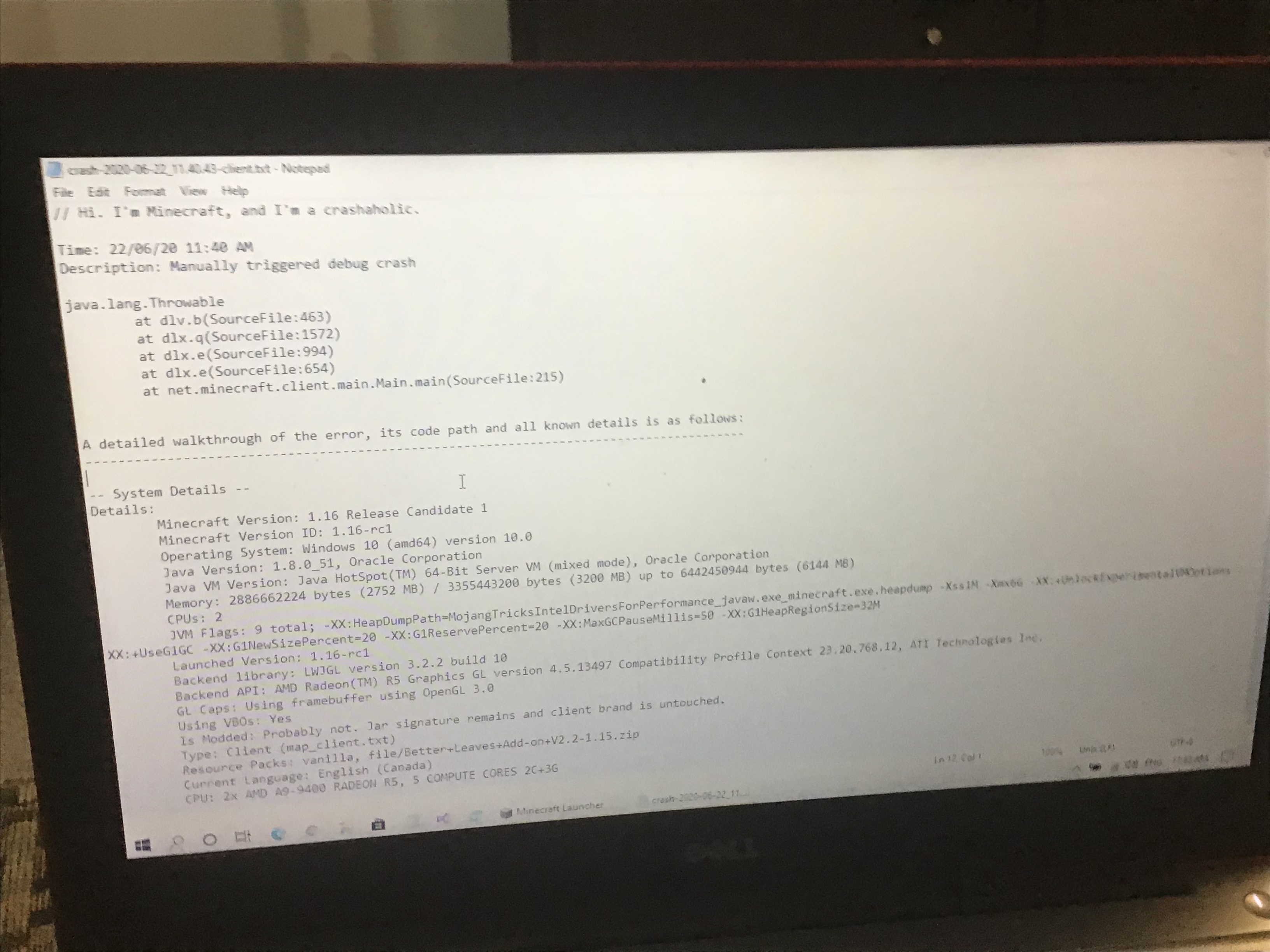
Please force a crash by pressing F3 + C for 10 seconds while in-game and attach the crash report (minecraft/crash-reports/crash-<DATE>-client.txt) here - you can do this in any world.
Quick Links:
📓 Issue Guidelines – 🛠 Community Support – 📧 Customer Support – ✍️ Feedback and Suggestions – 📖 Game Wiki
💬 Mojira Subreddit – 💬 Mojira Discord
Please check that you do not have any incompatible software installed (apologies for the website layout, the tech support team is currently moving): https://minecraftirc.net/support-articles/known-incompatible-software/
I don’t have any incompatible software installed.
Please add the launcher log using these instructions to this ticket - please copy the log after the error has occurred.
Quick Links:
📓 Issue Guidelines – 🛠 Community Support – 📧 Customer Support – ✍️ Feedback and Suggestions – 📖 Game Wiki
💬 Mojira Subreddit – 💬 Mojira Discord
No errors occurred. I have tried that even before I reported this issue.