 MC-239482
Entity Spawning inside block with Spectator mode
Seed: 5450957878814971038
/tp @p -1800.287 12.91045 -144.444
How to Reproduce?
1. Install snapshot 21w2a
2. Open Minecraft
3. Create a New Word with the specified world seed
4. Open LAN and enable cheats
5. Switch to Spectator Mode
6. Use this command -> /tp @p -1803.093 12.91045 -142.585
7. Switch to Creative Mode
There is a chance that mobs such as Glow Squids spawn inside the block when chunks are loaded while in Spectator mode.
Additional notes, mobs in spectator modes does not move in accordance to the Minecraft Wiki.
"Mob view
A spectator can click on an entity with the attack button, to take its view. Their position is locked to that of the entity, and their POV moves in accordance with the entity. Viewing oneself while spectating from an entity's point-of-view using F5 shows the entity. Pressing the dismount key (⇧ Shift by default) returns the player to flying mode. In addition to spectating mobs, players can also spectate any other entity, such as an end crystal, primed TNT, or an armor stand.
Certain mobs also apply a shader while looking from their point-of-view. This filters how the world is portrayed to the spectator. Similar to the Super Secret Settings, if one presses F4, it removes the filter without dismounting the mob. Below is a table of mobs that have a filter."
~Minecraft Wiki

Attachments1
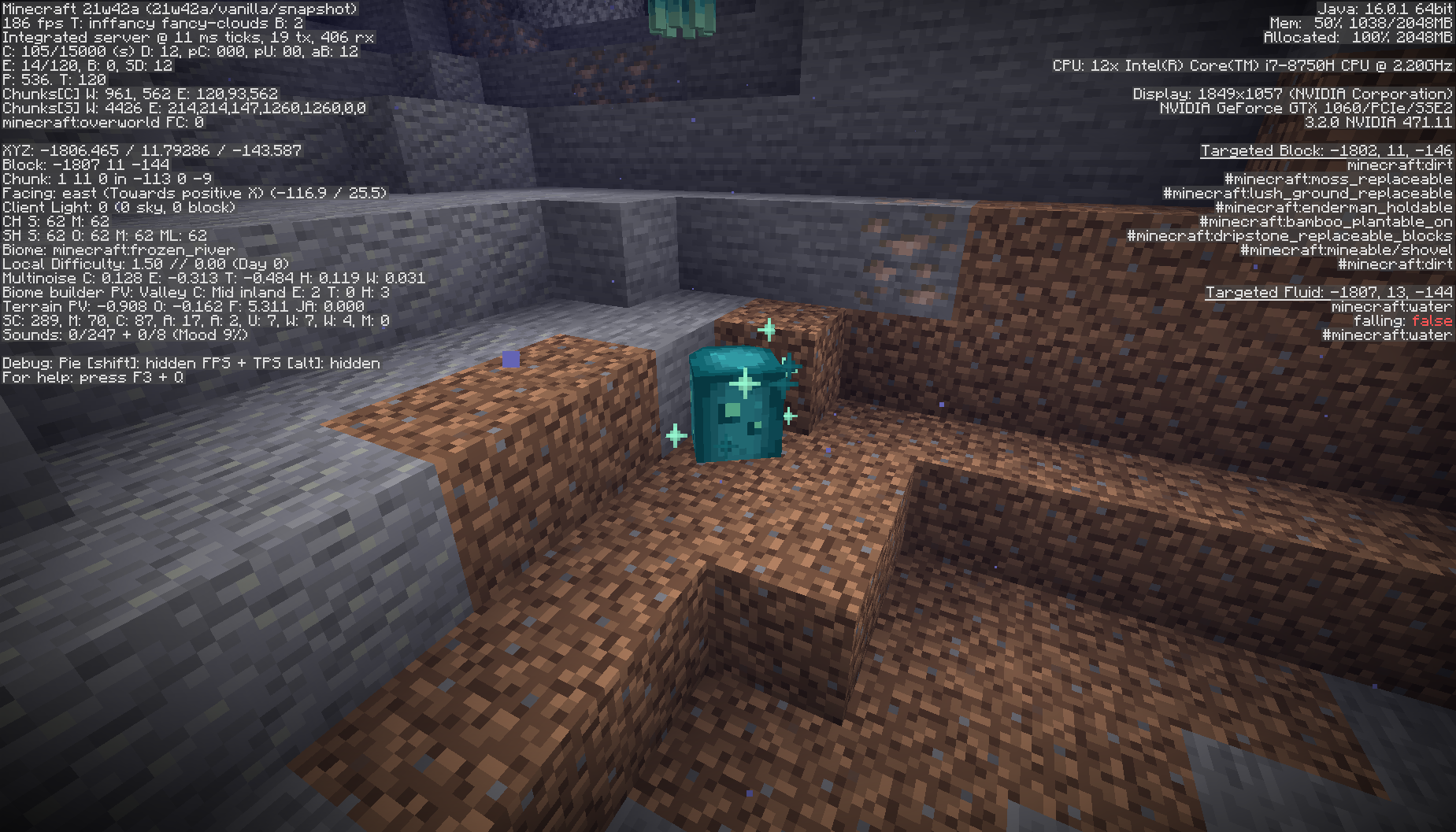

Created Issue:
Change in Entity Behavior after /gamemode switching
Seed: 5450957878814971038
How to Reproduce?
1. Install snapshot 21w2a
2. Open Minecraft
3. Create a New Word with the specified world seed
4. Open LAN and enable cheats
5. Switch to Spectator Mode
6. Use this command -> /tp @p -1803.093 12.91045 -142.585
6. Switch to Creative Mode
Attachments1
Seed: 5450957878814971038
How to Reproduce?
1. Install snapshot 21w2a
2. Open Minecraft
3. Create a New Word with the specified world seed
4. Open LAN and enable cheats
5. Switch to Spectator Mode
6. Use this command -> /tp @p -1803.093 12.91045 -142.585
6. Switch to Creative Mode
Seed: 5450957878814971038
NOTE: If the Glow Squid are not spawned, please spawn at least five of them in the designated coordinates below.
/tp @p -1800.287 12.91045 -144.444How to Reproduce?
1. Install snapshot 21w2a
2. Open Minecraft
3. Create a New Word with the specified world seed
4. Open LAN and enable cheats
5. Switch to Spectator Mode
6. Use this command -> /tp @p -1803.093 12.91045 -142.585
7. Switch to Creative Mode
8. Repeat switching from Spectator and Creative and you'll witness a change in the entity behavior.
Seed: 5450957878814971038
NOTE: If the Glow Squid are not spawned, please spawn at least five of them in the designated coordinates below.
/tp @p -1800.287 12.91045 -144.444How to Reproduce?
1. Install snapshot 21w2a
2. Open Minecraft
3. Create a New Word with the specified world seed
4. Open LAN and enable cheats
5. Switch to Spectator Mode
6. Use this command -> /tp @p -1803.093 12.91045 -142.585
7. Switch to Creative Mode
8. Repeat switching from Spectator and Creative and you'll witness a change in the entity behavior.
#RoadToHelper
Seed: 5450957878814971038
NOTE: If the Glow Squid are not spawned, please spawn at least five of them in the designated coordinates below.
/tp @p -1800.287 12.91045 -144.444How to Reproduce?
1. Install snapshot 21w2a
2. Open Minecraft
3. Create a New Word with the specified world seed
4. Open LAN and enable cheats
5. Switch to Spectator Mode
6. Use this command -> /tp @p -1803.093 12.91045 -142.585
7. Switch to Creative Mode
8. Repeat switching from Spectator and Creative and you'll witness a change in the entity behavior.
#RoadToHelper
Seed: 5450957878814971038
/tp @p -1800.287 12.91045 -144.444How to Reproduce?
1. Install snapshot 21w2a
2. Open Minecraft
3. Create a New Word with the specified world seed
4. Open LAN and enable cheats
5. Switch to Spectator Mode
6. Use this command -> /tp @p -1803.093 12.91045 -142.585
7. Switch to Creative ModeSome of the Glow Squids spawn inside the block when chunks are loaded while in Spectator mode.
ChangeinEntity Behavior after /gamemode switchingEntity Spawning inside block with Spectator mode
Seed: 5450957878814971038
/tp @p -1800.287 12.91045 -144.444How to Reproduce?
1. Install snapshot 21w2a
2. Open Minecraft
3. Create a New Word with the specified world seed
4. Open LAN and enable cheats
5. Switch to Spectator Mode
6. Use this command -> /tp @p -1803.093 12.91045 -142.585
7. Switch to Creative Mode
Some of theGlow Squids spawn inside the block when chunks are loaded while in Spectator mode.
Seed: 5450957878814971038
/tp @p -1800.287 12.91045 -144.444How to Reproduce?
1. Install snapshot 21w2a
2. Open Minecraft
3. Create a New Word with the specified world seed
4. Open LAN and enable cheats
5. Switch to Spectator Mode
6. Use this command -> /tp @p -1803.093 12.91045 -142.585
7. Switch to Creative ModeThere is a chance that mobs such as Glow Squids spawn inside the block when chunks are loaded while in Spectator mode.
Seed: 5450957878814971038
/tp @p -1800.287 12.91045 -144.444How to Reproduce?
1. Install snapshot 21w2a
2. Open Minecraft
3. Create a New Word with the specified world seed
4. Open LAN and enable cheats
5. Switch to Spectator Mode
6. Use this command -> /tp @p -1803.093 12.91045 -142.585
7. Switch to Creative ModeThere is a chance that mobs such as Glow Squids spawn inside the block when chunks are loaded while in Spectator mode.
Seed: 5450957878814971038
/tp @p -1800.287 12.91045 -144.444How to Reproduce?
1. Install snapshot 21w2a
2. Open Minecraft
3. Create a New Word with the specified world seed
4. Open LAN and enable cheats
5. Switch to Spectator Mode
6. Use this command -> /tp @p -1803.093 12.91045 -142.585
7. Switch to Creative ModeThere is a chance that mobs such as Glow Squids spawn inside the block when chunks are loaded while in Spectator mode.
Additional notes, mobs in spectator modes does not move in accordance to the Minecraft Wiki.
"Mob view
A spectator can click on an entity with the attack button, to take its view. Their position is locked to that of the entity, and their POV moves in accordance with the entity. Viewing oneself while spectating from an entity's point-of-view using F5 shows the entity. Pressing the dismount key (⇧ Shift by default) returns the player to flying mode. In addition to spectating mobs, players can also spectate any other entity, such as an end crystal, primed TNT, or an armor stand.
Certain mobs also apply a shader while looking from their point-of-view. This filters how the world is portrayed to the spectator. Similar to the Super Secret Settings, if one presses F4, it removes the filter without dismounting the mob. Below is a table of mobs that have a filter."
~Minecraft Wiki
![[Mod] Anthony Cicinelli](../../../data/avatars/users/10122.svg)
In the screenshot you've provided, the glow squid doesn't appear to have spawned inside of blocks. If it did, it would suffocate and die. I cannot reproduce this behavior.