 MC-250679
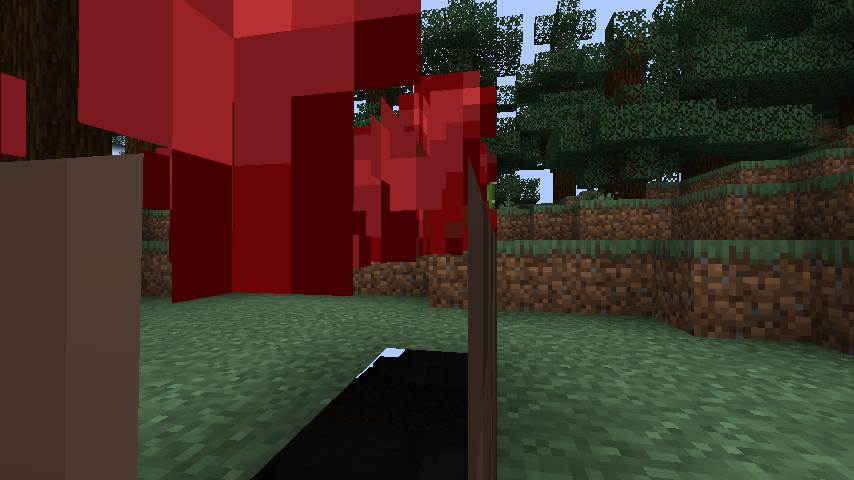
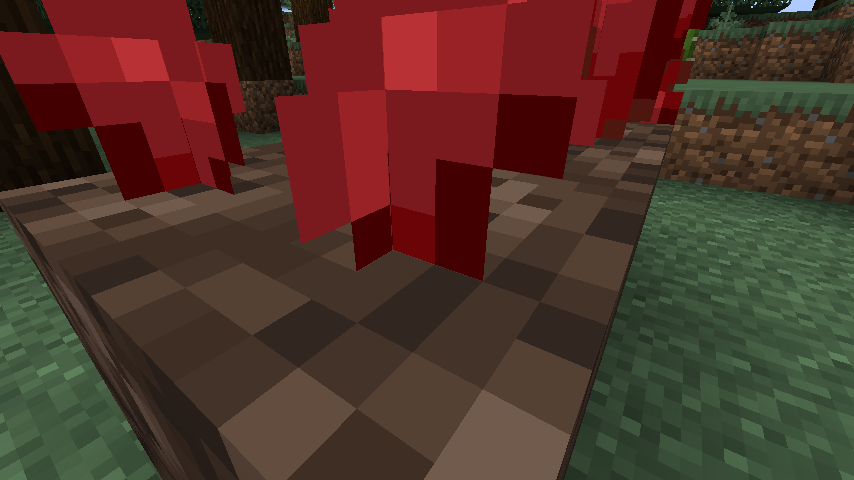
Some pixels of nether wart are hidden inside of the block
The resource pack attached offers a complete fix for this issue. Mojang have my full permission to (and are encouraged to) replace the affected vanilla model files with the contents of the resource pack.
Download resource pack:

The bug
The planted nether wart block refers to the same "crop.json" model file as overworld crops such as wheat. While this is fine for the most part, in practice it results in some of the pixels of the nether wart texture being buried in the soul sand.
The crop model is offset one pixel downwards as to match the shape of farmland (MC-50155), which results in a seamless connection for other crops, but as soul sand is a full cube, the bottom layer of the nether wart texture ends up being completely hidden when it should be visible.
How to reproduce
- Plant seeds on farmland
- Plant nether wart on soul sand
- Enter Spectator mode and fly inside the farmland and soul sand
Expected results
The wheat crops and nether wart should have all of their pixels visible from aboveground, and flying into the base blocks shouldn't reveal anything new that isn't normally visible.
Actual results
This is true of the wheat, but the bottom layer of nether wart's texture is completely obscured by the soul sand.
How to fix
I've attached a resource pack to this ticket which fixes this issue entirely, alongside fixing a few other issues. Mojang have my complete permission to use these assets in-game to fix this issue (and are strongly encouraged to use it due to it fixing other issues which would likely otherwise remain in the game for needlessly long and require more time to fix).
This resource pack introduces a new "hash" template model, which is identical to the crop model except that its planes range from 0 to 16 pixels on the Y axis, rather than the -1 to 15 for crops, such that the entire texture for nether wart is visible in all stages.
This resource pack also fixes some minor issues with seagrass, which I've made to use this model instead (thus deprecating template_seagrass.json). The hash model accepts two different textures (for blocks like nether wart which use only one texture, template_hash_all.json collapses the two textures into one parameter in much the same way as cube_all), and each seagrass texture has been split into two, with a new texture halfway offset.
With these two texture options and alternate seagrass textures, this resource pack contains a fix for MC-202598, which was resolved as Won't Fix due to its originally proposed fix resulting in seagrass swaying in two directions at once, which was considered aesthetically undesirable. This resource pack fixes MC-202598's mirroring issue while getting around the "plants not swaying in the same direction" issue at the same time, since the alternate texture sways in time with the original (and arguably feels even more natural as a result due to subtle differences in the texture).
In addition, this partially fixes MC-203406, since the hash model does not include any redundant tintindex parameters that go unused.
Hopefully this paragraph makes these bonus fixes clear enough.
Linked Issues
 Normal
Attachments8




Created Issue:
Some pixels of nether wart are hidden inside of the block
The resource pack attached offers a complete fix for this issue. Mojang have my full permission to (and are encouraged to) replace the affected vanilla model files with the contents of the resource pack.
Download resource pack:
The bug
The planted nether wart block refers to the same "crop.json" model file as overworld crops such as wheat. While this is fine for the most part, in practice it results in some of the pixels of the nether wart texture being buried in the soul sand.
The crop model is offset one pixel downwards as to match the shape of farmland (
MC-50155), which results in a seamless connection for other crops, but as soul sand is a full cube, the bottom layer of the nether wart texture ends up being completely hidden when it should be visible.How to reproduce
- Plant seeds on farmland
- Plant nether wart on soul sand
- Enter Spectator mode and fly inside the farmland and soul sand
Expected results
The wheat crops and nether wart should have all of their pixels visible from aboveground, and flying into the base blocks shouldn't reveal anything new that isn't normally visible.
Actual results
This is true of the wheat, but the bottom layer of nether wart's texture is completely obscured by the soul sand.
How to fix
I've attached a resource pack to this ticket which fixes this issue entirely, alongside fixing a few other issues. Mojang have my complete permission to use these assets in-game to fix this issue (and are strongly encouraged to use it due to it fixing other issues which would likely otherwise remain in the game for needlessly long and require more time to fix).
This resource pack introduces a new "hash" template model, which is identical to the crop model except that its planes range from 0 to 16 pixels on the Y axis, rather than the -1 to 15 for crops, such that the entire texture for nether wart is visible in all stages.
This resource pack also fixes some minor issues with seagrass, which I've made to use this model instead (thus deprecating template_seagrass.json). The hash model accepts two different textures (for blocks like nether wart which use only one texture, template_hash_all.json collapses the two textures into one parameter in much the same way as cube_all), and each seagrass texture has been split into two, with a new texture halfway offset.
With these two texture options and alternate seagrass textures, this resource pack contains a fix for MC-202598, which was resolved as Won't Fix due to its originally proposed fix resulting in seagrass swaying in two directions at once, which was considered aesthetically undesirable. This resource pack fixes MC-202598's mirroring issue while getting around the "plants not swaying in the same direction" issue at the same time, since the alternate texture sways in time with the original (and arguably feels even more natural as a result due to subtle differences in the texture).
In addition, this partially fixes
MC-203406, since the hash model does not include any redundant tintindex parameters that go unused.Hopefully this paragraph makes these bonus fixes clear enough.
Attachments6
![[Mod] Les3awe](../../../data/avatars/users/79847.png)
relates to
[Mojang] Grum (Erik Broes) I decided to revisit a fix for this after discovering/while reporting MC-250679. The resource pack I've attached there fixes this mirroring issue while still managing to have seagrass sway in the same direction underwater. The fix is overall rather simple - I have an in-depth description of how it's done in that ticket but it basically entails using two copies of the seagrass animation, with one offset halfway, and applying the two different animations on different parts of the model so that the overall animation/direction remains synchronized.
Current vanilla model:
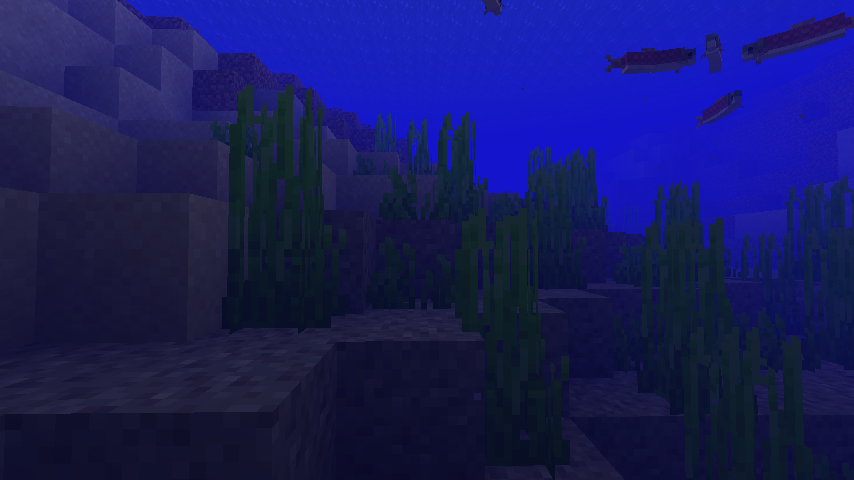
With the fix from MC-250679:

Would this fix be acceptable? I think the outcome is actually preferable to vanilla's current behaviour, since for large bodies of seagrass the texture's repetition is less obvious.
Relates to: MC-176095 MC-199660 MC-208679 MC-250985
May also relate to: MC-159560
The bug
All three texture files used for nether wart crops contain pixels that cannot normally be seen, by virtue of the fact that the crop model places them too low (MC-250679).
Both the default textures and Programmer Art are affected.
How to fix
Fixed versions of the texture files for nether wart are attached to this ticket. Fixing this should be as easy as replacing vanilla's current block/nether_wart_stage0.png, block/nether_wart_stage1.png and block/nether_wart_stage2.png textures with these fixed textures.
I've also included Programmer Art versions of these textures, as Programmer Art is also affected by this issue. Programmer Art's fix can be applied in much the same way.
As these assets are modified versions of Mojang's own game assets, intended as a fix to the game, Mojang have all the rights to use these as a fix. If required for some reason, I give Mojang full permission to use these.
Unlike the other unused pixel issues I've reported, I've decided to fix this issue by moving everything in the texture up one pixel, as opposed to simply deleting the unused pixels from the texture file.
It appears as though this was the case even upon its first introduction (the bottom row is definitely cut off in old versions, but I may have to test whether it's actually inside the ground to be sure):

