 MC-258577
Some parts of debug pie chart are inaccessible
The bug
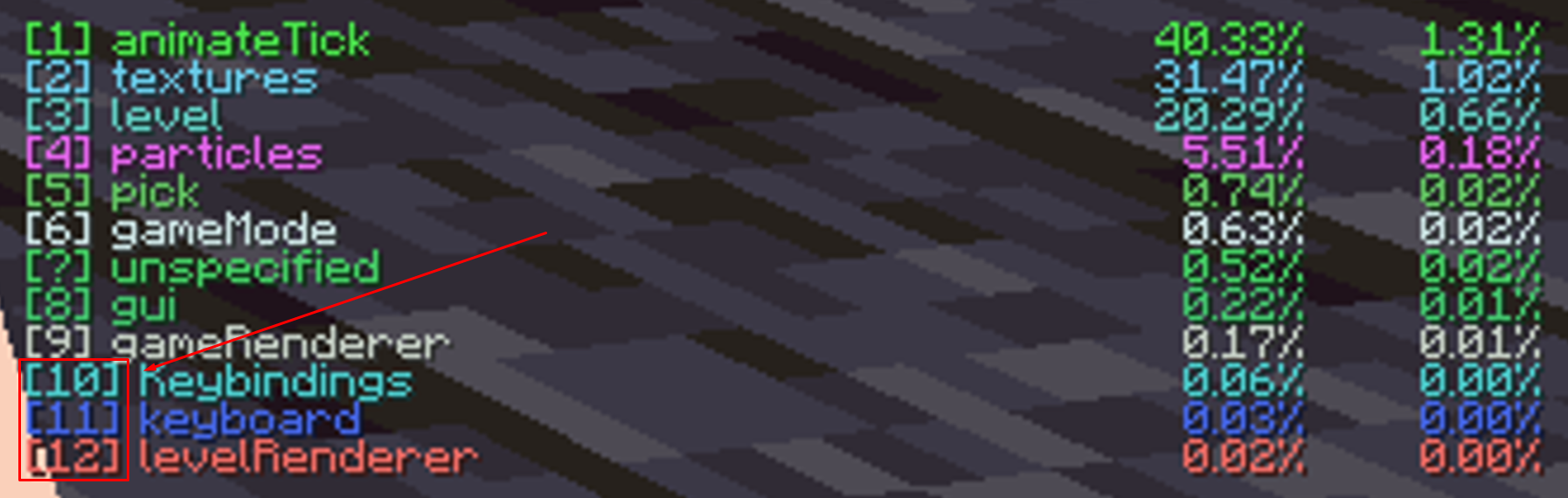
The debug pie chart is controlled with the number keys 0-9. If there are many menus to choose from, the number that can be pressed may exceed 9. This causes it to be inaccessible because pressing numbers simultaneously (eg. pressing 1 and 0 to access 10) does not work.
Steps to reproduce
- Hold shift while opening the debug menu to start the pie chart
- Navigate to "tick"
→ Notice how you are unable to access menus with numbers above 9.
Linked Issues

![[Mod] Avoma](../../../data/avatars/users/86198.png)

Created Issue:
Some parts of debug pie chart are inaccessible
The bug
The debug pie chart is controlled with the number keys 0-9. If there are many menus to choose from, the number that needs to press may exceed 9. This causes it to be inaccessible because pressing numbers simultaneously (eg. pressing 1 and 0 to access 10) does not work.
Steps to reproduce
- Hold shift while opening the debug menu to start the pie chart
- Navigate to "tick"
→Environment
Java 17.0.5.8, Windows 11
The bug
The debug pie chart is controlled with the number keys 0-9. If there are many menus to choose from, the number that
needs topress may exceed 9. This causes it to be inaccessible because pressing numbers simultaneously (eg. pressing 1 and 0 to access 10) does not work.Steps to reproduce
- Hold shift while opening the debug menu to start the pie chart
- Navigate to "tick"
→The bug
The debug pie chart is controlled with the number keys 0-9. If there are many menus to choose from, the number that can be pressed may exceed 9. This causes it to be inaccessible because pressing numbers simultaneously (eg. pressing 1 and 0 to access 10) does not work.
Steps to reproduce
- Hold shift while opening the debug menu to start the pie chart
- Navigate to "tick"
→
Java 17.0.5.8, Windows 11
![[Mod] ampolive](../../../data/avatars/users/18949.svg)
![[Mod] tryashtar](../../../data/avatars/users/41963.png)
duplicates
Thank you for your report!
We're tracking this issue in MC-215458, so this ticket is being resolved and linked as a duplicate.
If you would like to add a vote and any extra information to the main ticket it would be appreciated.
If you haven't already, you might like to make use of the search feature to see if the issue has already been mentioned.
Quick Links:
📓 Bug Tracker Guidelines – 💬 Community Support – 📧 Mojang Support
📓 Project Summary – ✍️ Feedback and Suggestions – 📖 Game Wiki
– I am a bot. This action was performed automatically! The ticket was resolved by one of our moderators, and I left this message to give more information to you.