 MC-264124
Launching with not English keyboard layout messes up key names
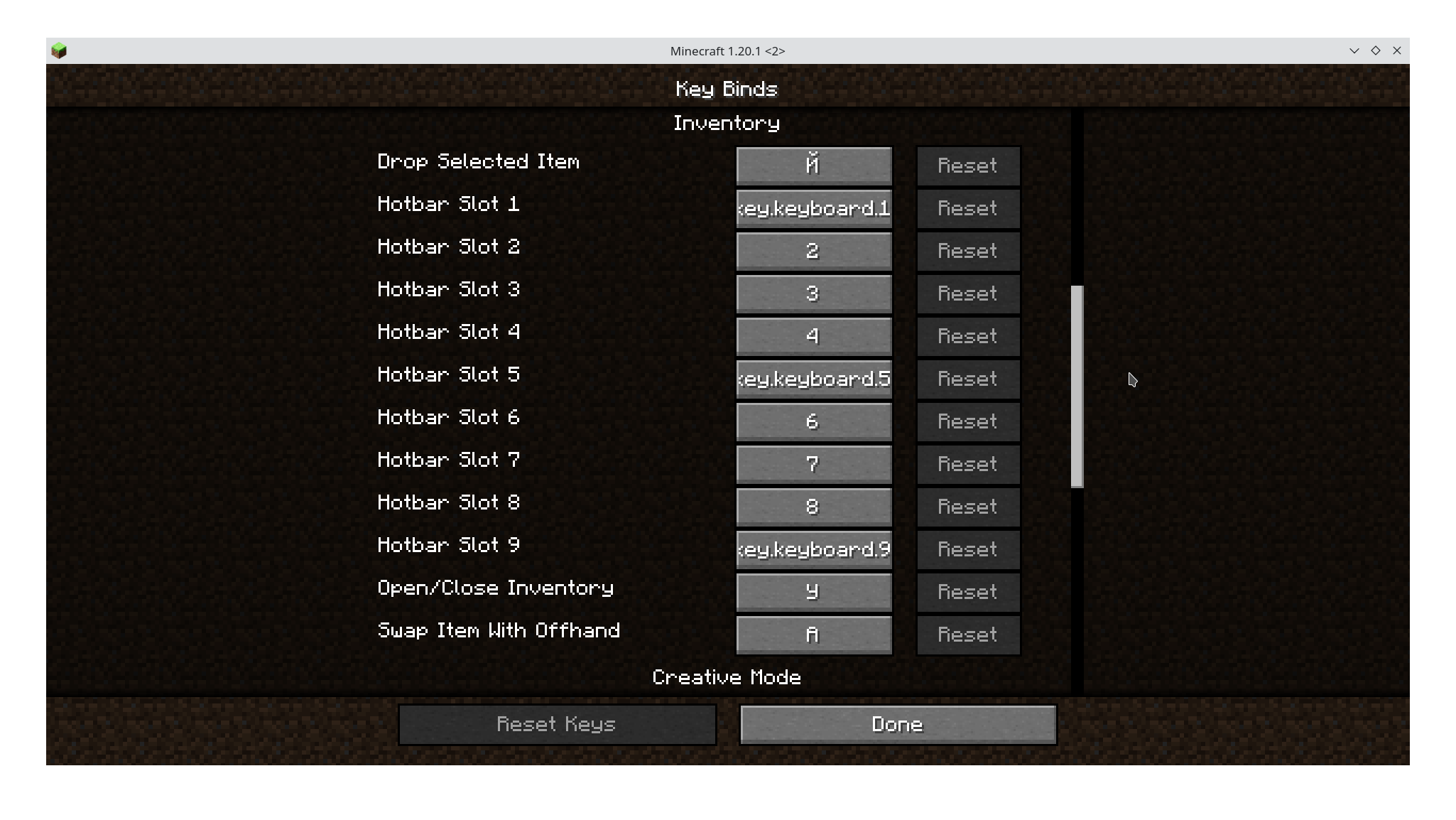
If I launch Minecraft with Russian keyboard layout enabled at the moment, key names in Key Binds are the corresponding Russian letters. 1, 5 and 9 have broken names: key.keyboard.5, other digits are okay.
If I change the layout in game, nothing changes. Only restarting game with English layout makes keys be English. Language in the launcher doesn't change anything.
Environment
Linux 6.4.2, EndeavourOS, KDE Plasma 5.27.6, X11


 Normal
Created Issue:
Launching with not English keyboard layout messes up key names
If I launch Minecraft with Russian keyboard layout enabled at the moment, key names in Key Binds are the corresponding Russian letters.
If I launch Minecraft with Russian keyboard layout enabled at the moment, key names in Key Binds are the corresponding Russian letters.
(if anyone sees it, i am still finishing up)
If I launch Minecraft with Russian keyboard layout enabled at the moment, key names in Key Binds are the corresponding Russian letters.
(if anyone sees it, i am still finishing up)
If I launch Minecraft with Russian keyboard layout enabled at the moment, key names in Key Binds are the corresponding Russian letters.
(if anyone sees it, i am still finishing up)
If I launch Minecraft with Russian keyboard layout enabled at the moment, key names in Key Binds are the corresponding Russian letters. 1, 5 and 9 have broken names: key.keyboard.5, other digits are okay.
If I change the layout in game, nothing changes. Only restarting game with English layout makes keys be English. Language in the launcher doesn't change anything.
Linux 6.4.2, EndeavourOS, KDE Plasma 5.27.6, X11
![[Mod] turbo](../../../data/avatars/users/92867.png)
![[Bot] Arisa](../../../data/avatars/users/43007.png)
![[Mojang] Maxime Lebrot](../../../data/avatars/users/18941.svg)
I have trouble reproducing this issue. Can you please check if this is still an issue in 1.20.4 or the latest snapshot? If so, please update the affected versions.
Yes, I still have this issue with 1.20.4 and 24w03b. Will try to reproduce in VM
This happens in VirtualBox too. Steps to reproduce:
Maybe, after opening the game it will go fullscreen and break the resolution. F11 may not work and mouse may also break. Then use arrow keys to open settings and disable fullscreen