![[Mod] turbo](../../../data/avatars/users/92867.png) [Mod] turbo
[Mod] turbo
- zTxrbq
- JIRAUSER715707
- Europe/Berlin
- Yes
- No
 MCL-21626MCL-22531
 MC-256956
![[Mojang] slicedlime](../../../data/assets/gravatar/slicedlime.jpeg)
 Low
Low










 WEB-6114















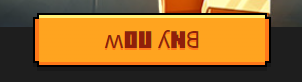
The Bug:
The Minecraft Launcher performs automatic conversion to uppercase in various places, depending on the font used. For example, even though the string for the play button is “Play”, it appears as “PLAY” on the play button itself. This conversion is very straightforward in the source language and hence works as intended in English.
However, this case conversion appears to behave inconsistently in other languages, such as Greek. Greek has to follow a set of rules when a word or sentence is fully capitalized and, as a result of this conversion to uppercase, Greek translations appear to have undesirable accents in the fully capitalized text, which go against the language’s rules. This is because the strings on Crowdin appear in their lowercase form and hence are translated as such, but in some cases the Launcher may use them in their uppercase form instead so it performs case conversion automatically.
This issue can be partially dealt with by translators by simply translating the string in its uppercase form so that the Launcher will not convert it incorrectly. However, this would not be possible if the string were to appear in both the uppercase and lowercase form (see “Play” in the next paragraph).
Observed Behavior:
In the attached screenshot of the Launcher main page, the string “Play” which is only available in its lowercase form on Crowdin, has been translated to “Παιχνίδι” in Greek and contains an accent. The same string appears in two instances on the Launcher as shown in (1) and (2). In (1), the string appears in its original form, exactly as it was translated on Crowdin. In (2), the string is converted to uppercase by the Launcher. The accent is no longer there, and this behavior is expected in Greek.
In (3), there is the string “Coming Summer 2020”. Just like “Play”, this one is available in its lowercase form on Crowdin, and it has been translated as “Έρχεται Καλοκαίρι του 2022”, which also contains accents. The Launcher again applies an uppercase conversion mapping, but this time the accents are still present, which is not expected in Greek.
As such, it seems there is an inconsistency in the way conversion to uppercase characters takes place in the Launcher. In (2), this was done properly, but in (3) it was not.
Expected Behavior:
Neither (2) nor (3) should have accents in their uppercase form:
- “Παιχνίδι” > “ΠΑΙΧΝΙΔΙ”
- “Έρχεται Καλοκαίρι του 2022” > “ΕΡΧΕΤΑΙ ΚΑΛΟΚΑΙΡΙ ΤΟΥ 2022”
Affected Strings:
Before reading the table, please note the following:
- Words colored in GREEN are correct.
- Words colored in RED are incorrect.
Translation Observed Behavior Expected Behavior String ContextString URL on Crowdin Έρχεται Καλοκαίρι του 2022 ´ΕΡΧΕΤΑΙ ΚΑΛΟΚΑÍΡΙ ΤΟΥ 2022|ΕΡΧΕΤΑΙ ΚΑΛΟΚΑΙΡΙ ΤΟΥ 2022|#: ..\..\apps\launcher\src\routes\Java\routes\Play\components\BuyGamePass\index.tsx:186|https://crowdin.com/translate/minecraft-launcher/9420/en-el#5273514|
|Έρχεται Καλοκαίρι 2022: Αγοράστε το Πακέτο Minecraft PC, Αποκτήστε και τα Δύο Παιχνίδια για PC!|´ΕΡΧΕΤΑΙ ΚΑΛΟΚΑÍΡΙ 2022: ΑΓΟΡÁΣΤΕ ΤΟ ΠΑΚÉΤΟ MINECRAFT PC, ΑΠΟΚΤḢΣΤΕ ΚΑΙ ΤΑ ΔÝΟ ΠΑΙΧΝÍΔΙΑ ΓΙΑ PC!|ΕΡΧΕΤΑΙ ΚΑΛΟΚΑΙΡΙ 2022: ΑΓΟΡΑΣΤΕ ΤΟ ΠΑΚΕΤΟ MINECRAFT PC, ΑΠΟΚΤΗΣΤΕ ΚΑΙ ΤΑ ΔΥΟ ΠΑΙΧΝΙΔΙΑ ΓΙΑ PC!|#: ..\..\apps\launcher\src\routes\Java\routes\Play\components\BuyGamePassCallout\index.tsx:198 |https://crowdin.com/translate/minecraft-launcher/9420/en-el#5295422|
|Παιχνίδι|ΠΑΙΧΝΙΔΙΠΑΙΧΝΙΔΙ #: ..\..\apps\launcher\src\routes\Java\components\JavaSubMenu\index.tsx:88
#: ..\..\apps\launcher\src\routes\Java\components\PlayButtonText\index.tsx:23
#: ..\..\apps\launcher\src\routes\Java\context\Play\components\WarningDialogs\index.tsx:51
#: ..\..\apps\launcher\src\routes\Java\routes\Configurations\components\Item\index.tsx:226
#: ..\..\apps\launcher\src\routes\Products\components\PlayButtonText\index.tsx:38
#: ..\..\apps\launcher\src\routes\Products\index.tsx:36
#: ..\..\apps\launcher\src\routes\Products\index.tsx:59https://crowdin.com/translate/minecraft-launcher/9420/en-el#5202262 Also, the same issue affects the dates as they appear in the changelog. There is a webpage summarizing the issue: https://icu.unicode.org/design/case/greek-upper.
The Bug:
The Minecraft Launcher performs automatic conversion to uppercase in various places, depending on the font used. For example, even though the string for the play button is “Play”, it appears as “PLAY” on the play button itself. This conversion is very straightforward in the source language and hence works as intended in English.
However, this case conversion appears to behave inconsistently in other languages, such as Greek. Greek has to follow a set of rules when a word or sentence is fully capitalized and, as a result of this conversion to uppercase, Greek translations appear to have undesirable accents in the fully capitalized text, which go against the language’s rules. This is because the strings on Crowdin appear in their lowercase form and hence are translated as such, but in some cases the Launcher may use them in their uppercase form instead so it performs case conversion automatically.
This issue can be partially dealt with by translators by simply translating the string in its uppercase form so that the Launcher will not convert it incorrectly. However, this would not be possible if the string were to appear in both the uppercase and lowercase form (see “Play” in the next paragraph).
Observed Behavior:
In the attached screenshot of the Launcher main page, the string “Play” which is only available in its lowercase form on Crowdin, has been translated to “Παιχνίδι” in Greek and contains an accent. The same string appears in two instances on the Launcher as shown in (1) and (2). In (1), the string appears in its original form, exactly as it was translated on Crowdin. In (2), the string is converted to uppercase by the Launcher. The accent is no longer there, and this behavior is expected in Greek.
In (3), there is the string “Coming Summer 2020”. Just like “Play”, this one is available in its lowercase form on Crowdin, and it has been translated as “Έρχεται Καλοκαίρι του 2022”, which also contains accents. The Launcher again applies an uppercase conversion mapping, but this time the accents are still present, which is not expected in Greek.
As such, it seems there is an inconsistency in the way conversion to uppercase characters takes place in the Launcher. In (2), this was done properly, but in (3) it was not.
Expected Behavior:
Neither (2) nor (3) should have accents in their uppercase form:
- “Παιχνίδι” > “ΠΑΙΧΝΙΔΙ”
- “Έρχεται Καλοκαίρι του 2022” > “ΕΡΧΕΤΑΙ ΚΑΛΟΚΑΙΡΙ ΤΟΥ 2022”
Affected Strings:
Before reading the table, please note the following:
- Words colored in GREEN are correct.
- Words colored in RED are incorrect.
Translation Observed Behavior Expected Behavior String URL on Crowdin Έρχεται Καλοκαίρι του 2022 ´ΕΡΧΕΤΑΙ ΚΑΛΟΚΑÍΡΙ ΤΟΥ 2022|ΕΡΧΕΤΑΙ ΚΑΛΟΚΑΙΡΙ ΤΟΥ 2022 https://crowdin.com/translate/minecraft-launcher/9420/en-el#5273514 Έρχεται Καλοκαίρι 2022: Αγοράστε το Πακέτο Minecraft PC, Αποκτήστε και τα Δύο Παιχνίδια για PC! ´ΕΡΧΕΤΑΙ ΚΑΛΟΚΑÍΡΙ 2022: ΑΓΟΡÁΣΤΕ ΤΟ ΠΑΚÉΤΟ MINECRAFT PC, ΑΠΟΚΤḢΣΤΕ ΚΑΙ ΤΑ ΔÝΟ ΠΑΙΧΝÍΔΙΑ ΓΙΑ PC! ΕΡΧΕΤΑΙ ΚΑΛΟΚΑΙΡΙ 2022: ΑΓΟΡΑΣΤΕ ΤΟ ΠΑΚΕΤΟ MINECRAFT PC, ΑΠΟΚΤΗΣΤΕ ΚΑΙ ΤΑ ΔΥΟ ΠΑΙΧΝΙΔΙΑ ΓΙΑ PC! https://crowdin.com/translate/minecraft-launcher/9420/en-el#5295422 Παιχνίδι ΠΑΙΧΝΙΔΙ ΠΑΙΧΝΙΔΙ https://crowdin.com/translate/minecraft-launcher/9420/en-el#5202262 Also, the same issue affects the dates as they appear in the changelog. There is a webpage summarizing the issue: https://icu.unicode.org/design/case/greek-upper.
The Bug:
The Minecraft Launcher performs automatic conversion to uppercase in various places, depending on the font used. For example, even though the string for the play button is “Play”, it appears as “PLAY” on the play button itself. This conversion is very straightforward in the source language and hence works as intended in English.
However, this case conversion appears to behave inconsistently in other languages, such as Greek. Greek has to follow a set of rules when a word or sentence is fully capitalized and, as a result of this conversion to uppercase, Greek translations appear to have undesirable accents in the fully capitalized text, which go against the language’s rules. This is because the strings on Crowdin appear in their lowercase form and hence are translated as such, but in some cases the Launcher may use them in their uppercase form instead so it performs case conversion automatically.
This issue can be partially dealt with by translators by simply translating the string in its uppercase form so that the Launcher will not convert it incorrectly. However, this would not be possible if the string were to appear in both the uppercase and lowercase form (see “Play” in the next paragraph).
Observed Behavior:
In the attached screenshot of the Launcher main page, the string “Play” which is only available in its lowercase form on Crowdin, has been translated to “Παιχνίδι” in Greek and contains an accent. The same string appears in two instances on the Launcher as shown in (1) and (2). In (1), the string appears in its original form, exactly as it was translated on Crowdin. In (2), the string is converted to uppercase by the Launcher. The accent is no longer there, and this behavior is expected in Greek.
In (3), there is the string “Coming Summer 2020”. Just like “Play”, this one is available in its lowercase form on Crowdin, and it has been translated as “Έρχεται Καλοκαίρι του 2022”, which also contains accents. The Launcher again applies an uppercase conversion mapping, but this time the accents are still present, which is not expected in Greek.
As such, it seems there is an inconsistency in the way conversion to uppercase characters takes place in the Launcher. In (2), this was done properly, but in (3) it was not.
Expected Behavior:
Neither (2) nor (3) should have accents in their uppercase form:
- “Παιχνίδι” > “ΠΑΙΧΝΙΔΙ”
- “Έρχεται Καλοκαίρι του 2022” > “ΕΡΧΕΤΑΙ ΚΑΛΟΚΑΙΡΙ ΤΟΥ 2022”
Affected Strings:
Before reading the table, please note the following:
- Words colored in GREEN are correct.
- Words colored in RED are incorrect.
Translation Observed Behavior Expected Behavior String URL on Crowdin Έρχεται Καλοκαίρι του 2022 ´ΕΡΧΕΤΑΙ ΚΑΛΟΚΑÍΡΙ ΤΟΥ 2022|ΕΡΧΕΤΑΙ ΚΑΛΟΚΑΙΡΙ ΤΟΥ 2022 https://crowdin.com/translate/minecraft-launcher/9420/en-el#5273514 Έρχεται Καλοκαίρι 2022: Αγοράστε το Πακέτο Minecraft PC, Αποκτήστε και τα Δύο Παιχνίδια για PC! ´ΕΡΧΕΤΑΙ ΚΑΛΟΚΑÍΡΙ 2022: ΑΓΟΡÁΣΤΕ ΤΟ ΠΑΚÉΤΟ MINECRAFT PC, ΑΠΟΚΤḢΣΤΕ ΚΑΙ ΤΑ ΔÝΟ ΠΑΙΧΝÍΔΙΑ ΓΙΑ PC! ΕΡΧΕΤΑΙ ΚΑΛΟΚΑΙΡΙ 2022: ΑΓΟΡΑΣΤΕ ΤΟ ΠΑΚΕΤΟ MINECRAFT PC, ΑΠΟΚΤΗΣΤΕ ΚΑΙ ΤΑ ΔΥΟ ΠΑΙΧΝΙΔΙΑ ΓΙΑ PC! https://crowdin.com/translate/minecraft-launcher/9420/en-el#5295422 Παιχνίδι ΠΑΙΧΝΙΔΙ ΠΑΙΧΝΙΔΙ https://crowdin.com/translate/minecraft-launcher/9420/en-el#5202262 Also, the same issue affects the dates as they appear in the changelog. There is a webpage summarizing the issue: https://icu.unicode.org/design/case/greek-upper.
The Bug:
The Minecraft Launcher performs automatic conversion to uppercase in various places, depending on the font used. For example, even though the string for the play button is “Play”, it appears as “PLAY” on the play button itself. This conversion is very straightforward in the source language and hence works as intended in English.
However, this case conversion appears to behave inconsistently in other languages, such as Greek. Greek has to follow a set of rules when a word or sentence is fully capitalized and, as a result of this conversion to uppercase, Greek translations appear to have undesirable accents in the fully capitalized text, which go against the language’s rules. This is because the strings on Crowdin appear in their lowercase form and hence are translated as such, but in some cases the Launcher may use them in their uppercase form instead so it performs case conversion automatically.
This issue can be partially dealt with by translators by simply translating the string in its uppercase form so that the Launcher will not convert it incorrectly. However, this would not be possible if the string were to appear in both the uppercase and lowercase form (see “Play” in the next paragraph).
Observed Behavior:
In the attached screenshot of the Launcher main page, the string “Play” which is only available in its lowercase form on Crowdin, has been translated to “Παιχνίδι” in Greek and contains an accent. The same string appears in two instances on the Launcher as shown in (1) and (2). In (1), the string appears in its original form, exactly as it was translated on Crowdin. In (2), the string is converted to uppercase by the Launcher. The accent is no longer there, and this behavior is expected in Greek.
In (3), there is the string “Coming Summer 2020”. Just like “Play”, this one is available in its lowercase form on Crowdin, and it has been translated as “Έρχεται Καλοκαίρι του 2022”, which also contains accents. The Launcher again applies an uppercase conversion mapping, but this time the accents are still present, which is not expected in Greek.
As such, it seems there is an inconsistency in the way conversion to uppercase characters takes place in the Launcher. In (2), this was done properly, but in (3) it was not.
Expected Behavior:
Neither (2) nor (3) should have accents in their uppercase form:
- “Παιχνίδι” > “ΠΑΙΧΝΙΔΙ”
- “Έρχεται Καλοκαίρι του 2022” > “ΕΡΧΕΤΑΙ ΚΑΛΟΚΑΙΡΙ ΤΟΥ 2022”
Affected Strings:
Before reading the table, please note the following:
- Words colored in GREEN are correct.
- Words colored in RED are incorrect.
Translation Observed Behavior Expected Behavior String URL on Crowdin Έρχεται Καλοκαίρι του 2022 ´ΕΡΧΕΤΑΙ ΚΑΛΟΚΑÍΡΙ ΤΟΥ 2022|ΕΡΧΕΤΑΙ ΚΑΛΟΚΑΙΡΙ ΤΟΥ 2022 Έρχεται Καλοκαίρι 2022: Αγοράστε το Πακέτο Minecraft PC, Αποκτήστε και τα Δύο Παιχνίδια για PC! ´ΕΡΧΕΤΑΙ ΚΑΛΟΚΑÍΡΙ 2022: ΑΓΟΡÁΣΤΕ ΤΟ ΠΑΚÉΤΟ MINECRAFT PC, ΑΠΟΚΤḢΣΤΕ ΚΑΙ ΤΑ ΔÝΟ ΠΑΙΧΝÍΔΙΑ ΓΙΑ PC! ΕΡΧΕΤΑΙ ΚΑΛΟΚΑΙΡΙ 2022: ΑΓΟΡΑΣΤΕ ΤΟ ΠΑΚΕΤΟ MINECRAFT PC, ΑΠΟΚΤΗΣΤΕ ΚΑΙ ΤΑ ΔΥΟ ΠΑΙΧΝΙΔΙΑ ΓΙΑ PC! https://crowdin.com/translate/minecraft-launcher/9420/en-el#5295422 Παιχνίδι ΠΑΙΧΝΙΔΙ ΠΑΙΧΝΙΔΙ https://crowdin.com/translate/minecraft-launcher/9420/en-el#5202262 Also, the same issue affects the dates as they appear in the changelog. There is a webpage summarizing the issue: https://icu.unicode.org/design/case/greek-upper.
The Bug:
The Minecraft Launcher performs automatic conversion to uppercase in various places, depending on the font used. For example, even though the string for the play button is “Play”, it appears as “PLAY” on the play button itself. This conversion is very straightforward in the source language and hence works as intended in English.
However, this case conversion appears to behave inconsistently in other languages, such as Greek. Greek has to follow a set of rules when a word or sentence is fully capitalized and, as a result of this conversion to uppercase, Greek translations appear to have undesirable accents in the fully capitalized text, which go against the language’s rules. This is because the strings on Crowdin appear in their lowercase form and hence are translated as such, but in some cases the Launcher may use them in their uppercase form instead so it performs case conversion automatically.
This issue can be partially dealt with by translators by simply translating the string in its uppercase form so that the Launcher will not convert it incorrectly. However, this would not be possible if the string were to appear in both the uppercase and lowercase form (see “Play” in the next paragraph).
Observed Behavior:
In the attached screenshot of the Launcher main page, the string “Play” which is only available in its lowercase form on Crowdin, has been translated to “Παιχνίδι” in Greek and contains an accent. The same string appears in two instances on the Launcher as shown in (1) and (2). In (1), the string appears in its original form, exactly as it was translated on Crowdin. In (2), the string is converted to uppercase by the Launcher. The accent is no longer there, and this behavior is expected in Greek.
In (3), there is the string “Coming Summer 2020”. Just like “Play”, this one is available in its lowercase form on Crowdin, and it has been translated as “Έρχεται Καλοκαίρι του 2022”, which also contains accents. The Launcher again applies an uppercase conversion mapping, but this time the accents are still present, which is not expected in Greek.
As such, it seems there is an inconsistency in the way conversion to uppercase characters takes place in the Launcher. In (2), this was done properly, but in (3) it was not.
Expected Behavior:
Neither (2) nor (3) should have accents in their uppercase form:
- “Παιχνίδι” > “ΠΑΙΧΝΙΔΙ”
- “Έρχεται Καλοκαίρι του 2022” > “ΕΡΧΕΤΑΙ ΚΑΛΟΚΑΙΡΙ ΤΟΥ 2022”
Affected Strings:
Before reading the table, please note the following:
- Words colored in GREEN are correct.
- Words colored in RED are incorrect.
Translation Observed Behavior Expected Behavior String URL on Crowdin Έρχεται Καλοκαίρι του 2022 ´ΕΡΧΕΤΑΙ ΚΑΛΟΚΑÍΡΙ ΤΟΥ 2022|ΕΡΧΕΤΑΙ ΚΑΛΟΚΑΙΡΙ ΤΟΥ 2022 Έρχεται Καλοκαίρι 2022: Αγοράστε το Πακέτο Minecraft PC, Αποκτήστε και τα Δύο Παιχνίδια για PC! ´ΕΡΧΕΤΑΙ ΚΑΛΟΚΑÍΡΙ 2022: ΑΓΟΡÁΣΤΕ ΤΟ ΠΑΚÉΤΟ MINECRAFT PC, ΑΠΟΚΤḢΣΤΕ ΚΑΙ ΤΑ ΔÝΟ ΠΑΙΧΝÍΔΙΑ ΓΙΑ PC! ΕΡΧΕΤΑΙ ΚΑΛΟΚΑΙΡΙ 2022: ΑΓΟΡΑΣΤΕ ΤΟ ΠΑΚΕΤΟ MINECRAFT PC, ΑΠΟΚΤΗΣΤΕ ΚΑΙ ΤΑ ΔΥΟ ΠΑΙΧΝΙΔΙΑ ΓΙΑ PC! https://crowdin.com/translate/minecraft-launcher/9420/en-el#5295422 Παιχνίδι ΠΑΙΧΝΙΔΙ ΠΑΙΧΝΙΔΙ https://crowdin.com/translate/minecraft-launcher/9420/en-el#5202262 Also, the same issue affects the dates as they appear in the changelog. There is a webpage summarizing the issue: https://icu.unicode.org/design/case/greek-upper.
The Bug:
The Minecraft Launcher performs automatic conversion to uppercase in various places, depending on the font used. For example, even though the string for the play button is “Play”, it appears as “PLAY” on the play button itself. This conversion is very straightforward in the source language and hence works as intended in English.
However, this case conversion appears to behave inconsistently in other languages, such as Greek. Greek has to follow a set of rules when a word or sentence is fully capitalized and, as a result of this conversion to uppercase, Greek translations appear to have undesirable accents in the fully capitalized text, which go against the language’s rules. This is because the strings on Crowdin appear in their lowercase form and hence are translated as such, but in some cases the Launcher may use them in their uppercase form instead so it performs case conversion automatically.
This issue can be partially dealt with by translators by simply translating the string in its uppercase form so that the Launcher will not convert it incorrectly. However, this would not be possible if the string were to appear in both the uppercase and lowercase form (see “Play” in the next paragraph).
Observed Behavior:
In the attached screenshot of the Launcher main page, the string “Play” which is only available in its lowercase form on Crowdin, has been translated to “Παιχνίδι” in Greek and contains an accent. The same string appears in two instances on the Launcher as shown in (1) and (2). In (1), the string appears in its original form, exactly as it was translated on Crowdin. In (2), the string is converted to uppercase by the Launcher. The accent is no longer there, and this behavior is expected in Greek.
In (3), there is the string “Coming Summer 2020”. Just like “Play”, this one is available in its lowercase form on Crowdin, and it has been translated as “Έρχεται Καλοκαίρι του 2022”, which also contains accents. The Launcher again applies an uppercase conversion mapping, but this time the accents are still present, which is not expected in Greek.
As such, it seems there is an inconsistency in the way conversion to uppercase characters takes place in the Launcher. In (2), this was done properly, but in (3) it was not.
Expected Behavior:
Neither (2) nor (3) should have accents in their uppercase form:
- “Παιχνίδι” > “ΠΑΙΧΝΙΔΙ”
- “Έρχεται Καλοκαίρι του 2022” > “ΕΡΧΕΤΑΙ ΚΑΛΟΚΑΙΡΙ ΤΟΥ 2022”
Affected Strings:
Before reading the table, please note the following:
- Words colored in GREEN are correct.
- Words colored in RED are incorrect.
Translation Observed Behavior Expected Behavior Έρχεται Καλοκαίρι του 2022 ´ΕΡΧΕΤΑΙ ΚΑΛΟΚΑÍΡΙ ΤΟΥ 2022 ΕΡΧΕΤΑΙ ΚΑΛΟΚΑΙΡΙ ΤΟΥ 2022 Έρχεται Καλοκαίρι 2022: Αγοράστε το Πακέτο Minecraft PC, Αποκτήστε και τα Δύο Παιχνίδια για PC! ´ΕΡΧΕΤΑΙ ΚΑΛΟΚΑÍΡΙ 2022: ΑΓΟΡÁΣΤΕ ΤΟ ΠΑΚÉΤΟ MINECRAFT PC, ΑΠΟΚΤḢΣΤΕ ΚΑΙ ΤΑ ΔÝΟ ΠΑΙΧΝÍΔΙΑ ΓΙΑ PC! ΕΡΧΕΤΑΙ ΚΑΛΟΚΑΙΡΙ 2022: ΑΓΟΡΑΣΤΕ ΤΟ ΠΑΚΕΤΟ MINECRAFT PC, ΑΠΟΚΤΗΣΤΕ ΚΑΙ ΤΑ ΔΥΟ ΠΑΙΧΝΙΔΙΑ ΓΙΑ PC! Παιχνίδι ΠΑΙΧΝΙΔΙ ΠΑΙΧΝΙΔΙ Also, the same issue affects the dates as they appear in the changelog. There is a webpage summarizing the issue: https://icu.unicode.org/design/case/greek-upper.
The Bug:
The Minecraft Launcher performs automatic conversion to uppercase in various places, depending on the font used. For example, even though the string for the play button is “Play”, it appears as “PLAY” on the play button itself. This conversion is very straightforward in the source language and hence works as intended in English.
However, this case conversion appears to behave inconsistently in other languages, such as Greek. Greek has to follow a set of rules when a word or sentence is fully capitalized and, as a result of this conversion to uppercase, Greek translations appear to have undesirable accents in the fully capitalized text, which go against the language’s rules. This is because the strings on Crowdin appear in their lowercase form and hence are translated as such, but in some cases the Launcher may use them in their uppercase form instead so it performs case conversion automatically.
This issue can be partially dealt with by translators by simply translating the string in its uppercase form so that the Launcher will not convert it incorrectly. However, this would not be possible if the string were to appear in both the uppercase and lowercase form (see “Play” in the next paragraph).
Observed Behavior:
In the attached screenshot of the Launcher main page, the string “Play” which is only available in its lowercase form on Crowdin, has been translated to “Παιχνίδι” in Greek and contains an accent. The same string appears in two instances on the Launcher as shown in (1) and (2). In (1), the string appears in its original form, exactly as it was translated on Crowdin. In (2), the string is converted to uppercase by the Launcher. The accent is no longer there, and this behavior is expected in Greek.
In (3), there is the string “Coming Summer 2020”. Just like “Play”, this one is available in its lowercase form on Crowdin, and it has been translated as “Έρχεται Καλοκαίρι του 2022”, which also contains accents. The Launcher again applies an uppercase conversion mapping, but this time the accents are still present, which is not expected in Greek.
As such, it seems there is an inconsistency in the way conversion to uppercase characters takes place in the Launcher. In (2), this was done properly, but in (3) it was not.
Expected Behavior:
Neither (2) nor (3) should have accents in their uppercase form:
- “Παιχνίδι” > “ΠΑΙΧΝΙΔΙ”
- “Έρχεται Καλοκαίρι του 2022” > “ΕΡΧΕΤΑΙ ΚΑΛΟΚΑΙΡΙ ΤΟΥ 2022”
Affected Strings:
Before reading the table, please note the following:
- Words colored in GREEN are correct.
- Words colored in RED are incorrect.
- https://crowdin.com/translate/minecraft-launcher/9420/en-el#5273514
- https://crowdin.com/translate/minecraft-launcher/9420/en-el#5295422
- https://crowdin.com/translate/minecraft-launcher/9420/en-el#5202262
Translation Observed Behavior Expected Behavior Έρχεται Καλοκαίρι του 2022 ´ΕΡΧΕΤΑΙ ΚΑΛΟΚΑÍΡΙ ΤΟΥ 2022 ΕΡΧΕΤΑΙ ΚΑΛΟΚΑΙΡΙ ΤΟΥ 2022 Έρχεται Καλοκαίρι 2022: Αγοράστε το Πακέτο Minecraft PC, Αποκτήστε και τα Δύο Παιχνίδια για PC! ´ΕΡΧΕΤΑΙ ΚΑΛΟΚΑÍΡΙ 2022: ΑΓΟΡÁΣΤΕ ΤΟ ΠΑΚÉΤΟ MINECRAFT PC, ΑΠΟΚΤḢΣΤΕ ΚΑΙ ΤΑ ΔÝΟ ΠΑΙΧΝÍΔΙΑ ΓΙΑ PC! ΕΡΧΕΤΑΙ ΚΑΛΟΚΑΙΡΙ 2022: ΑΓΟΡΑΣΤΕ ΤΟ ΠΑΚΕΤΟ MINECRAFT PC, ΑΠΟΚΤΗΣΤΕ ΚΑΙ ΤΑ ΔΥΟ ΠΑΙΧΝΙΔΙΑ ΓΙΑ PC! Παιχνίδι ΠΑΙΧΝΙΔΙ ΠΑΙΧΝΙΔΙ Also, the same issue affects the dates as they appear in the changelog. There is a webpage summarizing the issue: https://icu.unicode.org/design/case/greek-upper.
The Bug:
The Minecraft Launcher performs automatic conversion to uppercase in various places, depending on the font used. For example, even though the string for the play button is “Play”, it appears as “PLAY” on the play button itself. This conversion is very straightforward in the source language and hence works as intended in English.
However, this case conversion appears to behave inconsistently in other languages, such as Greek. Greek has to follow a set of rules when a word or sentence is fully capitalized and, as a result of this conversion to uppercase, Greek translations appear to have undesirable accents in the fully capitalized text, which go against the language’s rules. This is because the strings on Crowdin appear in their lowercase form and hence are translated as such, but in some cases the Launcher may use them in their uppercase form instead so it performs case conversion automatically.
This issue can be partially dealt with by translators by simply translating the string in its uppercase form so that the Launcher will not convert it incorrectly. However, this would not be possible if the string were to appear in both the uppercase and lowercase form (see “Play” in the next paragraph).
Observed Behavior:
In the attached screenshot of the Launcher main page, the string “Play” which is only available in its lowercase form on Crowdin, has been translated to “Παιχνίδι” in Greek and contains an accent. The same string appears in two instances on the Launcher as shown in (1) and (2). In (1), the string appears in its original form, exactly as it was translated on Crowdin. In (2), the string is converted to uppercase by the Launcher. The accent is no longer there, and this behavior is expected in Greek.
In (3), there is the string “Coming Summer 2020”. Just like “Play”, this one is available in its lowercase form on Crowdin, and it has been translated as “Έρχεται Καλοκαίρι του 2022”, which also contains accents. The Launcher again applies an uppercase conversion mapping, but this time the accents are still present, which is not expected in Greek.
As such, it seems there is an inconsistency in the way conversion to uppercase characters takes place in the Launcher. In (2), this was done properly, but in (3) it was not.
Expected Behavior:
Neither (2) nor (3) should have accents in their uppercase form:
- “Παιχνίδι” > “ΠΑΙΧΝΙΔΙ”
- “Έρχεται Καλοκαίρι του 2022” > “ΕΡΧΕΤΑΙ ΚΑΛΟΚΑΙΡΙ ΤΟΥ 2022”
Affected Strings:
Before reading the table, please note the following:
- Words colored in GREEN are correct.
- Words colored in RED are incorrect.
- https://crowdin.com/translate/minecraft-launcher/9420/en-el#5273514
- https://crowdin.com/translate/minecraft-launcher/9420/en-el#5295422
- https://crowdin.com/translate/minecraft-launcher/9420/en-el#5202262
Translation Observed Behavior Expected Behavior Έρχεται Καλοκαίρι του 2022 ´ΕΡΧΕΤΑΙ ΚΑΛΟΚΑÍΡΙ ΤΟΥ 2022 ΕΡΧΕΤΑΙ ΚΑΛΟΚΑΙΡΙ ΤΟΥ 2022 Έρχεται Καλοκαίρι 2022: Αγοράστε το Πακέτο Minecraft PC, Αποκτήστε και τα Δύο Παιχνίδια για PC! ´ΕΡΧΕΤΑΙ ΚΑΛΟΚΑÍΡΙ 2022: ΑΓΟΡÁΣΤΕ ΤΟ ΠΑΚÉΤΟ MINECRAFT PC, ΑΠΟΚΤḢΣΤΕ ΚΑΙ ΤΑ ΔÝΟ ΠΑΙΧΝÍΔΙΑ ΓΙΑ PC! ΕΡΧΕΤΑΙ ΚΑΛΟΚΑΙΡΙ 2022: ΑΓΟΡΑΣΤΕ ΤΟ ΠΑΚΕΤΟ MINECRAFT PC, ΑΠΟΚΤΗΣΤΕ ΚΑΙ ΤΑ ΔΥΟ ΠΑΙΧΝΙΔΙΑ ΓΙΑ PC! Παιχνίδι ΠΑΙΧΝΙΔΙ ΠΑΙΧΝΙΔΙAlso, the same issue affects the dates as they appear in the changelog. There is a webpage summarizing the issue: https://icu.unicode.org/design/case/greek-upper.
The Bug:
The Minecraft Launcher performs automatic conversion to uppercase in various places, depending on the font used. For example, even though the string for the play button is “Play”, it appears as “PLAY” on the play button itself. This conversion is very straightforward in the source language and hence works as intended in English.
However, this case conversion appears to behave inconsistently in other languages, such as Greek. Greek has to follow a set of rules when a word or sentence is fully capitalized and, as a result of this conversion to uppercase, Greek translations appear to have undesirable accents in the fully capitalized text, which go against the language’s rules. This is because the strings on Crowdin appear in their lowercase form and hence are translated as such, but in some cases the Launcher may use them in their uppercase form instead so it performs case conversion automatically.
This issue can be partially dealt with by translators by simply translating the string in its uppercase form so that the Launcher will not convert it incorrectly. However, this would not be possible if the string were to appear in both the uppercase and lowercase form (see “Play” in the next paragraph).
Observed Behavior:
In the attached screenshot of the Launcher main page, the string “Play” which is only available in its lowercase form on Crowdin, has been translated to “Παιχνίδι” in Greek and contains an accent. The same string appears in two instances on the Launcher as shown in (1) and (2). In (1), the string appears in its original form, exactly as it was translated on Crowdin. In (2), the string is converted to uppercase by the Launcher. The accent is no longer there, and this behavior is expected in Greek.
In (3), there is the string “Coming Summer 2020”. Just like “Play”, this one is available in its lowercase form on Crowdin, and it has been translated as “Έρχεται Καλοκαίρι του 2022”, which also contains accents. The Launcher again applies an uppercase conversion mapping, but this time the accents are still present, which is not expected in Greek.
As such, it seems there is an inconsistency in the way conversion to uppercase characters takes place in the Launcher. In (2), this was done properly, but in (3) it was not.
Expected Behavior:
Neither (2) nor (3) should have accents in their uppercase form:
- “Παιχνίδι” > “ΠΑΙΧΝΙΔΙ”
- “Έρχεται Καλοκαίρι του 2022” > “ΕΡΧΕΤΑΙ ΚΑΛΟΚΑΙΡΙ ΤΟΥ 2022”
Affected Strings:
Before reading the table, please note the following:
- Words colored in GREEN are correct.
- Words colored in RED are incorrect.
Translation Observed Behavior Expected Behavior String URL on Crowdin Έρχεται Καλοκαίρι του 2022 ´ΕΡΧΕΤΑΙ ΚΑΛΟΚΑÍΡΙ ΤΟΥ 2022 ΕΡΧΕΤΑΙ ΚΑΛΟΚΑΙΡΙ ΤΟΥ 2022 https://crowdin.com/translate/minecraft-launcher/9420/en-el#5273514 Έρχεται Καλοκαίρι 2022: Αγοράστε το Πακέτο Minecraft PC, Αποκτήστε και τα Δύο Παιχνίδια για PC! ´ΕΡΧΕΤΑΙ ΚΑΛΟΚΑÍΡΙ 2022: ΑΓΟΡÁΣΤΕ ΤΟ ΠΑΚÉΤΟ MINECRAFT PC, ΑΠΟΚΤḢΣΤΕ ΚΑΙ ΤΑ ΔÝΟ ΠΑΙΧΝÍΔΙΑ ΓΙΑ PC! ΕΡΧΕΤΑΙ ΚΑΛΟΚΑΙΡΙ 2022: ΑΓΟΡΑΣΤΕ ΤΟ ΠΑΚΕΤΟ MINECRAFT PC, ΑΠΟΚΤΗΣΤΕ ΚΑΙ ΤΑ ΔΥΟ ΠΑΙΧΝΙΔΙΑ ΓΙΑ PC! https://crowdin.com/translate/minecraft-launcher/9420/en-el#5295422 Παιχνίδι ΠΑΙΧΝΙΔΙ ΠΑΙΧΝΙΔΙ https://crowdin.com/translate/minecraft-launcher/9420/en-el#5202262 Also, the same issue affects the dates as they appear in the changelog. There is a webpage summarizing the issue: https://icu.unicode.org/design/case/greek-upper.
The Bug:
The Minecraft Launcher performs automatic conversion to uppercase in various places, depending on the font used. For example, even though the string for the play button is “Play”, it appears as “PLAY” on the play button itself. This conversion is very straightforward in the source language and hence works as intended in English.
However, this case conversion appears to behave inconsistently in other languages, such as Greek. Greek has to follow a set of rules when a word or sentence is fully capitalized and, as a result of this conversion to uppercase, Greek translations appear to have undesirable accents in the fully capitalized text, which go against the language’s rules. This is because the strings on Crowdin appear in their lowercase form and hence are translated as such, but in some cases the Launcher may use them in their uppercase form instead so it performs case conversion automatically.
This issue can be partially dealt with by translators by simply translating the string in its uppercase form so that the Launcher will not convert it incorrectly. However, this would not be possible if the string were to appear in both the uppercase and lowercase form (see “Play” in the next paragraph).
Observed Behavior:
In the attached screenshot of the Launcher main page, the string “Play” which is only available in its lowercase form on Crowdin, has been translated to “Παιχνίδι” in Greek and contains an accent. The same string appears in two instances on the Launcher as shown in (1) and (2). In (1), the string appears in its original form, exactly as it was translated on Crowdin. In (2), the string is converted to uppercase by the Launcher. The accent is no longer there, and this behavior is expected in Greek.
In (3), there is the string “Coming Summer 2020”. Just like “Play”, this one is available in its lowercase form on Crowdin, and it has been translated as “Έρχεται Καλοκαίρι του 2022”, which also contains accents. The Launcher again applies an uppercase conversion mapping, but this time the accents are still present, which is not expected in Greek.
As such, it seems there is an inconsistency in the way conversion to uppercase characters takes place in the Launcher. In (2), this was done properly, but in (3) it was not.
Expected Behavior:
Neither (2) nor (3) should have accents in their uppercase form:
- “Παιχνίδι” > “ΠΑΙΧΝΙΔΙ”
- “Έρχεται Καλοκαίρι του 2022” > “ΕΡΧΕΤΑΙ ΚΑΛΟΚΑΙΡΙ ΤΟΥ 2022”
Affected Strings:
Before reading the table, please note the following:
- Words colored in GREEN are correct.
- Words colored in RED are incorrect.
Translation Observed Behavior Expected Behavior String URL on Crowdin Έρχεται Καλοκαίρι του 2022 ´ΕΡΧΕΤΑΙ ΚΑΛΟΚΑÍΡΙ ΤΟΥ 2022 ΕΡΧΕΤΑΙ ΚΑΛΟΚΑΙΡΙ ΤΟΥ 2022 https://crowdin.com/translate/minecraft-launcher/9420/en-el#5273514 Έρχεται Καλοκαίρι 2022: Αγοράστε το Πακέτο Minecraft PC, Αποκτήστε και τα Δύο Παιχνίδια για PC! ´ΕΡΧΕΤΑΙ ΚΑΛΟΚΑÍΡΙ 2022: ΑΓΟΡÁΣΤΕ ΤΟ ΠΑΚÉΤΟ MINECRAFT PC, ΑΠΟΚΤḢΣΤΕ ΚΑΙ ΤΑ ΔÝΟ ΠΑΙΧΝÍΔΙΑ ΓΙΑ PC! ΕΡΧΕΤΑΙ ΚΑΛΟΚΑΙΡΙ 2022: ΑΓΟΡΑΣΤΕ ΤΟ ΠΑΚΕΤΟ MINECRAFT PC, ΑΠΟΚΤΗΣΤΕ ΚΑΙ ΤΑ ΔΥΟ ΠΑΙΧΝΙΔΙΑ ΓΙΑ PC! https://crowdin.com/translate/minecraft-launcher/9420/en-el#5295422 Παιχνίδι ΠΑΙΧΝΙΔΙ ΠΑΙΧΝΙΔΙ https://crowdin.com/translate/minecraft-launcher/9420/en-el#5202262
Also, the same issue affects the dates as they appear in the changelog.There is a webpage summarizing the issue: https://icu.unicode.org/design/case/greek-upper.The Bug:
The Minecraft Launcher performs automatic conversion to uppercase in various places, depending on the font used. For example, even though the string for the play button is “Play”, it appears as “PLAY” on the play button itself. This conversion is very straightforward in the source language and hence works as intended in English.
However, this case conversion appears to behave inconsistently in other languages, such as Greek. Greek has to follow a set of rules when a word or sentence is fully capitalized and, as a result of this conversion to uppercase, Greek translations appear to have undesirable accents in the fully capitalized text, which go against the language’s rules. This is because the strings on Crowdin appear in their lowercase form and hence are translated as such, but in some cases the Launcher may use them in their uppercase form instead so it performs case conversion automatically.
This issue can be partially dealt with by translators by simply translating the string in its uppercase form so that the Launcher will not convert it incorrectly. However, this would not be possible if the string were to appear in both the uppercase and lowercase form (see “Play” in the next paragraph).
Observed Behavior:
In the attached screenshot of the Launcher main page, the string “Play” which is only available in its lowercase form on Crowdin, has been translated to “Παιχνίδι” in Greek and contains an accent. The same string appears in two instances on the Launcher as shown in (1) and (2). In (1), the string appears in its original form, exactly as it was translated on Crowdin. In (2), the string is converted to uppercase by the Launcher. The accent is no longer there, and this behavior is expected in Greek.
In (3), there is the string “Coming Summer 2020”. Just like “Play”, this one is available in its lowercase form on Crowdin, and it has been translated as “Έρχεται Καλοκαίρι του 2022”, which also contains accents. The Launcher again applies an uppercase conversion mapping, but this time the accents are still present, which is not expected in Greek.
As such, it seems there is an inconsistency in the way conversion to uppercase characters takes place in the Launcher. In (2), this was done properly, but in (3) it was not.
Expected Behavior:
Neither (2) nor (3) should have accents in their uppercase form:
- “Παιχνίδι” > “ΠΑΙΧΝΙΔΙ”
- “Έρχεται Καλοκαίρι του 2022” > “ΕΡΧΕΤΑΙ ΚΑΛΟΚΑΙΡΙ ΤΟΥ 2022”
Affected Strings:
Before reading the table, please note the following:
- Words colored in GREEN are correct.
- Words colored in RED are incorrect.
Translation Observed Behavior Expected Behavior String URL on Crowdin Έρχεται Καλοκαίρι του 2022 ´ΕΡΧΕΤΑΙ ΚΑΛΟΚΑÍΡΙ ΤΟΥ 2022 ΕΡΧΕΤΑΙ ΚΑΛΟΚΑΙΡΙ ΤΟΥ 2022 https://crowdin.com/translate/minecraft-launcher/9420/en-el#5273514 Έρχεται Καλοκαίρι 2022: Αγοράστε το Πακέτο Minecraft PC, Αποκτήστε και τα Δύο Παιχνίδια για PC! ´ΕΡΧΕΤΑΙ ΚΑΛΟΚΑÍΡΙ 2022: ΑΓΟΡÁΣΤΕ ΤΟ ΠΑΚÉΤΟ MINECRAFT PC, ΑΠΟΚΤḢΣΤΕ ΚΑΙ ΤΑ ΔÝΟ ΠΑΙΧΝÍΔΙΑ ΓΙΑ PC! ΕΡΧΕΤΑΙ ΚΑΛΟΚΑΙΡΙ 2022: ΑΓΟΡΑΣΤΕ ΤΟ ΠΑΚΕΤΟ MINECRAFT PC, ΑΠΟΚΤΗΣΤΕ ΚΑΙ ΤΑ ΔΥΟ ΠΑΙΧΝΙΔΙΑ ΓΙΑ PC! https://crowdin.com/translate/minecraft-launcher/9420/en-el#5295422 Παιχνίδι ΠΑΙΧΝΙΔΙ ΠΑΙΧΝΙΔΙ https://crowdin.com/translate/minecraft-launcher/9420/en-el#5202262
Also, the same issue affects the dates as they appear in the changelog.
Observed Behavior Expected Behavior ΤΕΤÁΡΤΗ 11 ΜΑΪΟΥ 2022 ΤΕΤΑΡΤΗ 11 ΜΑΪΟΥ 2022
There is a webpage summarizing the issue: https://icu.unicode.org/design/case/greek-upper.
The Bug:
The Minecraft Launcher performs automatic conversion to uppercase in various places, depending on the font used. For example, even though the string for the play button is “Play”, it appears as “PLAY” on the play button itself. This conversion is very straightforward in the source language and hence works as intended in English.
However, this case conversion appears to behave inconsistently in other languages, such as Greek. Greek has to follow a set of rules when a word or sentence is fully capitalized and, as a result of this conversion to uppercase, Greek translations appear to have undesirable accents in the fully capitalized text, which go against the language’s rules. This is because the strings on Crowdin appear in their lowercase form and hence are translated as such, but in some cases the Launcher may use them in their uppercase form instead so it performs case conversion automatically.
This issue can be partially dealt with by translators by simply translating the string in its uppercase form so that the Launcher will not convert it incorrectly. However, this would not be possible if the string were to appear in both the uppercase and lowercase form (see “Play” in the next paragraph).
Observed Behavior:
In the attached screenshot of the Launcher main page, the string “Play” which is only available in its lowercase form on Crowdin, has been translated to “Παιχνίδι” in Greek and contains an accent. The same string appears in two instances on the Launcher as shown in (1) and (2). In (1), the string appears in its original form, exactly as it was translated on Crowdin. In (2), the string is converted to uppercase by the Launcher. The accent is no longer there, and this behavior is expected in Greek.
In (3), there is the string “Coming Summer 2020”. Just like “Play”, this one is available in its lowercase form on Crowdin, and it has been translated as “Έρχεται Καλοκαίρι του 2022”, which also contains accents. The Launcher again applies an uppercase conversion mapping, but this time the accents are still present, which is not expected in Greek.
As such, it seems there is an inconsistency in the way conversion to uppercase characters takes place in the Launcher. In (2), this was done properly, but in (3) it was not.
Expected Behavior:
Neither (2) nor (3) should have accents in their uppercase form:
- “Παιχνίδι” > “ΠΑΙΧΝΙΔΙ”
- “Έρχεται Καλοκαίρι του 2022” > “ΕΡΧΕΤΑΙ ΚΑΛΟΚΑΙΡΙ ΤΟΥ 2022”
Affected Strings:
Before reading the table, please note the following:
- Words colored in GREEN are correct.
- Words colored in RED are incorrect.
Translation Observed Behavior Expected Behavior String URL on Crowdin Έρχεται Καλοκαίρι του 2022 ´ΕΡΧΕΤΑΙ ΚΑΛΟΚΑÍΡΙ ΤΟΥ 2022 ΕΡΧΕΤΑΙ ΚΑΛΟΚΑΙΡΙ ΤΟΥ 2022 https://crowdin.com/translate/minecraft-launcher/9420/en-el#5273514 Έρχεται Καλοκαίρι 2022: Αγοράστε το Πακέτο Minecraft PC, Αποκτήστε και τα Δύο Παιχνίδια για PC! ´ΕΡΧΕΤΑΙ ΚΑΛΟΚΑÍΡΙ 2022: ΑΓΟΡÁΣΤΕ ΤΟ ΠΑΚÉΤΟ MINECRAFT PC, ΑΠΟΚΤḢΣΤΕ ΚΑΙ ΤΑ ΔÝΟ ΠΑΙΧΝÍΔΙΑ ΓΙΑ PC! ΕΡΧΕΤΑΙ ΚΑΛΟΚΑΙΡΙ 2022: ΑΓΟΡΑΣΤΕ ΤΟ ΠΑΚΕΤΟ MINECRAFT PC, ΑΠΟΚΤΗΣΤΕ ΚΑΙ ΤΑ ΔΥΟ ΠΑΙΧΝΙΔΙΑ ΓΙΑ PC! https://crowdin.com/translate/minecraft-launcher/9420/en-el#5295422 Παιχνίδι ΠΑΙΧΝΙΔΙ ΠΑΙΧΝΙΔΙ https://crowdin.com/translate/minecraft-launcher/9420/en-el#5202262
Also, the same issue affects the dates as they appear in the changelog. These cannot be translated on Crowdin and most likely come from the device.
Observed Behavior Expected Behavior ΤΕΤÁΡΤΗ 11 ΜΑΪΟΥ 2022 ΤΕΤΑΡΤΗ 11 ΜΑΪΟΥ 2022
There is a webpage summarizing the issue: https://icu.unicode.org/design/case/greek-upper.
The Bug:
The Minecraft Launcher performs automatic conversion to uppercase in various places, depending on the font used. For example, even though the string for the play button is “Play”, it appears as “PLAY” on the play button itself. This conversion is very straightforward in the source language and hence works as intended in English.
However, this case conversion appears to behave inconsistently in other languages, such as Greek. Greek has to follow a set of rules when a word or sentence is fully capitalized and, as a result of this conversion to uppercase, Greek translations appear to have undesirable accents in the fully capitalized text, which go against the language’s rules. This is because the strings on Crowdin appear in their lowercase form and hence are translated as such, but in some cases the Launcher may use them in their uppercase form instead so it performs case conversion automatically.
This issue can be partially dealt with by translators by simply translating the string in its uppercase form so that the Launcher will not convert it incorrectly. However, this would not be possible if the string were to appear in both the uppercase and lowercase form (see “Play” in the next paragraph).
Observed Behavior:
In the attached screenshot of the Launcher main page, the string “Play” which is only available in its lowercase form on Crowdin, has been translated to “Παιχνίδι” in Greek and contains an accent. The same string appears in two instances on the Launcher as shown in (1) and (2). In (1), the string appears in its original form, exactly as it was translated on Crowdin. In (2), the string is converted to uppercase by the Launcher. The accent is no longer there, and this behavior is expected in Greek.
In (3), there is the string “Coming Summer 2020”. Just like “Play”, this one is available in its lowercase form on Crowdin, and it has been translated as “Έρχεται Καλοκαίρι του 2022”, which also contains accents. The Launcher again applies an uppercase conversion mapping, but this time the accents are still present, which is not expected in Greek.
As such, it seems there is an inconsistency in the way conversion to uppercase characters takes place in the Launcher. In (2), this was done properly, but in (3) it was not.
Expected Behavior:
Neither (2) nor (3) should have accents in their uppercase form:
- “Παιχνίδι” > “ΠΑΙΧΝΙΔΙ”
- “Έρχεται Καλοκαίρι του 2022” > “ΕΡΧΕΤΑΙ ΚΑΛΟΚΑΙΡΙ ΤΟΥ 2022”
Affected Strings:
Before reading the table, please note the following:
- Words colored in GREEN are correct.
- Words colored in RED are incorrect.
Translation Observed Behavior Expected Behavior String URL on Crowdin Έρχεται Καλοκαίρι του 2022 ´ΕΡΧΕΤΑΙ ΚΑΛΟΚΑÍΡΙ ΤΟΥ 2022 ΕΡΧΕΤΑΙ ΚΑΛΟΚΑΙΡΙ ΤΟΥ 2022 https://crowdin.com/translate/minecraft-launcher/9420/en-el#5273514 Έρχεται Καλοκαίρι 2022: Αγοράστε το Πακέτο Minecraft PC, Αποκτήστε και τα Δύο Παιχνίδια για PC! ´ΕΡΧΕΤΑΙ ΚΑΛΟΚΑÍΡΙ 2022: ΑΓΟΡÁΣΤΕ ΤΟ ΠΑΚÉΤΟ MINECRAFT PC, ΑΠΟΚΤḢΣΤΕ ΚΑΙ ΤΑ ΔÝΟ ΠΑΙΧΝÍΔΙΑ ΓΙΑ PC! ΕΡΧΕΤΑΙ ΚΑΛΟΚΑΙΡΙ 2022: ΑΓΟΡΑΣΤΕ ΤΟ ΠΑΚΕΤΟ MINECRAFT PC, ΑΠΟΚΤΗΣΤΕ ΚΑΙ ΤΑ ΔΥΟ ΠΑΙΧΝΙΔΙΑ ΓΙΑ PC! https://crowdin.com/translate/minecraft-launcher/9420/en-el#5295422 Παιχνίδι ΠΑΙΧΝΙΔΙ ΠΑΙΧΝΙΔΙ https://crowdin.com/translate/minecraft-launcher/9420/en-el#5202262
Also, the same issue affects the dates as they appear in the changelog. These cannot be translated on Crowdin and most likely come from the device.
Observed Behavior Expected Behavior ΤΕΤÁΡΤΗ 11 ΜΑΪΟΥ 2022ΤΕΤΑΡΤΗ 11 ΜΑΪΟΥ 2022
There is a webpage summarizing the issue: https://icu.unicode.org/design/case/greek-upper.
The Bug:
The Minecraft Launcher performs automatic conversion to uppercase in various places, depending on the font used. For example, even though the string for the play button is “Play”, it appears as “PLAY” on the play button itself. This conversion is very straightforward in the source language and hence works as intended in English.
However, this case conversion appears to behave inconsistently in other languages, such as Greek. Greek has to follow a set of rules when a word or sentence is fully capitalized and, as a result of this conversion to uppercase, Greek translations appear to have undesirable accents in the fully capitalized text, which go against the language’s rules. This is because the strings on Crowdin appear in their lowercase form and hence are translated as such, but in some cases the Launcher may use them in their uppercase form instead so it performs case conversion automatically.
This issue can be partially dealt with by translators by simply translating the string in its uppercase form so that the Launcher will not convert it incorrectly. However, this would not be possible if the string were to appear in both the uppercase and lowercase form (see “Play” in the next paragraph).
Observed Behavior:
In the attached screenshot of the Launcher main page, the string “Play” which is only available in its lowercase form on Crowdin, has been translated to “Παιχνίδι” in Greek and contains an accent. The same string appears in two instances on the Launcher as shown in (1) and (2). In (1), the string appears in its original form, exactly as it was translated on Crowdin. In (2), the string is converted to uppercase by the Launcher. The accent is no longer there, and this behavior is expected in Greek.
In (3), there is the string “Coming Summer 2020”. Just like “Play”, this one is available in its lowercase form on Crowdin, and it has been translated as “Έρχεται Καλοκαίρι του 2022”, which also contains accents. The Launcher again applies an uppercase conversion mapping, but this time the accents are still present, which is not expected in Greek.
As such, it seems there is an inconsistency in the way conversion to uppercase characters takes place in the Launcher. In (2), this was done properly, but in (3) it was not.
Expected Behavior:
Neither (2) nor (3) should have accents in their uppercase form:
- “Παιχνίδι” > “ΠΑΙΧΝΙΔΙ”
- “Έρχεται Καλοκαίρι του 2022” > “ΕΡΧΕΤΑΙ ΚΑΛΟΚΑΙΡΙ ΤΟΥ 2022”
Affected Strings:
Before reading the table, please note the following:
- Words colored in GREEN are correct.
- Words colored in RED are incorrect.
Translation Observed Behavior Expected Behavior String URL on Crowdin Έρχεται Καλοκαίρι του 2022 ´ΕΡΧΕΤΑΙ ΚΑΛΟΚΑÍΡΙ ΤΟΥ 2022 ΕΡΧΕΤΑΙ ΚΑΛΟΚΑΙΡΙ ΤΟΥ 2022 https://crowdin.com/translate/minecraft-launcher/9420/en-el#5273514 Έρχεται Καλοκαίρι 2022: Αγοράστε το Πακέτο Minecraft PC, Αποκτήστε και τα Δύο Παιχνίδια για PC! ´ΕΡΧΕΤΑΙ ΚΑΛΟΚΑÍΡΙ 2022: ΑΓΟΡÁΣΤΕ ΤΟ ΠΑΚÉΤΟ MINECRAFT PC, ΑΠΟΚΤḢΣΤΕ ΚΑΙ ΤΑ ΔÝΟ ΠΑΙΧΝÍΔΙΑ ΓΙΑ PC! ΕΡΧΕΤΑΙ ΚΑΛΟΚΑΙΡΙ 2022: ΑΓΟΡΑΣΤΕ ΤΟ ΠΑΚΕΤΟ MINECRAFT PC, ΑΠΟΚΤΗΣΤΕ ΚΑΙ ΤΑ ΔΥΟ ΠΑΙΧΝΙΔΙΑ ΓΙΑ PC! https://crowdin.com/translate/minecraft-launcher/9420/en-el#5295422 Παιχνίδι ΠΑΙΧΝΙΔΙ ΠΑΙΧΝΙΔΙ https://crowdin.com/translate/minecraft-launcher/9420/en-el#5202262
Also, the same issue affects the dates as they appear in the changelog. These cannot be translated on Crowdin and most likely come from the device.
Observed Behavior Expected Behavior ΤΕΤÁΡΤΗ 11 ΜΑΐΟΥ 2022 ΤΕΤΑΡΤΗ 11 ΜΑΪΟΥ 2022
There is a webpage summarizing the issue: https://icu.unicode.org/design/case/greek-upper.
The Bug:
The Minecraft Launcher performs automatic conversion to uppercase in various places, depending on the font used. For example, even though the string for the play button is “Play”, it appears as “PLAY” on the play button itself. This conversion is very straightforward in the source language and hence works as intended in English.
However, this case conversion appears to behave inconsistently in other languages, such as Greek. Greek has to follow a set of rules when a word or sentence is fully capitalized and, as a result of this conversion to uppercase, Greek translations appear to have undesirable accents in the fully capitalized text, which go against the language’s rules. This is because the strings on Crowdin appear in their lowercase form and hence are translated as such, but in some cases the Launcher may use them in their uppercase form instead so it performs case conversion automatically.
This issue can be partially dealt with by translators by simply translating the string in its uppercase form so that the Launcher will not convert it incorrectly. However, this would not be possible if the string were to appear in both the uppercase and lowercase form (see “Play” in the next paragraph).
Observed Behavior:
In the attached screenshot of the Launcher main page, the string “Play” which is only available in its lowercase form on Crowdin, has been translated to “Παιχνίδι” in Greek and contains an accent. The same string appears in two instances on the Launcher as shown in (1) and (2). In (1), the string appears in its original form, exactly as it was translated on Crowdin. In (2), the string is converted to uppercase by the Launcher. The accent is no longer there, and this behavior is expected in Greek.
In (3), there is the string “Coming Summer 2020”. Just like “Play”, this one is available in its lowercase form on Crowdin, and it has been translated as “Έρχεται Καλοκαίρι του 2022”, which also contains accents. The Launcher again applies an uppercase conversion mapping, but this time the accents are still present, which is not expected in Greek.
As such, it seems there is an inconsistency in the way conversion to uppercase characters takes place in the Launcher. In (2), this was done properly, but in (3) it was not.
Expected Behavior:
Neither (2) nor (3) should have accents in their uppercase form:
- “Παιχνίδι” > “ΠΑΙΧΝΙΔΙ”
- “Έρχεται Καλοκαίρι του 2022” > “ΕΡΧΕΤΑΙ ΚΑΛΟΚΑΙΡΙ ΤΟΥ 2022”
Affected Strings:
Before reading the table, please note the following:
- Words colored in GREEN are correct.
- Words colored in RED are incorrect.
Translation Observed Behavior Expected Behavior String URL on Crowdin Έρχεται Καλοκαίρι του 2022 ´ΕΡΧΕΤΑΙ ΚΑΛΟΚΑÍΡΙ ΤΟΥ 2022 ΕΡΧΕΤΑΙ ΚΑΛΟΚΑΙΡΙ ΤΟΥ 2022 https://crowdin.com/translate/minecraft-launcher/9420/en-el#5273514 Έρχεται Καλοκαίρι 2022: Αγοράστε το Πακέτο Minecraft PC, Αποκτήστε και τα Δύο Παιχνίδια για PC! ´ΕΡΧΕΤΑΙ ΚΑΛΟΚΑÍΡΙ 2022: ΑΓΟΡÁΣΤΕ ΤΟ ΠΑΚÉΤΟ MINECRAFT PC, ΑΠΟΚΤḢΣΤΕ ΚΑΙ ΤΑ ΔÝΟ ΠΑΙΧΝÍΔΙΑ ΓΙΑ PC! ΕΡΧΕΤΑΙ ΚΑΛΟΚΑΙΡΙ 2022: ΑΓΟΡΑΣΤΕ ΤΟ ΠΑΚΕΤΟ MINECRAFT PC, ΑΠΟΚΤΗΣΤΕ ΚΑΙ ΤΑ ΔΥΟ ΠΑΙΧΝΙΔΙΑ ΓΙΑ PC! https://crowdin.com/translate/minecraft-launcher/9420/en-el#5295422 Παιχνίδι ΠΑΙΧΝΙΔΙ ΠΑΙΧΝΙΔΙ https://crowdin.com/translate/minecraft-launcher/9420/en-el#5202262
Also, the same issue affects the dates as they appear in the changelog. These cannot be translated on Crowdin and most likely come from the device.
Observed Behavior Expected Behavior ΤΕΤÁΡΤΗ 11 ΜΑΐΟΥ 2022 ΤΕΤΑΡΤΗ 11 ΜΑΪΟΥ 2022
There is a webpage summarizing the issue: https://icu.unicode.org/design/case/greek-upper.
The Bug:
The Minecraft Launcher performs automatic conversion to uppercase in various places, depending on the font used. For example, even though the string for the play button is “Play”, it appears as “PLAY” on the play button itself. This conversion is very straightforward in the source language and hence works as intended in English.
However, this case conversion appears to behave inconsistently in other languages, such as Greek. Greek has to follow a set of rules when a word or sentence is fully capitalized and, as a result of this conversion to uppercase, Greek translations appear to have undesirable accents in the fully capitalized text, which go against the language’s rules. This is because the strings on Crowdin appear in their lowercase form and hence are translated as such, but in some cases the Launcher may use them in their uppercase form instead so it performs case conversion automatically.
This issue can be partially dealt with by translators by simply translating the string in its uppercase form so that the Launcher will not convert it incorrectly. However, this would not be possible if the string were to appear in both the uppercase and lowercase form (see “Play” in the next paragraph).
Observed Behavior:
In the attached screenshot of the Launcher main page, the string “Play” which is only available in its lowercase form on Crowdin, has been translated to “Παιχνίδι” in Greek and contains an accent. The same string appears in two instances on the Launcher as shown in (1) and (2). In (1), the string appears in its original form, exactly as it was translated on Crowdin. In (2), the string is converted to uppercase by the Launcher. The accent is no longer there, and this behavior is expected in Greek.
In (3), there is the string “Coming Summer 2020”. Just like “Play”, this one is available in its lowercase form on Crowdin, and it has been translated as “Έρχεται Καλοκαίρι του 2022”, which also contains accents. The Launcher again applies an uppercase conversion mapping, but this time the accents are still present, which is not expected in Greek.
As such, it seems there is an inconsistency in the way conversion to uppercase characters takes place in the Launcher. In (2), this was done properly, but in (3) it was not.
Expected Behavior:
Neither (2) nor (3) should have accents in their uppercase form:
- “Παιχνίδι” > “ΠΑΙΧΝΙΔΙ”
- “Έρχεται Καλοκαίρι του 2022” > “ΕΡΧΕΤΑΙ ΚΑΛΟΚΑΙΡΙ ΤΟΥ 2022”
Affected Strings:
Before reading the table, please note the following:
- Words colored in GREEN are correct.
- Words colored in RED are incorrect.
Translation Observed Behavior Expected Behavior String URL on Crowdin Έρχεται Καλοκαίρι του 2022 ´ΕΡΧΕΤΑΙ ΚΑΛΟΚΑÍΡΙ ΤΟΥ 2022 ΕΡΧΕΤΑΙ ΚΑΛΟΚΑΙΡΙ ΤΟΥ 2022 https://crowdin.com/translate/minecraft-launcher/9420/en-el#5273514 Έρχεται Καλοκαίρι 2022: Αγοράστε το Πακέτο Minecraft PC, Αποκτήστε και τα Δύο Παιχνίδια για PC! ´ΕΡΧΕΤΑΙ ΚΑΛΟΚΑÍΡΙ 2022: ΑΓΟΡÁΣΤΕ ΤΟ ΠΑΚÉΤΟ MINECRAFT PC, ΑΠΟΚΤḢΣΤΕ ΚΑΙ ΤΑ ΔÝΟ ΠΑΙΧΝÍΔΙΑ ΓΙΑ PC! ΕΡΧΕΤΑΙ ΚΑΛΟΚΑΙΡΙ 2022: ΑΓΟΡΑΣΤΕ ΤΟ ΠΑΚΕΤΟ MINECRAFT PC, ΑΠΟΚΤΗΣΤΕ ΚΑΙ ΤΑ ΔΥΟ ΠΑΙΧΝΙΔΙΑ ΓΙΑ PC! https://crowdin.com/translate/minecraft-launcher/9420/en-el#5295422 Παιχνίδι ΠΑΙΧΝΙΔΙ ΠΑΙΧΝΙΔΙ https://crowdin.com/translate/minecraft-launcher/9420/en-el#5202262
Also, the same issue affects the dates as they appear in the changelog. These cannot be translated on Crowdin and most likely come from the device.
Observed Behavior Expected Behavior ΤΕΤÁΡΤΗ 11 ΜΑΐΟΥ 2022 ΤΕΤΑΡΤΗ 11 ΜΑΪΟΥ 2022
There is a webpage summarizing the issue: https://icu.unicode.org/design/case/greek-upper.
The Bug:
The Minecraft Launcher performs automatic conversion to uppercase in various places, depending on the font used. For example, even though the string for the play button is “Play”, it appears as “PLAY” on the play button itself. This conversion is very straightforward in the source language and hence works as intended in English.
However, this case conversion appears to behave inconsistently in other languages, such as Greek. Greek has to follow a set of rules when a word or sentence is fully capitalized and, as a result of this conversion to uppercase, Greek translations appear to have undesirable accents in the fully capitalized text, which go against the language’s rules. This is because the strings on Crowdin appear in their lowercase form and hence are translated as such, but in some cases the Launcher may use them in their uppercase form instead so it performs case conversion automatically.
This issue can be partially dealt with by translators by simply translating the string in its uppercase form so that the Launcher will not convert it incorrectly. However, this would not be possible if the string were to appear in both the uppercase and lowercase form (see “Play” in the next paragraph).
Observed Behavior:
In the attached screenshot of the Launcher main page, the string “Play” which is only available in its lowercase form on Crowdin, has been translated to “Παιχνίδι” in Greek and contains an accent. The same string appears in two instances on the Launcher as shown in (1) and (2). In (1), the string appears in its original form, exactly as it was translated on Crowdin. In (2), the string is converted to uppercase by the Launcher. The accent is no longer there, and this behavior is expected in Greek.
In (3), there is the string “Coming Summer 2020”. Just like “Play”, this one is available in its lowercase form on Crowdin, and it has been translated as “Έρχεται Καλοκαίρι του 2022”, which also contains accents. The Launcher again applies an uppercase conversion mapping, but this time the accents are still present, which is not expected in Greek.
As such, it seems there is an inconsistency in the way conversion to uppercase characters takes place in the Launcher. In (2), this was done properly, but in (3) it was not.
Expected Behavior:
Neither (2) nor (3) should have accents in their uppercase form:
- “Παιχνίδι” > “ΠΑΙΧΝΙΔΙ”
- “Έρχεται Καλοκαίρι του 2022” > “ΕΡΧΕΤΑΙ ΚΑΛΟΚΑΙΡΙ ΤΟΥ 2022”
Affected Strings:
Before reading the table, please note the following:
- Words colored in GREEN are correct.
- Words colored in RED are incorrect.
Translation Observed Behavior Expected Behavior String URL on Crowdin Έρχεται Καλοκαίρι του 2022 ´ΕΡΧΕΤΑΙ ΚΑΛΟΚΑÍΡΙ ΤΟΥ 2022 ΕΡΧΕΤΑΙ ΚΑΛΟΚΑΙΡΙ ΤΟΥ 2022 https://crowdin.com/translate/minecraft-launcher/9420/en-el#5273514 Έρχεται Καλοκαίρι 2022: Αγοράστε το Πακέτο Minecraft PC, Αποκτήστε και τα Δύο Παιχνίδια για PC! ´ΕΡΧΕΤΑΙ ΚΑΛΟΚΑÍΡΙ 2022: ΑΓΟΡÁΣΤΕ ΤΟ ΠΑΚÉΤΟ MINECRAFT PC, ΑΠΟΚΤḢΣΤΕ ΚΑΙ ΤΑ ΔÝΟ ΠΑΙΧΝÍΔΙΑ ΓΙΑ PC! ΕΡΧΕΤΑΙ ΚΑΛΟΚΑΙΡΙ 2022: ΑΓΟΡΑΣΤΕ ΤΟ ΠΑΚΕΤΟ MINECRAFT PC, ΑΠΟΚΤΗΣΤΕ ΚΑΙ ΤΑ ΔΥΟ ΠΑΙΧΝΙΔΙΑ ΓΙΑ PC! https://crowdin.com/translate/minecraft-launcher/9420/en-el#5295422 Παιχνίδι ΠΑΙΧΝΙΔΙ ΠΑΙΧΝΙΔΙ https://crowdin.com/translate/minecraft-launcher/9420/en-el#5202262
Also, the same issue affects the dates as they appear in the changelog. These cannot be translated on Crowdin and most likely come from the device.
Observed Behavior Expected Behavior ΤΕΤÁΡΤΗ 11 ΜΑΐΟΥ 2022 ΤΕΤΑΡΤΗ 11 ΜΑΪΟΥ 2022
There is a webpage summarizing the issue: https://icu.unicode.org/design/case/greek-upper.
The Bug:
The Minecraft Launcher performs automatic conversion to uppercase in various places, depending on the font used. For example, even though the string for the play button is “Play”, it appears as “PLAY” on the play button itself. This conversion is very straightforward in the source language and hence works as intended in English.
However, this case conversion appears to behave inconsistently in other languages, such as Greek. Greek has to follow a set of rules when a word or sentence is fully capitalized and, as a result of this conversion to uppercase, Greek translations appear to have undesirable accents in the fully capitalized text, which go against the language’s rules. This is because the strings on Crowdin appear in their lowercase form and hence are translated as such, but in some cases the Launcher may use them in their uppercase form instead so it performs case conversion automatically.
This issue can be partially dealt with by translators by simply translating the string in its uppercase form so that the Launcher will not convert it incorrectly. However, this would not be possible if the string were to appear in both the uppercase and lowercase form (see “Play” in the next paragraph).
Observed Behavior:
In the attached screenshot of the Launcher main page, the string “Play” which is only available in its lowercase form on Crowdin, has been translated to “Παιχνίδι” in Greek and contains an accent. The same string appears in two instances on the Launcher as shown in (1) and (2). In (1), the string appears in its original form, exactly as it was translated on Crowdin. In (2), the string is converted to uppercase by the Launcher. The accent is no longer there, and this behavior is expected in Greek.
In (3), there is the string “Coming Summer 2020”. Just like “Play”, this one is available in its lowercase form on Crowdin, and it has been translated as “Έρχεται Καλοκαίρι του 2022”, which also contains accents. The Launcher again applies an uppercase conversion mapping, but this time the accents are still present, which is not expected in Greek.
As such, it seems there is an inconsistency in the way conversion to uppercase characters takes place in the Launcher. In (2), this was done properly, but in (3) it was not.
Expected Behavior:
Neither (2) nor (3) should have accents in their uppercase form:
- “Παιχνίδι” > “ΠΑΙΧΝΙΔΙ”
- “Έρχεται Καλοκαίρι του 2022” > “ΕΡΧΕΤΑΙ ΚΑΛΟΚΑΙΡΙ ΤΟΥ 2022”
Affected Strings:
Before reading the table, please note the following:
- Words colored in GREEN are correct.
- Words colored in RED are incorrect.
Translation Observed Behavior Expected Behavior String URL on Crowdin Έρχεται Καλοκαίρι του 2022 ´ΕΡΧΕΤΑΙ ΚΑΛΟΚΑÍΡΙ ΤΟΥ 2022 ΕΡΧΕΤΑΙ ΚΑΛΟΚΑΙΡΙ ΤΟΥ 2022 https://crowdin.com/translate/minecraft-launcher/9420/en-el#5273514 Έρχεται Καλοκαίρι 2022: Αγοράστε το Πακέτο Minecraft PC, Αποκτήστε και τα Δύο Παιχνίδια για PC! ´ΕΡΧΕΤΑΙ ΚΑΛΟΚΑÍΡΙ 2022: ΑΓΟΡÁΣΤΕ ΤΟ ΠΑΚÉΤΟ MINECRAFT PC, ΑΠΟΚΤḢΣΤΕ ΚΑΙ ΤΑ ΔÝΟ ΠΑΙΧΝÍΔΙΑ ΓΙΑ PC! ΕΡΧΕΤΑΙ ΚΑΛΟΚΑΙΡΙ 2022: ΑΓΟΡΑΣΤΕ ΤΟ ΠΑΚΕΤΟ MINECRAFT PC, ΑΠΟΚΤΗΣΤΕ ΚΑΙ ΤΑ ΔΥΟ ΠΑΙΧΝΙΔΙΑ ΓΙΑ PC! https://crowdin.com/translate/minecraft-launcher/9420/en-el#5295422 Παιχνίδι ΠΑΙΧΝΙΔΙ ΠΑΙΧΝΙΔΙ https://crowdin.com/translate/minecraft-launcher/9420/en-el#5202262 Notes:
The same issue also affects the dates as they appear in the changelog. These cannot be translated on Crowdin and most likely come from the device.
Observed Behavior Expected Behavior ΤΕΤÁΡΤΗ 11 ΜΑΐΟΥ 2022 ΤΕΤΑΡΤΗ 11 ΜΑΪΟΥ 2022
There is a webpage summarizing the issue: https://icu.unicode.org/design/case/greek-upper.
The Bug:
The Minecraft Launcher performs automatic conversion to uppercase in various places, depending on the font used. For example, even though the string for the play button is “Play”, it appears as “PLAY” on the play button itself. This conversion is very straightforward in the source language and hence works as intended in English.
However, this case conversion appears to behave inconsistently in other languages, such as Greek. Greek has to follow a set of rules when a word or sentence is fully capitalized and, as a result of this conversion to uppercase, Greek translations appear to have undesirable accents in the fully capitalized text, which go against the language’s rules. This is because the strings on Crowdin appear in their lowercase form and hence are translated as such, but in some cases the Launcher may use them in their uppercase form instead so it performs case conversion automatically.
This issue can be partially dealt with by translators by simply translating the string in its uppercase form so that the Launcher will not convert it incorrectly. However, this would not be possible if the string were to appear in both the uppercase and lowercase form (see “Play” in the next paragraph).
Observed Behavior:
In the attached screenshot of the Launcher main page, the string “Play” which is only available in its lowercase form on Crowdin, has been translated to “Παιχνίδι” in Greek and contains an accent. The same string appears in two instances on the Launcher as shown in (1) and (2). In (1), the string appears in its original form, exactly as it was translated on Crowdin. In (2), the string is converted to uppercase by the Launcher. The accent is no longer there, and this behavior is expected in Greek.
In (3), there is the string “Coming Summer 2020”. Just like “Play”, this one is available in its lowercase form on Crowdin, and it has been translated as “Έρχεται Καλοκαίρι του 2022”, which also contains accents. The Launcher again applies an uppercase conversion mapping, but this time the accents are still present, which is not expected in Greek.
As such, it seems there is an inconsistency in the way conversion to uppercase characters takes place in the Launcher. In (2), this was done properly, but in (3) it was not.
Expected Behavior:
Neither (2) nor (3) should have accents in their uppercase form:
- “Παιχνίδι” > “ΠΑΙΧΝΙΔΙ”
- “Έρχεται Καλοκαίρι του 2022” > “ΕΡΧΕΤΑΙ ΚΑΛΟΚΑΙΡΙ ΤΟΥ 2022”
Affected Strings:
Before reading the table, please note the following:
- Words colored in GREEN are correct.
- Words colored in RED are incorrect.
Translation Observed Behavior Expected Behavior String URL on Crowdin Έρχεται Καλοκαίρι του 2022 ´ΕΡΧΕΤΑΙ ΚΑΛΟΚΑÍΡΙ ΤΟΥ 2022 ΕΡΧΕΤΑΙ ΚΑΛΟΚΑΙΡΙ ΤΟΥ 2022 https://crowdin.com/translate/minecraft-launcher/9420/en-el#5273514 Έρχεται Καλοκαίρι 2022: Αγοράστε το Πακέτο Minecraft PC, Αποκτήστε και τα Δύο Παιχνίδια για PC! ´ΕΡΧΕΤΑΙ ΚΑΛΟΚΑÍΡΙ 2022: ΑΓΟΡÁΣΤΕ ΤΟ ΠΑΚÉΤΟ MINECRAFT PC, ΑΠΟΚΤḢΣΤΕ ΚΑΙ ΤΑ ΔÝΟ ΠΑΙΧΝÍΔΙΑ ΓΙΑ PC! ΕΡΧΕΤΑΙ ΚΑΛΟΚΑΙΡΙ 2022: ΑΓΟΡΑΣΤΕ ΤΟ ΠΑΚΕΤΟ MINECRAFT PC, ΑΠΟΚΤΗΣΤΕ ΚΑΙ ΤΑ ΔΥΟ ΠΑΙΧΝΙΔΙΑ ΓΙΑ PC! https://crowdin.com/translate/minecraft-launcher/9420/en-el#5295422 Παιχνίδι ΠΑΙΧΝΙΔΙ ΠΑΙΧΝΙΔΙ https://crowdin.com/translate/minecraft-launcher/9420/en-el#5202262 Notes:
The same issue also affects the dates as they appear in the changelog. These cannot be translated on Crowdin and most likely come from the device.
Observed Behavior Expected Behavior ΤΕΤÁΡΤΗ 11 ΜΑΐΟΥ 2022 ΤΕΤΑΡΤΗ 11 ΜΑΪΟΥ 2022
There is a webpage summarizing the issue: https://icu.unicode.org/design/case/greek-upper.
The Bug:
The Minecraft Launcher performs automatic conversion to uppercase in various places, depending on the font used. For example, even though the string for the play button is “Play”, it appears as “PLAY” on the play button itself. This conversion is very straightforward in the source language and hence works as intended in English.
However, this case conversion appears to behave inconsistently in other languages, such as Greek. Greek has to follow a set of rules when a word or sentence is fully capitalized and, as a result of this conversion to uppercase, Greek translations appear to have undesirable accents in the fully capitalized text, which go against the language’s rules. This is because the strings on Crowdin appear in their lowercase form and hence are translated as such, but in some cases the Launcher may use them in their uppercase form instead so it performs case conversion automatically.
This issue can be partially dealt with by translators by simply translating the string in its uppercase form so that the Launcher will not convert it incorrectly. However, this would not be possible if the string were to appear in both the uppercase and lowercase form (see “Play” in the next paragraph).
Observed Behavior:
In the attached screenshot of the Launcher main page, the string “Play” which is only available in its lowercase form on Crowdin, has been translated to “Παιχνίδι” in Greek and contains an accent. The same string appears in two instances on the Launcher as shown in (1) and (2). In (1), the string appears in its original form, exactly as it was translated on Crowdin. In (2), the string is converted to uppercase by the Launcher. The accent is no longer there, and this behavior is expected in Greek.
In (3), there is the string “Coming Summer 2020”. Just like “Play”, this one is available in its lowercase form on Crowdin, and it has been translated as “Έρχεται Καλοκαίρι του 2022”, which also contains accents. The Launcher again applies an uppercase conversion mapping, but this time the accents are still present, which is not expected in Greek.
As such, it seems there is an inconsistency in the way conversion to uppercase characters takes place in the Launcher. In (2), this was done properly, but in (3) it was not.
Expected Behavior:
Neither (2) nor (3) should have accents in their uppercase form:
- →
“Παιχνίδι” > “ΠΑΙΧΝΙΔΙ”
- →
Affected Strings:
Before reading the table, please note the following:
- Words colored in GREEN are correct.
- Words colored in RED are incorrect.
Translation Observed Behavior Expected Behavior String URL on Crowdin Έρχεται Καλοκαίρι του 2022 ´ΕΡΧΕΤΑΙ ΚΑΛΟΚΑÍΡΙ ΤΟΥ 2022 ΕΡΧΕΤΑΙ ΚΑΛΟΚΑΙΡΙ ΤΟΥ 2022 https://crowdin.com/translate/minecraft-launcher/9420/en-el#5273514 Έρχεται Καλοκαίρι 2022: Αγοράστε το Πακέτο Minecraft PC, Αποκτήστε και τα Δύο Παιχνίδια για PC! ´ΕΡΧΕΤΑΙ ΚΑΛΟΚΑÍΡΙ 2022: ΑΓΟΡÁΣΤΕ ΤΟ ΠΑΚÉΤΟ MINECRAFT PC, ΑΠΟΚΤḢΣΤΕ ΚΑΙ ΤΑ ΔÝΟ ΠΑΙΧΝÍΔΙΑ ΓΙΑ PC! ΕΡΧΕΤΑΙ ΚΑΛΟΚΑΙΡΙ 2022: ΑΓΟΡΑΣΤΕ ΤΟ ΠΑΚΕΤΟ MINECRAFT PC, ΑΠΟΚΤΗΣΤΕ ΚΑΙ ΤΑ ΔΥΟ ΠΑΙΧΝΙΔΙΑ ΓΙΑ PC! https://crowdin.com/translate/minecraft-launcher/9420/en-el#5295422 Παιχνίδι ΠΑΙΧΝΙΔΙ ΠΑΙΧΝΙΔΙ https://crowdin.com/translate/minecraft-launcher/9420/en-el#5202262 Notes:
The same issue also affects the dates as they appear in the changelog. These cannot be translated on Crowdin and most likely come from the device.
Observed Behavior Expected Behavior ΤΕΤÁΡΤΗ 11 ΜΑΐΟΥ 2022 ΤΕΤΑΡΤΗ 11 ΜΑΪΟΥ 2022
There is a webpage summarizing the issue: https://icu.unicode.org/design/case/greek-upper.
The Bug:
The Minecraft Launcher performs automatic conversion to uppercase in various places, depending on the font used. For example, even though the string for the play button is “Play”, it appears as “PLAY” on the play button itself. This conversion is very straightforward in the source language and hence works as intended in English.
However, this case conversion appears to behave inconsistently in other languages, such as Greek. Greek has to follow a set of rules when a word or sentence is fully capitalized and, as a result of this conversion to uppercase, Greek translations appear to have undesirable accents in the fully capitalized text, which go against the language’s rules. This is because the strings on Crowdin appear in their lowercase form and hence are translated as such, but in some cases the Launcher may use them in their uppercase form instead so it performs case conversion automatically.
This issue can be partially dealt with by translators by simply translating the string in its uppercase form so that the Launcher will not convert it incorrectly. However, this would not be possible if the string were to appear in both the uppercase and lowercase form (see “Play” in the next paragraph).
Observed Behavior:
In the attached screenshot of the Launcher main page, the string “Play” which is only available in its lowercase form on Crowdin, has been translated to “Παιχνίδι” in Greek and contains an accent. The same string appears in two instances on the Launcher as shown in (1) and (2). In (1), the string appears in its original form, exactly as it was translated on Crowdin. In (2), the string is converted to uppercase by the Launcher. The accent is no longer there, and this behavior is expected in Greek.
In (3), there is the string “Coming Summer 2020”. Just like “Play”, this one is available in its lowercase form on Crowdin, and it has been translated as “Έρχεται Καλοκαίρι του 2022”, which also contains accents. The Launcher again applies an uppercase conversion mapping, but this time the accents are still present, which is not expected in Greek.
As such, it seems there is an inconsistency in the way conversion to uppercase characters takes place in the Launcher. In (2), this was done properly, but in (3) it was not.
Expected Behavior:
Neither (2) nor (3) should have accents in their uppercase form:
- →
- →
Affected Strings:
Before reading the table, please note the following:
Words colored in GREEN are correct.Words colored in RED are incorrect.
Translation Observed Behavior Expected Behavior String URL on Crowdin Έρχεται Καλοκαίρι του 2022 ´ΕΡΧΕΤΑΙ ΚΑΛΟΚΑÍΡΙ ΤΟΥ 2022 ΕΡΧΕΤΑΙ ΚΑΛΟΚΑΙΡΙ ΤΟΥ 2022 https://crowdin.com/translate/minecraft-launcher/9420/en-el#5273514 Έρχεται Καλοκαίρι 2022: Αγοράστε το Πακέτο Minecraft PC, Αποκτήστε και τα Δύο Παιχνίδια για PC! ´ΕΡΧΕΤΑΙ ΚΑΛΟΚΑÍΡΙ 2022: ΑΓΟΡÁΣΤΕ ΤΟ ΠΑΚÉΤΟ MINECRAFT PC, ΑΠΟΚΤḢΣΤΕ ΚΑΙ ΤΑ ΔÝΟ ΠΑΙΧΝÍΔΙΑ ΓΙΑ PC! ΕΡΧΕΤΑΙ ΚΑΛΟΚΑΙΡΙ 2022: ΑΓΟΡΑΣΤΕ ΤΟ ΠΑΚΕΤΟ MINECRAFT PC, ΑΠΟΚΤΗΣΤΕ ΚΑΙ ΤΑ ΔΥΟ ΠΑΙΧΝΙΔΙΑ ΓΙΑ PC! https://crowdin.com/translate/minecraft-launcher/9420/en-el#5295422 Παιχνίδι ΠΑΙΧΝΙΔΙ ΠΑΙΧΝΙΔΙ https://crowdin.com/translate/minecraft-launcher/9420/en-el#5202262 Notes:
The same issue also affects the dates as they appear in the changelog. These cannot be translated on Crowdin and most likely come from the device.
Translation Observed Behavior Expected Behavior String URL on Crowdin Έρχεται Καλοκαίρι του 2022 ´ΕΡΧΕΤΑΙ ΚΑΛΟΚΑÍΡΙ ΤΟΥ 2022 ΕΡΧΕΤΑΙ ΚΑΛΟΚΑΙΡΙ ΤΟΥ 2022 https://crowdin.com/translate/minecraft-launcher/9420/en-el#5273514 Έρχεται Καλοκαίρι 2022: Αγοράστε το Πακέτο Minecraft PC, Αποκτήστε και τα Δύο Παιχνίδια για PC! ´ΕΡΧΕΤΑΙ ΚΑΛΟΚΑÍΡΙ 2022: ΑΓΟΡÁΣΤΕ ΤΟ ΠΑΚÉΤΟ MINECRAFT PC, ΑΠΟΚΤḢΣΤΕ ΚΑΙ ΤΑ ΔÝΟ ΠΑΙΧΝÍΔΙΑ ΓΙΑ PC! ΕΡΧΕΤΑΙ ΚΑΛΟΚΑΙΡΙ 2022: ΑΓΟΡΑΣΤΕ ΤΟ ΠΑΚΕΤΟ MINECRAFT PC, ΑΠΟΚΤΗΣΤΕ ΚΑΙ ΤΑ ΔΥΟ ΠΑΙΧΝΙΔΙΑ ΓΙΑ PC! https://crowdin.com/translate/minecraft-launcher/9420/en-el#5295422 Παιχνίδι ΠΑΙΧΝΙΔΙ ΠΑΙΧΝΙΔΙ https://crowdin.com/translate/minecraft-launcher/9420/en-el#5202262 Observed Behavior Expected Behavior ΤΕΤÁΡΤΗ11ΜΑΐΟΥ2022ΤΕΤΑΡΤΗ11ΜΑΪΟΥ2022
There is a webpage summarizing the issue: https://icu.unicode.org/design/case/greek-upper.
The Bug:
The Minecraft Launcher performs automatic conversion to uppercase in various places, depending on the font used. For example, even though the string for the play button is “Play”, it appears as “PLAY” on the play button itself. This conversion is very straightforward in the source language and hence works as intended in English.
However, this case conversion appears to behave inconsistently in other languages, such as Greek. Greek has to follow a set of rules when a word or sentence is fully capitalized and, as a result of this conversion to uppercase, Greek translations appear to have undesirable accents in the fully capitalized text, which go against the language’s rules. This is because the strings on Crowdin appear in their lowercase form and hence are translated as such, but in some cases the Launcher may use them in their uppercase form instead so it performs case conversion automatically.
This issue can be partially dealt with by translators by simply translating the string in its uppercase form so that the Launcher will not convert it incorrectly. However, this would not be possible if the string were to appear in both the uppercase and lowercase form (see “Play” in the next paragraph).
Observed Behavior:
In the attached screenshot of the Launcher main page (screenshot1.png
), the string “Play” which is only available in its lowercase form on Crowdin, has been translated to “Παιχνίδι” in Greek and contains an accent. The same string appears in two instances on the Launcher as shown in (1) and (2). In (1), the string appears in its original form, exactly as it was translated on Crowdin. In (2), the string is converted to uppercase by the Launcher. The accent is no longer there, and this behavior is expected in Greek.
In (3), there is the string “Coming Summer 2020”. Just like “Play”, this one is available in its lowercase form on Crowdin, and it has been translated as “Έρχεται Καλοκαίρι του 2022”, which also contains accents. The Launcher again applies an uppercase conversion mapping, but this time the accents are still present, which is not expected in Greek.
As such, it seems there is an inconsistency in the way conversion to uppercase characters takes place in the Launcher. In (2), this was done properly, but in (3) it was not.
Expected Behavior:
Neither (2) nor (3) should have accents in their uppercase form:
- →
- →
Affected Strings:
Before reading the table, please note the following:
- Characters colored in GREEN are correct.
- Characters colored in RED are incorrect.
Source String Translation Observed Behavior Expected Behavior String URL on Crowdin Play (screenshot1.png Παιχνίδι ΠΑΙΧΝΙΔΙ ΠΑΙΧΝΙΔΙ https://crowdin.com/translate/minecraft-launcher/9420/en-el#5202262 Game Snapshots ([^screenshot4.png]) Στιγμιότυπα Παιχνιδιού ΣΤΙΓΜΙΌΤΥΠΑ ΠΑΙΧΝΙΔΙΟΎ ΣΤΙΓΜΙΟΤΥΠΑ ΠΑΙΧΝΙΔΙΟΥ https://crowdin.com/translate/minecraft-launcher/9420/en-el#5296148 Recommended System Requirements: ([^screenshot5.png] ) Προτεινόμενες Απαιτήσεις Συστήματος: ΠΡΟΤΕΙΝΌΜΕΝΕΣ ΑΠΑΙΤΉΣΕΙΣ ΣΥΣΤΉΜΑΤΟΣ: ΠΡΟΤΕΙΝΟΜΕΝΕΣ ΑΠΑΙΤΗΣΕΙΣ ΣΥΣΤΗΜΑΤΟΣ: https://crowdin.com/translate/minecraft-launcher/9420/en-el#5296150 Language ([^greek_accents.mp4]) Γλώσσα ΓΛΏΣΣΑ ΓΛΩΣΣΑ https://crowdin.com/translate/minecraft-launcher/9420/en-el#5202566 Launcher settings ([^greek_accents.mp4]) Ρυθμίσεις εκκινητή ΡΥΘΜΊΣΕΙΣ ΕΚΚΙΝΗΤΉ ΡΥΘΜΙΣΕΙΣ ΕΚΚΙΝΗΤΗ https://crowdin.com/translate/minecraft-launcher/9420/en-el#5202556 Minecraft: Java Edition settings ([^greek_accents.mp4]) Ρυθμίσεις Minecraft: Java Edition ΡΥΘΜΊΣΕΙΣ MINECRAFT: JAVA EDITION ΡΥΘΜΙΣΕΙΣ MINECRAFT: JAVA EDITION https://crowdin.com/translate/minecraft-launcher/9420/en-el#5227068 Friday, March 10, 2023 (screenshot1.png Παρασκευή 10 Μαρτίου 2023 ΠΑΡΑΣΚΕΥΉ 10 ΜΑΡΤΊΟΥ 2023 ΠΑΡΑΣΚΕΥΗ 10 ΜΑΡΤΙΟΥ 2023 Crowdin does not localize date formats Note:
There is a webpage summarizing the issue: https://icu.unicode.org/design/case/greek-upper. This issue is not only exclusive to Greek, but also affects Turkish (Turkish.png

The Bug:
The Minecraft Launcher performs automatic conversion to uppercase in various places, depending on the font used. For example, even though the string for the play button is “Play”, it appears as “PLAY” on the play button itself. This conversion is very straightforward in the source language and hence works as intended in English.
However, this case conversion appears to behave inconsistently in other languages, such as Greek. Greek has to follow a set of rules when a word or sentence is fully capitalized and, as a result of this conversion to uppercase, Greek translations appear to have undesirable accents in the fully capitalized text, which go against the language’s rules. This is because the strings on Crowdin appear in their lowercase form and hence are translated as such, but in some cases the Launcher may use them in their uppercase form instead so it performs case conversion automatically.
This issue can be partially dealt with by translators by simply translating the string in its uppercase form so that the Launcher will not convert it incorrectly. However, this would not be possible if the string were to appear in both the uppercase and lowercase form (see “Play” in the next paragraph).
Observed Behavior:
In the attached screenshot of the Launcher main page (screenshot1.png
In (3), there is the string “Coming Summer 2020”. Just like “Play”, this one is available in its lowercase form on Crowdin, and it has been translated as “Έρχεται Καλοκαίρι του 2022”, which also contains accents. The Launcher again applies an uppercase conversion mapping, but this time the accents are still present, which is not expected in Greek.
As such, it seems there is an inconsistency in the way conversion to uppercase characters takes place in the Launcher. In (2), this was done properly, but in (3) it was not.
Expected Behavior:
Neither (2) nor (3) should have accents in their uppercase form:
- →
- →
Affected Strings:
Before reading the table, please note the following:
- Characters colored in GREEN are correct.
- Characters colored in RED are incorrect.
Source String Translation Observed Behavior Expected Behavior String URL on Crowdin Play (screenshot1.png Παιχνίδι ΠΑΙΧΝΙΔΙ ΠΑΙΧΝΙΔΙ https://crowdin.com/translate/minecraft-launcher/9420/en-el#5202262 Game Snapshots ([^screenshot4.png]) Στιγμιότυπα Παιχνιδιού ΣΤΙΓΜΙΌΤΥΠΑ ΠΑΙΧΝΙΔΙΟΎ ΣΤΙΓΜΙΟΤΥΠΑ ΠΑΙΧΝΙΔΙΟΥ https://crowdin.com/translate/minecraft-launcher/9420/en-el#5296148 Recommended System Requirements: ([^screenshot5.png]) Προτεινόμενες Απαιτήσεις Συστήματος: ΠΡΟΤΕΙΝΌΜΕΝΕΣ ΑΠΑΙΤΉΣΕΙΣ ΣΥΣΤΉΜΑΤΟΣ: ΠΡΟΤΕΙΝΟΜΕΝΕΣ ΑΠΑΙΤΗΣΕΙΣ ΣΥΣΤΗΜΑΤΟΣ: https://crowdin.com/translate/minecraft-launcher/9420/en-el#5296150 Language ([^greek_accents.mp4]) Γλώσσα ΓΛΏΣΣΑ ΓΛΩΣΣΑ https://crowdin.com/translate/minecraft-launcher/9420/en-el#5202566 Launcher settings ([^greek_accents.mp4]) Ρυθμίσεις εκκινητή ΡΥΘΜΊΣΕΙΣ ΕΚΚΙΝΗΤΉ ΡΥΘΜΙΣΕΙΣ ΕΚΚΙΝΗΤΗ https://crowdin.com/translate/minecraft-launcher/9420/en-el#5202556 Minecraft: Java Edition settings ([^greek_accents.mp4]) Ρυθμίσεις Minecraft: Java Edition ΡΥΘΜΊΣΕΙΣ MINECRAFT: JAVA EDITION ΡΥΘΜΙΣΕΙΣ MINECRAFT: JAVA EDITION https://crowdin.com/translate/minecraft-launcher/9420/en-el#5227068 Friday, March 10, 2023 (screenshot1.png Παρασκευή 10 Μαρτίου 2023 ΠΑΡΑΣΚΕΥΉ 10 ΜΑΡΤΊΟΥ 2023 ΠΑΡΑΣΚΕΥΗ 10 ΜΑΡΤΙΟΥ 2023 Crowdin does not localize date formats Note:
There is a webpage summarizing the issue: https://icu.unicode.org/design/case/greek-upper. This issue is not only exclusive to Greek, but also affects Turkish (Turkish.png
The Bug:
The Minecraft Launcher performs automatic conversion to uppercase in various places, depending on the font used. For example, even though the string for the play button is “Play”, it appears as “PLAY” on the play button itself. This conversion is very straightforward in the source language and hence works as intended in English.
However, this case conversion appears to behave inconsistently in other languages, such as Greek. Greek has to follow a set of rules when a word or sentence is fully capitalized and, as a result of this conversion to uppercase, Greek translations appear to have undesirable accents in the fully capitalized text, which go against the language’s rules. This is because the strings on Crowdin appear in their lowercase form and hence are translated as such, but in some cases the Launcher may use them in their uppercase form instead so it performs case conversion automatically.
This issue can be partially dealt with by translators by simply translating the string in its uppercase form so that the Launcher will not convert it incorrectly. However, this would not be possible if the string were to appear in both the uppercase and lowercase form (see “Play” in the next paragraph).
Observed Behavior:
In the attached screenshot of the Launcher main page (screenshot1.png
In (3), there is the string “Coming Summer 2020”. Just like “Play”, this one is available in its lowercase form on Crowdin, and it has been translated as “Έρχεται Καλοκαίρι του 2022”, which also contains accents. The Launcher again applies an uppercase conversion mapping, but this time the accents are still present, which is not expected in Greek.
As such, it seems there is an inconsistency in the way conversion to uppercase characters takes place in the Launcher. In (2), this was done properly, but in (3) it was not.
Expected Behavior:
Neither (2) nor (3) should have accents in their uppercase form:
- →
- →
Affected Strings:
Before reading the table, please note the following:
- Characters colored in GREEN are correct.
- Characters colored in RED are incorrect.
Source String Translation Observed Behavior Expected Behavior String URL on Crowdin Play (screenshot1.png Παιχνίδι ΠΑΙΧΝΙΔΙ ΠΑΙΧΝΙΔΙ https://crowdin.com/translate/minecraft-launcher/9420/en-el#5202262 Game Snapshots ([^screenshot4.png]) Στιγμιότυπα Παιχνιδιού ΣΤΙΓΜΙΌΤΥΠΑ ΠΑΙΧΝΙΔΙΟΎ ΣΤΙΓΜΙΟΤΥΠΑ ΠΑΙΧΝΙΔΙΟΥ https://crowdin.com/translate/minecraft-launcher/9420/en-el#5296148 Recommended System Requirements: ([^screenshot5.png]) Προτεινόμενες Απαιτήσεις Συστήματος: ΠΡΟΤΕΙΝΌΜΕΝΕΣ ΑΠΑΙΤΉΣΕΙΣ ΣΥΣΤΉΜΑΤΟΣ: ΠΡΟΤΕΙΝΟΜΕΝΕΣ ΑΠΑΙΤΗΣΕΙΣ ΣΥΣΤΗΜΑΤΟΣ: https://crowdin.com/translate/minecraft-launcher/9420/en-el#5296150 Language ([^greek_accents.mp4]) Γλώσσα ΓΛΏΣΣΑ ΓΛΩΣΣΑ https://crowdin.com/translate/minecraft-launcher/9420/en-el#5202566 Launcher settings ([^greek_accents.mp4]) Ρυθμίσεις εκκινητή ΡΥΘΜΊΣΕΙΣ ΕΚΚΙΝΗΤΉ ΡΥΘΜΙΣΕΙΣ ΕΚΚΙΝΗΤΗ https://crowdin.com/translate/minecraft-launcher/9420/en-el#5202556 Minecraft: Java Edition settings ([^greek_accents.mp4]) Ρυθμίσεις Minecraft: Java Edition ΡΥΘΜΊΣΕΙΣ MINECRAFT: JAVA EDITION ΡΥΘΜΙΣΕΙΣ MINECRAFT: JAVA EDITION https://crowdin.com/translate/minecraft-launcher/9420/en-el#5227068 Friday, March 10, 2023 ([^screenshot2.png], affects all dates) Παρασκευή 10 Μαρτίου 2023 ΠΑΡΑΣΚΕΥΉ 10 ΜΑΡΤΊΟΥ 2023 ΠΑΡΑΣΚΕΥΗ 10 ΜΑΡΤΙΟΥ 2023 Crowdin does not localize date formats Note:
There is a webpage summarizing the issue: https://icu.unicode.org/design/case/greek-upper. This issue is not only exclusive to Greek, but also affects Turkish (Turkish.png
The Bug:
The Minecraft Launcher performs automatic conversion to uppercase in various places, depending on the font used. For example, even though the string for the play button is “Play”, it appears as “PLAY” on the play button itself. This conversion is very straightforward in the source language and hence works as intended in English.
However, this case conversion appears to behave inconsistently in other languages, such as Greek. Greek has to follow a set of rules when a word or sentence is fully capitalized and, as a result of this conversion to uppercase, Greek translations appear to have undesirable accents in the fully capitalized text, which go against the language’s rules. This is because the strings on Crowdin appear in their lowercase form and hence are translated as such, but in some cases the Launcher may use them in their uppercase form instead so it performs case conversion automatically.
This issue can be partially dealt with by translators by simply translating the string in its uppercase form so that the Launcher will not convert it incorrectly. However, this would not be possible if the string were to appear in both the uppercase and lowercase form (see “Play” in the next paragraph).
Observed Behavior:
In the attached screenshot of the Launcher main page (screenshot1.png
In (3), there is the string “Coming Summer 2020”. Just like “Play”, this one is available in its lowercase form on Crowdin, and it has been translated as “Έρχεται Καλοκαίρι του 2022”, which also contains accents. The Launcher again applies an uppercase conversion mapping, but this time the accents are still present, which is not expected in Greek.
As such, it seems there is an inconsistency in the way conversion to uppercase characters takes place in the Launcher. In (2), this was done properly, but in (3) it was not.
Expected Behavior:
Neither (2) nor (3) should have accents in their uppercase form:
- →
- →
Affected Strings:
Before reading the table, please note the following:
- Characters colored in GREEN are correct.
- Characters colored in RED are incorrect.
Source String Translation Observed Behavior Expected Behavior String URL on Crowdin Play (screenshot1.png Παιχνίδι ΠΑΙΧΝΙΔΙ ΠΑΙΧΝΙΔΙ https://crowdin.com/translate/minecraft-launcher/9420/en-el#5202262 Game Snapshots ([^screenshot4.png]) Στιγμιότυπα ΠαιχνιδιούΣΤΙΓΜΙΌΤΥΠΑ ΠΑΙΧΝΙΔΙΟΎ ΣΤΙΓΜΙΟΤΥΠΑ ΠΑΙΧΝΙΔΙΟΥ https://crowdin.com/translate/minecraft-launcher/9420/en-el#5296148 Recommended System Requirements: ([^screenshot5.png]) Προτεινόμενες Απαιτήσεις Συστήματος: ΠΡΟΤΕΙΝΌΜΕΝΕΣ ΑΠΑΙΤΉΣΕΙΣ ΣΥΣΤΉΜΑΤΟΣ: ΠΡΟΤΕΙΝΟΜΕΝΕΣ ΑΠΑΙΤΗΣΕΙΣ ΣΥΣΤΗΜΑΤΟΣ: https://crowdin.com/translate/minecraft-launcher/9420/en-el#5296150 Language ([^greek_accents.mp4]) ΓλώσσαΓΛΏΣΣΑ ΓΛΩΣΣΑ https://crowdin.com/translate/minecraft-launcher/9420/en-el#5202566 Launcher settings ([^greek_accents.mp4]) Ρυθμίσεις εκκινητήΡΥΘΜΊΣΕΙΣ ΕΚΚΙΝΗΤΉ ΡΥΘΜΙΣΕΙΣ ΕΚΚΙΝΗΤΗ https://crowdin.com/translate/minecraft-launcher/9420/en-el#5202556 Minecraft: Java Edition settings ([^greek_accents.mp4]) ΡυθμίσειςMinecraft: Java EditionΡΥΘΜΊΣΕΙΣ MINECRAFT: JAVA EDITION ΡΥΘΜΙΣΕΙΣ MINECRAFT: JAVA EDITION https://crowdin.com/translate/minecraft-launcher/9420/en-el#5227068 Friday, March 10, 2023 ([^screenshot2.png], affects all dates) Παρασκευή 10 Μαρτίου2023ΠΑΡΑΣΚΕΥΉ 10 ΜΑΡΤΊΟΥ 2023 ΠΑΡΑΣΚΕΥΗ 10 ΜΑΡΤΙΟΥ 2023 Crowdin does not localize date formats Note:
There is a webpage summarizing the issue: https://icu.unicode.org/design/case/greek-upper. This issue is not only exclusive to Greek, but also affects Turkish (Turkish.png
The Bug:
The Minecraft Launcher performs automatic conversion to uppercase in various places, depending on the font used. For example, even though the string for the play button is “Play”, it appears as “PLAY” on the play button itself. This conversion is very straightforward in the source language and hence works as intended in English.
However, this case conversion appears to behave inconsistently in other languages, such as Greek. Greek has to follow a set of rules when a word or sentence is fully capitalized and, as a result of this conversion to uppercase, Greek translations appear to have undesirable accents in the fully capitalized text, which go against the language’s rules. This is because the strings on Crowdin appear in their lowercase form and hence are translated as such, but in some cases the Launcher may use them in their uppercase form instead so it performs case conversion automatically.
This issue can be partially dealt with by translators by simply translating the string in its uppercase form so that the Launcher will not convert it incorrectly. However, this would not be possible if the string were to appear in both the uppercase and lowercase form (see “Play” in the next paragraph).
Observed Behavior:
In the attached screenshot of the Launcher main page (screenshot1.png
In (3), there is the string “Coming Summer 2020”. Just like “Play”, this one is available in its lowercase form on Crowdin, and it has been translated as “Έρχεται Καλοκαίρι του 2022”, which also contains accents. The Launcher again applies an uppercase conversion mapping, but this time the accents are still present, which is not expected in Greek.
As such, it seems there is an inconsistency in the way conversion to uppercase characters takes place in the Launcher. In (2), this was done properly, but in (3) it was not.
Expected Behavior:
Neither (2) nor (3) should have accents in their uppercase form:
- →
- →
Affected Strings:
Before reading the table, please note the following:
- Characters colored in GREEN are correct.
- Characters colored in RED are incorrect.
Source String Translation Observed Behavior Expected Behavior String URL on Crowdin Attachment Play Παιχνίδι ΠΑΙΧΝΙΔΙ ΠΑΙΧΝΙΔΙ https://crowdin.com/translate/minecraft-launcher/9420/en-el#5202262 screenshot1.png Game Snapshots Στιγμιότυπα Παιχνιδιού ΣΤΙΓΜΙΌΤΥΠΑ ΠΑΙΧΝΙΔΙΟΎ ΣΤΙΓΜΙΟΤΥΠΑ ΠΑΙΧΝΙΔΙΟΥ https://crowdin.com/translate/minecraft-launcher/9420/en-el#5296148 [^screenshot4.png] Recommended System Requirements: Προτεινόμενες Απαιτήσεις Συστήματος: ΠΡΟΤΕΙΝΌΜΕΝΕΣ ΑΠΑΙΤΉΣΕΙΣ ΣΥΣΤΉΜΑΤΟΣ: ΠΡΟΤΕΙΝΟΜΕΝΕΣ ΑΠΑΙΤΗΣΕΙΣ ΣΥΣΤΗΜΑΤΟΣ: https://crowdin.com/translate/minecraft-launcher/9420/en-el#5296150 [^screenshot5.png] Language Γλώσσα ΓΛΏΣΣΑ ΓΛΩΣΣΑ https://crowdin.com/translate/minecraft-launcher/9420/en-el#5202566 [^greek_accents.mp4] Launcher settings Ρυθμίσεις εκκινητή ΡΥΘΜΊΣΕΙΣ ΕΚΚΙΝΗΤΉ ΡΥΘΜΙΣΕΙΣ ΕΚΚΙΝΗΤΗ https://crowdin.com/translate/minecraft-launcher/9420/en-el#5202556 [^greek_accents.mp4] Minecraft: Java Edition settings Ρυθμίσεις Minecraft: Java Edition ΡΥΘΜΊΣΕΙΣ MINECRAFT: JAVA EDITION ΡΥΘΜΙΣΕΙΣ MINECRAFT: JAVA EDITION https://crowdin.com/translate/minecraft-launcher/9420/en-el#5227068 [^greek_accents.mp4] Friday, March 10, 2023 Παρασκευή 10 Μαρτίου 2023 ΠΑΡΑΣΚΕΥΉ 10 ΜΑΡΤΊΟΥ 2023 ΠΑΡΑΣΚΕΥΗ 10 ΜΑΡΤΙΟΥ 2023 Crowdin does not localize date formats [^screenshot2.png], affects all dates Note:
There is a webpage summarizing the issue: https://icu.unicode.org/design/case/greek-upper. This issue is not only exclusive to Greek, but also affects Turkish (Turkish.png
The Bug:
The Minecraft Launcher performs automatic conversion to uppercase in various places, depending on the font used. For example, even though the string for the play button is “Play”, it appears as “PLAY” on the play button itself. This conversion is very straightforward in the source language and hence works as intended in English.
However, this case conversion appears to behave inconsistently in other languages, such as Greek. Greek has to follow a set of rules when a word or sentence is fully capitalized and, as a result of this conversion to uppercase, Greek translations appear to have undesirable accents in the fully capitalized text, which go against the language’s rules. This is because the strings on Crowdin appear in their lowercase form and hence are translated as such, but in some cases the Launcher may use them in their uppercase form instead so it performs case conversion automatically.
This issue can be partially dealt with by translators by simply translating the string in its uppercase form so that the Launcher will not convert it incorrectly. However, this would not be possible if the string were to appear in both the uppercase and lowercase form (see “Play” in the next paragraph).
Observed Behavior:
In the attached screenshot of the Launcher main page (screenshot1.png
In (3), there is the string “Coming Summer 2020”. Just like “Play”, this one is available in its lowercase form on Crowdin, and it has been translated as “Έρχεται Καλοκαίρι του 2022”, which also contains accents. The Launcher again applies an uppercase conversion mapping, but this time the accents are still present, which is not expected in Greek.
As such, it seems there is an inconsistency in the way conversion to uppercase characters takes place in the Launcher. In (2), this was done properly, but in (3) it was not.
Expected Behavior:
Neither (2) nor (3) should have accents in their uppercase form:
- →
- →
Affected Strings:
Before reading the table, please note the following:
- Characters colored in GREEN are correct.
- Characters colored in RED are incorrect.
Source String Translation Observed Behavior Expected Behavior String URL on Crowdin Attachment Play Παιχνίδι ΠΑΙΧΝΙΔΙ ΠΑΙΧΝΙΔΙ https://crowdin.com/translate/minecraft-launcher/9420/en-el#5202262 screenshot1.png Game Snapshots Στιγμιότυπα Παιχνιδιού ΣΤΙΓΜΙΌΤΥΠΑ ΠΑΙΧΝΙΔΙΟΎ ΣΤΙΓΜΙΟΤΥΠΑ ΠΑΙΧΝΙΔΙΟΥ https://crowdin.com/translate/minecraft-launcher/9420/en-el#5296148 [^screenshot4.png] Recommended System Requirements: Προτεινόμενες Απαιτήσεις Συστήματος: ΠΡΟΤΕΙΝΌΜΕΝΕΣ ΑΠΑΙΤΉΣΕΙΣ ΣΥΣΤΉΜΑΤΟΣ: ΠΡΟΤΕΙΝΟΜΕΝΕΣ ΑΠΑΙΤΗΣΕΙΣ ΣΥΣΤΗΜΑΤΟΣ: https://crowdin.com/translate/minecraft-launcher/9420/en-el#5296150 [^screenshot5.png] LanguageΓλώσσαΓΛΏΣΣΑΓΛΩΣΣΑhttps://crowdin.com/translate/minecraft-launcher/9420/en-el#5202 566[^greek_accents.mp4] Launcher settings Ρυθμίσεις εκκινητή ΡΥΘΜΊΣΕΙΣ ΕΚΚΙΝΗΤΉ ΡΥΘΜΙΣΕΙΣ ΕΚΚΙΝΗΤΗ https://crowdin.com/translate/minecraft-launcher/9420/en-el#5202556 [^greek_accents.mp4] Minecraft: Java Edition settings Ρυθμίσεις Minecraft: Java Edition ΡΥΘΜΊΣΕΙΣ MINECRAFT: JAVA EDITION ΡΥΘΜΙΣΕΙΣ MINECRAFT: JAVA EDITION https://crowdin.com/translate/minecraft-launcher/9420/en-el#5227068 [^greek_accents.mp4] Friday, March 10, 2023 Παρασκευή 10 Μαρτίου 2023 ΠΑΡΑΣΚΕΥΉ 10 ΜΑΡΤΊΟΥ 2023 ΠΑΡΑΣΚΕΥΗ 10 ΜΑΡΤΙΟΥ 2023 Crowdin does not localize date formats [^screenshot2.png], affects all dates Note:
There is a webpage summarizing the issue: https://icu.unicode.org/design/case/greek-upper. This issue is not only exclusive to Greek, but also affects Turkish (Turkish.png
The Bug:
The Minecraft Launcher performs automatic conversion to uppercase in various places, depending on the font used. For example, even though the string for the play button is “Play”, it appears as “PLAY” on the play button itself. This conversion is very straightforward in the source language and hence works as intended in English.
However, this case conversion appears to behave inconsistently in other languages, such as Greek. Greek has to follow a set of rules when a word or sentence is fully capitalized and, as a result of this conversion to uppercase, Greek translations appear to have undesirable accents in the fully capitalized text, which go against the language’s rules. This is because the strings on Crowdin appear in their lowercase form and hence are translated as such, but in some cases the Launcher may use them in their uppercase form instead so it performs case conversion automatically.
This issue can be partially dealt with by translators by simply translating the string in its uppercase form so that the Launcher will not convert it incorrectly. However, this would not be possible if the string were to appear in both the uppercase and lowercase form (see “Play” in the next paragraph).
Observed Behavior:
In the attached screenshot of the Launcher main page (screenshot1.png
In (3), there is the string “Coming Summer 2020”. Just like “Play”, this one is available in its lowercase form on Crowdin, and it has been translated as “Έρχεται Καλοκαίρι του 2022”, which also contains accents. The Launcher again applies an uppercase conversion mapping, but this time the accents are still present, which is not expected in Greek.
As such, it seems there is an inconsistency in the way conversion to uppercase characters takes place in the Launcher. In (2), this was done properly, but in (3) it was not.
Expected Behavior:
Neither (2) nor (3) should have accents in their uppercase form:
- →
- →
Affected Strings:
Before reading the table, please note the following:
- Characters colored in GREEN are correct.
- Characters colored in RED are incorrect.
Source String Translation Observed Behavior Expected Behavior String URL on Crowdin Attachment Play Παιχνίδι ΠΑΙΧΝΙΔΙ ΠΑΙΧΝΙΔΙ https://crowdin.com/translate/minecraft-launcher/9420/en-el#5202262 screenshot1.png Game Snapshots Στιγμιότυπα Παιχνιδιού ΣΤΙΓΜΙΌΤΥΠΑ ΠΑΙΧΝΙΔΙΟΎ ΣΤΙΓΜΙΟΤΥΠΑ ΠΑΙΧΝΙΔΙΟΥ https://crowdin.com/translate/minecraft-launcher/9420/en-el#5296148 [^screenshot4.png] Recommended System Requirements: Προτεινόμενες Απαιτήσεις Συστήματος: ΠΡΟΤΕΙΝΌΜΕΝΕΣ ΑΠΑΙΤΉΣΕΙΣ ΣΥΣΤΉΜΑΤΟΣ: ΠΡΟΤΕΙΝΟΜΕΝΕΣ ΑΠΑΙΤΗΣΕΙΣ ΣΥΣΤΗΜΑΤΟΣ: https://crowdin.com/translate/minecraft-launcher/9420/en-el#5296150 [^screenshot5.png] Settings Ρυθμίσεις ΡΥΘΜΊΣΕΙΣ ΡΥΘΜΙΣΕΙΣ https://crowdin.com/translate/minecraft-launcher/9420/en-el#5202404 [^greek_accents.mp4] Language Γλώσσα ΓΛΏΣΣΑ ΓΛΩΣΣΑ https://crowdin.com/translate/minecraft-launcher/9420/en-el#5202566 [^greek_accents.mp4] Launcher settings Ρυθμίσεις εκκινητή ΡΥΘΜΊΣΕΙΣ ΕΚΚΙΝΗΤΉ ΡΥΘΜΙΣΕΙΣ ΕΚΚΙΝΗΤΗ https://crowdin.com/translate/minecraft-launcher/9420/en-el#5202556 [^greek_accents.mp4] Minecraft: Java Edition settings Ρυθμίσεις Minecraft: Java Edition ΡΥΘΜΊΣΕΙΣ MINECRAFT: JAVA EDITION ΡΥΘΜΙΣΕΙΣ MINECRAFT: JAVA EDITION https://crowdin.com/translate/minecraft-launcher/9420/en-el#5227068 [^greek_accents.mp4] Friday, March 10, 2023 Παρασκευή 10 Μαρτίου 2023 ΠΑΡΑΣΚΕΥΉ 10 ΜΑΡΤΊΟΥ 2023 ΠΑΡΑΣΚΕΥΗ 10 ΜΑΡΤΙΟΥ 2023 Crowdin does not localize date formats [^screenshot2.png], affects all dates Note:
There is a webpage summarizing the issue: https://icu.unicode.org/design/case/greek-upper. This issue is not only exclusive to Greek, but also affects Turkish (Turkish.png
The Bug:
The Minecraft Launcher performs automatic conversion to uppercase in various places, depending on the font used. For example, even though the string for the play button is “Play”, it appears as “PLAY” on the play button itself. This conversion is very straightforward in the source language and hence works as intended in English.
However, this case conversion appears to behave inconsistently in other languages, such as Greek. Greek has to follow a set of rules when a word or sentence is fully capitalized and, as a result of this conversion to uppercase, Greek translations appear to have undesirable accents in the fully capitalized text, which go against the language’s rules. This is because the strings on Crowdin appear in their lowercase form and hence are translated as such, but in some cases the Launcher may use them in their uppercase form instead so it performs case conversion automatically.
This issue can be partially dealt with by translators by simply translating the string in its uppercase form so that the Launcher will not convert it incorrectly. However, this would not be possible if the string were to appear in both the uppercase and lowercase form (see “Play” in the next paragraph).
Observed Behavior:
In the attached screenshot of the Launcher main page (screenshot1.png
In (3), there is the string “Coming Summer 2020”. Just like “Play”, this one is available in its lowercase form on Crowdin, and it has been translated as “Έρχεται Καλοκαίρι του 2022”, which also contains accents. The Launcher again applies an uppercase conversion mapping, but this time the accents are still present, which is not expected in Greek.
As such, it seems there is an inconsistency in the way conversion to uppercase characters takes place in the Launcher. In (2), this was done properly, but in (3) it was not.
Expected Behavior:
Neither (2) nor (3) should have accents in their uppercase form:
- →
- →
Affected Strings:
Before reading the table, please note the following:
- Characters colored in GREEN are correct.
- Characters colored in RED are incorrect.
Source String Translation Observed Behavior Expected Behavior String URL on Crowdin Attachment Play Παιχνίδι ΠΑΙΧΝΙΔΙ ΠΑΙΧΝΙΔΙ https://crowdin.com/translate/minecraft-launcher/9420/en-el#5202262 screenshot1.png Game Snapshots Στιγμιότυπα Παιχνιδιού ΣΤΙΓΜΙΌΤΥΠΑ ΠΑΙΧΝΙΔΙΟΎ ΣΤΙΓΜΙΟΤΥΠΑ ΠΑΙΧΝΙΔΙΟΥ https://crowdin.com/translate/minecraft-launcher/9420/en-el#5296148 [^screenshot4.png] Recommended System Requirements: Προτεινόμενες Απαιτήσεις Συστήματος: ΠΡΟΤΕΙΝΌΜΕΝΕΣ ΑΠΑΙΤΉΣΕΙΣ ΣΥΣΤΉΜΑΤΟΣ: ΠΡΟΤΕΙΝΟΜΕΝΕΣ ΑΠΑΙΤΗΣΕΙΣ ΣΥΣΤΗΜΑΤΟΣ: https://crowdin.com/translate/minecraft-launcher/9420/en-el#5296150 [^screenshot5.png] Settings Ρυθμίσεις ΡΥΘΜΊΣΕΙΣ ΡΥΘΜΙΣΕΙΣ https://crowdin.com/translate/minecraft-launcher/9420/en-el#5202404 [^greek_accents.mp4] Language Γλώσσα ΓΛΏΣΣΑ ΓΛΩΣΣΑ https://crowdin.com/translate/minecraft-launcher/9420/en-el#5202566 [^greek_accents.mp4] Launcher settings Ρυθμίσεις εκκινητή ΡΥΘΜΊΣΕΙΣ ΕΚΚΙΝΗΤΉ ΡΥΘΜΙΣΕΙΣ ΕΚΚΙΝΗΤΗ https://crowdin.com/translate/minecraft-launcher/9420/en-el#5202556 [^greek_accents.mp4] Minecraft: Java Edition settings Ρυθμίσεις Minecraft: Java Edition ΡΥΘΜΊΣΕΙΣ MINECRAFT: JAVA EDITION ΡΥΘΜΙΣΕΙΣ MINECRAFT: JAVA EDITION https://crowdin.com/translate/minecraft-launcher/9420/en-el#5227068 [^greek_accents.mp4] Friday, March 10, 2023 Παρασκευή 10 Μαρτίου 2023 ΠΑΡΑΣΚΕΥΉ 10 ΜΑΡΤΊΟΥ 2023 ΠΑΡΑΣΚΕΥΗ 10 ΜΑΡΤΙΟΥ 2023 Crowdin does not localize date formats [^screenshot2.png], affects all dates Note:
There is a webpage summarizing the issue: https://icu.unicode.org/design/case/greek-upper. This issue is not only exclusive to Greek, but also affects Turkish (Turkish.png
The Bug:
The Minecraft Launcher performs automatic conversion to uppercase in various places, depending on the font used. For example, even though the string for the play button is “Play”, it appears as “PLAY” on the play button itself. This conversion is very straightforward in the source language and hence works as intended in English.
However, this case conversion appears to behave inconsistently in other languages, such as Greek. Greek has to follow a set of rules when a word or sentence is fully capitalized and, as a result of this conversion to uppercase, Greek translations appear to have undesirable accents in the fully capitalized text, which go against the language’s rules. This is because the strings on Crowdin appear in their lowercase form and hence are translated as such, but in some cases the Launcher may use them in their uppercase form instead so it performs case conversion automatically.
This issue can be partially dealt with by translators by simply translating the string in its uppercase form so that the Launcher will not convert it incorrectly. However, this would not be possible if the string were to appear in both the uppercase and lowercase form (see “Play” in the next paragraph).
Observed Behavior:
In the attached screenshot of the Launcher main page (screenshot1.png
In (3), there is the string “Coming Summer 2020”. Just like “Play”, this one is available in its lowercase form on Crowdin, and it has been translated as “Έρχεται Καλοκαίρι του 2022”, which also contains accents. The Launcher again applies an uppercase conversion mapping, but this time the accents are still present, which is not expected in Greek.
As such, it seems there is an inconsistency in the way conversion to uppercase characters takes place in the Launcher. In (2), this was done properly, but in (3) it was not.
Expected Behavior:
Neither (2) nor (3) should have accents in their uppercase form:
- →
- →
Affected Strings:
Before reading the table, please note the following:
- Characters colored in GREEN are correct.
- Characters colored in RED are incorrect.
Source String Translation Observed Behavior Expected Behavior String URL on Crowdin Attachment Play Παιχνίδι ΠΑΙΧΝΙΔΙ ΠΑΙΧΝΙΔΙ https://crowdin.com/translate/minecraft-launcher/9420/en-el#5202262 screenshot1.png Mojang login Σύνδεση Mojang ΣΎΝΔΕΣΗ MOJANG ΣΥΝΔΕΣΗ MOJANG https://crowdin.com/translate/minecraft-launcher/9420/en-el#5248086 [^screenshot6.png] Microsoft login Σύνδεση Microsoft ΣΎΝΔΕΣΗ MICROSOFT ΣΥΝΔΕΣΗ MICROSOFT https://crowdin.com/translate/minecraft-launcher/9420/en-el#5248084 [^screenshot6.png] Go back Επιστροφή ΕΠΙΣΤΡΟΦΉ ΕΠΙΣΤΡΟΦΗ https://crowdin.com/translate/minecraft-launcher/9420/en-el#5226928 [^screenshot6.png] Game Snapshots Στιγμιότυπα Παιχνιδιού ΣΤΙΓΜΙΌΤΥΠΑ ΠΑΙΧΝΙΔΙΟΎ ΣΤΙΓΜΙΟΤΥΠΑ ΠΑΙΧΝΙΔΙΟΥ https://crowdin.com/translate/minecraft-launcher/9420/en-el#5296148 [^screenshot4.png] Recommended System Requirements: Προτεινόμενες Απαιτήσεις Συστήματος: ΠΡΟΤΕΙΝΌΜΕΝΕΣ ΑΠΑΙΤΉΣΕΙΣ ΣΥΣΤΉΜΑΤΟΣ: ΠΡΟΤΕΙΝΟΜΕΝΕΣ ΑΠΑΙΤΗΣΕΙΣ ΣΥΣΤΗΜΑΤΟΣ: https://crowdin.com/translate/minecraft-launcher/9420/en-el#5296150 [^screenshot5.png] Settings Ρυθμίσεις ΡΥΘΜΊΣΕΙΣ ΡΥΘΜΙΣΕΙΣ https://crowdin.com/translate/minecraft-launcher/9420/en-el#5202404 [^greek_accents.mp4] Language Γλώσσα ΓΛΏΣΣΑ ΓΛΩΣΣΑ https://crowdin.com/translate/minecraft-launcher/9420/en-el#5202566 [^greek_accents.mp4] Launcher settings Ρυθμίσεις εκκινητή ΡΥΘΜΊΣΕΙΣ ΕΚΚΙΝΗΤΉ ΡΥΘΜΙΣΕΙΣ ΕΚΚΙΝΗΤΗ https://crowdin.com/translate/minecraft-launcher/9420/en-el#5202556 [^greek_accents.mp4] Minecraft: Java Edition settings Ρυθμίσεις Minecraft: Java Edition ΡΥΘΜΊΣΕΙΣ MINECRAFT: JAVA EDITION ΡΥΘΜΙΣΕΙΣ MINECRAFT: JAVA EDITION https://crowdin.com/translate/minecraft-launcher/9420/en-el#5227068 [^greek_accents.mp4] Friday, March 10, 2023 Παρασκευή 10 Μαρτίου 2023 ΠΑΡΑΣΚΕΥΉ 10 ΜΑΡΤΊΟΥ 2023 ΠΑΡΑΣΚΕΥΗ 10 ΜΑΡΤΙΟΥ 2023 Crowdin does not localize date formats [^screenshot2.png], affects all dates Note:
There is a webpage summarizing the issue: https://icu.unicode.org/design/case/greek-upper. This issue is not only exclusive to Greek, but also affects Turkish (Turkish.png
The Bug:
The Minecraft Launcher performs automatic conversion to uppercase in various places, depending on the font used. For example, even though the string for the play button is “Play”, it appears as “PLAY” on the play button itself. This conversion is very straightforward in the source language and hence works as intended in English.
However, this case conversion appears to behave inconsistently in other languages, such as Greek. Greek has to follow a set of rules when a word or sentence is fully capitalized and, as a result of this conversion to uppercase, Greek translations appear to have undesirable accents in the fully capitalized text, which go against the language’s rules. This is because the strings on Crowdin appear in their lowercase form and hence are translated as such, but in some cases the Launcher may use them in their uppercase form instead so it performs case conversion automatically.
This issue can be partially dealt with by translators by simply translating the string in its uppercase form so that the Launcher will not convert it incorrectly. However, this would not be possible if the string were to appear in both the uppercase and lowercase form (see “Play” in the next paragraph).
Observed Behavior:
In the attached screenshot of the Launcher main page (screenshot1.png
In (3), there is the string “Coming Summer 2020”. Just like “Play”, this one is available in its lowercase form on Crowdin, and it has been translated as “Έρχεται Καλοκαίρι του 2022”, which also contains accents. The Launcher again applies an uppercase conversion mapping, but this time the accents are still present, which is not expected in Greek.
As such, it seems there is an inconsistency in the way conversion to uppercase characters takes place in the Launcher. In (2), this was done properly, but in (3) it was not.
Expected Behavior:
Neither (2) nor (3) should have accents in their uppercase form:
- →
- →
Affected Strings:
Before reading the table, please note the following:
- Characters colored in GREEN are correct.
- Characters colored in RED are incorrect.
Source String Translation Observed Behavior Expected Behavior String URL on Crowdin Attachment PlayΠαιχνίδιΠΑΙΧΝΙΔΙΠΑΙΧΝΙΔΙhttps://crowdin.com/translate/minecraft-launcher/9420/en-el#5202262 screenshot1.png Mojang loginΣ ύνδεση MojangΣ ΎΝΔΕΣΗ MOJANGΣ ΥΝΔΕΣΗ MOJANGhttps://crowdin.com/ translate/minecraft-launcher/9420/en-el#5248086[^screenshot6.png] Microsoft loginΣύνδεση MicrosoftΣΎΝΔΕΣΗ MICROSOFTΣΥΝΔΕΣΗ MICROSOFThttps://crowdin.com/ translate/minecraft-launcher/9420/en-el#5248084[^screenshot6.png] Go backΕ πιστροφήΕ ΠΙΣΤΡΟΦΉΕ ΠΙΣΤΡΟΦΗhttps://crowdin.com/ translate/minecraft-launcher/9420/en-el#5226928[^screenshot6.png] Game Snapshots Στιγμιότυπα Παιχνιδιού ΣΤΙΓΜΙΌΤΥΠΑ ΠΑΙΧΝΙΔΙΟΎ ΣΤΙΓΜΙΟΤΥΠΑ ΠΑΙΧΝΙΔΙΟΥ https://crowdin.com/ translate/minecraft-launcher/9420/en-el#5296148[^screenshot4.png] Recommended System Requirements: Προτεινόμενες Απαιτήσεις Συστήματος: ΠΡΟΤΕΙΝΌΜΕΝΕΣ ΑΠΑΙΤΉΣΕΙΣ ΣΥΣΤΉΜΑΤΟΣ: ΠΡΟΤΕΙΝΟΜΕΝΕΣ ΑΠΑΙΤΗΣΕΙΣ ΣΥΣΤΗΜΑΤΟΣ: https://crowdin.com/translate/minecraft-launcher/9420/en-el#5296150 [^screenshot5.png] Settings Ρυθμίσεις ΡΥΘΜΊΣΕΙΣ ΡΥΘΜΙΣΕΙΣ https://crowdin.com/translate/minecraft-launcher/9420/en-el#5202404 [^greek_accents.mp4] Language Γλώσσα ΓΛΏΣΣΑ ΓΛΩΣΣΑ https://crowdin.com/translate/minecraft-launcher/9420/en-el#5202566 [^greek_accents.mp4] Launcher settings Ρυθμίσεις εκκινητή ΡΥΘΜΊΣΕΙΣ ΕΚΚΙΝΗΤΉ ΡΥΘΜΙΣΕΙΣ ΕΚΚΙΝΗΤΗ https://crowdin.com/translate/minecraft-launcher/9420/en-el#5202556 [^greek_accents.mp4] Minecraft: Java Edition settings Ρυθμίσεις Minecraft: Java Edition ΡΥΘΜΊΣΕΙΣ MINECRAFT: JAVA EDITION ΡΥΘΜΙΣΕΙΣ MINECRAFT: JAVA EDITION https://crowdin.com/translate/minecraft-launcher/9420/en-el#5227068 [^greek_accents.mp4] Friday, March 10, 2023 Παρασκευή 10 Μαρτίου 2023 ΠΑΡΑΣΚΕΥΉ 10 ΜΑΡΤΊΟΥ 2023 ΠΑΡΑΣΚΕΥΗ 10 ΜΑΡΤΙΟΥ 2023 Crowdin does not localize date formats [^screenshot2.png], affects all dates Note:
There is a webpage summarizing the issue: https://icu.unicode.org/design/case/greek-upper. This issue is not only exclusive to Greek, but also affects Turkish (Turkish.png
The Bug:
The Minecraft Launcher performs automatic conversion to uppercase in various places, depending on the font used. For example, even though the string for the play button is “Play”, it appears as “PLAY” on the play button itself. This conversion is very straightforward in the source language and hence works as intended in English.
However, this case conversion appears to behave inconsistently in other languages, such as Greek. Greek has to follow a set of rules when a word or sentence is fully capitalized and, as a result of this conversion to uppercase, Greek translations appear to have undesirable accents in the fully capitalized text, which go against the language’s rules. This is because the strings on Crowdin appear in their lowercase form and hence are translated as such, but in some cases the Launcher may use them in their uppercase form instead so it performs case conversion automatically.
This issue can be partially dealt with by translators by simply translating the string in its uppercase form so that the Launcher will not convert it incorrectly. However, this would not be possible if the string were to appear in both the uppercase and lowercase form (see “Play” in the next paragraph).
Observed Behavior:
In the attached screenshot of the Launcher main page (screenshot1.png
In (3), there is the string “Coming Summer 2020”. Just like “Play”, this one is available in its lowercase form on Crowdin, and it has been translated as “Έρχεται Καλοκαίρι του 2022”, which also contains accents. The Launcher again applies an uppercase conversion mapping, but this time the accents are still present, which is not expected in Greek.
As such, it seems there is an inconsistency in the way conversion to uppercase characters takes place in the Launcher. In (2), this was done properly, but in (3) it was not.
Expected Behavior:
Neither (2) nor (3) should have accents in their uppercase form:
- →
- →
Before reading the table, please note the following:
- Characters colored in GREEN are correct.
- Characters colored in RED are incorrect.
Source String Translation Observed Behavior Expected Behavior String URL on Crowdin Attachment Your own server, always online Ο δικός σας διακομιστής, πάντα συνδεδεμένος Ο ΔΙΚΌΣ ΣΑΣ ΔΙΑΚΟΜΙΣΤΉΣ, ΠΆΝΤΑ ΣΥΝΔΕΔΕΜΈΝΟΣ Ο ΔΙΚΟΣ ΣΑΣ ΔΙΑΚΟΜΙΣΤΗΣ, ΠΑΝΤΑ ΣΥΝΔΕΔΕΜΕΝΟΣ https://crowdin.com/editor/minecraft-launcher/9420/en-el#5346201 Persistent Multiplayer Worlds Συνεχείς Κόσμοι Παιχνιδιού Πολλαπλών Παικτών ΣΥΝΕΧΕΊΣ ΚΌΣΜΟΙ ΠΑΙΧΝΙΔΙΟΎ ΠΟΛΛΑΠΛΏΝ ΠΑΙΚΤΏΝ ΣΥΝΕΧΕΙΣ ΚΟΣΜΟΙ ΠΑΙΧΝΙΔΙΟΥ ΠΟΛΛΑΠΛΩΝ ΠΑΙΚΤΩΝ https://crowdin.com/editor/minecraft-launcher/9420/en-el#5346215 Friends Play Free Οι Φίλοι Παίζουν Δωρεάν ΟΙ ΦΊΛΟΙ ΠΑΊΖΟΥΝ ΔΩΡΕΆΝ ΟΙ ΦΙΛΟΙ ΠΑΙΖΟΥΝ ΔΩΡΕΑΝ https://crowdin.com/editor/minecraft-launcher/9420/en-el#5346221 Easy and Safe Εύκολα και Ασφαλή ΕΎΚΟΛΑ ΚΑΙ ΑΣΦΑΛΉ ΕΥΚΟΛΑ ΚΑΙ ΑΣΦΑΛΗ https://crowdin.com/editor/minecraft-launcher/9420/en-el#5346225 Game Snapshots Στιγμιότυπα Παιχνιδιού ΣΤΙΓΜΙΌΤΥΠΑ ΠΑΙΧΝΙΔΙΟΎ ΣΤΙΓΜΙΟΤΥΠΑ ΠΑΙΧΝΙΔΙΟΥ https://crowdin.com/editor/minecraft-launcher/9420/en-el#5296148 Recommended System Requirements: Προτεινόμενες Απαιτήσεις Συστήματος: ΠΡΟΤΕΙΝΌΜΕΝΕΣ ΑΠΑΙΤΉΣΕΙΣ ΣΥΣΤΉΜΑΤΟΣ: ΠΡΟΤΕΙΝΟΜΕΝΕΣ ΑΠΑΙΤΗΣΕΙΣ ΣΥΣΤΗΜΑΤΟΣ: https://crowdin.com/translate/minecraft-launcher/9420/en-el#5296150 Settings Ρυθμίσεις ΡΥΘΜΊΣΕΙΣ ΡΥΘΜΙΣΕΙΣ https://crowdin.com/translate/minecraft-launcher/9420/en-el#5202404 Language Γλώσσα ΓΛΏΣΣΑ ΓΛΩΣΣΑ https://crowdin.com/translate/minecraft-launcher/9420/en-el#5202566 Launcher settings Ρυθμίσεις εκκινητή ΡΥΘΜΊΣΕΙΣ ΕΚΚΙΝΗΤΉ ΡΥΘΜΙΣΕΙΣ ΕΚΚΙΝΗΤΗ https://crowdin.com/translate/minecraft-launcher/9420/en-el#5202556 Launcher accessibility settings Ρυθμίσεις προσβασιμότητας εκκινητή ΡΥΘΜΊΣΕΙΣ ΠΡΟΣΒΑΣΙΜΌΤΗΤΑΣ ΕΚΚΙΝΗΤΉ ΡΥΘΜΙΣΕΙΣ ΠΡΟΣΒΑΣΙΜΟΤΗΤΑΣ ΕΚΚΙΝΗΤΗ https://crowdin.com/editor/minecraft-launcher/9420/en-el#5344319 Minecraft: Java Edition settings Ρυθμίσεις Minecraft: Java Edition ΡΥΘΜΊΣΕΙΣ MINECRAFT: JAVA EDITION ΡΥΘΜΙΣΕΙΣ MINECRAFT: JAVA EDITION https://crowdin.com/translate/minecraft-launcher/9420/en-el#5227068 Quick Play Γρήγορο Παιχνίδι ΓΡΉΓΟΡΟ ΠΑΙΧΝΊΔΙ ΓΡΗΓΟΡΟ ΠΑΙΧΝΙΔΙ https://crowdin.com/editor/minecraft-launcher/9420/en-el#5346415 Tuesday, September 17, 2024 Τρίτη 17 Σεπτεμβρίου 2024 ΤΡΊΤΗ 17 ΣΕΠΤΕΜΒΡΊΟΥ 2024 ΤΡΙΤΗ 17 ΣΕΠΤΕΜΒΡΙΟΥ 2024 Crowdin does not localize date formats Note:
There is a webpage summarizing the issue: https://icu.unicode.org/design/case/greek-upper. This issue is not only exclusive to Greek, but also affects Turkish (Turkish.png


The Bug:
The Minecraft Launcher performs automatic conversion to uppercase in various places, depending on the font used. For example, even though the string for the play button is “Play”, it appears as “PLAY” on the play button itself. This conversion is very straightforward in the source language and hence works as intended in English.
However, this case conversion appears to behave inconsistently in other languages, such as Greek. Greek has to follow a set of rules when a word or sentence is fully capitalized and, as a result of this conversion to uppercase, Greek translations appear to have undesirable accents in the fully capitalized text, which go against the language’s rules. This is because the strings on Crowdin appear in their lowercase form and hence are translated as such, but in some cases the Launcher may use them in their uppercase form instead so it performs case conversion automatically.
This issue can be partially dealt with by translators by simply translating the string in its uppercase form so that the Launcher will not convert it incorrectly. However, this would not be possible if the string were to appear in both the uppercase and lowercase form (see “Play” in the next paragraph).
Observed Behavior:
In the attached screenshot of the Launcher main page (screenshot1.png
In (3), there is the string “Coming Summer 2020”. Just like “Play”, this one is available in its lowercase form on Crowdin, and it has been translated as “Έρχεται Καλοκαίρι του 2022”, which also contains accents. The Launcher again applies an uppercase conversion mapping, but this time the accents are still present, which is not expected in Greek.
As such, it seems there is an inconsistency in the way conversion to uppercase characters takes place in the Launcher. In (2), this was done properly, but in (3) it was not.
Expected Behavior:
Neither (2) nor (3) should have accents in their uppercase form:
- →
- →
Affected Strings:
Before reading the table, please note the following:
- Characters colored in GREEN are correct.
- Characters colored in RED are incorrect.
Source String Translation Observed Behavior Expected Behavior String URL on Crowdin Attachment Your own server, always online Ο δικός σας διακομιστής, πάντα συνδεδεμένος Ο ΔΙΚΌΣ ΣΑΣ ΔΙΑΚΟΜΙΣΤΉΣ, ΠΆΝΤΑ ΣΥΝΔΕΔΕΜΈΝΟΣ Ο ΔΙΚΟΣ ΣΑΣ ΔΙΑΚΟΜΙΣΤΗΣ, ΠΑΝΤΑ ΣΥΝΔΕΔΕΜΕΝΟΣ https://crowdin.com/editor/minecraft-launcher/9420/en-el#5346201 Persistent Multiplayer Worlds Συνεχείς Κόσμοι Παιχνιδιού Πολλαπλών Παικτών ΣΥΝΕΧΕΊΣ ΚΌΣΜΟΙ ΠΑΙΧΝΙΔΙΟΎ ΠΟΛΛΑΠΛΏΝ ΠΑΙΚΤΏΝ ΣΥΝΕΧΕΙΣ ΚΟΣΜΟΙ ΠΑΙΧΝΙΔΙΟΥ ΠΟΛΛΑΠΛΩΝ ΠΑΙΚΤΩΝ https://crowdin.com/editor/minecraft-launcher/9420/en-el#5346215 Friends Play Free Οι Φίλοι Παίζουν Δωρεάν ΟΙ ΦΊΛΟΙ ΠΑΊΖΟΥΝ ΔΩΡΕΆΝ ΟΙ ΦΙΛΟΙ ΠΑΙΖΟΥΝ ΔΩΡΕΑΝ https://crowdin.com/editor/minecraft-launcher/9420/en-el#5346221 Easy and Safe Εύκολα και Ασφαλή ΕΎΚΟΛΑ ΚΑΙ ΑΣΦΑΛΉ ΕΥΚΟΛΑ ΚΑΙ ΑΣΦΑΛΗ https://crowdin.com/editor/minecraft-launcher/9420/en-el#5346225 Game Snapshots Στιγμιότυπα Παιχνιδιού ΣΤΙΓΜΙΌΤΥΠΑ ΠΑΙΧΝΙΔΙΟΎ ΣΤΙΓΜΙΟΤΥΠΑ ΠΑΙΧΝΙΔΙΟΥ https://crowdin.com/editor/minecraft-launcher/9420/en-el#5296148 Recommended System Requirements: Προτεινόμενες Απαιτήσεις Συστήματος: ΠΡΟΤΕΙΝΌΜΕΝΕΣ ΑΠΑΙΤΉΣΕΙΣ ΣΥΣΤΉΜΑΤΟΣ: ΠΡΟΤΕΙΝΟΜΕΝΕΣ ΑΠΑΙΤΗΣΕΙΣ ΣΥΣΤΗΜΑΤΟΣ: https://crowdin.com/translate/minecraft-launcher/9420/en-el#5296150 Settings Ρυθμίσεις ΡΥΘΜΊΣΕΙΣ ΡΥΘΜΙΣΕΙΣ https://crowdin.com/translate/minecraft-launcher/9420/en-el#5202404 Language Γλώσσα ΓΛΏΣΣΑ ΓΛΩΣΣΑ https://crowdin.com/translate/minecraft-launcher/9420/en-el#5202566 Launcher settings Ρυθμίσεις εκκινητή ΡΥΘΜΊΣΕΙΣ ΕΚΚΙΝΗΤΉ ΡΥΘΜΙΣΕΙΣ ΕΚΚΙΝΗΤΗ https://crowdin.com/translate/minecraft-launcher/9420/en-el#5202556 Launcher accessibility settings Ρυθμίσεις προσβασιμότητας εκκινητή ΡΥΘΜΊΣΕΙΣ ΠΡΟΣΒΑΣΙΜΌΤΗΤΑΣ ΕΚΚΙΝΗΤΉ ΡΥΘΜΙΣΕΙΣ ΠΡΟΣΒΑΣΙΜΟΤΗΤΑΣ ΕΚΚΙΝΗΤΗ https://crowdin.com/editor/minecraft-launcher/9420/en-el#5344319 Minecraft: Java Edition settings Ρυθμίσεις Minecraft: Java Edition ΡΥΘΜΊΣΕΙΣ MINECRAFT: JAVA EDITION ΡΥΘΜΙΣΕΙΣ MINECRAFT: JAVA EDITION https://crowdin.com/translate/minecraft-launcher/9420/en-el#5227068 Quick Play Γρήγορο Παιχνίδι ΓΡΉΓΟΡΟ ΠΑΙΧΝΊΔΙ ΓΡΗΓΟΡΟ ΠΑΙΧΝΙΔΙ https://crowdin.com/editor/minecraft-launcher/9420/en-el#5346415 Tuesday, September 17, 2024 Τρίτη 17 Σεπτεμβρίου 2024 ΤΡΊΤΗ 17 ΣΕΠΤΕΜΒΡΊΟΥ 2024 ΤΡΙΤΗ 17 ΣΕΠΤΕΜΒΡΙΟΥ 2024 Crowdin does not localize date formats Note:
There is a webpage summarizing the issue: https://icu.unicode.org/design/case/greek-upper. This issue is not only exclusive to Greek, but also affects Turkish (Turkish.png
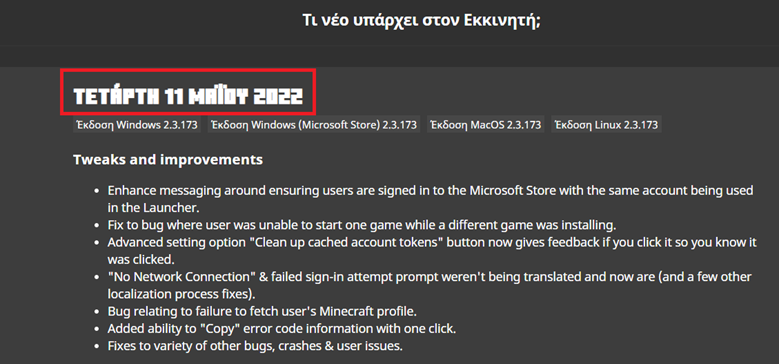

The Bug:
The string of text "WAITING ON INSTALL" displayed within the Launcher is untranslatable.
Steps to Reproduce:
- Open the Launcher in the version stated.
- Set the language to something that is not English (Settings).
- Begin load
inga Java Installation by clicking on the "PLAY" button in the respective page; while the installation is still loading, click on the "MINECRAFT for Windows" tab on the left side, and quickly observe the respective "PLAY" button in that page.- It should say "WAITING ON INSTALL", regardless of language selected.
- Attempt to search for the existence of this string by using this search filter on the official Minecraft Launcher Crowdin project.
- Take note as to whether or not the string of text "WAITING ON INSTALL" is untranslatable.
Observed Behavior:
This string of text is untranslatable.
Expected Behavior:
This string of text would be translatable.
The Bug:
The string of text "WAITING ON INSTALL" displayed within the Launcher is untranslatable.
Steps to Reproduce:
- Open the Launcher in the version stated.
- Set the language to something that is not English (Settings).
- Begin to load a Java Installation by clicking on the "PLAY" button in the respective page; while the installation is still loading, click on the "MINECRAFT for Windows" tab on the left side, and quickly observe the respective "PLAY" button in that page.
- It should say "WAITING ON INSTALL", regardless of the language selected.
Observed Behavior:
This string of text is untranslatable.
Expected Behavior:
This string of text would be translatable.
Notes:
- Attempt to search for the existence of this string by using this search filter on the official Minecraft Launcher Crowdin project.
- Take note as to whether or not the string of text "WAITING ON INSTALL" is untranslatable.
The Bug:
The string of text "WAITING ON INSTALL" displayed within the Launcher is untranslatable.
Steps to Reproduce:
- Open the Launcher in the version stated.
- Set the language to something that is not English (Settings).
- Begin to load a Java Installation by clicking on the "PLAY" button in the respective page; while the installation is still loading, click on the "MINECRAFT for Windows" tab on the left side, and quickly observe the respective "PLAY" button in that page.
- It should say "WAITING ON INSTALL", regardless of the language selected.
Observed Behavior:
This string of text is untranslatable.
Expected Behavior:
This string of text would be translatable.
Notes:
- Attempt to search for the existence of this string by using this search filter on the official Minecraft Launcher
Crowdin project.- Take note as to whether or not the string of text "WAITING ON INSTALL" is untranslatable.
The Bug:
The string of text "WAITING ON INSTALL" displayed within the Launcher is untranslatable.
Steps to Reproduce:
- Open the Launcher in the version stated.
- Set the language to something that is not English (Settings).
- Begin to load a Java Installation by clicking on the "PLAY" button in the respective page; while the installation is still loading, click on the "MINECRAFT for Windows" tab on the left side, and quickly observe the respective "PLAY" button in that page.
- It should say "WAITING ON INSTALL", regardless of the language selected.
Observed Behavior:
This string of text is untranslatable.
Expected Behavior:
This string of text would be translatable.
Notes:
- Attempt to search for the existence of this string by using this search filter on the official Minecraft Launcher project on Crowdin.
- Take note as to whether or not the string of text "WAITING ON INSTALL" is untranslatable.
The Bug:
The string of text
"WAITING ON INSTALL"displayed within the Launcher is untranslatable.Steps to Reproduce:
- Open the Launcher in the version stated.
- Set the language to something that is not English (Settings).
- Begin to load a Java Installation by clicking on the
"PLAY"button in the respective page; while the installation is still loading, click on the"MINECRAFTfor Windows"tab on the left side, and quickly observe the respective"PLAY"button in that page.- It should say
"WAITING ON INSTALL", regardless of the language selected.Observed Behavior:
This string of text is untranslatable.
Expected Behavior:
This string of text would be translatable.
Notes:
- Attempt to search for the existence of this string by using this search filter on the official Minecraft Launcher project on Crowdin.
- Take note as to whether or not the string of text
"WAITING ON INSTALL"is untranslatable.The Bug:
The string of text “WAITING ON INSTALL” displayed within the Launcher is untranslatable.
Steps to Reproduce:
- Open the Launcher in the version stated.
- Set the language to something that is not English (Settings).
- Begin to load a Java Installation by clicking on the “PLAY” button in the respective page; while the installation is still loading, click on the “Minecraft for Windows” tab on the left side, and quickly observe the respective “PLAY” button in that page.
- It should say “WAITING ON INSTALL”, regardless of the language selected.
Observed Behavior:
This string of text is untranslatable.
Expected Behavior:
This string of text would be translatable.
Notes:
- Attempt to search for the existence of this string by using this search filter on the official Minecraft Launcher project on Crowdin.
- Take note as to whether or not the string of text “WAITING ON INSTALL” is untranslatable.
The string of text"WAITING ON INSTALL"displayed within the Launcher is untranslatableThe string of text “WAITING ON INSTALL” displayed within the Launcher is untranslatable
The Bug:
The string of text “WAITING ON INSTALL” displayed within the Launcher is untranslatable.
Steps to Reproduce:
- Open the Launcher in the version stated.
- Set the language to something that is not English (Settings).
- Begin to load a Java Installation by clicking on the “PLAY” button in the respective page; while the installation is still loading, click on the “Minecraft for Windows” tab on the left side, and quickly observe the respective “PLAY” button in that page.
- It should say “WAITING ON INSTALL”, regardless of the language selected.
Observed Behavior:
This string of text is untranslatable.
Expected Behavior:
This string of text would be translatable.
Notes:
- Attempt to search for the existence of this string by using this search filter on the official Minecraft Launcher project on Crowdin.
- Take note as to whether or not the string of text “WAITING ON INSTALL” is untranslatable.
The Bug:
The string of text “WAITING ON INSTALL” displayed within the Launcher is untranslatable.
Steps to Reproduce:
- Open the Launcher in the version stated.
- Set the language to something that is not English (Settings).
- Begin to load a Java Installation by clicking on the “PLAY” button in the respective page; while the installation is still loading, click on the “Minecraft for Windows” tab on the left side, and quickly observe the respective “PLAY” button in that page.
→
It should say “WAITING ON INSTALL”, regardless of the language selected.
Observed Behavior:
This string of text is untranslatable.
Expected Behavior:
This string of text would be translatable.
Notes:
- Attempt to search for the existence of this string by using this search filter on the official Minecraft Launcher project on Crowdin.
- Take note as to whether or not the string of text “WAITING ON INSTALL” is untranslatable.
The Bug:
The string of text “Manage profile” displayed within the Launcher is untranslatable.
Steps to Reproduce:
- Open the Launcher in the version stated.
- Set the language to something that is not English (Settings).
- Open the account drop-down menu at the top left.
Itshould say “Manage profile”, regardless of the language selected.Observed Behavior:
This string of text is untranslatable.
Expected Behavior:
This string of text would be translatable.
Notes:
- Attempt to search for the existence of this string by using this search filter on the official Minecraft Launcher project on Crowdin.
- Take note as to whether or not the string of text “Manage profile” is untranslatable.
The Bug:
The string of text “Manage profile” displayed within the Launcher is untranslatable.
Steps to Reproduce:
- Open the Launcher in the version stated.
- Set the language to something that is not English (Settings).
- Open the account drop-down menu at the top left.
- The menu item should say “Manage profile”, regardless of the language selected.
Observed Behavior:
This string of text is untranslatable.
Expected Behavior:
This string of text would be translatable.
Notes:
- Attempt to search for the existence of this string by using this search filter on the official Minecraft Launcher project on Crowdin.
- Take note as to whether or not the string of text “Manage profile” is untranslatable.
The Bug:
The string of text “Manage profile” displayed within the Launcher is untranslatable.
Steps to Reproduce:
- Open the Launcher in the version stated.
- Set the language to something that is not English (Settings).
- Open the account drop-down menu at the top left.
- The menu item should say “Manage profile”, regardless of the language selected.
Observed Behavior:
This string of text is untranslatable.
Expected Behavior:
This string of text would be translatable.
Notes:
- Attempt to search for the existence of this string by using this search filter on the official Minecraft Launcher project on Crowdin.
- Take note as to whether or not the string of text “Manage profile” is untranslatable.
The Bug:
The string of text “Manage profile” displayed within the Launcher is untranslatable.
Steps to Reproduce:
- Open the Launcher in the version stated.
- Set the language to something that is not English (Settings).
- Open the account drop-down menu at the top left.
→
Observed Behavior:
This string of text is untranslatable.
Expected Behavior:
This string of text would be translatable.
Notes:
- Attempt to search for the existence of this string by using this search filter on the official Minecraft Launcher project on Crowdin.
- Take note as to whether or not the string of text “Manage profile” is untranslatable.
The Bug:
The string of text “Minecraft Java now filters profanity on Java Realms. This feature is on by default. You can change this setting on the 'My Account' page after logging into minecraft.net” displayed within the Launcher is untranslatable.
Steps to Reproduce:
- Open the Launcher in the version stated.
- Observe the Realms profanity filter announcement pop-up.
- Set the language to something that is not English (Settings).
- Notice the Realms profanity filter announcement, which is again displayed on the right side of the main page.
It should say “Minecraft Java now filters profanity on Java Realms. This feature is on by default. You can change this setting on the 'My Account' page after logging into minecraft.net”, regardless of the language selected.Observed Behavior:
This string of text is untranslatable.
Expected Behavior:
This string of text would be translatable.
Notes:
- Attempt to search for the existence of this string by using this search filter on the official Minecraft Launcher project on Crowdin.
- Take note as to whether or not the string of text “Minecraft Java now filters profanity on Java Realms. This feature is on by default. You can change this setting on the 'My Account' page after logging into minecraft.net” is untranslatable.
The Bug:
The string of text “Minecraft Java now filters profanity on Java Realms. This feature is on by default. You can change this setting on the 'My Account' page after logging into minecraft.net” displayed within the Launcher is untranslatable.
Steps to Reproduce:
- Open the Launcher in the version stated.
- Observe the Realms profanity filter announcement pop-up.
→
- Set the language to something that is not English (Settings).
- Notice the Realms profanity filter announcement, which is again displayed on the right side of the main page.
→
Observed Behavior:
This string of text is untranslatable.
Expected Behavior:
This string of text would be translatable.
Notes:
- Attempt to search for the existence of this string by using this search filter on the official Minecraft Launcher project on Crowdin.
- Take note as to whether or not the string of text “Minecraft Java now filters profanity on Java Realms. This feature is on by default. You can change this setting on the 'My Account' page after logging into minecraft.net” is untranslatable.
screenshot4.png
The Bug:
The string of text “VOTE IN %1$s DAYS” displayed within the Launcher is not center-aligned.
Steps to Reproduce:
- Open the Launcher in the version stated.
- Set the language to something that is not English (Settings).
- Click on the Minecraft Live tab.
→
should not be center-aligned.Observed Behavior:
The text inside the button is not center-aligned.
Expected Behavior:
The text inside the button is center-aligned.
The Bug:
The string of text “VOTE IN %1$s DAYS” displayed within the Launcher is not center-aligned.
Steps to Reproduce:
- Open the Launcher in the version stated.
- Set the language to something that is not English (Settings).
- Click on the Minecraft Live tab.
→
Observed Behavior:
The text inside the button is not center-aligned.
Expected Behavior:
The text inside the button is center-aligned.
The Bug:
The selected language variable in the translation status note does not work properly and does not pull its value from the correct string.
Steps to Reproduce:
- Open the launcher in the specified version, having German already selected.
- Set the language to Czech (Settings).
- Observe the translation status note.
→
Observe that it displays“Deutsch - Deutschland” instead of “Česky - Česko”.Observed Behavior:
The text inside this note took the old value for the variable %1$s in the string https://crowdin.com/translate/minecraft-launcher/9420/en-cs#5202598, despite being translated correctly in https://crowdin.com/translate/minecraft-launcher/9420/en-cs#5227066. Instead, the translation from https://crowdin.com/translate/minecraft-launcher/9420/en-de#5227066 is still displayed.
Expected Behavior:
The text is correctly displayed in the selected language.
The Bug:
The selected language variable in the translation status note does not work properly and does not pull its value from the correct string.
Steps to Reproduce:
- Open the launcher in the specified version, having German already selected.
- Set the language to Czech (Settings).
- Observe the translation status note.
→
Observed Behavior:
The text inside this note took the old value for the variable %1$s in the string https://crowdin.com/translate/minecraft-launcher/9420/en-cs#5202598, despite being translated correctly in https://crowdin.com/translate/minecraft-launcher/9420/en-cs#5227066. Instead, the translation from https://crowdin.com/translate/minecraft-launcher/9420/en-de#5227066 is still displayed.
Expected Behavior:
The text is correctly displayed in the selected language.
The Bug:
The selected language variable in the translation status note does not work properly and does not pull its value from the correct string.
Steps to Reproduce:
- Open the launcher in the specified version, having German already selected.
- Set the language to Czech (Settings).
- Observe the translation status note.
→
Observed Behavior:
The text inside this note took the old value for the variable %1$s in the string https://crowdin.com/translate/minecraft-launcher/9420/en-cs#5202598, despite being translated correctly in https://crowdin.com/translate/minecraft-launcher/9420/en-cs#5227066. Instead, the translation from https://crowdin.com/translate/minecraft-launcher/9420/en-de#5227066 is still displayed.
Expected Behavior:
The text is correctly displayed in the selected language (“Česky - Česko”).
The Bug:
The selected language variable in the translation status note does not work properly and does not pull its value from the correct string.
Steps to Reproduce:
- Open the launcher in the specified version, having German already selected.
- Set the language to Czech (Settings).
- Observe the translation status note.
→
Observed Behavior:
The text inside this note is uncorrectly displayed in the language selected before (“Deutsch - Deutschland”). It took the old value for the variable %1$s in the string https://crowdin.com/translate/minecraft-launcher/9420/en-cs#5202598, despite being translated correctly in https://crowdin.com/translate/minecraft-launcher/9420/en-cs#5227066. Instead, the translation from https://crowdin.com/translate/minecraft-launcher/9420/en-de#5227066 is still displayed.
Expected Behavior:
The text is correctly displayed in the selected language (“Česky - Česko”).
The Bug:
The selected language variable in the translation status note does not work properly and does not pull its value from the correct string.
Steps to Reproduce:
- Open the launcher in the specified version, having German already selected.
- Set the language to Czech (Settings).
- Observe the translation status note.
→
Observed Behavior:
The text inside this note is uncorrectly displayed in the language selected before (“Deutsch - Deutschland”). It took the old value for the variable %1$s in the string https://crowdin.com/translate/minecraft-launcher/9420/en-cs#5202598, despite being translated correctly in https://crowdin.com/translate/minecraft-launcher/9420/en-cs#5227066. Instead, the translation from https://crowdin.com/translate/minecraft-launcher/9420/en-de#5227066 is still displayed.
Expected Behavior:
The text is correctly displayed in the selected language (“Česky - Česko”).
The Bug:
The selected language variable in the translation status note does not work properly and does not pull its value from the correct string.
Steps to Reproduce:
- Open the launcher in the specified version, having German already selected.
- Set the language to Czech (Settings).
- Observe the translation status note.
→
Observed Behavior:
The text inside this note is uncorrectly displayed in the language selected before (“Deutsch - Deutschland”).
Expected Behavior:
The text is correctly displayed in the selected language (“Česky - Česko”).
Note:
- It took the old value for the variable %1$s in the string https://crowdin.com/translate/minecraft-launcher/9420/en-cs#5202598, despite being translated correctly in https://crowdin.com/translate/minecraft-launcher/9420/en-cs#5227066. Instead, the translation from https://crowdin.com/translate/minecraft-launcher/9420/en-de#5227066 is still displayed.
The Bug:
The selected language variable in the translation status note does not work properly and does not pull its value from the correct string.
Steps to Reproduce:
- Open the launcher in the specified version, having German already selected.
- Set the language to Czech (Settings).
- Observe the translation status note.
→
Observed Behavior:
The text inside this note is uncorrectly displayed in the language selected before (“Deutsch - Deutschland”).
Expected Behavior:
The text is correctly displayed in the selected language (“Česky - Česko”).
Note:
- It took the old value for the variable %1$s in the string https://crowdin.com/translate/minecraft-launcher/9420/en-cs#5202598, despite being translated correctly in https://crowdin.com/translate/minecraft-launcher/9420/en-cs#5227066
.Instead, the translation from https://crowdin.com/translate/minecraft-launcher/9420/en-de#5227066 is still displayed.The Bug:
The selected language variable in the translation status note does not work properly and does not pull its value from the correct string.
Steps to Reproduce:
- Open the launcher in the specified version, having German already selected.
- Set the language to Czech (Settings).
- Observe the translation status note.
→
Observed Behavior:
The text inside this note is uncorrectly displayed in the language selected before (“Deutsch - Deutschland”).
Expected Behavior:
The text is correctly displayed in the selected language (“Česky - Česko”).
Notes:
- It took the old value for the variable %1$s in the string https://crowdin.com/translate/minecraft-launcher/9420/en-cs#5202598, despite being translated correctly in https://crowdin.com/translate/minecraft-launcher/9420/en-cs#5227066.
- Instead, the translation from https://crowdin.com/translate/minecraft-launcher/9420/en-de#5227066 is still displayed.
The variable of the selected language in the translation status note does not work correctly when changing languages
The Bug:
The selected language variable in the translation status note does not work properly when changing languages and does not pull its value from the correct string.
Steps to Reproduce:
- Open the launcher in the specified version, having German already selected.
- Set the language to Czech (Settings).
- Observe the translation status note.
→
Observed Behavior:
The text inside this note is uncorrectly displayed in the language selected before (“Deutsch - Deutschland”).
Expected Behavior:
The text is correctly displayed in the selected language (“Česky - Česko”).
Notes:
- It took the old value for the variable %1$s in the string https://crowdin.com/translate/minecraft-launcher/9420/en-cs#5202598, despite being translated correctly in https://crowdin.com/translate/minecraft-launcher/9420/en-cs#5227066.
- Instead, the translation from https://crowdin.com/translate/minecraft-launcher/9420/en-de#5227066 is still displayed.
The Bug:
The selected language variable in the translation status note does not work properly when changing languages and does not pull its value from the correct string.
Steps to Reproduce:
- Open the launcher in the specified version, having German already selected.
- Set the language to Czech (Settings).
- Observe the translation status note.
→
Observed Behavior:
The text inside this note is uncorrectly displayed in the language selected before (“Deutsch - Deutschland”).
Expected Behavior:
The text is correctly displayed in the selected language (“Česky - Česko”).
Notes:
- It took the old value for the variable %1$s in the string https://crowdin.com/translate/minecraft-launcher/9420/en-cs#5202598, despite being translated correctly in https://crowdin.com/translate/minecraft-launcher/9420/en-cs#5227066.
- Instead, the translation from https://crowdin.com/translate/minecraft-launcher/9420/en-de#5227066 is still displayed.
- This issue is also present in other languages in connection with Czech.
The Bug:
The selected language variable in the translation status note does not work properly when changing languages and does not pull its value from the correct string.
Steps to Reproduce:
- Open the launcher in the specified version, having German already selected.
- Set the language to Czech (Settings).
- Observe the translation status note.
→
Observed Behavior:
The text inside this note is uncorrectly displayed in the language selected before (“Deutsch - Deutschland”).
Expected Behavior:
The text is correctly displayed in the selected language (“Česky - Česko”).
Notes:
- It took the old value for the variable %1$s in the string https://crowdin.com/translate/minecraft-launcher/9420/en-cs#5202598, despite being translated correctly in https://crowdin.com/translate/minecraft-launcher/9420/en-cs#5227066.
- Instead, the translation from https://crowdin.com/translate/minecraft-launcher/9420/en-de#5227066 is still displayed.
- This issue is also present in other languages
in connection with Czech.The Bug:
The selected language variable in the translation status note does not work properly when changing languages and does not pull its value from the correct string.
Steps to Reproduce:
- Open the launcher in the specified version, having German already selected.
- Set the language to Czech (Settings).
- Observe the translation status note.
→
Observed Behavior:
The text inside this note is uncorrectly displayed in the language selected before (“Deutsch - Deutschland”).
Expected Behavior:
The text is correctly displayed in the selected language (“Česky - Česko”).
Notes:
- It took the old value for the variable %1$s in the string https://crowdin.com/translate/minecraft-launcher/9420/en-cs#5202598, despite being translated correctly in https://crowdin.com/translate/minecraft-launcher/9420/en-cs#5227066.
- Instead, the translation from https://crowdin.com/translate/minecraft-launcher/9420/en-de#5227066 is still displayed.
- This issue is also present in other languages.
- There seems to be issues with translations when switching languages, as parts are translated and the variable is not. I am unsure if this is intentional.
The Bug:
The selected language variable in the translation status note does not work properly when changing languages and does not pull its value from the correct string.
Steps to Reproduce:
- Open the launcher in the specified version, having German already selected.
- Set the language to Czech (Settings).
- Observe the translation status note.
→
Observed Behavior:
The text inside this note is uncorrectly displayed in the language selected before (“Deutsch - Deutschland”).
Expected Behavior:
The text is correctly displayed in the selected language (“Česky - Česko”). Already displayed notes remain in the previous language and are not (partially) retranslated.
Notes:
- It took the old value for the variable %1$s in the string https://crowdin.com/translate/minecraft-launcher/9420/en-cs#5202598, despite being translated correctly in https://crowdin.com/translate/minecraft-launcher/9420/en-cs#5227066.
- Instead, the translation from https://crowdin.com/translate/minecraft-launcher/9420/en-de#5227066 is still displayed.
- This issue is also present in other languages.
- There seems to be issues with translations when switching languages, as parts are translated and the variable is not. I am unsure if this is intentional.
The Bug:
The selected language variable in the translation status note does not work properly when changinglanguagesanddoes not pull its value from the correct string.Steps to Reproduce:
- Open the launcher in the specified version, having German already selected.
- Set the language to Czech (Settings).
- Observe the translation status note.
→
shouldsay “Deutsch - Deutschland” instead of “Česky - Česko”.Observed Behavior:
The text inside this note is uncorrectly displayed in the language selected before (“Deutsch - Deutschland”).
Expected Behavior:
The text is correctly displayed in the selected language (“Česky - Česko”). Already displayed notes remain in the previous language and are not (partially) retranslated.
Notes:
- It took the old value for the variable %1$s in the string https://crowdin.com/translate/minecraft-launcher/9420/en-cs#5202598, despite being translated correctly in https://crowdin.com/translate/minecraft-launcher/9420/en-cs#5227066.
- Instead, the translation from https://crowdin.com/translate/minecraft-launcher/9420/en-de#5227066 is still displayed.
- This issue is also present in other languages.
- There seems to be issues with translations when switching languages, as parts are translated and the variable is not. I am unsure if this is intentional.
The Bug:
Changing the language also changes the translation for the second part of the already displayed prompt, but not the translation of the language and region, which results in a mix of two different language files which looks unintentional. I expect the prompt to stay as is and not change when switching languages.
Steps to Reproduce:
- Open the launcher in the specified version, having German already selected.
- Set the language to Czech (Settings).
- Observe the translation status note.
→
Observed Behavior:
The text inside this note is uncorrectly displayed in the language selected before (“Deutsch - Deutschland”).
Expected Behavior:
The text is correctly displayed in the selected language (“Česky - Česko”). Already displayed notes remain in the previous language and are not (partially) retranslated.
Notes:
- It took the old value for the variable %1$s in the string https://crowdin.com/translate/minecraft-launcher/9420/en-cs#5202598, despite being translated correctly in https://crowdin.com/translate/minecraft-launcher/9420/en-cs#5227066.
- Instead, the translation from https://crowdin.com/translate/minecraft-launcher/9420/en-de#5227066 is still displayed.
- This issue is also present in other languages.
- There seems to be issues with translations when switching languages, as parts are translated and the variable is not. I am unsure if this is intentional.
The Bug:
Changing the language also changes the translation for the second part of the already displayed prompt, but not the translation of the language and region, which results in a mix of two different language files which looks unintentional. I expect the prompt to stay as is and not change when switching languages.
Steps to Reproduce:
- Open the launcher in the specified version, having
Germanalready selected.- Set the language to
Czech (Settings).- Observe the translation status note.
→
Observed Behavior:
T
he text inside this note is uncorrectly displayed in the language selected before (“Deutsch - Deutschland”).Expected Behavior:
The
text is correctly displayed in the selected language (“Česky - Česko”). Already displayednotes remain in the previous language and are not (partially) retranslated.Notes:
- It took the old value for the variable %1$s in the string https://crowdin.com/translate/minecraft-launcher/9420/en-cs#5202598, despite being translated correctly in https://crowdin.com/translate/minecraft-launcher/9420/en-cs#5227066.
- Instead, the translation from https://crowdin.com/translate/minecraft-launcher/9420/en-de#5227066 is still displayed.
- This issue is also present in other languages.
- Th
ere seems to be issues with translations when switching languages, as parts are translated and the variable is not. I am unsure if this is intentional.The Bug:
Changing the language also changes the translation for the second part of the already displayed prompt, but not the translation of the language and region, which results in a mix of two different language files which looks unintentional. I expect the prompt to stay as is and not change when switching languages.
Steps to Reproduce:
- Open the launcher in the specified version, having Pirate English already selected.
- Set the language to Polish (Settings).
- Observe the translation status note.
→
Observed Behavior:
Translations from two different language files are mixed. "Pirate Speak - The Seven Seas" remains as is and the second part changes.
Expected Behavior:
The prompt text remains as it was displayed and does not change; already displayed prompts remain in the previous language and are not (partially) retranslated.
Notes:
- This issue is present in all languages that are not 100% proofread.
Thevariable of the selectedlanguageinthetranslation status note does not work correctly when changing languagesWhen changing the language, the second part of the Crowdin prompt is retranslated, while the first part remains as initially displayed
The Bug:
Changing the language also changes the translation for the second part of the already displayed prompt, but not the translation of the language and region, which results in a mix of two different language files which looks unintentional. I expect the prompt to stay as is and not change when switching languages.
Steps to Reproduce:
- Open the launcher in the specified version, having P
irate English already selected.Setthe language to Polish (Settings).Observe the translation status note.→
Observed Behavior:
Translations from two different language files are mixed. "Pirate Speak - The Seven Seas" remains as is and the second part changes.
Expected Behavior:
The prompt text remains as it was displayed and does not change; already displayed prompts remain in the previous language and are not (partially) retranslated.
Notes:
- This issue is present in all languages that are not 100% proofread.
The Bug:
Changing the language also changes the translation for the second part of the already displayed prompt, but not the translation of the language and region, which results in a mix of two different language files which looks unintentional. I expect the prompt to stay as is and not change when switching languages.
Steps to Reproduce:
- Open the launcher in the specified version, having Polish already selected.
- Change the language to Pirate Speak.
- Set the language to Polish again (Settings).
- Observe the translation status note.
→
Observed Behavior:
Translations from two different language files are mixed. "Pirate Speak - The Seven Seas" remains as is and the second part changes.
Expected Behavior:
The prompt text remains as it was displayed and does not change; already displayed prompts remain in the previous language and are not (partially) retranslated.
Notes:
- This issue is present in all languages that are not 100% proofread.
The Bug:
Changing the language also changes the translation for the second part of the already displayed prompt, but not the translation of the language and region, which results in a mix of two different language files which looks unintentional. I expect the prompt to stay as is and not change when switching languages.
Steps to Reproduce:
- Open the launcher in the specified version, having Polish already selected.
- Change the language to Pirate Speak.
Set the language to Polish again (Settings).Observe the translation status note.→
Observed Behavior:
Translations from two different language files are mixed. "Pirate Speak - The Seven Seas" remains as is and the second part changes.
Expected Behavior:
The prompt text remains as it was displayed and does not change; already displayed prompts remain in the previous language and are not (partially) retranslated.
Notes:
- This issue is present in all languages that are not 100% proofread.
The Bug:
Changing the language also changes the translation for the second part of the already displayed prompt, but not the translation of the language and region, which results in a mix of two different language files which looks unintentional. I expect the prompt to stay as is and not change when switching languages.
Steps to Reproduce:
- Open the launcher in the specified version, having Polish already selected.
- Change the language to Pirate Speak.
- Observe the translation status note.
- Set the language to Polish again (Settings).
- Observe the translation status note.
→
Observed Behavior:
Translations from two different language files are mixed. "Pirate Speak - The Seven Seas" remains as is and the second part changes.
Expected Behavior:
The prompt text remains as it was displayed and does not change; already displayed prompts remain in the previous language and are not (partially) retranslated.
Notes:
- This issue is present in all languages that are not 100% proofread.
The Bug:
The strings of text for the mob description of Sniffer, Rascal and Tuff Golem displayed within the Launcher are untranslatable.
Steps to Reproduce:
- Open the Launcher in the version stated.
- Set the language to something that is not English (Settings).
- Click on the Minecraft Live tab and scroll down.
→
Observed Behavior:
Th
isstrings of text are untranslatable, “ABOUT MOBS” is however.Expected Behavior:
Th
isstrings of text would be translatable as well.Notes:
- Attempt to search for the existence of this string by using this search filter on the official Minecraft Launcher project on Crowdin.
- Take note as to whether or not the strings of text are untranslatable.
The Bug:
The strings of text for the mob descriptions of Sniffer, Rascal and Tuff Golem displayed within the Launcher are untranslatable.
Steps to Reproduce:
- Open the Launcher in the version stated.
- Set the language to something that is not English (Settings).
- Click on the Minecraft Live tab and scroll down.
→
Observed Behavior:
These strings of text are untranslatable, “ABOUT MOBS” is however.
Expected Behavior:
These strings of text would be translatable as well.
Notes:
- Attempt to search for the existence of this string by using this search filter on the official Minecraft Launcher project on Crowdin.
- Take note as to whether or not the strings of text are untranslatable.
The Bug:
The strings of text for the mob descriptions of Sniffer, Rascal and Tuff Golem displayed within the Launcher are untranslatable.
Steps to Reproduce:
- Open the Launcher in the version stated.
- Set the language to something that is not English (Settings).
- Click on the Minecraft Live tab and scroll down.
→
The mob descriptionsstayEnglish,regardless of the language selected.Observed Behavior:
These strings of text are untranslatable, “ABOUT MOBS” is however.
Expected Behavior:
These strings of text would be translatable as well.
Notes:
- Attempt to search for the existence of this string by using this search filter on the official Minecraft Launcher project on Crowdin.
- Take note as to whether or not the strings of text are untranslatable.
The Bug:
The strings of text for the mob descriptions of Sniffer, Rascal and Tuff Golem displayed within the Launcher are untranslatable.
Steps to Reproduce:
- Open the Launcher in the version stated.
- Set the language to something that is not English (Settings).
- Click on the Minecraft Live tab and scroll down.
→
Observed Behavior:
These strings of text are untranslatable, “ABOUT MOBS” is however.
Expected Behavior:
These strings of text would be translatable as well.
Notes:
- Attempt to search for the existence of this string by using this search filter on the official Minecraft Launcher project on Crowdin.
- Take note as to whether or not the strings of text are untranslatable.
TheMinecraft Live mob vote descriptions are not translatable


The Bug:
The mob voting dialog displayed within the Launcher during mob vote is not center-aligned, despite the fact that all the other texts are.
Steps to Reproduce:
- Open the Launcher in the version stated.
- Set the time to a time in the future when mob voting will take place..
- Click on "Vote In Launcher".
→
Observed Behavior:
Mob voting text is not center-aligned.
Expected Behavior:
Mob voting text is center-aligned, as in the dialog before it (as well as the strings below).
The Bug:
The mob voting dialog displayed within the Launcher during mob vote is not center-aligned, despite the fact that all the other texts are.
Steps to Reproduce:
- Open the Launcher in the version stated.
- Set the time to a time in the future when mob voting will take place..
- Click on "Vote In Launcher".
→
Observed Behavior:
Mob voting text is
not center-aligned.Expected Behavior:
Mob voting text is center-aligned, as in the dialog before it (as well as the strings below).
The Bug:
The mob voting dialog displayed within the Launcher during mob vote is not center-aligned, despite the fact that all the other texts are.
Steps to Reproduce:
- Open the Launcher in the version stated.
- Set the time to a time in the future when mob voting will take place..
- Click on "Vote In Launcher".
→
Observed Behavior:
Mob voting text is left-aligned.
Expected Behavior:
Mob voting text is center-aligned, as in the dialog before it (as well as the strings below).
The Bug:
The mob voting dialog displayed within the Launcher during mob vote is not center-aligned, despite the fact that all the other texts are.
Steps to Reproduce:
OpentheLauncher in the version stated.Setthetime to a time in the future when mob voting will take place..- Click on "Vote In Launcher".
→
Observed Behavior:
Mob voting text is left-aligned.
Expected Behavior:
Mob voting text is center-aligned, as in the dialog before it (as well as the strings below).
The Bug:
The mob voting dialog displayed within the Launcher during mob vote is not center-aligned, despite the fact that all the other texts are.
Steps to Reproduce:
- Set the time to a time in the future when mob voting will take place.
- Open the Launcher in the version stated.
- Click on "Vote In Launcher".
→
Observed Behavior:
Mob voting text is left-aligned.
Expected Behavior:
Mob voting text is center-aligned, as in the dialog before it (as well as the strings below).
I can confirm.
“Lava” in gamerule.lavaSourceConversion is misspelled as “Lave”
The Bug:
“Lava” in gamerule.lavaSourceConversion is misspelled as “Lave”.
Affected Strings:
Before reading the table, please note the following:
- Words colored in GREEN are correct.
- Words colored in RED are incorrect.
Translation Key Current String Expected String gamerule.lavaSourceConversion Lave converts to source Lava converts to source
The Bug:
“Lava” in gamerule.lavaSourceConversion is misspelled as “Lave”.
Affected Strings:
Before reading the table, please note the following:
- Words colored in GREEN are correct.
- Words colored in RED are incorrect.
Translation Key Current String Expected String gamerule.lavaSourceConversion Lave converts to source Lava converts to source The Bug:
“Lava” in gamerule.lavaSourceConversion is misspelled as “Lave”.
Affected Strings:
Before reading the table, please note the following:
- Words colored in GREEN are correct.
- Words colored in RED are incorrect.
Translation Key Current String Expected String gamerule.lavaSourceConversion Lave converts to source Lava converts to source
The Bug:
“Lava” in gamerule.lavaSourceConversion is misspelled as “Lave”.
Affected Strings:
Before reading the table, please note the following:
- Words colored in GREEN are correct.
- Words colored in RED are incorrect.
Translation Key Current String Expected String gamerule.lavaSourceConversion Lave converts to source Lava converts to source
The Bug:
The string of text “Launch Marketplace” displayed within the Launcher is untranslatable.
Steps to Reproduce:
- Open the Launcher in the version stated.
- Set the language to something that is not English (Settings).
- Click on the Minecraft for Windows tab.
- Click on “
The Dark Knight in Minecraft!”.→
Observed Behavior:
This string of text is untranslatable.
Expected Behavior:
This string of text would be translatable.
Notes:
- Attempt to search for the existence of this string by using this search filter on the official Minecraft Launcher project on Crowdin.
- Take note as to whether or not the string of text “Launch Marketplace” is untranslatable.
The Bug:
The string of text “Launch Marketplace” displayed within the Launcher is untranslatable.
Steps to Reproduce:
- Open the Launcher in the version stated.
- Set the language to something that is not English (Settings).
- Click on the Minecraft for Windows tab.
- Click on “Join the Soccer Celebration!”.
→
Observed Behavior:
This string of text is untranslatable.
Expected Behavior:
This string of text would be translatable.
Notes:
- Attempt to search for the existence of this string by using this search filter on the official Minecraft Launcher project on Crowdin.
- Take note as to whether or not the string of text “Launch Marketplace” is untranslatable.
The Bug:
The string of text “Launch Marketplace” displayed within the Launcher is untranslatable.
Steps to Reproduce:
- Open the Launcher in the version stated.
- Set the language to something that is not English (Settings).
- Click on the Minecraft for Windows tab.
- Click on “
Join the Soccer Celebration!”.→
Observed Behavior:
This string of text is untranslatable.
Expected Behavior:
This string of text would be translatable.
Notes:
- Attempt to search for the existence of this string by using this search filter on the official Minecraft Launcher project on Crowdin.
- Take note as to whether or not the string of text “Launch Marketplace” is untranslatable.
The Bug:
The string of text “Launch Marketplace” displayed within the Launcher is untranslatable.
Steps to Reproduce:
- Open the Launcher in the version stated.
- Set the language to something that is not English (Settings).
- Click on the Minecraft for Windows tab.
- Click on “Minecraft Marketplace Block Friday Sale!”.
→
Observed Behavior:
This string of text is untranslatable.
Expected Behavior:
This string of text would be translatable.
Notes:
- Attempt to search for the existence of this string by using this search filter on the official Minecraft Launcher project on Crowdin.
- Take note as to whether or not the string of text “Launch Marketplace” is untranslatable.
The Bug:
The string of text “Launch Marketplace” displayed within the Launcher is untranslatable.
Steps to Reproduce:
- Open the Launcher in the version stated.
- Set the language to something that is not English (Settings).
- Click on the Minecraft for Windows tab.
- Click on “M
inecraft Marketplace Block Friday Sale!”.→
Observed Behavior:
This string of text is untranslatable.
Expected Behavior:
This string of text would be translatable.
Notes:
- Attempt to search for the existence of this string by using this search filter on the official Minecraft Launcher project on Crowdin.
- Take note as to whether or not the string of text “Launch Marketplace” is untranslatable.
The Bug:
The string of text “Launch Marketplace” displayed within the Launcher is untranslatable.
Steps to Reproduce:
- Open the Launcher in the version stated.
- Set the language to something that is not English (Settings).
- Click on the Minecraft for Windows tab.
- Click on “Master all 4 Elements as the Avatar!”.
→
Observed Behavior:
This string of text is untranslatable.
Expected Behavior:
This string of text would be translatable.
Notes:
- Attempt to search for the existence of this string by using this search filter on the official Minecraft Launcher project on Crowdin.
- Take note as to whether or not the string of text “Launch Marketplace” is untranslatable.
Could you please upload launcher_log file from your .minecraft folder? The bug tracker only accepts bugs that occur in a vanilla environment. If the problem is unique to this particular modpack, please contact the creator; this ticket is most likely invalid as your game is modified when experiencing this issue.
The prompt is back. Please reopen; can reproduce.
The prompt is back. Please reopen; can reproduce.
Relates to MC-98316.
The Bug:
The translation key container.isLocked ("%s is locked!") uses a variable instead of single strings for translation, which leads to grammatical errors in some translations due to dual use of strings, for example "Chest" in Swedish.
Translation Key Current Output Expected Output String URL on Crowdin container.isLocked Kista är låst! Kistan är låst! https://crowdin.com/translate/minecraft/10038/enus-sv#5336132 subtitles.block.chest.locked Kistan är låst Kistan är låst https://crowdin.com/translate/minecraft/10038/enus-sv#5338976 Observed Behavior:
container.isLocked uses a variable and a single string, which inevitably leads to grammatically incorrect translations.
Expected Behavior:
container.isLocked doesn't use a variable and one string for each lockable container, which leads to no grammatically incorrect translations.

Please refrain from commenting here to request a reversal of this change. Instead, please use the feedback site or feedback discord server. This platform is for bug reports only, not complaints about design changes.
Comments containing feedback, complaints, change requests, and the like will be removed.
When falling a long distance onto a slime block and holding sneak, you do not bounce and, notably, you take fall damage.
I believe that not bouncing is intended, given the behavior of holding spacebar while bouncing on slime, but by the same token, the fall damage does not seem intentional.
Sharpness weapon should have atttack particle, but MCPE is missing that.
Edit by [Mojang] Mega_Spud (Jay Wells) and [Mod] turbo:
According to the wiki, certain enchants should show particles when used on the corresponding mob. These are:
Sword or axe enchanted with Sharpness, Smite, or Bane of Arthropods
The only sword that has attack particles, is the Bane of Arthropods, and even that is swirls rather than the correct particle, shown on the wiki:

![[Mod] markderickson](../../../data/avatars/users/18946.svg)
I don't believe the screenshot showcases the issue – did you possibly add an incorrect attachment, [Mod] turbo?

Please only comment if you have new information related to reproducing this issue. If you're still experiencing this issue, please report it using the Feedback Hub application found in the Start menu in accordance with this comment from SeaLocust. Please also refer to this comment for potential workarounds.
The best way you can indicate that an issue is important to you is to vote for it. Please do not add "me too" comments to this (or any other confirmed) issue. Repetitive or unhelpful comments may be deleted or edited to reduce clutter.
For more information, please check out the 📓 Bug Tracker Guidelines.
The bug
The launcher says "Accounts in Microsoft Store and Launcher do not match" even though my login accounts are the same.

[Mod] turbo ⇨ see MC-263767

While the team is hard at work investigating and addressing the issue, we have some exciting news to share with you!
We've launched the official Minecraft Feedback Discord server, where you can directly submit your ideas, suggestions, and feedback to help shape the future of the game. Your input is incredibly valuable to us, and we're eager to hear your thoughts.
👉 Join us on Discord: https://discord.gg/MXxTqXnuD5
Please don't comment if you are also affected by the issue, and instead use the vote button to indicate that you are affected. Your comments are most valuable when they provide new information or findings.
Every time I login to the feedback, it signs me out saying; "Hang on a moment while we sign you out.". Then it says at the end; "It's a good idea to close all browsers windows.". Is it trying to bully me? Is it trying to keep me out?
Stop making disparaging comments about the reporter of this ticket and Mojang. This is not the place to complain about design changes. Please direct your feedback to the appropriate channels, such as the feedback site or feedback discord server.
Comments containing feedback, complaints, insults, change requests, and the like will be removed.
When powering and depowering the crafter in the same gametick, and then powering and depowering it again in the next, it outputs items every gametick. This is probably a bug given that comparable blocks such as the dropper and dispenser have a 4 gametick cooldown between outputting items.
![[Mod] Jiingy](../../../data/avatars/users/91802.png)
I would like to Request review of this issue and it's "Working as Intended" resolution.
Currently Behavior is Inconsistent
- Current UV is not comparable, or consistent to any other entity UV that currently exists
- All other texture maps in the game follow same principle for which texture face goes where on the UV map. In order from top left-most face to the bottom right-most face, the order is always "top, bottom, right, front, left, back". Comparing this to the chest, you have "bottom, top, left, back, right, front" which is almost entirely inverted to the standard UV map.
- Chests boats use a 'proper' UV map for their chests
(I add this reason understanding that new behavior does not equate to inconsistency to old features, but I feel as though it is a very important note at least)- While the boat chests are not animated like the block entity, it is still important to note that the standard UV map layout was preferred for the chests on the boat rather than the chest's UV map.
- The current chest UV map has lead to issues such as MC-265457 being created which see the chest boat's chest texture as being inconsistent to the regular chest UV map. If this is true, and should be fixed, the solution ultimately becomes making the chest boat's UV map arguably of a lesser quality for no real benefit other than consistency.
The current UV map negatively impacts resource pack artists and modders
- It is confusing / unintuative to veiw & change
- Considering it does not follow the standard practice for UV maps, resource pack artists and modders often need to figure out how the chest UV map even works before being able to make changes to it due to how out of order it is.
- As shown by this gif attached to the issue by [Mod] turbo, the chest wrapping & unwrapping arguably does not make any sense to an average observer:
- It is incredibly time consuming to modify
- Currently it takes a much longer time and much harder effort to make any changes or modifications to the UV as each texture face of the chest must be individually flipped both vertically, and horizontally, to get the expected results for the texture in a pack or mod. (Bearing in mind, this has to be done for 10 different chest textures. These are the normal, left, and right textures for the chest and trapped chest, and then one extra for the ender chest).
- It cannot be reasonably created or modified all at once
- The chest UV map effectively needs to be changed once single face at a time because of how each face needs to be inverted horizontally and vertically. This creates a lot of redundancy in having to tweak small sections of the texture only to then invert them.
Ultimately, I am of course unsure how or why the chest textures were changed to this new UV model back in 1.15, but I would argue there is much benefit to be had in reconsidering this behavior for many people. This would also almost certainly require changing/fixing the lid animation on the chest as the block model would have to be changed.

@[Mod] turbo its this the Original Post of the issue?

is anyone found how to fix that having same issue
Reply from [Mod] turbo:
Please limit your comments to information related to reproducing the bug, as this is not a support forum or help desk. Comments like this are not helpful and add nothing to the report.
(delete entire comment after reading)

Please refrain from commenting here to request a reversal of this change. Instead, please use the feedback site or feedback discord server. This platform is for bug reports only, not complaints about design changes.
Comments containing feedback, complaints, change requests, and the like will be removed.
Copper Bulbs turn on and off slower starting in 23w46a. The Copper Bulbs being at their original speed was very useful for use in Redstone contraptions, something Mojang said they wanted the Copper Bulb to be used in.

I see a lot of reports with the same title:
Although they are all from different users, I have noticed that the format of the names of all these users is almost the same, so I suspect that you are disrupting the order.
If so, please don't disrupt here, thanks.
If not, please continue.
Reply from [Mod] turbo:
This is the only way to delete your bug tracker account, so everything has been done as intended and no one is disrupting anything here. (delete entire comment after reading)
Did it occur more than once? Will you be able to reproduce it for a video?
On what language did this issue occur?
56789_01234
Does this occur also on Win7/8 version of the Launcher?
This ticket will automatically reopen when you reply.
Have I been inactive that long? Oops.
I apologize for having been so inactive. While I haven't made any bug reports in years, I do occasionally check on this issue in the hopes that it will eventually be fixed.
Reply from [Mod] turbo:
The reporter is expected to keep the ticket up to date. This also includes adding new affected versions. Simply checking to see if it has been resolved is not sufficient, especially since unmaintained issues are less likely to be picked up and ultimately fixed.

This works as intended, read more here: https://minecraft.makecode.com/courses/csintro/coordinates/overview#:~:text=To%20see%20where%20you%20are,see%20how%20these%20values%20change.
Edit: Sorry turbo, I'll add an official link regarding info about coordinates instead (provided by microsoft themselves) hopefully that works better
Reply from [Mod] turbo:
Please do not use the old Minecraft Wiki, I have updated the link. Also, the Minecraft Wiki is not a source for intended behavior. It's a documentation of the current state and cannot be used as a proof of intended behavior.

Can confirm in 1.20.2
Reply from [Mod] turbo:
Please don't confirm reports for outdated versions. 1.20.4 is the only version we are currently accepting issues for, and the only version we can add as affected.
Can confirm in 1.20.2 still, except it's just the raw message and no info about the entities
Reply from [Mod] turbo:
Please do not confirm tickets for outdated versions. We are currently only accepting confirmations for 1.20.4.

But you've never been active on this report before…
Reply from [Mod] turbo:
Please limit your comments to new information about the bug. This comment does not add anything to the report. Your concern may be valid, but this is at the discretion of the moderators. Delete this comment after reading.

Please limit your comments to new information about the bug. If you are also affected and would like to express this, please use the "Vote" feature.
Comments that do not add value, repeat what has already been said, or contain other suggestions will be removed.
This is not the place to make suggestions. Instead, please direct your suggestions and feedback to the appropriate channels, such as the feedback site or feedback discord server.
A change was made to the item_used_on_block advancement criteria in this snapshot(s) such that the criteria only triggers/grants if the action made a change to the block, in order to fix an inconsistency with using axes on Waxed Copper Doors and Trapdoors (MC-266055). However, this change breaks previous functionality by no longer allowing the criteria to trigger when interacting with any block unless the use caused some action.
This behavior was used previously by data pack authors to detect when players interacted with any number of blocks, and in particular, block entities – with or without items – and is not easily replicable without.
Steps to reproduce:
- Download the attached data pack Item Used on Block Example.zip and add it to a world
- Place a dropper, and then inside it, place 8 dirt in the center, and 1 wheat seeds in each other slot
- Close, then open the dropper
- You will not receive the advancement anymore, but it can still be granted with commands (/advancement grant @s only item:open_dropper)
- Redo the same experiment in 1.20.4
- Notice that you receive an advancement, signified by a chat message and sound. The advancement revokes, so you can repeat this.
This is an unannounced feature change that impacts many existing data packs.
Are you able to reproduce this in the latest version, or just in general again? I ask, as I was unable to reproduce the issue at all, and [Mod] turbo was able to reproduce it once, and then not again after that. Any extra info which can be provided would be helpful, as there is some sort of commonality to reproduce this, but that's currently unclear.

As [Mod] turbo said, changes were introduced, and json handling became more strict, as mentioned in the changelogs; the fact that your malformatted command is no longer accepted is not a bug. "reset" is not a valid color name. Previously it got ignored, but no more; as part of the changes it now throws an error.
Report this to the generator author, as it's their problem to fix, and not a bug with the game.
As requested by [Mod] turbo, please also provide a video of this issue occurring with your F3 debug screen enabled. Thanks 
Can confirm in 1.20.1
Reply from [Mod] turbo:
Please do not confirm tickets for outdated versions. We are currently only accepting confirmations for 1.20.4 and 23w51b.
Confirming this is still happening in v.1.20.51
I even turned an entire chunk into dirt and then air with a /fill command thinking maybe I just missed the frame but the marker(s) are still there.
Just glad I found this thread but now I'm wondering if I should continue in my current world or abandon and start over since this is an integral part of the world I'm building.
Reply from [Mod] turbo:
There is no 1.20.51 in Minecraft: Java Edition. Please make sure you are in the correct project section before commenting and confirming issues.
Add the datapack creating a new world, inside the world surch for structures desert_pyramid, then enter it
and you will see the one layer of sand in the area of the stairs (there are 6 different pyramids) Is it perhaps
an issue with structure_blocks?
Edit by [Mod] turbo: Removed resource pack advertisement.

[Mod] turbo Lazy response, no one wants to give me a proper solution anyways!

Might also be with enchantment tables.
It is on Enchantment Tables on bedrock.
Reply from [Mod] turbo:
I cannot reproduce this problem with enchantment tables in 1.20.5-rc2. Please verify that this is actually a problem and don't just guess. If it's a problem in Minecraft: Java Edition, please create a new issue. If not, please remember to test before commenting next time. Please delete this comment after you have read it.

Can confirm!
Reply from [Mod] turbo:
Comments like this are pure spam. There's nothing of value in them. The issue has been confirmed, triaged by Mojang, and all current versions have been marked as affected (while you didn't even specify the version in which you were able to confirm it). Please delete this comment after reading it, as well as any other similar comments you have made recently.
Can confirm, but this is definitely intended. If you can casually survive lava due to spawn immunity, wardens are no exception.
Reply from [Mod] turbo:
Comments like this are pure spam. There's nothing of value in them. The issue has been confirmed, triaged by Mojang, and all current versions have been marked as affected (while you didn't even specify the version in which you were able to confirm it). Please delete this comment after reading it, as well as any other similar comments you have made recently.
Can confirm!
Reply from [Mod] turbo:
Comments like this are pure spam. There's nothing of value in them. The issue has been confirmed, triaged by Mojang, and all current versions have been marked as affected (while you didn't even specify the version in which you were able to confirm it). Please delete this comment after reading it, as well as any other similar comments you have made recently.
Can confirm. Definitely a long time bug.
Reply from [Mod] turbo:
Comments like this are pure spam. There's nothing of value in them. The issue has been confirmed, triaged by Mojang, and all current versions have been marked as affected (while you didn't even specify the version in which you were able to confirm it). Please delete this comment after reading it, as well as any other similar comments you have made recently.
Can confirm.
Reply from [Mod] turbo:
Comments like this are pure spam. There's nothing of value in them. The issue has been confirmed, triaged by Mojang, and all current versions have been marked as affected (while you didn't even specify the version in which you were able to confirm it). Please delete this comment after reading it, as well as any other similar comments you have made recently.
Edit by [Mod] turbo:
It seems that friendly creatures like new wolf variants and armadillos don't spawn at all in old (upgraded) chunks, not even in new chunks, only once in newly generated chunks.
Steps to Reproduce by kelianor in this comment
- Create a single-biome savanna world in 1.20.4 with commands enabled
- Set simulation and render distance to 16 or more.
- Once you load in a world, fly around spawn to load new chunks.
- Upgrade it to 1.20.5
- Place 2 always active repeating command blocks with commands bellow
/execute as @e[type=armadillo] run say MC-271088 is false /execute as @e[type=armadillo] run effect give @s glowing infinite - Run /tick sprint 2d and stay still.
Armadillos don't spawn. - Run /tick sprint stop otherwise chunks might not load
- Run /tp @s 30000 320 30000
- Repeat the same steps in 5, 6 points.
At least one armadillo shoud have spawned - Wait until all chunks are loaded and run /kill @e[type=armadillo]
New armadillos don't spawn.
Note by Seacraft Gaming in this comment
I originally thought that this was intended behavior, and occurs because of something called a "mob cap", which prevents mobs from passively spawning after reaching a maximum capacity. For friendly creatures (which includes armadillos), this cap is only 10, and is likely already filled by existing mobs in the area like sheep, pigs, horses, etc. Therefore, no additional friendly creatures can spawn. On top of that, friendly creature spawns are also quite infrequent.
I ran steps 1 and 2 as instructed (in 1.20.6), and, sure enough, nothing spawned. However, I then ran /kill @e[type=!player] to kill all the mob-cap-filling mobs. I was expecting some creatures to spawn, maybe run the kill command a couple more times and wait until an armadillo spawns, putting this report to rest. However, I found that, despite waiting multiple in-game days, no friendly creatures spawned at all. It is possible that friendly creature spawns are just that rare, but I am highly doubtful of that. It is also possible that this is a savanna-specific issue, but I am not sure and do not have the time to test it right now, and I do not see any reason for that to be the case.
Old Description
With the Armadillo // Wolf Armor Update officially releasing yesterday, I assumed that I would be able see these little critters and new wolf variants on my Minecraft realm once it updated.
Unfortunately, that didn't happen. Despite traveling to the Savannah biome on my server, no Armadillos spawned. I tried downloading my realm to my Minecraft single player mode as an attempt to sync the update into my realm. Once that didn't work, I tried optimizing my world. Once that didn't work, I attempted to load back into Minecraft via the Installations menu and customizing a "most recent launch" through there. I tried loading back into my Realm World once more and.... nothing. No armadillos; no new wolf variants.
If you want to try this bug out for yourself, just try to find an armadillo on your realm in a pre-existing Savannah biome. They won't be there. And if they are, please let me know what I am doing wrong, because I have tried everything aside from deleting this world from my realm (which I would prefer not to do since I've had it for 2+ years now.
Thanks.

[Mod] turbo Yep! I didn't see that issue; sorry.
KojiDust The video does not load. Please upload the video to another platform as [Mod] turbo mentioned.
If you are coming from Mogswamp, please refrain from commenting here and asking Mojang to fix this. Comments are meant to provide new information, not as a petition forum for content creators. Comments like "please fix this" are spam; all comments containing feedback, complaints, change requests, no new info, and the like will be removed. Repeated violations may result in consequences to your bug tracker account.
Intersection loot chests in trial chambers only spawn with iron blocks, diamond, and cake instead of from the intended loot table. When running the /loot command it generates correctly, but not in the structures (see attached images).
Steps to Reproduce:
- Generate the "corridor/end_1" trial chambers structure by using the command provided below.
/place template minecraft:trial_chambers/corridor/end_1
- Open the chest below the stairs and observe how an iron block, a cake, and a diamond always generates.

Fix is to alter the texture ./assets/minecraft/textures/gui/sprites/container/bundle/blocked_slot.png to match the slot.png texture.
This is configurable in a resource pack under the same address.
Reply from [Mod] turbo:
While I appreciate additional input, you don't need to comment on every ticket now that Phoenix SC mentioned these tickets in a video. Thank you.
[Mod] turbo The world is a survival world with no mods are data packs. It is vanilla Minecraft and the issue happened after I updated the world to1.21. I need squids to spawn, HOW CAN I FIX IT.
I am sorry about that. I used a Chinese Minecraft launcher - PCL2.
Despite this, I am going to show a way to reproduce it with command. It precisely changes the player's coordinates, allowing it to be located exactly at the edge of the upper slab. If this still doesn't work, then it should be a problem with my computer or launcher.
(I found that there is a problem with the ordered list below, but I don't know how to modify it.)
/fill ~1 ~ ~1 ~1 ~1 ~2 minecraft:glass
/fill ~-1 ~ ~1 ~-1 ~1 ~2 minecraft:glass
/setblock ~ ~1 ~2 stone_slab[type=top]
/setblock ~ ~2 ~2 minecraft:command_block
- Set the command in the command block to:
tp [username] ~ ~-2 ~-0.7999999
- Activate this command block.
- Try to move towards the direction of the slab (don't press the Shift key).
- Then you will see the player was stuck like in the video:reproduce with command.mp4
- If the player didn't stuck at the edge of the slab (the player didn't try to sneak or the player successfully sneak down), change the number of 9s in the command of the command block and have some other tries.
This should be a bug caused by accuracy issues, so when the player is in a very small range of coordinates, it can cause the game to not know whether to continue moving forward or stop in front of the slab. I tried to make the game more laggy and reproducible before, probably because in this situation, the precision required to catch this bug was smaller.
Reply from [Mod] turbo:
I fixed the ordered list for you. You left blank lines between the steps so the list always starts at the beginning.
[Mod] turbo Can you also attach a world that is currently in an active slot? If it exceeds the file size limit, you can upload it to a file sharing site (e.g., OneDrive) and link it here.
We are currently working on implementing an appropriate rate limit rule for the old Mojang API to ensure our servers are not strained by scanning traffic. At the same time, we want to ensure this does not impact legitimate traffic. We are aware of the issue and investigating it.
Since roughly the 15th of January around 3PM GMT, querying the Public API will result in random 403 Forbidden errors.
When trying to query the API, it will randomly returns a 403 Forbidden error. This error is random as if you refresh you will sometimes not get it.
This also is not related to a specific username or world location as multiple people are getting it around the world.
This is a Blocker Issue as it makes the Public API Production useless due to the lack of reliability on it.

Step to reproduce:
- Go to https://api.mojang.com/users/profiles/minecraft/Picsou993 (if this one works, try to refresh or to change the username as you might get lucky due to the randomness of this issue).
Can confirm.
Can confirm.
Can confirm.
Can confirm.
Can confirm.
Can confirm.
Can confirm.
Can confirm.
Can confirm.
Can confirm.
Can confirm.
Can confirm.
Can confirm.
Can confirm.
Can confirm.
Can confirm.
Can confirm.
Can confirm.
Can confirm.
Can confirm.
This issue has been fixed.
This issue has been fixed.
This issue has been fixed.
This issue has been fixed.
Can confirm.
Can confirm.
Can confirm.
Can confirm.
The pop-up still exists, it just popped up for me. So the ticket should not be "Invalid", but "Fixed".
Yes, thank you, my bad. I have attached the correct screenshot.
Hello, thank you for your report! If you are https://crowdin.com/profile/danielgolan/activity, I have to inform you that your activity does not match your description. Moreover, I have discussed your case internally and I consider your issue to be invalid.
If you think translations are wrong, you can create an issue and request to have your translation reviewed. We do not delete comments or translations unless they contain obvious mistakes or are spam. Next time, please create a discussion on Crowdin instead of here, as this is not the right place for such a concern.
This issue has been fixed. These strings can now be found on Crowdin at https://crowdin.com/translate/minecraft-launcher/9420/en-de#5297066 and https://crowdin.com/translate/minecraft-launcher/9420/en-de#5297068.
Confirmed in 1.19.2.
Cannot reproduce anymore in 1.19.2.
Closely relates to
MCL-22392.I can confirm that. It probably happens due to a missing space in the HTML tags.
This issue has been fixed.
The issue no longer exists as the article is no longer displayed on the homepage. Cannot reproduce.
Cannot reproduce as well. The issue has been fixed, the page is accessible as usual.
Cannot reproduce. Note: You need to set the language using the menu at the bottom of the page, not the URL, for the change to be applied. Your issue occurs with all languages. The page does not accept this as a change and resets itself on the next page. This is WAI.
Heya, were you able to migrate in the meantime or does the issue still occur? If you were able to migrate, what did you do?
Confirmed for 1.19.2.
It looks like you are using a modified game. The bug tracker is only for vanilla, not forge.
Cannot reproduce in 1.19.2 anymore.
The download link is no longer accessible. Can you still reproduce it in 1.19.2?
Can confirm.
No, the buttons dynamically change according to the length of the translation as of the latest update. This issue does not occur anymore.
Yes, as stated in the "Notes" this issue is reproduceable for any language, see screenshots. I have chosen Czech only as an example.
Cannot reproduce, the string no longer exists.
Cannot reproduce, the string no longer exists.
Cannot reproduce, these strings no longer exist.
Confirmed for 2.3.448 (Windows).
I uploaded a video of the issue.
It even shows another issue, which is that a translation status notice does not appear every time the language is changed.It appears to be intended to display a prompt here only for languages that are not 100% proofread.
Cannot reproduce anymore; this issue appears to be fixed.
The proofreader reached the necessary approval rate and Korean was added back to the launcher with the next update. Cannot reproduce anymore.
Confirmed for 2.3.448 (Windows). The context of the second string has changed from #: ..\utils\src\useCoreError\index.tsx:114 to #: ..\utils\src\useCoreError\index.tsx:119.
Cannot reproduce. Were you able to change your username in the meantime?
Duplicates
WEB-1254.Do you still have this issue? If not, how could you solve it?
Do you still have this issue? If not, how could you solve it?
Cannot reproduce anymore; it redirects me to https://help.minecraft.net/hc/en-us.
Do you still have this issue? If not, how could you solve it?
Do you still have this issue? If not, how could you solve it?
Relates to/clones part of MCL-21552.
Just as a follow-up, these source strings can be accessed on Crowdin. This particular string at https://crowdin.com/translate/minecraft-launcher/9420/en-de#5342806.
Do you still have this issue? If not, how could you solve it?
Do you still have this issue? If not, how could you solve it?
"Нельзя запустить Minecraft для Windows из этой версии лаунчера. Загрузить новый лаунчер" translates to "Minecraft for Windows cannot be launched with this version of the Launcher. Download the New Launcher".
Source is #: ..\..\apps\launcher\src\routes\Products\routes\Play\components\UpgradeLauncherToast\index.tsx:45 and #: ..\..\apps\launcher\src\routes\Products\routes\Play\components\UpgradeLauncherToast\index.tsx:70.
Do you still have this issue? If not, how could you solve it?
I can confirm this behavior.
I can confirm this behavior.
I can confirm this behavior.
I can confirm this behavior.
I can confirm this behavior.
I can confirm this behavior.
I can confirm this behavior.
I can confirm this behavior.
I can confirm that behavior.
I can confirm this behavior and attached a video showcasing the issue.
This project (MCL) is for the Minecraft Launcher only; for Java Edition, go to MC. A moderator can move this report to the MC project, so don't make a new one there now.
Can you describe your issue in more detail? Why can't you leave the portal? Can't your mate help you?
This report is invalid as your game was modified when experiencing this issue.
Relates to/is duplicated by
MC-256937. Pre-release OptiFine versions are known for causing layer issues.I can confirm this behavior as well and attached another video showcasing the issue; perhaps it's easier to see here. [^MCL-22625.mp4]
I forwarded this to the Romanian proofreader, the translations are getting approved consistently now. Note that translations are not final during snapshot versions and can still change, as unapproved translations also get into the game.
Cannot reproduce anymore; this issue appears to be fixed.
Could you please upload launcher_log file from your .minecraft folder, and a video of the issue as well?
I can confirm this behavior.
Hi, please follow the workaround from
MCL-22317.No worries, sorry I couldn't help you. The workaround mentioned usually helps.
This project (MCL) is for the Minecraft Launcher only; for Java Edition, go to MC. A moderator can move this report to the MC project, so don't make a new one there now.
However, your issue sounds invalid; it's entirely an Aternos connection problem, which is often overloaded. Do you have the same issue on other servers?
Hi, I see that you are using version 1.18.2. Does this issue also happen in version 1.19.2 and the latest snapshot?
Same error as in
MCL-22632. Could you please check if the workaround ofMCL-22317works for you or you installed incompatible software according toMCL-11510?I doubt this behavior is WAI and I am requesting a review of this ticket.
Duplicate of
MCL-22649. The translation is "An unexpected issue occurred; we are sorry for the inconvenience. Please try restarting your Launcher. If that does not resolve the issue, please log a bug report %1$sHERE%2$s".Likely a duplicate of
MCL-22665.Duplicate of
MCL-22649.Does
MCL-22670describe your issue?Does
MCL-22649describe your issue?Likely a duplicate of
MCL-22665.Can partially reproduce in 2.3.481 (Windows); the image of MCD is no longer displayed, however the message with its character save reference is still the same.
Can still reproduce in 2.3.481 (Windows), even though Minecraft Live is long over.
Affects 2.3.481 (Windows) as well. The string paths have changed in the meantime.
EDIT: Still affects 2.3.580 (New Windows App), resp. Windows, Mac and Linux as well.
Still an issue in 2.3.481 (Windows).
The prompt no longer exists; cannot reproduce.
The prompt no longer exists; cannot reproduce.
The prompt no longer exists; cannot reproduce.
I can confirm this.
I can confirm this.
Does the workaround from
MCL-22317work for you?Likely a duplicate of
MCL-22649.Does
MCL-19551describe your issue?I can confirm this behavior.
Looks like the same issue as
MCL-22662.Duplicate of
MCL-22649.I can confirm this behavior.
Clones
MCL-22713.Relates to/duplicates
WEB-1567.Hi, yeah, the issue still occurs. I recorded a new video in the older launcher. 2022-11-15 14-54-59.mp4
Can you upload a video showcasing the issue?
If you are on Windows, you can use Windows+Alt+R to open a built-in app for recording game footage. In case you don't have a program to record videos, I recommend using the free recording software OBS. In case the resulting video file is too large to be uploaded to the bug tracker directly, please upload it elsewhere (e.g. as unlisted video on YouTube) and link to it here.
Please upload it elsewhere (e.g. as unlisted video on YouTube) and link to it here.
Does MCPE-155025 describe your issue?
Could you please upload the launcher_log.txt file from your .minecraft folder?
Press Windows+R and run "%appdata%" (without quotation marks). Your .minecraft folder should be located there.
Do you use VPN or any of the incompatible software on machine you try to log-in?
Duplicates
MCL-22662.Could you please upload the launcher_log.txt file from your .minecraft folder as well as a video showcasing the issue?
Duplicate of
MCL-22649.Does
MCL-22670describe your issue?Your first screenshot looks like a duplicate of
MCL-11510, however your second screenshot looks like a billing issue.That's an IncompatibleConfigurationToast, the translation of which says "Caution: Your operating system may not support the version of Minecraft selected. Sorry, unable to start Minecraft." The bug tracker is unable to provide fixes for modifications done by other people. If you are unable to start the game I would recommend that you uninstall the modification. If you want to have the mod fixed, please contact the Forge developers.
I can confirm this behavior.
Cannot reproduce; issue no longer occurs.
Could you please upload the launcher_log.txt file from your .minecraft folder?
Your attached launcher_log file looks like a duplicate of
MC-253507. Any chance you're using a modified version of Minecraft (forge)?Duplicates
MCL-22662.Looks like a duplicate of
MC-253507.Likely a duplicate of
MCL-11510.Are you by chance using a modified version of Minecraft (fabric loader) or does this issue occur in vanilla environment as well?
Does either
MCL-11510orMCL-21713describe your issue?Does
MC-257721describe your issue? If so, it's likely a duplicate ofMCL-22662.Also happens to me that it always starts on my second monitor, where I keep dragging it to the main screen, where I also end up closing the window. The next time I start the application, it appears again on the second screen.
A workaround is to drag the window to the smallest dimensions and then close it. Then it also starts as a small window again on the desired monitor (main screen).
Looks like a duplicate of either
MCL-11510orMCL-21713.Does
MC-207896describe your issue?Looks like a duplicate of either
MCL-11510orMCL-21713.Looks like a duplicate of either
MCL-11510orMCL-21713.Sounds like either
MCL-11510orMCL-21713.Duplicate of
MCL-22662.Duplicate of
MCL-22662.WEB would be the appropriate project here, not MCL. A moderator can move this ticket, so please do not create a new one.
It has nothing to do with Java or Minecraft for Windows, but the launcher itself. I attached a video of the issue; however, I can only capture the main screen, not the second monitor. Sensitive data and taskbar were obscured.
The prompt no longer exists; cannot reproduce.
The prompt no longer exists; cannot reproduce.
The tab no longer exists; cannot reproduce.
Judging by the duplicates, this ticket is a duplicate of
MCL-21596. Please check the comments there for solution instructions.Relates to/duplicate of
MCPE-160716.I can confirm this behavior.
The prompt no longer exists; cannot reproduce.
The prompt no longer exists; cannot reproduce.
Does
MCL-22470describe your issue?The prompt no longer exists; cannot reproduce.
The prompt no longer exists; cannot reproduce.
This is still an issue in 2.3.508 (New Windows App), same with the button in
MCL-22622.Likely a duplicate of
MCL-21713.Duplicate of
MCL-22665.Does it also not work in non-modified environment? If not, does
MCL-22665describe your issue?Isn't it more likely a duplicate of MC-159657 instead of MC-157148?
Duplicate of
MCL-22768.Please make sure you delete any modifications and reproduce the crash in vanilla environment. Your crash log still looks like a modified environment (forge) in an outdated Minecraft version (1.12.2).
I can confirm this behavior.
Looks like a duplicate of
MCL-22317.String no longer exists due to being fixed; see https://crowdin.com/translate/minecraft-launcher/9420/en-de#5343319.
I can confirm the "Hanging Sign" behavior.
Cannot reproduce anymore; this issue appears to be fixed.
This issue is invalid. Your game, launcher or server is modified. Please make sure you delete any modifications and reproduce the crash in vanilla environment.
You might want to take a look at the comments at
MCL-20496.Looks like a duplicate of
MCL-21596.Still an issue in 2.3.562 (New Windows App).
Still an issue in 2.3.562 (New Windows App).
Cannot reproduce anymore; this issue appears to be fixed.
Cannot reproduce anymore; this tab no longer exists.
Cannot reproduce anymore; this tab no longer exists.
Confirmed for 2.3.562 (New Windows App). The context of the second string has changed from #: ..\utils\src\useCoreError\index.tsx:119 to #: ..\logic\src\CoreError\index.tsx:124.
Still an issue in 2.3.562 (New Windows App). Some contexts have changed:
I was able to simply drag the icon from the location demonstrated in BugLauncher1.PNG to the desktop to create a shortcut without any difficulties or workarounds.
Automatically adjusts for me in 2.3.562 (New Windows App); cannot reproduce anymore.
Duplicate of/relates to
MCL-16780.Hi, the issue is still present on "See what's new in Preview!" when hovering on the bottom edge of the prompt. 2023-01-16 15-28-37.mp4
I can confirm this behavior. It happens not only in the crafting table, but also in the 2×2 crafting grid in my inventory screen.
I can confirm this behavior, the color does not change for online players.
I can confirm this behavior, however, it's really subtle.
I can confirm this behavior.
I can confirm the behavior; the villager immediately wakes up in a state of shock.
I can confirm this behavior for 23w03a as well.
I can confirm this behavior.
I can confirm this behavior.
Can confirm for 2.3.562 (New Windows App). The German text translates to "The operation completed successfully."