 MC-265791
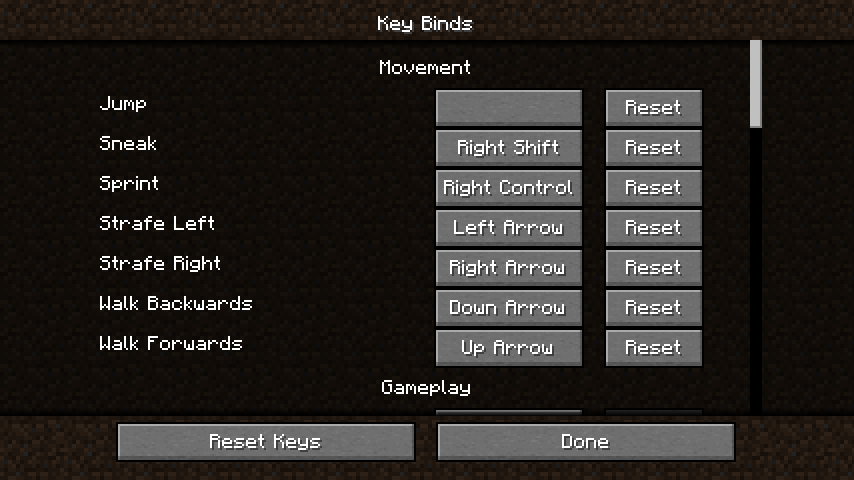
Keypad equals key has a completely blank name in Key Binds menu
Likely related to MC-263708 and MC-132076.
The bug
If a control is bound to the keypad equals sign in the Key Binds menu, the name of that key will be rendered completely blank.
A translation key exists for the string:
"key.keyboard.keypad.equal": "Keypad =",
it, however, appears to go completely unused, likely for the same reason as MC-263708.
How to reproduce
- Bind a control to the keypad equals key
- Observe
Expected results
The name of the key would be given as "Keypad =".
Actual results
The button renders completely blank.
Attachments1

Created Issue:
Keypad equals key has a completely blank name in Key Binds menu
Likely related to MC-263708 and
MC-132076.The bug
If a control is bound to the keypad equals sign in the Key Binds menu, the name of that key will be rendered completely blank.
A translation key exists for the string:
"key.keyboard.keypad.equal": "Keypad =",it, however, appears to go completely unused, likely for the same reason as MC-263708.
How to reproduce
- Bind a control to the keypad equals key
- Observe
Expected results
The name of the key would be given as "Keypad =".
Actual results
The button renders completely blank.
Attachments1
![[Mod] turbo](../../../data/avatars/users/92867.png)
The equals and keypad equals keys both appear as = for me, though when binding each of the two keys, the binds do not conflict with each other as two binds of the same key would. The binds are saved as key.keyboard.equal and key.keyboard.keypad.equal respectively.
Please record a video of this happening and attach it to this report. This ticket will automatically reopen when you reply.