 MC-88939
Black spot below block on y-chunk start
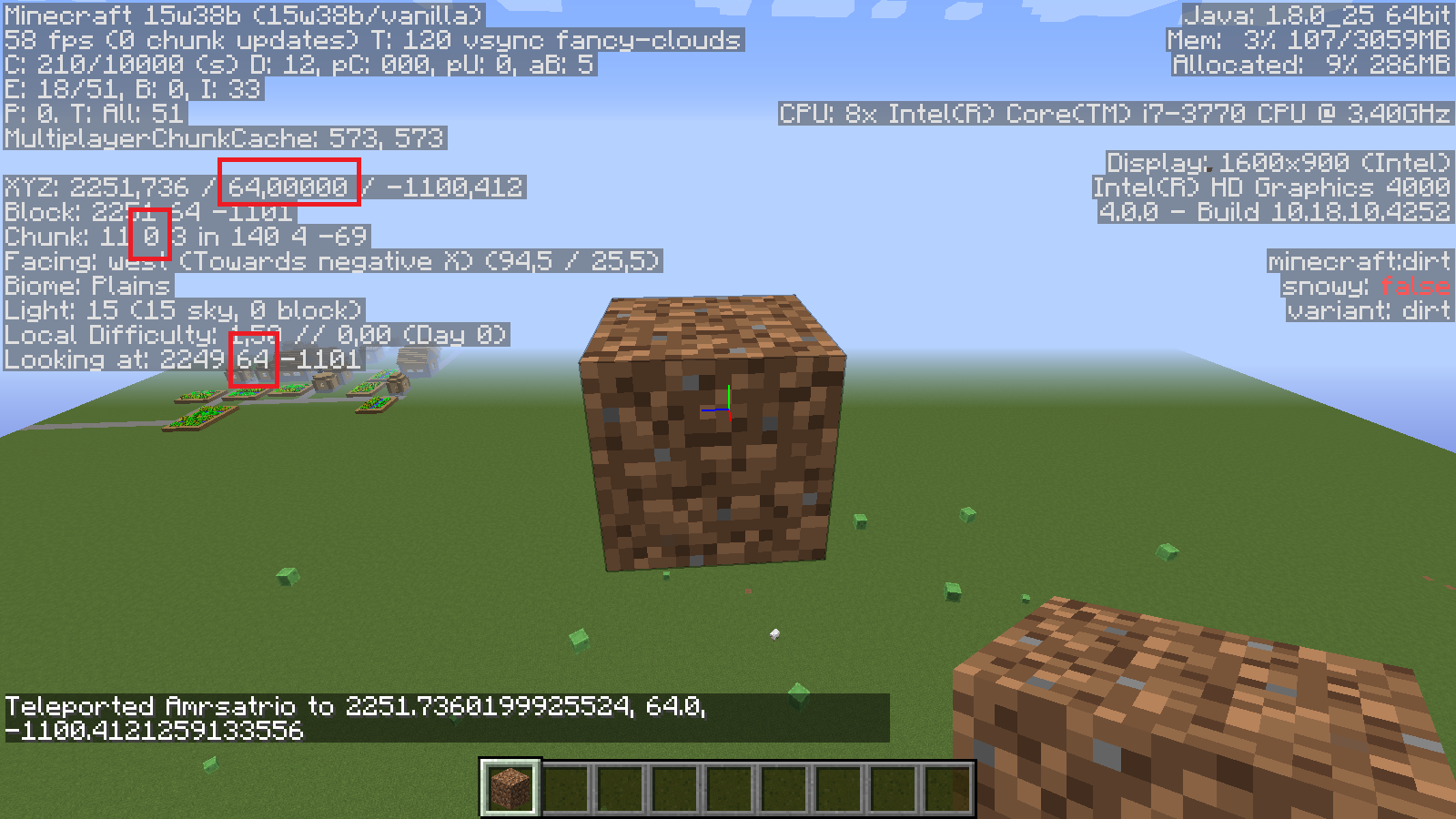
Blocks on (Chunk: x 0 y in ...) (example: y = 64, 128, etc) have a black spot below it when placed using /setblock or after reopening the world. (look at debug screen in video)
What I expect: the light below it is calculated correctly
What actually happened: The light is incorrectly calculated making a black spot.
To reproduce: Create a default superflat world, type /setblock ~ 64 ~ dirt and look below the block.
A black spot is produced below the block..To fix it place a block below the dirt then destroy it. Now reopen the world. The black spot is back.
Linked Issues


Created Issue:
Black spot below block on y-chunk start
Blocks on (Chunk:
0
in ...) (example: y = 64, 128, etc) have a black spot below it when placed using setblock or after reopening the world. (look at debug screen in video)
What I expect: the light below it is calculated correctly
What actually happened: The light is incorrectly calculated making a black spot.
To reproduce: Create a default superflat world, type "/setblock ~ 64 ~ dirt" and look below the block. A black spot is produced below the block..To fix it place a block below the dirt then destroy it. Now reopen the world. The black spot is back.Environment
Windows 10
Blocks on (Chunk:
What I expect: the light below it is calculated correctly
What actually happened: The light is incorrectly calculated making a black spot.
To reproduce: Create a default superflat world, type "/setblock ~ 64 ~ dirt" and look below the block. A black spot is produced below the block..To fix it place a block below the dirt then destroy it. Now reopen the world. The black spot is back.Blocks on (Chunk: x 0 y in ...) (example: y = 64, 128, etc) have a black spot below it when placed using setblock or after reopening the world. (look at debug screen in video)
What I expect: the light below it is calculated correctly
What actually happened: The light is incorrectly calculated making a black spot.
To reproduce: Create a default superflat world, type "/setblock ~ 64 ~ dirt" and look below the block. A black spot is produced below the block..To fix it place a block below the dirt then destroy it. Now reopen the world. The black spot is back.
![[Mod] Michael Wobst](../../../data/avatars/users/37868.png)
Blocks on (Chunk: x 0 y in ...) (example: y = 64, 128, etc) have a black spot below it when placed using setblock or after reopening the world. (look at debug screen in video)
What I expect: the light below it is calculated correctly
What actually happened: The light is incorrectly calculated making a black spot.
To reproduce: Create a default superflat world, type "/setblock ~ 64 ~ dirt" and look below the block.A black spot is produced below the block..To fix it place a block below the dirt then destroy it. Now reopen the world. The black spot is back.Blocks on (Chunk: x 0 y in ...) (example: y = 64, 128, etc) have a black spot below it when placed using /setblock or after reopening the world. (look at debug screen in video)
What I expect: the light below it is calculated correctly
What actually happened: The light is incorrectly calculated making a black spot.
To reproduce: Create a default superflat world, type /setblock ~ 64 ~ dirt and look below the block.
A black spot is produced below the block..To fix it place a block below the dirt then destroy it. Now reopen the world. The black spot is back.
Windows 10

![[Mojang] Georgii Gavrichev](../../../data/avatars/users/22428.png) [Mojang] Georgii Gavrichev
[Mojang] Georgii Gavrichev
Maybe this relates to
MC-29490orMC-7508.Confirmed. See two attached screenshots showing off the result of manually placing a block in the black spot.
Confirmed for 1.13.1.