 MCD-4294
We were unable to verify what products you own. Please check your internet connection.
On the Minecraft Dungeons Launcher, a red box appears in the corner stating "We were unable to verify what products you own. Please check your internet connection"
The following methods have often successfully resolved/workaround this issue:
Logging out from the Microsoft account on the launcher > closing and reopening the launcher > Logging back into the launcher
If the issue persists then attempt:
Backup your save files (just to be safe) > Uninstall the launcher > reboot computer > reinstall the launcher > log out from the launcher > reboot computer > log into the launcher.
Linked Issues
 MCL-15229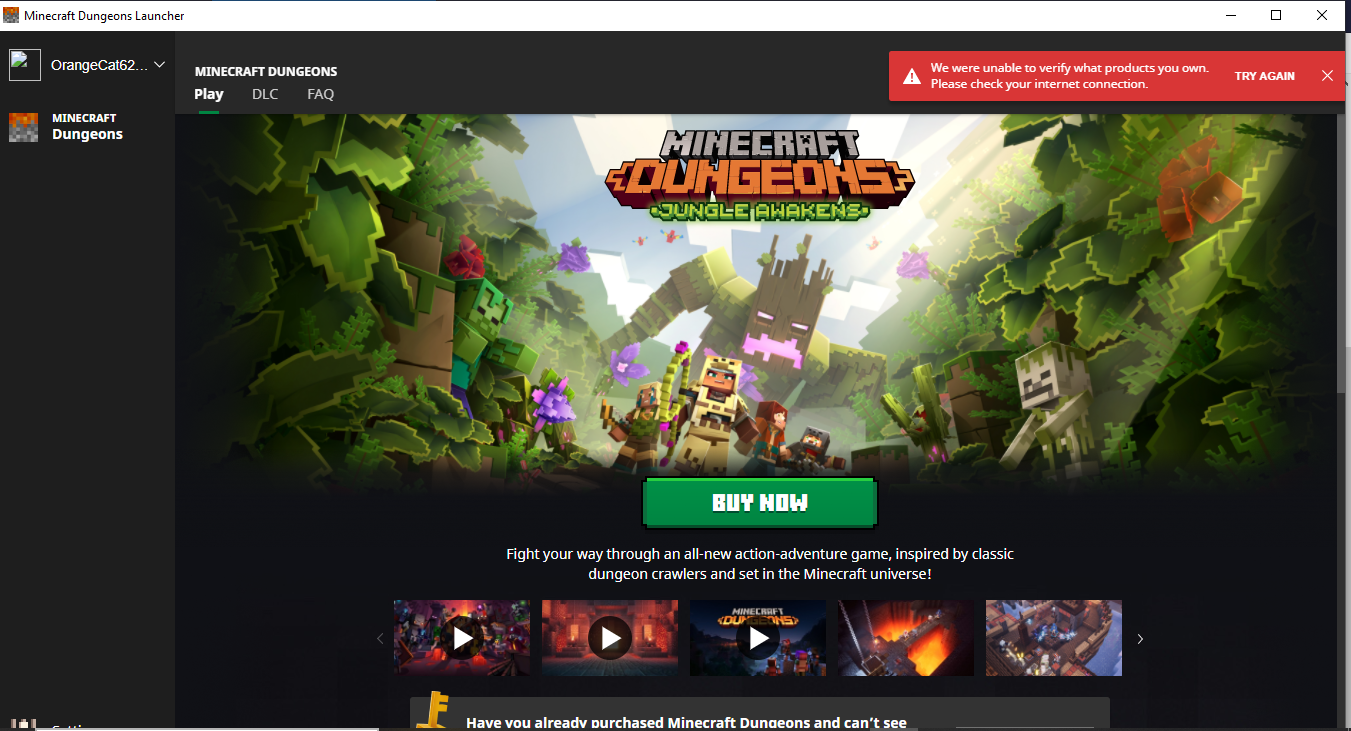

Created Issue:
We were unable to verify what products you own. Please check your internet connection.TRY AGAIN
We were unable to verify what products you own. Please check your internet connection.TRY AGAIN
Attachments1
We were unable to verify what products you own. Please check your internet connection
.TRY AGAIN
We were unable to verify what products you own. Please check your internet connection never mind

![[Bot] Arisa](../../../data/avatars/users/43007.png)

Just started getting this error today after purchasing the Hero Pass to upgrade my version of the game. I uninstalled the game and the launcher, no effect. I confirmed all Windows Updates were complete, no effect. I restarted my computer, no effect. The issue persists. My profile on Minecraftdungeons.net does show that I own the Hero Edition of Minecraft Dungeons, so I'm not sure why it's happening.
![[Mod] Raybeano99](../../../data/avatars/users/55518.png)
We were unable to verify what products you own. Please check your internet connection never mind
On the Minecraft Dungeons Launcher, a red box appears in the corner stating "We were unable to verify what products you own. Please check your internet connection"
WorkaroundThe following methods have often successfully resolved/workaround this issue:
Logging out from the Microsoft account on the launcher > closing and reopening the launcher > Logging back into the launcherIf the issue persists then attempt:
Backup your save files (just to be safe) > Uninstall the launcher > reboot computer > reinstall the launcher > log out from the launcher > reboot computer > log into the launcher.
We were unable to verify what products you own. Please check your internet connection.TRY AGAIN
![[Mod] LateLag](../../../data/avatars/users/92884.png)
duplicates
🔎 Confirm that you have purchased Minecraft Dungeons Launcher
<https://www.minecraftdungeons.net/profile/>
Login to Minecraftdungeons.net
Click on your username > profile
Does the site say you own the game?
Uninstalling the game and the launcher, reinstalling the launcher, then logging out and back into the launcher appears to have resolved this issue for me.
The reinstalling launcher thing didn't work. I am also having this issue that says they were unable to verify.
I am having the same issue. I have uninstalled everything. Reinstalled the launcher and am still getting the same error. I have verified that I have the Hero Edition through my minecraft dungeons profile. There is no option for me to redownload the game I own!
I figured out how to fix it, you have to log out of your microsoft account on the launcher, and then sign back in. It worked for me
It worked! Thank you Gavin!
Thank you for your report!
However, we're tracking this issue in
MCL-15229.Although this can be quite annoying, the MCD project is for bugs within the game itself. This one seems to be an issue with the launcher.
Quick Links:
📓 Bug Tracker Guidelines – 💬 Community Support – 📧 Mojang Support
📓 Project Summary – ✍️ Feedback and Suggestions – 📖 Game Wiki – 📖 FAQs