![[Mod] Raybeano99](../../../data/avatars/users/55518.png) [Mod] Raybeano99
[Mod] Raybeano99
- Raybeano99
- JIRAUSER501328
- Europe/London
- Yes
- No
 MCD-4378MCD-4465
 WEB-3622
![[Mojang] Web Team](../../../data/avatars/users/10122.svg)
















Try this:
🦑 *Squid/Camp Load crash (Windows)*
Open the game to the Main Menu > *Disable Wi-Fi* > Start an offline game > Make progress (Finish Creeper woods) When at camp: Pause > return to Main Menu > *Enable Wi-Fi*
You should be able to play the game normally from now on in both Online and Offline sessions.If the issue persists but only for online games:
Open the game to the Main Menu > *Disable Wi-Fi* > Start an offline game > Make progress (Finish Creeper woods).
When at camp: *Enable WI-FI* > Make progress (again)
The save file might be read-only. Exit the game and Try:
WIN-R > copy and paste %HOMEPATH%\Saved Games\Mojang Studios\Dungeons into the run box > [numerical folder] > characters > right click on .dat file > Proprites > untick read-only
Do the same to savedata.dat
Dungeons may crash upon first start.
if that still doesn’t fix the issue,
Does your windows username contain any symbols, accented or unusual characters?
MCD-101
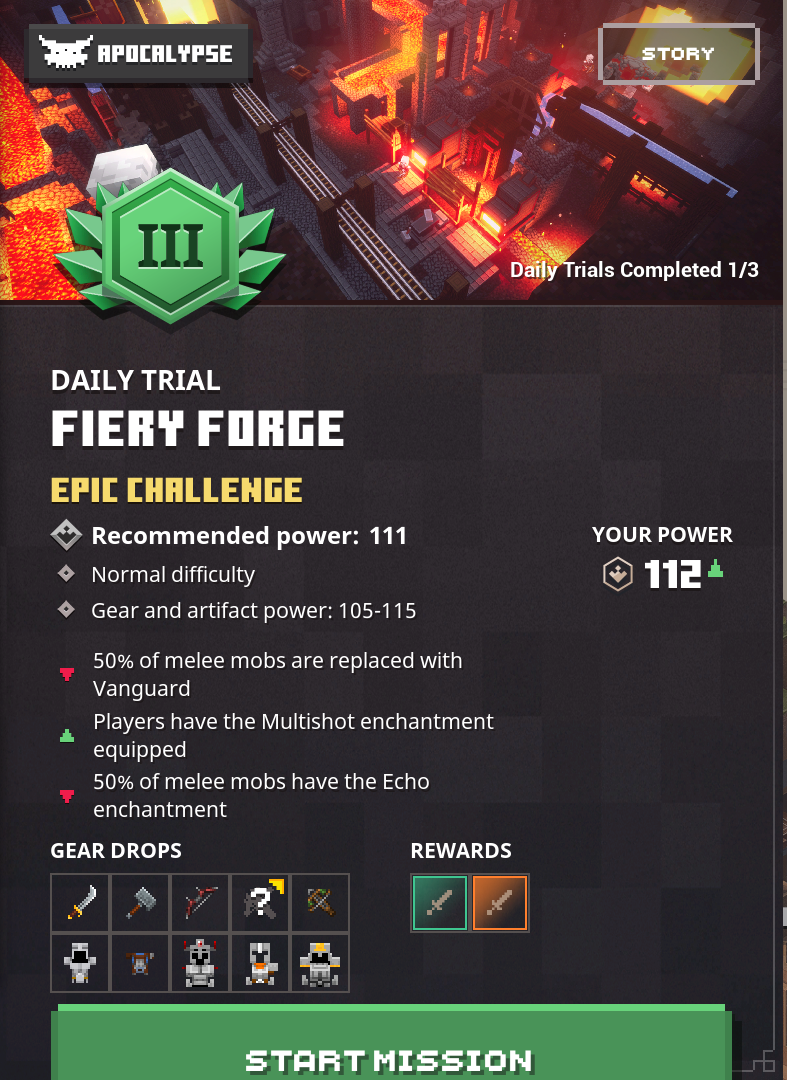
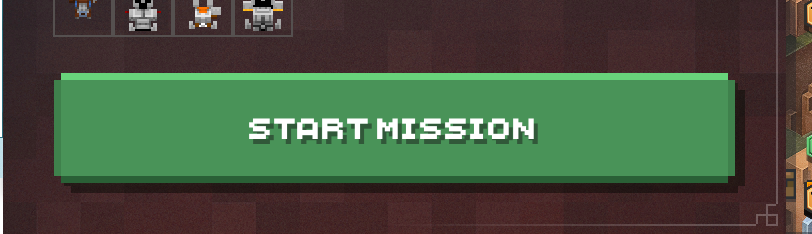
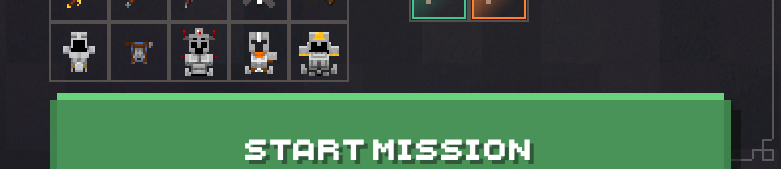
Start Misson Button too low on Daily Trial Mission Summary
The "Start Misson" button can appear too low and become partially cut off due to the extended information of Daily Trail Modifiers.
Players are still able to access the daily trialsThe button is meant to be contained within the Summary border ie:
Theoretically, the button could appear so low that the button is no longer on-screen preventing mouse users from playing the trial. Using Controllers will be able to work around this layout issue in this theoretical scenario.
The "Start Missi
on" button can appear too low and become partially cut off due to the extended information of Daily Trail Modifiers.
Players are still able to access the daily trialsThe button is meant to be contained within the Summary border ie:
Theoretically, the button could appear so low that the button is no longer on-screen preventing mouse users from playing the trial. Using Controllers will be able to work around this layout issue in this theoretical scenario.
The "Start Missi
on" button can appear too low and become partially cut off due to the extended information of Daily Trail Modifiers.
Players are still able to access the daily trialsThe button is meant to be contained within the Summary border ie:
Theoretically, the button could appear so low that the button is no longer on-screen preventing mouse users from playing the trial. Using Controllers will be able to work around this layout issue in this theoretical scenario.
The "Start Mission" button can appear too low and become partially cut off due to the extended information of Daily Trail Modifiers.
Players are still able to access the daily trialsThe button is meant to be contained within the Summary border ie:
Theoretically, the button could appear so low that the button is no longer on-screen preventing mouse users from playing the trial. Using Controllers will be able to work around this layout issue in this theoretical scenario.
Windows display language = UK English
When using a controller, MenuSelectAlt1 appears as the button hint for X on all villager interfaces.
Either the button hint is not meant to appear OR the function connected to button X is improperly displayed. Pressing X seemingly does nothing so perhaps the former.EDIT:
Found by entering an online game, X is the button to Reserve Items. The button hint should not be displayed in an Offline game

MenuSelectAlt1 controller button hint on new villager interface in an Offline Game
Windows display language = UK English
When using a controller, MenuSelectAlt1 appears as the button hint for X on all villager interfaces.
Either the button hint is not meant to appear OR the function connected to button X is improperly displayed. Pressing X seemingly does nothing so perhaps the former.EDIT:
Found by entering an online game, X is the button to Reserve Items. The button hint should not be displayed in an Offline game
Windows display language = UK English
When using a controller, MenuSelectAlt1 appears as the button hint for X on all villager interfaces.
Either the button hint is not meant to appear OR the function connected to button X is improperly displayed. Pressing X seemingly does nothing so perhaps the former.EDIT:
Found by entering an online game, X is the button to Reserve Items. The button hint should not be displayed in an Offline game
Windows display language = UK English
When using a controller, MenuSelectAlt1 appears as the button hint for X on all villager interfaces.
Either the button hint is not meant to appear OR the function connected to button X is improperly displayed. Pressing X seemingly does nothing so perhaps the former.EDIT:
Found by entering an online game, X is the button to Reserve Items. The button hint should not be displayed in an Offline game
Windows display language = UK English
When using a controller, MenuSelectAlt1 appears as the button hint for X on all villager interfaces.
Either the button hint is not meant to appear OR the function connected to button X is improperly displayed. Pressing X seemingly does nothing so perhaps the former.EDIT:
Found by entering an online game,X is the button to Reserve Items. The button hint should not be displayed in an Offline game
Notei got the key for the golden gate headed back into combat then before i set off to the gate noticed that the key was gone from my back and no where to be seen
NoteMissions of reported occurrence:
Desert Temple, Cacti CanyonDesert temple report:
i got the key for the golden gate headed back into combat then before i set off to the gate noticed that the key was gone from my back and no where to be seen
bugTextures rendered improperly - Lines shown on environment textures
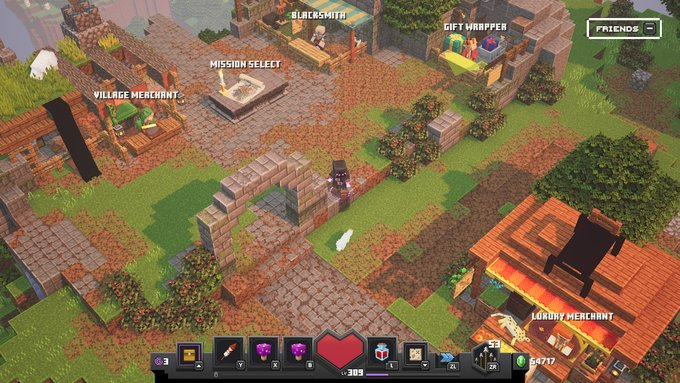
The banners on fhe stands of the luxurious merchant and the village merchant arent rendering, they appear as pitch black.
On Xbox one,
The banners on fhe stands of the luxurious merchant and the village merchant arent rendering, they appear as pitch black.
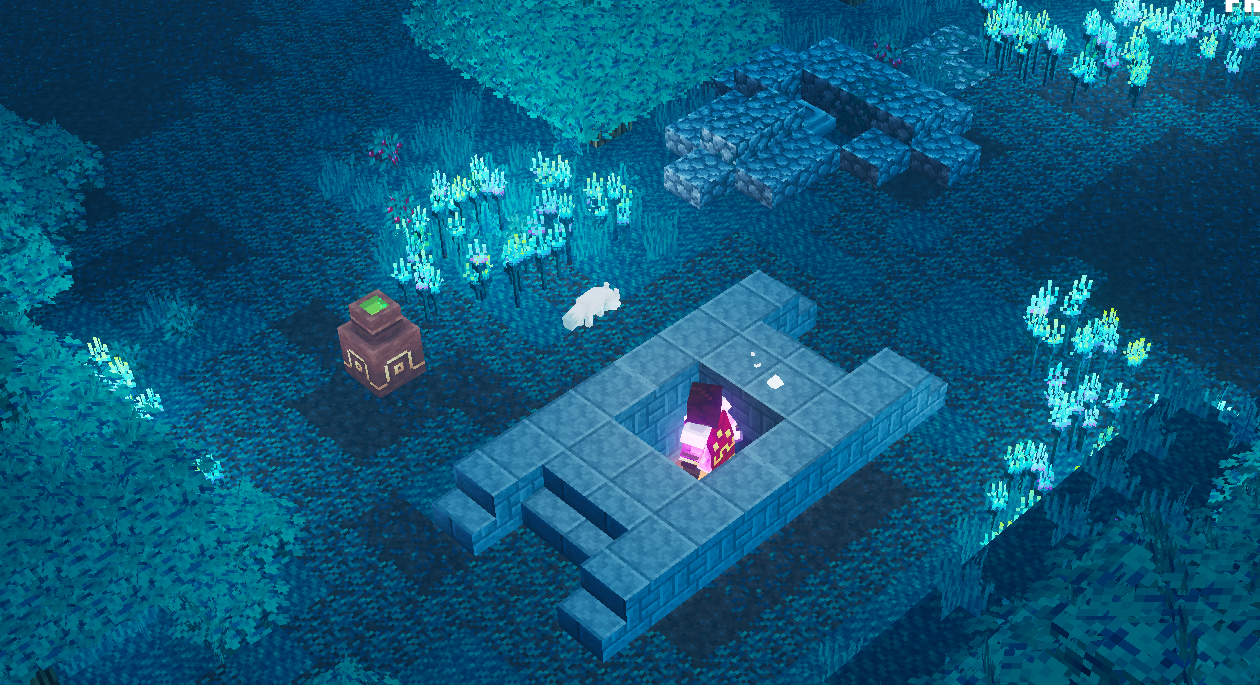
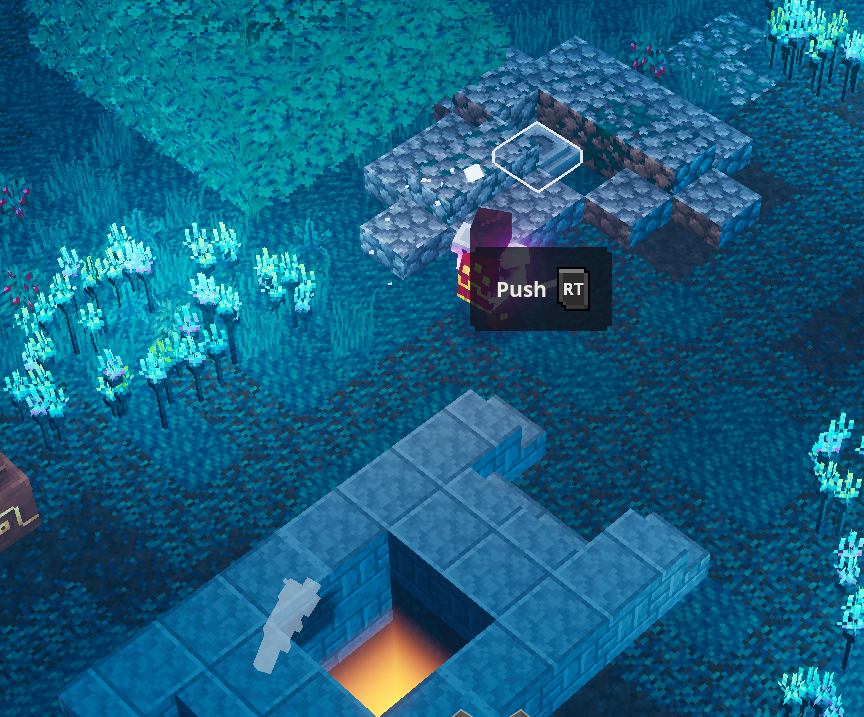
The block for the Creeper Woods Rune location entrance is able to descend when the player is standing on top of it without having to push the button nearby that extends the stone ruins. This allows the user to fall into the hole and become stuck.
If the user enters the rune location and exits, they will become trapped into the ground.
The user is able to escape by rolling when trapped into the ground (but hugging grass blocks is not very fun).
The block for the Creeper Woods Rune location entrance is able to descend when the player is standing on top of it without having to push the button nearby that extends the stone ruins. This allows the user to fall into the hole and become stuck.
If the user enters the rune location and exits, they will become trapped into the ground.
The user is able to escape by rolling when trapped into the ground (but hugging grass blocks is not very fun).
Thank you for taking the time to construct a report.
Non-consistent crashes like these generate logs that are sent to Mojang upon pressing “Submit”.
(I personally do experience these occasional, spontaneous crashes. Ensure your PC is not overheating.)
This ticket will be considered Invalid.Here are some helpful quick links:
📓 Issue Guidelines
💬 Community Support
📧 Mojang Support
✍️ Feedback and Suggestions
📖 Game Wiki
Source of report:
{Minecraft Dungeons Discord |https://canary.discord.com/channels/579770991056519194/684876964708089940/755748388636459139]Signing into xCloud/Cloud gaming with the same MS account used on the Nintedo Switch will cause the Switch to sign out from the MS account and prevent the user from signing in again with the same MS account via a "Service not available" error message.
Workaround: Sign out from xCloud/Cloud gaming > Reboot the Switch > Open Minecraft Dungeons > Main menu > Settings > Game > Configure Online Play > Sign in.
Perhaps similar will occur if a regular Xbox One was used to Log in instead of xCloud.
Source of report: Minecraft Dungeons Discord
Signing into xCloud/Cloud gaming with the same MS account used on the Nintedo Switch will cause the Switch to sign out from the MS account and prevent the user from signing in again with the same MS account via a "Service not available" error message.
Workaround: Sign out from xCloud/Cloud gaming > Reboot the Switch > Open Minecraft Dungeons > Main menu > Settings > Game > Configure Online Play > Sign in.
Perhaps similar will occur if a regular Xbox One was used to Log in instead of xCloud.
Source of report: Minecraft Dungeons Discord - Conversation with Mr.vermilion
Signing into xCloud/Cloud gaming with the same MS account used on the Nintedo Switch will cause the Switch to sign out from the MS account and prevent the user from signing in again with the same MS account via a "Service not available" error message.
Workaround: Sign out from xCloud/Cloud gaming > Reboot the Switch > Open Minecraft Dungeons > Main menu > Settings > Game > Configure Online Play > Sign in.
Perhaps similar will occur if a regular Xbox One was used to Log in instead of xCloud.
Recently I have been playing the new dailytrialsand have noticed that my daily trials are not resettingDaily Trials do not update to show new trials
Daily Trialsdonot appearfor someWindowsusersDaily Trials not appearing on Windows
Dailychallenges not showing upon Nintendo SwitchDaily trials not appearing on Nintendo Switch
Redstone Monstrosity's Dungeon/forge BugUnable to reenter
Unable to re-enter Redstone Monstrosity Arena
This bug is in the minecraft dungeons loading screen with the spinning cube.Infinite Loading screen after starting an Online or Offline Game
Alex skinmissing on Windows 10 versionAlex skin no longer available to use
We were unable to verify what products you own. Please check your internet connection never mind
On the Minecraft Dungeons Launcher, a red box appears in the corner stating "We were unable to verify what products you own. Please check your internet connection"
WorkaroundThe following methods have often successfully resolved/workaround this issue:
Logging out from the Microsoft account on the launcher > closing and reopening the launcher > Logging back into the launcherIf the issue persists then attempt:
Backup your save files (just to be safe) > Uninstall the launcher > reboot computer > reinstall the launcher > log out from the launcher > reboot computer > log into the launcher.
We were unable to verify what products you own. Please check your internet connection.TRY AGAIN
Startmenu.png
Consistant UE4 Start-up Crash while starting the game - "A Dungeons process has crashed: UE4-Dungeons"
Consistant UE4 Start-up Crash while starting the game - "A Dungeons process has crashed: UE4-Dungeons"Consistant UE4 Start-up Crash
Consistant UE4 Start-up CrashConsistent UE4 Start-up Crash
is duplicated by
Tested on Windows 10 Microsoft Edge Dev 89.0.723.0 & iPadOS 14.3 safari
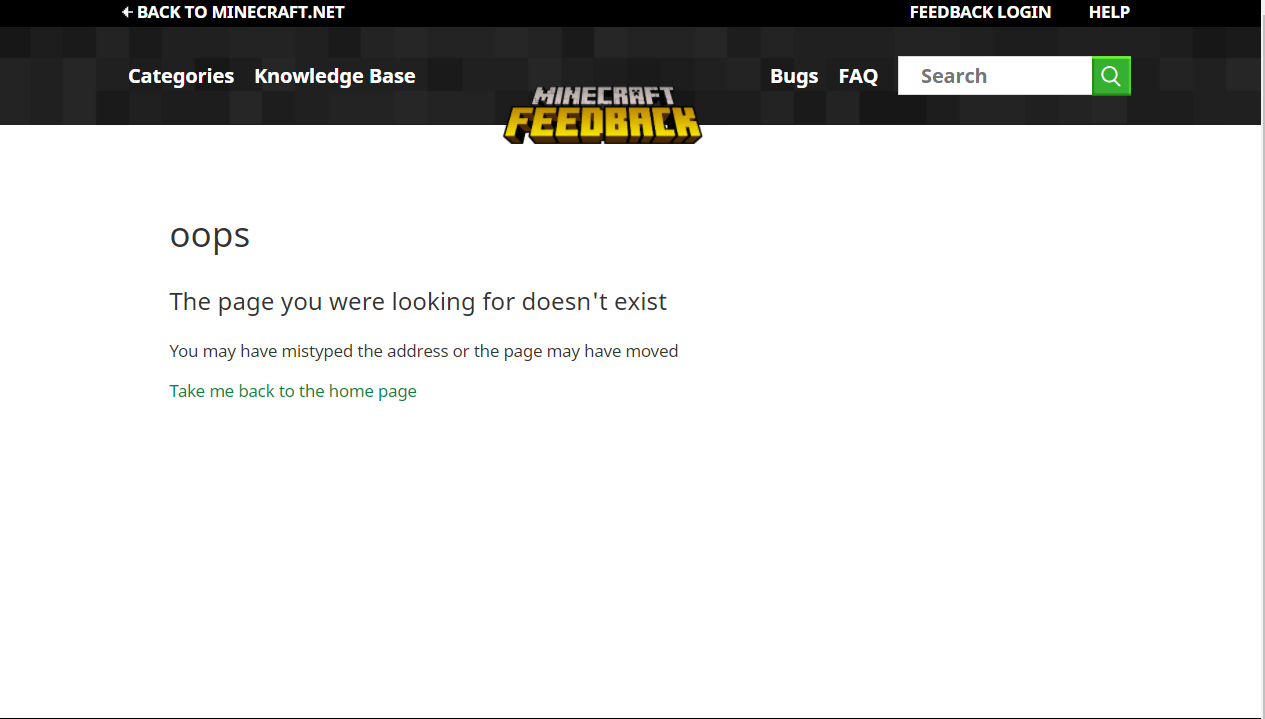
On the feedback site, clicking "FAQ" on the page header directs the user to
Current result: a missing page https://feedback.minecraft.net/hc/en-us/articles/360003457532-Minecraft-Support-Links
Expected result: the functioning FAQ page https://feedback.minecraft.net/hc/en-us/articles/360013357391
Starting a mission in online multiplayer at an Apocalypse PLUS threat level yields a confirmation/"USER Starting Mission" box with a threat level of
Current result: Apocalypse VII
Expected result: the Apocalypse PLUS threat levelThis is a visual bug - The selected threat level of the mission is not altered.
For example:
Start an online game and enter camp
Invite 1 or more online friends
Open the map and select a mission
Select Apocalypse PLUS 9
Select Start Mission
Observe the "USER Starting Mission" dialogue box

I dropped down to a small area and can't moveStuck on ledge after falling off edge in Windswept Peaks
NoteThe location with the scroll (a small ship that can randomly appear in one of the dead ends) is intended to have a very small chance of generating, which can sometimes result in it not appearing for over 50 playthroughs of the mission. To maximize your chances of finding the ship, please make sure to do the following:
1. Only search for it in the part before the drawbridge, and quit the mission if you do not find it there. While there is a chance it might appear after the drawbridge, it takes less time to look for it that way.
2. As soon as you enter the mission, open the map to check how many secrets are present. If you've already beaten Obsidian Pinnacle and used the button inside the Camp's church, then the mission will have 2 guaranteed secrets, meaning you should only search if there are 3 secrets shown or more. If you haven't used the church button yet, then there will be only 1 guaranteed secret, meaning you should search when there are 2 secrets shown or more.
My name is Krastum and my problem is the Arch Haven Mission. After running the pigman pastures on all difficulties, default, adventure, and apocalypse the mission to unlock the arch haven has not spawned in any version of the level. I have tried running the mission and exploring every part of the level but with no avail in finding the second boat to unlock the arch haven. I don't know if this is a glitch but after running the mission multiple times on every level the boat doesn't spawn and it's getting frustrating not having all the levels unlocked. If you could fix this that would be fantastic.
Thanks,
Krastum
Note (Pre-1.8.0.0)The location with the scroll (a small ship that can randomly appear in one of the dead ends) is intended to have a very small chance of generating, which can sometimes result in it not appearing for over 50 playthroughs of the mission. To maximize your chances of finding the ship, please make sure to do the following:
1. Only search for it in the part before the drawbridge, and quit the mission if you do not find it there. While there is a chance it might appear after the drawbridge, it takes less time to look for it that way.
2. As soon as you enter the mission, open the map to check how many secrets are present. If you've already beaten Obsidian Pinnacle and used the button inside the Camp's church, then the mission will have 2 guaranteed secrets, meaning you should only search if there are 3 secrets shown or more. If you haven't used the church button yet, then there will be only 1 guaranteed secret, meaning you should search when there are 2 secrets shown or more.
My name is Krastum and my problem is the Arch Haven Mission. After running the pigman pastures on all difficulties, default, adventure, and apocalypse the mission to unlock the arch haven has not spawned in any version of the level. I have tried running the mission and exploring every part of the level but with no avail in finding the second boat to unlock the arch haven. I don't know if this is a glitch but after running the mission multiple times on every level the boat doesn't spawn and it's getting frustrating not having all the levels unlocked. If you could fix this that would be fantastic.
Thanks,
Krastum
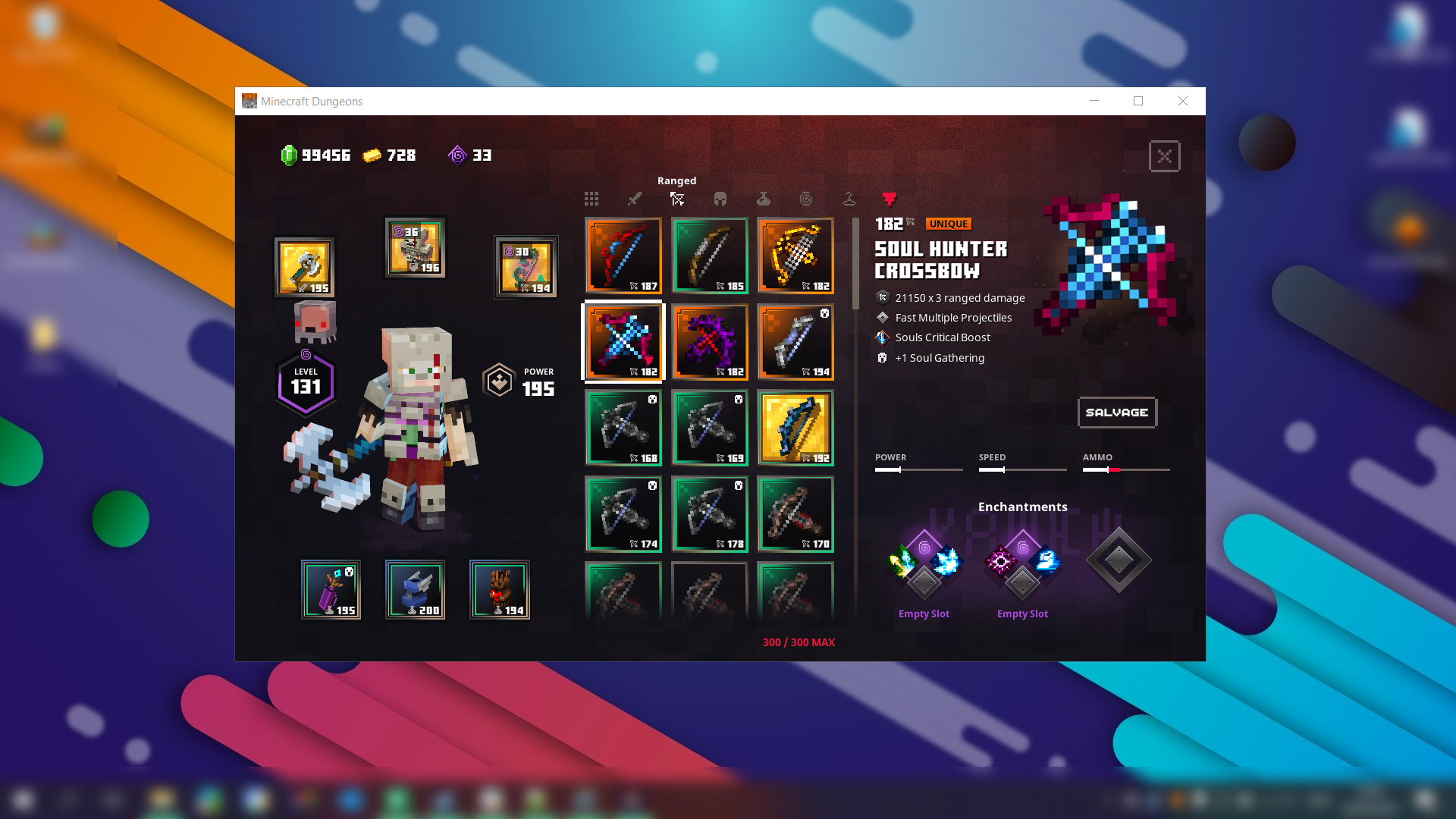
Soul HuntersCrossbowSoul Hunter Crossbow discription Missing
Soul Hunter Crossbow discriptionMissingSoul Hunter Crossbow discription missing
Soul Hunter Crossbow discription missingSoul Hunter Crossbow description missing
Firework Arrows andFireworkArrows not affected by UnchantingFirework Arrows and Torment Arrows not affected by Unchanting
CRITICAL BUG -Ranged Dynamo stacks do not reset if a Firework Arrow or Torment Arrow is shot
Tested on Microsoft Edge Version 92.0.891.1 (Official build) dev (64-bit) & iPadOS 14.6 (iPad 6th gen) Safari
Users are unable to complete a purchase of Minecraft Dungeons items within their cart due to the GO TO CHECKOUT appearing grey and is unclickable.
- Open an In-Private/Incognito Window (to avoid interface from extensions & cookies)
- Add any item to the cart.
- Click on Cart (to arrive at minecraftdungeons.net/cart/ )
- Click on GO TO CHECKOUT
- Sign in with a Microsoft Account, following any log in prompts shown
Expected result: a Green, clickable GO TO CHECKOUT button and continues purchase procedure.
Actual Result: a Grey, unclickable GO TO CHECKOUT button that prevents continuation of purchase procedure. In the developer error console:{{instrument.js:136 POSThttps://api.minecraftservices.com/order/validate500 }}is displayed.
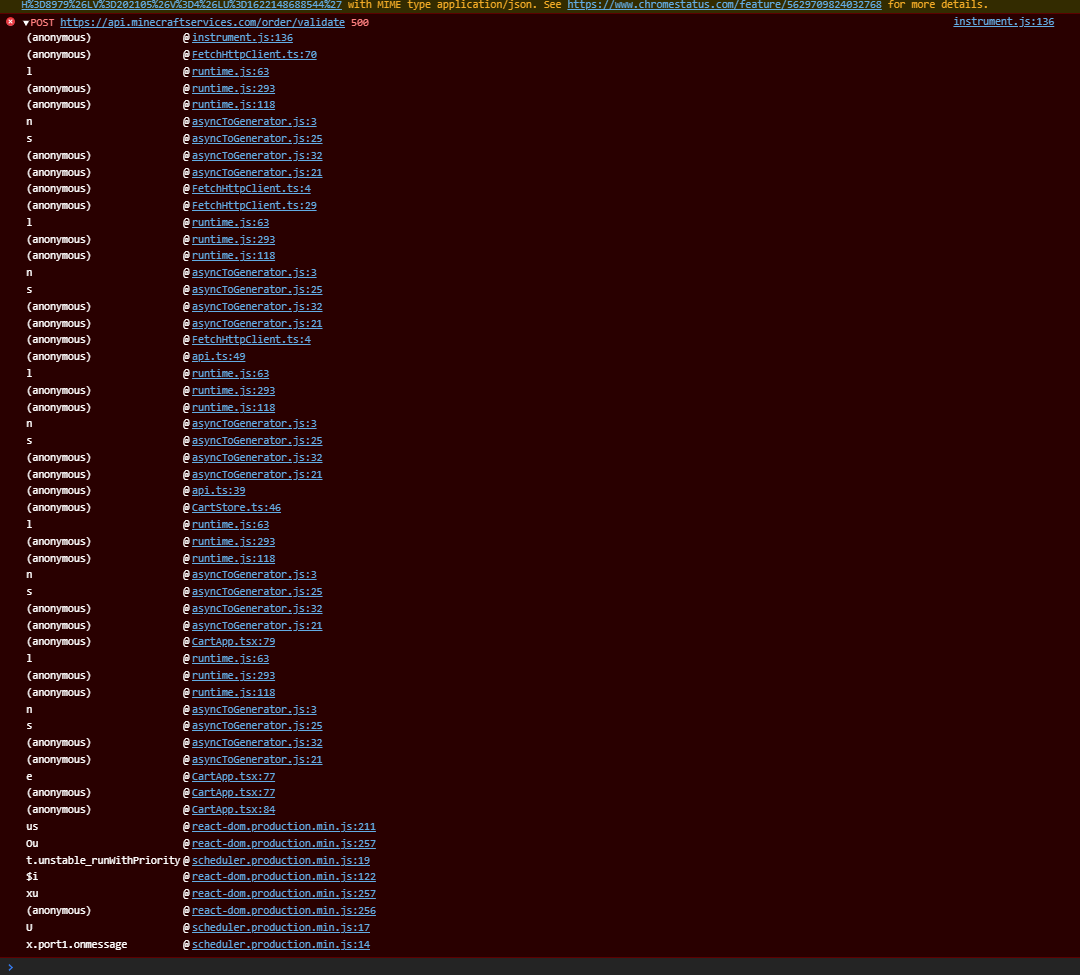
Tested on Microsoft Edge Version 92.0.891.1 (Official build) dev (64-bit) & iPadOS 14.6 (iPad 6th gen) Safari
Users are unable to complete a purchase of Minecraft Dungeons items within their cart due to the GO TO CHECKOUT appearing grey and is unclickable.
- Open an In-Private/Incognito Window (to avoid interface from extensions & cookies)
- Add any item to the cart.
- Click on Cart (to arrive at minecraftdungeons.net/cart/ )
- Click on GO TO CHECKOUT
- Sign in with a Microsoft Account, following any log in prompts shown
Expected result: a Green, clickable GO TO CHECKOUT button and continues purchase procedure.
Actual Result: a Grey, unclickable GO TO CHECKOUT button that prevents continuation of purchase procedure. In the developer error console: instrument.js:136 POST https://api.minecraftservices.com/order/validate 500 is displayed.
Cloud save BrokenInfinite load when uploading hero to cloud storage.
able to activate beaconwhile still behindgateAble to activate beacon in Soggy Swamp while blocked by gate.
duplicates
duplicates
is duplicated by
The
{{Unique}}tag is applied to non-unique variants of Armour, Melee, & Ranged equipment when armour enchanted with Luck of the Sea is equipped.Reproduction Steps for Chests & Mob dropped gear:
- Equip armour enchanted with Luck of the Sea.
- Enter a mission.
- Open chests & defeat mobs during the mission.
Observed result: Some non-unique equipment drops possess the unique tag.
Expected result: Unique tag to not appear on non-unique equipment.Reproduction Steps for merchant offerings:
- Equip armour enchanted with Luck of the Sea.
- Interact with the Village Merchant, Luxury Merchant, or Piglin Merchant
- Restock merchant inventory.
Observed result: Some non-unique equipment presented possess the unique tag.
Expected result: Unique tag to not appear on non-unique equipmentIssue differs from
MCD-6330in that this occurrence is not limited to Ancient Mobs.
Have not yet observed an Ancient Mob drop non-unique equipment with the unique tag,

This issue may be caused by third party anti-ransomware software.
Note that it is not the only possible cause - crashes can also reset the progress (see MCD-1205), so does Windows usernames that contain special characters (MCD-101). Always use the pause menu to properly quit the game.
Data corruption may occur on its own too, so creating backups is highly recommended.
See this comment by [Mod] Raybeano99 for more details on this.
Version 1.8.8.0, released on May 5th 2021, introduced the feature of cloud saves. Please make sure to use this feature in order to avoid this issue.
Cloud saves can be accessed by opening the character selection and either clicking "Upload Hero" when an existing hero is selected, or "Download Hero" when an empty space is selected.
For some users, the game progress occasionally resets after restarting Minecraft: Dungeons.
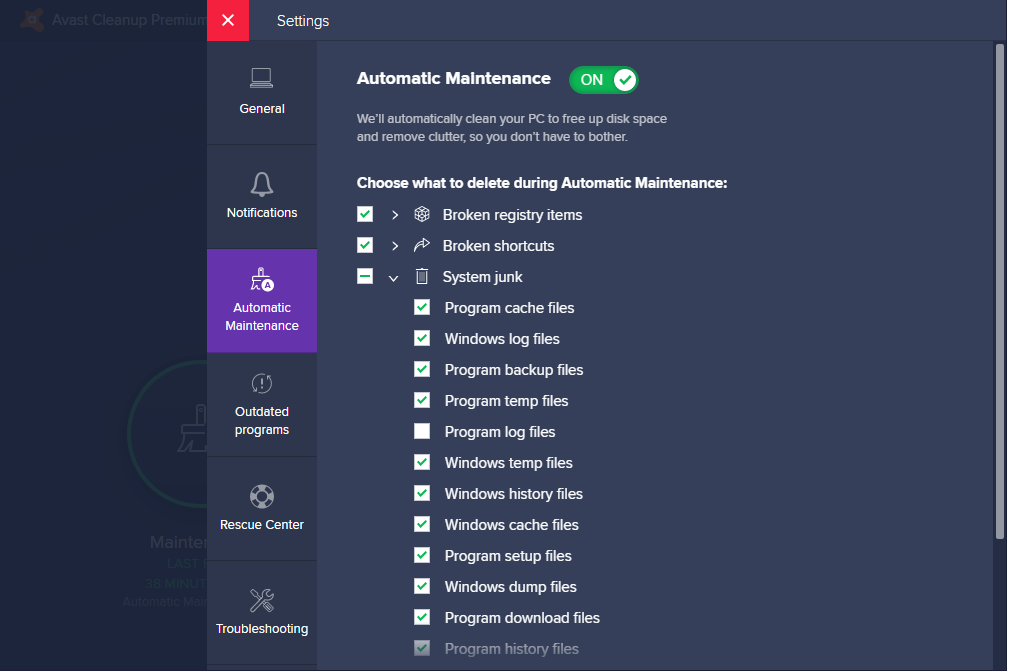
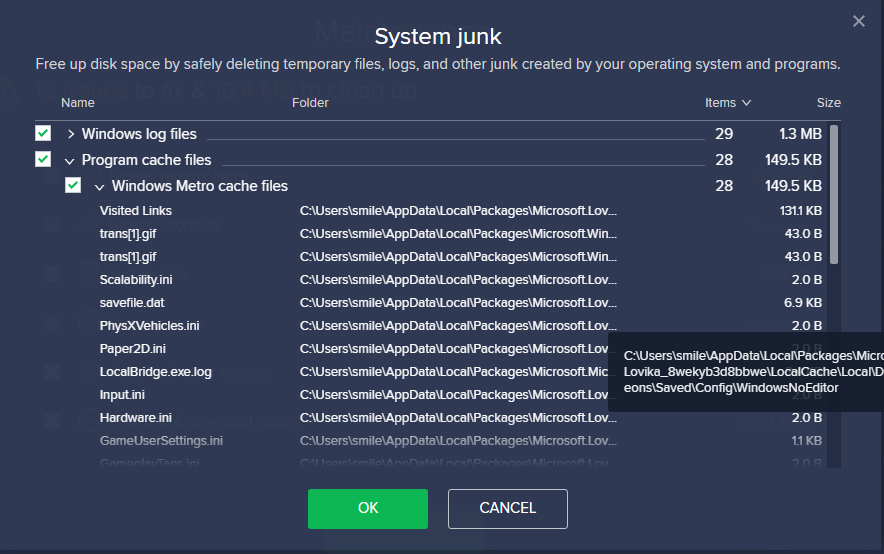
Avast Cleanup deletes save data and saved settings of the Microsoft store (Windows 10) Version during automatic and manual maintenance tasks. Avast labels these files as System Junk > Windows Metro Cache Files. (See below)
Disabling automatic maintenance at: Settings (Cog icon) > Automatic maintenance > Click the green switch will stop automatic removal of the save data and settings files. (see below)
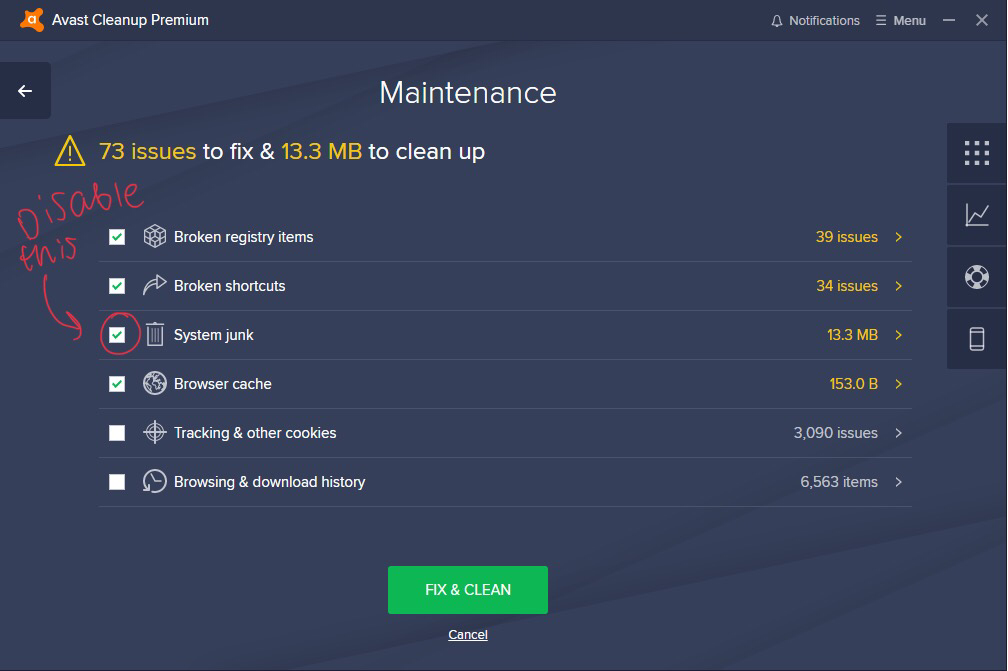
Before a manual maintenance task, unticking System junk will prevent the task from deleting the files (not performing any manual maintenance would be the best advice though)
Other cleanup software, perhaps even Windows Disk Clean-Up, may also remove the save data and settings files but these have not been investigated.
Edit Note: Avast Anti-virus has nothing to do with this, only the cleanup program under the same brand name.
Try the following method:
Open game to the Main Menu > Disable Wi-Fi > Start an offline game > Make progress (Finish Creeper woods
When at camp: Pause > return to Main Menu > Enable wifi
You should be able to play the game normally from now on.
💳*Minecraftdungeons.net not accepting Debit/Credit cards*
The site seems to have issues with card payments...
Some have been able to work around this using Paypal or an equivalent service.
You can add your card to a Paypal (or equivalent account) or send over a small amount to the account.
You can delete the account afterwards if you wish.
Alternatively, if you are on Windows 10, purchase the Microsoft Store version from the Microsoft Store app
Try the following
🦑 *Squid/Camp Load crash*
Open the game to the Main Menu > *Disable Wi-Fi* > Start an offline game > Make progress (Finish Creeper woods) When at camp: Pause > return to Main Menu > *Enable Wi-Fi*
You should be able to play the game normally from now on in both Online and Offline sessions.
If the issue persists but only for online games:
Open the game to the Main Menu > *Disable Wi-Fi* > Start an offline game > Make progress (Finish Creeper woods).
When at camp: *Enable WI-FI* > Make progress (again)
As the save data folder have been moved to %HOMEPATH%\Saved Games\Mojang Studios\Dungeons Cleanup software should no longer misidentify the save files as Metro Cache for the Microsoft store (UWP, Windows 10) version.
However, some Anti-Ransomware software (ie: Norton SafeLock) may block Dungeons from writing new saved data onto existing data BUT you should be notified about this and given the option to add Dungeons to the exclusion/exemptions/safe list.
I would like to also mention that 3rd party software (ie: Antivirus programs, Cheat Engine, Cleanup software, Anything not dungeons) is definitely not the only cause of Save Data Destruction.
Using ALT-F4, Ending via Task Manger, Shut down/Restart/Log off when the game is still running with your character loaded or any other methods for forcibly closing Dungeons can also cause data "corruption" - Always use Pause > Return to desktop (Or Return to Main menu > Exit to desktop).
Of course, Data loss may occur "spontaneously" and hence, creating backups is Highly recommended by the community (this is applicable for all other data as well, not just Dungeons). Always expect the unexpected and always prepare for the worst
Mojang have posted an entry onto their Help/FAQ page: https://help.minecraft.net/hc/en-us/articles/360043504492
For console users with Online subscriptions, disabling automatic cloud backup for Dungeons for full manual control of your backups is not a bad idea (The auto-backup replace working files with damaged ones), you WILL need to remember to upload your saved data regularly though.
Using USB/SD backups as cusman suggested for the PlayStation 4 is also an effective method to keep backups.
(I should have given an update when 1.2.0+ patch was introduced to Windows - apologies for the lateness)
Try:
🦑 *Squid/Camp Load crash*
Open the game to the Main Menu > *Disable Wi-Fi* > Start an offline game > Make progress (Finish Creeper woods) When at camp: Pause > return to Main Menu > *Enable Wi-Fi*
You should be able to play the game normally from now on in both Online and Offline sessions.
If the issue persists but only for online games:
Open the game to the Main Menu > *Disable Wi-Fi* > Start an offline game > Make progress (Finish Creeper woods).
When at camp: *Enable WI-FI* > Make progress (again)
Try this:
Switch Infinite Loading Screen
Turn on aeroplane mode > open Minecraft Dungeons > Settings > Log off (from Microsoft account) > Close and reopen Minecraft Dungeons > log in with your Microsoft account.
Then, *if stuck after* turning off aeroplane mode after pressing A to log in: Enter aeroplane mode (again) > Main menu > Settings > turn off Configure Online Play > Close and reopen the game > turn on Configure Online Play
Not a bug - Xinput is the only controller input accepted by MC Dungeons (https://help.minecraft.net/hc/en-us/articles/360043954571-Accepted-Controllers-for-Minecraft-Dungeons).
The switch Pro controller uses Direct Input and needs to be converted.
If you do have Steam installed you can use one of the methods below specific for your version of the game:
Microsoft Store version – Steam & GloSC
Open Steam and open the Settings > Controller > General Controller Settings
Turn on (Tick) all the Configuration Supports.
Close that window and close the Steam Settings window
(Or go to Desktop configuration to adjust how the controller acts when steam is running but not in a game)
Download the latest GloSC-installer exe from <https://github.com/Alia5/GloSC/releases>
(Chromium based browsers may state that the program is dangerous, it is perfectly safe. I use it if that is of any comfort).
Run the GloSC installer to install GloSC. Open GloSC once installed
Click “Create New”
Type "Minecraft Dungeons" into the Name textbox.
Copy and Paste the below text into the Path textbox:
Microsoft.Lovika_8wekyb3d8bbwe!Game
Ensure that “Launch game” has been enabled (ticked)
Click Save > Add to steam.
When steam restarts, a Minecraft Dungeons steam shortcut should be visible in the steam library.
If a GloSC dialogue pops up saying “Can’t detect Steam shortcut file!” Perform the following:
Click on steam > bottom left corner there is a “add a game button”, click it > Add a non-steam product > select any program and click add selected programs
Make sure to launch the game through “Desktop Steam” not big picture mode
Just a few things to point out:
You’ll have to start the game through Steam if you want to use the controller.
Make sure the Steam Overly is enabled.
Whenever you close the game, make sure to close the GloSC overlay.
If your screen goes completely black use ALT-TAB to switch to the GloSC overlay and ALT-F4 to kill it (with kindness of course) then open the steam shortcut again but close the extra Game window that appears.
Launcher version - Steam
Open Steam and open the Settings > Controller > General Controller Settings
Turn on (Tick) all the Configuration Supports.
Close that window and close the Steam Settings window
(Or go to Desktop configuration to adjust how the controller acts when steam is running but not in a game)
Click on the “Add a game” + box in the lower left corner > Add a non-steam game > Select Minecraft dungeons (Not the Launcher)
If the game does not appear on the list, Click Browse then look at
%LOCALAPPDATA%\Mojang\products\dungeons\dungeons OR C:\Program files (86x)\Minecraft Dungeons Launcher\products\dungeons\dungeons
You’ll have to start the game through Steam if you want to use the controller.
Make sure the Steam Overly is enabled.
You might have restrictions attached to your account preventing you from accessing online services. These restrictions might be due to Parental controls or to the birth-date entered on the account is below a specific age.
See: https://support.xbox.com/help/family-online-safety/child-accounts/why-am-i-asked-for-parental-consent
and
https://support.microsoft.com/en-us/help/4482922/xbox-one-online-safety-and-privacy-settings-for-parents-and-kids
To alter these restriction settings:
Log into https://account.xbox.com/settings with a Parent account that has the account that purchased the game in its Microsoft Family.
Click on the account image of the account with the game > Privacy
Select “Everyone” for “Others can communicate with voice, text or invites”
Click “Submit”
Click Xbox One/Windows 10 Online Safety
Select “Allow” for all available options > Click “Submit”
Restart Minecraft Dungeons
The settings might apply instantaneously or take up to 24hours.
If you are sent to the Xbox Beta support page instead of the settings the account is underage. See the support pages and use a parent account to change the settings.
Did you check you are both on the latest version of the game?
Check for updates on the Microsoft store for the Windows 10 version.
Open the Microsoft store from the start menu > triple dots in the top right corner > downloads and updates > Get updates
👥Does everyone need to own the DLC to play the new missions together?
If the host of a game session owns Jungle Awakens, players that do not own it can still join the host and play the new missions. All players will still be able to obtain new gear that is dropped, even if they don’t own the DLC. You will need to purchase Jungle Awakens if you want to play the new missions in your own game session.
From Minecraft Dungeons FAQ
Try this:
Switch Infinite Loading Screen
Turn on aeroplane mode > open Minecraft Dungeons > Settings > Log off (from Microsoft account) > Close and reopen Minecraft Dungeons > log in with your Microsoft account.
Then, if stuck after turning off aeroplane mode after pressing A to log in:
Enter aeroplane mode (again) > Main menu > Settings > turn off Configure Online Play > Close and reopen the game > turn on Configure Online Play
Post the idea on the Feedback site https://aka.ms/DungeonsFeedback rather than here, the bug and issue tracker.
You might have purchased the Windows 10 (Microsoft store) version instead of the Launcher version.
Check for Minecraft Dungeons at:
On Windows 10:
Open the Microsoft Store App from the start menu.
On the top right corner, Click the Triple dots > My Library
On Windows 7/8
<https://account.microsoft.com/billing/orders>
Login to Microsoft.com > Profile Image > My Microsoft Account > Order history under Payment and Billing
If you are unable see Dungeons at the Microsoft Store/Account then add a comment.
Are you logging into the Launcher with the Microsoft account used to buy the game? Not a Minecraft/Mojang account?
Log in with the Microsoft account on the Minecraft Dungeons launcher, not the Minecraft launcher that is shown above.
Hm.. Perhaps try
Open the start menu > type and open Credential Manager (凭证管理员) > Windows Credentials > “Remove” all items with the Xb prefix. Then restart your computer and try logging in to the launcher.
Try this:
🦑 *Squid/Camp Load crash (Windows)*
Open the game to the Main Menu > *Disable Wi-Fi* > Start an offline game > Make progress (Finish Creeper woods) When at camp: Pause > return to Main Menu > *Enable Wi-Fi*
You should be able to play the game normally from now on in both Online and Offline sessions.
If the issue persists but only for online games:
Open the game to the Main Menu > *Disable Wi-Fi* > Start an offline game > Make progress (Finish Creeper woods).
When at camp: *Enable WI-FI* > Make progress (again)
Have you both made sure you are on the latest version of the game?
🔎 *Check for updates on the Microsoft store for the Windows 10 (UWP) Version*
Open the Microsoft store from the start menu > triple dots in the top right corner > downloads and updates > Get updates
🔎 *Check for updates for the Launcher (Windows 7/8/10) Version*
Open the launcher > Button should say UPDATE instead of PLAY > Click it
Did the method work? (Also, please don't duplicate your own ticket multiple times)
🥳 Brill!
Try the following:
Open the Microsoft store > Profile Image > Account name > Sign out > Reboot device > Sign in
THEN
Open the start menu > type “Apps” > Press Enter > search for “store” > Click Microsoft store > Advanced options > Terminate > Reset
THEN
WIN(⊞)-R > type wsreset.exe > Press Enter
If that doesn't change anything try:
Open the start menu > Type CMD > Command Prompt > Run as an administrator > type sfc /scannow > Press enter > wait for it to finish > Reboot the computer if any files were repaired
Try the following:
Open the Microsoft store > Profile Image > Account name > Sign out > Reboot device > Sign in
THEN
Open the start menu > type “Apps” > Press Enter > search for “store” > Click Microsoft store > Advanced options > Terminate > Reset
THEN
WIN(⊞)-R > type wsreset.exe > Press Enter
If that doesn't change anything try:
Open the start menu > Type CMD > Command Prompt > Run as an administrator > type sfc /scannow > Press enter > wait for it to finish > Reboot the computer if any files were repaired
Post the idea on the Feedback site https://aka.ms/DungeonsFeedback rather than here, the bug and issue tracker.
Does the crash occur when you load up a character?
When you state "every platform", is that from personal experience or from others?
(Do you personally own the game on Xbox One, PC (Launcher and Store versions), PlayStation 4 & Nintendo Switch or just the one?)
Check here:
<https://www.minecraftdungeons.net/profile/>
Login to Minecraftdungeons.net
Click on your username > profile
What does the website say?
Is Dungeons still installed?
Did you use Cheat Engine by any chance? (Sorry for the very late reply)
Try:
🦑 *Squid/Camp Load crash*
Open the game to the Main Menu > *Disable Wi-Fi* > Start an offline game > Make progress (Finish Creeper woods) When at camp: Pause > return to Main Menu > *Enable Wi-Fi*
You should be able to play the game normally from now on in both Online and Offline sessions.
If the issue persists but only for online games:
Open the game to the Main Menu > *Disable Wi-Fi* > Start an offline game > Make progress (Finish Creeper woods).
When at camp: *Enable WI-FI* > Make progress (again)
If that failed, Did you use cheat engine and are you using the Microsoft Store version?
Try:
🦑 *Squid/Camp Load crash*
Open the game to the Main Menu > *Disable Wi-Fi* > Start an offline game > Make progress (Finish Creeper woods) When at camp: Pause > return to Main Menu > *Enable Wi-Fi*
You should be able to play the game normally from now on in both Online and Offline sessions.
If the issue persists but only for online games:
Open the game to the Main Menu > *Disable Wi-Fi* > Start an offline game > Make progress (Finish Creeper woods).
When at camp: *Enable WI-FI* > Make progress (again)
If that failed, Did you use cheat engine?
Try:
🦑 *Squid/Camp Load crash*
Open the game to the Main Menu > *Disable Wi-Fi* > Start an offline game > Make progress (Finish Creeper woods) When at camp: Pause > return to Main Menu > *Enable Wi-Fi*
You should be able to play the game normally from now on in both Online and Offline sessions.
If the issue persists but only for online games:
Open the game to the Main Menu > *Disable Wi-Fi* > Start an offline game > Make progress (Finish Creeper woods).
When at camp: *Enable WI-FI* > Make progress (again)
If that failed, Did you use cheat engine?
Try:
🦑 *Squid/Camp Load crash*
Open the game to the Main Menu > *Disable Wi-Fi* > Start an offline game > Make progress (Finish Creeper woods) When at camp: Pause > return to Main Menu > *Enable Wi-Fi*
You should be able to play the game normally from now on in both Online and Offline sessions.
If the issue persists but only for online games:
Open the game to the Main Menu > *Disable Wi-Fi* > Start an offline game > Make progress (Finish Creeper woods).
When at camp: *Enable WI-FI* > Make progress (again)
If that failed, Did you use cheat engine and are you using the Microsoft Store version?
Try:
🦑 *Squid/Camp Load crash*
Open the game to the Main Menu > *Disable Wi-Fi* > Start an offline game > Make progress (Finish Creeper woods) When at camp: Pause > return to Main Menu > *Enable Wi-Fi*
You should be able to play the game normally from now on in both Online and Offline sessions.
If the issue persists but only for online games:
Open the game to the Main Menu > *Disable Wi-Fi* > Start an offline game > Make progress (Finish Creeper woods).
When at camp: *Enable WI-FI* > Make progress (again)
If that failed, Did you use cheat engine and are you using the Microsoft Store version?
Where these "Modifications" done through Cheat Engine?
Try:
🦑 *Squid/Camp Load crash*
Open the game to the Main Menu > *Disable Wi-Fi* > Start an offline game > Make progress (Finish Creeper woods) When at camp: Pause > return to Main Menu > *Enable Wi-Fi*
You should be able to play the game normally from now on in both Online and Offline sessions.
If the issue persists but only for online games:
Open the game to the Main Menu > *Disable Wi-Fi* > Start an offline game > Make progress (Finish Creeper woods).
When at camp: *Enable WI-FI* > Make progress (again)
If that failed, Did you use cheat engine and are you using the Microsoft Store version?
See if this works:
🔨 *Fixing Microsoft Store (Windows 10) Dungeons after Cheat Engine related Squid/Camp Load Crash*
Close the game > WIN(⊞)-R > Paste %HOMEPATH%\Saved Games\Mojang Studios\Dungeons into the run box > Enter > Click and Drag the _numerical folder_ to your desktop.
THEN
Uninstall Cheat Engine from Add and Remove Programs
THEN
Log out from Windows (or Restart to the log in screen) > _Hold SHIFT_ > Click the Power Icon > _Continuing to hold SHIFT, Click Restart (& Restart Anyway) > wait for a Blue interface to appear > __Release SHIFT_
THEN
Troubleshoot > Advanced Options > Start-up Settings > Restart > Press the number for _Safe mode with Command Prompt_ > Log in > You should see a Black Desktop with a Single cmd exe window Type sfc /scannow > Enter > Wait for it to complete > Type chkdsk C: /f /v /x > Enter > Press `Y` > Enter > CTRL-ALT-DEL > Press the Power icon Restart > Wait for the computer to return to the Log in screen.
THEN
Squid/Camp Load Crash method again with a new character.
Have you tried reinstalling the game at all?
Do you know your system specifications?
Not a Bug
All save files are LOCAL and not connected to an account. You need to manually transfer the files.
📦 Transfer Save data between Computers
On the source computer (where your character and progress is currently stored):
WIN(⊞)-R> Copy and paste the path below to the Run Box:
_1.2.0.0 and above_
%HOMEPATH%\Saved Games\Mojang Studios\Dungeons
Copy the numerical folder and paste it to a USB or Cloud storage.
Connect the USB or Cloud storage to the destination computer (ensure it has launched dungeons at least once) > use WIN(⊞)-R again to open the path
Copy the contents of the source numerical folder into the destination numerical folder and replace any existing files
Instead of using invites, try joining the game from the friends panel that appears before an Online Game.
Still not working after performing the steps exactly?
Could you log into https://enforcement.xbox.com/ with the account that you are using for Dungeons and comment with what it says about the account?
Attempt a repair of the game:
open the start menu > right click on dungeons > more > app settings > repair > Restart the computer > try starting an online game in dungeons.
Could you log into https://enforcement.xbox.com/ with the account that you are using for Dungeons (the one that doesn't work) and comment with what it says about the account?
You have both the Launcher version (minecraftdungeons.net) and the Microsoft store versions or just one version?
What is the error on the Microsoft store?
This bug ticket is for Multiple platforms.
Uninstall > Reboot Computer > Reinstall?
Could you clarify your description a bit more please.
🌐 *Cross Platform Multiplayer*
Cross platform multiplayer has not been implemented yet.
It is on Mojang’s to do list. No information regarding a release time has been announced.
> Our goal is to let everyone play together regardless of platform, and we’re looking forward to enabling cross-platform play in a future free game update
> From #faq
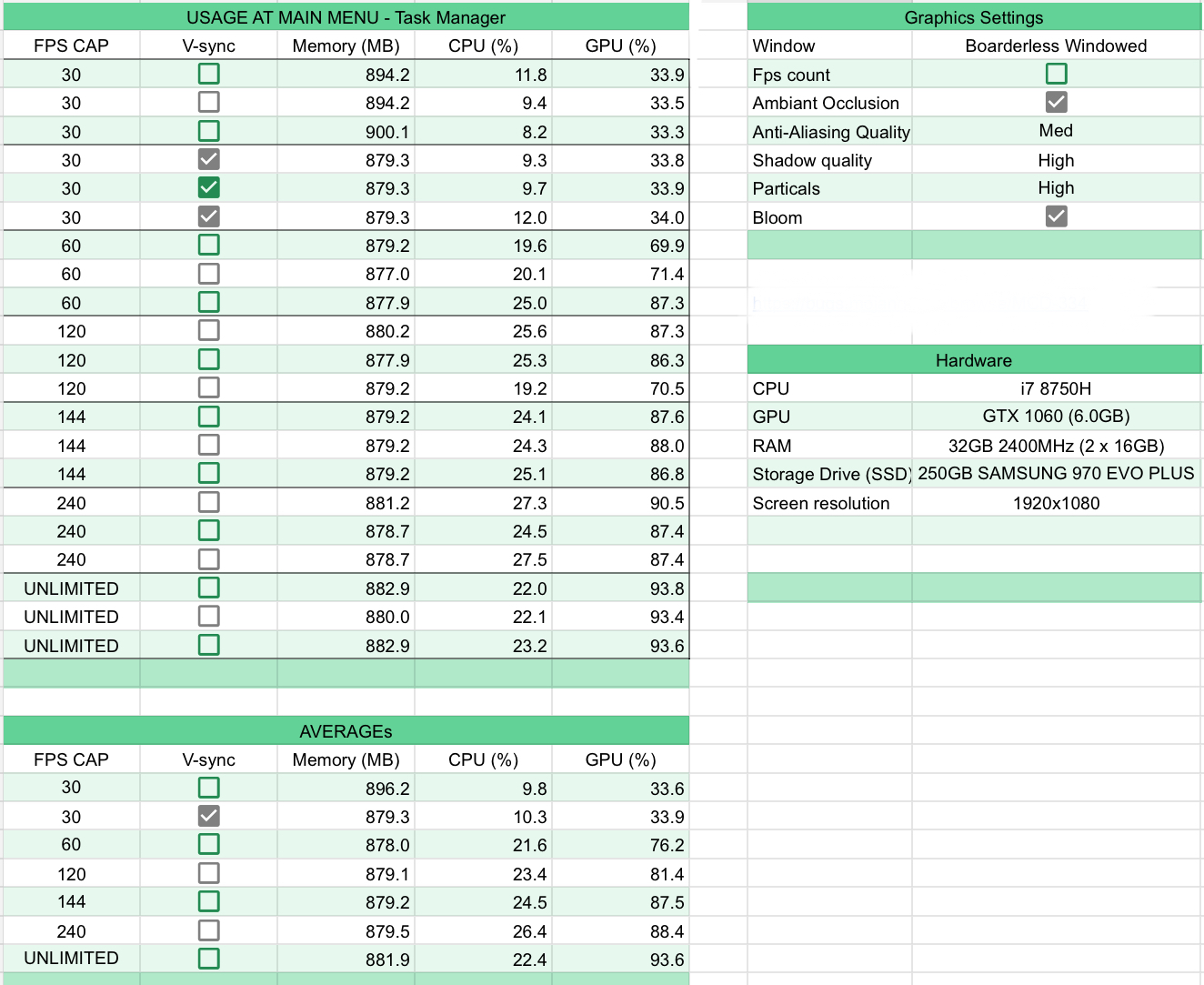
This data might provide some insight into the usage at different FPS Caps. Sample size is terrible at three unfortunately.
Did the .dat files contain empty spaces when opened with notepad?
(Summary comment on behalf of CerealDegree342 - Full Discord conversation at https://discord.com/channels/579770991056519194/684876964708089940/733566747440840734)
1. Enter the in-game menu
2. Select Online Game > Press X
3. Join friend that is at camp in an online session
Expected result: User successfully joins friend at camp
What occurs: Join Session Failure, Was not possible to retrieve game address error popup
User and friends on Non-Pro PS4, Dungeons Build 1.3.2.0, latest system firmware.User can join friends on other games with no issues, only occurs on Dungeons.
Error occurs when Joining friends via Invites or through the in-game join button. Error occurs to friends if they try to join the user.
Does not seem to be linked with save data (Error still occurs after moving the Save data to Cloud/USB and using a new character)
Reinstalling the game allows the user to join friends ONCE but after that, the error occurs when trying to join (Possible but not very helpful workaround)
🦑 Squid/Camp Crash Method is still yet to be tested on the issue.
(Open the game to the Main Menu > Disable Wi-Fi > Start an offline game > Make progress (Finish Creeper woods) When at camp: Pause > return to Main Menu > Enable Wi-Fi > Online game > Join Friend)
UPDATE: 🦑 Method is a temporary workaround. If the user receives the error again, attempt 🦑 again. Turning off the PS4 requires the method to be performed again.
(Discord link to message confirming: https://discord.com/channels/579770991056519194/690335665514086410/733840476087779351)
PC users, Perhaps attempt the following:
🧰 Clearing Xb Credentials through Credential Manager
Open the start menu > type and open Credential Manager > Windows Credentials > “Remove” all items with the Xb prefix > Reboot PC >
Visual Steps: <https://imgur.com/gallery/P2JYmMt>
---------------------------------------------------
This issue may be caused by Bullguard Antivirus
Add Dungeons to an exclusion list or Turn it Off
(Reported for Launcher, effectiveness on the Microsoft Store Version unknown)
@Feniks De Smet
📂 *Creating a Backup on Windows*
WIN(⊞)-R > Copy and paste the following path into the Run Box:
_1.2.0.0 and above_
%HOMEPATH%\Saved Games\Mojang Studios\Dungeons
Then, Press enter > Copy the _*number folder*_, not just individual files.
Do *Not* back them up in the Appdata folder, put them somewhere safe like a USB, Cloud storage or an External Hard Drive.
@Daniel Wystyrk The save data path was moved in v1.2.0.0. Both PC versions now share the same path.
🔏 Privilege error & Parental/Privacy Controls
You might have restrictions attached to your account preventing you from accessing online services. These restrictions might be due to Parental controls or to the birth-date entered on the account is below a specific age.
Please read: https://support.xbox.com/help/family-online-safety/child-accounts/why-am-i-asked-for-parental-consent
and
https://support.microsoft.com/en-us/help/4482922/xbox-one-online-safety-and-privacy-settings-for-parents-and-kids
To alter these restriction settings:
Log into https://account.xbox.com/settings with a Parent/Adult account that has the account that purchased the game in its Microsoft Family.
Click on the account image of the account with the game > Privacy
Select “Everyone” for “Others can communicate with voice, text or invites”
Click “Submit”
Click Xbox One/Windows 10 Online Safety
Select “Allow” for all available options > Click “Submit”
Restart Minecraft Dungeons
The settings might apply instantaneously or take up to 24 hours.
Likely not a bug with the game.
Attempt the following
Open the start menu > type “Apps” > Press Enter > Search for “Gaming” > Gaming Services > Advanced options > Terminate > Reset > reboot computer
Probablement pas un bug avec le jeu.
Essayez ce qui suit
Ouvrez le menu Démarrer> tapez “Applications” > Appuyez sur Entrée> Recherchez “Jeu” > Services de jeu > Options avancées > Arrêter > Réinitialiser > redémarrer l'ordinateur
🖥 *Failed to check for game dependencies error*
Please Download and Install the Following
*Direct X End-User Runtime:* https://www.microsoft.com/en-us/download/details.aspx?id=35
*Visual C++ Redistributable:* https://support.microsoft.com/en-gb/help/2977003/the-latest-supported-visual-c-downloads
(x64 for intel CPUs, ARM64 for ARM CPUs)
If Visual C install says "can only be installed on windows XP and newer platforms"
Start menu > Type "64 bit" > Enter > What does System Type say?
If 32 bit operating system, 64 based processor then follow:https://www.windowscentral.com/how-upgrade-32-bit-64-bit-version-windows-10
If both say 32 bit, unfortunately your computer is unable to run Minecraft dungeons due to your computer hardware being 32 Bit
Launcher or Microsoft store version?
Are you using gamepass?
Try:
Closing the game > Uninstall game> WIN(⊞)-R > %temp% > Enter > Ctrl-A > Delete > Reinstall game (Skip any folders in use)
Launcher or Microsoft store version?
See if referring to the below guide helps.
📔 *.augis' guide to unlocking secret locations*[
<|https://imgur.com/gallery/qnG8fWz] https://imgur.com/a/MEmnZZZ>
Asking for the spawn conditions/rate to change would be better suited in the feedback site as it is not a bug but a feature alteration.
https://aka.ms/DungeonsFeedback
Does this occur consistently? Does your laptop get hot - if so, try to provide more space where your laptop vents are.
The software might be incompatible with the game. If you are on windows 10, there are ease of access settings that can alter the screen display colour to accommodate for Red/Green Colourblindness.
Use the ZR or R button to toggle between offline and online mode on the main menu (as shown on screen)
The hero pass cosmetics are shown in In-game inventory > cosmetics.
DLC missions cannot be accessed until default difficulty has been completed
Backup your saved data and try uninstalling the game > rebooting the computer > reinstalling the game.
📂 *Creating a Backup on Windows*
WIN(⊞)-R > Copy and paste the following path into the Run Box:
_1.2.0.0 and above_
`%HOMEPATH%\Saved Games\Mojang Studios\Dungeons`
Then, Press enter > Copy the _*number folder*_, not just individual files.
Do *Not* back them up in the Appdata folder, put them somewhere safe like a USB, Cloud storage or an External Hard Drive.
Please check for any windows updates and try reinstalling the game
WAI
0/2 Secrets is for users who have entered the end room of the Stone Building at camp (to start the Rune Quest)
0/1 is for when the user hasn't done the above.
That IGN guide lacks information.
Please refer to:
📔 *.augis' guide to unlocking secret locations*
https://imgur.com/a/MEmnZZZ
🌐 *Public Multiplayer*
There is no Public Multiplayer of any kind implemented, you can only play with those you have added on your Friend List.
What are your PC Specifications?
Are you using the Launcher or Microsoft store version?
Try the following:
🧰 *Clearing Xb Credentials through Credential Manager*
Open the start menu > type and open Credential Manager > Windows Credentials > “Remove” *all* items with the *Xb* prefix > Reboot PC
Visual Steps: <https://imgur.com/gallery/P2JYmMt>
No information regarding Cross platform saves has been announced.
(Sorry, I got mixed up with Cross platform multiplayer)
🔎 Confirm that you have purchased Minecraft Dungeons Launcher
<https://www.minecraftdungeons.net/profile/>
Login to Minecraftdungeons.net
Click on your username > profile
Does the site say you own the game?
What happens if you try to play the game with a new character?
Did you use Cheat engine at any point on your current character?
Cheat engine can cause a lot of issues with dungeons.
Uninstall Cheat engine
THEN
WIN-R > paste %HOMEPATH%\Saved Games\Mojang Studios\Dungeons into the run box > Enter > Move the Numerical folder to the desktop
THEN
Uninstall the game (Delete saved data too)
THEN
Log out from Windows (or Restart/Shutdown to the log in screen) > _Hold SHIFT_ > Click the Power Icon > _Continuing to hold SHIFT, Click Restart (& Restart Anyway) > wait for a Blue interface to appear > __Release SHIFT_
THEN
Troubleshoot > Advanced Options > Start-up Settings > Restart > Press the number for _Safe mode with Command Prompt_ > Log in > You should see a Black Desktop with a Single cmd exe window
Type DISM.exe /Online /Cleanup-image /Restorehealth > Enter > Wait for it to complete > Type sfc /scannow > Enter > Wait for it to complete > Type chkdsk C: /f /v /x > Enter > Press Y > Enter > CTRL-ALT-DEL > Press the Power icon > Restart > Wait for the computer to return to the Log in screen > Log in
THEN
go to minecraftdungeons.net > triple lines > download launcher > run the downloaded file > install dungeons
I believe it has occurred to a few (very few) Xbox one users too.
console Safe zone settings have no affect. Users would have to temporarily alter their TV screen/display settings (away from the correct settings) to remove the the border (or ensure that the HUD and UI elements are visible on screen. Users would then have to revert these TV settings to use other Non-Dungeon UI and services.
🦑 *Squid/Camp Load crash (Windows)*
Open the game to the Main Menu > *Disable Wi-Fi* > Start an offline game > Make progress (Finish Creeper woods) When at camp: Pause > return to Main Menu > *Enable Wi-Fi*
You should be able to play the game normally from now on in both Online and Offline sessions.
If the issue persists but only for online games:
Open the game to the Main Menu > *Disable Wi-Fi* > Start an offline game > Make progress (Finish Creeper woods).
When at camp: *Enable WI-FI* > Make progress (again)
(If you are using an ethernet cable and the computer has no WI--FI functionality, remove and reinsert the cable accordingly)
Did you both purchase the Launcher version for the base game/standard edition and then purchase the hero pass from the Microsoft store (or vice-versa)?
If you are on Windows 10 (and have game bar enabled) try:
WIN(⊞)-G > triple lines > Xbox Social > Profile Image > Appear Offline > Appear Online > try seeing if your friend can join you
I believe invites don't fully work with the launcher version, you will have to join each other through the Online Game panel at the Main menu.
Try this:
WIN(⊞)-G > triple lines > Xbox Social > Profile Image > Appear Offline > Appear Online
(Already answered in MCD Discord)
This is a bug tracker. Please ask questions on the MCD reddit or the official MCD discord.
Please check Windows Update to see if there are any available updates
Are you using the Launcher version or MS store version of the game?
What mission is the screenshot taken at?
Upload the video to streamable and provide the link.
From exe? Both the Microsoft store version and the Launcher version use an exe in one way or another.
I will presume you are using the Launcher.
Please attempt the following:
✨ Setting Dungeons to run at High Performance (Launcher Version)
Open the Start menu > type “Graphic Settings” > press Enter
From the “Choose and app to set preference” dropdown box, select “Classic App” > Browse > paste the following into the Path bar:
OR
Click on Dungeons exe or MinecraftDungeons exe
Click “Add” then click on Dungeons exe or MinecraftDungeons exe > Options > High Performance > Save
Then reboot the computer.
Have your friends also attempted the above?
Have they been able to play with others online in dungeons?
Are you friends also on PC?
Try the solutions in: https://www.reddit.com/r/MinecraftDungeons/comments/iourm4/solved_daily_trials_not_appearing_on_nintendo/?utm_source=amp&utm_medium=&utm_content=post_body
_Creating a new character_, unlocking Creepy Crypt from Creeper Woods and completing Creepy Crypt does unlock the Trial for the new character.
I suspect a “flag” on _existing characters_ that have unlocked Creepy Crypt is not being read in the same way as the other “flags”. (The game recognises that the Crypt has been completed but not unlocked from Creeper Woods)
🌐 *Cross Platform Multiplayer*
Cross platform multiplayer has not been implemented yet.
It is on Mojang’s to do list.
No information regarding a release time has been announced.
> Our goal is to let everyone play together regardless of platform, and we’re looking forward to enabling cross-platform play in a future free game update
> ** From #faq**
> I see some folks asking about crossplay. It's still on the way and has not been forgotten! It's a big technical undertaking and won't make it for Creeping Winter but the team is making good progress on it.
> *Gartzke*
Could you provide some screenshots please?
Do you own dungeons on Windows 10 as well or JUST on Xbox one?
What power level is the character just before they enter camp (Before competing the mission)?
Passive chickens (excluding chicken jockeys) and regular pigs (excluding piggybank) are not implemented mobs.
The randomised food drops from mobs is intentional (cows will drop bread and pork for instance).
This would be feature request or a suggestion rather than a bug.
Please make feature requests and suggestions at the feedback site: https://feedback.minecraft.net/hc/en-us
What difficulty (ie: Adventure) and sub-difficultly (ie: III) are you playing the mission at to complete the blacksmith upgrade requirements?
Please refer to https://www.playstation.com/en-gb/get-help/help-library/error-codes/su-30746-0/ on entering safe mode and updating the system.
What are your system specifications?
Make sure the time and date settings is set to automatically update If they are already, turn auto update off > reboot switch > auto update on.
If the issue persists, check if
Open Dungeons > Settings > Game > Configure online play
Asks for you to sign out.
Sign out if that is the case and then try signing in again.
Just the integrated graphics and no dedicated GPU/Graphics card?
Multiple users have reported this occurring on the Nintendo Switch from the Minecraft Dungeons discord server.
Occurrence 1
Occurrence 2
Could you follow <https://minecrafthopper.net/help/dxdiag/> and post the URL here so we can get more info about your system.
Graphic issues like this are likely caused by being under minimum requirements.
Explore around camp. There should be some piston jump pads present to get to the other side. When at the other side, hug the walls and find a hidden path to the stone building
Judging from the screenshots, the character.
Did you update from pre-1.2.0.0 to 1.4?
Thank you for taking the time to construct a report.
This ticket Duplicates an existing main ticket that we are tracking at:
MCD-638.This ticket will be resolved as a duplicate and linked onto the main ticket.
Commenting there with any extra new information and voting for the main ticket would be greatly appreciated.
If you haven't already, you might be interested in the search feature to discover if the issue has already been reported before.
Here are some helpful quick links:
📓 Issue Guidelines
💬 Community Support
📧 Mojang Support
✍️ Feedback and Suggestions
📖 Game Wiki
Thank you for taking the time to construct a report.
This ticket Duplicates an existing main ticket that we are tracking at: ) and voting for the main ticket would be greatly appreciated.
MCD-4442.This ticket will be resolved as a duplicate and linked onto the main ticket.
Commenting there with any extra new information (which you have shown to have
If you haven't already, you might be interested in the search feature to discover if the issue has already been reported before.
Here are some helpful quick links:
:notebook: Issue Guidelines
:speech_bubble: Community Support
:e-mail: Mojang Support
:writing_hand: Feedback and Suggestions
:book: Game Wiki
Thank you for taking the time to construct a report.
This ticket Duplicates an existing main ticket that we are tracking at:
MCD-1205.This ticket will be resolved as a duplicate and linked onto the main ticket.
Commenting there with any extra new information and voting for the main ticket would be greatly appreciated.
If you haven't already, you might be interested in the search feature to discover if the issue has already been reported before.
Here are some helpful quick links:
📓 Issue Guidelines
💬 Community Support
📧 Mojang Support
✍️ Feedback and Suggestions
📖 Game Wiki
Thank you for taking the time to construct a report.
However, this ticket is Invaild as it describes multiple bugs/issues.
Please only make tickets containing a single bug report. Bugs are easier for both us and for you to track and identify individually in their own tickets.
Here are some helpful quick links:
📓 Issue Guidelines
💬 Community Support
📧 Mojang Support
✍️ Feedback and Suggestions
📖 Game Wiki
Thank you for taking the time to construct a report.
This ticket Duplicates an existing main ticket that we are tracking at:
MCD-4380.This ticket will be resolved as a duplicate and linked onto the main ticket.
Commenting there with any extra new information and voting for the main ticket would be greatly appreciated.
If you haven't already, you might be interested in the search feature to discover if the issue has already been reported before.
Here are some helpful quick links:
📓 Issue Guidelines
💬 Community Support
📧 Mojang Support
✍️ Feedback and Suggestions
📖 Game Wiki
"Thank you for taking the time to construct a report.
This ticket Duplicates an existing main ticket that has been confirmed at:
MCD-4459This ticket will be resolved as a duplicate and linked onto the main ticket.
If you haven't already, you might be interested in the search feature to discover if the issue has already been reported before.
Here are some helpful quick links:
Issue Guidelines
Community Support
Mojang Support
Feedback and Suggestions
Game Wiki"
"Thank you for taking the time to construct a report.
However, this is a technical support issue and rather than a bug.
This ticket will be considered Invalid.
The Minecraft Community Support discord possesses the resources and experience to assist you with your issue.
Here are some helpful quick links:
Issue Guidelines
Community Support
Mojang Support
Game Wiki"
Merchants must be found and rescued in order for them to spawn at camp.
"Thank you for taking the time to construct a report.
This ticket Duplicates an existing main ticket that we are tracking at:
MCD-4442This ticket will be resolved as a duplicate and linked onto the main ticket.
Commenting there with any extra new information and voting for the main ticket would be greatly appreciated.
If you haven't already, you might be interested in the search feature to discover if the issue has already been reported before.
Here are some helpful quick links:
Issue Guidelines
Community Support
Mojang Support
Feedback and Suggestions
Game Wiki"
"Thank you for taking the time to construct a report.
This ticket Duplicates an existing main ticket that has been confirmed at:
MCD-4472This ticket will be resolved as a duplicate and linked onto the main ticket.
If you haven't already, you might be interested in the search feature to discover if the issue has already been reported before.
Here are some helpful quick links:
Issue Guidelines
Community Support
Mojang Support
Feedback and Suggestions
Game Wiki"
Could you provide screenshots please?
The count does not appear to reset at local midnight and continues counting up with each completed trial.
Yes. See Latest Discord Conversation
Soul artefacts like the Lightning Rod and Harvester will cause mobs to not drop collectable souls (you can see the souls float up and fade away to the skies). This is intentional.
We are unable to recover your character, sorry.
What was the previous version before your updated? Did the game crash or force quit (Task manager, Alt-F4, Bluescreened) prior to updating?
Are the files at
WIN-R > `%HOMEPATH%\Saved Games\Mojang Studios\Dungeons` > Enter > Number folder > Characters
DAT or BAK files?
Is there anything in the files of the Characters folder?
There is this save file provided by Mojang to help you get back to where you where: https://help.minecraft.net/hc/en-us/articles/360047236831
What are your system specifications?
We are unable to recover your character, sorry.
It is not unusual to only have the one file be damaged and it is usually the one most recently loaded.
Did the game crash or force quit (Task manager, Alt-F4, Bluescreened) prior to reopening it again?
What prevents you from entering Squid Coast?
What device are you on?
Ah.. of which case:
This ticket Duplicates an existing main ticket that we are tracking at: https://bugs.mojang.com/browse/MCD-1205
This ticket will be resolved as a duplicate and linked onto the main ticket.
Voting for the main ticket would be greatly appreciated. Please only comment there if you have extra information that hasn't been stated before.
If you haven't already, you might be interested in the search feature to discover if the issue has already been reported before.
You can use this file from to help you get back to were if you haven't already done so: https://help.minecraft.net/hc/en-us/articles/360047236831
Here are some helpful quick links:
Issue Guidelines
Community Support
Mojang Support
Feedback and Suggestions
Game Wiki"
"Thank you for taking the time to construct a report.
This ticket Duplicates an existing main ticket that has been confirmed at:
MCD-4377This ticket will be resolved as a duplicate and linked onto the main ticket.
If you haven't already, you might be interested in the search feature to discover if the issue has already been reported before.
Here are some helpful quick links:
Issue Guidelines
Community Support
Mojang Support
Feedback and Suggestions
Game Wiki"
If the character files are themselves damaged, then they unfortunately won't be readable by the game.
Often the contents of the save file is replaced by blank characters. The file size is retained but the information is not.
Thank you for taking the time to construct a report.
However, this is a technical support issue and rather than a bug.
This ticket will be considered Invalid.
The Minecraft Community Support discord possesses the resources and experience to assist you with your issue.
Here are some helpful quick links:
Issue Guidelines
Community Support
Mojang Support
Feedback and Suggestions
Game Wiki
Have your tried deleting anything relating to Minecraft Dungeons from the Switch's storage through System Settings > Data Management (ie: Save Data)?
"Thank you for taking the time to construct a report.
This ticket Duplicates an existing main ticket that has been confirmed at:
MCD-4412This ticket will be resolved as a duplicate and linked onto the main ticket.
If you haven't already, you might be interested in the search feature to discover if the issue has already been reported before.
Here are some helpful quick links:
Issue Guidelines
Community Support
Mojang Support
Feedback and Suggestions
Game Wiki"
What happens if you attempt similar steps as the Switch to workaround around the issue?
PS4 Settings > Network > Clear the checkbox for "Connect to the Internet" > Start Dungeons > If loads correctly, re-check "Connect to the Internet"
Thank you for taking the time to construct a report.
This ticket Duplicates an existing main ticket that we are tracking at:
MCD-3963This ticket will be resolved as a duplicate and linked onto the main ticket.
Commenting there with any extra new information and voting for the main ticket would be greatly appreciated.
If you haven't already, you might be interested in the search feature to discover if the issue has already been reported before.
Here are some helpful quick links:
Issue Guidelines
Community Support
Mojang Support
Feedback and Suggestions
Game Wiki
Could you elaborate?
Please include:
If you and your friend have been able to play online in Minecraft Dungeons before.
If you and your friend is on the Launcher or Microsoft store variant.
The error/dialogue that appears preventing you from playing online.
Please also check that you and your friend are on the latest update (1.4.6 )from Pause or Main menu > Settings.
Could you provide screenshots and any more details to reproduce the entrapment please.
Thank you for taking the time to construct a report.
This ticket Duplicates an existing main ticket that we are tracking at: http://bugs.mojang.com/browse/MCD-15229
This ticket will be resolved as a duplicate and linked onto the main ticket.
Commenting there with any extra new information and voting for the main ticket would be greatly appreciated.
If you haven't already, you might be interested in the search feature to discover if the issue has already been reported before.
Here are some helpful quick links:
Issue Guidelines
Community Support
Mojang Support
Feedback and Suggestions
Game Wiki"
Thank you for taking the time to construct a report.
This ticket Duplicates an existing main ticket
MCD-153that has been labelled by the developers to Works as intended.Please vote on the feedback site post if you wish to see this become a implemented feature in the future.
If you haven't already, you might be interested in the search feature to discover if the issue has already been reported before.
Here are some helpful quick links:
Issue Guidelines
Community Support
Mojang Support
Feedback and Suggestions
Game Wiki
Thank you for taking the time to construct a report.
Ticket is Invalid as it is a feature request or a suggestion rather than a bug.
This tracker is for bug reports only..
Here are some helpful quick links:
Issue Guidelines
Community Support
Mojang Support
Feedback and Suggestions
Game Wiki
Thank you for taking the time to construct a report.
This ticket Duplicates an existing main ticket that we are tracking at:
MCL-15229This ticket will be resolved as a duplicate and linked onto the main ticket.
Commenting there with any extra new information and voting for the main ticket would be greatly appreciated.
If you haven't already, you might be interested in the search feature to discover if the issue has already been reported before.
Here are some helpful quick links:
Issue Guidelines
Community Support
Mojang Support
Feedback and Suggestions
Game Wiki
Thank you for taking the time to construct a report.
This ticket Duplicates an existing main ticket that we are tracking at:
MCL-15229This ticket will be resolved as a duplicate and linked onto the main ticket.
Commenting there with any extra new information and voting for the main ticket would be greatly appreciated.
If you haven't already, you might be interested in the search feature to discover if the issue has already been reported before.
Here are some helpful quick links:
Issue Guidelines
Community Support
Mojang Support
Feedback and Suggestions
Game Wiki
"Thank you for taking the time to construct a report.
This ticket Duplicates an existing main ticket that we are tracking at:
MCD-1205This ticket will be resolved as a duplicate and linked onto the main ticket.
Commenting there with any extra new information and voting for the main ticket would be greatly appreciated.
If you haven't already, you might be interested in the search feature to discover if the issue has already been reported before.
Here are some helpful quick links:
Issue Guidelines
Community Support
Mojang Support
Feedback and Suggestions
Game Wiki"
Thank you for taking the time to construct a report.
However, this is a technical support issue and rather than a bug.
This ticket will be considered Invalid.
The Minecraft Community Support discord possesses the resources and experience to assist you with your issue.
Here are some helpful quick links:
Issue Guidelines
Community Support
Mojang Support
Feedback and Suggestions
Game Wiki
Thank you for taking the time to construct a report.
However, this ticket is Invaild.
Purchasing the Microsoft store variant of the game does not grant access to use the launcher to open the game. You can open Minecraft Dungeons from the Start menu of your computer.
Here are some helpful quick links:
Issue Guidelines
Community Support
Mojang Support
Feedback and Suggestions
Game Wiki
You can launch the Microsoft store variant from the start menu.
Hero pass/edition cosmetics are located at In-Game inventory > cosmetics.
The launcher and Microsoft store do not share purchases (DLC for the launcher will not be recognised by the store for example.)
Your "main" issue is quite hard to decipher from the infomation provided.
Does the crashing reoccur if you update your graphics driver to the latest version?
5) i see that friend is online but i cant add him, and he can join me
Your friend is able to join you but you are unable to invite them?
Perhaps attempt: WIN(⊞)-G > triple lines > Xbox Social > Profile Image > Appear Offline > Appear Online
Could you provide a video or more explanation of your issue please?
"Thank you for taking the time to construct a report.
This ticket Duplicates an existing main ticket that we are tracking at:
MCD-4062This ticket will be resolved as a duplicate and linked onto the main ticket.
Commenting there with any extra new information and voting for the main ticket would be greatly appreciated.
If you haven't already, you might be interested in the search feature to discover if the issue has already been reported before.
Here are some helpful quick links:
Issue Guidelines
Community Support
Mojang Support
Feedback and Suggestions
Game Wiki"
Thank you for taking the time to construct a report.
However, this ticket is Invaild as it is not a bug report.
Curious amour is not implemented into the game.
Here are some helpful quick links:
Issue Guidelines
Community Support
Mojang Support
Feedback and Suggestions
Game Wiki
Could you attach screenshots or videos and provide your computer specifications please.
This ticket is Invalid. This tracker is for bug reports only.
You can request refunds from:
https://help.minecraft.net/hc/requests/new For the Launcher from minecraftdungeons.net
https://xbox.com/refund For the Microsoft store variant.
Here are some helpful quick links:
Issue Guidelines
Community Support
Mojang Support
Feedback and Suggestions
Game Wiki"
Thank you for taking the time to construct a report.
This ticket Duplicates an existing main ticket that has been confirmed at:
MCD-4459This ticket will be resolved as a duplicate and linked onto the main ticket.
If you haven't already, you might be interested in the search feature to discover if the issue has already been reported before.
Here are some helpful quick links:
Issue Guidelines
Community Support
Mojang Support
Feedback and Suggestions
Game Wiki
Thank you for taking the time to construct a report.
This ticket Duplicates an existing main ticket that has been confirmed at:
MCD-4387This ticket will be resolved as a duplicate and linked onto the main ticket.
If you haven't already, you might be interested in the search feature to discover if the issue has already been reported before.
Here are some helpful quick links:
Issue Guidelines
Community Support
Mojang Support
Feedback and Suggestions
Game Wiki
Thank you for taking the time to construct a report.
Ticket is Invalid as it is a feature request or a suggestion rather than a bug.
This tracker is for bug reports only..
Here are some helpful quick links:
Issue Guidelines
Community Support
Mojang Support
Feedback and Suggestions
Game Wiki
Does this issue resemble
MCD-4174?"Thank you for taking the time to construct a report.
However, this is a technical support issue rather than a bug and also used 3rd party software to modify the game/characters.
This ticket will be considered Invalid.
The Minecraft Community Support discord possesses the resources and experience to assist you with your issue.
Here are some helpful quick links:
Issue Guidelines
Community Support
Mojang Support
Feedback and Suggestions
Game Wiki"
Hidden Scrolls are not guaranteed to appear in missions and can be very rare,
See if .augis' guide to unlocking secret locations (imgur} assists you in uncovering the scrolls.
Arch Haven is the pesky one that has no indication of appearance unless you travel to and check the area it can spawn at.
Do you use the Launcher or Microsoft store variant?
Is there a .dat or .bak file at WIN-R > %HOMEPATH%\Saved Games\Mojang Studios\Dungeons > Enter > [Number folder] > Characters ?
If a file is shown there, does opening the file with notepad show lots of random characters or blank spaces?
Thank you for taking the time to construct a report.
This ticket Duplicates an existing main ticket that has been confirmed at:
MCD-4640This ticket will be resolved as a duplicate and linked onto the main ticket.
If you haven't already, you might be interested in the search feature to discover if the issue has already been reported before.
Here are some helpful quick links:
Issue Guidelines
Community Support
Mojang Support
Feedback and Suggestions
Game Wiki
Could you specify the error that appears please.
If the error states “service not available” and you have previously been able to login successfully, attempt the following:
Open Dungeons > Settings > Game > Configure online play > Sign out > sign in
Attempt:
Open Dungeons -> Settings -> Game -> Configure online play See if there is an option to Sign out and click it if it is present. Then sign in
If the issue persists verify that your Time & Date settings are correct .
System Settings -> System -> Date and Time
> set to automatically update (Synchronise Clock via Internet)
Reproduction steps:
Thank you for taking the time to construct a report.
However, this is a technical support issue rather than a bug.
This ticket will be considered Invalid.
The Minecraft Community Support discord possesses the resources and experience to assist you with your issue.
Here are some helpful quick links:
Issue Guidelines
Community Support
Mojang Support
Feedback and Suggestions
Game Wiki
"Thank you for taking the time to construct a report.
However, this ticket is Incomplete as it does not contain suffecent infomation for the report to be understood and repoduced.
You are free to create and post a new ticket with more infomation and repoducrion steps on this issue. Please ensure you have read the Bug Tracker Guidelines and have used the search feature to discover if the issue has already been reported before.
Here are some helpful quick links:
Issue Guidelines
Community Support
Mojang Support
Feedback and Suggestions
Game Wiki"
Thank you for taking the time to construct a report.
This ticket Duplicates an existing main ticket that we are tracking at:
MCD-4406This ticket will be resolved as a duplicate and linked onto the main ticket.
Commenting there with any extra new information and voting for the main ticket would be greatly appreciated.
If you haven't already, you might be interested in the search feature to discover if the issue has already been reported before.
Here are some helpful quick links:
Issue Guidelines
Community Support
Mojang Support
Feedback and Suggestions
Game Wiki
Try using an incognito / in-private window.
Thank you for taking the time to construct a report.
This ticket Duplicates the primary ticket that we are tracking at:
MCD-4947While this ticket was posted earlier than the primary ticket linked, this one has less infomation attached.
This ticket will be resolved as a duplicate and linked onto the main ticket.
Here are some helpful quick links:
Issue Guidelines
Community Support
Mojang Support
Feedback and Suggestions
Game Wiki
"Thank you for taking the time to construct a report.
However, this ticket is Invaild.
Curious armour is not an obtainable item in the game.
The item likely was forced added in by non-legitimate methods.
The armour is known to crash the game upon interaction.
Here are some helpful quick links:
Issue Guidelines
Community Support
Mojang Support
Feedback and Suggestions
Game Wiki"
Thank you for taking the time to construct a report.
However, this ticket is Invaild as this is not a bug report.
🔏 Privilege error & Parental/Privacy Controls
If your account has a birthdate under your country's age of digital majority, it will be considered a Child Account and it will need consent from your parent or guardian to access Multiplayer services.
To permit access:
Log in to <http://account.microsoft.com/family/addmember> on a parent account and add the child account to a Microsoft family.
Then visit <https://account.xbox.com/settings> -> Click on the profile of the Child account -> Set Others can communicate with voice, text or invites to Everyone -> Scroll down and click Submit
Click Xbox One/Windows 10 Online Safety -> Set You can create and join clubs to Allow -> Set Join Multiplayer Games to Allow -> Scroll down and click Submit
Then restart Minecraft Dungeons
The settings might apply instantaneously or take up to 24 hours.
Here are some helpful quick links:
Issue Guidelines
Community Support
Mojang Support
Feedback and Suggestions
Game Wiki
Does this occur at all instances where controller buttons are mentioned or only at the main menu?
Can confirm.
The visual bug is not immediately apparent after enchantment of Cowardice and Death Bater and leaving the inventory (Cowardice and Death Bater effect icons are shown separately as intended). Bug becomes visible after entering a mission or camp with the amour possessing Cowardice and Death Bater equipped.
Unequipping the armour in camp does not remove the visual bug however re-equipping does separate the two enchantment effects icons. Unequpping again and leaving the inventory makes Cowardice Effect icon erroneously visible even with different armour pieces that do not possess Cowardice. Entering a mission or returning to the main menu removes the persistent Cowardice effect icon. Taking damage does not remove the Cowardice icon.
Does
MCD-638describe the report you specifed?The soggy cave scroll entrance can appear in one of multiple locations after the interior section of soggy swamp, not just the one spot you are positioned at. Traverse further than what you currently are doing as it can be located just before the cauldron boss.
As you have already started/finished the rune collection, you are searching for two secrets.
Thank you for taking the time to construct a report.
Non-consistent/One-time crashes like these generate logs that are sent to Mojang upon pressing “Submit”.
(I personally do experience these occasional, spontaneous crashes. Ensure your PC is not overheating.)
This ticket will be considered Invalid.
Here are some helpful quick links:
Issue Guidelines
Community Support
Mojang Support
Feedback and Suggestions
Game Wiki
Thank you for taking the time to construct a report.
However, this ticket is Invaild.
Curious armour is not an obtainable item in the game.
The item was forced added in by non-legitimate methods.
The armour is known to crash the game upon interaction.
Here are some helpful quick links:
Issue Guidelines
Community Support
Mojang Support
Feedback and Suggestions
Game Wiki
Purchasing/redeeming for one platform does not grant access to the game on other platforms - This is intended.
The save file location you are looking at is for pre-1.2.0.0. The current location is at WIN-R -> Paste %HOMEPATH%\Saved Games\Mojang Studios\Dungeons to the run box -> Enter -> [numerical folder] -> characters.
There might be are two files at that current location, one being your Lv.140 save and another being the old save (the one you see in the game currently) from pre-1.2.0.0 that may have been automatically reimported from the old location when the latest file was damaged.
Close the game before opening any of the files.
If you open a file at the current location with notepad and the contents appear blank, that save file has been damaged. Unless you made a backup before the sudden-reboot, that character has been lost,
If there is seemingly random characters shown in the file and if that file is a .bak, it might still be functional.
Right click the .bak file -> Rename -> Replace .bak with .dat -> Press enter
Perhaps attempt the following:
🧰 *Clearing Xb Credentials through Credential Manager*
Open the start menu -> type and open Credential Manager -> Windows Credentials -> “Remove” *all* items with the *Xb* prefix -> Reboot PC
Visual Steps: <https://imgur.com/gallery/P2JYmMt>
Could you elaborate? Completing the mission does not unlock the merchant by itself as described above,
Perhaps provide a video of you rescuing the captured merchant and then returning to camp.
There is a small visual guide at https://imgur.com/a/44Knd9I if it assists.
Thank you for taking the time to construct a report.
However, this ticket is Invaild as this is not a bug report.
The location you are referring to is for pre-1.2.0.0.
The Numerical folder location is now WIN-R -> paste `%HOMEPATH%\Saved Games\Mojang Studios\Dungeons` into the run box -> enter
Here are some helpful quick links:
Issue Guidelines
Community Support
Mojang Support
Feedback and Suggestions
Game Wiki
Thank you for taking the time to construct a report.
This ticket Duplicates an existing main ticket that we are tracking at:
MCD-1100This ticket will be resolved as a duplicate and linked onto the main ticket.
Commenting there with any extra new information and voting for the main ticket would be greatly appreciated.
If you haven't already, you might be interested in the search feature to discover if the issue has already been reported before.
Here are some helpful quick links:
Issue Guidelines
Community Support
Mojang Support
Feedback and Suggestions
Game Wiki
Affects all platforms when using controllers.
Keyboard and Mouse users seem to possess a greater reach due to the ability of directly clicking interactables, thus removing the gameplay significance of the bug, rather than turning the character to face the interactable item, seemingly with a height restriction, in the case of using controller.
Thank you for taking the time to construct a report.
However, the ticket describes functionality that Works as Intended.
Cross platform cloud saves/Account connected progression is not currently an implemented feature. It has been announced to be in the works at this article
Here are some helpful quick links:
Issue Guidelines
Community Support
Mojang Support
Feedback and Suggestions
Game Wiki
See https://help.minecraft.net/hc/articles/360053351331 for information and visual steps.
To access dungeons on the Minecraft Launcher:
• Sign into the Microsoft account from SETTINGS -> ACCOUNT -> Add Microsoft Account.
• Leave the SETTINGS -> click the top left corner of the launcher where the account name is shown -> Select the Microsoft Account.
You do not need to sign out of any pre-existing Mojang Accounts.
Dungeons has never used Mojang accounts, only Microsoft accounts.
Ensure the top left of your launcher says Microsoft account, not Mojang account.
Glided Items with 300 total at exit however I can attempt the alternative scenario you raised.
Occurs in both cases you described.
You should be able to use your mouse wheel or the scroll bar.
Any items with xb at the start of the name is an Xb prefix credential.
Are you referring to the videos at https://www.minecraft.net/en-us/dungeons ?
Jungle https://youtu.be/dXZgUCxF5qc
Winter https://youtu.be/bA1DxKP63hs
Peaks https://youtu.be/PC0e1-rtn-Q
Nether https://youtu.be/vAdT4Kp9nGE
I did see some for Howling Peaks video at t=19 (Goat Gear, Rugged Climbing Gear & Resolute Tempest Knife) but not for any of the others.
Could you elaborate on the others?
Try resizing the game window. Seems item descriptions can disappear on lower window dimensions.


It could be the case that this occurs only with the Soul Hunter Crossbow
What account does the top left of your launcher say?
If it says Mojang account please see the following information:
See https://help.minecraft.net/hc/articles/360053351331 for information and visual steps.
To access dungeons on the Minecraft Launcher:
• Sign into the Microsoft account from *SETTINGS -> ACCOUNT -> Add Microsoft Account*.
• Leave the SETTINGS -> *click the top left corner* of the launcher where the account name is shown -> Select the Microsoft Account.
You do not need to sign out of any preexisting Mojang Accounts.
Dungeons has never used Mojang accounts, only Microsoft accounts.
Ensure the top left of your launcher says Microsoft account, not Mojang account.
See https://help.minecraft.net/hc/articles/360053351331 for information and visual steps.
To access dungeons on the Minecraft Launcher:
• Sign into the Microsoft account from SETTINGS -> ACCOUNT -> Add Microsoft Account.
• Leave the SETTINGS -> click the top left corner of the launcher where the account name is shown -> Select the Microsoft Account.
You do not need to sign out of any preexisting Mojang Accounts.
Dungeons has never used Mojang accounts, only Microsoft accounts.
Ensure the top left of your launcher says Microsoft account, not Mojang account.
Has the latest 1.8.X.0 hotfix resolved these specific occurrences for you?
There was some fixes to menu text-to-speech noted in the patch-notes: https://aka.ms/DungeonsUpdate
Following discussion at the Minecraft Dungeons Discord, this occurrence Works as intended
Offering enchantment points to Ancient Hunts will reduce the hero's level by the number of points offered.
The power value of dropped/rewarded equipment is determined by the hero's power and the difficulty/threat level selected.
Here are some helpful quick links:
Issue Guidelines
Community Support
Mojang Support
Feedback and Suggestions
Game Wiki
I believe your images show the little boat that randomly generates.
The arch haven scroll is now located in the large ship that always generates.
Can you access regular daily trials?
Does your game has a connected Microsoft account?
Are your date time settings is set to "Synchronise Clock via Internet"?
Ay. You need to have a Microsoft account to access the trials, including these ones. See FAQ-Daily-Trials and Signing-into-a-Microsoft-Account for more information.
Seems the Launcher is set to read the Mojang account. Dungeons has never used Mojang account, only Microsoft accounts.
Ensure your Microsoft account is added from Launcher > Settings > Accounts > Add Microsoft account
Then instruct the Launcher to read the Microsoft account from clicking the top left corner and selecting the added Microsoft account.
Until Migration occurs, you’ll have to keep switching between the Mojang and Microsoft account from the top left corner to play Java Minecraft and Dungeons respectively.
Change log of update 1.9.1.0 states that this issue has been fixed. Please confirm with a reply/comment if this is indeed the case.
Thank you for taking the time to construct a report
This ticket describes intended game behaviour and shall be closed as Works as intended.
Soul artifacts such as the Harvester do not cause defeated mobs to drop collectable souls.
Here are some helpful quick links:
Issue Guidelines
Community Support
Mojang Support
Feedback and Suggestions
Game Wiki
Users are unable to successfully upload their heroes to Cloud Storage. Occurs for both existing and new characters, regardless of DLC equips.
Reproduction steps:
Expected result: Hero is uploaded after a short duration with a prompt to signify result (completion or failure).
Actual result: User encounters a loading screen with seemingly no end. Clicking the in-game X does not permit the user to escape this screen, forcing the user to force close the game to escape. Selected hero does not appear in the uploaded characters upon reopening the game -> Hero Settings -> Select blank slot -> Download hero.
As Berrybox referenced, the drawbridge is lowered by a button on the other side of said bridge, not by completing missions and it isn't lowered when pressing the button when in other people's camps.
In your own camp, look for a bounce pad that will launch the hero to the other side of camp then hug the wall till a hidden path is found. The button will be accessible upon crossing the path.
Thank you for taking the time to construct a report.
This ticket Duplicates the behaviour described at an existing main ticket:
MCD-45This ticket will be resolved as a duplicate and linked onto the main ticket.
If you haven't already, you might be interested in the search feature to discover if the issue has already been reported before.
Here are some helpful quick links:
Issue Guidelines
Community Support
Mojang Support
Feedback and Suggestions
Game Wiki
Thank you for taking the time to construct a report.
This ticket Duplicates an existing ticket,
MCD-5198, that describes the same behaviour.This ticket will be resolved as a duplicate and linked onto the main ticket.
That ticket has already been resolved as Won't Fix. The Encrusted Anchor does have description text. Description text does not appear if available space is insufficient to display it.
If you haven't already, you might be interested in the search feature to discover if the behaviour has already been reported before.
Here are some helpful Quick Links:
📓 Bug Tracker Guidelines
💬 Community Support
📧 Mojang Support
📓 Project Summary
✍️ Feedback and Suggestions
📖 Game Wiki
📖 FAQs
Did you complete the trials in a multiplayer environment?
If yes, please specify if it was online (hosting or joining) or local co-op?
Closing the ticket as Awaiting Response temporarily. Like before, it'll re-open when you reply.
Huh... Thought they did. Wonder when that got turned off
Here are the new links, sorry about that:
Non-Trial https://streamable.com/r8r2kk
Trail: https://streamable.com/wja4h6