 MCD-7152
Minecraft Dungeons crashes on opening using discrete graphics card
Clarification: during the explanation of the problem I have shown in brackets the attached image to which it refers.
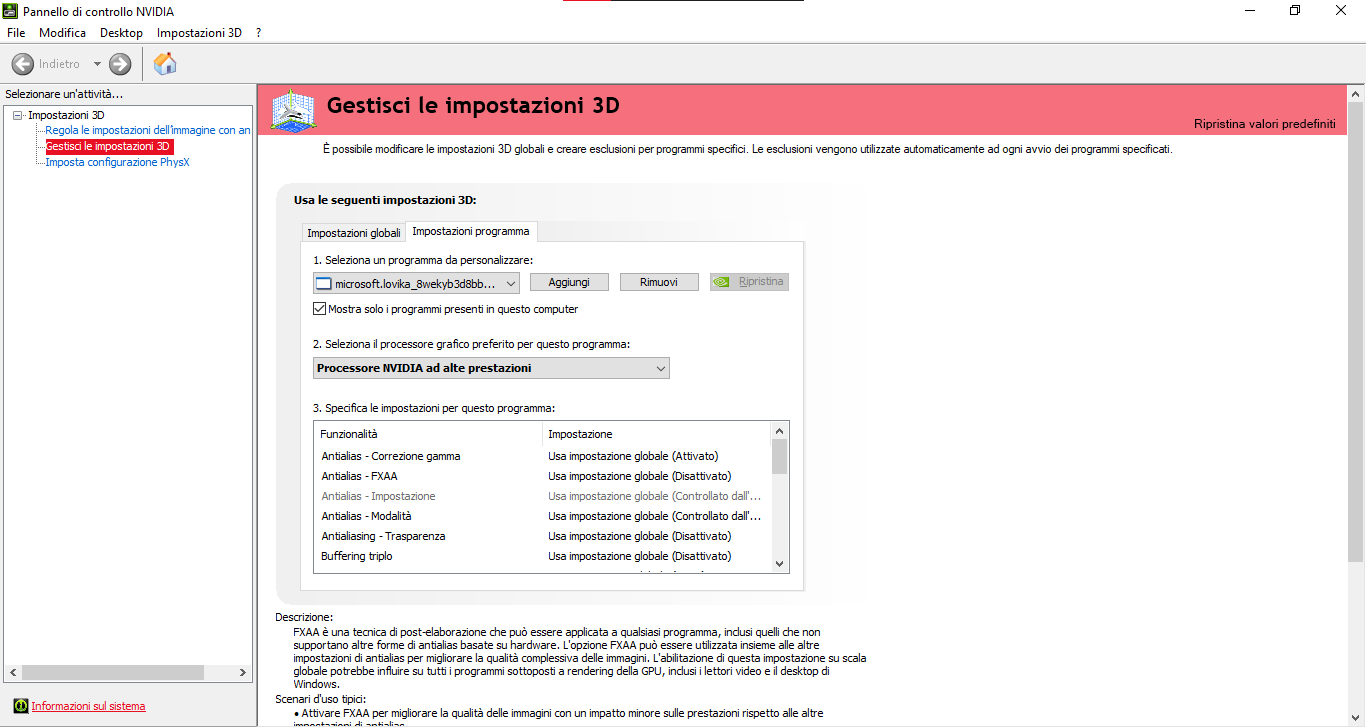
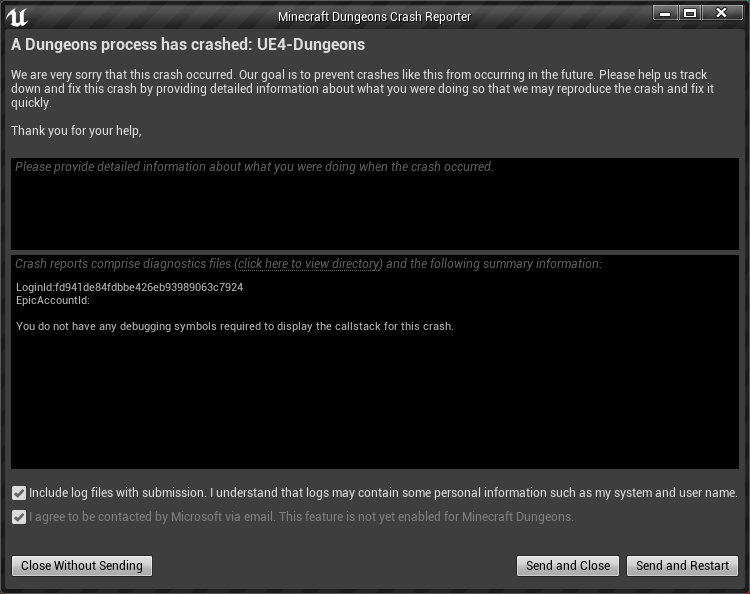
If I try opening Minecraft Dungeons using the discrete graphics card (set from the NVIDIA control panel and going to "Manage 3D Settings" -> "Program Settings" -> then selecting the program, in this case Minecraft Dungeons, and finally setting "High performance NVIDIA processor" as preferred graphics processor (img01)) the game crashes immediately at the beginning showing the following error (img02):
LoginId:fd941de84fdbbe426eb93989063c7924
EpicAccountId:
You do not have any debugging symbols required to display the callstack for this crash.
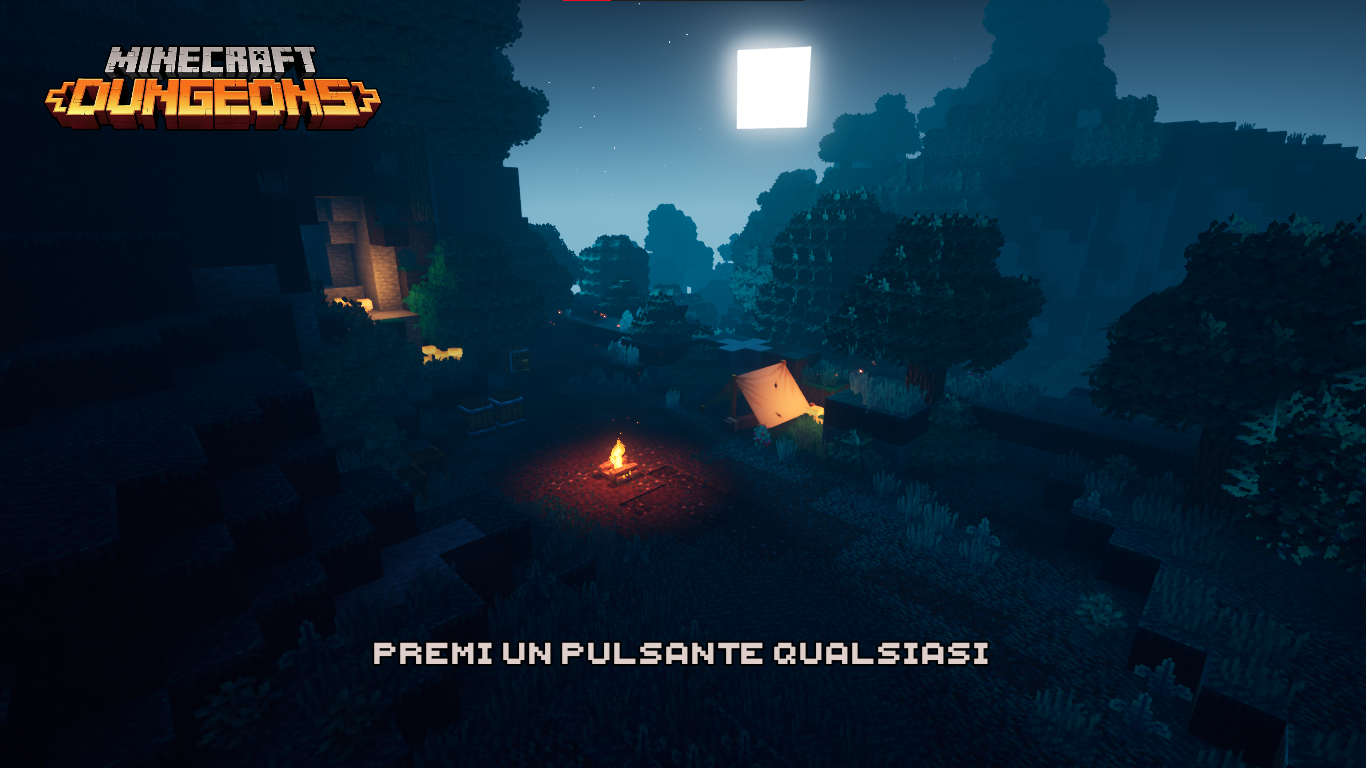
Instead if I try it again but using the integrated graphics card (always set from the NVIDIA control panel (img03-1)) the game works perfectly (img04).
Below are the specifications of my PC:
- CPU: Intel Core i5-2450M;
- Integrated GPU: Intel HD Graphics 3000;
- Discrete GPU: NVIDIA GeForce GT 540M;
- RAM: 6.00 GB
Finally all of my PC's component drivers are updated to the latest version.
P.S.
I also attach a compressed folder with crash related files.


- Awaiting Response
 Fabio Zanconato
- 1
- 1
- Plausible
- Windows
- Windows 10 (Version: 21H2; OS build: 19044.1645)
Created Issue:
Minecraft Dungeons crashes on opening using discrete graphics card
Clarification: during the explanation of the problem I have shown in brackets the attached image to which it refers.
If I try opening Minecraft Dungeons using the discrete graphics card (set from the NVIDIA control panel and going to "Manage 3D Settings" -> "Program Settings" -> then selecting the program, in this case Minecraft Dungeons, and finally setting "High performance NVIDIA processor" as preferred graphics processor (img01)) the *game crashes immediately at the beginning showing the following error (*img02):
LoginId:fd941de84fdbbe426eb93989063c7924
EpicAccountId:You do not have any debugging symbols required to display the callstack for this crash.
Instead if I try it again but using the integrated graphics card (always set from the NVIDIA control panel (img03-1)) the *game works perfectly (*img04).
Below are the specifications of my PC:
- CPU: Intel Core i5-2450M;
- Integrated GPU: Intel HD Graphics 3000;
- Discrete GPU: NVIDIA GeForce GT 540M;
- RAM: 6.00 GB
Finally all of my PC's component drivers are updated to the latest version.
P.S.
I also attach a compressed folder with crash related files.
Attachments5
- Unresolved
- Open
- Unconfirmed
- Windows
- Windows 10 (Version: 21H2; OS build: 19044.1645)
- Version #20802
Clarification: during the explanation of the problem I have shown in brackets the attached image to which it refers.
If I try opening Minecraft Dungeons using the discrete graphics card (set from the NVIDIA control panel and going to "Manage 3D Settings" -> "Program Settings" -> then selecting the program, in this case Minecraft Dungeons, and finally setting "High performance NVIDIA processor" as preferred graphics processor (img01)) ** the *game crashes immediately at the beginning showing the following error (*img02):
LoginId:fd941de84fdbbe426eb93989063c7924
EpicAccountId:You do not have any debugging symbols required to display the callstack for this crash.
Instead if I try it again but using the integrated graphics card (always set from the NVIDIA control panel (img03-1)) ** the *game works perfectly (*img04).
Below are the specifications of my PC:
- CPU: Intel Core i5-2450M;
- Integrated GPU: Intel HD Graphics 3000;
- Discrete GPU: NVIDIA GeForce GT 540M;
- RAM: 6.00 GB
Finally all of my PC's component drivers are updated to the latest version.
P.S.
I also attach a compressed folder with crash related files.
Clarification: during the explanation of the problem I have shown in brackets the attached image to which it refers.
If I try opening Minecraft Dungeons using the discrete graphics card (set from the NVIDIA control panel and going to "Manage 3D Settings" -> "Program Settings" -> then selecting the program, in this case Minecraft Dungeons, and finally setting "High performance NVIDIA processor" as preferred graphics processor (
img01)) ** the *game crashes immediately at the beginning showing the following error (*img02):
LoginId:fd941de84fdbbe426eb93989063c7924
EpicAccountId:You do not have any debugging symbols required to display the callstack for this crash.
Instead if I try it again but using the integrated graphics card (always set from the NVIDIA control panel (
img03-1)) ** the *game works perfectly (*img04).Below are the specifications of my PC:
- CPU: Intel Core i5-2450M;
- Integrated GPU: Intel HD Graphics 3000;
- Discrete GPU: NVIDIA GeForce GT 540M;
- RAM: 6.00 GB
Finally all of my PC's component drivers are updated to the latest version.
P.S.
I also attach a compressed folder with crash related files.Clarification: during the explanation of the problem I have shown in brackets the attached image to which it refers.
If I try opening Minecraft Dungeons using the discrete graphics card (set from the NVIDIA control panel and going to "Manage 3D Settings" -> "Program Settings" -> then selecting the program, in this case Minecraft Dungeons, and finally setting "High performance NVIDIA processor" as preferred graphics processor (img01)) the game crashes immediately at the beginning showing the following error (img02):
LoginId:fd941de84fdbbe426eb93989063c7924
EpicAccountId:You do not have any debugging symbols required to display the callstack for this crash.
Instead if I try it again but using the integrated graphics card (always set from the NVIDIA control panel (img03-1) ** the game works perfectly (img04).
Below are the specifications of my PC:
- CPU: Intel Core i5-2450M;
- Integrated GPU: Intel HD Graphics 3000;
- Discrete GPU: NVIDIA GeForce GT 540M;
- RAM: 6.00 GB
Finally all of my PC's component drivers are updated to the latest version.
P.S.
I also attach a compressed folder with crash related files.
Clarification: during the explanation of the problem I have shown in brackets the attached image to which it refers.
If I try opening Minecraft Dungeons using the discrete graphics card (set from the NVIDIA control panel and going to "Manage 3D Settings" -> "Program Settings" -> then selecting the program, in this case Minecraft Dungeons, and finally setting "High performance NVIDIA processor" as preferred graphics processor (img01)) the game crashes immediately at the beginning showing the following error (img02):
LoginId:fd941de84fdbbe426eb93989063c7924
EpicAccountId:You do not have any debugging symbols required to display the callstack for this crash.
Instead if I try it again but using the integrated graphics card (always set from the NVIDIA control panel (img03-1)
**the game works perfectly (img04).Below are the specifications of my PC:
- CPU: Intel Core i5-2450M;
- Integrated GPU: Intel HD Graphics 3000;
- Discrete GPU: NVIDIA GeForce GT 540M;
- RAM: 6.00 GB
Finally all of my PC's component drivers are updated to the latest version.
P.S.
I also attach a compressed folder with crash related files.
Clarification: during the explanation of the problem I have shown in brackets the attached image to which it refers.
If I try opening Minecraft Dungeons using the discrete graphics card (set from the NVIDIA control panel and going to "Manage 3D Settings" -> "Program Settings" -> then selecting the program, in this case Minecraft Dungeons, and finally setting "High performance NVIDIA processor" as preferred graphics processor (img01)) the game crashes immediately at the beginning showing the following error (img02):
LoginId:fd941de84fdbbe426eb93989063c7924
EpicAccountId:You do not have any debugging symbols required to display the callstack for this crash.
Instead if I try it again but using the integrated graphics card (always set from the NVIDIA control panel (img03-1)) the game works perfectly (img04).
Below are the specifications of my PC:
- CPU: Intel Core i5-2450M;
- Integrated GPU: Intel HD Graphics 3000;
- Discrete GPU: NVIDIA GeForce GT 540M;
- RAM: 6.00 GB
Finally all of my PC's component drivers are updated to the latest version.
P.S.
I also attach a compressed folder with crash related files.
![[MCQA] Bartłomiej Słodkowski](../../../data/avatars/users/18941.svg)
![[Bot] Arisa](../../../data/avatars/users/43007.png)
![[Mojang] Mega_Spud (Jay Wells)](../../../data/avatars/users/92696.png)
Thank you for your report!
However, this issue has been temporarily closed as Awaiting Response.
Version 1.15.0.0 has been released today (you can check the game's version in the Settings). Is the issue still present in that version?
This ticket will automatically reopen when you reply.
Quick Links:
📓 Issue Guidelines – 💬 Mojang Support – 📓 Project Summary – 📧 Suggestions – 📖 Minecraft Wiki
Unfortunatly the issue persist even with the latest version (1.15.0.0).
Version 1.15.1.0 was released today. Is this still an issue in this version?
This ticket will automatically reopen when you reply.
I apologize for the long wait for the answer but the issue still remains also in version 1.15.1.0.
Version 1.16.2.0 was released on October 19th. Is this still an issue in this version?
This ticket will automatically reopen when you reply.
The issue is still present also in versions 1.16.2.0 and 1.16.3.0.
What Fabio Zanconato described happens to me the same way, unless I use the integrated graphics card the game is not fluid and perfect but at least it is playable as far as possible..
Unfortunately we were unsuccessful in reproducing this issue.
Version 1.17.0.0 was released today. Is this still an issue in the latest version?
This ticket will automatically reopen when you reply.