 MCL-11238
Log turns white after several lines go through
When launching an instance through the Twitch Launcher, with the "open output logs when games start" option set to true, the log displays somewhere around twenty to thirty log lines, then turns completely white, as shown:

I would send Twitch a bug report, but I have a feeling this is more your bug than theirs. I've been wrong about that sort of thing before though.
I have no idea why this happens, or how one would fix it, but it's very strange!
I do prefer this launcher design over the previous, it looks much cleaner, and it's much easier to use.
Environment
Running an unmodded instance through the Twitch launcher. (It only occurs if launching through Twitch. I can send them a bug report as well, if you'd like.)
Java Install Type: JDK
java version "1.8.0_211"
Java(TM) SE Runtime Environment (build 1.8.0_211-b12)
Java HotSpot(TM) 64-Bit Server VM (build 25.211-b12, mixed mode)
Computer Information:
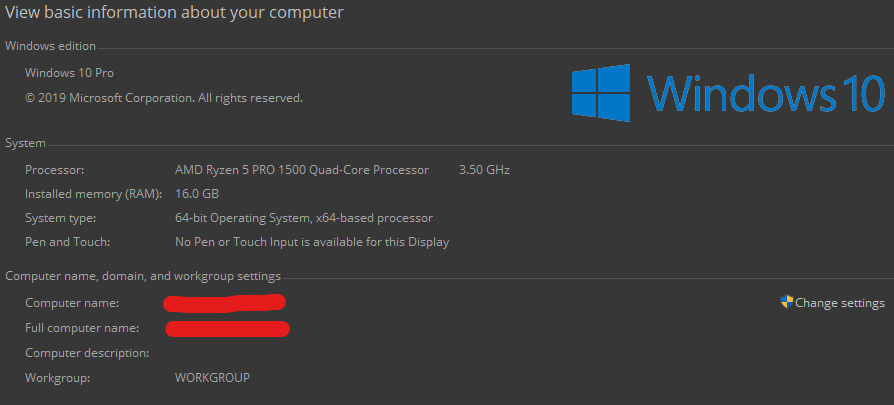
Launcher Options:


Created Issue:
Log turns white after several lines go through
When launching an instance, with the "open output logs when games start" option set to true, the log displays somewhere around twenty to thirty log lines, then turns completely white, as shown:
I have no idea why this happens, or how one would fix it, but it's very strange!I do prefer this launcher design over the previous, it looks much cleaner, and it's much easier to use.
Environment
Running an unmodded instance through the Twitch launcher. (It only occurs if launching through Twitch. I can send them a bug report as well, if you'd like.)
Java Version Type: JDK
java version "1.8.0_211"
Java(TM) SE Runtime Environment (build 1.8.0_211-b12)
Java HotSpot(TM) 64-Bit Server VM (build 25.211-b12, mixed mode)Computer Information:
Launcher Options:

When launching an instance, with the "open output logs when games start" option set to true, the log displays somewhere around twenty to thirty log lines, then turns completely white, as shown:
I have no idea why this happens, or how one would fix it, but it's very strange!I do prefer this launcher design over the previous, it looks much cleaner, and it's much easier to use.
When launching an instance, with the "open output logs when games start" option set to true, the log displays somewhere around twenty to thirty log lines, then turns completely white, as shown:
I have no idea why this happens, or how one would fix it, but it's very strange!
I do prefer this launcher design over the previous, it looks much cleaner, and it's much easier to use.
When launching an instance, with the "open output logs when games start" option set to true, the log displays somewhere around twenty to thirty log lines, then turns completely white, as shown:
I have no idea why this happens, or how one would fix it, but it's very strange!
I do prefer this launcher design over the previous, it looks much cleaner, and it's much easier to use.
When launching an instance, with the "open output logs when games start" option set to true, the log displays somewhere around twenty to thirty log lines, then turns completely white, as shown:
I have no idea why this happens, or how one would fix it, but it's very strange!
I do prefer this launcher design over the previous, it looks much cleaner, and it's much easier to use.
Running an unmodded instance through the Twitch launcher. (It only occurs if launching through Twitch. I can send them a bug report as well, if you'd like.)
Java Version Type: JDK
java version "1.8.0_211"
Java(TM) SE Runtime Environment (build 1.8.0_211-b12)
Java HotSpot(TM) 64-Bit Server VM (build 25.211-b12, mixed mode)Computer Information:
Launcher Options:
Running an unmodded instance through the Twitch launcher. (It only occurs if launching through Twitch. I can send them a bug report as well, if you'd like.)
Java Version Type: JDK
java version "1.8.0_211"
Java(TM) SE Runtime Environment (build 1.8.0_211-b12)
Java HotSpot(TM) 64-Bit Server VM (build 25.211-b12, mixed mode)Computer Information:
Launcher Options:
When launching an instance through the Twitch Launcher, with the "open output logs when games start" option set to true, the log displays somewhere around twenty to thirty log lines, then turns completely white, as shown:
I have no idea why this happens, or how one would fix it, but it's very strange!
I do prefer this launcher design over the previous, it looks much cleaner, and it's much easier to use.
When launching an instance through the Twitch Launcher, with the "open output logs when games start" option set to true, the log displays somewhere around twenty to thirty log lines, then turns completely white, as shown:
I
have no idea why this happens, or how one would fix it, but it's very strange!I
do prefer this launcher design over the previous, it looks much cleaner, and it's much easier to use.When launching an instance through the Twitch Launcher, with the "open output logs when games start" option set to true, the log displays somewhere around twenty to thirty log lines, then turns completely white, as shown:
I would send Twitch a bug report, but I have a feeling this is more your bug than theirs. I've been wrong about that sort of thing before though.
I have no idea why this happens, or how one would fix it, but it's very strange!
I do prefer this launcher design over the previous, it looks much cleaner, and it's much easier to use.
Running an unmodded instance through the Twitch launcher. (It only occurs if launching through Twitch. I can send them a bug report as well, if you'd like.)
Java
VersionType: JDK
java version "1.8.0_211"
Java(TM) SE Runtime Environment (build 1.8.0_211-b12)
Java HotSpot(TM) 64-Bit Server VM (build 25.211-b12, mixed mode)Computer Information:
Launcher Options:
Running an unmodded instance through the Twitch launcher. (It only occurs if launching through Twitch. I can send them a bug report as well, if you'd like.)
Java Install Type: JDK
java version "1.8.0_211"
Java(TM) SE Runtime Environment (build 1.8.0_211-b12)
Java HotSpot(TM) 64-Bit Server VM (build 25.211-b12, mixed mode)Computer Information:
Launcher Options:
![[Mojang] slicedlime](../../../data/assets/gravatar/slicedlime.jpeg)

Hello! We're sorry you're experiencing this problem. In order to diagnose the problem, we need to look at your launcher log file. It's called launcher_log.txt, and can be found in your Minecraft folder. Please attach it to this bug report.