![[Mojang] slicedlime](../../../data/assets/gravatar/slicedlime.jpeg) [Mojang] slicedlime
[Mojang] slicedlime
- slicedlime
- slicedlime
- Europe/Stockholm
- Yes
- No
 MC-36340
![[Mojang] Matthew Gatland](../../../data/avatars/users/43046.png)
![[Mojang] Timur Nazarov](../../../data/avatars/users/18945.svg)
![[Mojang] Gnembon](../../../data/avatars/users/93709.png)
![[Helper] Jack McKalling](../../../data/avatars/users/92859.png)

![[Mod] markderickson](../../../data/avatars/users/18946.svg)


![[Mod] Sonicwave](../../../data/avatars/users/94627.png)





![[Mojang] Searge (Michael Stoyke)](../../../data/assets/gravatar/searge.png) [Mojang] Searge (Michael Stoyke)
[Mojang] Searge (Michael Stoyke)The instamine bug is back. In survival I can break dirt almost instantly with an iron shovel. Also I can mine stone like crazy with an efficiency v diamond pickaxe
Steps to reproduce:
1. Use touch controls (I'm on iOS)
2. Give yourself haste 2 and efficiency 5 pickaxe
3. Try to mine stone
4. The first block will instantly break, but you can't break any more blocks until you pick up your thumb and tap/hold again
macOS launchercritical issueLauncher requires elevated privileges on macOS
duplicates
is duplicated by
duplicates
is duplicated by
is duplicated by
 MCL-10292 → MC-141242
duplicates
is duplicated by
is duplicated by
is duplicated by
relates to
duplicates
duplicates
is duplicated by
[Mojang] slicedlime[Mojang] slicedlime![[Mojang] Nathan Adams](../../../data/assets/gravatar/dinnerbone.png)
Possible SolutionIf you have a Nvidia graphics card, please follow the instructions found on ticket
MC-112780and report back if it fixes your issue or not.edit: Original report below the line. Actually figured out what was causing the issue.
Moving the .minecraft folder using an NTSF symbolic link, for example by using a tool like steammover (http://www.traynier.com/software/steammover), causes the launcher to hang itself without any window shown.
------------------------------------------------------------------------------
Starting the launcher creates two instances of minecraftlauncher.exe, one stuck at a constant 25% CPU load, one at 0%. Ram usage varies between 6mb and 70mb for both. Cannot really identify a pattern there.No log file is created. The file itself gets created, but remains empty.
My system has already been checked for any kind of malware or whatever that may affect the launcher. Several reinstalls of the launcher as well as plenty of restarts also did not help. The updating works fine every time, the launcher stops doing anything after it got past "unpacking launcher" whenever I do a fresh install.
PS: This is a last resort effort to get back to playing. A threat on http://www.minecraftforum.net/forums/support/unmodified-minecraft-client/2792870-launcher-hangs-with-no-window-showing-at-25-cpu as well as 2 hours in the IRC linked on the mojang support page did not result in anything. Help me Obi Jeb Kenobi, you are my only hope. Ive got stuff to build after all. :>
edit: Original report below the line. Actually figured out what was causing the issue.
Moving the .minecraft folder using an NTSF symbolic link, for example by using a tool like steammover (http://www.traynier.com/software/steammover), causes the launcher to hang itself without any window shown.
------------------------------------------------------------------------------
Starting the launcher creates two instances of minecraftlauncher.exe, one stuck at a constant 25% CPU load, one at 0%. Ram usage varies between 6mb and 70mb for both. Cannot really identify a pattern there.No log file is created. The file itself gets created, but remains empty.
My system has already been checked for any kind of malware or whatever that may affect the launcher. Several reinstalls of the launcher as well as plenty of restarts also did not help. The updating works fine every time, the launcher stops doing anything after it got past "unpacking launcher" whenever I do a fresh install.
PS: This is a last resort effort to get back to playing. A threat on http://www.minecraftforum.net/forums/support/unmodified-minecraft-client/2792870-launcher-hangs-with-no-window-showing-at-25-cpu as well as 2 hours in the IRC linked on the mojang support page did not result in anything. Help me Obi Jeb Kenobi, you are my only hope. Ive got stuff to build after all. :>
[Mojang] slicedlime![[Mojang] Petr Mrázek](../../../data/avatars/users/26709.png) [Mojang] slicedlimeMCL-10509 → MC-144207[Mojang] slicedlimeMCL-10587 → MC-145329MCL-10677 → MC-147211MCL-10688 → MC-147741[Mojang] slicedlime[Mojang] slicedlimeMCL-10794 → MC-151689MCL-10764 → MC-151690
[Mojang] slicedlimeMCL-10509 → MC-144207[Mojang] slicedlimeMCL-10587 → MC-145329MCL-10677 → MC-147211MCL-10688 → MC-147741[Mojang] slicedlime[Mojang] slicedlimeMCL-10794 → MC-151689MCL-10764 → MC-151690relates to
![[Mojang] Georgii Gavrichev](../../../data/avatars/users/22428.png) [Mojang] Georgii Gavrichev
[Mojang] Georgii Gavrichevrelates to
[Mojang] slicedlime![[Mojang] Cory Scheviak](../../../data/avatars/users/92893.png) [Mojang] Cory Scheviak[Mojang] Georgii Gavrichev
[Mojang] Cory Scheviak[Mojang] Georgii Gavrichev Very Important
 ProfMobius (Thomas Guimbretiere)[Mojang] slicedlime
relates to
relates to
[Mojang] slicedlime[Mojang] slicedlimerelates to
duplicates
[Mojang] slicedlimeduplicates
duplicates
"Note that this does not mean that we think performance is perfect - we will keep working on performance optimizations for future versions."
The performance is not just "not perfect", it is dramatically bad. 1.14 does not need "optimizations" but a general fix of completely broken performance. We are testing on 1.14 since the release. There is a noticable difference from 1.14.3 to 1.14.4 but this is still very very far from fixing the game. My dedicated Xeon 4-cores with 16 GB RAM server was running so far with disabled raids and without using elytras, because it was simply dying otherwise. After updating to 1.14.4 we could see some better performance, yes. But after turning on raids and starting to use elytras again the server sometimes drops even to 9 TPS with 7 players on board. This is not just "not perfect" performance. This is the end of any reasonable multiplayer experience with 1.14+. Now when you gave up on fixing the game in 1.14+ I'm sure you will never be able to bring back performance even a bit close to 1.13.2. And I don't think you will be able to do it in 1.15 in the future. The only way is to start our server from scratch on 1.13.2 and not upgrading it anymore.Simple comparison on the same machine back to 1.13.2:
- 1.13.2: render distance 15, server TPS stable 20 always and all the time, with 20+ players on-line.
- 1.14.4: render distance 6, server TPS often dropping to 9-10, with 7 players on-line.
No more comments needed.
@slicedlime - it occurs when players are playing, all the time. Greetings!
I reported, but u said it's resolved XDD 6 TPS is good enough for u, okay. Grats.
Mod NoticeThis bug can have multiple symptoms, including, but not limited to:
- Blocks reappear after being mined
- Entities don't move
- Chunks don't load and when entering them, the player falls out of the world
- Cannot open chests and other containers
- Cannot interact with entities
Also, when this issue occurs, the a line like this:
Can't keep up! Is the server overloaded? Running 5000ms or 100 ticks behindwill be printed occasionally in the game console.
Sometimes this issue will become so bad that it will crash the server. In that case the crash report usually has a line like Description: Watching Server.
If you experience this issue, please run a complete debug dump by following these steps:
- Generate a debug profiling (.txt file):
- Run /debug start
- Wait for a few minutes
- Run /debug stop
- Generate a debug report (.zip file):
- Run /debug report
Those files will be generated in the debug folder of your Minecraft instance. If you are on singleplayer, access your game directory. If you are on server, report to your system administrator. If you don't have op permission, either ask your server admin to perform the dump, or if you are on singleplayer, open your world to LAN with cheats on.
Please attach this text and the zip files here and link them to your comment using the attachment (paperclip icon in the text editor). Do not comment if you don't have both of these files.The bug
When my "ms ticks" is higher than normal, i can't place/remove blocks, drop/pick up items, use items like a carrot on a stick. Delay between my action and world's reaction are extremely high.
Upd: in snapshot 18w45a ms ticks is still really high in normal world when mobs are spawning. Chunks stops rendering sometimes, items cannot be picked up etc.
Mod NoticeWe are now closing this issue, because it has grown too indistinct. Note that this does not mean that we think performance is perfect - we will keep working on performance optimizations for future versions.
However, this Jira issue in specific has outgrown its usefulness, containing a range of different concerns all mixed together. If you still experience performance problems, please identify what the scenario is and submit specific bugs, so separate issues can be tracked separately. Also please make sure to include debug reports and all relevant information when reporting such bugs.
Note: Jira is not a discussion forum. If you have performance issues, follow the instructions above rather than posting further comments on this issue.
This bug can have multiple symptoms, including, but not limited to:
- Blocks reappear after being mined
- Entities don't move
- Chunks don't load and when entering them, the player falls out of the world
- Cannot open chests and other containers
- Cannot interact with entities
Also, when this issue occurs, the a line like this:
Can't keep up! Is the server overloaded? Running 5000ms or 100 ticks behindwill be printed occasionally in the game console.
Sometimes this issue will become so bad that it will crash the server. In that case the crash report usually has a line like Description: Watching Server.
If you experience this issue, please run a complete debug dump by following these steps:
- Generate a debug profiling (.txt file):
- Run /debug start
- Wait for a few minutes
- Run /debug stop
- Generate a debug report (.zip file):
- Run /debug report
Those files will be generated in the debug folder of your Minecraft instance. If you are on singleplayer, access your game directory. If you are on server, report to your system administrator. If you don't have op permission, either ask your server admin to perform the dump, or if you are on singleplayer, open your world to LAN with cheats on.
Please attach this text and the zip files here and link them to your comment using the attachment (paperclip icon in the text editor). Do not comment if you don't have both of these files.The bug
When my "ms ticks" is higher than normal, i can't place/remove blocks, drop/pick up items, use items like a carrot on a stick. Delay between my action and world's reaction are extremely high.
Upd: in snapshot 18w45a ms ticks is still really high in normal world when mobs are spawning. Chunks stops rendering sometimes, items cannot be picked up etc.
 Important
![[Mojang] Bartosz Bok](../../../data/avatars/users/10122.svg) [Mojang] Bartosz BokImportant
[Mojang] Bartosz BokImportantis duplicated by
 NormalNormalNormalVery ImportantImportantImportantNormalNormalNormalProfMobius (Thomas Guimbretiere)[Mojang] Bartosz BokImportant
duplicates
 LowNormal
is duplicated by
Normal![[Mojang] Grum (Erik Broes)](../../../data/assets/gravatar/grum.png) [Mojang] Grum (Erik Broes)
[Mojang] Grum (Erik Broes)is duplicated by
is duplicated by
NormalNormalNormal![[Mod] Avoma](../../../data/avatars/users/86198.png)
Please note that this bug was only partially fixed:
While part of this bug is WAI, replaceable blocks will be allowed between the table and shelves without affecting the bonus.
The Bug:
Transparent blocks placed between bookshelves and enchanting tables negate bonuses received from bookshelves.
Steps to Reproduce:
- Build the setup shown in the attachment below. setup.png

- Obtain some lapis along with a diamond pickaxe.
- Place the diamond pickaxe inside the enchanting table and take note of the enchantments available.
- Place some carpets on top of the diamond blocks.
- Place the diamond pickaxe inside the enchanting table.
- Take note as to whether or not transparent blocks placed between bookshelves and enchanting tables negate bonuses received from bookshelves.

Observed Behavior:
Transparent blocks negate bonuses received from bookshelves.
Expected Behavior:
Transparent blocks would not negate bonuses received from bookshelves.
The comment section in the bug tracker is only meant for providing additional information regarding a bug report, it's not meant to be used as a forum for discussion. Please see [Mojang] slicedlime's comment on where you can hold discussions.
If you don't respect the rules of the bug tracker, you may be banned.
[Mojang] Adrian Östergård's comment
The bug
In 1.2.5 SSP and before the little wobble to the whole viewport that occurs when you take damage used to indicate the direction the damage came from. As part of the 1.3 client/server merge, this behavior was lost.
Steps to view correct behavior
- Revert to 1.2.5 SSP and start a new creative world
- Build the contraption as shown in the image attachment below
- Fill the dispensers with arrows.
- Exit MC and use NBTExplorer to change the world to survival mode (alternatively play survival until you obtain those items or open a copy of a current world)
- Facing forward, strafe left into the left pressure plate. Arrow will hit you and the viewport will tilt to the right, simulating the head whiplash.
- Facing forward, strafe right into the right pressure plate. Arrow will hit you and the viewport will tilt to the left, simulating the head whiplash.
- Facing forward, walk into the front pressure plate. Arrow will hit you and the viewport will tilt DOWN, simulating being hit in the top of the head by something
- Facing forward, back into the rear pressure plate, Arrow will hit you and the viewport will tilt UP, simulating being hit in the back of the head and having forward whiplash.
- This seemingly "cool aesthetic" actually has real gameplay value because it indicates to fighters where incoming damage is originating from.
- Repeat all steps in latest version (no need to use NBT editors just open to lan with cheat mode to switch gamemode). Notice how the viewport will always tilt right no matter what.
Code analysis (MCP Names)
EntityLivingBase.attackedAtYaw is not synced to the client, causing an animation present in the client to not be correctly rendered.

[Mojang] slicedlime Indeed, confirmed, the sign's text gets also erased if the chunk unloads.
It outputs a slightly different error now than before:
[14:39:38] [Server thread/ERROR]: Failed to load data for block entity Sign
java.lang.NullPointerException
	at aqn$1.h(SourceFile:99) ~[1.9.jar:?]
	at ex.a(SourceFile:38) ~[1.9.jar:?]
	at ev.a(SourceFile:37) ~[1.9.jar:?]
	at ev.a(SourceFile:63) ~[1.9.jar:?]
	at aqn.a(SourceFile:107) ~[1.9.jar:?]
	at apv.a(SourceFile:108) [1.9.jar:?]
	at ass.a(SourceFile:306) [1.9.jar:?]
	at ass.a(SourceFile:83) [1.9.jar:?]
	at ass.a(SourceFile:70) [1.9.jar:?]
	at lo.f(SourceFile:124) [1.9.jar:?]
	at lo.c(SourceFile:76) [1.9.jar:?]
	at lu.<init>(SourceFile:40) [1.9.jar:?]
	at lv.c(SourceFile:195) [1.9.jar:?]
	at lv.c(SourceFile:287) [1.9.jar:?]
	at mm.d(SourceFile:334) [1.9.jar:?]
	at mb.a(SourceFile:508) [1.9.jar:?]
	at it.a(SourceFile:126) [1.9.jar:?]
	at it$b.a(SourceFile:18) [1.9.jar:?]
	at fh$1.run(SourceFile:13) [1.9.jar:?]
	at java.util.concurrent.Executors$RunnableAdapter.call(Unknown Source) [?:1.8.0_40]
	at java.util.concurrent.FutureTask.run(Unknown Source) [?:1.8.0_40]
	at g.a(SourceFile:45) [1.9.jar:?]
	at net.minecraft.server.MinecraftServer.D(SourceFile:597) [1.9.jar:?]
	at net.minecraft.server.MinecraftServer.C(SourceFile:553) [1.9.jar:?]
	at byn.C(SourceFile:154) [1.9.jar:?]
	at net.minecraft.server.MinecraftServer.run(SourceFile:457) [1.9.jar:?]
	at java.lang.Thread.run(Unknown Source) [?:1.8.0_40]
14:45:27] [Server thread/ERROR]: Failed to load data for block entity Sign
java.lang.NullPointerException
	at aqn$1.h(SourceFile:99) ~[1.9.jar:?]
	at ex.a(SourceFile:38) ~[1.9.jar:?]
	at ev.a(SourceFile:37) ~[1.9.jar:?]
	at ev.a(SourceFile:63) ~[1.9.jar:?]
	at aqn.a(SourceFile:107) ~[1.9.jar:?]
	at apv.a(SourceFile:108) [1.9.jar:?]
	at ass.a(SourceFile:306) [1.9.jar:?]
	at ass.a(SourceFile:83) [1.9.jar:?]
	at ass.a(SourceFile:70) [1.9.jar:?]
	at lo.f(SourceFile:124) [1.9.jar:?]
	at lo.c(SourceFile:76) [1.9.jar:?]
	at lo.d(SourceFile:91) [1.9.jar:?]
	at aht.a(SourceFile:297) [1.9.jar:?]
	at aht.a(SourceFile:883) [1.9.jar:?]
	at lp.a(SourceFile:934) [1.9.jar:?]
	at mm.c(SourceFile:329) [1.9.jar:?]
	at mm.a(SourceFile:160) [1.9.jar:?]
	at md.b(SourceFile:116) [1.9.jar:?]
	at md.c(SourceFile:62) [1.9.jar:?]
	at ek.a(SourceFile:232) [1.9.jar:?]
	at ma.c(SourceFile:187) [1.9.jar:?]
	at net.minecraft.server.MinecraftServer.D(SourceFile:643) [1.9.jar:?]
	at net.minecraft.server.MinecraftServer.C(SourceFile:553) [1.9.jar:?]
	at byn.C(SourceFile:154) [1.9.jar:?]
	at net.minecraft.server.MinecraftServer.run(SourceFile:457) [1.9.jar:?]
	at java.lang.Thread.run(Unknown Source) [?:1.8.0_40]
[Mojang] slicedlime Thank you! }=)
Here's how to disable the beta launcher again:
If you switched to the beta launcher and can't log in, you can switch back by editing launcher_profiles.json in your minecraft folder. Change the "channel" field from "beta" to "release".
– This tweet by [Mojang] slicedlime
Here's a guide on how to find your minecraft folder: Click me
JSON files can be opened and edited by any plain text editor.
If you need any further assistance with opting out of the beta launcher, please join the Community Support help chat. There are people in there that can help you.
Whenever I put my login information into the new launcher it loads infinitely. If I put in the wrong information it says "Invalid username or password" and I have logged into minecraft.net to make sure I was able to login.
![[Mod] violine1101](../../../data/avatars/users/92858.png)
Here's how to disable the beta launcher again:
If you switched to the beta launcher and can't log in, you can switch back by editing launcher_profiles.json in your minecraft folder. Change the "channel" field from "beta" to "release".
– Tweet by [Mojang] slicedlime
Here's a guide on how to find your minecraft folder: Click me
[Mojang] slicedlime, I think the issue here was that the top banner said "Server is down", but on the "Help" page, it says that the game servers are currently healthy. Not that the servers are down in the first place.
Matt, to answer your question:
We are aware of this. Other bugs being fixed does not mean this isn't being worked on.
– [Mojang] slicedlime in this comment from 12 days ago
This is not a support forum, but a bug tracker. You have filed a bug report. [Mojang] slicedlime or another developer will take a look at it at some point. As it's currently the weekend, you can't expect a reply until Monday. Please be patient.
If you continue to have issues, you can try to opt out of the launcher beta by following the steps in this ticket: MCL-11001.
Here's how to disable the beta launcher again:
If you switched to the beta launcher and can't log in, you can switch back by editing launcher_profiles.json in your minecraft folder. Change the "channel" field from "beta" to "release".
– This tweet by [Mojang] slicedlime
Here's a guide on how to find your minecraft folder: Click me
JSON files can be opened and edited by any plain text editor.
If you need any further assistance with opting out of the beta launcher, please join the Community Support help chat. There are people in there that can help you.
The bug
The launcher is closed immediately after being opened. I am on the beta channel. This is happening since the launcher has been released. Switching to the release channel by editing launcher_profiles.json solves the issue.
I have attached the launcher log, as well as the native log.
To reproduce
- Open launcher
- Go to "Settings"
- Enable beta versions
→ Launcher closes. When trying to open it again, it'll close again
[Mojang] slicedlime's point is that issues with access modifiers do not qualify as a bug in the first place.
The bug
Prior to 19w39a, blocks used to be lit from the left when being viewed in an inventory. Now, they're lit from the right.
This is intentional as per this comment by [Mojang] slicedlime:
Highlight is now on the front face of blocks.
Relates to MC-161273

More information about what exactly has been changed in regards to client-side performance in 1.15 can be found in this Reddit post: A word or two about performance in Minecraft 1.15-pre1
Comment by [Mojang] slicedlime:
You do not need to convince us that this is a bug. This is not a forum for debate, and the reddit post clearly states that we are continuously working to improve performance.
If you have more data to add to the bug, please do so without unrelated walls of text. Otherwise, please refrain from posting.
The target of 30 FPS is a minimum limit. This doesn't mean that you will never get more than 30 FPS, it means that when the game has lots of work to do, it'll remain at 30 FPS at a minimum.
If you would rather have high FPS than chunks at a far distance, there is already a mechanism in the game for this - lower your render distance. Again, this does not mean we'll stop working on performance, but your confrontational attitude is doing nothing but adding to the noise.
Any further comments that do not provide additional information for this bug will be removed. Further comments that do add information are appreciated.
The GPUs are not boosting to 3D clocks, someone in the rendering team has to enable a flag or change a tag somewhere in the code to give the GPUs the memo that this particular OpenGL load is 3D rendering instead of general computing or crypto mining. Then we can perhaps start talking about optimization, which is way worse even with the GPU boosting correctly. Spoiler alert: >50% drop.
-First, a baseline test of 1.14.4 with no tweaks or shenanigans. Minecraft Seed for the latest round of tests is "test2", fresh generated world with standard settings. About 200FPS after a minute of waiting until GPU clocks stabilize up. 44%GPU utilization at 2025Mhz.

-then 1.15-pre1 with no tweaks or shenanigans, reusing the world from 1.14.4 due to the bugfixing of world generation resulting in different visuals in some places, want a 100% correlated test here within reason (villagers or mobs popping in sight). About 110FPS, 38%GPU utilization at 1395Mhz (which is 2D-mode clocks)

-then you can force the driver to boost the GPU to Maximum Performance via the nVidia Control Panel (right-click in windows desktop): you have to manually add the javaw.exe in the Manage 3D Configuration tab to do so, AND manually select the GPU (1660Ti in this example) as the predetermined OpenGL Renderer. The workaround does not work with only one of the two fixes applied; and unfortunately I can't help Radeon users because I don't have one of their GPUs. Adding a screenshot of my own for visual reference, sorry it's in spanish but I think I'd have to change my OS language and reinstall the drivers to show you in english.
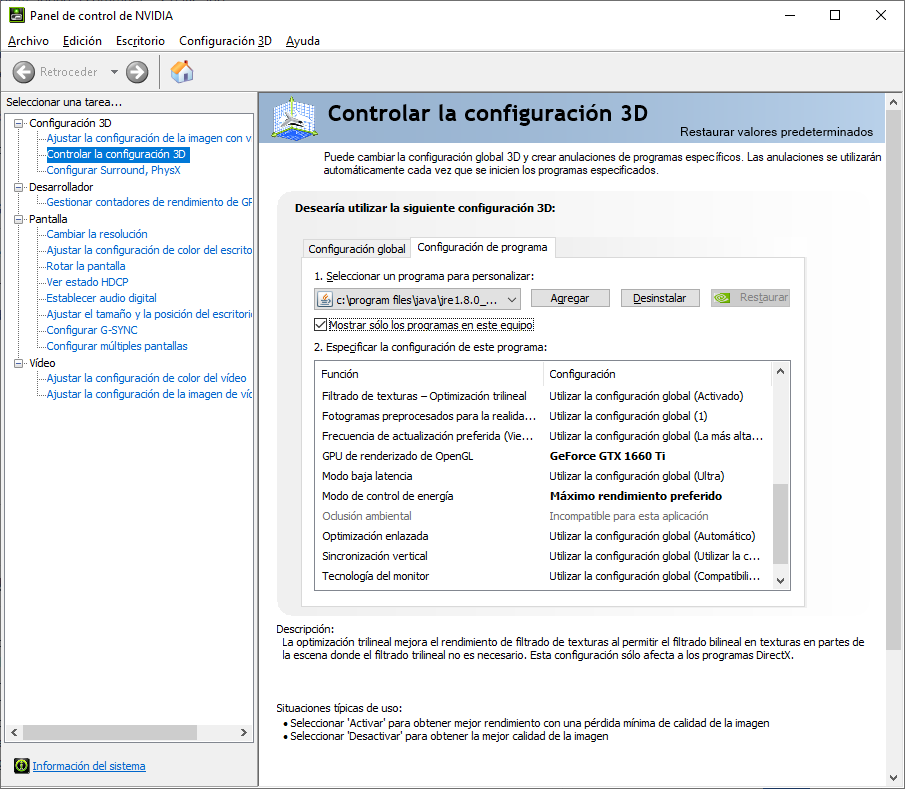

This workaround results in peaks of about 155-160FPS with 39% GPU utilization at 2025Mhz. GPU frequency usually dips below because there seems to be a "ghost" framerate limiter so the game hovers around 150±5FPS; perhaps it's a frequency-related bottleneck from the new rendering engine. I have the framerate unlimited as you can see in the F3 tags top left. Somehow, the illusion breaks when you look around as the GPU goes insane and it downclocks for no apparent reason other than refreshing the frame buffer and probably the texture buffer too; it dips well below the 60FPS mark which is quite a painful disparity between the top and bottom range of the framerate during playtime. In 1.14.4 it dips from 200FPS to 120ish during normal gameplay or 100FPS if I really try hard to spin around with the mouse.
I wanted to try a harder graphics load so I loaded my multiplayer server with snapshot 19w34a (last one before the new rendering engine) and stood still for a minute until everything loaded in, then took a screenshot. 164 FPS, GPU at 1815Mhz 40% use

After that, I updated the same server to 1.15-pre1 and tried to apply my workaround from nVidia Control Panel to get the GPU to boost up in the client PC. Unfortunately, for whatever reason it won't work even if I restart the PC and apply the settings multiple times. I guess the game is happy to provide over 30FPS and doesn't bother to ask for more resources from the GPU lol. Waited 5 minutes to see if anything changed but nope: 76 FPS, GPU at 1095Mhz and chilling at 23% usage
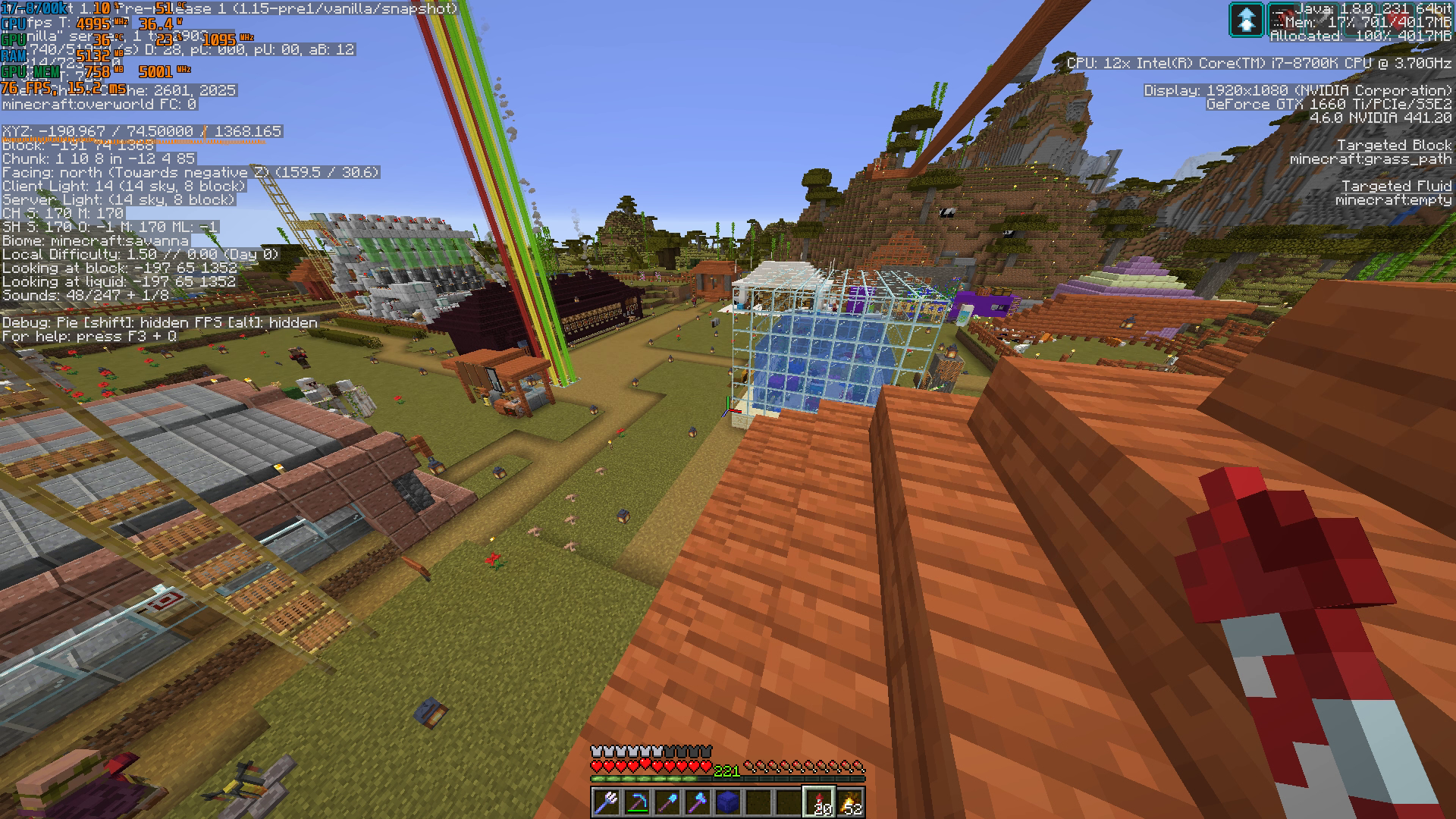
So, when you're actually playing the game on a multiplayer server, you can expect at least a halving of the FPS from the old rendering engine to the new one. In this particular instance, dropping from 164 to 76FPS means a [1-(76/164)] x 100 = 53.6% performance drop in static conditions. I wanted to try dynamic conditions by logging and recording a test drive of a minecart rail facing the same spot, but unfortunately the game crashed on me several times while moving around in the world so I eventually gave up.
----------------------
TL;DR: in the same benchmarking conditions, 1.14.4 was giving 200FPS, 1.15-pre1 gives 110FPS if you're an average user; or 150FPS if you know how to force your GPU as the OpenGL renderer and bruteforce Maximum Performance or 3D clocks-mode on it, but then the game stutters insanely when you actually look around and try to play instead of benchmark it. That's a -25% direct performance improvement in the absolute best case scenario. The workaround may or may not work, it seems that in graphics-intensive scenarios it doesn't so performance can tank from 160s to 70s FPS, over 50%.
GPU Frequency can be observed through gpuZ, hwinfo64, Afterburner or Rivatuner RTSS; there's plenty of material online if you google any of those names to check how your GPUs are behaving and/or toggling overlays with real time reporting. It would be nice if Minecraft could retrieve the info itself and display it in the F3 menu, it would make these issues more ovbious in the future.
Not really, [Mojang] slicedlime has marked this ticket as "Important" on August 26 though, so it'll definitely be fixed at some point.

[Mojang] Agnes Larsson [Mojang] slicedlime Video attached.

The bug
Warped/crimson fungi can be placed on grass, dirt and many other blocks. But when using bone meal on the fungi while on top of non-nylium blocks, they wouldn't grow into large fungi. Also mentioned in [Mojang] slicedlime's video.

This works as intended.
Even though it isn't mentioned in the snapshot post, [Mojang] slicedlime mentioned this in his newest video, so it should be intended.
He mentions this at around 2:19
Slicedlime's video
![[Mod] NeunEinser](../../../data/avatars/users/39263.png)
Works as intended.
Has been confirmed WAI by [Mojang] slicedlime on reddit: https://www.reddit.com/r/Minecraft/comments/fdfmcy/hot_off_the_smithing_table_snapshot_20w10a_is_out/fjh8gwe/?context=3
This is working as intended as per this comment by [Mojang] slicedlime:
This was done for performance reasons, with pre-stacking of the item entities. We'll change it so drops appear at the position of a correct block type, but note that it'll still not be "fully correct" - a stone stack will drop from a stone block, but they will still be able to merge over larger-than-usual distances. You could say an explosion is a chaotic event that throws blocks around, I suppose.
Edited the title according to [Mojang] slicedlime's comment in order to prevent confusion when the snapshot is released.
![[Helper] Johnibur](../../../data/avatars/users/28381.png)
From [Mojang] slicedlime on this subredit thread:
We're a fair ways off from [fixing this issue]. While fishing farms and 0-tick farms were pure exploits that didn't need replacements (lily pads aside), TNT dupers fill a slot in the game that the intended game mechanics still cannot.
![[Mod] Michael Wobst](../../../data/avatars/users/37868.png)
It has clearly been stated by [Mojang] slicedlime that this is a feature request.
Worlds newly generated in 1.16 Pre-release 1 are corrupted beyond simple repair. The part of the level.dat file that stores dimensions has gone missing, meaning that these worlds do not have a Nether or End. [Mojang] slicedlime has a full explanation in this Pre-release 2 video here, along with some potential ways on how to fix it - though we thoroughly recommend to instead just discard the world.
Built a portal, game crashed before loading Nether.
Stack trace
Description: Ticking player

java.lang.NullPointerException: Ticking player
	at ze.a(SourceFile:651)
	at aoj.bg(SourceFile:1900)
	at aoj.ad(SourceFile:437)
	at aov.ad(SourceFile:320)
	at aoj.j(SourceFile:419)
	at aov.j(SourceFile:2181)
	at bdy.j(SourceFile:275)
	at ze.w_(SourceFile:418)
	at zv.b(SourceFile:206)
	at me.a(SourceFile:234)
	at zu.c(SourceFile:171)
	at net.minecraft.server.MinecraftServer.b(SourceFile:885)
	at net.minecraft.server.MinecraftServer.a(SourceFile:812)
	at eov.a(SourceFile:93)
	at net.minecraft.server.MinecraftServer.v(SourceFile:671)
	at net.minecraft.server.MinecraftServer.a(SourceFile:256)
	at java.lang.Thread.run(Thread.java:745)
Item stacks above the stack size limit are not supported.

Since MC-191826 got resolved as WAI, I think that magma cubes shouldn't spawn in Warped forests either. This was mentioned in [Mojang] slicedlime's video (but I can't prove them unintentionally spawning in warped forests since these videos are still unofficial)
It has been resolved as Won't fix by [Mojang] slicedlime last month.
![[Mojang] Adrian Östergård](../../../data/assets/gravatar/nighter.jpeg)
The comment section in the bug tracker is only meant for providing additional information regarding a bug report, it's not meant to be used as a forum for discussion. Please see [Mojang] slicedlime previous comment on where you can hold discussions.
If you don't respect the rules of the bug tracker, you may be banned.

Mateus Pereira Milbradt I agree, that it doesn’t make sense and should be changed, however mojang decides whether something is intended or not and [Mojang] slicedlime marked it as Works As Intended.
apple502j: [Mojang] slicedlime's videos are not considered official sources based on his own comment.
The bug
Shulkers teleport after generating, causing them to be positioned incorrectly when the player reaches the end city. This is caused by the fact that shulkers now generate one block above where they used to generate.
Well-known example
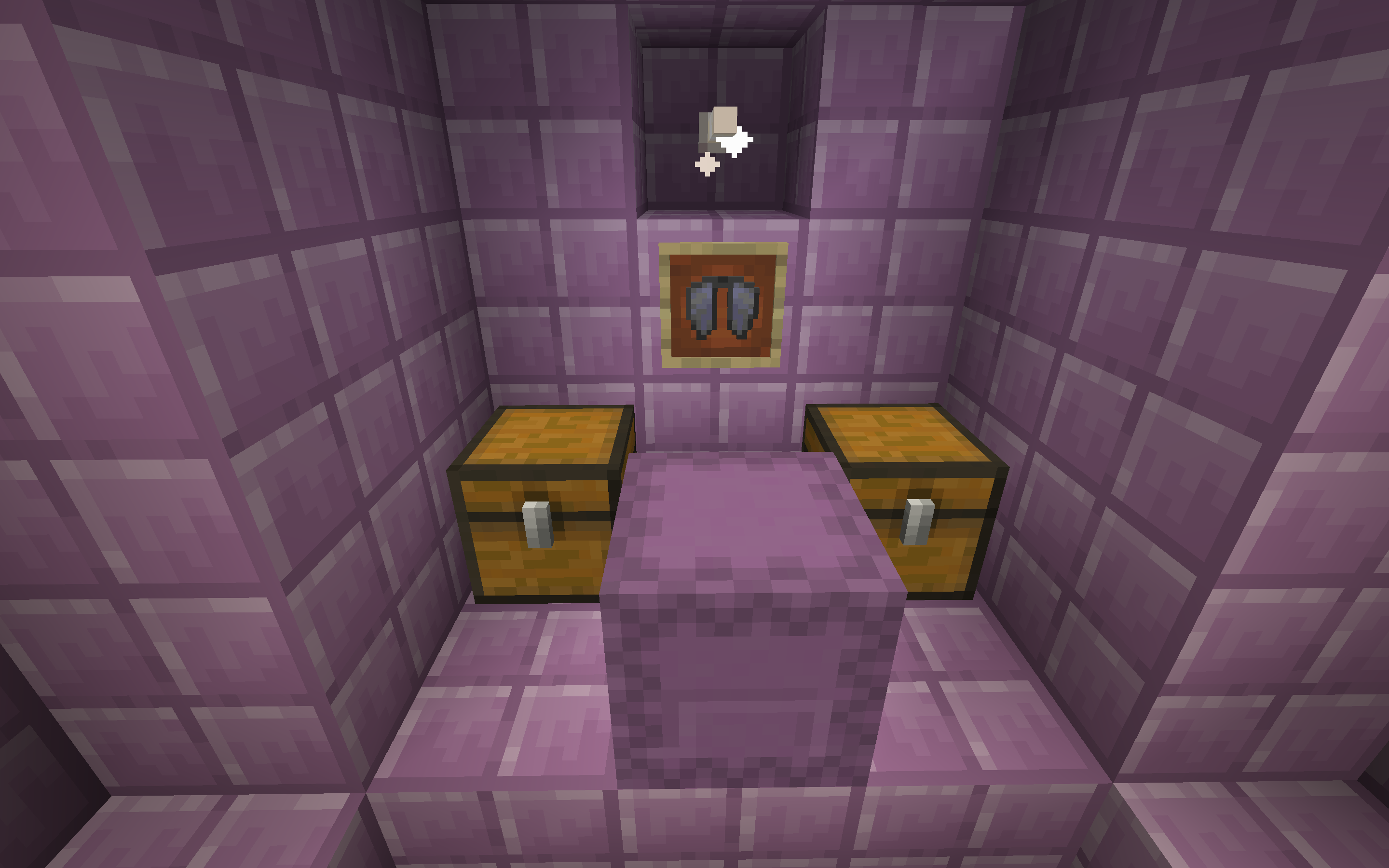
In previous versions (1.16.5), a shulker always spawned in front of the block between the two chests:
However, in 21w03a and above, the shulker spawns one block above where it previously generated:
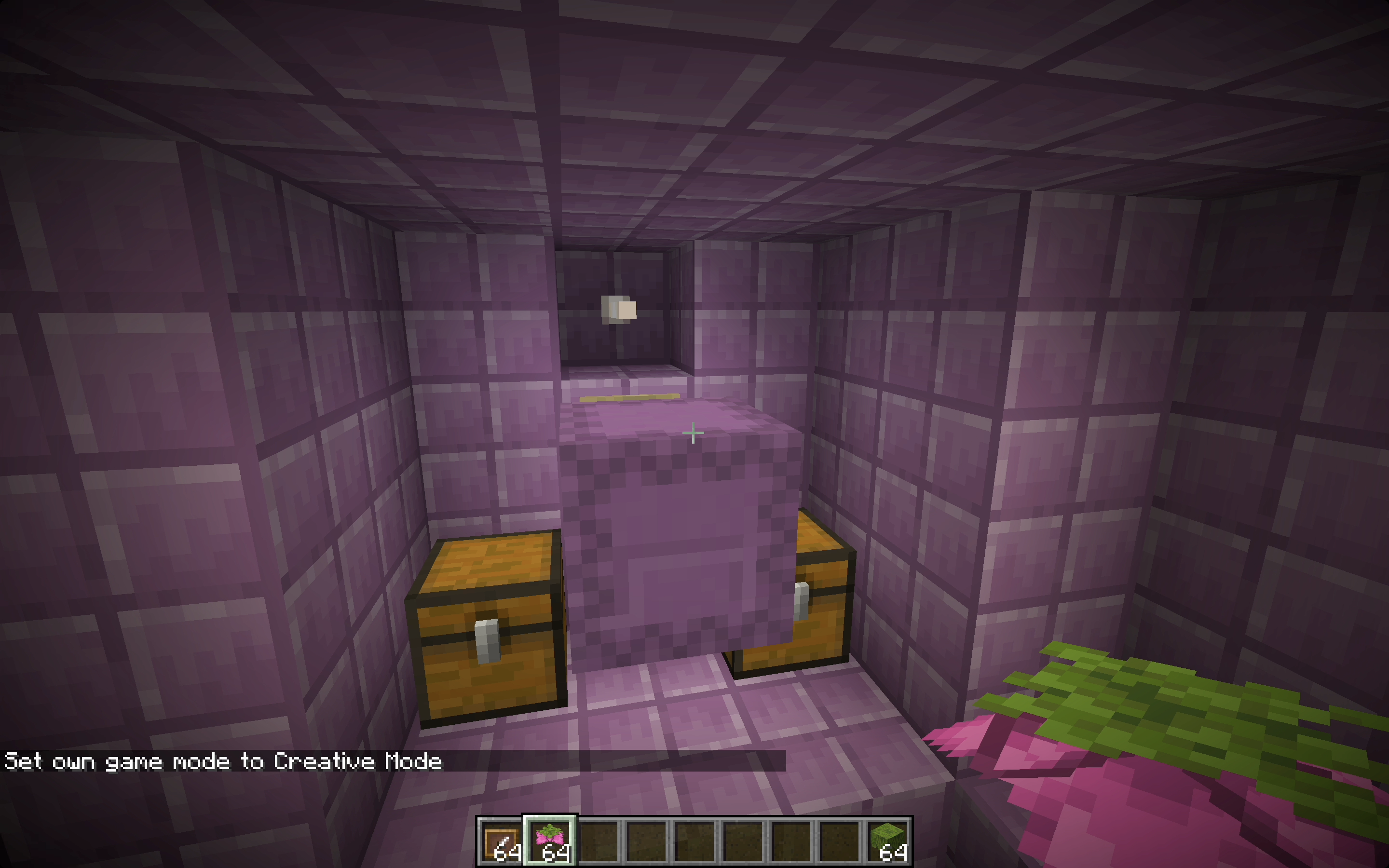
This causes it to instantly teleport when the chunk is loaded, causing the shulker to be placed in a completely different place than it is supposed to:
How to reproduce
- Create a world in 1.16.5
- Enter the end (/execute in the_end run tp @s ~ 100 ~)
- Find an end city containing an end ship (making use of the /locate endcity command may help)
 A shulker generates in front of the block between the two chests, as intended
 - Create a world in 21w05a
- Repeat steps 2-3
The shulker is not in the same place, as it has teleported as soon as it spawned
Additional information
This issue clones MC-213542. That report was resolved as Incomplete by [Mojang] slicedlime, as the expected behavior, and what the issue really was, were not present in the description.
[Mojang] slicedlime why did you close this as a duplicate of MC-1133? This is indeed not calculated based on the center, any part of the players hitbox can stand above the big dripleaf to make it tilt.
The bug
When configuring debug settings for carvers, and setting the block's name to a block that updates with /setblock (see list in MC-31100), an acacia button is placed instead of the desired block.
In the screenshot attached, although I configured the settings with redstone wire, acacia buttons were placed instead.

How to reproduce
If these reproduction steps are more complicated than needed, sorry – I am not good with datapacks!
I was able to reproduce this issue by setting up a datapack using [Mojang] slicedlime's example worldgen settings (here). I added "debug_mode": true, to the cave carver file under "debug_settings": {, and changed the default block placed to redstone wire (minecraft:redstone_wire) instead of crimson button. I then created a world using the datapack.
The bug
Azalea trees can generate more than two blocks submerged in water. According to this comment by [Mojang] slicedlime, the maximum amount of water that an azalea tree should generate in is two blocks.

How to reproduce
Create a Single Biome world with the Lush Caves biome:
Seed: 1238268594428547397
Coordinates: /execute in minecraft:overworld run tp @s 806.25 62.64 834.17 1445.84 11.57
The bug
Trees, huge mushroom and huge fungus that generate near ponds can generate floating over them.
How to reproduce
- 1.16.5 Reproduction
Seed: 3835701469282179249
Coordinates: /tp @s -6118 68 228
- 1.17.1 Reproduction
Seed: -7959106340531916582
Coordinates: /tp @s 146 64 110
- 22w15a Reproduction
Seed: 3260044728808172435
Coordinates: /tp @s 198615 66 3573
- 1.19 Reproduction
Seed: 4373241205666815302
Coordinates: /tp @s 192791 81 -514
Note
This was created based on the comment from [Mojang] slicedlime here
The current diamond ore generation in Java edition is correct see this tweet from [Mojang] slicedlime
@[Mojang] slicedlime, I've found an azalea tree in three blocks of water, and have updated the description accordingly.
I am able to reproduce this issue in 1.18.1. As stated by [Mojang] slicedlime in MC-245937, no photo-sensitivity issues should be present in the game.
No photo-sensitivity issues are present in the game
You can use the following command to reproduce this.
/setblock ~ ~ ~ minecraft:repeating_command_block{Command:"/effect give @p minecraft:blindness 1 5 true",auto:1b}

According to [Mojang] slicedlime's video, they should be as custimizable now; but I have yet to verify this. From what I understand, spacing and salt can not be changed.
Just some more information I've discovered.
In my testing, this issue appears to indeed occur when the server is running several ticks behind as I speculated in my above comment. As a simple method of reproducing this issue, simply execute the command provided below multiple times in order to load multiple new chunks, therefore introducing a delay for the server, thus resulting in this issue occurring.
/tp @s ~10000 ~ ~
Additionally, following on from [Mojang] slicedlime's comment, restarting the server and/or having the player in question reconnect to the server didn't resolve the issue and the problem remained.
MC-251989.png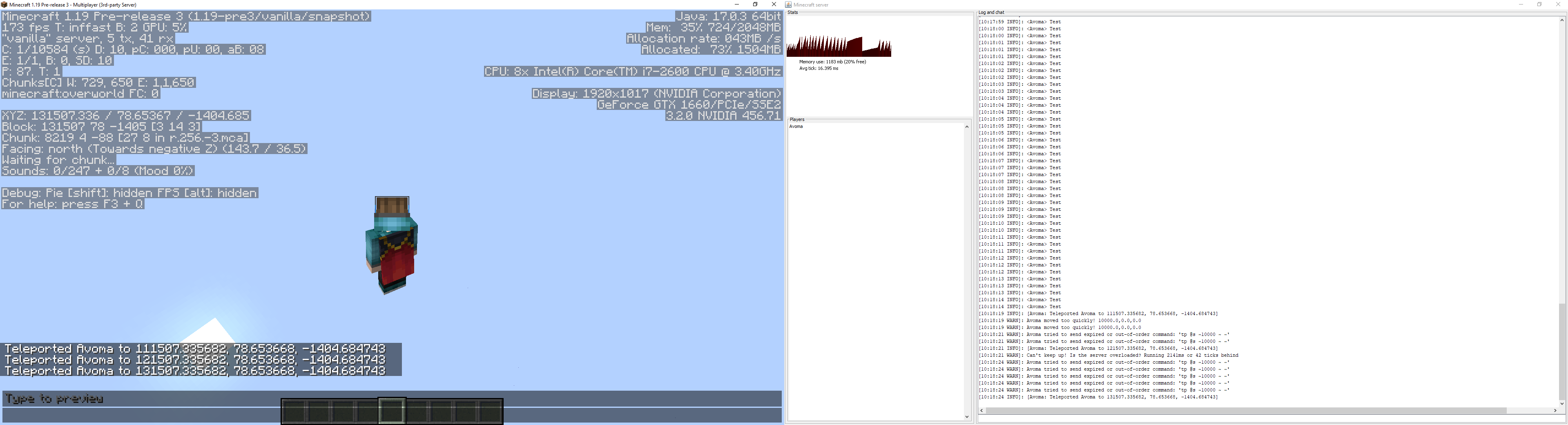
The Bug:
Render and simulation distance on realms and servers can be set beyond the maximum limit that the server or realm allows despite having no impact.
Back in November of 2021, MC-7949 was reopened and assigned to [Mojang] slicedlime. This ticket was regarding how the "Difficulty" button could be accessed and utilized within the in-game options menu on multiplayer servers despite it doing nothing. So why is this relevant? The reopening and assigning of this report imply that buttons should not be accessible to players in situations where they have no impact, hence my reasoning for creating this report.
In Minecraft: Java Edition realms, the render distance is set to 12 and the simulation distance is set to 9. This information is sourced from this tweet by [Mojang] CornerHard. Having these values able to be set above the limits that the realm allows through the use of the in-game video settings menu, creates confusion for the player and misleads them due to the fact that altering these options has no impact. The same thing can be seen with servers.
To conclude, if the maximum render or simulation distance on a server or a realm is, for example, 16, this should be made clear to the player and they should not be able to set the given option to a higher value through the use of the in-game video settings menu, as this wouldn't have any impact.
Steps to Reproduce:
- Join a realm or a server that limits the render or simulation distance to a certain value.
- Navigate to the video settings menu and attempt to change your render or simulation distance to a value above the maximum limit of what the server or realm allows.
- Take note as to whether or not you're able to do so and if it has an impact or not.
Observed Behavior:
Render/simulation distance on realms/servers can be set beyond the maximum limit that the server/realm allows despite having no impact.
Expected Behavior:
Render/simulation distance on realms/servers would not be able to be set beyond the maximum limit that the server/realm allows. For example, if a server allows the maximum render distance of 18, the users' render distance slider within the video settings menu should be limited to a maximum of 18 chunks. This would prevent players from being misled as well as minimalizing confusion.
The Bug:
The pulsating of the night vision effect isn't accessible-friendly.
When the night vision effect is low in duration, the sky's brightness pulsates, thus in some cases creating a distorting inconvenience for players, especially those who suffer from photosensitive epilepsy.
The in-game additions of the "Hide Lighting Flashes" button and the "Darkness Pulsing" slider heavily suggest that Mojang aims to make the game more accessible to those who suffer from photosensitive epilepsy and other similar problems. This concept is also reinforced by the triaging and fixing of bug reports such as MC-221686, MC-245937, MC-253881, MC-253367, and MC-253968. Additionally, here's a quote from Mojang Studios employee, [Mojang] slicedlime on MC-245937, which further reinforces the same concept as mentioned above.
No photo-sensitivity issues are present in the game
Steps to Reproduce:
- Set the time to "midnight".
/time set midnight
- Give yourself the night vision effect with a low duration.
/effect give @s minecraft:night_vision 10 0
- Observe how the sky flashes and how there's no way to stop this from happening, thus potentially harming those who suffer from photosensitive epilepsy and other similar problems.
Observed Behavior:
The pulsating of the night vision effect isn't accessible-friendly and cannot be disabled, thus in some cases creating a distorting inconvenience for players, especially those who suffer from photosensitive epilepsy.
Expected Behavior:
There should be an option to control if or how much the night vision effect can make the sky pulsate.
They all use the loot table of their corresponding block as if mined by a silk touch diamond packaxe, which [Mojang] slicedlime mentions explicitly in his update video. (While the video is a personal thing of his, I do think that that constitutes as a WAI source.)
Melon drops because of silk touch, no grass because it isn't shears.
I must say, I honestly expected a new entry in the loot tables for "held by enderman" instead.
This change wasmade at the same time as wood type sounds getting added, and, while not a source for WAI, [Mojang] slicedlime did showcase it in his changes videos, so Mojang absolutely knows this change was made. So seeing as it wasn't reverted, following that, it seems intentional.
Relates to or clones MC-127749. This problem was discovered thanks to [Mojang] slicedlime's 23w05a update video.
![[Mod] ampolive](../../../data/avatars/users/18949.svg)
Phantoms deal a damage of 2 on Easy difficulty, so this is working as intended as per [Mojang] slicedlime's comment on MC-259902: "The minimum incoming damage to cause durability loss on a shield is 3".
Working as intended as per [Mojang] slicedlime's comment on MC-259902: "The minimum incoming damage to cause durability loss on a shield is 3".
All azalea trees in the pictures have generated in two blocks of water, which is intended as per [Mojang] slicedlime's comment in MC-218592.
It's a duplicate; that ticket is about general minor gui issues,not specific issues with a certain gui.
See also [Mojang] slicedlime's comment.
While not mentioned directly, it is stated that they have no impact on gameplay, and are for style only. [Mojang] slicedlime's videos do point it out clearly though.
Duplicate of MC-137588, and WAI, see [Mojang] slicedlime's comment, here.
Cannot reproduce in 23w33a; are you sure you are not experiencing MC-264897, [Mojang] slicedlime?
![[Helper] clam lol](../../../data/avatars/users/92852.png)
Thank you [Mojang] slicedlime for reopening this.
![[Mod] turbo](../../../data/avatars/users/92867.png)
This is likely WAI considering how the Trial Spawner was introduced in News in Minecraft Snapshot 23w45a: Trial Chambers & The Breeze! by [Mojang] slicedlime.
![[Mod] Jiingy](../../../data/avatars/users/91802.png)
To further back the previous comment up, see MC-137588, MC-223033 and this comment by [Mojang] slicedlime on MC-259902
The report you have submitted is working as intended as per this comment by [Mojang] slicedlime: Wind charges are dealing less than 3 damage.
The game crashes when hit by a breeze after disabling the update_1_21 data pack.
Steps to reproduce
- Create a new world with update_1_21 data pack enabled.
- Run /datapack disable update_1_21 and exit the world.
- Rejoin the world, spawn a breeze and go into survival mode.
- Wait for the breeze to attack you and the game will crash instantly.
I filed this bug report following a discussion on the Minecraft Commands Discord server involving [Mojang] slicedlime, using [Helper] Misode's repro steps.
Bedrock Edition repost of MC-266446 (resolved as Won't Fix).
Comment by [Mojang] slicedlime
Improved in 1.20.5-pre1. Remaining cases are from carvers (not noise caves), and are considered Won't fix status.
Trial chambers can generate exposed to the air, relates to MCPE-146753.
Seed: 3317253191420042803
Coordinates: -1084 -1 584
Seed: 3317253191420042803
Coordinates 1: -1107 -8 599
Coordinates 2: -251 -14 -1666
Steps to Reproduce:
- Create a new world using the given seed.
- Teleport to the given coordinates.
Observed Results:
Trial chambers can generate exposed to the air.
Expected Results:
Trial chambers shouldn't generate exposed to the air.
What difficulty are you on when reproducing this issue?
Medium slimes deal one heart (2 damage) on Normal difficulty, and one and a half hearts (3 damage) on Hard. On normal difficulty durability is not lost, because the attack does not deal enough damage (per this comment by [Mojang] slicedlime). When compared to hard difficulty, the damage is high enough (3) for durability to be lost.
Here is a demonstration:
2024-05-16_12-23-14.mp4
Very rarely, a stronghold can generate exposed to a noise cave or the world surface, seemingly without the presence of a cave carver. I first noticed this issue a while ago on the ocean floor (probably pre-1.20) but deleted the world without recording the seed or coordinates; now at long last I have found another occurrence.
Seed: 47874503654705
Coordinates: /execute in minecraft:overworld run teleport @s 1059.34 39.39 -1488.44 186.65 23.81
Context
As per [Mojang] slicedlime's comment on MC-266446, noise caves should not be able to directly abut encapsulated structures. Although the structure encapsulation option was only added in 1.20.5-pre1, strongholds have been encapsulated in this way for a while now, probably since at least the 1.18 snapshots. I don't know how much difference there is between stronghold encapsulation and "new" encapsulation, but it would not surprise me if there was some difference, given that strongholds are very old structures.
Unrelated note
MC-267423 also occurs with this seed.
![[Mod] Jarl-Penguin](../../../data/avatars/users/92849.png)
Thank you for your report!
However, this issue is Invalid.
This report does not describe a bug.
Please see [Mojang] slicedlime's comment:
You are referencing a preview for a Bedrock version greater than 1.21. No snapshots have been released past 1.21, therefore we do not accept parity bugs related to those features.
Quick Links:
📓 Bug Tracker Guidelines – 💬 Community Support – 📧 Mojang Support (Technical Issues) – 📧 Microsoft Support (Account Issues)
📓 Project Summary – ✍️ Feedback and Suggestions – 📖 Game Wiki

[Mojang] slicedlime That makes sense, thank you for clarifying 
Please read over the comments left by [Mojang] slicedlime and [Mod] Greymagic27 on that report, see if that helps.
The Bug:
There are no shadows on text displayed within the social interactions list menu.
The report was created based on this comment by [Mojang] slicedlime.
Steps to Reproduce:
- Join a singleplayer world and open it to LAN.
- Open the social interactions menu and look closely at the text within your name.
Observed Behavior:
There are no shadows.
Expected Behavior:
There would be shadows.
The Bug:
There are no shadows on text displayed within toasts.
The report was created based on this comment by [Mojang] slicedlime.
Just to clarify, this includes first time tutorial, recipe, backup, and advancement toasts.
Steps to Reproduce:
- Unlock all recipes by using the command provided below.
/recipe give @s *
- Look closely at the text within the toast.
Observed Behavior:
There are no shadows.
Expected Behavior:
There would be shadows.
The Bug:
There are no shadows on text displayed within inventories or interactable blocks.
The report was created based on this comment by [Mojang] slicedlime.
Affected Interfaces:
- Survival Inventory
- Creative Inventory
- Stonecutter
- Cartography Table
- Fletching Table
- Smithing Table
- Grindstone
- Loom
- Furnace
- Smoker
- Blast Furnace
- Anvil
- Enchanting Table
- Brewing Stand
- Chest
- Trapped Chest
- Barrel
- Ender Chest
Steps to Reproduce:
- Open the survival inventory.
- Look closely at the "Crafting" text.
Observed Behavior:
There are no shadows.
Expected Behavior:
There would be shadows.
The Bug:
There are no shadows on text displayed within the written and writable book interfaces.
The report was created based on this comment by [Mojang] slicedlime.
Steps to Reproduce:
- Obtain a book and quill and open it.
- Look closely at the text displayed within the interface.
Observed Behavior:
There are no shadows.
Expected Behavior:
There would be shadows.
The Bug:
There are no shadows on text displayed within signs or sign interfaces.
The report was created based on this comment by [Mojang] slicedlime.
Steps to Reproduce:
- Place down a sign and write some text on it.
- Look closely at the text.
Observed Behavior:
There are no shadows.
Expected Behavior:
There would be shadows.
The Bug:
There are no shadows on text displayed within the superflat customization or preset lists.
The report was created based on this comment by [Mojang] slicedlime.
Steps to Reproduce:
- Click on "Create New World", then hit the "World" tab, and change the world type to superflat.
- Click on the "Customize" button and look closely at the text within the list.
Observed Behavior:
There are no shadows.
Expected Behavior:
There would be shadows.
From [Mojang] slicedlime: "We provide no parity guarantees on implementation details or resource pack capabilities." In other words, only issues which affect gameplay can be considered parity issues. (I think this is fairly clear-cut, but if you know of any edge cases feel free to share them here and I will ask for clarification.)
The Bug:
There are no shadows on text used to display the names of categories within the key binds menu.
The report was created based on this comment by [Mojang] slicedlime.
Steps to Reproduce:
- Navigate to the key binds menu.
- Look at the text that's used to display the names of categories.
Observed Behavior:
There are no shadows.
Expected Behavior:
There would be shadows.
The Bug:
There are no shadows on text used to display the names of lists within the resource pack and data pack menus.
The report was created based on this comment by [Mojang] slicedlime.
Steps to Reproduce:
- Navigate to the resource pack menu.
- Look at the bold text that's used to display the names of lists.
Observed Behavior:
There are no shadows.
Expected Behavior:
There would be shadows.
The Bug:
There are no shadows on text used to display the description of report categories within the "Select Report Category" menu.
The report was created based on this comment by [Mojang] slicedlime.
Steps to Reproduce:
- Join a world and open it to LAN.
- Have another player join and type something in chat.
- Navigate to the social interactions menu and begin making a report for the player.
- Select the "Select Report Category" button.
- Click on any of the option and look closely at the text within the description.
Observed Behavior:
There are no shadows.
Expected Behavior:
There would be shadows.
The Bug:
There are no shadows on text used to display the speed at which a world is being uploaded within the realms menu.
The report was created based on this comment by [Mojang] slicedlime.
Steps to Reproduce:
- Navigate to the realms menu and select your realm.
- Click the "Configure" button and then the "Reset World" button.
- Click the "Upload World" button and select a world to be uploaded.
- Look closely at the text that's used to display the speed at which a world is being uploaded.
Observed Behavior:
There are no shadows.
Expected Behavior:
There would be shadows.
The Bug:
There are no shadows on text used to display the start date and time left of your realm subscription within the realms menu.
The report was created based on this comment by [Mojang] slicedlime.
Steps to Reproduce:
- Navigate to the realms menu and select your realm.
- Click the "Configure" button and then the "Subscription" button.
- Look closely at the text that's used to display the start date and time left of your realm subscription.
Observed Behavior:
There are no shadows.
Expected Behavior:
There would be shadows.
The Bug:
There are no shadows on text displayed within the F3 debug menu.
The report was created based on this comment by [Mojang] slicedlime.
Steps to Reproduce:
- Enter a world and open the F3 debug menu.
- Look closely at the text within the menu.
Observed Behavior:
There are no shadows.
Expected Behavior:
There would be shadows.
The Bug:
There are no shadows on text displayed when connecting to realms.
The report was created based on this comment by [Mojang] slicedlime.
Steps to Reproduce:
- Navigate to the realms menu and connect to your realm.
- Look closely at the text on your screen as you're connecting to the realm.
Observed Behavior:
There are no shadows.
Expected Behavior:
There would be shadows.
The Bug:
There are no shadows on text used to display the names of text boxes within the realms settings menu.
The report was created based on this comment by [Mojang] slicedlime.
Steps to Reproduce:
- Navigate to the realms menu and configure you realm.
- Click on the "Settings" button and look closely at the text that's used to display the names of text boxes.
Observed Behavior:
There are no shadows.
Expected Behavior:
There would be shadows.
The Bug:
There are no shadows on text used to display the description of advancements within the advancements menu.
The report was created based on this comment by [Mojang] slicedlime.
Steps to Reproduce:
- Open the advancements menu and hold your mouse cursor over any advancement.
- Look at the text that's used to display the description of the advancement.
Observed Behavior:
There are no shadows.
Expected Behavior:
There would be shadows.
The Bug:
There are no shadows on text used to display the names of game rules within the game rules menu.
The report was created based on this comment by [Mojang] slicedlime.
Steps to Reproduce:
- Begin creating a new world.
- Click on the "More" tab and then the "Game Rules" button.
- Look at the text that's used to display the names of game rules.
Observed Behavior:
There are no shadows.
Expected Behavior:
There would be shadows.
The Bug:
There are no shadows on placeholder text displayed within the "Please describe what happened" box within the reporting menu.
The report was created based on this comment by [Mojang] slicedlime.
Steps to Reproduce:
- Join a world and open it to LAN.
- Have another player join and type something in chat.
- Navigate to the social interactions menu and begin making a report for the player.
- Look closely at the placeholder text within the "Please describe what happened" box.
Observed Behavior:
There are no shadows.
Expected Behavior:
There would be shadows.
Still present in 1.8 (I tried pigs and horses, with the same effect).
Still present in 1.8.8 - but appears to be fixed in 15w33c.
Still present for beacons and head slots in 15w44a. Hotkeys can still get a full stack of emeralds into the beacon slot and a full stack of pumpkins onto my face.
Still present in 15w46a, reproduced using the same commands as in the video in the description.
Confirmed in 1.9-pre2.
I cannot reproduce this at all on 1.9-pre4. As far as I can tell it is fixed.
I can't find this in the comments this far, so I thought I'd add it in a quick note: This happens whenever the chunk unloads and re-loads. So it doesn't require the world to be closed and re-opened, it just requires you to leave the area and come back.
Entity lag I detailed here: https://www.youtube.com/watch?v=m8hLFol9j5M is still exactly the same in 16w15a, much lower performance than the same test in 1.8.9.
Yes, possibly. I didn't know about that bug.
Exactly the same for me in 16w15b as well. Definitely not fixed - possibly even slightly worse than 16w15a: https://youtu.be/vqYrmGKWH8A?t=36s
Confirmed in 16w20a. Still exactly the same.
Is the fix version correct for this? It looks exactly the same in 16w50a to me.
Not a duplicate.
Updating with better description from comment above.
When gaining slow fall this way, the icon also stays on the HUD for me, and the effect appears to still apply even though doing /effect clear @s says I have no effects.
Still present in 18w20a. Same seed and location as listed in "How to reproduce" still has a cut off tower exactly as in 18w19b.
The launcher runs in several processes. This is simply an implementation detail of how the program runs.
Caused by external application.
This is the bug database. Support for individual user problems is here: https://minecraft.net/en-us/help/
Not launcher-related. Moving to MC.
What version of the launcher is this? What system are you running it on?
RAM settings are arguments to java, which there is a setting for in launch options.
Is your launcher_profiles.json file write protected or owned by a different user or something like that?
This was an external error with the ReCaptcha service, that has since been fixed.
Please attach the entire log file.
Also, there is a newer beta version: 2.1.2360. Please see if that fixes the problem.
Not the same issue. One is a bug with the launcher startup, the other with the launcher starting the game.
That version should now be updated. Sorry about that.
The version number in the corner is the version number of the launcher. It is not supposed to be the same as the version number of Minecraft.
Works fine on the latest beta at least. Launcher appears on same pixel as last time I opened it.
Hello
Please try the beta launcher from here and see if that helps: https://minecraft.net/en-us/article/try-new-minecraft-launcher-beta
If not, please attach the log files from your .minecraft folder: launcher_log.txt and nativelog.txt
Fernando Guillermo Obispo What version of the launcher are you using?
Sir Pineapple Could you please attach your launcher_log.txt file after starting the game?
Launcher log available in duplicate bug
MC-145133- the sound assets all appear to be correctly downloaded and stored in the correct locations.This is not a launcher-related bug. Please resubmit the bug to the Minecraft (MC) project, with the appropriate information.
It wasn't an option because you posted the bug in the wrong project - this is not a Launcher bug.
I can't reproduce this at all. Does it happen all the time for you?
Can you please attach your launcher_log.txt file after trying to exit the application?
Not related to Launcher.
Not launcher related.
Please include the launcher log as well - launcher_log.txt.
And what happens if you click the Reset java path button?
Try removing the resourcepack.
This can only be done with villagers who have not yet traded. As such, it is the intended design.
Still in 1.14.2-pre3: https://www.twitch.tv/videos/428355184?t=00h15m36s
Alexander Melkov If you can still reproduce that server hang bug, please report it and if at all possible attach the world file to the report so we can investigate it.
This is intended - a patrol will not spawn when you are inside a village, to prevent triggering raids by simply defending yourself against a patrol.
Is this still an issue in post-1.14 releases?
This is not a discussion forum. Please do not comment if you do not have further information to add, since it makes it harder for us to find relevant information to fixing bugs.
We are aware of this. Other bugs being fixed does not mean this isn't being worked on.
Is this still an issue in 1.14.3-pre1 or later?
Wandering Traders are villager-like, but not a part of the village.
Is this still an issue on 2.1.4998 or above? The new downloading systems should support this.
Should now be fixed on the beta version. If not, please attach launcher log file.
If this is still a problem, please attach full launcher log file.
Is this still an issue?
Please attach launcher and game log files.
The launcher is supposed to run several processes. If you mess with them, things may not work.
If the game consistently fails to start, please log a Minecraft bug.
The launcher is expected to run multiple processes.
Please contact Mojang support for help with account issues. https://help.mojang.com/
Please try again in the latest beta version of the launcher. If that isn't working, please attach a new launcher log file from that version, and information about your computer hardware.
Server outages are not launcher bugs.
Please contact Mojang Support for help with account issues. https://help.mojang.com/
Please report game crashes to the game project, and include crash report files and log files.
Try removing the Minecraft Launcher from the "Add or remove programs" option in your windows start menu, then reinstall using the downloaded file.
You appear to have some broken permission on your install folder. It is likely they messed some permissions up when they were trying to restore worlds, and the launcher no longer has access to write the files it needs to. Please try deleting the following folder from the computer:
C:\Users\STEVE\AppData\Roaming\.minecraft\assets
then try running the launcher again.
Please attach launcher and game log files.
Please add description, your computer specifications and game log files. If the game crashes, also attach the crash log.
Game crash, not a launcher issue. Also not on latest game versions, so will not transfer to game project. Please report again if this still occurs on the latest Java Edition version.
Moving this from the Launcher project.
Please see
MC-297Please see
MC-297Related to game, not launcher.
Please attach log files and crash log.
Have you tried reinstalling?
Please attach log files and complete description.
Please attach launcher_log.txt from your .minecraft folder. https://help.mojang.com/customer/portal/articles/1480874-where-are-minecraft-files-stored-
Thank you - some interesting follow-up questions from information in that log:
It appears that you are running the Minecraft Launcher from the Curse/Twitch launcher - is that correct? If so, you'll most likely need to change the folder in there.
Please attach launcher_log.txt and the game log from an instance when this happened.
Please attach launcher_log.txt.
That is odd. It seems to be installed by Curse.
I'd suggest you uninstall the Launcher and Re-install it in another location that is not under OneDrive.
This seems to be a security-related error. Do you have any third-party software installed that is related to Minecraft or Minecraft Accounts? What anti-virus software do you have?
Please provide all relevant details. What modpack are you trying to launch, and which version of the modpack? Have you modified it in any way from the default twitch install? Do you have any changed settings?
Please attach launcher_log.txt.
Please attach launcher_log.txt
Please attatch launcher_log.txt.
Hi! Thanks for the information - the launcher is not an Electron app, but this information is still useful. I'll close this as a duplicate for now, since we already have other bugs tracking the same problem.
Did you restart the launcher fully? Without any game instance running?
Also, please attach launcher_log.txt from running the launcher while having the problem.
Please attach launcher_log.txt.
There's no indication of a segmentation fault in that strace. Could you please try again, and attach the launcher_log.txt file. Make sure there are no minecraft-launcher processes running before you start.
Please attach launcher_log.txt
Hi! We've added more debug information to the log in the latest beta to try to track this down. Could you please switch to the beta version (Enable the beta toggle in Settings and restart the launcher), then start the game again and attach the new launcher_log.txt file afterwards?
Please attach launcher_log.txt.
Also, which of the packages did you use to install the launcher?
Interesting. Thank you - we are investigating.
Thank you for the information! We are investigating.
Do you have any custom settings for the java runtime on your installation?
Game crashes are not launcher issues.
Which one are you starting? If you click on that one, and then expand the More Options, what does it say under Java Executable?
If you have this bug, please try the BETA version of the launcher (enable it in Settings) and attach launcher_log.txt from your minecraft folder to this bug. Thank you!
Also, please attach the log file to the bug report, don't use an online paste text service.
The Japanese translation has not finished its proofreading pass.
This version in specific looks in the wrong place to find out if there is an update, so the message pops up in error. Will be fixed in the next release.
This is an unfortunate side effect of how twitch has made their launcher. We do not support running Minecraft in multiple different launcher instances at a time.
The best you can do is forcefully end the launcher process in the task manager and then launch the second pack.
That is very strange - thank you for the information. Could you please attach your launcher_log.txt file?
Hello. What happens if you try to download https://launcher.mojang.com/v1/objects/559cf2a0c3a6661932c631753dac193983dcf2ef/cef.pak from the same computer that is experiencing the issue?
There's no iphone version of the launcher. Did you mean the pocket edition of the game? If so, please submit a new bug to that project and make sure to include all the required information.
Please provide the details. In which way did it not work? What happened when you tried?
What do you mean with "can't access"? Also, have you tried restarting the launcher?
Attaching pictures should be fine here.
Hello! We're sorry you're experiencing this problem. In order to diagnose the problem, we need to look at your launcher log file. It's called launcher_log.txt, and can be found in your Minecraft folder. Please attach it to this bug report.
Hello! We're sorry you're experiencing this problem. In order to diagnose the problem, we need to look at your launcher log file. It's called launcher_log.txt, and can be found in your Minecraft folder. Please attach it to this bug report.
The new launcher has been fully released. It'll act exactly as you describe if the beta version matches the released version.
Hello! We're sorry you're experiencing this problem. In order to diagnose the problem, we need to look at your launcher log file. It's called launcher_log.txt, and can be found in your Minecraft folder. Please attach it to this bug report.
This is not a launcher bug. Please contact Mojang Support: https://help.mojang.com/
Yunseong Jung The linux Launcher does not automatically update itself. Whichever version you installed is the one that runs. If you want to switch, install another version.
Hello! We're sorry you're experiencing this problem. In order to diagnose the problem, we need to look at your launcher log file. It's called launcher_log.txt, and can be found in your Minecraft folder. Please attach it to this bug report.
Villagers need to be able to walk to the bed in order to reproduce.
This is a temporary condition until the next release.
Hello! We're sorry you're experiencing this problem. In order to diagnose the problem, we need to look at your launcher log file. It's called launcher_log.txt, and can be found in your Minecraft folder. Please attach it to this bug report.
Hello! We're sorry you're experiencing this problem. In order to diagnose the problem, we need to look at your launcher log file. It's called launcher_log.txt, and can be found in your Minecraft folder. Please attach it to this bug report.
Hello! We're sorry you're experiencing this problem. In order to diagnose the problem, we need to look at your launcher log file. It's called launcher_log.txt, and can be found in your Minecraft folder. Please attach it to this bug report.
Hello! We're sorry you're experiencing this problem. In order to diagnose the problem, we need to look at your launcher log file. It's called launcher_log.txt, and can be found in your Minecraft folder. Please attach it to this bug report.
Hello! We're sorry you're experiencing this problem. In order to diagnose the problem, we need to look at your launcher log file. It's called launcher_log.txt, and can be found in your Minecraft folder. Please attach it to this bug report.
Hello! We're sorry you're experiencing this problem. In order to diagnose the problem, we need to look at your launcher log file. It's called launcher_log.txt, and can be found in your Minecraft folder. Please attach it to this bug report.
Hello! We're sorry you're experiencing this problem. In order to diagnose the problem, we need to look at your launcher log file. It's called launcher_log.txt, and can be found in your Minecraft folder. Please attach it to this bug report.
Are you certain you are running the latest version? We fixed a crash that looked exactly like this, and it seems to have been fixed for everyone else.
The game automatically reports crashes through the launcher. However, you appear to have disabled this functionality by changing the host lookup in your computer:
Primary ip: 127.0.0.1, Url: hopper.minecraft.net
If you want assistance with crashes, please undo things meant to prevent crash reports from being sent.
This looks like it's a system-related problem. The error in the log indicates a problem with the SSL CA cert (path? access rights?) while trying to access our authentication server. The Launcher uses the libcurl version installed in the system.
While we will try to improve the error messaging around this, it is ultimately not a problem that we can fix.
Not a launcher bug.
We released a new beta version with some more log output for this yesterday. Please do this:
Hello! We're sorry you're experiencing this problem. In order to diagnose the problem, we need to look at your launcher log file. It's called launcher_log.txt, and can be found in your Minecraft folder. Please attach it to this bug report.
Hello! We're sorry you're experiencing this problem. In order to diagnose the problem, we need to look at your launcher log file. It's called launcher_log.txt, and can be found in your Minecraft folder. Please attach it to this bug report.
Hello! We're sorry you're experiencing this problem. In order to diagnose the problem, we need to look at your launcher log file. It's called launcher_log.txt, and can be found in your Minecraft folder. Please attach it to this bug report.
Hello! We're sorry you're experiencing this problem. In order to diagnose the problem, we need to look at your launcher log file. It's called launcher_log.txt, and can be found in your Minecraft folder. Please attach it to this bug report.
Hi! Thank you for the report.
Have you tried changing your installation to use the newer JRE? Does that give you the same result?
The crash should have generated a file called C:\Users\Zelda\AppData\Roaming\.minecraft\hs_err_pid1616.log - could you please attach that to the report?
Hi. What you attached was the game log. You'll need to attach the launcher log. It's called launcher_log.txt.
That is awfully weird - that log is from an older launcher session, where you successfully started playing the game. Are there more than one launcher_log.txt files on your computer?
Hello! We're sorry you're experiencing this problem. In order to diagnose the problem, we need to look at your launcher log file. It's called launcher_log.txt, and can be found in your Minecraft folder. Please attach it to this bug report.
The Launcher certainly runs on Ubuntu 18.04. Whatever is causing this is a difference between regular Ubuntu and GalliumOS I suppose.
Why is there no log available? You should certainly have a launcher_log.txt. If the launcher was working before, you might also have a native_log.txt. Both are found in your .minecraft folder. What happens when you run it? How long does it take to exit? What's the exit code?
The latest beta version also has more logging enabled. Please try that and see if you get any more information. You can download a package from here: https://www.minecraft.net/en-us/article/try-new-minecraft-launcher-beta
Installation? What are you doing that is failing?
Anyway, you should have a launcher_log.txt file that you can attach. You can also email me the profiles file at slicedlime at mojang.com.
Not a launcher bug.
Hello! We're sorry you're experiencing this problem. In order to diagnose the problem, we need to look at your launcher log file. It's called launcher_log.txt, and can be found in your Minecraft folder. Please attach it to this bug report.
Not a launcher bug. Report game crashes to the Minecraft project, and make sure to include relevant log files.
Hello! We're sorry you're experiencing this problem. In order to diagnose the problem, we need to look at your launcher log file. It's called launcher_log.txt, and can be found in your Minecraft folder. Please attach it to this bug report.
Hello! We're sorry you're experiencing this problem. In order to diagnose the problem, we need to look at your launcher log file. It's called launcher_log.txt, and can be found in your Minecraft folder. Please attach it to this bug report.
That's because you're supposed to download and install the new launcher from that site.
Hello! We're sorry you're experiencing this problem. In order to diagnose the problem, we need to look at your launcher log file. It's called launcher_log.txt, and can be found in your Minecraft folder. Please attach it to this bug report.
We've fixed the division by zero for 1.14.4-pre3, but will leave the rest of the behavior as there is no risk of this impacting a player by accident.
Hello! We're sorry you're experiencing this problem. In order to diagnose the problem, we need to look at your launcher log file. It's called launcher_log.txt, and can be found in your Minecraft folder. Please attach it to this bug report.
Please see https://bugs.mojang.com/browse/MC-297
Please describe the issue in detail when opening a ticket.
Important Note: We're shipping a fix for one cause of this in 1.14.4-pre3. It is possible that there are more causes, so if you still get this after upgrading to 1.14.4-pre3 or later, please make sure to generate a new debug report and attach it to this issue.
This is a feature request, not a bug.
Is this still an issue on 1.14.4-pre3 or later?
Never mind, got a repro.
Lee Ward Being snarky does not help the bug get fixed. If you're not going to contribute any new information, please refrain from commenting.
So I think you're misinterpreting things a fair bit here. A sampling profiler will only tell you what is active within a process, not how much CPU that process is using in the system. The screenshot you posted only says that BufferedReader.readLine() is active 100% of the time, not that it's actually using up any performance. That's because it blocks waiting for input - basically until you input anything in the console, the game could will not even run.
You're also expected to get a lot of activity, because the server still runs 20 ticks per second, so having the thread output a whole lot of stuff is expected. The timeouts on those futex traces do look a bit short, but that could also be normal. Basically, there's very little indication that anything is actually wrong in all of that material.
When I follow your repro steps, the server drops to something like 10% CPU on my VM after the initial world gen is complete.
What exact hardware (and VM software, if any) are you running this on? What is the OS & distro versions?
Hello! We're sorry you're experiencing this problem. In order to diagnose the problem, we need to look at your launcher log file. It's called launcher_log.txt, and can be found in your Minecraft folder. Please attach it to this bug report.
Hello! We're sorry you're experiencing this problem. In order to diagnose the problem, we need to look at your launcher log file. It's called launcher_log.txt, and can be found in your Minecraft folder. Please attach it to this bug report.
The launcher log file is called launcher_log.txt, and can be found in your Minecraft folder. Please attach it to this bug report.
The fact that a computer game uses up computing resources when in-game is not a bug.
It looks like another program on your computer is interfering with the Launcher's ability to write files. Have you tried rebooting?
There's no indication in the posted log file about any issues. There's also only one attached file, despite there being two people who commented that they uploaded the file. Please find the correct file and attach it to the report.
According to the logs, this is your system is rejecting the server's SSL certificate. This could indicate some form of error in your installation of libcurl, or something similar.
Could you try downloading this file with curl, and see if that works?
curl https://launchermeta.mojang.com/mc/game/version_manifest.json
Hello! We're sorry you're experiencing this problem. In order to diagnose the problem, we need to look at your launcher log file. It's called launcher_log.txt, and can be found in your Minecraft folder. Please attach it to this bug report.
This is a problem with how old versions treat the configuration files. If you want it to work, run different versions in different folders.
That was not the requested file.
This is caused by anti-virus software like ByteFence on your system. For workaround instructions, see
MCL-5546.Do you have a file called native_log.txt? If so, could you please attach it?
That's a launcher log file from a session when you have not attempted to start the game? Please try to start the game, then attach the new launcher_log.txt. And if more people have the issue, feel free to attach your logs to this issue as well.
The logs seem to indicate your systems have been tampered with.
Do you have any minecraft-related third party software installed, or have you had such software installed previously?
There's a file called hosts, you can find it under this location:
C:\Windows\system32\drivers\etc
Could you please attach that to this issue?
We've added more diagnostics for this issue in the latest beta version. Please switch on the beta in Settings, restart the launcher, try starting the game again and then attach a new launcher_log.txt file to this ticket.
That log does not show the game being started at all. Please attach a log file that was done when the problem occurred.
If the game starts, but mods do not, please report this to the mod frameworks rather than here.
Not related to the launcher. Post game bugs in the Minecraft Java Edition (MC) project.
Hello! We're sorry you're experiencing this problem. In order to diagnose the problem, we need to look at your launcher log file. It's called launcher_log.txt, and can be found in your Minecraft folder. Please attach it to this bug report.
Hello! We're sorry you're experiencing this problem. In order to diagnose the problem, we need to look at your launcher log file. It's called launcher_log.txt, and can be found in your Minecraft folder. Please attach it to this bug report.
This is a problem with your graphics drivers. Please see
MC-297for update instructions.This is an issue with your graphics drivers. Please see
MC-297for instructions on how to upgrade.Hello! We're sorry you're experiencing this problem. In order to diagnose the problem, we need to look at your launcher log file. It's called launcher_log.txt, and can be found in your Minecraft folder. Please attach it to this bug report.
Hello! We're sorry you're experiencing this problem. In order to diagnose the problem, we need to look at your launcher log file. It's called launcher_log.txt, and can be found in your Minecraft folder. Please attach it to this bug report.
Hello! We're sorry you're experiencing this problem. In order to diagnose the problem, we need to look at your launcher log file. It's called launcher_log.txt, and can be found in your Minecraft folder. Please attach it to this bug report.
The screenshot shows Minecraft 1.12.2. Does this also happen on the latest version of Minecraft?
Hello! We're sorry you're experiencing this problem. In order to diagnose the problem, we need to look at your launcher log file. It's called launcher_log.txt, and can be found in your Minecraft folder. Please attach it to this bug report.
The error message states what's wrong. Some other program on the computer is preventing the launcher from modifying a file it needs to modify. A simple workaround is to try rebooting your computer.
Hello! We're sorry you're experiencing this problem. In order to diagnose the problem, we need to look at your launcher log file. It's called launcher_log.txt, and can be found in your Minecraft folder. Please attach it to this bug report.
As the error message states, another program on your computer is interfering with the Launcher's ability to write a file. You need to identify and fix this other program - there's nothing the Launcher can do about it. An easy thing to try is to reboot your computer.
The logs seem to indicate your systems have been tampered with.
Do you have any minecraft-related third party software installed, or have you had such software installed previously?
There's a file called hosts, you can find it under this location:
C:\Windows\system32\drivers\etc
Could you please attach that to this issue?
Does the file C:\Users\Bruno Klepa\AppData\Roaming\.minecraft\launcher_profiles.json exist? If so, I suggest you try deleting it and starting the Launcher again.
This is a problem with your graphics drivers. Please see
MC-297for update instructions.Hello! We're sorry you're experiencing this problem. In order to diagnose the problem, we need to look at your launcher log file. It's called launcher_log.txt, and can be found in your Minecraft folder. Please attach it to this bug report.
Try compressing the launcher_log.txt file into a zip archive and then attaching it to the issue.
The logs seem to indicate your systems have been tampered with.
Do you have any minecraft-related third party software installed, or have you had such software installed previously?
There's a file called hosts, you can find it under this location:
C:\Windows\system32\drivers\etc
Could you please attach that to this issue?
Your error states that your system is out of memory. The comment above about trying to allocate more RAM to java than is available in the machine seems like a good explanation for this - Make sure your JVM arguments in your Installation does not have too high number in it. If in doubt, go back to the default values.
The logs seem to indicate your systems have been tampered with.
Do you have any minecraft-related third party software installed, or have you had such software installed previously?
There's a file called hosts, you can find it under this location:
C:\Windows\system32\drivers\etc
Could you please attach that to this issue?
Hello! We're sorry you're experiencing this problem. In order to diagnose the problem, we need to look at your launcher log file. It's called launcher_log.txt, and can be found in your Minecraft folder. Please attach it to this bug report.
Hello! We're sorry you're experiencing this problem. In order to diagnose the problem, we need to look at your launcher log file. It's called launcher_log.txt, and can be found in your Minecraft folder. Please attach it to this bug report.
Hello! We're sorry you're experiencing this problem. In order to diagnose the problem, we need to look at your launcher log file. It's called launcher_log.txt, and can be found in your Minecraft folder. Please attach it to this bug report.
Hello! We're sorry you're experiencing this problem. In order to diagnose the problem, we need to look at your launcher log file. It's called launcher_log.txt, and can be found in your Minecraft folder. Please attach it to this bug report.
Hello! We're sorry you're experiencing this problem. In order to diagnose the problem, we need to look at your launcher log file. It's called launcher_log.txt, and can be found in your Minecraft folder. Please attach it to this bug report.
Hello! We're sorry you're experiencing this problem. In order to diagnose the problem, we need to look at your launcher log file. It's called launcher_log.txt, and can be found in your Minecraft folder. Please attach it to this bug report.
The logs seem to indicate your systems have been tampered with.
Do you have any minecraft-related third party software installed, or have you had such software installed previously?
There's a file called hosts, you can find it under this location:
C:\Windows\system32\drivers\etc
Could you please attach that to this issue?