 kdlvt kel
- kd8lvt
- kd8lvt
- Europe/Stockholm
- Yes
- No
 MC-41836
![[Mojang] Georgii Gavrichev](../../../data/avatars/users/22428.png)
 MCL-11238
 MCD-2001


Crash report: https://pastebin.com/iH4mR3Jv
To replicate: left-click on a group of recipes as though you want to see a recipe
Expected behavior: The group opens, or the ghost-items that show the recipe flash (slowly) through the available recipes in the group
Actual behavior: Crash due to division by zeroOther notes: This bug only crashed the client, the dedicated server is still running without issue.
Crash report: https://pastebin.com/iH4mR3Jv
To replicate: left-click on a group of recipes as though you want to see a recipe
Expected behavior: The group opens, or the ghost-items that show the recipe flash (slowly) through the available recipes in the group
Actual behavior: Crash due to division by zeroOther notes: This bug only crashed the client, the dedicated server is still running without issue.
---------------
EDIT
---------------
I just tested on another computer, and the only one effected on both computers seemed to be the rabbit stew group. Perhaps it's a per-computer basis?
Crash report: https://pastebin.com/iH4mR3Jv
To replicate: left-click on a group of recipes as though you want to see a recipe
Expected behavior: The group opens, or the ghost-items that show the recipe flash (slowly) through the available recipes in the group
Actual behavior: Crash due to division by zeroOther notes: This bug only crashed the client, the dedicated server is still running without issue.
---------------
EDIT
---------------
I just tested on another computer, and the only one effected on both computers seemed to be the rabbit stew group. Perhaps it's a per-computer basis?Crash report: https://pastebin.com/iH4mR3Jv
To replicate: left-click on a group of recipes as though you want to see a recipe
Expected behavior: The group opens, or the ghost-items that show the recipe flash (slowly) through the available recipes in the group
Actual behavior: Crash due to division by zeroOther notes: This bug only crashed the client, the dedicated server is still running without issue.
Crash report: https://pastebin.com/iH4mR3Jv
To replicate: left-click on a group of recipes as though you want to see a recipe
Expected behavior: The
group opens, or the ghost-items that show the recipe flash (slowly) through the available recipes in the group
Actual behavior: Crash due to division by zeroOther notes: This bug only crashed the client, the dedicated server is still running without issue.
Crash report: https://pastebin.com/iH4mR3Jv
To replicate: left-click on a group of recipes as though you want to see a recipe
Expected behavior: The current displayed recipe in the group is applied to the crafting table
Actual behavior: Crash due to division by zeroOther notes: This bug only crashed the client, the dedicated server is still running without issue.
Crash report: https://pastebin.com/iH4mR3Jv
To replicate: left-click on an affected group of recipes as though you want to see a recipe
Expected behavior: The current displayed recipe in the group is applied to the crafting table
Actual behavior: Crash due to division by zeroOther notes: This bug only crashed the client, the dedicated server is still running without issue.
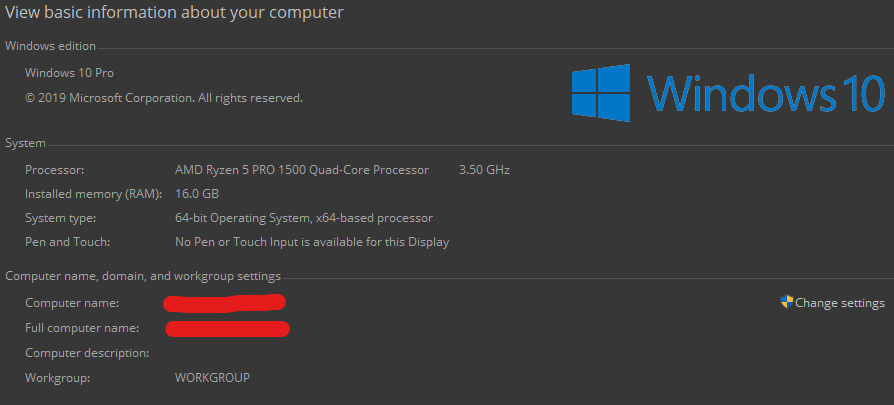
OS: Windows 10 64-bit
CPU: AMD Ryzen 5 PRO 1500 (3.50GHz)
RAM: 16GB (4GB Allocated to MC)Graphics Card: AMD Radeon R7 430
VRAM: 2GB
Shared Graphics Memory: 8GB
When launching an instance, with the "open output logs when games start" option set to true, the log displays somewhere around twenty to thirty log lines, then turns completely white, as shown:
I have no idea why this happens, or how one would fix it, but it's very strange!I do prefer this launcher design over the previous, it looks much cleaner, and it's much easier to use.
When launching an instance, with the "open output logs when games start" option set to true, the log displays somewhere around twenty to thirty log lines, then turns completely white, as shown:
I have no idea why this happens, or how one would fix it, but it's very strange!
I do prefer this launcher design over the previous, it looks much cleaner, and it's much easier to use.
When launching an instance, with the "open output logs when games start" option set to true, the log displays somewhere around twenty to thirty log lines, then turns completely white, as shown:
I have no idea why this happens, or how one would fix it, but it's very strange!
I do prefer this launcher design over the previous, it looks much cleaner, and it's much easier to use.
When launching an instance, with the "open output logs when games start" option set to true, the log displays somewhere around twenty to thirty log lines, then turns completely white, as shown:
I have no idea why this happens, or how one would fix it, but it's very strange!
I do prefer this launcher design over the previous, it looks much cleaner, and it's much easier to use.
Running an unmodded instance through the Twitch launcher. (It only occurs if launching through Twitch. I can send them a bug report as well, if you'd like.)
Java Version Type: JDK
java version "1.8.0_211"
Java(TM) SE Runtime Environment (build 1.8.0_211-b12)
Java HotSpot(TM) 64-Bit Server VM (build 25.211-b12, mixed mode)Computer Information:
Launcher Options:
Running an unmodded instance through the Twitch launcher. (It only occurs if launching through Twitch. I can send them a bug report as well, if you'd like.)
Java Version Type: JDK
java version "1.8.0_211"
Java(TM) SE Runtime Environment (build 1.8.0_211-b12)
Java HotSpot(TM) 64-Bit Server VM (build 25.211-b12, mixed mode)Computer Information:
Launcher Options:

When launching an instance through the Twitch Launcher, with the "open output logs when games start" option set to true, the log displays somewhere around twenty to thirty log lines, then turns completely white, as shown:
I have no idea why this happens, or how one would fix it, but it's very strange!
I do prefer this launcher design over the previous, it looks much cleaner, and it's much easier to use.
When launching an instance through the Twitch Launcher, with the "open output logs when games start" option set to true, the log displays somewhere around twenty to thirty log lines, then turns completely white, as shown:
I
have no idea why this happens, or how one would fix it, but it's very strange!I
do prefer this launcher design over the previous, it looks much cleaner, and it's much easier to use.When launching an instance through the Twitch Launcher, with the "open output logs when games start" option set to true, the log displays somewhere around twenty to thirty log lines, then turns completely white, as shown:
I would send Twitch a bug report, but I have a feeling this is more your bug than theirs. I've been wrong about that sort of thing before though.
I have no idea why this happens, or how one would fix it, but it's very strange!
I do prefer this launcher design over the previous, it looks much cleaner, and it's much easier to use.
Running an unmodded instance through the Twitch launcher. (It only occurs if launching through Twitch. I can send them a bug report as well, if you'd like.)
Java
VersionType: JDK
java version "1.8.0_211"
Java(TM) SE Runtime Environment (build 1.8.0_211-b12)
Java HotSpot(TM) 64-Bit Server VM (build 25.211-b12, mixed mode)Computer Information:
Launcher Options:
Running an unmodded instance through the Twitch launcher. (It only occurs if launching through Twitch. I can send them a bug report as well, if you'd like.)
Java Install Type: JDK
java version "1.8.0_211"
Java(TM) SE Runtime Environment (build 1.8.0_211-b12)
Java HotSpot(TM) 64-Bit Server VM (build 25.211-b12, mixed mode)Computer Information:
Launcher Options:
Sorry about the duplicate :/
Is it possible to fix it on my end?
With more testing, (on another computer as well) it seems that only certain groups of recipes are affected.
Current known groups / recipes:
Rabbit Stew
Clock
Compass
I'm not sure what these have in common (other than the Clock and Compass being semi-animated items) so I'm not sure why this occuring.