 MCL-14496
Impossible to click help article link in Skin File information tool-tip
In the "Skins" menu, there's a tooltip you can view by hovering on a "?" that contains a link to a Minecraft help article about skins. However, it's not possible to click this link in the tooltip as the tooltip disappears when you move your mouse cursor off the "?" icon.
If you lose window focus off the launcher, such as by Alt+Tabbing out while hovering over the "?" icon, it's still not possible to click on the hyperlink as the tooltip instantly disappears when clicking back into focus.
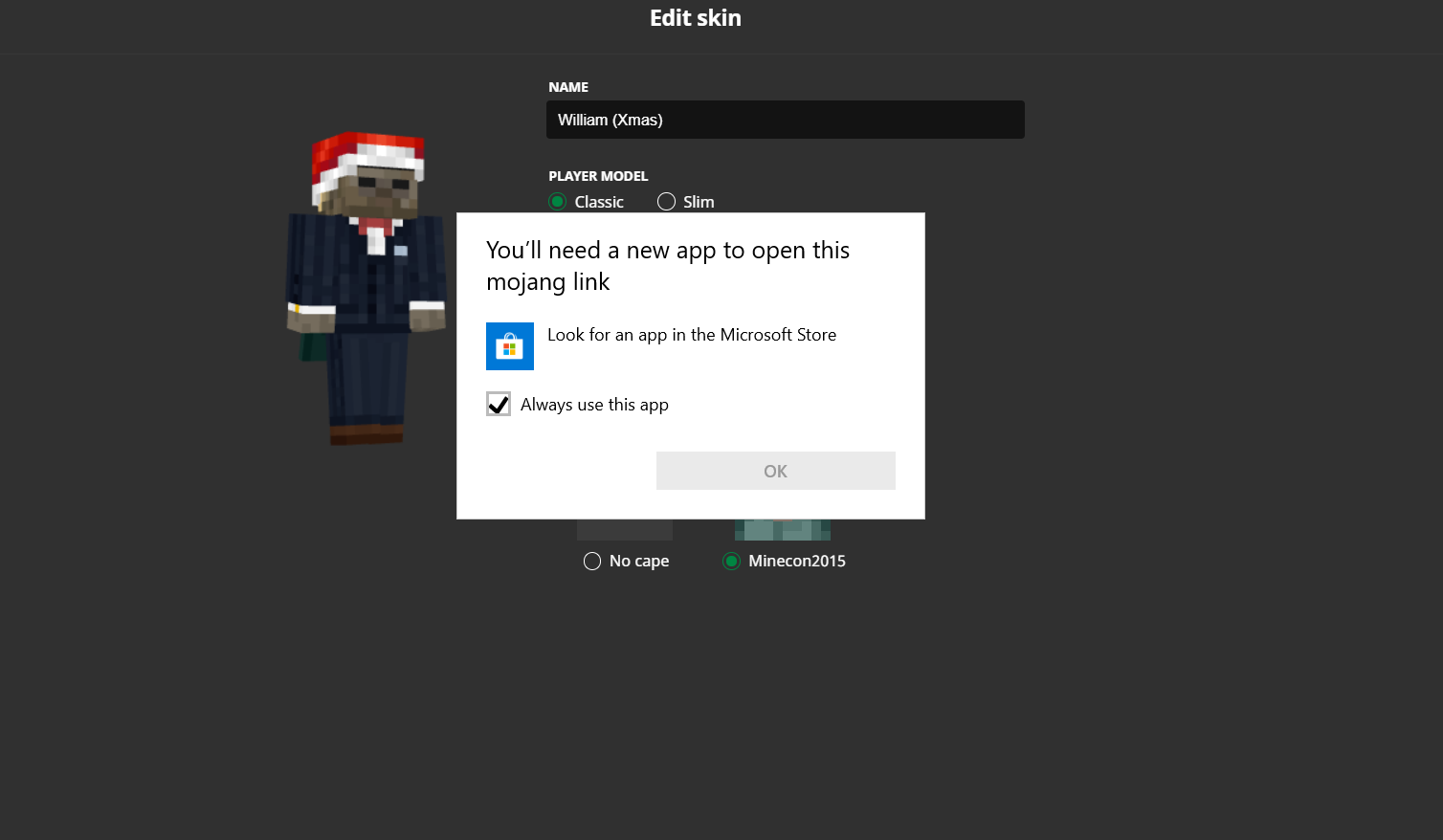
Also note: Pressing middle click while hovering over the "?" icon also brings up a "how do you want to open this file?" windows prompt, asking how I want to open a "mojang link" file type. (see Middle clicking questionmark.png)
What I expected to happen
I expected the tooltip would remain visible as long as my mouse cursor remained hovered on it or the "?" icon, allowing me to click the link and view the help article.
What actually happened
The tooltip disappeared immediately after moving my cursor off the "?" icon and onto the tooltip.
Steps to reproduce
- From the launcher, select the Java Edition tab, then click "Skins" at the top.
- Select a skin and click edit or start creating a new one.
- Position your mouse cursor over the circled white question mark icon next to "Skin File" and attempt to click the link in the white tooltip that appears.
Environment
Windows 10


Created Issue:
Impossible to click help article link in Skin File information tool-tip
In the "Skins" menu, there's a tooltip you can view by hovering on a "?" that contains a link to a Minecraft help article about skins. However, it's not possible to click this link in the tooltip as the tooltip disappears when the mouse stops hovering on the "?" icon.
What I expected to happen
I expected the tooltip would remain visible as long as my mouse cursor remained hovered on it or the "?" icon, allowing me to click the link and view the help article.
What actually happened
The tooltip disappeared immediately after moving my cursor off the "?" icon and onto the tooltip.
Steps to reproduce
- From the launcher, select the Java Edition tab, then click "Skins" at the top.
- Select a skin and click edit or start creating a new one.
- Position your mouse cursor over the circled white question mark icon next to "Skin File" and attempt to click the link in the white tooltip that appears.
Environment
Windows 10
Attachments2
In the "Skins" menu, there's a tooltip you can view by hovering on a "?" that contains a link to a Minecraft help article about skins. However, it's not possible to click this link in the tooltip as the tooltip disappears when
the mouse stops hovering onthe "?" icon.
What I expected to happen
I expected the tooltip would remain visible as long as my mouse cursor remained hovered on it or the "?" icon, allowing me to click the link and view the help article.
What actually happened
The tooltip disappeared immediately after moving my cursor off the "?" icon and onto the tooltip.
Steps to reproduce
- From the launcher, select the Java Edition tab, then click "Skins" at the top.
- Select a skin and click edit or start creating a new one.
- Position your mouse cursor over the circled white question mark icon next to "Skin File" and attempt to click the link in the white tooltip that appears.
In the "Skins" menu, there's a tooltip you can view by hovering on a "?" that contains a link to a Minecraft help article about skins. However, it's not possible to click this link in the tooltip as the tooltip disappears when you move your mouse cursor off the "?" icon.
What I expected to happen
I expected the tooltip would remain visible as long as my mouse cursor remained hovered on it or the "?" icon, allowing me to click the link and view the help article.
What actually happened
The tooltip disappeared immediately after moving my cursor off the "?" icon and onto the tooltip.
Steps to reproduce
- From the launcher, select the Java Edition tab, then click "Skins" at the top.
- Select a skin and click edit or start creating a new one.
- Position your mouse cursor over the circled white question mark icon next to "Skin File" and attempt to click the link in the white tooltip that appears.
In the "Skins" menu, there's a tooltip you can view by hovering on a "?" that contains a link to a Minecraft help article about skins. However, it's not possible to click this link in the tooltip as the tooltip disappears when you move your mouse cursor off the "?" icon.
If you lose window focus off the launcher, such as by Alt+Tabbing out while hovering over the "?" icon, it's still not possible to click on the hyperlink as the tooltip instantly disappears when clicking back into focus.
What I expected to happen
I expected the tooltip would remain visible as long as my mouse cursor remained hovered on it or the "?" icon, allowing me to click the link and view the help article.
What actually happened
The tooltip disappeared immediately after moving my cursor off the "?" icon and onto the tooltip.
Steps to reproduce
- From the launcher, select the Java Edition tab, then click "Skins" at the top.
- Select a skin and click edit or start creating a new one.
- Position your mouse cursor over the circled white question mark icon next to "Skin File" and attempt to click the link in the white tooltip that appears.
In the "Skins" menu, there's a tooltip you can view by hovering on a "?" that contains a link to a Minecraft help article about skins. However, it's not possible to click this link in the tooltip as the tooltip disappears when you move your mouse cursor off the "?" icon.
If you lose window focus off the launcher, such as by Alt+Tabbing out while hovering over the "?" icon, it's still not possible to click on the hyperlink as the tooltip instantly disappears when clicking back into focus.
Also note: Pressing middle click while hovering over the "?" icon also brings up a "how do you want to open this file?" windows prompt, asking how I want to open a "mojang link" file type.
What I expected to happen
I expected the tooltip would remain visible as long as my mouse cursor remained hovered on it or the "?" icon, allowing me to click the link and view the help article.
What actually happened
The tooltip disappeared immediately after moving my cursor off the "?" icon and onto the tooltip.
Steps to reproduce
- From the launcher, select the Java Edition tab, then click "Skins" at the top.
- Select a skin and click edit or start creating a new one.
- Position your mouse cursor over the circled white question mark icon next to "Skin File" and attempt to click the link in the white tooltip that appears.
In the "Skins" menu, there's a tooltip you can view by hovering on a "?" that contains a link to a Minecraft help article about skins. However, it's not possible to click this link in the tooltip as the tooltip disappears when you move your mouse cursor off the "?" icon.
If you lose window focus off the launcher, such as by Alt+Tabbing out while hovering over the "?" icon, it's still not possible to click on the hyperlink as the tooltip instantly disappears when clicking back into focus.
Also note: Pressing middle click while hovering over the "?" icon also brings up a "how do you want to open this file?" windows prompt, asking how I want to open a "mojang link" file type.
What I expected to happen
I expected the tooltip would remain visible as long as my mouse cursor remained hovered on it or the "?" icon, allowing me to click the link and view the help article.
What actually happened
The tooltip disappeared immediately after moving my cursor off the "?" icon and onto the tooltip.
Steps to reproduce
- From the launcher, select the Java Edition tab, then click "Skins" at the top.
- Select a skin and click edit or start creating a new one.
- Position your mouse cursor over the circled white question mark icon next to "Skin File" and attempt to click the link in the white tooltip that appears.
In the "Skins" menu, there's a tooltip you can view by hovering on a "?" that contains a link to a Minecraft help article about skins. However, it's not possible to click this link in the tooltip as the tooltip disappears when you move your mouse cursor off the "?" icon.
If you lose window focus off the launcher, such as by Alt+Tabbing out while hovering over the "?" icon, it's still not possible to click on the hyperlink as the tooltip instantly disappears when clicking back into focus.
Also note: Pressing middle click while hovering over the "?" icon also brings up a "how do you want to open this file?" windows prompt, asking how I want to open a "mojang link" file type. (see Middle clicking questionmark.png)
What I expected to happen
I expected the tooltip would remain visible as long as my mouse cursor remained hovered on it or the "?" icon, allowing me to click the link and view the help article.
What actually happened
The tooltip disappeared immediately after moving my cursor off the "?" icon and onto the tooltip.
Steps to reproduce
- From the launcher, select the Java Edition tab, then click "Skins" at the top.
- Select a skin and click edit or start creating a new one.
- Position your mouse cursor over the circled white question mark icon next to "Skin File" and attempt to click the link in the white tooltip that appears.

Hovering over certain UI elements and buttons and pressing the middle mouse button will cause the launcher to try and open a file with the "mojang link" filetype, causing a Windows Explorer prompt to appear asking the user to specify which program they want to open the file with. See below for a list of the UI elements that cause this to happen when middle clicked.
What I expected to happen
Middle clicking on the UI elements would have no effect.
What actually happened
The UI elements would react with their animations as though I pressed on them with the left mouse button, but would instead try to open a "mojang link" file on my computer, causing the Windows Explorer prompt to appear asking me which program I wanted to open the file with.
Steps to reproduce
- Position your mouse cursor over one of the following UI elements:
- (Java Edition Launcher) "View accounts" button on the accounts dropdown menu
- (Java Edition Launcher) "News", "Minecraft: Java Edition", "Minecraft Dungeons" buttons on the left panel.
- (Java Edition Launcher) "Play", "Installations", "Skins", "Patch notes" tabs on the Minecraft: Java Edition menu.
- (Java Edition Launcher) "New..." button to add a new installation on the Installations tab of the MC:JE menu.
- (Java Edition Launcher) "Settings" button on the left panel.
- (Java Edition Launcher) "Accounts", "General", "About" tabs on Settings menu
- (Java Edition Launcher) "Add account" button on Accounts tab of Settings menu
- (Java Edition Launcher) The "X" button to close a text article screen (As used to display Patch Notes, the Help menu and the Third Party Licenses).
- (Java Edition Launcher) Circled "?" Tooltips in the Skins menu (Relates to
MCL-14496) - (Dungeons Launcher) "Minecraft Dungeons" and "Settings" buttons on the left panel.
- (Dungeons Launcher) "General" and "About" tabs on the settings menu.
- (Dungeons Launcher) The "X" button to close a text article screen (As used to display the Help menu and the Third Party Licenses).
- Press the middle mouse button.
- Observe as the launcher attempts to open a "mojang link" file leading to a prompt appearing asking which program to open it with.
Other notes
Some UI elements won't try to open the mojang link file when clicked with the middle mouse button, but will still display the animation as though they were pressed with the left mouse button. This includes the Play button on both the Java and Dungeons launcher, tickboxes on either launcher, "Whats new"/"Third-party licenses" buttons in the About section of the settings tab on either launcher and when selecting an account in the "Accounts" tab of the Java Edition launcher.
Hi William, great finding and perfect reporting. I have passed this on to the team!
This has now been fixed! 🎉
It will be available in our next release. Thanks for making Minecraft better.