 MCL-19084
MC Java Launcher - login not persistent
Using a non-migrated Mojang account, the minecraft launcher fails to remember the user password upon launch, even if the "keep me logged in" checkbox is ticked. For reference I am using the minecraft-launcher package from the Arch Linux AUR, installed using the yay helper under the ~/.minecraft directory.
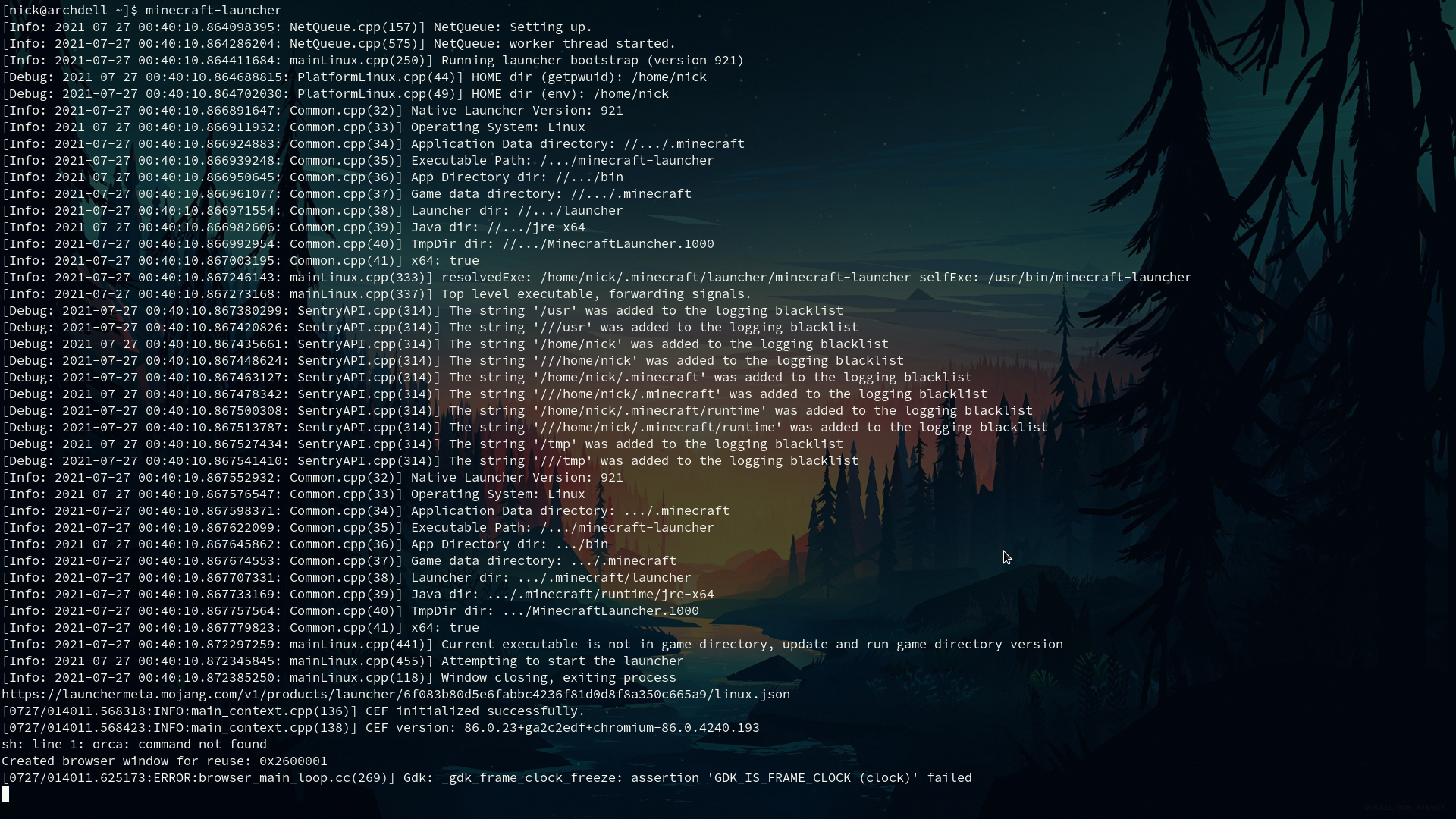
Attached is the terminal output when running minecraft-launcher. I have tried reinstalling the package and deleting/rebuilding all associated .json files, to no avail. No abnormalities are apparent in the launcher_accounts.json file, with "persistent" : true, as it should be, and a blank "userproperties" array. All other variables contain hex keys/hashes as normal.
Possibly combine/replace MCL-18924, which seems similar, asides from "AccessToken" not being empty in my case.
Environment
Java versions: 8 and 16 both tried (seems to be no difference)
X: X11/Xorg + picom
OS: Arch Linux x86_64
Kernel: 5.13.4-arch2-1
CPU: Intel i5-4570
GPU: NVIDIA GeForce GTX 750 Ti
Memory: 8 GB DDR3 @ 1600MHz single channel
Storage: 5400 RPM HDD 500GB
Linked Issues
Attachments2


Created Issue:
MC Java Launcher - login not persistent
Using a non-migrated Mojang account, the minecraft launcher fails to remember the user password upon launch, even if the "keep me logged in" checkbox is ticked. For reference I am using the minecraft-launcher package from the Arch Linux AUR, installed using the yay helper under the ~/.minecraft directory.
Attached is the terminal output when running minecraft-launcher. I have tried reinstalling the package and deleting/rebuilding all associated .json files, to no avail. No abnormalities are apparent in the launcher_accounts.json file, with "persistent" : true, as it should be, and a blank "userproperties" array. All other variables contain hex keys/hashes as normal.
Possibly combine/replaceMCL-18924, which seems similar, asides from "AccessToken" not being empty in my case.Environment
Java versions: 8 and 16 both tried; both yield same results
OS: Arch Linux x86_64
Kernel: 5.13.4-arch2-1
CPU: Intel i5-4570
GPU: NVIDIA GeForce GTX 750 Ti
Memory: 8 GB DDR3 @ 1600MHz single channel
Storage: 5400 RPM HDD 500GB
Attachments1
Java versions: 8
and 16 both tried; both yield same results
OS: Arch Linux x86_64
Kernel: 5.13.4-arch2-1
CPU: Intel i5-4570
GPU: NVIDIA GeForce GTX 750 Ti
Memory: 8 GB DDR3 @ 1600MHz single channel
Storage: 5400 RPM HDD 500GBJava versions: 8/16 (seems no difference)
X: X11/Xorg (wayland disabled)
OS: Arch Linux x86_64
Kernel: 5.13.4-arch2-1
CPU: Intel i5-4570
GPU: NVIDIA GeForce GTX 750 Ti
Memory: 8 GB DDR3 @ 1600MHz single channel
Storage: 5400 RPM HDD 500GB
Java versions: 8/16 (seems no difference)
X: X11/Xorg(wayland disabled)
OS: Arch Linux x86_64
Kernel: 5.13.4-arch2-1
CPU: Intel i5-4570
GPU: NVIDIA GeForce GTX 750 Ti
Memory: 8 GB DDR3 @ 1600MHz single channel
Storage: 5400 RPM HDD 500GBJava versions: 8/16 (seems no difference)
X: X11/Xorg + picom
OS: Arch Linux x86_64
Kernel: 5.13.4-arch2-1
CPU: Intel i5-4570
GPU: NVIDIA GeForce GTX 750 Ti
Memory: 8 GB DDR3 @ 1600MHz single channel
Storage: 5400 RPM HDD 500GB
Java versions: 8
/16 (seemsno difference)
X: X11/Xorg + picom
OS: Arch Linux x86_64
Kernel: 5.13.4-arch2-1
CPU: Intel i5-4570
GPU: NVIDIA GeForce GTX 750 Ti
Memory: 8 GB DDR3 @ 1600MHz single channel
Storage: 5400 RPM HDD 500GBJava versions: 8 and 16 both tried (seems to be no difference)
X: X11/Xorg + picom
OS: Arch Linux x86_64
Kernel: 5.13.4-arch2-1
CPU: Intel i5-4570
GPU: NVIDIA GeForce GTX 750 Ti
Memory: 8 GB DDR3 @ 1600MHz single channel
Storage: 5400 RPM HDD 500GB
![[Mod] Umija5895M](../../../data/avatars/users/10122.svg)
duplicates
Related
MCL-18331i have the same issue, in linux when closing the launcher the password is gone.
Minecraft: Java Edition
MC-233303Linux minecraft launcher 1.17.1 does not keep password after closing launcher
Duplicates
MCL-18924"fixed" in latest update
Thank you for your report!
We're tracking this issue in
MCL-18924, so this ticket is being resolved and linked as a duplicate.That ticket has already been resolved as Fixed. Please check the Fix Version/s field in that ticket to see in which version this behavior was or will be fixed.
If you haven't already, you might like to make use of the search feature to see if the issue has already been mentioned.
Quick Links:
📓 Bug Tracker Guidelines – 💬 Community Support – 📧 Mojang Support
📓 Project Summary – ✍️ Feedback and Suggestions – 📖 Game Wiki
– I am a bot. This action was performed automatically! The ticket was resolved by one of our moderators, and I left this message to give more information to you.