 MCL-20102
MCL in the Microsoft Store has very poor support for mklink
When I use mklink to import the .minecraft directory elsewhere, the old version of MCL can run very normally. But when I use the new MCL app, the launcher can't open (screenshot1)
mklink /D .\.minecraft E:\Game\Other\Minecraft\Data
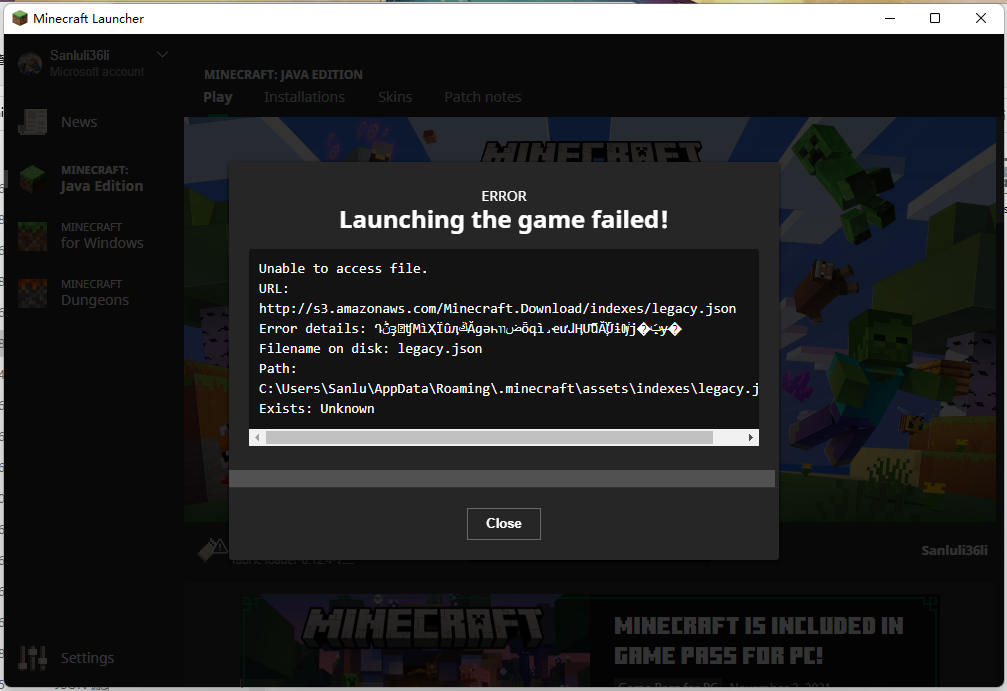
When I try to restore .minecraft and then mklink the "assets", "libraries" and "versions" directories, I try to start the java version of minecraft, but the file cannot be downloaded (screenshot2), or the launcher crashes directly
mklink /D .\assets E:\Game\Other\Minecraft\Data\assets
mklink  /D .\libraries E:\Game\Other\Minecraft\Data\libraries
mklink /D .\versions E:\Game\Other\Minecraft\Data\versions
There is no problem with the old MinecraftLauncher.exe
It is suspected that the related API has a special judgment on the directory created by mklink
It seems to have been fixed in the latest version (2.2.7450)
Environment
Windows 11 21H2 22000.282
Launcher for Windows 10.0 2.2.7264
Linked Issues


Created Issue:
MCL in the Microsoft Store has very poor support for mklink
Put the summary of the bug you're having here
What I expected to happen was...:
Describe what you thought should happen hereWhat actually happened was...:
Describe what happened hereSteps to Reproduce:
1. Put a step by step guide on how to trigger the bug here
2. ...
3. ...Environment
Put your operating system (Windows 7, Windows XP, OSX) and Java version if you know it here
Put the summary of the bug you're having here
What I expected to happen was...:
Describe what you thought should happen hereWhat actually happened was...:
Describe what happened hereSteps to Reproduce:
1. Put a step by step guide on how to trigger the bug here
2. ...
3. ...When I use mklink to import the .minecraft directory elsewhere, the old version of MCL can run very normally. But when I use the new MCL app, the launcher often fails to open
When I use mklink to import the .minecraft directory elsewhere, the old version of MCL can run very normally. But when I use the new MCL app, the launcher often fails to open
When I try to restore .minecraft and then mklink the "assets", "libraries", and "versions" directories, the files cannot be downloaded
When I use mklink to import the .minecraft directory elsewhere, the old version of MCL can run very normally. But when I use the new MCL app, the launcher
often fails to openWhen I try to restore .minecraft and then mklink the "assets", "libraries", and "versions" directories, the files cannot be downloaded
When I use mklink to import the .minecraft directory elsewhere, the old version of MCL can run very normally. But when I use the new MCL app, the launcher can't open (screenshot1)
When I try to restore .minecraft and then mklink the "assets", "libraries", and "versions" directories, the files cannot be downloaded
When I use mklink to import the .minecraft directory elsewhere, the old version of MCL can run very normally. But when I use the new MCL app, the launcher can't open (screenshot1)
When I try to restore .minecraft and then mklink the "assets", "libraries"
,and "versions" directories, the filescannot be downloadedWhen I use mklink to import the .minecraft directory elsewhere, the old version of MCL can run very normally. But when I use the new MCL app, the launcher can't open (screenshot1)
When I try to restore .minecraft and then mklink the "assets", "libraries" and "versions" directories, I try to start the java version of minecraft, but the file cannot be downloaded (screenshot2), or the launcher crashes directly
When I use mklink to import the .minecraft directory elsewhere, the old version of MCL can run very normally. But when I use the new MCL app, the launcher can't open (screenshot1)
When I try to restore .minecraft and then mklink the "assets", "libraries" and "versions" directories, I try to start the java version of minecraft, but the file cannot be downloaded (screenshot2), or the launcher crashes directly
When I use mklink to import the .minecraft directory elsewhere, the old version of MCL can run very normally. But when I use the new MCL app, the launcher can't open (screenshot1)
When I try to restore .minecraft and then mklink the "assets", "libraries" and "versions" directories, I try to start the java version of minecraft, but the file cannot be downloaded (screenshot2), or the launcher crashes directly
There is no problem with the old MinecraftLauncher.exe
When I use mklink to import the .minecraft directory elsewhere, the old version of MCL can run very normally. But when I use the new MCL app, the launcher can't open (screenshot1)
When I try to restore .minecraft and then mklink the "assets", "libraries" and "versions" directories, I try to start the java version of minecraft, but the file cannot be downloaded (screenshot2), or the launcher crashes directly
There is no problem with the old MinecraftLauncher.exe
When I use mklink to import the .minecraft directory elsewhere, the old version of MCL can run very normally. But when I use the new MCL app, the launcher can't open (screenshot1)
mklink /D .\.minecraft E:\Game\Other\Minecraft\Data
When I try to restore .minecraft and then mklink the "assets", "libraries" and "versions" directories, I try to start the java version of minecraft, but the file cannot be downloaded (screenshot2), or the launcher crashes directly
mklink /D .\assets E:\Game\Other\Minecraft\Data\assets
mklink  /D .\libraries E:\Game\Other\Minecraft\Data\libraries
mklink /D .\versions E:\Game\Other\Minecraft\Data\versions
There is no problem with the old MinecraftLauncher.exe
Put your operating system (Windows 7, Windows XP, OSX) and Java version if you know it here
Windows 11 21H2 22000.282
Launcher for Windows 10.0 2.2.7264
When I use mklink to import the .minecraft directory elsewhere, the old version of MCL can run very normally. But when I use the new MCL app, the launcher can't open (screenshot1)
mklink /D .\.minecraft E:\Game\Other\Minecraft\Data
When I try to restore .minecraft and then mklink the "assets", "libraries" and "versions" directories, I try to start the java version of minecraft, but the file cannot be downloaded (screenshot2), or the launcher crashes directly
mklink /D .\assets E:\Game\Other\Minecraft\Data\assets
mklink  /D .\libraries E:\Game\Other\Minecraft\Data\libraries
mklink /D .\versions E:\Game\Other\Minecraft\Data\versions
There is no problem with the old MinecraftLauncher.exe
It is suspected that the related API has a special judgment on the directory created by mklink
When I use mklink to import the .minecraft directory elsewhere, the old version of MCL can run very normally. But when I use the new MCL app, the launcher can't open (screenshot1)
mklink /D .\.minecraft E:\Game\Other\Minecraft\Data
When I try to restore .minecraft and then mklink the "assets", "libraries" and "versions" directories, I try to start the java version of minecraft, but the file cannot be downloaded (screenshot2), or the launcher crashes directly
mklink /D .\assets E:\Game\Other\Minecraft\Data\assets
mklink  /D .\libraries E:\Game\Other\Minecraft\Data\libraries
mklink /D .\versions E:\Game\Other\Minecraft\Data\versions
There is no problem with the old MinecraftLauncher.exe
It is suspected that the related API has a special judgment on the directory created by mklink
When I use mklink to import the .minecraft directory elsewhere, the old version of MCL can run very normally. But when I use the new MCL app, the launcher can't open (screenshot1)
mklink /D .\.minecraft E:\Game\Other\Minecraft\Data
When I try to restore .minecraft and then mklink the "assets", "libraries" and "versions" directories, I try to start the java version of minecraft, but the file cannot be downloaded (screenshot2), or the launcher crashes directly
mklink /D .\assets E:\Game\Other\Minecraft\Data\assets
mklink  /D .\libraries E:\Game\Other\Minecraft\Data\libraries
mklink /D .\versions E:\Game\Other\Minecraft\Data\versions
There is no problem with the old MinecraftLauncher.exe
It is suspected that the related API has a special judgment on the directory created by mklink
![[Mod] Umija5895M](../../../data/avatars/users/10122.svg)
is duplicated by
When I use mklink to import the .minecraft directory elsewhere, the old version of MCL can run very normally. But when I use the new MCL app, the launcher can't open (screenshot1)
mklink /D .\.minecraft E:\Game\Other\Minecraft\Data
When I try to restore .minecraft and then mklink the "assets", "libraries" and "versions" directories, I try to start the java version of minecraft, but the file cannot be downloaded (screenshot2), or the launcher crashes directly
mklink /D .\assets E:\Game\Other\Minecraft\Data\assets
mklink  /D .\libraries E:\Game\Other\Minecraft\Data\libraries
mklink /D .\versions E:\Game\Other\Minecraft\Data\versions
There is no problem with the old MinecraftLauncher.exe
It is suspected that the related API has a special judgment on the directory created by mklink
It seems to have been fixed in the latest version ()
When I use mklink to import the .minecraft directory elsewhere, the old version of MCL can run very normally. But when I use the new MCL app, the launcher can't open (screenshot1)
mklink /D .\.minecraft E:\Game\Other\Minecraft\Data
When I try to restore .minecraft and then mklink the "assets", "libraries" and "versions" directories, I try to start the java version of minecraft, but the file cannot be downloaded (screenshot2), or the launcher crashes directly
mklink /D .\assets E:\Game\Other\Minecraft\Data\assets
mklink  /D .\libraries E:\Game\Other\Minecraft\Data\libraries
mklink /D .\versions E:\Game\Other\Minecraft\Data\versions
There is no problem with the old MinecraftLauncher.exe
It is suspected that the related API has a special judgment on the directory created by mklink
It seems to have been fixed in the latest version (2.2.7450)
When I use mklink to import the .minecraft directory elsewhere, the old version of MCL can run very normally. But when I use the new MCL app, the launcher can't open (screenshot1)
mklink /D .\.minecraft E:\Game\Other\Minecraft\Data
When I try to restore .minecraft and then mklink the "assets", "libraries" and "versions" directories, I try to start the java version of minecraft, but the file cannot be downloaded (screenshot2), or the launcher crashes directly
mklink /D .\assets E:\Game\Other\Minecraft\Data\assets
mklink  /D .\libraries E:\Game\Other\Minecraft\Data\libraries
mklink /D .\versions E:\Game\Other\Minecraft\Data\versions
There is no problem with the old MinecraftLauncher.exe
It is suspected that the related API has a special judgment on the directory created by mklink
It seems to have been fixed in the latest version (2.2.7450)
When I use mklink to import the .minecraft directory elsewhere, the old version of MCL can run very normally. But when I use the new MCL app, the launcher can't open (screenshot1)
mklink /D .\.minecraft E:\Game\Other\Minecraft\Data
When I try to restore .minecraft and then mklink the "assets", "libraries" and "versions" directories, I try to start the java version of minecraft, but the file cannot be downloaded (screenshot2), or the launcher crashes directly
mklink /D .\assets E:\Game\Other\Minecraft\Data\assets
mklink  /D .\libraries E:\Game\Other\Minecraft\Data\libraries
mklink /D .\versions E:\Game\Other\Minecraft\Data\versions
There is no problem with the old MinecraftLauncher.exe
It is suspected that the related API has a special judgment on the directory created by mklink
It seems to have been fixed in the latest version (2.2.7450)
When I use mklink to import the .minecraft directory elsewhere, the old version of MCL can run very normally. But when I use the new MCL app, the launcher can't open (screenshot1)
mklink /D .\.minecraft E:\Game\Other\Minecraft\Data
When I try to restore .minecraft and then mklink the "assets", "libraries" and "versions" directories, I try to start the java version of minecraft, but the file cannot be downloaded (screenshot2), or the launcher crashes directly
mklink /D .\assets E:\Game\Other\Minecraft\Data\assets
mklink  /D .\libraries E:\Game\Other\Minecraft\Data\libraries
mklink /D .\versions E:\Game\Other\Minecraft\Data\versions
There is no problem with the old MinecraftLauncher.exe
It is suspected that the related API has a special judgment on the directory created by mklink
It seems to have been fixed in the latest version (2.2.7450)
When I use mklink to import the .minecraft directory elsewhere, the old version of MCL can run very normally. But when I use the new MCL app, the launcher can't open (screenshot1)
mklink /D .\.minecraft E:\Game\Other\Minecraft\Data
When I try to restore .minecraft and then mklink the "assets", "libraries" and "versions" directories, I try to start the java version of minecraft, but the file cannot be downloaded (screenshot2), or the launcher crashes directly
mklink /D .\assets E:\Game\Other\Minecraft\Data\assets
mklink  /D .\libraries E:\Game\Other\Minecraft\Data\libraries
mklink /D .\versions E:\Game\Other\Minecraft\Data\versions
There is no problem with the old MinecraftLauncher.exe
It is suspected that the related API has a special judgment on the directory created by mklink
It seems to have been fixed in the latest version (2.2.7450)


Duplicates MCL-20102
![[Bot] Arisa](../../../data/avatars/users/43007.png)
Thank you for your report!
We're tracking this issue in MCL-20102, so this ticket is being resolved and linked as a duplicate.
If you would like to add a vote and any extra information to the main ticket it would be appreciated.
If you haven't already, you might like to make use of the search feature to see if the issue has already been mentioned.
Quick Links:
📓 Bug Tracker Guidelines – 💬 Community Support – 📧 Mojang Support
📓 Project Summary – ✍️ Feedback and Suggestions – 📖 Game Wiki
– I am a bot. This action was performed automatically! The ticket was resolved by one of our moderators, and I left this message to give more information to you.