 MCL-21522
Minecraft Dungeons won't update
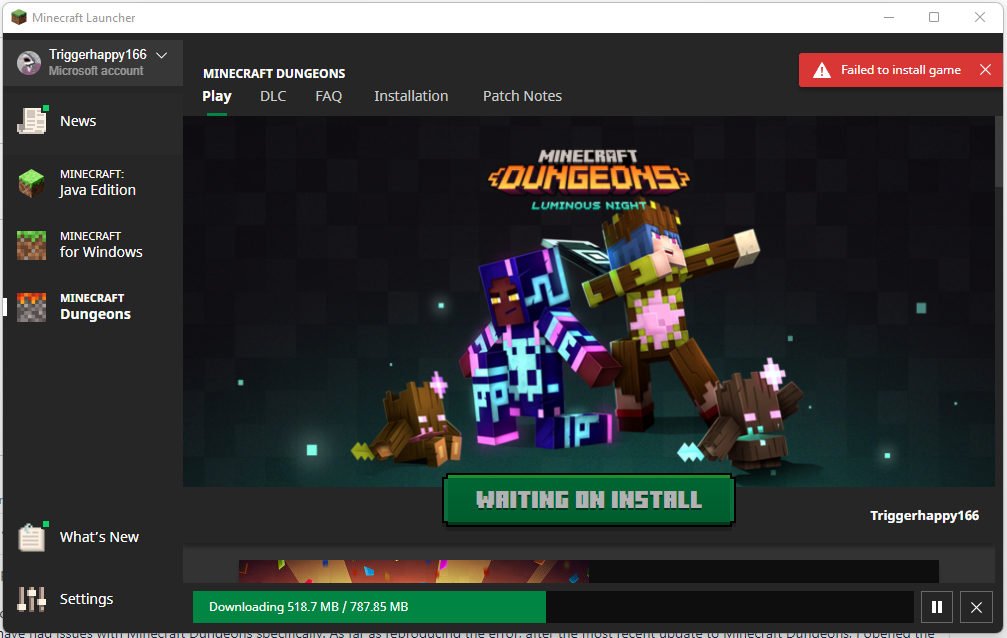
The game won't update. It downloads all 703.74 MB of the update, which doesn't fill the entire progress bar, then stops and gives me a "Failed to install game" error. No matter how many times I've tried this, it doesn't change.
Environment
Windows 11, Java 8.0.3310.9
Linked Issues


Created Issue:
Minecraft Dungeons won't update
The game won't update. It downloads all 703.74 MB of the update, which doesn't fill the entire progress bar, then stops and gives me a "Failed to install game" error. No matter how many times I've tried this, it doesn't change.
Environment
Windows 11, Java 8.0.3310.9
Added Attachments:

Added Linked Issues:
is duplicated by
Added Attachments:
![[Bot] Arisa](../../../data/avatars/users/43007.png)
![[Mod] markderickson](../../../data/avatars/users/18946.svg)
Removed Labels: update-failure
Added Linked Issues:
duplicates
Removed Linked Issues:
is duplicated by
Same error on update. Reinstalled Launcher and Dungeons, same result
Uninstalled the game and now it can no longer install at all
I have the exact same issue. I hope it can be fixed.
Hi there!
Could you try to reinstall the Launcher? After deleting it, find .minecraft and delete the file - what is important that this file should be deleted from the trash bin, because corrupted files from the old .minecraft file may interract with the newly generated .minecraft file.
This ticket will automatically reopen when you reply.
I completely uninstalled the original Minecraft launcher, deleted the .minecraft folder, reinstalled the launcher, and it didn't work. Additionally, I'm getting the same error on the new Microsoft Store launcher. I don't use a VPN, and while I use Razer Cortex, GeForce Experience, and Discord, this issue is not any of the ones described in the notes on the Known Incompatible Software list, and I have been using these pieces of software for the entirety of 2022, and only just now have had issues with Minecraft Dungeons specifically. As far as reproducing the error, after the most recent update to Minecraft Dungeons, I opened the launcher, and clicked update. The download progress bar does not sync up, with the full download not filling the entire bar. Once I reach the full download amount of 787.85 MB, it gives me the "Failed to install game" error and brings me back to the update button. This has persisted after uninstalling and reinstalling Minecraft Dungeons.
Hi there!
Could you answer few questions regarding this issue, it will help with the investigation:
This ticket will automatically reopen when you reply.
Currently, I just tried the re-register fix and am waiting on the game to attempt to download again. If it doesn't work, I will try the final fix to see if it works. In case it's of note, Microsoft Store tries to download:
On startup, and none of them work. When Trying to download them again, they disappear from the downloads list, but then reappear when the PC starts up again.
The re-register fix did not work, nor did the beta launcher. I have bought Minecraft Dungeons through the original launcher made by Mojang, not the new Windows launcher. I also own the game through the Microsoft Store, as a separate purchase. The launcher version is the one that does not work, as it won't update to the latest version, but I want to continue using it to preserve my save data. If I can move to the version bought through the Microsoft Store, and keep my progress, I will do that, but as of yet, none of the proposed fixes have resolved the launcher version of the game not updating
Please, attach full launcher_log.txt file.
This ticket will automatically reopen when you reply.
Recently the launcher itself updated and when I updated Dungeons it started downloading 1.38 GB of content. When the installation was about to finish, it failed. When I pressed "Update" again, it started downloading 735.18 MB, it also failed. In other attempts it's downloading this second amount, but it still fails. None of them completed the bar.
Thank you for your report!
We're tracking this issue in
MCL-21612, so this ticket is being resolved and linked as a duplicate.If you would like to add a vote and any extra information to the main ticket it would be appreciated.
If you haven't already, you might like to make use of the search feature to see if the issue has already been mentioned.
Quick Links:
📓 Bug Tracker Guidelines – 📧 Mojang Support
📓 Project Summary – ✍️ Feedback and Suggestions – 📖 Game Wiki