![[MCQA] Zgajak](../../../data/avatars/users/10122.svg) [MCQA] Zgajak
[MCQA] Zgajak
- Zgajak
- JIRAUSER706438
- Europe/Stockholm
- Yes
- No
 MCL-22811
![[Mod] ManosSef](../../../data/avatars/users/61702.png)


 WEB-7467
is duplicated by
MCL-16698
is duplicated by
is duplicated by
is duplicated by
is duplicated by
is duplicated by
is duplicated by
is duplicated by
is duplicated by
is cloned by
is duplicated by
is duplicated by
is duplicated by
is duplicated by
is duplicated by
is duplicated by
is duplicated by
is duplicated by
is duplicated by
is duplicated by
is duplicated by
is duplicated by
is duplicated by
is duplicated by
is duplicated by
is duplicated by
is duplicated by
is duplicated by
is duplicated by
is duplicated by
is duplicated by
is duplicated by
is duplicated by
is duplicated by
is duplicated by
is duplicated by
is duplicated by
is duplicated by
is duplicated by
is duplicated by
is duplicated by
is duplicated by
is duplicated by
is duplicated by
is duplicated by
is duplicated by
is duplicated by
is duplicated by
is duplicated by
is duplicated by
is duplicated by
is duplicated by
is duplicated by
is duplicated by
is duplicated by
is duplicated by
is duplicated by
is duplicated by
is duplicated by
is duplicated by
is duplicated by
is duplicated by
is duplicated by
is duplicated by
is duplicated by
is duplicated by
is duplicated by
is duplicated by
is duplicated by
is duplicated by
is duplicated by
is duplicated by
is duplicated by
is duplicated by
Hi there!
Could you answer few questions regarding this issue, it will help with the investigation:
- Does this issue still occurs to you on newest version of Launcher?
- Have you tried to install Launcher from the minecraft.net website?
- Is your drivers up-to-date?
- Do you use VPN or any of the incompatible software on machine you try to log-in?
This ticket will automatically reopen when you reply.
duplicates
relates to
is duplicated by
RESOLVED - PC Java version
I have used both the .msi and the windows store launchers and both produced the same errors, until....
My recommendation / fix:
- Delete all .minecraft files and uninstall all Minecraft launchers.
- Ensure Java JRE is up-to-date
- Reinstall Minecraft launcher from here.
- Test 1.19 on your machine.
In short, try the D.E.R.T method.
I think after resetting my Windows 11, it deleted all of the files including the old launcher files, and after re-installing the OLD launcher here, something was fixed.
Good luck.
According to the log, this may be of some relevance:
"Action failed with result "HTTP server doesn't seem to support byte ranges. Cannot resume." (33) : https://launcher.mojang.com/v1/objects/05c9dcada2e15aa982b26c81e092325d14c65137/jvm.dll"
ENVIRONMENT:
Windows 11 Home 22000.675; 64-bit operating system, x64-based processor
CPU: 11th Gen Intel(R) Core(TM) i5-11600KF @ 3.90GHz 3.91 GHz (No OC)
RAM: 16.0 GB (15.9 GB usable) 3200MHz
JRE: Version 8 Update 333
GPU: EVGA Nvidia GeForce RTX 3060 12GB VRAM (No OC)
- JDK and JRE was completely reinstalled from scratch. Rebooted.
- Minecraft launcher and version completely reinstalled from scratch. Rebooted.
- Attempted running the launcher with elevated permissions.
- Reinstalled Windows 7/8 Launcher here.
Reset Windows 11 completely and reinstalled everything from scratch.
Amplifying information: Partner updated at the same time as me, almost Identical system with the only outlier being: Her system is Windows 10 Home, while my system run Windows 11 Home.
Currently, the fix has been found.
My thoughts: I believe the problem was isolated to the new launcher.
The Windows 7/8 launcher, after complete wipe and reinstall, works with Minecraft version 1.19; Find it here.
The following was a timeline of the steps taken to produce the error:
- Update to Minecraft version 1.19
- Set Java argument to "-Xmx8G -XX:+UnlockExperimentalVMOptions -XX:+UseG1GC -XX:G1NewSizePercent=20 -XX:G1ReservePercent=20 -XX:MaxGCPauseMillis=50 -XX:G1HeapRegionSize=32M"
- Click "Play"
- Error shows when download completes just before starting the game.
- Started intense trooubleshooting. So far, all I have tried has been included in this post. Will add more when more T/S is performed.
THE FOLLOWING WAS REPORTED BY THE MC LAUNCHER:
ERROR
Launching the game failed!
Unable to decompress file.
Error details: no message available
Filename on disk: jvm.dll
Path: C:\Users\XxPro\AppData\Local\Packages\Microsoft.4297127D64EC6_8wekyb3d8bbwe\LocalCache\Local\runtime\java-runtime-gamma\windows-x64\java-runtime-gamma\bin\server\jvm.dll
Exists: File
IN REPLY TO Zgajak
[MCQA] Zgajak added a comment - 17 hours ago
Hi there!
Could you answer few questions regarding this issue, it will help with the investigation:
- Does this issue occur on the newest version of the Launcher? YES
- Does this issue occur on beta version of the Launcher? YES
- Have you tried to install older version of the Launcher from the minecraft.net website (Windows 7/8 version)? YES, then again after it was deleted.
- Are you logged in in both Xbox app, MS store, and Launcher with the same MS account? YES
- Have you tried reinstalling the Launcher, but deleting .minecraft folder beforehand (copy it elsewhere before deleting)? YES
- Is your Windows and associated apps (Xbox app, MS store) up-to-date? YES
- Have you tried updating/downgrading JDK Java version? YES, as well as the JRE
- Have you tried to re-registering MS store as written here? YES
- Do you have enough free space on your disc drive? YES, 708GB/1TB
- Do you use VPN or any of the incompatible software on machine you try to log-in? NO, Tried with and without.
- Could you provide us with more in-depth repro steps? Refer to information above.
- Please also provide full launcher_log file. DONE. Attached to thread with screenshots.
Thank you for reading.
I have used both the .msi and the windows store launchers and both produced the same errors, until....
My recommendation / fix:
- Delete all .minecraft files and uninstall all Minecraft launchers.
- Ensure Java JRE is up-to-date
- Reinstall Minecraft launcher from [here|https://launcher.mojang.com/download/MinecraftInstaller.msi.]
- Test 1.19 on your machine.
In short, try the D.E.R.T method.
I think after resetting my Windows 11, it deleted all of the files including the old launcher files, and after re-installing the OLD launcher, something was fixed.
Good luck.
According to the log, this may be of some relevance:
"Action failed with result "HTTP server doesn't seem to support byte ranges. Cannot resume." (33) : https://launcher.mojang.com/v1/objects/05c9dcada2e15aa982b26c81e092325d14c65137/jvm.dll"
ENVIRONMENT:
Windows 11 Home 22000.675; 64-bit operating system, x64-based processor
CPU: 11th Gen Intel(R) Core(TM) i5-11600KF @ 3.90GHz 3.91 GHz (No OC)
RAM: 16.0 GB (15.9 GB usable) 3200MHz
JRE: Version 8 Update 333
GPU: EVGA Nvidia GeForce RTX 3060 12GB VRAM (No OC) # JDK and JRE was completely reinstalled from scratch. Rebooted.
- Minecraft launcher and version completely reinstalled from scratch. Rebooted.
- Attempted running the launcher with elevated permissions.
Reset Windows 11 completely and reinstalled everything from scratch.
Amplifying information: Partner updated at the same time as me, almost Identical system with the only outlier being: Her system is Windows 10 Home, while my system ran Windows 11 Home.
Currently, the fix has been found.
My thoughts: I believe the problem was isolated to the new launcher.
The Windows 7/8 launcher, after complete wipe and reinstall, works with Minecraft version 1.19; Find it here.
The following was a timeline of the steps taken to produce the error:
- Update to Minecraft version 1.19
- Set Java argument to "-Xmx8G -XX:+UnlockExperimentalVMOptions -XX:+UseG1GC -XX:G1NewSizePercent=20 -XX:G1ReservePercent=20 -XX:MaxGCPauseMillis=50 -XX:G1HeapRegionSize=32M"
- Click "Play"
- Error shows when download completes just before starting the game.
- Started intense trooubleshooting. So far, all I have tried has been included in this post. Will add more when more T/S is performed.
THE FOLLOWING WAS REPORTED BY THE MC LAUNCHER:
ERROR
Launching the game failed!
Unable to decompress file.
Error details: no message available
Filename on disk: jvm.dll
Path: C:\Users\XxPro\AppData\Local\Packages\Microsoft.4297127D64EC6_8wekyb3d8bbwe\LocalCache\Local\runtime\java-runtime-gamma\windows-x64\java-runtime-gamma\bin\server\jvm.dll
Exists: File
IN REPLY TO Zgajak
[MCQA] Zgajak added a comment - 17 hours ago
Hi there!
Could you answer few questions regarding this issue, it will help with the investigation:
- Does this issue occur on the newest version of the Launcher? YES
- Does this issue occur on beta version of the Launcher? YES
- Have you tried to install older version of the Launcher from the minecraft.net website (Windows 7/8 version)? YES
- Are you logged in in both Xbox app, MS store, and Launcher with the same MS account? YES
- Have you tried reinstalling the Launcher, but deleting .minecraft folder beforehand (copy it elsewhere before deleting)? YES
- Is your Windows and associated apps (Xbox app, MS store) up-to-date? YES
- Have you tried updating/downgrading JDK Java version? YES, as well as the JRE
- Have you tried to re-registering MS store as written here? YES
- Do you have enough free space on your disc drive? YES, 708GB/1TB
- Do you use VPN or any of the incompatible software on machine you try to log-in? NO, Tried with and without.
- Could you provide us with more in-depth repro steps? Refer to information above.
- Please also provide full launcher_log file. DONE. Attached to thread with screenshots.
Thank you for reading.

@[MCQA] Zgajak, the page still looks nearly identical and it still does not properly differentiate between editions. For the launcher that might be fine, but for the other links it can still be confusing.
![[Mod] Les3awe](../../../data/avatars/users/79847.png)
@[MCQA] Zgajak, feedback has been posted(Pending approval).
![[Mod] turbo](../../../data/avatars/users/92867.png)
Hi, I am unable to reproduce the behavior you describe. I can see from the logs that you're using 1.20.1-OptiFine_HD_U_I5 and Fabric, which looks like it's causing some corruption. After reinstalling like [MCQA] Zgajak said, make sure you test this in a vanilla (unmodified) environment. Any non-standard client/server/launcher build needs to be taken up with the appropriate team, not Mojang.
However, you may still not be able to play on your device.
This is what it looks like on my device when you should be able to play the game, but it is just that you are using the wrong version of the launcher as [MCQA] Zgajak said.
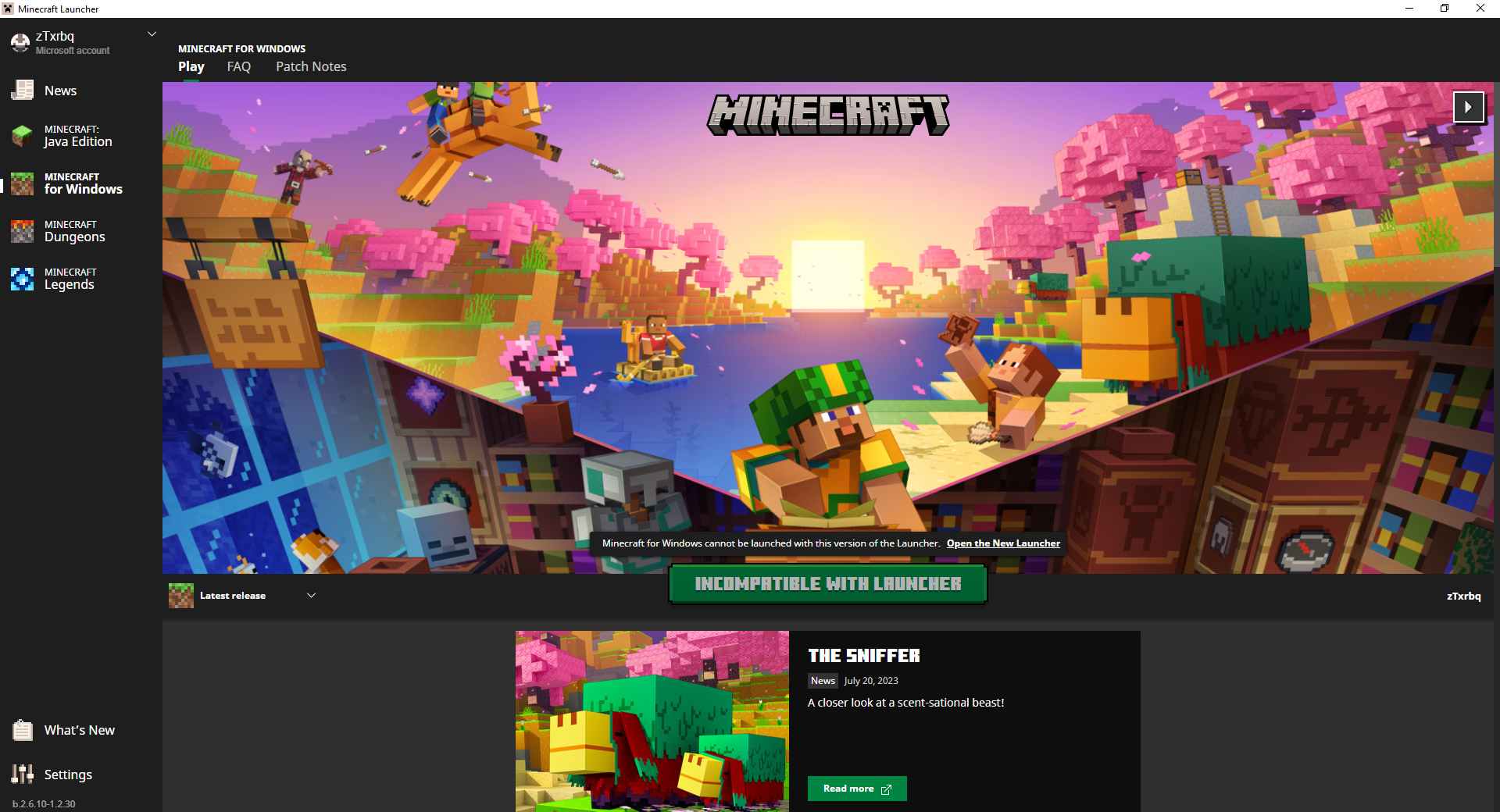
Hi, please answer the questions from [MCQA] Zgajak in this comment. After that, the ticket can be reopened.
Hi again, you don't need to buy Minecraft again. [MCQA] Zgajak was referring to https://www.minecraft.net/download.
![[Mod] markderickson](../../../data/avatars/users/18946.svg)
Hey [MCQA] Zgajak, I neglected to update the description and title when reopening this ticket. Sorry about that – it's better described now  I've also attached a screenshot that presents the issue.

My account was deactivated due to Microsoft's 60-day deadline, you must log into your account at least once for it to reset this period.
At least that's what I think.
I saw a “question” about a guy who went through the same thing as me. I soon deduced that this would be the reason why my account was deactivated. Here is the link to the post:
[
From what I remember, I logged into the account within the last 2 months. However, this “deadline” has not been reset?!
[MCQA] Zgajak
Can you at least change my account nickname? So that when I buy again I can put my Nickname and recover my data on the servers.
[MCQA] Zgajak, No, but right now players are not properly informed that the Super Mario Mash-up Pack was platform specific and can only work on Nintendo Switch specific (not cross-platform) multiplayer before purchase, I currently could no longer find a trace to the answer of "could I play the Super Mario Mash-up Pack on cross-platform multiplayer" in Minecraft Help. Even searching for one there does not give me a result of "if I could play the Super Mario Mash-up Pack on cross-platform multiplayer". Searching for just "Super Mario Mash-up Pack" only gives me result of "Different Minecraft Editions", which is on another issue I've made.
For "Nintendo Switch specific multiplayer", I mean Switch-to-Switch multiplayer, Nintendo Switch as a host and only other Nintendo Switches can join that through Nintendo Switch Online or in LAN mode, and no PC, no mobile, and no competitor's consoles can join that multiplayer.
I only have Nintendo Switch to test for but the issue could also apply to other platform specific contents, including but not limited to optional LittleBigPlanet Mash-up on PlayStation 4 only from Minecraft Marketplace Catalog and some DLC contents from Minecraft: Xbox One Edition that were transferred to it's Bedrock counterpart (for which was affected, click here, then search for "Playable on Xbox Only, Not Purchasable, Not Usable in Multiplayer") but I missed the point because of hatred of unfair restriction of Super Mario Mash-up Pack put (by Nintendo) to prevent me from using that on cross-platform multiplayer with my friends but not the community-made ports of it and mostly targeting that in hope so it could be used on cross-platform multiplayer.
I've updated the description to reflect such and corrected the summary to avoid targeting specific parts of contents.
All accounts belonging to Mojang employees, and employees who are part of the quality assurance team (MCQA) don't have consistent name colors. Mojang accounts most often have red names and MCQA accounts most often have yellow names, but this does not apply to all of them.
Expected result:
All Mojang accounts would have a red name and all MCQA accounts would have a yellow name.
Observed result:
These Mojang accounts have a yellow name (as opposed to red, but writing all of the red ones here would take forever):
These MCQA accounts have a yellow name (as expected):
- [MCQA] bardam
- [MCQA] Bartłomiej Słodkowski
- [MCQA] Iwcies
- [MCQA] kapla
- [MCQA] v-magwar
- [MCQA] Mateusz Świecki
- [MCQA] Migruz
- [MCQA] MiPaw
- [MCQA] Nikoo
- [MCQA] Bartłomiej Dziurżyński
- [MCQA] v-weszaj
These MCQA accounts have a red name:
Hi, @[MCQA] Zgajak. It did't help (everything that was suggested was done). It still won't start. Can't even create a new .minecraft folder.
[MCQA] Zgajak Same issue as exhila but I have found more as of 1.21.44 and 1.21.60.21.
- In Classic Skins, Various skin packs (that cannot be purchased in recent days) are missing, this symptom also affects skins from the Super Mario Mash-up Pack (currently Nintendo Switch only) (MCPE-183307) (see "2024062213032900_s.jpg" from AniMario)
- In Classic Skins, viewing all the skins from Marketplace sometimes lead to nothing (can pinpoint which skin packs were affected more reliably if performed in 1.21.60.21 Preview), for example Dungeons Hero Skin Pack, which cannot be purchased for new owner recently. (see Dungeons Hero Skin Pack not loading.mov
 )
) - Switching between Classic skin and Custom Character does not also switch the character model on the right consistently. (see "Character not switching consistently.jpeg" and "Skin not switching consistently.jpeg") while testing on 1.21.44 Hotfix.
- Importing custom skin while on multiplayer seems to be disallowed (iOS only as far as I tested) (
MCPE-187719) while testing on 1.21.44 Hotfix.
There is a symptom that can only be found in 1.21.60.21 Preview for now:
- Marketplace loading screen loads forever when offline, even on the Dressing Room, disallowing even swapping characters or skins while offline (since 1.21.60.21 Preview) (
MCPE-188521, iOS only as far as I tested, seems to be blocked byMCPE-188522on the rest)
However, there are symptoms that seem fixed in 1.21.60.21 Preview (But not 1.21.44 Hotfix):
- In Classic Skins, Button to view all skins from imported packs does not work (can’t open custom / imported skin packs) and it can shift the button down affecting the ability to view the skinpack from even the Marketplace. (being duplicated for the most) (various workarounds have been put, including this for non-consoles and that for consoles) (for proof of fix in 1.21.60.21, see imported skin pack bug fixed in 1.21.60.21 Preview.mov)
- Custom character spins when edited, but stops after very short time (even when Screen Animations was enabled), although it pops up with a toast “Your character has been saved” while testing on 1.21.44 Hotfix. (see character spin glitches to full stop.mov), Classic Skin spins fully though.
- In Character Creator, selecting the item that the character equips loads forever, requiring to select another, and then reselect the one equipped. (see equipped Persona item loads forever when other item was not selected first.mov for the symptom in 1.21.44 Hotfix)
Update: Wow you developers fixed things faster than I tested, I just found that the symptom where selecting the item that the character equips loads forever seemed fixed in 1.21.60.21.
Update 1: To see if your Dressing Room was the broken one (like this), enter the Dressing Room and see if it requires further loading (the loading icon / loading screen), or see if the background was transparent.
Few additional questions:
This ticket will automatically reopen when you reply.
Hi Tommaso!
Could you answer few questions regarding this issue, it will help with the investigation:
This ticket will automatically reopen when you reply.
Hi Phil!
Could you answer few questions regarding this issue, it will help with the investigation:
This ticket will automatically reopen when you reply.
Hi there!
Could you answer few questions regarding this issue, it will help with the investigation:
This ticket will automatically reopen when you reply.
Hi !
Few questions.
Thanks in advance
This ticket will automatically reopen when you reply.
Hi there!
Could you answer few questions regarding this issue, it will help with the investigation:
This ticket will automatically reopen when you reply.
Hi there!
Could you answer few questions regarding this issue, it will help with the investigation: * Does this issue still occurs to you on newest version of Launcher?
This ticket will automatically reopen when you reply.
Hi there!
Could you answer few questions regarding this issue, it will help with the investigation:
This ticket will automatically reopen when you reply.
Hi there!
Could you answer few questions regarding this issue, it will help with the investigation:
This ticket will automatically reopen when you reply.
Hi there!
Could you answer few questions regarding this issue, it will help with the investigation:
This ticket will automatically reopen when you reply.
Hi there!
Could you answer few questions regarding this issue, it will help with the investigation:
This ticket will automatically reopen when you reply.
Hi there!
Could you answer few questions regarding this issue, it will help with the investigation:
This ticket will automatically reopen when you reply.
Hi there!
Could you answer few questions regarding this issue, it will help with the investigation:
This ticket will automatically reopen when you reply.
Hi there!
Could you answer few questions regarding this issue, it will help with the investigation:
This ticket will automatically reopen when you reply.
Hi there!
Could you answer few questions regarding this issue, it will help with the investigation:
This ticket will automatically reopen when you reply.
Hi there!
Could you answer few questions regarding this issue, it will help with the investigation:
This ticket will automatically reopen when you reply.
Hi there!
Could you answer few questions regarding this issue, it will help with the investigation:
This ticket will automatically reopen when you reply.
Thank you for your report!
We're tracking this issue in
MCL-17395, so this ticket is being resolved and linked as a duplicate.If you would like to add a vote and any extra information to the main ticket it would be appreciated.
If you haven't already, you might like to make use of the search feature to see if the issue has already been mentioned.
Quick Links:
📓 Bug Tracker Guidelines – 📧 Mojang Support
📓 Project Summary – ✍️ Feedback and Suggestions – 📖 Game Wiki
Hi there!
Could you answer few questions regarding this issue, it will help with the investigation:
This ticket will automatically reopen when you reply.
Hi there!
Could you answer few questions regarding this issue, it will help with the investigation:
This ticket will automatically reopen when you reply.
Hi there!
Could you answer few questions regarding this issue, it will help with the investigation:
This ticket will automatically reopen when you reply.
Hi there!
Could you answer few questions regarding this issue, it will help with the investigation:
This ticket will automatically reopen when you reply.
Thank you for your report!
Closing as Cannot Reproduce.
The Legacy Launcher is no longer supported as noted in this post - Legacy Launcher Update - Legacy Launcher Update - Minecraft Update News (tumblr.com)
Please note, that mechanics of the game may change between updates.
Things such as graphics, sounds, world creation, biomes, redstone, villagers, and animals may not work the same in current versions.
Full Version History – Feature Requests and Suggestions
Quick Links:
📓 Bug Tracker Guidelines – 📧 Mojang Support
📓 Project Summary – ✍️ Feedback and Suggestions – 📖 Game Wiki
Thank you for your report!
However, this issue is Working as Intended.
The Legacy Launcher and Windows XP/Vista systems are no longer supported as noted in this post - Legacy Launcher Update - Legacy Launcher Update - Minecraft Update News (tumblr.com)
The report you have submitted is working as intended:
MCL-19832Please note, that mechanics of the game may change between updates.
Things such as graphics, sounds, world creation, biomes, redstone, villagers, and animals may not work the same in current versions.
Full Version History – Feature Requests and Suggestions
Quick Links:
📓 Bug Tracker Guidelines – 📧 Mojang Support
📓 Project Summary – ✍️ Feedback and Suggestions – 📖 Game Wiki
Thank you for your report!
Closing as Cannot Reproduce.
The Legacy Launcher is no longer supported as noted in this post - Legacy Launcher Update - Legacy Launcher Update - Minecraft Update News (tumblr.com)
Please note, that mechanics of the game may change between updates.
Things such as graphics, sounds, world creation, biomes, redstone, villagers, and animals may not work the same in current versions.
Full Version History – Feature Requests and Suggestions
Quick Links:
📓 Bug Tracker Guidelines – 📧 Mojang Support
📓 Project Summary – ✍️ Feedback and Suggestions – 📖 Game Wiki
Hi there!
Could you answer few questions regarding this issue, it will help with the investigation:
This ticket will automatically reopen when you reply.
Thank you for your report!
However, this issue is Working as Intended.
Users can only be logged with one account at a time in the new version of the Launcher, since it is connected to Xbox app and MS store.
Adding few accounts is only possible in older version of Launcher (which can be found here https://www.minecraft.net/en-us/download/alternative under 'Windows 7/8' section).
Switching accounts In new version of Launcher is possible by using 'Switch account' button.
The report you have submitted is working as intended:
MCL-20003Please note, that mechanics of the game may change between updates.
Things such as graphics, sounds, world creation, biomes, redstone, villagers, and animals may not work the same in current versions.
Full Version History – Feature Requests and Suggestions
Quick Links:
📓 Bug Tracker Guidelines – 📧 Mojang Support
📓 Project Summary – ✍️ Feedback and Suggestions – 📖 Game Wiki
Hi there!
Could you answer few questions regarding this issue, it will help with the investigation:
This ticket will automatically reopen when you reply.
Hi there!
Could you answer few questions regarding this issue, it will help with the investigation:
This ticket will automatically reopen when you reply.
Hi there!
Could you answer few questions regarding this issue, it will help with the investigation:
This ticket will automatically reopen when you reply.
Hi there!
Could you answer few questions regarding this issue, it will help with the investigation:
This ticket will automatically reopen when you reply.
Thank you for your report!
However, this issue is invalid.
Currently users cannot permanently close the banner, but you can try and write a suggestion for Launcher team here: https://feedback.minecraft.net/hc/en-us/community/posts/new
The report you have submitted is working as intended:
MCL-20039Please note, that mechanics of the game may change between updates.
Things such as graphics, sounds, world creation, biomes, redstone, villagers, and animals may not work the same in current versions.
Full Version History – Feature Requests and Suggestions
Quick Links:
📓 Bug Tracker Guidelines – 📧 Mojang Support
📓 Project Summary – ✍️ Feedback and Suggestions – 📖 Game Wiki
As per reporter's comment closing as Cannot Reproduce.
Hi there!
Could you answer few questions regarding this issue, it will help with the investigation:
This ticket will automatically reopen when you reply.
Hi there!
Could you answer few questions regarding this issue, it will help with the investigation:
This ticket will automatically reopen when you reply.
Hi there!
Could you answer few questions regarding this issue, it will help with the investigation:
This ticket will automatically reopen when you reply.
Hi there!
Could you answer few questions regarding this issue, it will help with the investigation:
This ticket will automatically reopen when you reply.
Hi there!
Could you answer few questions regarding this issue, it will help with the investigation:
This ticket will automatically reopen when you reply.
Hi there!
Could you answer few questions regarding this issue, it will help with the investigation:
This ticket will automatically reopen when you reply.
Hi there!
Could you answer few questions regarding this issue, it will help with the investigation:
This ticket will automatically reopen when you reply.
Thank you for your report!
However, this issue is Working as Intended.
You need to be logged in with the same account in Launcher, MS store and Xbox app for this message to disappear.
Users can only be logged with one account at a time in the new version of the Launcher, since it is connected to Xbox app and MS store.
The report you have submitted is working as intended:
MCL-20785Please note, that mechanics of the game may change between updates.
Things such as graphics, sounds, world creation, biomes, redstone, villagers, and animals may not work the same in current versions.
Full Version History – Feature Requests and Suggestions
Quick Links:
📓 Bug Tracker Guidelines – 📧 Mojang Support
📓 Project Summary – ✍️ Feedback and Suggestions – 📖 Game Wiki
Hi there!
Could you answer few questions regarding this issue, it will help with the investigation:
This ticket will automatically reopen when you reply.
Hi there!
Could you answer few questions regarding this issue, it will help with the investigation:
This ticket will automatically reopen when you reply.
Thank you for your report!
However, this issue is Working as Intended.
Hungarian Language is 100% translated but only 7% approved by proofreaders, it needs to be at least 95% approved.
The report you have submitted is working as intended:
MCL-21033Please note, that mechanics of the game may change between updates.
Things such as graphics, sounds, world creation, biomes, redstone, villagers, and animals may not work the same in current versions.
Full Version History – Feature Requests and Suggestions
Quick Links:
📓 Bug Tracker Guidelines – 📧 Mojang Support
📓 Project Summary – ✍️ Feedback and Suggestions – 📖 Game Wiki
Hi there!
Could you answer few questions regarding this issue, it will help with the investigation:
What I also suggest: disable all of the overlays like: Discord, Nvidia (or other graphic cards) overlay + be sure to turn off all of the program which can affect graphic settings like programs which read temperatures and cpu/gpu load.
This ticket will automatically reopen when you reply.
As per reporter's comment closing as Cannot Reproduce.
Hi there!
Could you answer few questions regarding this issue, it will help with the investigation:
I just want to mention that version 1.18 are no longer supported on Mac OS below version 10.14.5, and java 17 as written in this article: https://help.minecraft.net/hc/en-us/articles/4420326353933-Minecraft-Java-Edition-Versions-and-MacOS-
This ticket will automatically reopen when you reply.
Hi there!
Could you answer few questions regarding this issue, it will help with the investigation:
I also suggest to signing out of all your apps (Xbox app, MS store, Launcher) restarting, and signing in again.
I also suggest to follow the same steps as above but before signing in, install Xbox Identity Provider (found here https://www.microsoft.com/en-us/p/xbox-identity-provider/9wzdncrd1hkw?activetab=pivot:overviewtab) and then signing in again.
This ticket will automatically reopen when you reply.
Hi there!
Could you answer few questions regarding this issue, it will help with the investigation:
This ticket will automatically reopen when you reply.
Hi there!
Could you answer few questions regarding this issue, it will help with the investigation:
This ticket will automatically reopen when you reply.
As per reporter's comment closing as Cannot Reproduce.
Hi there!
Could you answer few questions regarding this issue, it will help with the investigation:
This ticket will automatically reopen when you reply.
Hi there!
Could you answer few questions regarding this issue, it will help with the investigation:
This ticket will automatically reopen when you reply.
Hi there!
Could you answer few questions regarding this issue, it will help with the investigation:
This ticket will automatically reopen when you reply.
As per reporter's comment closing as Cannot Reproduce.
Hi there!
Please sign in in Xbox app, MS store, and Launcher with the same MS account on the newest version of the Launcher
One more question, are you using MS store Launcher or older version of the Launcher?
This ticket will automatically reopen when you reply.
Hi there!
Could you answer few questions regarding this issue, it will help with the investigation:
This ticket will automatically reopen when you reply.
Hi there!
Could you answer few questions regarding this issue, it will help with the investigation:
This ticket will automatically reopen when you reply.
Hi there!
Could you answer few questions regarding this issue, it will help with the investigation:
This ticket will automatically reopen when you reply.
Hi there!
Could you answer few questions regarding this issue, it will help with the investigation:
This ticket will automatically reopen when you reply.
Hi there!
Could you answer few questions regarding this issue, it will help with the investigation:
This ticket will automatically reopen when you reply.
Hi there!
Could you answer few questions regarding this issue, it will help with the investigation:
This ticket will automatically reopen when you reply.
Thank you for your report!
Closing as Cannot Reproduce.
The Legacy Launcher is no longer supported as noted in this post - Legacy Launcher Update - Legacy Launcher Update - Minecraft Update News (tumblr.com)
If similar bug occurs within new, current Launcher, please create new Issue with new reprosteps.
Please note, that mechanics of the game may change between updates.
Things such as graphics, sounds, world creation, biomes, redstone, villagers, and animals may not work the same in current versions.
Full Version History – Feature Requests and Suggestions
Quick Links:
📓 Bug Tracker Guidelines – 📧 Mojang Support
📓 Project Summary – ✍️ Feedback and Suggestions – 📖 Game Wiki
Hi there!
Could you answer few questions regarding this issue, it will help with the investigation:
This ticket will automatically reopen when you reply.
Hi there!
Could you answer few questions regarding this issue, it will help with the investigation:
Do you have newest version of Java?
This ticket will automatically reopen when you reply.
Hi there!
Could you answer few questions regarding this issue, it will help with the investigation:
This ticket will automatically reopen when you reply.
Hi there!
Could you answer few questions regarding this issue, it will help with the investigation:
This ticket will automatically reopen when you reply.
Hi there!
Could you answer few questions regarding this issue, it will help with the investigation:
This ticket will automatically reopen when you reply.
Hi there!
Could you answer few questions regarding this issue, it will help with the investigation:
This ticket will automatically reopen when you reply.
Hi there!
Could you answer few questions regarding this issue, it will help with the investigation:
This ticket will automatically reopen when you reply.
Hi there!
Could you answer few questions regarding this issue, it will help with the investigation:
This ticket will automatically reopen when you reply.
Hi there!
Could you answer few questions regarding this issue, it will help with the investigation:
This ticket will automatically reopen when you reply.
Hi there!
Could you answer few questions regarding this issue, it will help with the investigation:
This ticket will automatically reopen when you reply.
Hi there!
Could you answer few questions regarding this issue, it will help with the investigation:
This ticket will automatically reopen when you reply.
Hi there!
Could you answer few questions regarding this issue, it will help with the investigation:
This ticket will automatically reopen when you reply.
Hi there!
Could you answer few questions regarding this issue, it will help with the investigation:
This ticket will automatically reopen when you reply.
Hi there!
Could you answer few questions regarding this issue, it will help with the investigation:
This ticket will automatically reopen when you reply.
Thank you for your report!
However, this issue is invalid.
You can write a suggestion for feature request for Launcher team here: Minecraft Feedback
The report you have submitted is working as intended:
MCL-19488Please note, that mechanics of the game may change between updates.
Things such as graphics, sounds, world creation, biomes, redstone, villagers, and animals may not work the same in current versions.
Full Version History – Feature Requests and Suggestions
Quick Links:
📓 Bug Tracker Guidelines – 📧 Mojang Support
📓 Project Summary – ✍️ Feedback and Suggestions – 📖 Game Wiki
Hi there!
Could you answer few questions regarding this issue, it will help with the investigation:
This ticket will automatically reopen when you reply.
Hi there!
Could you answer few questions regarding this issue, it will help with the investigation:
This ticket will automatically reopen when you reply.
Thank you for your report!
We're actually already tracking this issue at MCL-18387, so I will resolve and link this ticket as a duplicate.
I suggest also to browse through the main issue for potential fixes.
If you would like to add a vote and any extra information to the main ticket it would be appreciated.
If you haven't already, you might like to make use of the search feature to see if the issue has already been mentioned.
Quick Links:
📓 Issue Guidelines – 💬 Community Support – 📧 Customer Support – ✍️ Feedback and Suggestions – 📖 Game Wiki
Thank you for your report!
We're actually already tracking this issue at MCL-18387, so I will resolve and link this ticket as a duplicate.
I suggest also to browse through the main issue for potential fixes.
If you would like to add a vote and any extra information to the main ticket it would be appreciated.
If you haven't already, you might like to make use of the search feature to see if the issue has already been mentioned.
Quick Links:
📓 Issue Guidelines – 💬 Community Support – 📧 Customer Support – ✍️ Feedback and Suggestions – 📖 Game Wiki
Hi there!
Could you answer few questions regarding this issue, it will help with the investigation:
This ticket will automatically reopen when you reply.
Hi there!
This ticket will automatically reopen when you reply.
Hi there!
Could you answer few questions regarding this issue, it will help with the investigation:
This ticket will automatically reopen when you reply.
Hi there!
Could you answer few questions regarding this issue, it will help with the investigation:
This ticket will automatically reopen when you reply.
Hi there!
Could you answer few questions regarding this issue, it will help with the investigation:
This ticket will automatically reopen when you reply.
Closing as cannot reproduce per reporters comment.
Hi there!
Could you answer few questions regarding this issue, it will help with the investigation:
This ticket will automatically reopen when you reply.
Hi there!
Could you answer few questions regarding this issue, it will help with the investigation:
This ticket will automatically reopen when you reply.
Hi there!
Could you answer few questions regarding this issue, it will help with the investigation:
This ticket will automatically reopen when you reply.
Closing the ticket as cannot reproduce.
Hi there!
Could you answer few questions regarding this issue, it will help with the investigation:
This ticket will automatically reopen when you reply.
Hi there!
Could you answer few questions regarding this issue, it will help with the investigation:
This ticket will automatically reopen when you reply.
Thank you for your report!
However, this issue is Working as Intended.
The report you have submitted is working as intended:
MCL-21120Please note, that mechanics of the game may change between updates.
Things such as graphics, sounds, world creation, biomes, redstone, villagers, and animals may not work the same in current versions.
Full Version History – Feature Requests and Suggestions
Quick Links:
📓 Bug Tracker Guidelines – 📧 Mojang Support
📓 Project Summary – ✍️ Feedback and Suggestions – 📖 Game Wiki
Hi there!
Could you answer few questions regarding this issue, it will help with the investigation:
This ticket will automatically reopen when you reply.
Hi there!
Could you install Chrome/Chromium and restart your PC?
This ticket will automatically reopen when you reply.
Hi there!
Could you answer few questions regarding this issue, it will help with the investigation:
This ticket will automatically reopen when you reply.
Hi there!
Could you answer few questions regarding this issue, it will help with the investigation:
This ticket will automatically reopen when you reply.
Thank you for your report!
Closing as Cannot Reproduce.
This text is no longer in use.
Please note, that mechanics of the game may change between updates.
Things such as graphics, sounds, world creation, biomes, redstone, villagers, and animals may not work the same in current versions.
Full Version History – Feature Requests and Suggestions
Quick Links:
📓 Bug Tracker Guidelines – 📧 Mojang Support
📓 Project Summary – ✍️ Feedback and Suggestions – 📖 Game Wiki
Hi there!
Please provide in-depth repro steps since we cannot reproduce this issue on our end.
Reproduction steps might help us with understanding how this issue occurs.
This ticket will automatically reopen when you reply.
Hi there!
Could you answer few questions regarding this issue, it will help with the investigation:
This ticket will automatically reopen when you reply.
Closing the ticket as cannot reproduce per reporters comment.
Thank you for your report!
We're actually already tracking this issue at
MCL-21118, so I will resolve and link this ticket as a duplicate.I suggest also to browse through the main issue for potential fixes.
If you would like to add a vote and any extra information to the main ticket it would be appreciated.
If you haven't already, you might like to make use of the search feature to see if the issue has already been mentioned.
Quick Links:
📓 Issue Guidelines – 💬 Community Support – 📧 Customer Support – ✍️ Feedback and Suggestions – 📖 Game Wiki
Hi there!
Could you answer few questions regarding this issue, it will help with the investigation:
This ticket will automatically reopen when you reply.
Thank you for your report!
However, this issue is Working as Intended.
All version above macOS 10.15 are numbered 10.16.
The report you have submitted is working as intended:
MCL-19988Please note, that mechanics of the game may change between updates.
Things such as graphics, sounds, world creation, biomes, redstone, villagers, and animals may not work the same in current versions.
Full Version History – Feature Requests and Suggestions
Quick Links:
📓 Bug Tracker Guidelines – 📧 Mojang Support
📓 Project Summary – ✍️ Feedback and Suggestions – 📖 Game Wiki
Hi there!
Could you answer few questions regarding this issue, it will help with the investigation:
This ticket will automatically reopen when you reply.
Hi there!
Could you answer few questions regarding this issue, it will help with the investigation:
This ticket will automatically reopen when you reply.
Hi there!
Could you answer few questions regarding this issue, it will help with the investigation:
This ticket will automatically reopen when you reply.
Hi there!
Could you answer few questions regarding this issue, it will help with the investigation:
This ticket will automatically reopen when you reply.
Thank you for your report!
We're actually already tracking this issue at
MCL-14797, so I will resolve and link this ticket as a duplicate.I suggest also to browse through the main issue for potential fixes.
If you would like to add a vote and any extra information to the main ticket it would be appreciated.
If you haven't already, you might like to make use of the search feature to see if the issue has already been mentioned.
Quick Links:
📓 Issue Guidelines – 💬 Community Support – 📧 Customer Support – ✍️ Feedback and Suggestions – 📖 Game Wiki
Hi there!
Could you answer few questions regarding this issue, it will help with the investigation:
This ticket will automatically reopen when you reply.
Hi there!
Could you answer few questions regarding this issue, it will help with the investigation:
This ticket will automatically reopen when you reply.
Hi there!
Could you answer few questions regarding this issue, it will help with the investigation:
This ticket will automatically reopen when you reply.
Closing the issue as cannot reproduce, per reporters comment.
Closing the issue as cannot reproduce per reporters comment.
Hi there!
Could you answer few questions regarding this issue, it will help with the investigation:
This ticket will automatically reopen when you reply.
Hi there!
Could you answer few questions regarding this issue, it will help with the investigation:
This ticket will automatically reopen when you reply.
Thank you for your report!
However, this issue is invalid.
Version c0.28_01 is not officially supported.
The report you have submitted is invalid:
MCL-14936Please note, that mechanics of the game may change between updates.
Things such as graphics, sounds, world creation, biomes, redstone, villagers, and animals may not work the same in current versions.
Full Version History – Feature Requests and Suggestions
Quick Links:
📓 Bug Tracker Guidelines – 📧 Mojang Support
📓 Project Summary – ✍️ Feedback and Suggestions – 📖 Game Wiki
Hi there!
Could you answer few questions regarding this issue, it will help with the investigation:
This ticket will automatically reopen when you reply.
Hi there!
Could you answer few questions regarding this issue, it will help with the investigation:
This ticket will automatically reopen when you reply.
Hi there!
Could you answer few questions regarding this issue, it will help with the investigation:
This ticket will automatically reopen when you reply.
Hi there!
Could you answer few questions regarding this issue, it will help with the investigation:
This ticket will automatically reopen when you reply.
Hi there!
Could you answer few questions regarding this issue, it will help with the investigation:
This ticket will automatically reopen when you reply.
Closing as cannot reproduce per reporters comment.
Hi there!
Could you answer few questions regarding this issue, it will help with the investigation:
This ticket will automatically reopen when you reply.
Hi there!
Has ExploadingBottle solution fixed your issue?
This ticket will automatically reopen when you reply.
Hi there!
Could you answer few questions regarding this issue, it will help with the investigation:
This ticket will automatically reopen when you reply.
Hi there!
Could you answer few questions regarding this issue, it will help with the investigation:
This ticket will automatically reopen when you reply.
Hi there!
Could you answer few questions regarding this issue, it will help with the investigation:
This ticket will automatically reopen when you reply.
Hi there!
Could you answer few questions regarding this issue, it will help with the investigation:
This ticket will automatically reopen when you reply.
Hi there!
Could you answer few questions regarding this issue, it will help with the investigation:
This ticket will automatically reopen when you reply.
Hi there!
Could you answer few questions regarding this issue, it will help with the investigation:
This ticket will automatically reopen when you reply.
Thank you for your report!
However, this issue is Working as Intended.
The report you have submitted is working as intended:
MCL-20801Please note, that mechanics of the game may change between updates.
Things such as graphics, sounds, world creation, biomes, redstone, villagers, and animals may not work the same in current versions.
Full Version History – Feature Requests and Suggestions
Quick Links:
📓 Bug Tracker Guidelines – 📧 Mojang Support
📓 Project Summary – ✍️ Feedback and Suggestions – 📖 Game Wiki
Hi there!
Could you answer few questions regarding this issue, it will help with the investigation:
This ticket will automatically reopen when you reply.
Hi there!
Could you answer few questions regarding this issue, it will help with the investigation:
MCL-19986solved you issue?This ticket will automatically reopen when you reply.
Hi there!
Please uninstall 'Minecraft for Windows' and see if that solves your issue
This ticket will automatically reopen when you reply.
Hi there!
Could you answer few questions regarding this issue, it will help with the investigation:
This ticket will automatically reopen when you reply.
Hi there!
Could you answer few questions regarding this issue, it will help with the investigation:
This ticket will automatically reopen when you reply.
Hi there!
Could you answer few questions regarding this issue, it will help with the investigation:
This ticket will automatically reopen when you reply.
Hi there!
Could you answer few questions regarding this issue, it will help with the investigation:
This ticket will automatically reopen when you reply.
Thank you for your report!
However, this issue is invalid.
Legacy Launcher is no longer supported as seen in blog post Legacy Launcher Update - Legacy Launcher Update - Minecraft Update News (tumblr.com)
The report you have submitted is invalid:
MCL-11724Please note, that mechanics of the game may change between updates.
Things such as graphics, sounds, world creation, biomes, redstone, villagers, and animals may not work the same in current versions.
Full Version History – Feature Requests and Suggestions
Quick Links:
📓 Bug Tracker Guidelines – 📧 Mojang Support
📓 Project Summary – ✍️ Feedback and Suggestions – 📖 Game Wiki
Hi there!
Could you answer few questions regarding this issue, it will help with the investigation:
This ticket will automatically reopen when you reply.
Hi there!
Could you answer few questions regarding this issue, it will help with the investigation:
This ticket will automatically reopen when you reply.
Thank you for your report!
However, this issue is Incomplete.
Your report does not contain enough information. As such, we're unable to understand or reproduce the problem.
You are welcome to create a new ticket about your issue with more detailed information.
However, please review the Bug Tracker Guidelines and be sure to search for existing issues before writing a new bug report.
Please note, that mechanics of the game may change between updates.
Things such as graphics, sounds, world creation, biomes, redstone, villagers, and animals may not work the same in current versions.
Full Version History – Feature Requests and Suggestions
Quick Links:
📓 Bug Tracker Guidelines – 📧 Mojang Support
📓 Project Summary – ✍️ Feedback and Suggestions – 📖 Game Wiki
Hi there!
Could you answer few questions regarding this issue, it will help with the investigation:
This ticket will automatically reopen when you reply.
Hi there!
Could you answer few questions regarding this issue, it will help with the investigation:
This ticket will automatically reopen when you reply.
Hi there!
Could you answer few questions regarding this issue, it will help with the investigation:
This ticket will automatically reopen when you reply.
Hi there!
Could you answer few questions regarding this issue, it will help with the investigation:
This ticket will automatically reopen when you reply.
Hi there!
We could not reproduce this issue on our end with the Lates version of Launcher.
Could you answer few questions regarding this issue, it will help with the investigation:
This ticket will automatically reopen when you reply.
Closing as cannot reproduce per reporters comment.
Hi there!
Could you answer few questions regarding this issue, it will help with the investigation:
This ticket will automatically reopen when you reply.
Hi there!
Could you answer few questions regarding this issue, it will help with the investigation:
This ticket will automatically reopen when you reply.
Closing as cannot reproduce per reporters comment.
Hi there!
Could you answer few questions regarding this issue, it will help with the investigation:
This ticket will automatically reopen when you reply.
Hi there!
Could you answer few questions regarding this issue, it will help with the investigation:
This ticket will automatically reopen when you reply.
Closing as cannot reproduce per reporters comment.
Hi there!
Could you answer few questions regarding this issue, it will help with the investigation:
This ticket will automatically reopen when you reply.
Hi there!
Please try reset/re-register MS store as written here, also signing out of all your Windows Apps, and the signing in again.
This ticket will automatically reopen when you reply.
Hi there!
Could you answer few questions regarding this issue, it will help with the investigation:
This ticket will automatically reopen when you reply.
Hi there!
Could you answer few questions regarding this issue, it will help with the investigation:
This ticket will automatically reopen when you reply.
Hi there!
Could you answer few questions regarding this issue, it will help with the investigation:
This ticket will automatically reopen when you reply.
Hi there!
Could you answer few questions regarding this issue, it will help with the investigation:
This ticket will automatically reopen when you reply.
Hi there!
Could you answer few questions regarding this issue, it will help with the investigation:
This ticket will automatically reopen when you reply.
Hi there!
Could you answer few questions regarding this issue, it will help with the investigation:
This ticket will automatically reopen when you reply.
Closing as Cannot reproduce per reporters comment.
Hi there!
Could you answer few questions regarding this issue, it will help with the investigation:
This ticket will automatically reopen when you reply.
Hi there!
Could you answer few questions regarding this issue, it will help with the investigation:
This ticket will automatically reopen when you reply.
Hi there!
Could you answer few questions regarding this issue, it will help with the investigation:
This ticket will automatically reopen when you reply.
Hi there!
Could you answer few questions regarding this issue, it will help with the investigation:
This ticket will automatically reopen when you reply.
Hi there!
Could you answer few questions regarding this issue, it will help with the investigation:
This ticket will automatically reopen when you reply.
Closing as cannot reproduce per reporters comment,
Hi there!
Could you answer few questions regarding this issue, it will help with the investigation:
This ticket will automatically reopen when you reply.
Closing as cannot reproduce per reporters comment.
Hi there!
Could you answer few questions regarding this issue, it will help with the investigation:
This ticket will automatically reopen when you reply.
Hi there!
I would like to ask you a few questions, if you don't know the answers, or don't know how to find/execute those procedures, ask right away, we will go step by step with them.
It will help with the investigation:
This ticket will automatically reopen when you reply, that means that is set as resolved by the system, and it will open again when you add another comment
Hi there!
Could you answer few questions regarding this issue, it will help with the investigation:
This ticket will automatically reopen when you reply.
Hi there!
Could you answer few questions regarding this issue, it will help with the investigation:
This ticket will automatically reopen when you reply.
Hi there!
Could you answer few questions regarding this issue, it will help with the investigation:
This ticket will automatically reopen when you reply.
Hi there!
Could you answer few questions regarding this issue, it will help with the investigation:
This ticket will automatically reopen when you reply.
Hi there!
Could you answer few questions regarding this issue, it will help with the investigation:
This ticket will automatically reopen when you reply.
Hi there!
Could you answer few questions regarding this issue, it will help with the investigation:
This ticket will automatically reopen when you reply.
Closing as cannot reproduce per reporters comment.
Hi there!
Could you answer few questions regarding this issue, it will help with the investigation:
This ticket will automatically reopen when you reply.
Hi there!
Could you answer few questions regarding this issue, it will help with the investigation:
This ticket will automatically reopen when you reply.
Hi again Josee!
I will try to assist you as much as I can. There can be a number of solutions to this so we will try to find it and fix it.
Before I will go step by step on applications and installers, I have few more questions:
-Did you migrate your Mojang account to a new Microsoft Account?
-Did you use the same email for a migration, or did you create a new one?
-Did you receive an confirmation email on the migrated account mail address?
-Are you signing in with your Mojang Account email or Microsoft Account email (if migrated to a new email)?
-Are you signing in your Microsoft Account to the correct Login location (Microsoft Login, not Mojang login)?
After these questions, if issue still persists, we move on to other things.
So first of all, the Launchers.
There are two types of Minecraft Launcher, the new Launcher that can be found or either on minecraft.net website (https://launcher.mojang.com/download/MinecraftInstaller.exe) as well as in Microsoft Store program found on your computer (will talk about it later on), and the old Launcher that can be found also on minecraft.net (and only there) (https://launcher.mojang.com/download/MinecraftInstaller.msi). I know, this maybe confusing at first, but its just how things are at the moment . The new Launcher is directly connected to Microsoft Store and Xbox program (which is not an application for Xbox console, rather it's a program where you can edit your Xbox profile, and buy/launch games for PC).
Secondly the Microsoft Store.
Microsoft Store - you can search it in your search bar in the down left corner of the task bar, or you can find it by clicking start menu (the windows logo on the down left corner of the screen) and scrolling, and finding it there. Sign-in with your Microsoft account (top right circle icon on the program).
You can download the Minecraft Launcher from there also, just type "Minecraft Launcher" in the search bar of the program (it is located on the top of the application).
Thirdly Xbox Application.
Xbox program can be found on your computer, you can search it in your search bar in the down left corner of the task bar, or you can find it by clicking start menu (the windows logo on the down left corner of the screen) and scrolling, and finding it there. If its not on your computer, it can be downloaded from Xbox website (https://www.xbox.com/en-US/apps/xbox-app-for-pc) or from Microsoft Store. Download it (or open it if its already installed) and install on your computer. Sign in with your Microsoft account.
Now that we have these apps (short for applications) out of the way, let's try some fixing.
Please uninstall current Launcher you are using, and install the old Launcher, if it does not work, uninstall it again, and then install the new Launcher. Sign in with your Microsoft Account on all applications listed above (Microsoft Store, Xbox application, Launcher).
Side note, both Launchers can be uninstalled from the 'Start' menu, but the old Launcher redirects user to 'programs and features' window, where you have to find it and uninstall it there.
If this didn't help, please install 'Xbox Identity Provider' found here https://www.microsoft.com/en-us/p/xbox-identity-provider/9wzdncrd1hkw#activetab=pivot:overviewtab , some Windows need this program to work with other applications. Install it and then sign in with your Microsoft account.
You can also update your Windows, you can update it in 'Start' (the Windows button on the lower left side of screen), then go to 'Settings' (screw tool icon in start menu), then find 'Update & Security', and then click 'check for updates'. Install all the updates and restart your Computer afterwards.
I know that is much work to do, but I'm just listing possible solutions.
Hope this helps, if the issue still persists, please don't hesitate to reply
This ticket will automatically reopen when you reply
Hi there!
Make sure that you are logged in with the same account in Hub, Launcher, Minecraft store and Xbox app.
After that try this:
-Try joining Minecraft beta, and then leaving by accessing the same Minecraft page in 'Xbox insider hub' (Leave preview).
-There is also troubleshoot article in 'Xbox insider' "Can't leave the Minecraft Beta?" on the 'Announcements' tab that might help.
This ticket will automatically reopen when you reply.
Hi there!
'Minecraft for Windows' is not available in older version of Launcher (Unified).
Please download new version of Launcher that can be found or either on minecraft.net website (https://launcher.mojang.com/download/MinecraftInstaller.exe) as well as in Microsoft Store.
Remember to sign in with your Microsoft account in the new Launcher, Microsoft store and Xbox app.
Hope that this will resolve your issue.
This ticket will automatically reopen when you reply.
Thank you for your report!
However, this issue is Working as Intended.
You can still add old Launcher to your Steam library, and yes, newer releases will be supported for old Launcher.
The report you have submitted is working as intended:
MCL-20060Please note, that mechanics of the game may change between updates.
Things such as graphics, sounds, world creation, biomes, redstone, villagers, and animals may not work the same in current versions.
Full Version History – Feature Requests and Suggestions
Quick Links:
📓 Bug Tracker Guidelines – 📧 Mojang Support
📓 Project Summary – ✍️ Feedback and Suggestions – 📖 Game Wiki
Thank you for your report!
We're actually already tracking this issue at
MCL-14797, so I will resolve and link this ticket as a duplicate.I suggest also to browse through the main issue for potential fixes.
If you would like to add a vote and any extra information to the main ticket it would be appreciated.
If you haven't already, you might like to make use of the search feature to see if the issue has already been mentioned.
Quick Links:
📓 Issue Guidelines – 💬 Community Support – 📧 Customer Support – ✍️ Feedback and Suggestions – 📖 Game Wiki
Hi there!
Could you answer few questions regarding this issue, it will help with the investigation:
This ticket will automatically reopen when you reply.
Hi there!
Could you answer few questions regarding this issue, it will help with the investigation:
This ticket will automatically reopen when you reply.
Closing the ticket as cannot reproduce per reporters comment,
Thank you for your report!
We're actually already tracking this issue at
MCL-14797, so I will resolve and link this ticket as a duplicate.I suggest also to browse through the main issue for potential fixes.
If you would like to add a vote and any extra information to the main ticket it would be appreciated.
If you haven't already, you might like to make use of the search feature to see if the issue has already been mentioned.
Quick Links:
📓 Issue Guidelines – 💬 Community Support – 📧 Customer Support – ✍️ Feedback and Suggestions – 📖 Game Wiki
Hi there!
Could you answer few questions regarding this issue, it will help with the investigation:
This ticket will automatically reopen when you reply.
Hi there!
Could you answer few questions regarding this issue, it will help with the investigation:
This ticket will automatically reopen when you reply.
Hi again, Robert!
Closing this issue as Work as Intended.
Java game will not work on Family sharing option since it is not a Microsoft Store game.
All other games (Minecraft for Windows, Dungeons and even Launcher) are connected to MS Store, but Java game is not.
You can try to buy a Gamepass for 1$ (where Java is included and family sharing might work), but before buying anything you should contact microsoft/xbox support (https://support.xbox.com/en-US/help/family-online-safety/family/family-info) and ask them if this option would work.
Hope that this helps a bit.
Full Version History – Feature Requests and Suggestions
Quick Links:
📓 Bug Tracker Guidelines – 📧 Mojang Support
📓 Project Summary – ✍️ Feedback and Suggestions – 📖 Game Wiki
Hi there!
Could you answer few questions regarding this issue, it will help with the investigation:
This ticket will automatically reopen when you reply.
Hi there!
Could you answer few questions regarding this issue, it will help with the investigation:
This ticket will automatically reopen when you reply.
Hi there!
Could you answer few questions regarding this issue, it will help with the investigation:
This ticket will automatically reopen when you reply.