 MCL-4802
Standalone Mac launcher requests Java 1.6 runtime to be installed
The standalone launcher for Mac comes packaged with a Java runtime, and should run without/regardless any other runtime installed.
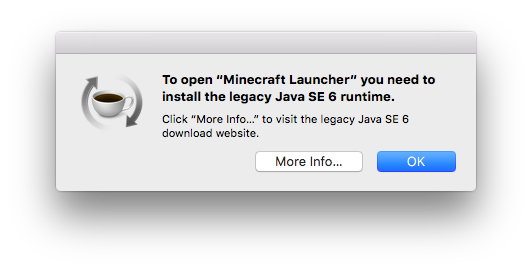
In actuality, this does not occur, and the user is prompted to install the Java 1.6 runtime upon executing the launcher.
Executing the Minecraft Updater within the app bundle of the Minecraft Launcher results in it downloading the runtime again, but doesn't solve the issue. Executing either executable (JavaApplicationStub and launcher) in the MacOS folder of the application bundle is successful in launching the Minecraft Launcher.
Environment
OS X 10.11.3, Java 1.8.0_60 installed (irrelevent since it should use the bundled Java 1.8.0_74)


Created Issue:
Standalone Mac launcher requests Java 1.6 runtime to be installed
The standalone launcher for Mac comes packaged with a Java runtime, and should run without/regardless any other runtime installed.
In actuality, this does not occur, and the user is prompted to install the Java 1.6 runtime upon executing the launcher.
Executing the Minecraft Updater within the app bundle of the Minecraft Launcher results in it downloading the runtime again, but doesn't solve the issue. Executing both executables (JavaApplicationStub and launcher) in the MacOS folder of the application bundle is successful in launching the Minecraft Launcher.
Environment
OS X 10.11.3, Java 1.8.0_60 installed (irrelevent since it should use the bundled Java 1.8.0_74)
Attachments4
The standalone launcher for Mac comes packaged with a Java runtime, and should run without/regardless any other runtime installed.
In actuality, this does not occur, and the user is prompted to install the Java 1.6 runtime upon executing the launcher.
Executing the Minecraft Updater within the app bundle of the Minecraft Launcher results in it downloading the runtime again, but doesn't solve the issue. Executing
bothexecutables(JavaApplicationStub and launcher) in the MacOS folder of the application bundle is successful in launching the Minecraft Launcher.The standalone launcher for Mac comes packaged with a Java runtime, and should run without/regardless any other runtime installed.
In actuality, this does not occur, and the user is prompted to install the Java 1.6 runtime upon executing the launcher.
Executing the Minecraft Updater within the app bundle of the Minecraft Launcher results in it downloading the runtime again, but doesn't solve the issue. Executing either executable (JavaApplicationStub and launcher) in the MacOS folder of the application bundle is successful in launching the Minecraft Launcher.
![[Mod] Ezekiel (ezfe)](../../../data/assets/gravatar/ezekielelin.jpeg)

I cannot reproduce this issue. You are likely using the legacy version of the Minecraft launcher, which does show this alert and has the same icon.
When I launch (on my laptop) the legacy version, I get that alert. When I launch the current version I do not and it uses the bundled java (not the java I have on my system).
Please delete any "Minecraft.app" files from your system (this will not impact your game), as well as any "Minecraft.dmg" (or related) files you used to install it. Then please download Minecraft again from this URL:
https://launcher.mojang.com/download/Minecraft.dmg
Please let me know if the issue still persists with this file. You should be able to find out by attempting to launch it from the DMG (if it complains about being in the DMG, then it will work).
As I very clearly described, this is NOT the legacy launcher. This is the standalone launcher, which I have reinstalled from the Mojang website multiple times, yet the issue is persisting. I will attempt this on other systems and, if possible, an alternate installation of OS X. I'll report any findings. It's entirely possible if not probable it's specific to something I've done.
Can you tell me the size of the app file you are trying to open? (Press ⌘ + i).
174.1 MB.
I have reopened the ticket, however there is nothing further I can do. What you can do however is test it on another computer and see if you run into the same problem. If you do, please let me know here.
I'm seeing the same issue. So that's at least one repo.
Is this still a concern in the current Minecraft Launcher version 2.0.805 / 2.0.806? If so, please update the affected versions in order to best aid Mojang ensuring bugs are still valid in the latest releases/pre-releases. If this has been done, we can reopen the issue.
Keep in mind that the "Resolved"-Status on this ticket just means "Answered", and that we are waiting for further information on whether this issue still exists or not. It will be reopened it as soon as the requested information has been delivered.
Could not reproduce with 2.0.1004, albeit on a different computer and macOS 10.13.3.