 Choomno
- Choomno
- choomno
- America/Los_Angeles
- Yes
- No
 MCL-4802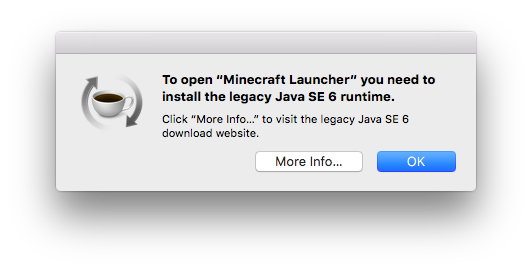


The standalone launcher for Mac comes packaged with a Java runtime, and should run without/regardless any other runtime installed.
In actuality, this does not occur, and the user is prompted to install the Java 1.6 runtime upon executing the launcher.
Executing the Minecraft Updater within the app bundle of the Minecraft Launcher results in it downloading the runtime again, but doesn't solve the issue. Executing
bothexecutables(JavaApplicationStub and launcher) in the MacOS folder of the application bundle is successful in launching the Minecraft Launcher.The standalone launcher for Mac comes packaged with a Java runtime, and should run without/regardless any other runtime installed.
In actuality, this does not occur, and the user is prompted to install the Java 1.6 runtime upon executing the launcher.
Executing the Minecraft Updater within the app bundle of the Minecraft Launcher results in it downloading the runtime again, but doesn't solve the issue. Executing either executable (JavaApplicationStub and launcher) in the MacOS folder of the application bundle is successful in launching the Minecraft Launcher.
As I very clearly described, this is NOT the legacy launcher. This is the standalone launcher, which I have reinstalled from the Mojang website multiple times, yet the issue is persisting. I will attempt this on other systems and, if possible, an alternate installation of OS X. I'll report any findings. It's entirely possible if not probable it's specific to something I've done.
174.1 MB.
Could not reproduce with 2.0.1004, albeit on a different computer and macOS 10.13.3.