 MCL-5438
Launcher does not consistently use OS directory seperation character
Affected version: 2.0.757 (Windows)
The bug
The launcher does not use the OS directory seperation character consistently. It appears it always uses a slash (/) where it creates a directory string itself but in other cases it uses the given one.
Affected situations
Slash after drive
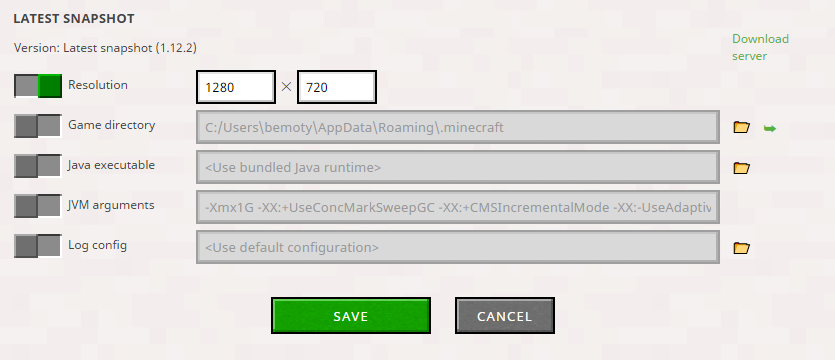
For a profile directory the launcher uses always a slash after the drive. This happens when
- it fills in the default directory
- after the user selected a folder with the folder picker. In the text field it first shows the representation the OS uses (for example only backslashes) but after saving and opening the settings again it has a slash after the drive.
- when pasting in a path then saving and opening the settings again.
Directories printed in the log and nativelog.txt
These directories sometimes use only slashes, sometimes only backslashes and then in other situations both.
Environment
Windows
![[Mod] bemoty](../../../data/avatars/users/50554.png)

Created Issue:
Launcher does not consistently use OS directory seperation character
Affected version: 2.0.757 (Windows)
The bug
The launcher does not use the OS directory seperation character consistently. It appears it always uses a slash (/) where it creates a directory string itself but in other cases it uses the given one.
Affected situations
Slash after drive
For a profile directory the launcher uses always a slash after the drive. This happens when
- it fills in the default directory
- after the user selected a folder with the folder picker. In the text field it first shows the representation the OS uses (for example only backslashes) but after saving and opening the settings again it has a slash after the drive.
- when pasting in a path then saving and opening the settings again.
Directories printed in the log and nativelog.txt
These directories sometimes use only slashes, sometimes only backslashes and then in other situations both.
Windows

A workaround for this seems to be to specify the desired path in the launcher_profiles.json file directly in the %appdata%\.minecraft directory on Windows. However, this will be reverted if you open the profile's settings again.
Can't reproduce it in the newer versions of the launcher, does anyone still have this issue?