 MCL-7033
console/output window does not work correctly
Sometimes the Output windows shows totaly nothing after a while or not, its random.
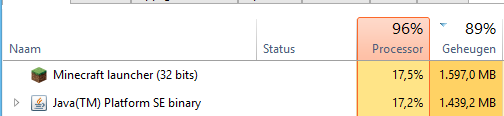
Sometimes when it is loaded correctly and i set the lines to show to 1000 (because 500 is not posible) it gets a higher ram usage then minecraft it self this causes my pc to slowdown. (edit: on 100 lines it still crashes after a while)
Output window is really useful for mod developers to see easyer where it went wrong instance of opening the lastest.log file. ALSO it is nice to see why minecraft crashes, because open crash report does not work (I can make a another issue for this). Yes I tested this with vanilla minecraft (just join a server that is quite busy/full) give it like 30 minutes and the output windows uses 1gb ram or is not working
Old launcher was much better with this.
Do I miss some info, I don't know you tell me
EFECTED LAUNCHERS (list is not up to date): 2.0.847
Environment
Windows 8.1 64bit, Java version: dont know, launcher downloaded it while I got it already installed (still think its useless to redownload java while I already have it), RAM: 8GB
Linked Issues


Created Issue:
console/output window does not work correctly
Sometimes the Output windows shows totaly nothing after a while or not, its random.
Sometimes when it is loaded correctly and i set the lines to show to 1000 (because 500 is not posible) it gets a higher ram usage then minecraft it self this causes my pc to slowdown.
Output window is really useful for mod developers to see easyer where it went wrong instance of opening the lastest.log file. ALSO it is nice to see why minecraft crashes, because open crash report does not work (I can make a another issue for this). Yes I tested this with vanilla minecraft (just join a server that is quite busy/full) give it like 30 minutes and the output windows uses 1gb ram or is not working
Old launcher was much better with this.
Do I miss some info, I don't know you tell meEnvironment
Windows 8.1 64bit, Java version: dont know, launcher downloaded it while I got it already installed (still think its useless to redownload java while I already have it), RAM: 8GB
Attachments2
Sometimes the Output windows shows totaly nothing after a while or not, its random.
Sometimes when it is loaded correctly and i set the lines to show to 1000 (because 500 is not posible) it gets a higher ram usage then minecraft it self this causes my pc to slowdown. (edit: on 100 lines it still crashes after a while)
Output window is really useful for mod developers to see easyer where it went wrong instance of opening the lastest.log file. ALSO it is nice to see why minecraft crashes, because open crash report does not work (I can make a another issue for this). Yes I tested this with vanilla minecraft (just join a server that is quite busy/full) give it like 30 minutes and the output windows uses 1gb ram or is not working
Old launcher was much better with this.
Do I miss some info, I don't know you tell me

Sometimes the Output windows shows totaly nothing after a while or not, its random.
Sometimes when it is loaded correctly and i set the lines to show to 1000 (because 500 is not posible) it gets a higher ram usage then minecraft it self this causes my pc to slowdown. (edit: on 100 lines it still crashes after a while)
Output window is really useful for mod developers to see easyer where it went wrong instance of opening the lastest.log file. ALSO it is nice to see why minecraft crashes, because open crash report does not work (I can make a another issue for this). Yes I tested this with vanilla minecraft (just join a server that is quite busy/full) give it like 30 minutes and the output windows uses 1gb ram or is not working
Old launcher was much better with this.
Do I miss some info, I don't know you tell meEFECTED LAUNCHERS (list is not up to date): 2.0.847
![[Mod] Urielsalis](../../../data/assets/gravatar/urielsalis.jpeg)
Thank you for your report!
However, this issue is a Duplicate ofMCL-5511.It has been linked to this report. If you have additional information, please add it to that report.
Please search before reporting, as it's likely that one exists already.Quick Links:
📓 Issue Guidelines – 💬 Community Support – 📧 Customer Support – 📖 Game Wiki
![[Mod] Neko](../../../data/avatars/users/92901.png)
duplicates
Hey there,
please try the following:
Hey there,
Have you tried the following:
Check your Java version and runtime.
Check your video driver details.
Check Windows Version.
Reinstalling Minecraft from drive\Program Files (x86)\Minecraft in Windows.
From "Programs and Files" in Windows.
Delete everything from %appdata%/.minecraft apart from resource packs, saves and anything else you deem important.
Also try using the new launcher.
Please try these steps and hope for better results!
This IS the new minecraft launcher otherwise I didn't say that the old launcher did it better
Java version: 1.8.0_131(global on system) and 1.8.0_25 (provided by mojang)
Video driver: NVidia GeForce Game ready version 378.92 (just updated to 381.65)
Windows version: Windows 8.1 64bit
Minecraft launcher: Just reinstalled just to be sure (now 2.0.847)
files in .minecraft: cleaned up
and it still crashes: https://puu.sh/vrDN7/ea8fec2221.png
Thank you for your report!
However, this issue is a Duplicate of
MCL-5540.It has been linked to this report. If you have additional information, please add it to that report.
Please search before reporting, as it's likely that one exists already.
Quick Links:
📓 Issue Guidelines – 💬 Community Support – 📧 Customer Support – 📖 Game Wiki