Launcher GUI scales wrong on update screens
On the update screen of the launcher, when resizing the window, it fails to resize properly, curring off text and rendering objects on top of each other.
What I expected to happen was...:
The launcher window should resize itself to display all text.
What actually happened was...:
The launcher window failed to resize, and rendered text and objects on the screen incorrectly.
Steps to Reproduce:
1. Start the Minecraft launcher.
2. Open Options, choose to Force update and hit OK.
3. Log in, the download will now start.
4. While it downloads, resize the window to a much smaller size, and you should see strange things happening.
Screenshots:
Screenshots are attached.
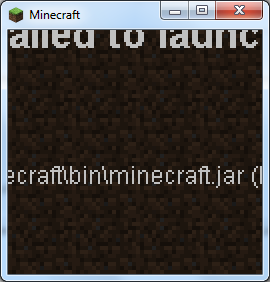
The first screenshot (LauncherScale.png) shows the bug with rendering text outside the window on an error screen where I first found the bug.
The second screenshot (LauncherScaleProgressBar.png) shows the bug on the update screen.
Environment
Windows 7 Home Premium 64-bit, Java version 1.7.0_09-b05


Created Issue:
Launcher GUI scales wrong on update screens
On the update screen of the launcher, when resizing the window, it fails to resize properly, curring off text and rendering objects on top of each other.
What I expected to happen was...:
The launcher window should resize itself to display all text.What actually happened was...:
The launcher window failed to resize, and rendered text and objects on the screen incorrectly.Steps to Reproduce:
1. Start the Minecraft launcher.
2. Open Options, choose to Force update and hit OK.
3. Log in, the download will now start.
4. While it downloads, resize the window to a much smaller size, and you should see strange things happening.Screenshots are attached.
Environment
Windows 7 Home Premium 64-bit, Java version 1.7.0_09-b05
Attachments2
It was on this screen I first found the problem. The text renders incorrectly.
On the update screen of the launcher, when resizing the window, it fails to resize properly, curring off text and rendering objects on top of each other.
What I expected to happen was...:
The launcher window should resize itself to display all text.What actually happened was...:
The launcher window failed to resize, and rendered text and objects on the screen incorrectly.Steps to Reproduce:
1. Start the Minecraft launcher.
2. Open Options, choose to Force update and hit OK.
3. Log in, the download will now start.
4. While it downloads, resize the window to a much smaller size, and you should see strange things happening.Screenshots
are attached.On the update screen of the launcher, when resizing the window, it fails to resize properly, curring off text and rendering objects on top of each other.
What I expected to happen was...:
The launcher window should resize itself to display all text.What actually happened was...:
The launcher window failed to resize, and rendered text and objects on the screen incorrectly.Steps to Reproduce:
1. Start the Minecraft launcher.
2. Open Options, choose to Force update and hit OK.
3. Log in, the download will now start.
4. While it downloads, resize the window to a much smaller size, and you should see strange things happening.Screenshots:
Screenshots are attached.
The first screenshot (LauncherScale.png) shows the bug with rendering text outside the window on an error screen where I first found the bug.
On the update screen of the launcher, when resizing the window, it fails to resize properly, curring off text and rendering objects on top of each other.
What I expected to happen was...:
The launcher window should resize itself to display all text.What actually happened was...:
The launcher window failed to resize, and rendered text and objects on the screen incorrectly.Steps to Reproduce:
1. Start the Minecraft launcher.
2. Open Options, choose to Force update and hit OK.
3. Log in, the download will now start.
4. While it downloads, resize the window to a much smaller size, and you should see strange things happening.Screenshots:
Screenshots are attached.
The first screenshot (LauncherScale.png) shows the bug with rendering text outside the window on an error screen where I first found the bug.
The second screenshot (LauncherScaleProgressBar.png) shows the bug on the update screen.
Failed to launch.jpg
![[Mojang] Grum (Erik Broes)](../../../data/assets/gravatar/grum.png)

 MC-6680 →
  MCL-84
Should anybody really be playing with a window that small? It seems like most other programs do the same when scaled ridiculously small.
Edit: It appears the main menu also breaks down at slightly smaller than your screenshot. If it's an issue, it's only a problem for people playing on 100x100 monitors (if they exist).
Old launcher, unable to fix this issue anymore, also don't do that
Okay, thanks for looking at it anyway