Unable To Play Older Versions With newer Launcher
Version Attempted 1.2.5
Crash: https://pastebin.com/xkvXtm0G
Java Executable: C:\Program Files\Java\jre1.8.0_151\bin\javaw.exe
JVM: Default
Steps to reproduce:
1. delete options.txt or it will crash on startup
2. launch mc 1.2.5 with a executable argument
3. click open single player and watch it crash
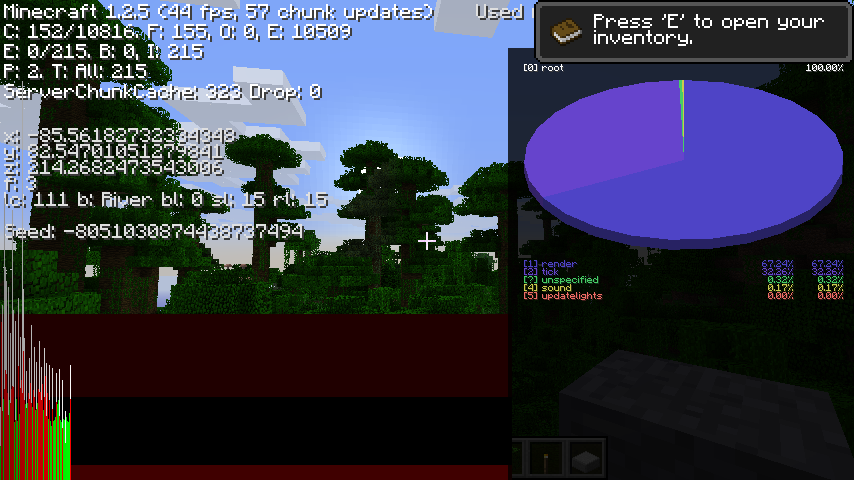
Below screenshot 1.2.5 does in fact launch and work with older launchers
Environment
Vanilla Launcher
Linked Issues
Attachments2


Created Issue:
Unable To Play Older Versions With newer Launcher
Version Attempted 1.2.5
Crash: https://pastebin.com/xkvXtm0G
Java Executable: C:\Program Files\Java\jre1.8.0_151\bin\javaw.exe
JVM: DefaultSteps to reproduce:
1. delete options.txt or it will crash on startup
2. launch mc 1.2.5 with a executable argument
3. click open single player and watch it crashEnvironment
Vanilla Launcher
![[Mod] Michael Wobst](../../../data/avatars/users/37868.png)
 MC-122071 →
  MCL-8525
![[Mod] Pokechu22](../../../data/avatars/users/92931.png)
is duplicated by
Version Attempted 1.2.5
Crash: https://pastebin.com/xkvXtm0G
Java Executable: C:\Program Files\Java\jre1.8.0_151\bin\javaw.exe
JVM: DefaultSteps to reproduce:
1. delete options.txt or it will crash on startup
2. launch mc 1.2.5 with a executable argument
3. click open single player and watch it crashBelow screenshot 1.2.5 does in fact launch and work with older launchers
Thank you for your report!
However, this issue is Invalid.
Your Minecraft version is outdated. We currently take issues for version 1.12.2 and the latest snapshot.
Please update to the latest version as it includes the newest fixes. If you still have this problem after updating, then please create a new issue.
In case of a game crash, please also attach the crashlog.
Quick Links:
📓 Issue Guidelines – 💬 Community Support – 📧 Customer Support – 📖 Game Wiki
It isn't invalid since the launcher is suppose to allow for older version gameplay which means this issue is valid
It is a valid launcher bug since it never occurred before the launcher was modified
Old versions are not supported because we cannot change the past.
Old minecraft versions are listed in the launcher, but they are provided on an as-is basis. They're old versions; they cannot and will not be updated (for obvious reasons).
Issues caused by the launcher incorrectly launching them are valid, but this is not one of those. This crash looks to be caused by you having a world in a gamemode that is not known to that version – i.e. you are launching the game in a folder that has been loaded by a newer version. Downgrading is 100% unsupported.
Make sure you have specified a different game directory for older versions; that should solve this problem.
To reiterate: the crash itself seems to be caused by a world having a game mode that is not known to 1.2.5 (which I think would either be adventure mode (if it's possible to select that?) or spectator mode (which would happen if you have a debug mode world)).
It's not an older version it's the new launcher is screwing everything up
Mc 1.2.5 doesn't need to be updated the launcher needs backported comparability the launcher needs to be updated
It's a launcher issue
mc 1.2.5 WORKED ALWAYS BEFORE
Let me ask you a question is the Launcher Supported? Yes? Then why isn't this being worked on and your closing the issue not everybody likes newer updates
You can get the old launcher from the alternative download page. Feel free to try using it, but I highly doubt it will help, since this crash is a crash from the game itself and not a launcher crash.
EDIT: If the old launcher does end up working, then this would be a valid issue, but probably for different reasons – it would imply that the new launcher is doing something wrong with launching that the old launcher isn't, which is fixable since both launchers can be updated. So please let me know if it does work.
The old launcher does work did you read my bug report I said specifically it the newer launcher is causing problems that the older launcher did not this crash happened because of the newer launcher
Remember you must delete options.txt generated by 1.10.2+ in order to test this bug out on the newer and older launcher. The bug I am reporting here is caused by the new launcher.
Is the options.txt a bug to? should I report that it? I mean mojang could make a new options file that is renamed for newer versions so older ones don't conflict like alpha beta 1.2.5 and < 1.5.2 . It's literally this simple to fix their bug File options = new File("options_new.txt"); a single line
I just tried the older launcher, deliberately launching in the wrong folder. The same crash happens.
The options.txt issue is
MCL-5837. And renaming files each version is not a valid solution for that – instead, checking the version and ignoring the data if it's from a newer version is better... and that's what's already done for newer versions. But older versions can't be changed, so instead the policy is just don't launch older versions in the same place as newer ones.No the same crash doesn't happen to me on any older launcher
Steps to reproduce this bug here:
delete options.txt
launch minecraft from an older version
launch 1.2.5
click single player
if(new launcher)
array out of bounds exception
Are the worlds the same in both cases? (Or does it crash before you can even see the worlds list)
It crashes when you click single player > new launcher
old launcher > works fine
I just added a screenshot of proof with older launchers
maybe you found another bug where relocating your directory doesn't work as it pulls the same %appdata%/.minecraft
Bug above is about the one I reported I successfully made 1.2.5 work in older launchers just not the newest as described as above
Again issue options.txt here is unrelated I will open up a separate one for this:
As for the options.txt I have a solution they simply rename the file to "options_new.txt" that exact string. Because after 1.5.2 it wasn't hard coded but, before then it causes crashes
or mojang could simply leave the old format of the options.txt file and then add the newer options later in the file making older versions compatible
That screenshot shows you can launch it. Can you open the single-player menu? Because that menu is where the crash happens - when it's reading all of the worlds. (I know this because I know how to read the stack trace in crash reports)
yes and you can verify this for yourself.
do as you have told me wipe .minecraft and download then install the legacy launcher even older then the one I have on my usb. Launch 1.2.5 and click single player it works
I can do one better, actually.
Ok did the launcher just update I can no longer reproduce. I reproduced the bug just 20 minuets ago