 MCPE-159182
"Distortion Effects" setting missing
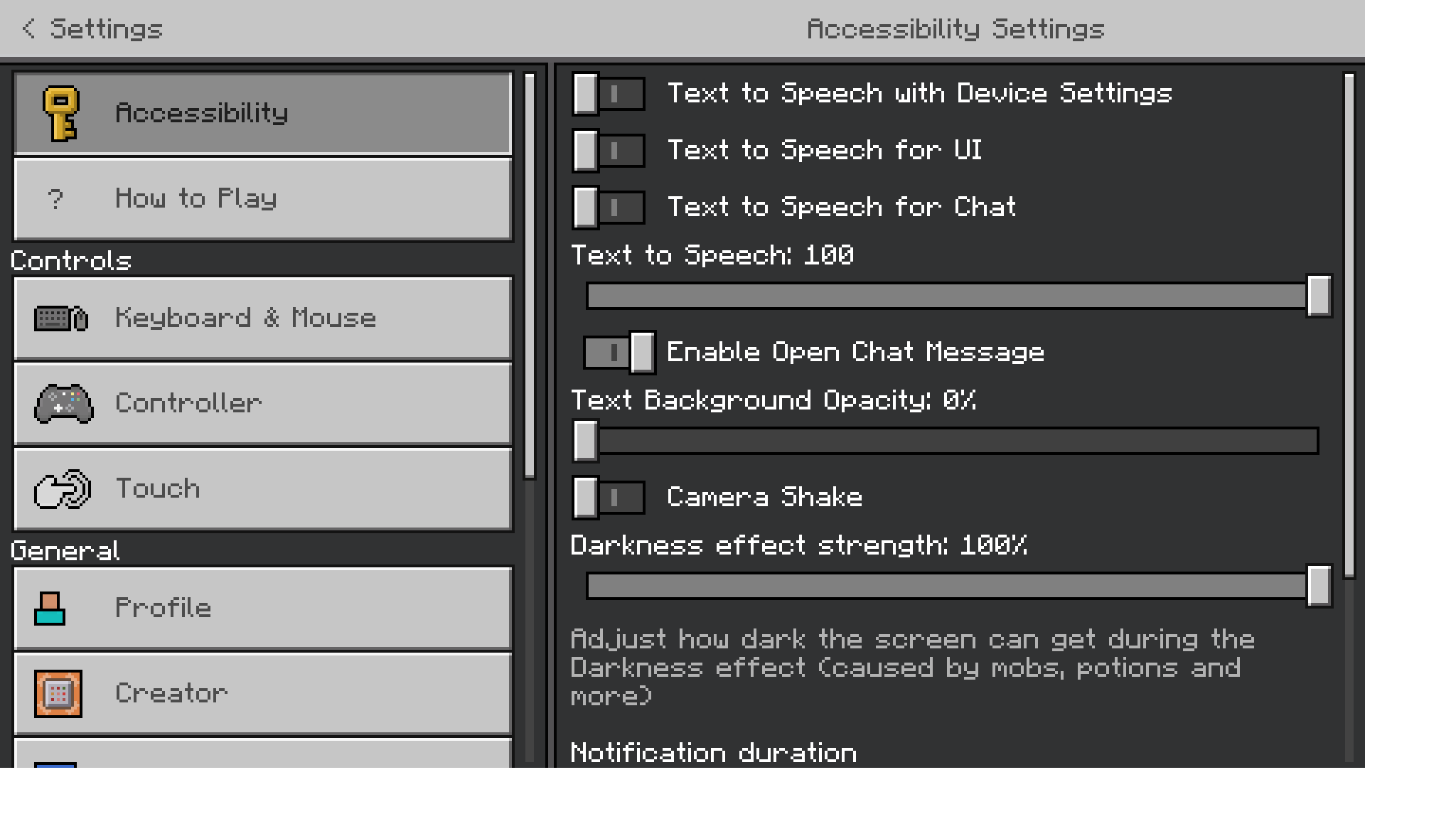
The "Distortion Effects" setting is missing from the Accessibility and/or Video settings menus, making it impossible to correctly set these effects for affected persons.
First screenshot shows Java accessibility settings with Distortion Effects slider clearly visible, second and third screenshots show Bedrock accessibility settings with Distortion Effects slider clearly missing. Both are version 1.19.10.


- Unresolved
 dunerat
- 9
- 1
- Confirmed
- 830081
- Windows
- Windows10.21H1 (build 19043.1766)
- missing-option vanilla-parity
- 1.19.10
Created Issue:
"Distortion Effects" setting missing
The "Distortion Effects" setting is missing from the Accessibility and/or Video settings menus, making it impossible to correctly set these effects for affected persons.
First screenshot shows Java accessibility settings with Distortion Effects slider clearly visible, second and third screenshots show Bedrock accessibility settings with Distortion Effects slider clearly missing. Both are version 1.19.10.
Attachments3
- Unresolved
- Open
- Unconfirmed
- Windows
- Windows10.21H1 (build 19043.1766)
- 1.19.10
![[Mod] OcelotOnesie](../../../data/avatars/users/43220.png)

![[Mod] EVGENSYPERPRO](../../../data/avatars/users/92853.png)
Summary:
In Bedrock Edition, there isn't an "FOV effects" slider like in Java Edition. This function adjusts the strength of all FOV changes; for example, freezing, entering/exiting liquids, speed effects, etc.
Instead, there's only a toggle option labeled "FOV Can Be Altered By Gameplay." This toggle functions similarly to setting the FOV to either 0% or 100% on Java Edition. The feature allowing adjustable FOV was introduced to Java Edition in version 1.16.2. Relates to MCPE-159182.
Steps to reproduce:
- Open settings.
- Try finding the "FOV effects" slider.
Observed results:
"FOV effects" slider is missing.
Expected results:
"FOV effects" slider is in the settings.
Screenshots:
Java

Can confirm in 1.21.70.22 Preview.