 MCPE-169982
Inactive titlebar still has accent color
STR:
- Enable the Windows setting to show accent colors on titlebars. Use light mode for apps.
- Make the Minecraft: Bedrock Edition window inactive
Actual behaviour:
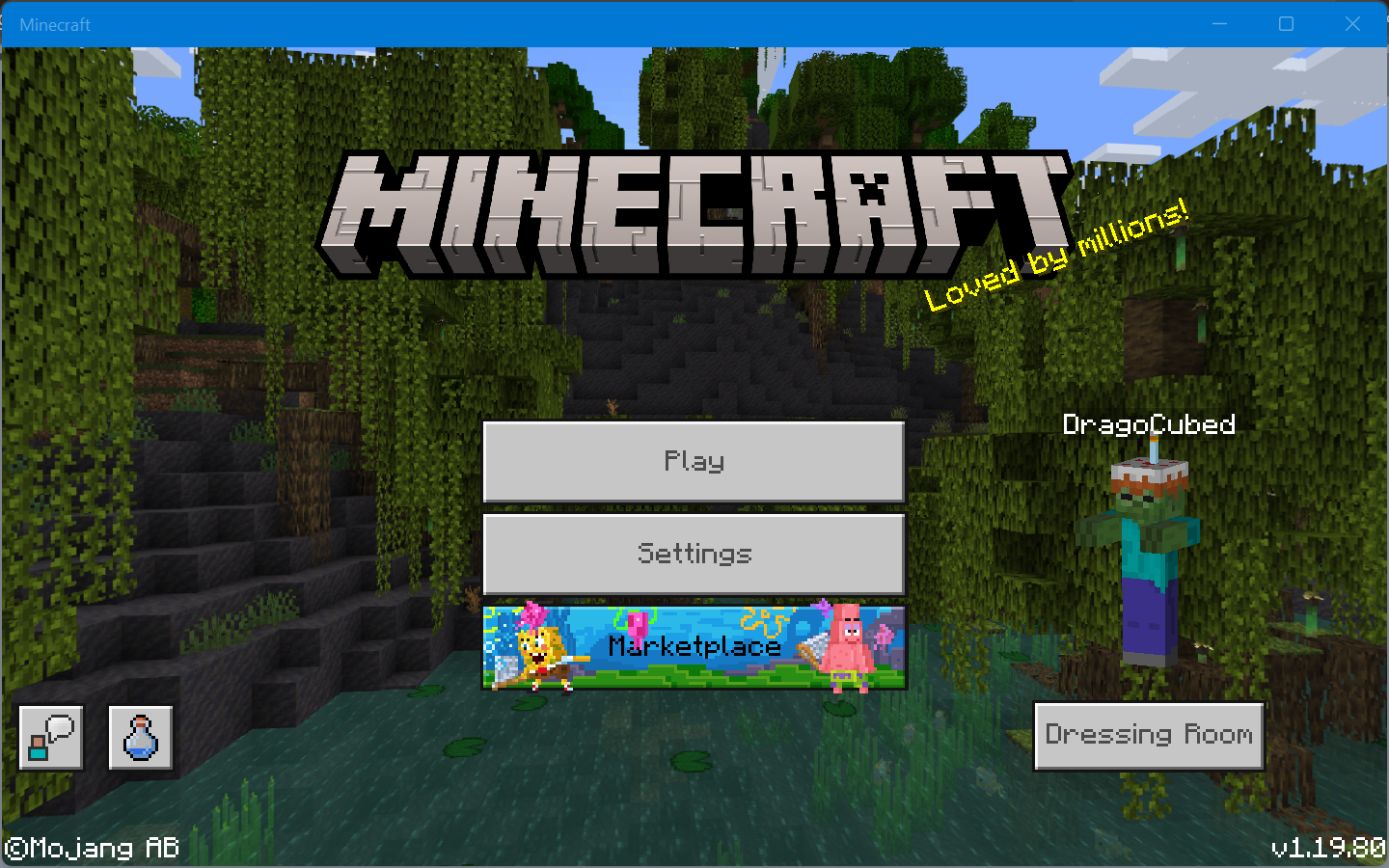
Expected behaviour:
Titlebar changes color to make it very clear that window is inactive, aiding accessibility: 
Notes:
This may be an issue across UWP apps on Windows. If that is the case, feel free to close this. Minecraft does not need a custom titlebar - and even if it were to use one, this issue would still be present as UWP apps cannot fully create custom titlebars.

Created Issue:
Inactive titlebar still has accent color
STR:
- Enable the Windows setting to show accent colors on titlebars. Use light mode for apps.
- Make the Minecraft: Bedrock Edition window inactive
Actual behaviour:
Expected behaviour:
Titlebar changes color to make it very clear that window is inactive:
Notes:
This may be an issue across UWP apps on Windows. If that is the case, feel free to close this. Minecraft does not need a custom titlebar - and even if it were to use one, this issue would still be present as UWP apps cannot fully create custom titlebars.
Attachments2
- Unresolved
- Open
- Unconfirmed
- Windows
- Windows 11 22H2
- 1.19.80
![[Bot] Arisa](../../../data/avatars/users/43007.png)
STR:
- Enable the Windows setting to show accent colors on titlebars. Use light mode for apps.
- Make the Minecraft: Bedrock Edition window inactive
Actual behaviour:
Expected behaviour:
Titlebar changes color to make it very clear that window is inactive:
Notes:
This may be an issue across UWP apps on Windows. If that is the case, feel free to close this. Minecraft does not need a custom titlebar - and even if it were to use one, this issue would still be present as UWP apps cannot fully create custom titlebars.
STR:
- Enable the Windows setting to show accent colors on titlebars. Use light mode for apps.
- Make the Minecraft: Bedrock Edition window inactive
Actual behaviour:
Expected behaviour:
Titlebar changes color to make it very clear that window is inactive:
Notes:
This may be an issue across UWP apps on Windows. If that is the case, feel free to close this. Minecraft does not need a custom titlebar - and even if it were to use one, this issue would still be present as UWP apps cannot fully create custom titlebars.
STR:
- Enable the Windows setting to show accent colors on titlebars. Use light mode for apps.
- Make the Minecraft: Bedrock Edition window inactive
Actual behaviour:
Expected behaviour:
Titlebar changes color to make it very clear that window is inactive:
Notes:
This may be an issue across UWP apps on Windows. If that is the case, feel free to close this. Minecraft does not need a custom titlebar - and even if it were to use one, this issue would still be present as UWP apps cannot fully create custom titlebars.
STR:
- Enable the Windows setting to show accent colors on titlebars. Use light mode for apps.
- Make the Minecraft: Bedrock Edition window inactive
Actual behaviour:
Expected behaviour:
Titlebar changes color to make it very clear that window is inactive, aiding accessibility:
Notes:
This may be an issue across UWP apps on Windows. If that is the case, feel free to close this. Minecraft does not need a custom titlebar - and even if it were to use one, this issue would still be present as UWP apps cannot fully create custom titlebars.
![[MCQA] Bartłomiej Słodkowski](../../../data/avatars/users/18941.svg)
![[MCQA] Kinga Izdebska](../../../data/avatars/users/18949.svg)
Thank you for your report!
However, this issue has been temporarily closed as Awaiting Response.
Is this still an issue in the latest version? If yes, can you please add it to the affected versions (or mention it if you are not the reporter)?
This ticket will automatically reopen when you reply.
Quick Links:
📓 Issue Guidelines – 💬 Mojang Support – 📓 Project Summary – 📧 Suggestions – 📖 Minecraft Wiki
Cleaning up old tickets: This ticket had been set to 'Awaiting Response', but has not received a response from the reporter (~3 months+) so is being closed as Incomplete. If you feel this is still a valid issue then please comment, or create a new ticket following the Issue Guidelines which includes steps to reproduce the problem.
Quick Links:
📓 Issue Guidelines – 💬 Mojang Support – 📧 Suggestions – 📖 Minecraft Wiki
Have a look at the Resolution and the comments to see why this ticket has been resolved. If you think this ticket has been resolved erroneously you can contact the Mojira staff on Discord or Reddit.
– I am a bot. This action was performed automatically! If you think it was incorrect, please notify us on Discord or Reddit
Can still reproduce with version 1.20.51. Love that a message was copy-pasted but this wasn't attempted to reproduce. Or better yet, a stale bot.