 MCPE-181404
Minecraft files (worlds, resource packs, etc.) become inexplicably, irreversibly encrypted
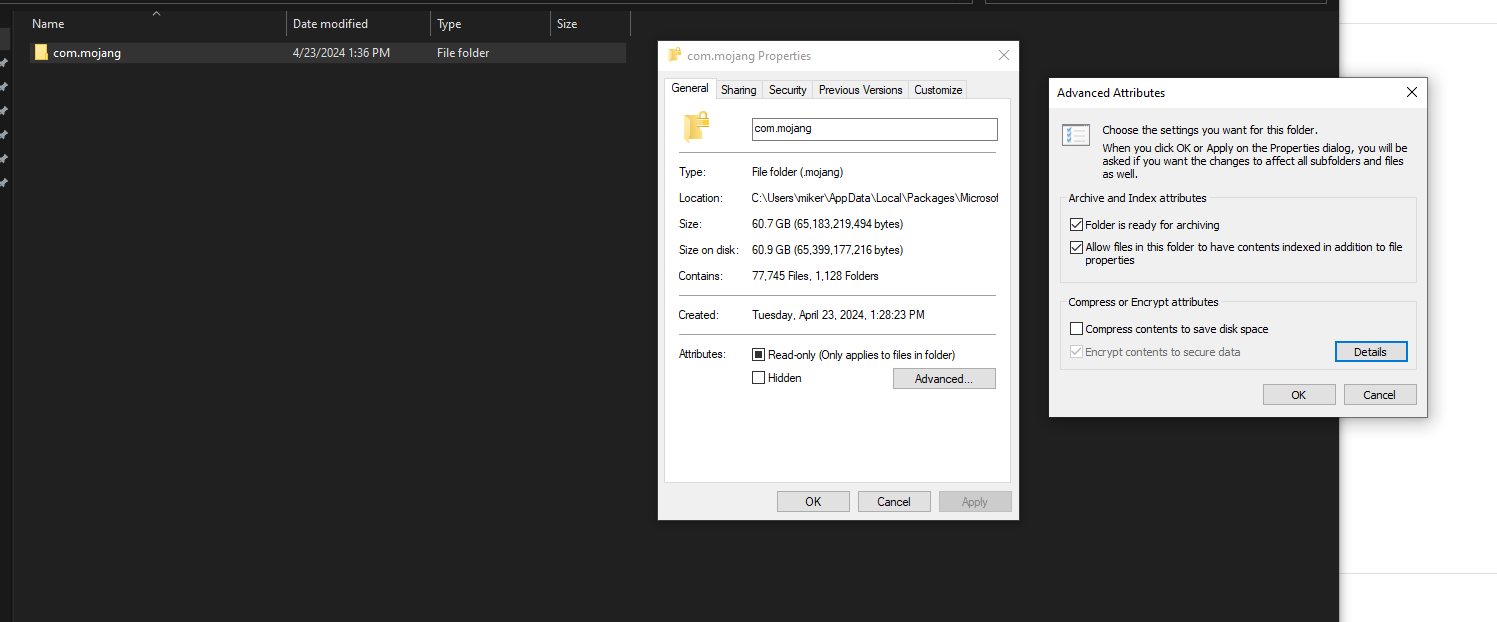
After reinstalling Minecraft Bedrock on my personal Windows 10 desktop PC last week, all files and folders within the com.mojang folder became inexplicably encrypted. The icons have a lock on them, and the "encrypt contents to secure data" button in advanced settings is checked and greyed out, with no way to deselect it. As a result, I'm unable to move/copy/paste/backup my worlds and other files.
When trying to move or copy/paste my world folders, I receive the error message "Your organization does not allow you to place this file here." Although this would seem like a Windows error, googling this error message returns results of other instances of users experiencing this specifically in relation to their Minecraft folders. (example: https://www.windowsphoneinfo.com/threads/your-organization-does-not-allow-you-to-place-this-file-here.771441/#Your_organization_does_not_allow_you_to_place_this_file_here)
No troubleshooting steps have worked for me. I can't uninstall/reinstall Minecraft as it will delete all my worlds, which is not an option. (For now, I can at least access them in-game.) All possible options to re-take ownership of the files and/or decrypt them don't work.


Created Issue:
Minecraft files (worlds, resource packs, etc.) become inexplicably, irreversibly encrypted
After reinstalling Minecraft Bedrock on my personal Windows 10 desktop PC last week, all files and folders within the com.mojang folder became inexplicably encrypted. The icons have a lock on them, and the "encrypt contents to secure data" button in advanced settings is checked and greyed out, with no way to deselect it. As a result, I'm unable to move/copy/paste/backup my worlds and other files.
When trying to move or copy/paste my world folders, I receive the error message "Your organization does not allow you to place this file here." Although this would seem like a Windows error, googling this error message returns results of other instances of users experiencing this specifically in relation to their Minecraft folders. (example: https://www.windowsphoneinfo.com/threads/your-organization-does-not-allow-you-to-place-this-file-here.771441/#Your_organization_does_not_allow_you_to_place_this_file_here)
No troubleshooting steps have worked for me. I can't uninstall/reinstall Minecraft as it will delete all my worlds, which is not an option. (For now, I can at least access them in-game.) All possible options to re-take ownership of the files and/or decrypt them don't work.
Attachments3
For the moment, you can export your worlds safely using the Export World button in the Edit World menu.
Are you using any antivirus or security software?
@agentmindstorm2 – that is a great suggestion, I'll do that in the meantime.
@goldenhelmet – only Windows Defender
I am experiencing the same issue, and it is critical that this problem is resolved as soon as possible. As a modder, it is essential for me to access and modify my plugins, but the encryption on the files is preventing this. The inability to manage these files is severely hindering my work. I would appreciate prompt attention to this matter.


When I try to File ownership -> Personal: