 Rogue Cheddar
- RogueCheddar
- JIRAUSER531060
- Europe/Stockholm
- Yes
- No
 BDS-18469
 MCPE-181404






Some structures do not generate on BDS since Minecraft 1.20 update (1.20.0.01 on BDS). On my server, this has affected trail ruins and ocean ruins.
Easy to replicate: Load the same seed offline and on a BDS after updating to 1.20. Travel to the nearest trail ruin or ocean ruin. Offline, the structure will generate as expected. On the BDS, it won't.
Edit: Attached screenshot of the console while exploring fresh world on BDS. Console shows the following error:
"[2023-06-20 15:51:32:845 ERROR] [Structure] Couldn't find a start anchor named "minecraft:road_anchor" in the structure pool element to place at Pos(-304,0,-864)."This specific test was on seed 1737625029 the error appeared multiple times during journey from world spawn to x -304 z -864 where a Trail Ruins structure should spawn. On BDS, structure fails to generate. Offline, structure appears as normal.
Some structures do not generate on BDS since Minecraft 1.20 update (1.20.0.01 on BDS). On my server, this has affected trail ruins and ocean ruins, and other structures too (I believe).
Easy to replicate: Load the same seed offline and on a BDS after updating to 1.20. Travel to the nearest trail ruin or ocean ruin. Offline, the structure will generate as expected. On the BDS, it won't.
Edit: Attached screenshot of the console while exploring fresh world on BDS. Console shows the following error:
"[2023-06-20 15:51:32:845 ERROR] [Structure] Couldn't find a start anchor named "minecraft:road_anchor" in the structure pool element to place at Pos(-304,0,-864)."This specific test was on seed 1737625029 the error appeared multiple times during journey from world spawn to x -304 z -864 where a Trail Ruins structure should spawn. On BDS, structure fails to generate. Offline, structure appears as normal.
Some structures do not generate on BDS since Minecraft 1.20 update (1.20.0.01 on BDS). On my server, this has affected trail ruins and ocean ruins, and other structures too (I believe).
Easy to replicate: Load the same seed offline and on a BDS after updating to 1.20. Travel to the nearest trail ruin or ocean ruin. Offline, the structure will generate as expected. On the BDS, it won't.
Edit: Attached screenshot of the console while exploring fresh world on BDS. Console shows the following error:
"[2023-06-20 15:51:32:845 ERROR] [Structure] Couldn't find a start anchor named "minecraft:road_anchor" in the structure pool element to place at Pos(-304,0,-864)."This specific test was on seed 1737625029 the error appeared multiple times during journey from world spawn to x -304 z -864 where a Trail Ruins structure should spawn. On BDS, structure fails to generate. Offline, structure appears as normal.
Some structures do not generate on BDS since Minecraft 1.20 update (1.20.0.01 on BDS). On my server, this has affected trail ruins and ocean ruins, and other structures too (I believe).
Easy to replicate: Load the same seed offline and on a BDS after updating to 1.20. Travel to the nearest trail ruin or ocean ruin. Offline, the structure will generate as expected. On the BDS, it won't.
Edit: Attached screenshot of the console while exploring fresh world on BDS. Console shows the following error:
"[2023-06-20 15:51:32:845 ERROR] [Structure] Couldn't find a start anchor named "minecraft:road_anchor" in the structure pool element to place at Pos(-304,0,-864)."This specific test was on seed 1737625029 the error appeared multiple times during journey from world spawn to x -304 z -864 where a Trail Ruins structure should spawn. On BDS, structure fails to generate. Offline, structure appears as normal.
Existing Allays in my survival world have once again lost the ability to duplicate/breed using amethyst shards. They dance to a jukebox properly but when given an amethyst shard simply hold it like any other item.
I tried creating a fresh world and Allays duplicated fine
soI think this isa return ofMC-253134As the world is pure survival I have not been able to find any new Allays to test whether this is only a problem with Allays that originated in older versions, but that's what it seems like.
Existing Allays in my survival world have once again lost the ability to duplicate/breed using amethyst shards. They dance to a jukebox properly but when given an amethyst shard simply hold it like any other item.
I tried creating a fresh world and Allays duplicated fine. I think this is similar to the Java issue here:
MC-253134As the world is pure survival I have not been able to find any new Allays to test whether this is only a problem with Allays that originated in older versions, but that's what it seems like.
![[Mod] GoldenHelmet](../../../data/avatars/users/18951.svg)
@Rogue Cheddar Are the librarians heads inside slabs? If so, they likely to glitch into an adjacent non-full block when you reload the chunk. Are you sure one of your guys was not just displaced?
@Onedown3togo Since the raid bar started but then stopped before it finished loading, I suspect the villager glitched out and either suffocated or fell to his death. Was he encased in non-solid blocks? Could you provide a picture of the location?
@Rogue Cheddar thanks, I was confused by the fact that your villagers are sleeping in the pic and I thought the stone bricks behind were in their heads. The fence made it hard to see. Anyway, was the villager who disappeared also the last one who had been added to the chunk?
@Rogue Cheddar the reason I asked about the villager being the most recent one added, is because I suspect in some cases the game may be reloading the chunk before saving it, overwriting any changes.
@Shannon Young hitting a monster no longer gives it persistence in 1.16. Taking damage now gives non-persistent mobs 30s of despawn immunity. So to preserve a monster mob beyond simulation distance you’ll need to name-tag it.
@Blake Lewis this is a Bedrock edition bug report. Please find a report on the Java project that fits your issue.
@Rogue Cheddar Looking at your pics, I don't see enough lighting to block monster spawns:

However, if you're on normal or hard difficulty, you should have some zombie villagers. So it may not be that. Can you get coordinates? And, do you typically log out or use a nether portal a certain distance from that room?
@John Tezeno Could you provide coordinates for where the leash knots are getting left on the fence after horses despawn? And for where you use a nether portal and/or typically log out?
@Rogue Cheddar How did I calculate the numbers? Just by counting blocks from the torches on the wall. How did I put them in the picture? I opened the picture in MSPaint, cropped it, typed the numbers on it, and saved.
As far as your platform, I think the device would only make a difference insofar as different devices have different processing power and save/load times, and that could impact how reliable the saving and loading is. There are several bugs that depend on slow loading (MCPE-31389, MCPE-74333, etc.) that I can reproduce by bogging down my PC.
However, the fact that you had a lot of despawn problems on your realm and none while playing locally may point to another issue. A lot of the comments on this ticket relate to realms worlds. According to MCPE-92017, realms actually continue running while no one is logged in. It seems to me that could be a huge source of the random despawns. If the "save and quit" process does not work the same on realms as it does on local worlds, perhaps it is more like crashing?
Same issue here, and to answer a previous poster's question, yes, in my experience this also causes the chest to not spawn at all. I've cleared out a massive area around the X down to 40ish blocks below surface, and no chest. Yet all treasure maps, no matter how far away I find them, point to the same spot. Frustrating and demoralizing.
I have a large village that spans multiple chunks, with several houses on chunk borders. If I let my villagers wander around, they disappear consistently. I've lost about a dozen. After remodeling several houses so that they're no longer on chunk borders, as well as locking villagers into the houses so that they can't get more than a few blocks from their bed, and none of them can even set foot onto a chunk border, I haven't had a single disappearance in over a week. Some are named, some are not. Seems to confirm that it's related to chunk borders, and possibly also to how far villagers are able to wander from their beds.
Edit: Bedrock realm I play on Windows 10 and Switch
Edit 2: Just had another villager despawn. I checked and there was no way he could access any chunk border. I've uploaded a screenshot of the area he was enclosed in. So maybe it's not related to chunk borders after all.
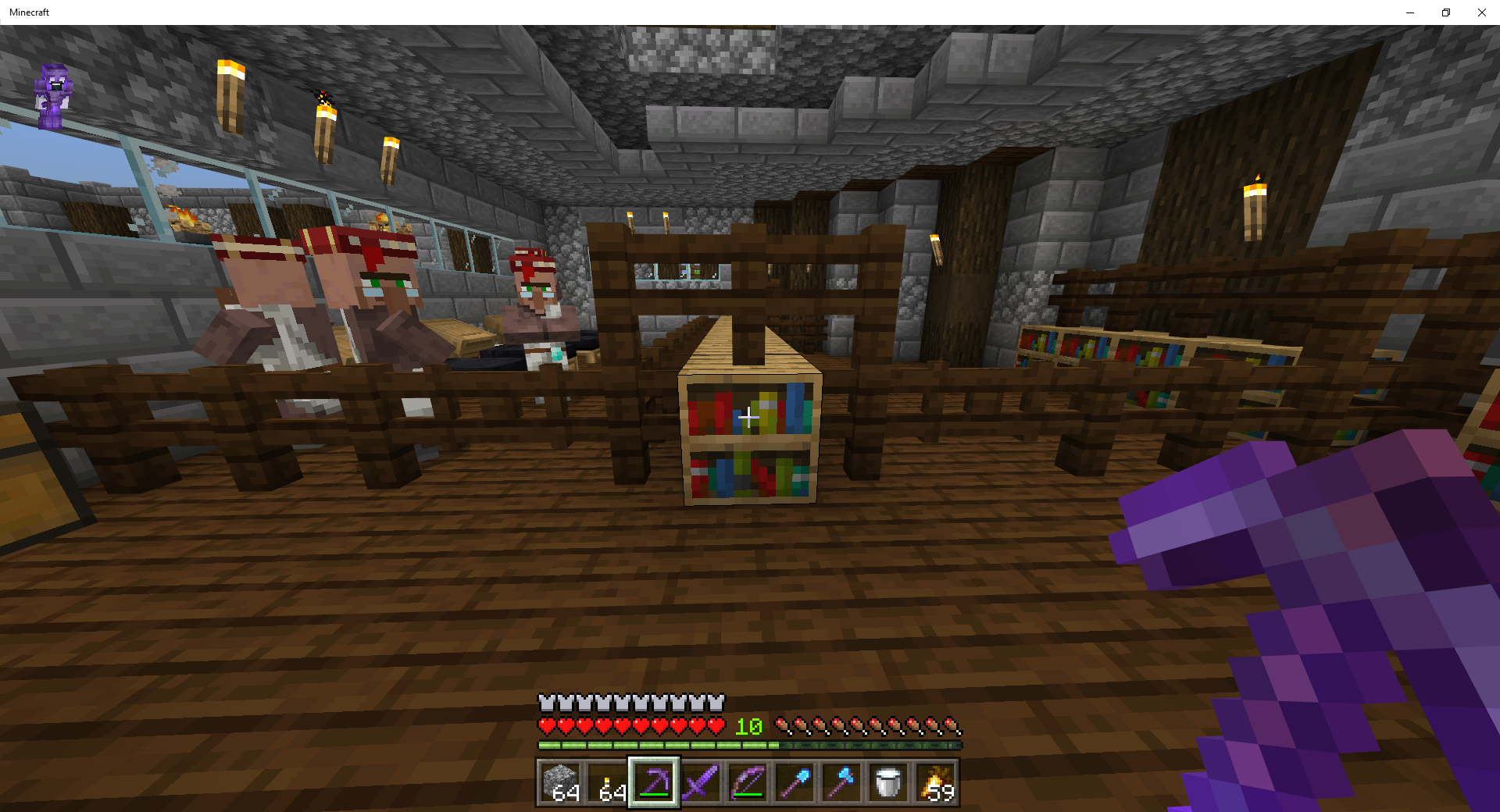
@GoldenHelmet no slabs in sight. I posted a pic of the area the latest villager disappeared from. There is a similar "pen" on the other side of these bookshelves, where four villagers have lived happily for several days without despawning. In this pen though, this villager disappeared after a short time. No slabs, chunk borders, or any other abnormalities present. noborder.png
@GoldenHelmet Nope, they are just sleeping in bed normally (I attached a new pic to show this). Yes, the villager who disappeared was the most recent one added. Does that make a difference?
I initially built this village to let them roam free–it's fully lit and has a massive wall around it, no chance to mobs to get in. Bell in the town square where they would all gather during the day, then they'd return to their respective houses and beds at night. That worked fine for a few in-game days, but it wasn't long before over 10 despawned all at once. Some had been cured from zombies, others had been bred. Some were named, others were not. Some had been traded with, others hadn't. Obviously they were all crossing multiple chunk borders daily, as I didn't know at the time about this issue. Since remodeling the houses to not sit on chunk borders, and using fences to confine them to the area immediately around their beds and job blocks, I've managed to prevent any more despawns, until now. I currently am back up to five librarians, two farmers, a cleric, and a fisher, all cured from zombies, some named, all traded with, and this latest librarian (who would have been number 6, and the fifth living in this specific chunk) is the only one to despawn since I made the changes to the village.
Edit: Worth noting, that's actually a different chunk–the fence is a chunk border. So that villager was the only villager in that chunk.
@goldenhelmet Been adding villagers around the village for a few days now with no incident for some time. However, just had two more librarians disappear from the same side of the same room as the last one. Once again, they have no access to a chunk border. This is on Switch on a realm. I never entered the nether during this time. However, i always use the “save and quit” option. Notable: these were NOT the most recent villagers cured and homed. I have a cartographer and an armorer who are newer and still present. Pretty bummed, as i thought moving them off borders had helped. Seems to be a problem with this specific location within the village. I’ll post a screenshot when I’m back at my pc tomorrow. One of them had fortune AND mending books
edit: should mention as well that both new disappearances were nametagged.
I've uploaded three screenshots (library1, library2, and library3). There's a chunk border down the middle of the building (right on the line between the bookshelves and the fence, so the villagers can't possibly touch the border). The librarians on the left (east) side have been there for weeks without despawning. Any villagers I house on the right (west) side despawn within a few in-game days. This is fairly consistent–3 villagers have despawned from that side of the room. They can't access any chunk borders and no enemies have spawned inside. I've added villagers to various other houses throughout the village (9 in total), and none have despawned in some time. For whatever reason, this seems to be a problem with this side of this house specifically.
Interesting about the light levels, how did you produce those numbers? The fourth wall in that room (the one not pictured) also has several torches on it, so I don't see how the levels can actually be that low. I will add more torches to the middle of the room--however, I really don't think that's it. I visit the room often to check on the librarians, and I've never once in many weeks of playing seen a mob spawned inside. And this is on normal difficulty, so, as you say, odds are some of them would have turned back into zombie villagers. None have.
Regarding your other questions, I typically head to my bedroom to log out. It's roughly 2-3 chunks away. And my Nether portal is nearby, about the same distance away as well. Would an exact block count help? I don't have access to coordinates on this realm.
In any case, I haven't had any more despawns in the past week plus, besides sheep. (I have left that side of the library empty. Sheep constantly despawn, though. I have to continuously breed them just to keep the population up.)
Edit: It occurred to me that the last batch of despawns happened when I was playing in the realm on my Switch. I have played exclusively on PC since then and have had no despawns (again, besides sheep). Maybe that has something to do with it? Could the platform you're playing on affect the bug? (for all previous despawns, I'm not sure whether they were all on Switch, or some on PC, as I usually switch between the two frequently.)
Bedrock 1.16 multiplayer realm Windows 10
Sometimes unemployed villagers simply won't take a job. Not a nitwit. These lecterns are not claimed by other villagers. I repeatedly destroy and replace lecterns to check for specific book trades, after a while they refuse to continue re-bonding with the POI and remain unemployed indefinitely.
This "fix" absolutely sucks.
Why is this marked as resolved? Bug is still present.
Happens not in splitscreen, in our multiplayer realm as well. The second seat of the boat experiences about 5 fps
I have a village with several villagers spread out through multiple chunks. This causes no lag. However, I tried to build a wheat farm with 15 villagers concentrated in one central chunk, and I can't go anywhere near it or the game freezes for literally 30 seconds (everything stops moving, including villagers, minecarts, golems, and any other entities) before becoming very choppy when it starts moving again.
Why do bugs constantly get marked as resolved on here when they are nowhere near resolved?This happens to me and others on my realm daily. It has nothing to do with elytra or swimming. As the original poster described, our heads clip through solid and semi-solid blocks (blocks, slabs, stairs, fences) and we take suffocation damage. Signing out and in usually fixes it temporarily. We've even had deaths caused by clipping through fences into lava.
My realm is absolutely wrecked right now. Performance has tanked for everyone. Started yesterday. Hoping this is why.
Corner tweeted that it's official. Unbelievable https://twitter.com/CornerHardMC/status/1349951720969785348
I don't see this mentioned yet in the comments but whatever changes were made are causing players in my server to drop through solid blocks when being kicked out of a minecart by an activator rail. (See attached video). This happens inconsistently but frequently enough that I've advised all users on my server to avoid taking any minecart rides for now. Minecraft 2021.03.18 - 16.37.26.11.DVR_Trim_Trim.mp4
Happening to players on my Windows 10 server. Very annoying bug as it makes it difficult to determine how fast you're flying, especially while flying over the void in the End.
I'm experiencing this as well. I'm trying to build in the Nether and it's borderline impossible in RTX because it's so dark and light doesn't spread. Only started happening with this update. I know Mojang doesn't tend to fix RTX bugs but I really hope they address this.
I believe this affect hopper minecarts as well. Hopper minecarts I have sitting still (for example jammed into blocks in trident killers) are disappearing when I leave and come back.
About half my guardian farm tridents disappeared yesterday (1.18+). This is definitely not fixed.
Today’s beta release (1.18.10.26) may fix this, if the patch notes are to be believed.
This happened to my 2 year old survival world on a BDS (bedrock dedicated server). Similar to other users, I could log in, but would be kicked after about 10 seconds. Then I would need to manually kill the server and restart it to be able to log in again, only to be kicked again about 10 seconds later every time.
I tried many fixes including having another player travel to the same region of the world. As long as the corrupted chunks were not loaded, everything worked fine. As soon as they reached those chunks it crashed again. I also tried downloading the world. Everything worked fine offline. I then re-uploaded it with the supposedly corrupted chunks having been loaded offline, and it nevertheless continued crashing as normal.
All my fix ideas having failed, I had my BDS service roll the server back to the most recent backup, which was about 14 hours old. That fixed it — we lost the day's progress but were able to continue playing as normal. Checked the previously corrupted chunks and they were fine, no issues.
Fast forward a few hours, had been playing in a different area with no issues. Took a train that passes through the previously-but-no-longer corrupted chunks. Guess what happened? Game crashed and now the same chunks are corrupted once again. Once could have been a fluke but clearly this is a serious issue with 1.18.30. I guess my server is closed until MJ issues a fix.
Edit: forgot to mention, as other users have noted, that the memory usage spikes off the charts when the corrupted chunks are loaded.
Editing again to add more data: The corruption is in chunks that were previously loaded, not newly generated in 1.18.30. As at least one other commenter noted, it occurred for me while on a minecart rail line (in the same place traveling in a minecart both times). There are very few entities in the affected chunks — a handful of mobs and a wandering trader and some llamas. I don't believe this is related to entities. And even now, other users are able to join the server just fine as long as they don't load the corrupted chunks.
@neocyania For me it happened twice, including the first time, and after restoring to backup. Both times it occurred in the same chunks. After restoring to backup, I was able to travel through the chunks at least 2 times without anything corrupting. So it's possible that it isn't guaranteed to happen again. But personally, I don't see the point in playing when it MIGHT happen. For now, I've saved multiple pre- and post-corruption versions of the world and will be waiting on MJ to issue a fix before playing again. I've let everyone on my server know that the server will be down until it's fixed.
The corrupted area in my world is not detailed at all. It's pretty much untouched wilderness besides the rail line going through it.
My world is approaching 4GB and I am unable to create a copy when enabling the "spectator mode" experimental feature. I'm guessing it's because of the file size so would like this ticket to be re-opened. If it's due to something else maybe someone can point me toward the correct ticket. Thanks.
Affects 1.19. Trying to do a shulker unloader that breaks the shulkers in a water stream but the dispenser won’t dispense the shulkers into the water stream, neither source nor flowing
Something in my resource pack is causing this. Any tips on figuring out what it is so I can delete it?
Edit: Based on the earlier comment by wan6845 I removed two files from my resource pack, player.entity.json and player.render_controllers.json, and that fixed it.
Edit #2: Upon further playing I realized that although my skin now appeared, it was rendering completely black with RTX on. I restored player.render_controllers.json to its original location. That fixed everything. So in conclusion, I only deleted player.entity.json from my texture pack and that fixed it. Leave the other file I mentioned alone.
I was able to restore my custom characters designed in the character creator. It probably depends on what texture pack you're using. I'm using a combination of Kelly's RTX, DefinedPBR, and a bunch of stuff I made. I would poke around and experiment with any files you have with "player" in the name
This is supposedly fixed in 1.19.20. However, I am curious whether the fix is retroactive – will all the excess data be trimmed from my world automatically, reducing the file size when I update?
This is back in 1.19.20
Getting this bug in 1.19.20. RTX pack is Kelly's RTX with some custom stuff made by me (affected lights are Kelly's RTX).

Finding this very annoying as I try to start building my overworld shulker farm. Has anyone found a way to get them down to the ground in survival?
Still a problem in 1.19.51. In a previous version I built a custom timer that raised a hopper underneath the jukebox as the custom song ended so that it would play completely before restarting. Now it ends at the length of the original song regardless of whether there is a hopper underneath
Also affects redstone and soul torches.
Same issue, removed the spaces from the world folder's filename and was able to edit settings. Seems to be the cause.
Thomas, did you replace the entire behavior_packs folder or just the vanilla_1.20.0 folder within the behavior_packs folder?
replying to v-weszaj: I followed the standard update procedure for the server company I use, through the console/dashboard. Take the server offline, change the version number, press the update button. This should theoretically replace all files properly.
I was able to resolve the issue by contacting the server company's support and having them manually reinstall the client server-side. After having them do it, I am able to generate new structures and no longer see the error.
I was able to resolve this by contacting the server company I use and asking them to reinstall the client server-side from scratch.
Allays in my existing world will not duplicate as of 1.20.10. I tried making a new world and allays (both naturally spawned and generated with an egg) could duplicate fine. But on my existing world, no allays can be duplicated, whether or not they have ever been attached to a lead. This also includes allays from before AND after the update that originally added duplication. Not sure if this should be re-opened or it's a new bug. (This is on a BDS if that makes a difference, although it is completely vanilla, no mods.)
Ah yup I linked a Java report. Whoops. I could have sworn there was an equivalent issue for Bedrock but having trouble finding it now.
Confirming I am on Bedrock. (on a dedicated server but running vanilla, no mods, pure survival.)
I can upload it but it's over 5GB. The file size limit here is 10MB. How do you recommend I upload it?
Here is a link to a copy of the world: https://drive.google.com/file/d/151G9xkQidLcmAi_O-o0nClfqCah8wQ2K/view?usp=sharing
Why is this resolved as won't fix when there aren't any comments? Should be re-opened IMO.
@agentmindstorm2 – that is a great suggestion, I'll do that in the meantime.
@goldenhelmet – only Windows Defender
Been almost a year since this issue began, updating with the latest: Reducing render distance still solves nether load time, however, now, even with RTX off and render distance set as low as possible (5 chunks), playing in the nether is impossible due to chunks frequently taking 30+ seconds to load.
I have this issue on my BDS as well and made a ticket about it last year here: BDS-19244
Interestingly, my server's issue is a bit different than the ones described here and at BDS-19101
I have the long nether loading time, which is alleviated when turning the render distance down. Also have chunks that refuse to load for 30+ seconds, which is present even with lowest render distance. However, eating and flying are normal (not laggy as described in this ticket). And server CPU usage does not spike to 100% but goes up to around 60% for the duration of loading.
I have this issue on my BDS as well and made a ticket about it last year here: BDS-19244
Interestingly, my server's issue is a bit different than the ones described here and at BDS-19359
I have the long nether loading time, which is alleviated when turning the render distance down. Also have chunks that refuse to load for 30+ seconds, which is present even with lowest render distance. (server render distance is 24 by default, I tried turning it to 5, same result.)
However, eating and flying are normal (not laggy as described in the other ticket). And notably, server CPU usage does not spike to 100% but goes up to around 60% for the duration of loading.
My server is hosted by Bisect Hosting and the "client-side-chunk-generation" option is not present in my server properties file