 MCPE-48870
First person view doesn't display custom geometry skins properly
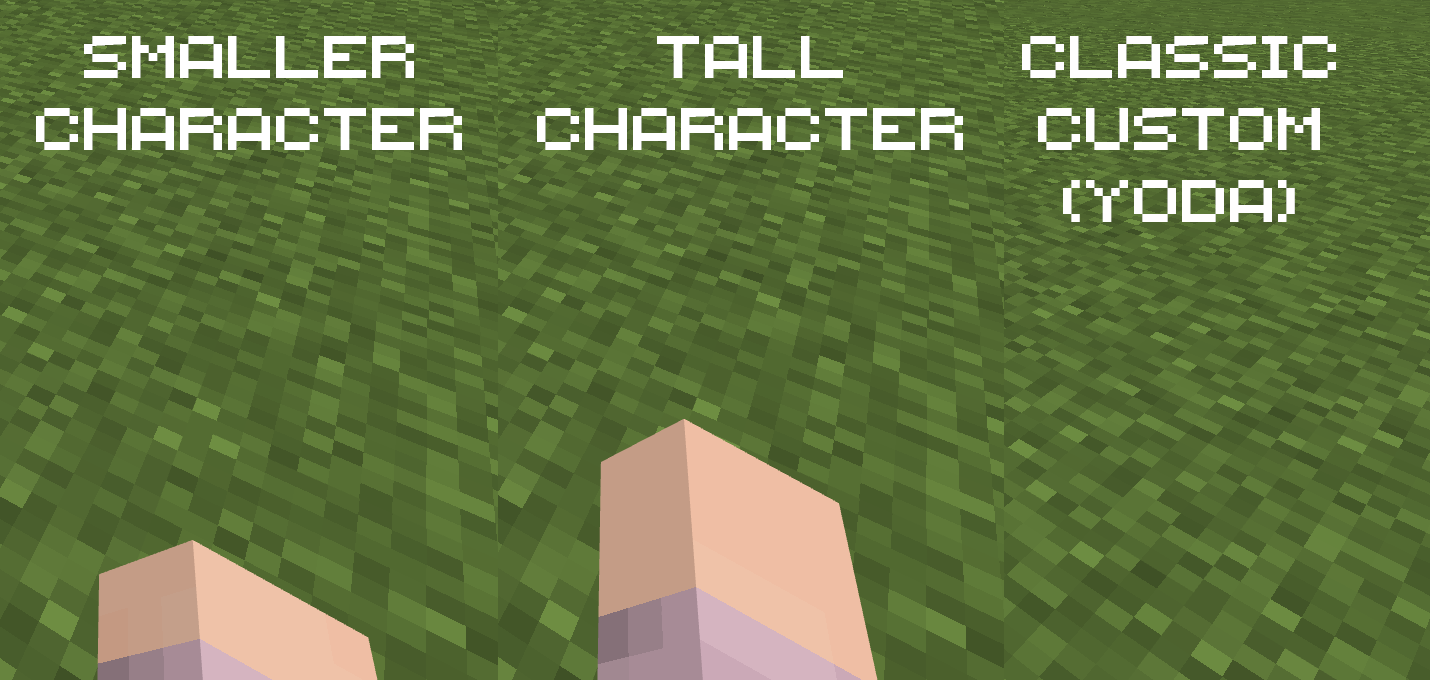
Characters from the character creator and specific classic skins can sometimes have shorter or longer arms. However, the first person arm doesn't accomodate these differences.
Steps to Reproduce:
- Observe the arm in the first person view;
- Change the height of the character and compare.
Observed Results:
Longer arms will extend further than they should, and shorter arms will barely be visible.
Expected Results:
The arm is repositioned accordingly avoid hindering gameplay.
Screenshots/Videos attached: Yes
Notes: The issue is now much less visible with changes that were made over time, but it's definitely still there.

- Unresolved
![[Mod] LateLag](../../../data/avatars/users/92884.png) [Mod] LateLag
[Mod] LateLag- 12
- 6
- Confirmed
- 307060, 324278
- Windows
- Windows 10
1.16.30.57 RTX Beta - 1.19.81 Hotfix
1.16.30.57 RTX Beta 1.16.200.51 Beta 1.15.0.11 RTX Beta 1.16.100.53 Beta 1.16.100.50 Beta 1.16.20.54 Beta 1.15.0.9 RTX Beta 1.16.20.52 Beta 1.16.0.55 Beta 1.14.25.1 Beta 1.14.0.51 Beta 1.14.0.50 Beta 1.13.3 1.13.2 1.13.1 1.14.1 Hotfix 1.13.0.15 Beta 1.13.0.13 Beta 1.13.0.9 Beta 1.13.0.6 Beta 1.13.0.2 Beta 1.14.30 Hotfix 1.16.1 1.16.10 1.16.21 1.16.20 1.16.50 Hotfix (iOS) 1.16.40 Hotfix 1.16.61 (PS4) 1.20.0.23 Preview 1.19.81 Hotfix
Created Issue:
First person view doesn't display custom geometry skins properly
Custom geometry skins that have shorter or longer arms are broken in the first person view. Instead of the arm being properly displayed like a regular arm, the arm is displayed in a weird position. See attached picture for comparison.
Attachments1
![[Mod] tryashtar](../../../data/avatars/users/41963.png)
![[Mojang] Mega_Spud (Jay Wells)](../../../data/avatars/users/92696.png)

@LateLag I created a resource pack that potentially fixes this issue. Could someone test it with a custom geometry skin and let me know if it fixes the issue?
C
ustom geometry skins thathave shorter or longer armsare broken inthe first personview. Instead of the arm being properly displayed like a regular arm, the arm is displayed in a weird position. See attached picture for comparison.Characters from the character creator and specific classic skins can sometimes have shorter or longer arms. However, the first person arm doesn't accomodate these differences.
Steps to Reproduce:
- Observe the arm in the first person view;
- Change the height of the character and compare.
Observed Results:
Longer arms will extend way further than they should, and shorter arms will barely be visible.Expected Results:
The arm is repositioned accordingly avoid hindering gameplay.Screenshots/Videos attached: Yes
Notes: I'm unsure if this was occurring before the change that made player models and animations data driven, but I believe it didn't, or at least happened to a lesser extent.
Characters from the character creator and specific classic skins can sometimes have shorter or longer arms. However, the first person arm doesn't accomodate these differences.
Steps to Reproduce:
- Observe the arm in the first person view;
- Change the height of the character and compare.
Observed Results:
Longer arms will extendwayfurther than they should, and shorter arms will barely be visible.Expected Results:
The arm is repositioned accordingly avoid hindering gameplay.Screenshots/Videos attached: Yes
Notes:
I'm unsure if this was occurring beforethechange thatmade player models and animations data driven, but I believe it didn't, or at least happened to a lesser extent.Characters from the character creator and specific classic skins can sometimes have shorter or longer arms. However, the first person arm doesn't accomodate these differences.
Steps to Reproduce:
- Observe the arm in the first person view;
- Change the height of the character and compare.
Observed Results:
Longer arms will extend further than they should, and shorter arms will barely be visible.Expected Results:
The arm is repositioned accordingly avoid hindering gameplay.Screenshots/Videos attached: Yes
Notes: The issue is now much less visible with changes that were made over time, but it's definitely still there.
As of 1.13.0.4 beta, longer arms have been lowered (still a bit taller) and shorter arms have been raised (still a bit lower). However, the punching animation for shorter arms is now going a bit too far, a clear gap between the end of the arm and the border of the screen is shown.
1.13.0.6 seems to have broken it even more. See
MCPE-47939for more details on that.The punching/breaking animation for longer arms seems a bit weird now.
Which skins does this affect specifically? Are they Marketplace or Character Creator skins, or are they 3rd Party skin packs? If applicable could you please provide a copy of the skin pack?
Thank you for your report!
However, this issue has been temporarily closed as Awaiting Response
Is this still an issue in the latest version? If so, please make sure the ticket description contains the following information:
If your ticket does not look like the example given here, then it's likely to be closed as incomplete.
This ticket will automatically reopen when you reply.
Quick Links:
📓 Issue Guidelines – 💬 Mojang Support – 📧 Suggestions – 📖 Minecraft Wiki
Cleaning up old tickets: This ticket had been set to 'Awaiting Response', but has not received a response from the reporter (~3 months+) so is being closed as Incomplete. If you feel this is still a valid issue then please comment, or create a new ticket following the Issue Guidelines which includes steps to reproduce the problem.
For any account or purchasing related issues, please contact Minecraft Customer Support directly, as we cannot assist with those here at the bug tracker.
Quick Links:
📓 Issue Guidelines – 💬 Mojang Support – 📧 Suggestions – 📖 Minecraft Wiki
Reopening; still and issue.