 MCPE-69399
Minecraft RTX Beta - Temples and Totems Shader Errors?
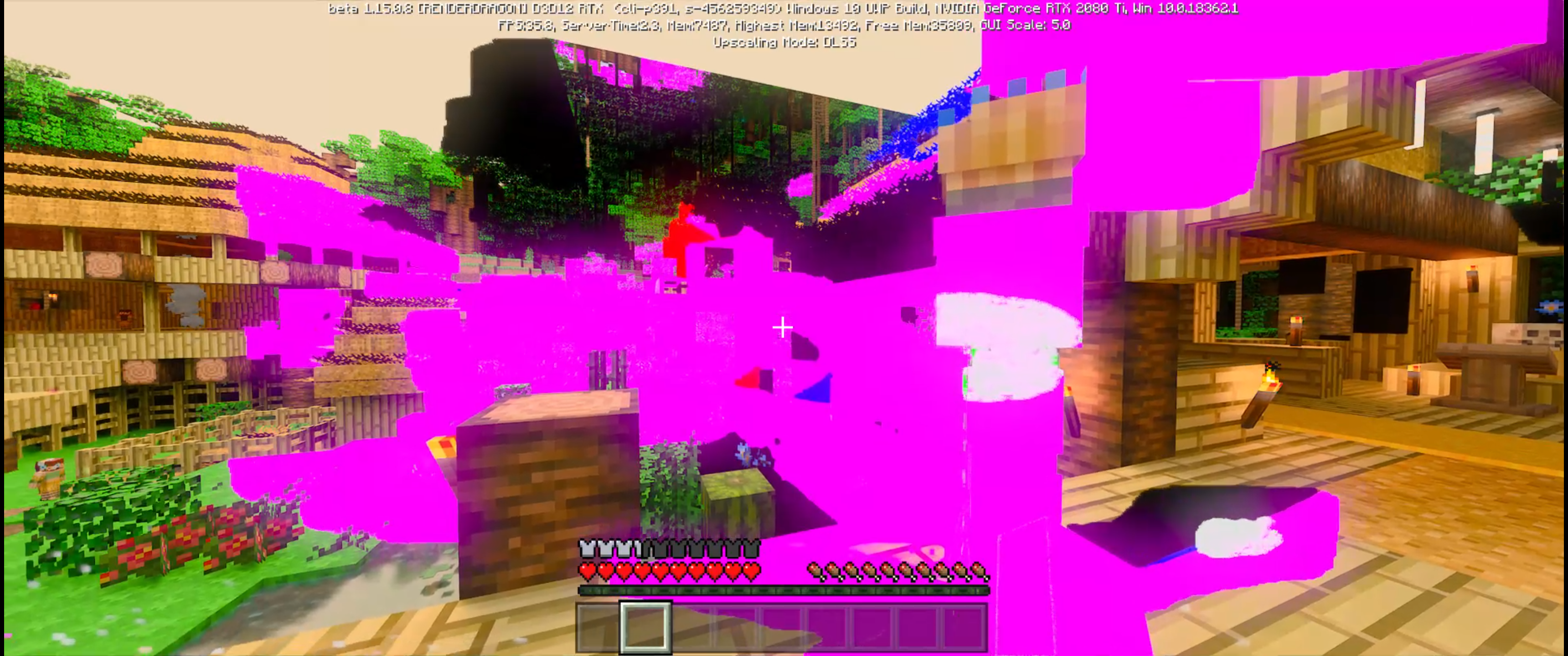
I had created a Totems and Temples RTX World, I had loaded others previously with only invisible blocks/Missing textures occasionally however, after creating this world it was about 1 Minute into gameplay that I would increase the Maximum Chunk render distance from 0/4 to 1/4 (Which I had done with all the other worlds with RTX with nothing like this happening), when all of a sudden this pink colour started to run through the screen. It would sort of clear up when I would turn the character but it would just come back. I ran around for a little while (Whilst recording) to see what would happen in different areas and things went a even weirder after going into the water and coming back out. Admin, Please email me if you require the video.
Attachments1

Created Issue:
Minecraft RTX Beta - Temples and Totems Shader Errors?
I had created a Totems and Temples RTX World, I had loaded others previously with only invisible blocks/Missing textures occasionally however, after creating this world it was about 1 Minute into gameplay that I would increase the Maximum Chunk render distance from 0/4 to 1/4 (Which I had done with all the other worlds with RTX with nothing like this happening), when all of a sudden this pink colour started to run through the screen. It would sort of clear up when I would turn the character but it would just come back. I ran around for a little while (Whilst recording) to see what would happen in different areas and things went a even weirder after going into the water and coming back out. Admin, Please email me if you require the video.
Attachments1
![[Mojang] Mega_Spud (Jay Wells)](../../../data/avatars/users/92696.png)

Is this still an issue in the latest RTX Beta version?
This issue was reported in an earlier RTX beta build, but has been temporarily closed as Awaiting Response
Several improvements and fixes have been made to the Minecraft with RTX beta for Windows 10. Be sure to check out the Known Issues List and Frequently Asked Questions for the latest details, as these issues do not need to be reported here.
If you would still like to report a bug, please make sure that you have checked that your system and graphics drivers are up to date. Also, please make sure that any packs you are using are valid and up to date. (You might need to check the Marketplace for the very latest updates.)
After that please update the affected version of this ticket, and make sure that the description above contains clear steps to reproduce the issue, like so:
You might like to also include any relevant information about your system specs.
This ticket will automatically reopen when you reply.
Quick Links:
📓 Issue Guidelines – 💬 Mojang Support – 📧 Suggestions – 📖 Minecraft Wiki
Cleaning up old tickets: This ticket had been set to 'Awaiting Response', but has not received a response from the reporter (~3 months+) so is being closed as Incomplete. If you feel this is still a valid issue then please comment, or create a new ticket following the Issue Guidelines which includes steps to reproduce the problem.
Quick Links:
📓 Issue Guidelines – 💬 Mojang Support – 📧 Suggestions – 📖 Minecraft Wiki