 MCPE-93398
Merging Multiple Geometry Doesnt Load Properly
>Summary :
The bug is exist long time since 1.14 official version. I've never seen its going to be fixed, so i create a new ticket in order there's no one who reported it. When i made skinpack via texture pack using render_controller, i cant merge 2 geometries into 1. In 1.14 beta and earlier than that, you can merge 2 Geometries by adding ":" symbol.
>Step To Reproduce
1. Make merged geometry with ":" to merge.
2. Define the geometry throug entity.json
3. Define it using render_controller
4. Apply the Resource_pack.
>Expected Result :
1. The skin appear
2. The Geometry Loaded
>Observed Result :
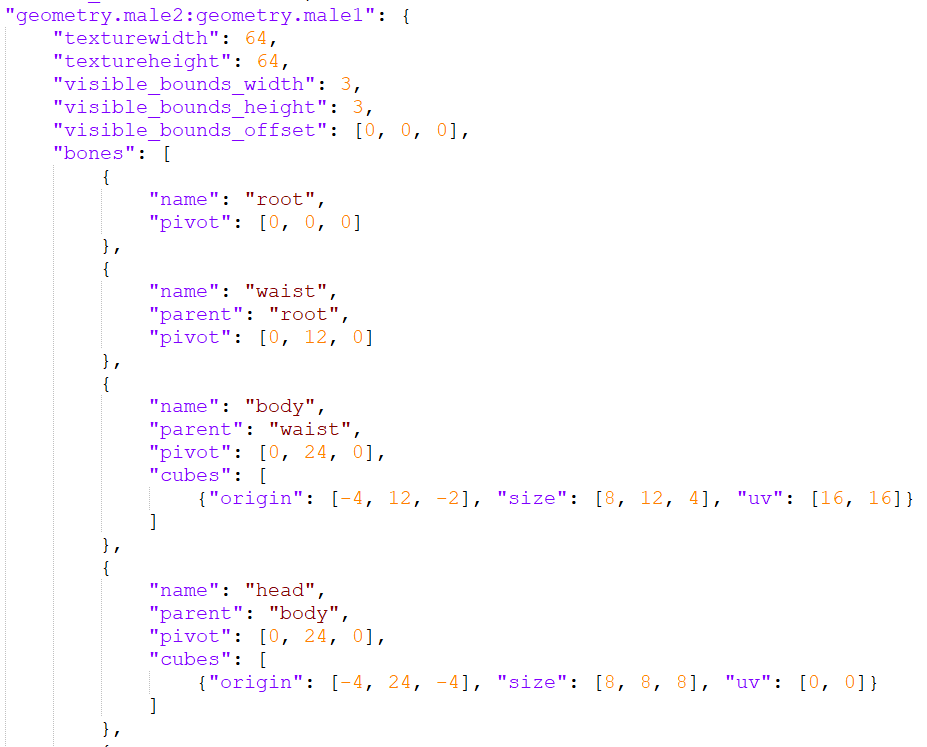
The first thing i do is to make 2 Geometry codes and then at the one of them, im adding the ":" symbol. So the identifier name will be like this :
* "geometry.male2:geometry.male1": {*
And then visualizing it via entity.json :
    {
      "geometry": {
        "default": "geometry.male1",
        "cape": "geometry.cape"
      }
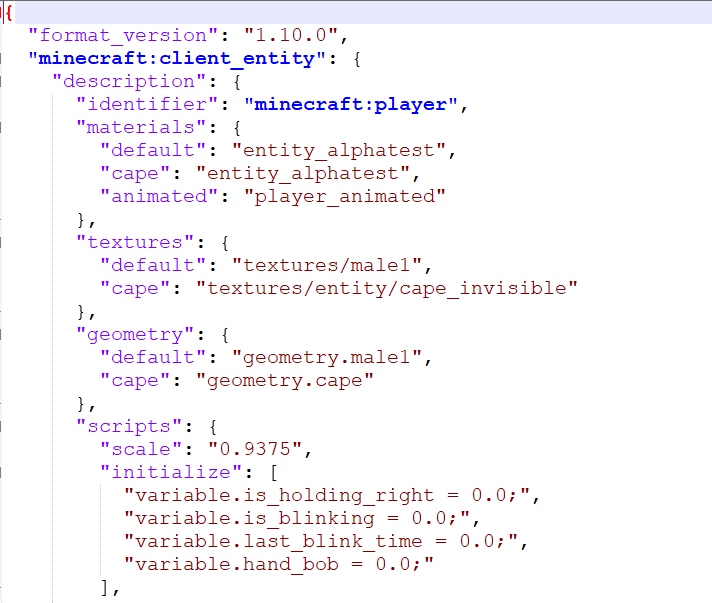
Its turn out that the Geometry doesnt loaded and make the skin Invisible. At first i think there's some changes inside the Minecraft environment, so i decide to define it once again at the entity.json like this :
    {
      "geometry": {
        "default": "geometry.male1:geometry.male2",
        "cape": "geometry.cape"
      }
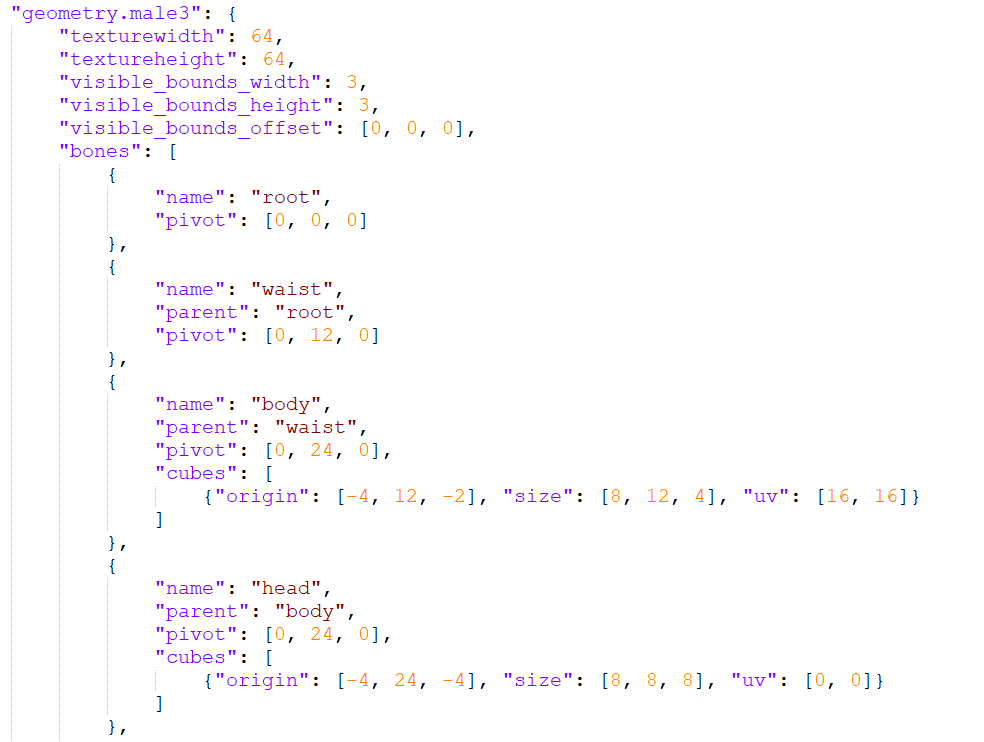
The result was still the same as before. The skins turns out blank and invisible. Already tested when using Custom Entities, the Geometry of defined entity doesnt load up and make the Entity was also invisible. Hope this one gets fixed because its really helpfull when making base geometry and adding Mobs variant geometry inside of it with just merging 2 geometries.

At the end, i need to separate the geometry and made the geometry independent to make it work. As you can see at the Attachment there's some skin that visualize and not Invisible (Because the Geometry already separated and Independent) while the Invisible one exist because as i tell earlier that the Geometry was merged with another.
>Reality Result :
1. The skin become Invisible
2. The Geometry doesnt loaded
>Issue Update :
On the latest version, the merged geometry skin will only can be seen by the owner and others cant see that. Here's the taken example from each perspective
- Owner Perspective (Device 1)
The merged geometry Resource Pack seems fine and its appear perfectly
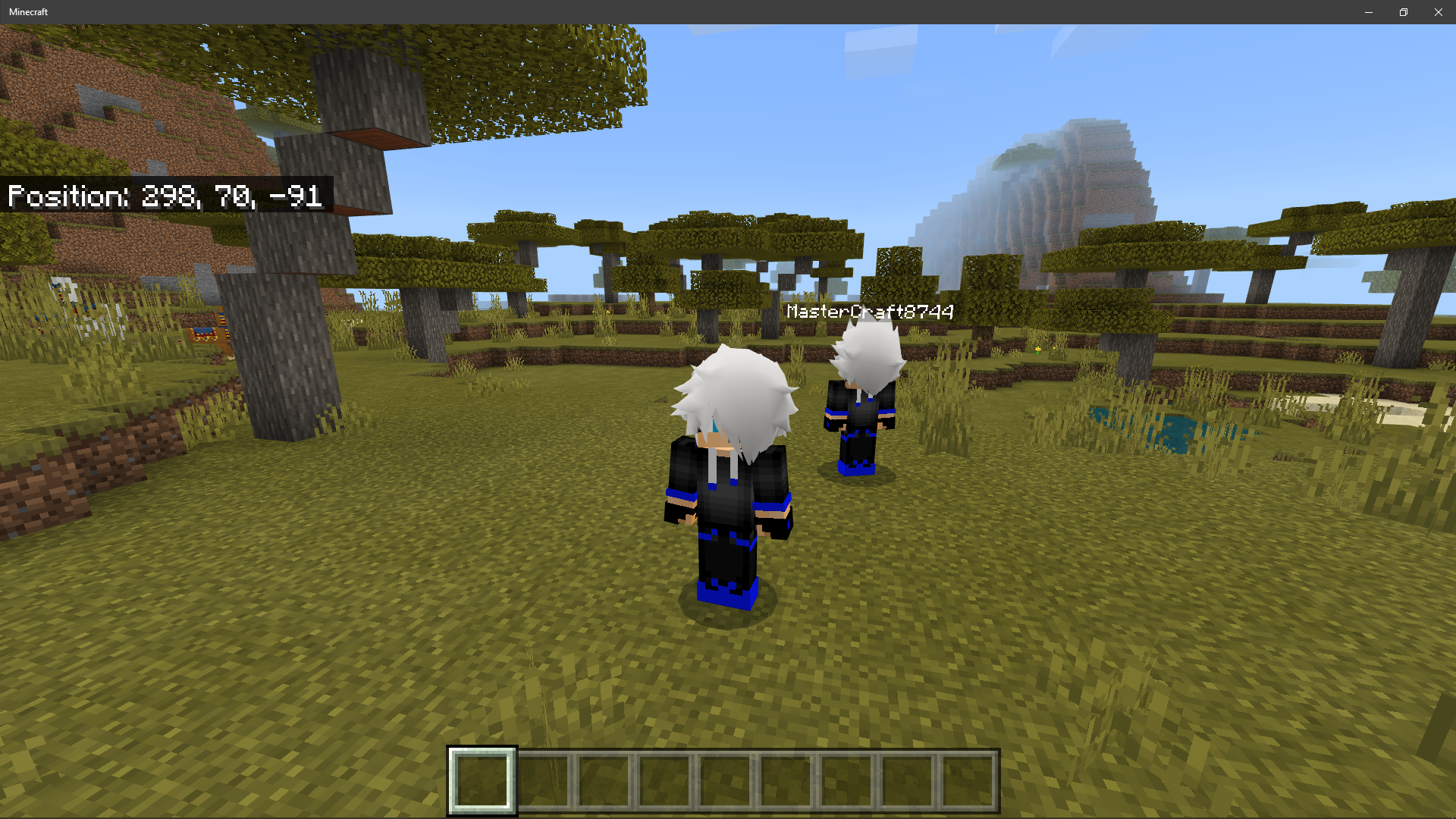
Yet, while on the Persona Editor.. The Player Render Controller doesnt work and make the Persona showing the Loading button.
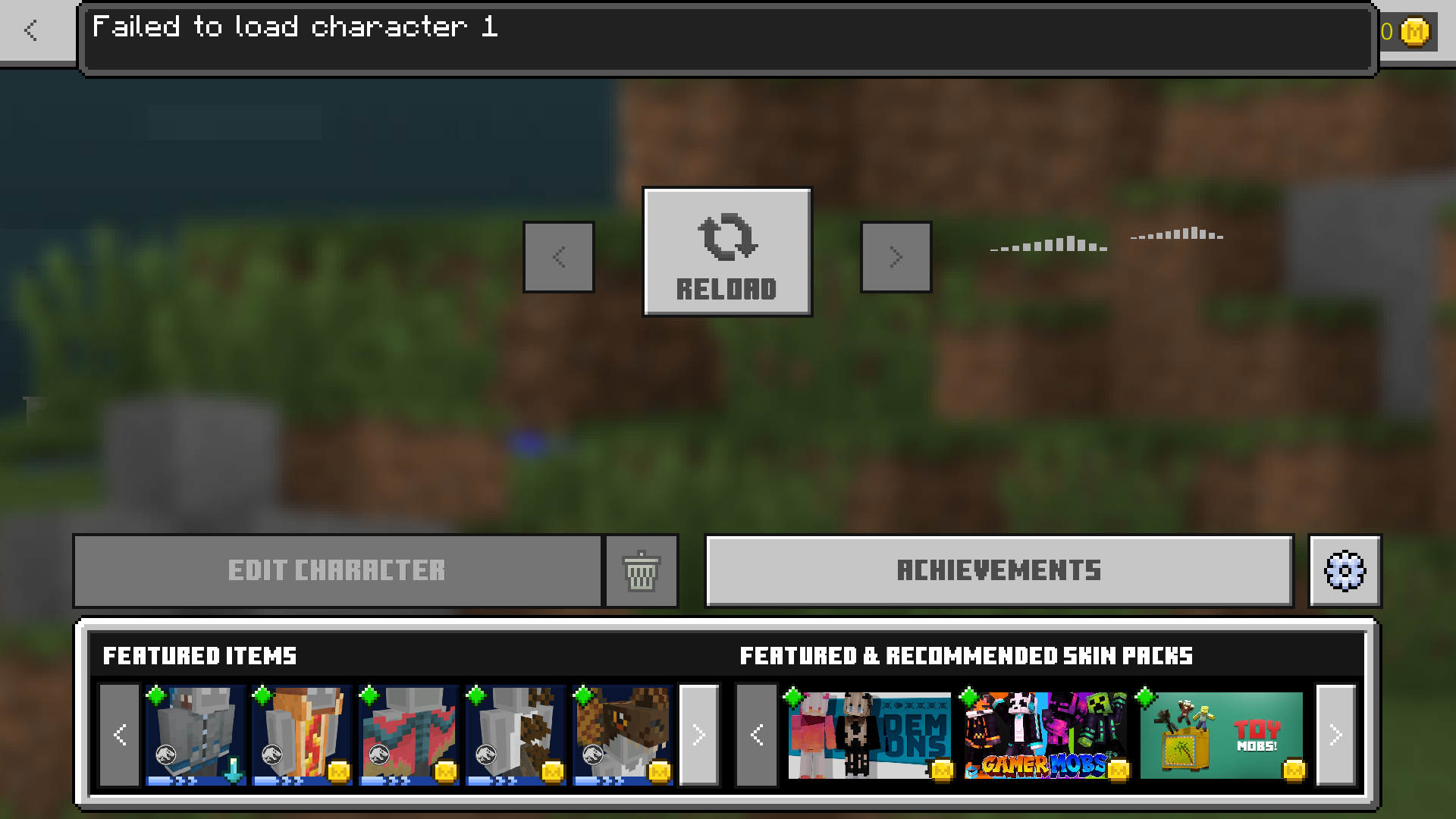
- Other Player Perspective (Device 2)
The Merged Custom Geometry Reource-Pack doesnt load up even though its sharing and using the same Resource-Packs.

The pack that used on the testing is : MCWig - Anime (With some edits)
Tested using Minecraft version : 1.16.20 Official & 1.16 Beta

- Incomplete
 user-806ac
- 0
- 2
- Plausible
- Multiple
- Windows 10 OS 1909 Build 18363
- Entities Entity Geometry Skin SkinBug Skins confirmed entites entities entity entity-data entity-model geometry skin skin-model skin. skin_bug skin_render skins
1.16.230.56 Beta - 1.16.210
1.16.230.56 Beta 1.16.230.54 Beta 1.16.220 1.16.220.52 Beta 1.16.210.50 Beta 1.16.200.57 Beta 1.16.30.52 RTX Beta 1.16.100.55 Beta 1.16.100.54 Beta 1.16.100.53 Beta 1.16.100.52 Beta 1.16.20.54 Beta 1.16.1 1.16.10 1.16.21 1.16.20 1.16.40 Hotfix 1.16.100 1.16.101 Hotfix 1.16.210
Created Issue:
Merging 2 Geometries make the Entity/Skin texture Invisible
The bug is exist long time since 1.14 official version. I've never seen its going to be fixed, so i create a new tickets in order there's no one who reported it. When i made skinpack via texture pack using render_controller, i cant merge 2 geometries into 1. In 1.14 beta and earlier than that, you can merge 2 Geometries by adding ":", here's the example :
- "geometry.male2:geometry.male1": {*
And then visualizing it via entity.json :
{ "default": "geometry.male1", "cape": "geometry.cape" }
{
"geometry":Its turn out that the Geometry doesnt loaded and make the skin Invisible. At first i think there's some changes inside the Minecraft environment, so i decide to define it once again at the entity.json like this :
{ "default": "geometry.male1:male2", "cape": "geometry.cape" }
{
"geometry":The result was still the same as before. The skins turns out blank and invisible. Already tested when using Custom Entities, the Geometry of defined entity doesnt load up and make the Entity was also invisible. Hope this one gets fixed because its really helpfull when making base geometry and adding Mobs variant geometry inside of it with just merging 2 geometries.
At the end, i need to separate the geometry and made the geometry independent to make it work. As you can see at the Attachment there's some skin that visualiza and not Invisible (Because the Geometry already separated and Independent) while the Invisible one exist because as i tell earliear that the Geometry was merged with another.
STEP TO REPRODUCE :
1. Make merged geometry with ":" to merge.
2. Define the geometry throug entity.json
3. Define it using render_controller
4. Apply the Resource_pack.EXPECTED RESULT :
1. The skin appear
2. The Geometry LoadedREALITY :
1. The skin become Invisible
2. The Geometry doesnt loaded
Attachments4
Bug1.PNG
- Unresolved
- Open
- Unconfirmed
- Windows
- Windows 10 OS 1909 Build 18363
- 1.16.20.54 Beta 1.16.1 1.16.10
The bug is exist long time since 1.14 official version. I've never seen its going to be fixed, so i create a new tickets in order there's no one who reported it. When i made skinpack via texture pack using render_controller, i cant merge 2 geometries into 1. In 1.14 beta and earlier than that, you can merge 2 Geometries by adding ":", here's the example :
- "geometry.male2:geometry.male1": {*
And then visualizing it via entity.json :
{ "default": "geometry.male1", "cape": "geometry.cape" }
{
"geometry":Its turn out that the Geometry doesnt loaded and make the skin Invisible. At first i think there's some changes inside the Minecraft environment, so i decide to define it once again at the entity.json like this :
{ "default": "geometry.male1:male2", "cape": "geometry.cape" }
{
"geometry":The result was still the same as before. The skins turns out blank and invisible. Already tested when using Custom Entities, the Geometry of defined entity doesnt load up and make the Entity was also invisible. Hope this one gets fixed because its really helpfull when making base geometry and adding Mobs variant geometry inside of it with just merging 2 geometries.
At the end, i need to separate the geometry and made the geometry independent to make it work. As you can see at the Attachment there's some skin that visualiz
aand not Invisible (Because the Geometry already separated and Independent) while the Invisible one exist because as i tell earliear that the Geometry was merged with another.STEP TO REPRODUCE :
1. Make merged geometry with ":" to merge.
2. Define the geometry throug entity.json
3. Define it using render_controller
4. Apply the Resource_pack.EXPECTED RESULT :
1. The skin appear
2. The Geometry LoadedREALITY :
1. The skin become Invisible
2. The Geometry doesnt loadedThe bug is exist long time since 1.14 official version. I've never seen its going to be fixed, so i create a new tickets in order there's no one who reported it. When i made skinpack via texture pack using render_controller, i cant merge 2 geometries into 1. In 1.14 beta and earlier than that, you can merge 2 Geometries by adding ":", here's the example :
- "geometry.male2:geometry.male1": {*
And then visualizing it via entity.json :
{ "default": "geometry.male1", "cape": "geometry.cape" }
{
"geometry":Its turn out that the Geometry doesnt loaded and make the skin Invisible. At first i think there's some changes inside the Minecraft environment, so i decide to define it once again at the entity.json like this :
{ "default": "geometry.male1:male2", "cape": "geometry.cape" }
{
"geometry":The result was still the same as before. The skins turns out blank and invisible. Already tested when using Custom Entities, the Geometry of defined entity doesnt load up and make the Entity was also invisible. Hope this one gets fixed because its really helpfull when making base geometry and adding Mobs variant geometry inside of it with just merging 2 geometries.
At the end, i need to separate the geometry and made the geometry independent to make it work. As you can see at the Attachment there's some skin that visualize and not Invisible (Because the Geometry already separated and Independent) while the Invisible one exist because as i tell earlier that the Geometry was merged with another.
STEP TO REPRODUCE :
1. Make merged geometry with ":" to merge.
2. Define the geometry throug entity.json
3. Define it using render_controller
4. Apply the Resource_pack.EXPECTED RESULT :
1. The skin appear
2. The Geometry LoadedREALITY :
1. The skin become Invisible
2. The Geometry doesnt loaded
The bug is exist long time since 1.14 official version. I've never seen its going to be fixed, so i create a new ticket
sin order there's no one who reported it. When i made skinpack via texture pack using render_controller, i cant merge 2 geometries into 1. In 1.14 beta and earlier than that, you can merge 2 Geometries by adding ":", here's the example :
- "geometry.male2:geometry.male1": {*
And then visualizing it via entity.json :
{ "default": "geometry.male1", "cape": "geometry.cape" }
{
"geometry":Its turn out that the Geometry doesnt loaded and make the skin Invisible. At first i think there's some changes inside the Minecraft environment, so i decide to define it once again at the entity.json like this :
{ "default": "geometry.male1:male2", "cape": "geometry.cape" }
{
"geometry":The result was still the same as before. The skins turns out blank and invisible. Already tested when using Custom Entities, the Geometry of defined entity doesnt load up and make the Entity was also invisible. Hope this one gets fixed because its really helpfull when making base geometry and adding Mobs variant geometry inside of it with just merging 2 geometries.
At the end, i need to separate the geometry and made the geometry independent to make it work. As you can see at the Attachment there's some skin that visualize and not Invisible (Because the Geometry already separated and Independent) while the Invisible one exist because as i tell earlier that the Geometry was merged with another.
STEP TO REPRODUCE :
1. Make merged geometry with ":" to merge.
2. Define the geometry throug entity.json
3. Define it using render_controller
4. Apply the Resource_pack.EXPECTED RESULT :
1. The skin appear
2. The Geometry LoadedREALITY :
1. The skin become Invisible
2. The Geometry doesnt loaded
The bug is exist long time since 1.14 official version. I've never seen its going to be fixed, so i create a new ticket in order there's no one who reported it. When i made skinpack via texture pack using render_controller, i cant merge 2 geometries into 1. In 1.14 beta and earlier than that, you can merge 2 Geometries by adding ":", here's the example :
- "geometry.male2:geometry.male1": {*
And then visualizing it via entity.json :
{ "default": "geometry.male1", "cape": "geometry.cape" }
{
"geometry":Its turn out that the Geometry doesnt loaded and make the skin Invisible. At first i think there's some changes inside the Minecraft environment, so i decide to define it once again at the entity.json like this :
{ "default": "geometry.male1:geometry.male2", "cape": "geometry.cape" }
{
"geometry":The result was still the same as before. The skins turns out blank and invisible. Already tested when using Custom Entities, the Geometry of defined entity doesnt load up and make the Entity was also invisible. Hope this one gets fixed because its really helpfull when making base geometry and adding Mobs variant geometry inside of it with just merging 2 geometries.
At the end, i need to separate the geometry and made the geometry independent to make it work. As you can see at the Attachment there's some skin that visualize and not Invisible (Because the Geometry already separated and Independent) while the Invisible one exist because as i tell earlier that the Geometry was merged with another.
STEP TO REPRODUCE :
1. Make merged geometry with ":" to merge.
2. Define the geometry throug entity.json
3. Define it using render_controller
4. Apply the Resource_pack.EXPECTED RESULT :
1. The skin appear
2. The Geometry LoadedREALITY :
1. The skin become Invisible
2. The Geometry doesnt loaded
The bug is exist long time since 1.14 official version. I've never seen its going to be fixed, so i create a new ticket in order there's no one who reported it. When i made skinpack via texture pack using render_controller, i cant merge 2 geometries into 1. In 1.14 beta and earlier than that, you can merge 2 Geometries by adding ":", here's the example :
- "geometry.male2:geometry.male1": {*
And then visualizing it via entity.json :
{ "default": "geometry.male1", "cape": "geometry.cape" }
{
"geometry":Its turn out that the Geometry doesnt loaded and make the skin Invisible. At first i think there's some changes inside the Minecraft environment, so i decide to define it once again at the entity.json like this :
{ "default": "geometry.male1:geometry.male2", "cape": "geometry.cape" }
{
"geometry":The result was still the same as before. The skins turns out blank and invisible. Already tested when using Custom Entities, the Geometry of defined entity doesnt load up and make the Entity was also invisible. Hope this one gets fixed because its really helpfull when making base geometry and adding Mobs variant geometry inside of it with just merging 2 geometries.
At the end, i need to separate the geometry and made the geometry independent to make it work. As you can see at the Attachment there's some skin that visualize and not Invisible (Because the Geometry already separated and Independent) while the Invisible one exist because as i tell earlier that the Geometry was merged with another.
STEP TO REPRODUCE :
1. Make merged geometry with ":" to merge.
2. Define the geometry throug entity.json
3. Define it using render_controller
4. Apply the Resource_pack.EXPECTED RESULT :
1. The skin appear
2. The Geometry LoadedREALITY :
1. The skin become Invisible
2. The Geometry doesnt loadedUPDATE :
On the latest version, the merged geometry skin will only can be seen by the owner and others cant see that. Its also
The bug is exist long time since 1.14 official version. I've never seen its going to be fixed, so i create a new ticket in order there's no one who reported it. When i made skinpack via texture pack using render_controller, i cant merge 2 geometries into 1. In 1.14 beta and earlier than that, you can merge 2 Geometries by adding ":", here's the example :
- "geometry.male2:geometry.male1": {*
And then visualizing it via entity.json :
{ "default": "geometry.male1", "cape": "geometry.cape" }
{
"geometry":Its turn out that the Geometry doesnt loaded and make the skin Invisible. At first i think there's some changes inside the Minecraft environment, so i decide to define it once again at the entity.json like this :
{ "default": "geometry.male1:geometry.male2", "cape": "geometry.cape" }
{
"geometry":The result was still the same as before. The skins turns out blank and invisible. Already tested when using Custom Entities, the Geometry of defined entity doesnt load up and make the Entity was also invisible. Hope this one gets fixed because its really helpfull when making base geometry and adding Mobs variant geometry inside of it with just merging 2 geometries.
At the end, i need to separate the geometry and made the geometry independent to make it work. As you can see at the Attachment there's some skin that visualize and not Invisible (Because the Geometry already separated and Independent) while the Invisible one exist because as i tell earlier that the Geometry was merged with another.
STEP TO REPRODUCE :
1. Make merged geometry with ":" to merge.
2. Define the geometry throug entity.json
3. Define it using render_controller
4. Apply the Resource_pack.EXPECTED RESULT :
1. The skin appear
2. The Geometry LoadedREALITY :
1. The skin become Invisible
2. The Geometry doesnt loadedUPDATE :
On the latest version, the merged geometry skin will only can be seen by the owner and others cant see that.Its alsoThe bug is exist long time since 1.14 official version. I've never seen its going to be fixed, so i create a new ticket in order there's no one who reported it. When i made skinpack via texture pack using render_controller, i cant merge 2 geometries into 1. In 1.14 beta and earlier than that, you can merge 2 Geometries by adding ":", here's the example :
- "geometry.male2:geometry.male1": {*
And then visualizing it via entity.json :
{ "default": "geometry.male1", "cape": "geometry.cape" }
{
"geometry":Its turn out that the Geometry doesnt loaded and make the skin Invisible. At first i think there's some changes inside the Minecraft environment, so i decide to define it once again at the entity.json like this :
{ "default": "geometry.male1:geometry.male2", "cape": "geometry.cape" }
{
"geometry":
The result was still the same as before. The skins turns out blank and invisible. Already tested when using Custom Entities, the Geometry of defined entity doesnt load up and make the Entity was also invisible. Hope this one gets fixed because its really helpfull when making base geometry and adding Mobs variant geometry inside of it with just merging 2 geometries.
At the end, i need to separate the geometry and made the geometry independent to make it work. As you can see at the Attachment there's some skin that visualize and not Invisible (Because the Geometry already separated and Independent) while the Invisible one exist because as i tell earlier that the Geometry was merged with another.
STEP TO REPRODUCE :
1. Make merged geometry with ":" to merge.
2. Define the geometry throug entity.json
3. Define it using render_controller
4. Apply the Resource_pack.EXPECTED RESULT :
1. The skin appear
2. The Geometry LoadedREALITY :
1. The skin become Invisible
2. The Geometry doesnt loadedUPDATE :
On the latest version, the merged geometry skin will only can be seen by the owner and others cant see that.
The bug is exist long time since 1.14 official version. I've never seen its going to be fixed, so i create a new ticket in order there's no one who reported it. When i made skinpack via texture pack using render_controller, i cant merge 2 geometries into 1. In 1.14 beta and earlier than that, you can merge 2 Geometries by adding ":", here's the example :
- "geometry.male2:geometry.male1": {*
And then visualizing it via entity.json :
{ "default": "geometry.male1", "cape": "geometry.cape" }
{
"geometry":
Its turn out that the Geometry doesnt loaded and make the skin Invisible. At first i think there's some changes inside the Minecraft environment, so i decide to define it once again at the entity.json like this :
{ "default": "geometry.male1:geometry.male2", "cape": "geometry.cape" }
{
"geometry":
The result was still the same as before. The skins turns out blank and invisible. Already tested when using Custom Entities, the Geometry of defined entity doesnt load up and make the Entity was also invisible. Hope this one gets fixed because its really helpfull when making base geometry and adding Mobs variant geometry inside of it with just merging 2 geometries.
At the end, i need to separate the geometry and made the geometry independent to make it work. As you can see at the Attachment there's some skin that visualize and not Invisible (Because the Geometry already separated and Independent) while the Invisible one exist because as i tell earlier that the Geometry was merged with another.
STEP TO REPRODUCE :
1. Make merged geometry with ":" to merge.
2. Define the geometry throug entity.json
3. Define it using render_controller
4. Apply the Resource_pack.EXPECTED RESULT :
1. The skin appear
2. The Geometry LoadedREALITY :
1. The skin become Invisible
2. The Geometry doesnt loadedUPDATE :
On the latest version, the merged geometry skin will only can be seen by the owner and others cant see that. Here's the the skin from each perspective
- Owner Perspective
Merging 2 Geometries make the Entity/SkintextureInvisible
The bug is exist long time since 1.14 official version. I've never seen its going to be fixed, so i create a new ticket in order there's no one who reported it. When i made skinpack via texture pack using render_controller, i cant merge 2 geometries into 1. In 1.14 beta and earlier than that, you can merge 2 Geometries by adding ":", here's the example :
- "geometry.male2:geometry.male1": {*
And then visualizing it via entity.json :
{ "default": "geometry.male1", "cape": "geometry.cape" }
{
"geometry":
Its turn out that the Geometry doesnt loaded and make the skin Invisible. At first i think there's some changes inside the Minecraft environment, so i decide to define it once again at the entity.json like this :
{ "default": "geometry.male1:geometry.male2", "cape": "geometry.cape" }
{
"geometry":
The result was still the same as before. The skins turns out blank and invisible. Already tested when using Custom Entities, the Geometry of defined entity doesnt load up and make the Entity was also invisible. Hope this one gets fixed because its really helpfull when making base geometry and adding Mobs variant geometry inside of it with just merging 2 geometries.
At the end, i need to separate the geometry and made the geometry independent to make it work. As you can see at the Attachment there's some skin that visualize and not Invisible (Because the Geometry already separated and Independent) while the Invisible one exist because as i tell earlier that the Geometry was merged with another.
STEP TO REPRODUCE :
1. Make merged geometry with ":" to merge.
2. Define the geometry throug entity.json
3. Define it using render_controller
4. Apply the Resource_pack.EXPECTED RESULT :
1. The skin appear
2. The Geometry LoadedREALITY :
1. The skin become Invisible
2. The Geometry doesnt loadedUPDATE :
On the latest version, the merged geometry skin will only can be seen by the owner and others cant see that. Here's the the skin from each perspective
- Owner Perspective
The bug is exist long time since 1.14 official version. I've never seen its going to be fixed, so i create a new ticket in order there's no one who reported it. When i made skinpack via texture pack using render_controller, i cant merge 2 geometries into 1. In 1.14 beta and earlier than that, you can merge 2 Geometries by adding ":", here's the example :
- "geometry.male2:geometry.male1": {*
And then visualizing it via entity.json :
{ "default": "geometry.male1", "cape": "geometry.cape" }
{
"geometry":
Its turn out that the Geometry doesnt loaded and make the skin Invisible. At first i think there's some changes inside the Minecraft environment, so i decide to define it once again at the entity.json like this :
{ "default": "geometry.male1:geometry.male2", "cape": "geometry.cape" }
{
"geometry":
The result was still the same as before. The skins turns out blank and invisible. Already tested when using Custom Entities, the Geometry of defined entity doesnt load up and make the Entity was also invisible. Hope this one gets fixed because its really helpfull when making base geometry and adding Mobs variant geometry inside of it with just merging 2 geometries.
At the end, i need to separate the geometry and made the geometry independent to make it work. As you can see at the Attachment there's some skin that visualize and not Invisible (Because the Geometry already separated and Independent) while the Invisible one exist because as i tell earlier that the Geometry was merged with another.
STEP TO REPRODUCE :
1. Make merged geometry with ":" to merge.
2. Define the geometry throug entity.json
3. Define it using render_controller
4. Apply the Resource_pack.EXPECTED RESULT :
1. The skin appear
2. The Geometry LoadedREALITY :
1. The skin become Invisible
2. The Geometry doesnt loadedUPDATE :
On the latest version, the merged geometry skin will only can be seen by the owner and others cant see that. Here's the the skin from each perspective
- Owner Perspective
The bug is exist long time since 1.14 official version. I've never seen its going to be fixed, so i create a new ticket in order there's no one who reported it. When i made skinpack via texture pack using render_controller, i cant merge 2 geometries into 1. In 1.14 beta and earlier than that, you can merge 2 Geometries by adding ":", here's the example :
- "geometry.male2:geometry.male1": {*
And then visualizing it via entity.json :
{ "default": "geometry.male1", "cape": "geometry.cape" }
{
"geometry":
Its turn out that the Geometry doesnt loaded and make the skin Invisible. At first i think there's some changes inside the Minecraft environment, so i decide to define it once again at the entity.json like this :
{ "default": "geometry.male1:geometry.male2", "cape": "geometry.cape" }
{
"geometry":
The result was still the same as before. The skins turns out blank and invisible. Already tested when using Custom Entities, the Geometry of defined entity doesnt load up and make the Entity was also invisible. Hope this one gets fixed because its really helpfull when making base geometry and adding Mobs variant geometry inside of it with just merging 2 geometries.
At the end, i need to separate the geometry and made the geometry independent to make it work. As you can see at the Attachment there's some skin that visualize and not Invisible (Because the Geometry already separated and Independent) while the Invisible one exist because as i tell earlier that the Geometry was merged with another.
STEP TO REPRODUCE :
1. Make merged geometry with ":" to merge.
2. Define the geometry throug entity.json
3. Define it using render_controller
4. Apply the Resource_pack.EXPECTED RESULT :
1. The skin appear
2. The Geometry LoadedREALITY :
1. The skin become Invisible
2. The Geometry doesnt loadedUPDATE :
On the latest version, the merged geometry skin will only can be seen by the owner and others cant see that. Here's the the skin from each perspective
- Owner Perspective
The merged geometry Resource Pack seems fine and its appear perfectly
Yet, while on the Persona Editor.. The Player Render Controller doesnt work and make the Persona showing the Loading button.
The bug is exist long time since 1.14 official version. I've never seen its going to be fixed, so i create a new ticket in order there's no one who reported it. When i made skinpack via texture pack using render_controller, i cant merge 2 geometries into 1. In 1.14 beta and earlier than that, you can merge 2 Geometries by adding ":", here's the example :
- "geometry.male2:geometry.male1": {*
And then visualizing it via entity.json :
{ "default": "geometry.male1", "cape": "geometry.cape" }
{
"geometry":
Its turn out that the Geometry doesnt loaded and make the skin Invisible. At first i think there's some changes inside the Minecraft environment, so i decide to define it once again at the entity.json like this :
{ "default": "geometry.male1:geometry.male2", "cape": "geometry.cape" }
{
"geometry":
The result was still the same as before. The skins turns out blank and invisible. Already tested when using Custom Entities, the Geometry of defined entity doesnt load up and make the Entity was also invisible. Hope this one gets fixed because its really helpfull when making base geometry and adding Mobs variant geometry inside of it with just merging 2 geometries.
At the end, i need to separate the geometry and made the geometry independent to make it work. As you can see at the Attachment there's some skin that visualize and not Invisible (Because the Geometry already separated and Independent) while the Invisible one exist because as i tell earlier that the Geometry was merged with another.
STEP TO REPRODUCE :
1. Make merged geometry with ":" to merge.
2. Define the geometry throug entity.json
3. Define it using render_controller
4. Apply the Resource_pack.EXPECTED RESULT :
1. The skin appear
2. The Geometry LoadedREALITY :
1. The skin become Invisible
2. The Geometry doesnt loadedUPDATE :
On the latest version, the merged geometry skin will only can be seen by the owner and others cant see that. Here's the the skin from each perspective
- Owner Perspective
The merged geometry Resource Pack seems fine and its appear perfectly
Yet, while on the Persona Editor.. The Player Render Controller doesnt work and make the Persona showing the Loading button.
- Other Player Perspective
The Merged Custom Geometry Reource-Pack doesnt load up
The bug is exist long time since 1.14 official version. I've never seen its going to be fixed, so i create a new ticket in order there's no one who reported it. When i made skinpack via texture pack using render_controller, i cant merge 2 geometries into 1. In 1.14 beta and earlier than that, you can merge 2 Geometries by adding ":", here's the example :
- "geometry.male2:geometry.male1": {*
And then visualizing it via entity.json :
{ "default": "geometry.male1", "cape": "geometry.cape" }
{
"geometry":
Its turn out that the Geometry doesnt loaded and make the skin Invisible. At first i think there's some changes inside the Minecraft environment, so i decide to define it once again at the entity.json like this :
{ "default": "geometry.male1:geometry.male2", "cape": "geometry.cape" }
{
"geometry":
The result was still the same as before. The skins turns out blank and invisible. Already tested when using Custom Entities, the Geometry of defined entity doesnt load up and make the Entity was also invisible. Hope this one gets fixed because its really helpfull when making base geometry and adding Mobs variant geometry inside of it with just merging 2 geometries.
At the end, i need to separate the geometry and made the geometry independent to make it work. As you can see at the Attachment there's some skin that visualize and not Invisible (Because the Geometry already separated and Independent) while the Invisible one exist because as i tell earlier that the Geometry was merged with another.
STEP TO REPRODUCE :
1. Make merged geometry with ":" to merge.
2. Define the geometry throug entity.json
3. Define it using render_controller
4. Apply the Resource_pack.EXPECTED RESULT :
1. The skin appear
2. The Geometry LoadedREALITY :
1. The skin become Invisible
2. The Geometry doesnt loadedUPDATE :
On the latest version, the merged geometry skin will only can be seen by the owner and others cant see that. Here's the the skin from each perspective
- Owner Perspective
The merged geometry Resource Pack seems fine and its appear perfectly
Yet, while on the Persona Editor.. The Player Render Controller doesnt work and make the Persona showing the Loading button.
- Other Player Perspective
The Merged Custom Geometry Reource-Pack doesnt load upThe bug is exist long time since 1.14 official version. I've never seen its going to be fixed, so i create a new ticket in order there's no one who reported it. When i made skinpack via texture pack using render_controller, i cant merge 2 geometries into 1. In 1.14 beta and earlier than that, you can merge 2 Geometries by adding ":", here's the example :
- "geometry.male2:geometry.male1": {*
And then visualizing it via entity.json :
{ "default": "geometry.male1", "cape": "geometry.cape" }
{
"geometry":
Its turn out that the Geometry doesnt loaded and make the skin Invisible. At first i think there's some changes inside the Minecraft environment, so i decide to define it once again at the entity.json like this :
{ "default": "geometry.male1:geometry.male2", "cape": "geometry.cape" }
{
"geometry":
The result was still the same as before. The skins turns out blank and invisible. Already tested when using Custom Entities, the Geometry of defined entity doesnt load up and make the Entity was also invisible. Hope this one gets fixed because its really helpfull when making base geometry and adding Mobs variant geometry inside of it with just merging 2 geometries.
At the end, i need to separate the geometry and made the geometry independent to make it work. As you can see at the Attachment there's some skin that visualize and not Invisible (Because the Geometry already separated and Independent) while the Invisible one exist because as i tell earlier that the Geometry was merged with another.
STEP TO REPRODUCE :
1. Make merged geometry with ":" to merge.
2. Define the geometry throug entity.json
3. Define it using render_controller
4. Apply the Resource_pack.EXPECTED RESULT :
1. The skin appear
2. The Geometry LoadedREALITY :
1. The skin become Invisible
2. The Geometry doesnt loadedUPDATE :
On the latest version, the merged geometry skin will only can be seen by the owner and others cant see that. Here's the the skin from each perspective
- Owner Perspective
The merged geometry Resource Pack seems fine and its appear perfectlyYet, while on the Persona Editor.. The Player Render Controller doesnt work and make the Persona showing the Loading button.
- Other Player Perspective
The Merged Custom Geometry Reource-Pack doesnt load up
The bug is exist long time since 1.14 official version. I've never seen its going to be fixed, so i create a new ticket in order there's no one who reported it. When i made skinpack via texture pack using render_controller, i cant merge 2 geometries into 1. In 1.14 beta and earlier than that, you can merge 2 Geometries by adding ":", here's the example :
- "geometry.male2:geometry.male1": {*
And then visualizing it via entity.json :
{ "default": "geometry.male1", "cape": "geometry.cape" }
{
"geometry":
Its turn out that the Geometry doesnt loaded and make the skin Invisible. At first i think there's some changes inside the Minecraft environment, so i decide to define it once again at the entity.json like this :
{ "default": "geometry.male1:geometry.male2", "cape": "geometry.cape" }
{
"geometry":
The result was still the same as before. The skins turns out blank and invisible. Already tested when using Custom Entities, the Geometry of defined entity doesnt load up and make the Entity was also invisible. Hope this one gets fixed because its really helpfull when making base geometry and adding Mobs variant geometry inside of it with just merging 2 geometries.
At the end, i need to separate the geometry and made the geometry independent to make it work. As you can see at the Attachment there's some skin that visualize and not Invisible (Because the Geometry already separated and Independent) while the Invisible one exist because as i tell earlier that the Geometry was merged with another.
STEP TO REPRODUCE :
1. Make merged geometry with ":" to merge.
2. Define the geometry throug entity.json
3. Define it using render_controller
4. Apply the Resource_pack.EXPECTED RESULT :
1. The skin appear
2. The Geometry LoadedREALITY :
1. The skin become Invisible
2. The Geometry doesnt loadedUPDATE :
On the latest version, the merged geometry skin will only can be seen by the owner and others cant see that. Here's the the skin from each perspective
- Owner Perspective
The merged geometry Resource Pack seems fine and its appear perfectlyYet, while on the Persona Editor.. The Player Render Controller doesnt work and make the Persona showing the Loading button.
- Other Player Perspective
The Merged Custom Geometry Reource-Pack doesnt load upThe bug is exist long time since 1.14 official version. I've never seen its going to be fixed, so i create a new ticket in order there's no one who reported it. When i made skinpack via texture pack using render_controller, i cant merge 2 geometries into 1. In 1.14 beta and earlier than that, you can merge 2 Geometries by adding ":", here's the example :
- "geometry.male2:geometry.male1": {*
And then visualizing it via entity.json :
{ "default": "geometry.male1", "cape": "geometry.cape" }
{
"geometry":
Its turn out that the Geometry doesnt loaded and make the skin Invisible. At first i think there's some changes inside the Minecraft environment, so i decide to define it once again at the entity.json like this :
{ "default": "geometry.male1:geometry.male2", "cape": "geometry.cape" }
{
"geometry":
The result was still the same as before. The skins turns out blank and invisible. Already tested when using Custom Entities, the Geometry of defined entity doesnt load up and make the Entity was also invisible. Hope this one gets fixed because its really helpfull when making base geometry and adding Mobs variant geometry inside of it with just merging 2 geometries.
At the end, i need to separate the geometry and made the geometry independent to make it work. As you can see at the Attachment there's some skin that visualize and not Invisible (Because the Geometry already separated and Independent) while the Invisible one exist because as i tell earlier that the Geometry was merged with another.
STEP TO REPRODUCE :
1. Make merged geometry with ":" to merge.
2. Define the geometry throug entity.json
3. Define it using render_controller
4. Apply the Resource_pack.EXPECTED RESULT :
1. The skin appear
2. The Geometry LoadedREALITY :
1. The skin become Invisible
2. The Geometry doesnt loadedUPDATE :
On the latest version, the merged geometry skin will only can be seen by the owner and others cant see that. Here's the the skin from each perspective
- Owner Perspective
The merged geometry Resource Pack seems fine and its appear perfectly
Yet, while on the Persona Editor.. The Player Render Controller doesnt work and make the Persona showing the Loading button.
- Other Player Perspective
The Merged Custom Geometry Reource-Pack doesnt load up even though its sharing and using the same Resource-Packs.
The pack that used on the testing is : MCWig : Anime With some edits
Tested using Minecraft version : 1.16.20 Official & 1.16 Beta
The bug is exist long time since 1.14 official version. I've never seen its going to be fixed, so i create a new ticket in order there's no one who reported it. When i made skinpack via texture pack using render_controller, i cant merge 2 geometries into 1. In 1.14 beta and earlier than that, you can merge 2 Geometries by adding ":", here's the example :
- "geometry.male2:geometry.male1": {*
And then visualizing it via entity.json :
{ "default": "geometry.male1", "cape": "geometry.cape" }
{
"geometry":
Its turn out that the Geometry doesnt loaded and make the skin Invisible. At first i think there's some changes inside the Minecraft environment, so i decide to define it once again at the entity.json like this :
{ "default": "geometry.male1:geometry.male2", "cape": "geometry.cape" }
{
"geometry":
The result was still the same as before. The skins turns out blank and invisible. Already tested when using Custom Entities, the Geometry of defined entity doesnt load up and make the Entity was also invisible. Hope this one gets fixed because its really helpfull when making base geometry and adding Mobs variant geometry inside of it with just merging 2 geometries.
At the end, i need to separate the geometry and made the geometry independent to make it work. As you can see at the Attachment there's some skin that visualize and not Invisible (Because the Geometry already separated and Independent) while the Invisible one exist because as i tell earlier that the Geometry was merged with another.
STEP TO REPRODUCE :
1. Make merged geometry with ":" to merge.
2. Define the geometry throug entity.json
3. Define it using render_controller
4. Apply the Resource_pack.EXPECTED RESULT :
1. The skin appear
2. The Geometry LoadedREALITY :
1. The skin become Invisible
2. The Geometry doesnt loadedUPDATE :
On the latest version, the merged geometry skin will only can be seen by the owner and others cant see that. Here's the the skinfrom each perspective
- Owner Perspective
The merged geometry Resource Pack seems fine and its appear perfectly
Yet, while on the Persona Editor.. The Player Render Controller doesnt work and make the Persona showing the Loading button.
- Other Player Perspective
The Merged Custom Geometry Reource-Pack doesnt load up even though its sharing and using the same Resource-Packs.
The pack that used on the testing is : MCWig : Anime With some edits
Tested using Minecraft version : 1.16.20 Official & 1.16 BetaThe bug is exist long time since 1.14 official version. I've never seen its going to be fixed, so i create a new ticket in order there's no one who reported it. When i made skinpack via texture pack using render_controller, i cant merge 2 geometries into 1. In 1.14 beta and earlier than that, you can merge 2 Geometries by adding ":", here's the example :
- "geometry.male2:geometry.male1": {*
And then visualizing it via entity.json :
{ "default": "geometry.male1", "cape": "geometry.cape" }
{
"geometry":
Its turn out that the Geometry doesnt loaded and make the skin Invisible. At first i think there's some changes inside the Minecraft environment, so i decide to define it once again at the entity.json like this :
{ "default": "geometry.male1:geometry.male2", "cape": "geometry.cape" }
{
"geometry":
The result was still the same as before. The skins turns out blank and invisible. Already tested when using Custom Entities, the Geometry of defined entity doesnt load up and make the Entity was also invisible. Hope this one gets fixed because its really helpfull when making base geometry and adding Mobs variant geometry inside of it with just merging 2 geometries.
At the end, i need to separate the geometry and made the geometry independent to make it work. As you can see at the Attachment there's some skin that visualize and not Invisible (Because the Geometry already separated and Independent) while the Invisible one exist because as i tell earlier that the Geometry was merged with another.
STEP TO REPRODUCE :
1. Make merged geometry with ":" to merge.
2. Define the geometry throug entity.json
3. Define it using render_controller
4. Apply the Resource_pack.EXPECTED RESULT :
1. The skin appear
2. The Geometry LoadedREALITY :
1. The skin become Invisible
2. The Geometry doesnt loadedUPDATE :
On the latest version, the merged geometry skin will only can be seen by the owner and others cant see that. Here's the taken example from each perspective
- Owner Perspective (Device 1)
The merged geometry Resource Pack seems fine and its appear perfectly
Yet, while on the Persona Editor.. The Player Render Controller doesnt work and make the Persona showing the Loading button.
- Other Player Perspective (Device 2)
The Merged Custom Geometry Reource-Pack doesnt load up even though its sharing and using the same Resource-Packs.
The pack that used on the testing is : MCWig : Anime With some edits
Tested using Minecraft version : 1.16.20 Official & 1.16 Beta
The bug is exist long time since 1.14 official version. I've never seen its going to be fixed, so i create a new ticket in order there's no one who reported it. When i made skinpack via texture pack using render_controller, i cant merge 2 geometries into 1. In 1.14 beta and earlier than that, you can merge 2 Geometries by adding ":", here's the example :
- "geometry.male2:geometry.male1": {*
And then visualizing it via entity.json :
{ "default": "geometry.male1", "cape": "geometry.cape" }
{
"geometry":
Its turn out that the Geometry doesnt loaded and make the skin Invisible. At first i think there's some changes inside the Minecraft environment, so i decide to define it once again at the entity.json like this :
{ "default": "geometry.male1:geometry.male2", "cape": "geometry.cape" }
{
"geometry":
The result was still the same as before. The skins turns out blank and invisible. Already tested when using Custom Entities, the Geometry of defined entity doesnt load up and make the Entity was also invisible. Hope this one gets fixed because its really helpfull when making base geometry and adding Mobs variant geometry inside of it with just merging 2 geometries.
At the end, i need to separate the geometry and made the geometry independent to make it work. As you can see at the Attachment there's some skin that visualize and not Invisible (Because the Geometry already separated and Independent) while the Invisible one exist because as i tell earlier that the Geometry was merged with another.
STEP TO REPRODUCE :
1. Make merged geometry with ":" to merge.
2. Define the geometry throug entity.json
3. Define it using render_controller
4. Apply the Resource_pack.EXPECTED RESULT :
1. The skin appear
2. The Geometry LoadedREALITY :
1. The skin become Invisible
2. The Geometry doesnt loadedUPDATE :
On the latest version, the merged geometry skin will only can be seen by the owner and others cant see that. Here's the taken example from each perspective
- Owner Perspective (Device 1)
The merged geometry Resource Pack seems fine and its appear perfectly
Yet, while on the Persona Editor.. The Player Render Controller doesnt work and make the Persona showing the Loading button.
- Other Player Perspective (Device 2)
The Merged Custom Geometry Reource-Pack doesnt load up even though its sharing and using the same Resource-Packs.
The pack that used on the testing is : MCWig
:AnimeWith some edits
Tested using Minecraft version : 1.16.20 Official & 1.16 BetaThe bug is exist long time since 1.14 official version. I've never seen its going to be fixed, so i create a new ticket in order there's no one who reported it. When i made skinpack via texture pack using render_controller, i cant merge 2 geometries into 1. In 1.14 beta and earlier than that, you can merge 2 Geometries by adding ":", here's the example :
- "geometry.male2:geometry.male1": {*
And then visualizing it via entity.json :
{ "default": "geometry.male1", "cape": "geometry.cape" }
{
"geometry":
Its turn out that the Geometry doesnt loaded and make the skin Invisible. At first i think there's some changes inside the Minecraft environment, so i decide to define it once again at the entity.json like this :
{ "default": "geometry.male1:geometry.male2", "cape": "geometry.cape" }
{
"geometry":
The result was still the same as before. The skins turns out blank and invisible. Already tested when using Custom Entities, the Geometry of defined entity doesnt load up and make the Entity was also invisible. Hope this one gets fixed because its really helpfull when making base geometry and adding Mobs variant geometry inside of it with just merging 2 geometries.
At the end, i need to separate the geometry and made the geometry independent to make it work. As you can see at the Attachment there's some skin that visualize and not Invisible (Because the Geometry already separated and Independent) while the Invisible one exist because as i tell earlier that the Geometry was merged with another.
STEP TO REPRODUCE :
1. Make merged geometry with ":" to merge.
2. Define the geometry throug entity.json
3. Define it using render_controller
4. Apply the Resource_pack.EXPECTED RESULT :
1. The skin appear
2. The Geometry LoadedREALITY :
1. The skin become Invisible
2. The Geometry doesnt loadedUPDATE :
On the latest version, the merged geometry skin will only can be seen by the owner and others cant see that. Here's the taken example from each perspective
- Owner Perspective (Device 1)
The merged geometry Resource Pack seems fine and its appear perfectly
Yet, while on the Persona Editor.. The Player Render Controller doesnt work and make the Persona showing the Loading button.
- Other Player Perspective (Device 2)
The Merged Custom Geometry Reource-Pack doesnt load up even though its sharing and using the same Resource-Packs.
The pack that used on the testing is : MCWig - Anime (With some edits)
Tested using Minecraft version : 1.16.20 Official & 1.16 Beta
Merging 2 Geometriesmake the Entity/Skin InvisibleMerging 2 Geometry make the Entity/Skin Invisible
The bug is exist long time since 1.14 official version. I've never seen its going to be fixed, so i create a new ticket in order there's no one who reported it. When i made skinpack via texture pack using render_controller, i cant merge 2 geometries into 1. In 1.14 beta and earlier than that, you can merge 2 Geometries by adding ":", here's the example :
- "geometry.male2:geometry.male1": {*
And then visualizing it via entity.json :
{ "default": "geometry.male1", "cape": "geometry.cape" }
{
"geometry":
Its turn out that the Geometry doesnt loaded and make the skin Invisible. At first i think there's some changes inside the Minecraft environment, so i decide to define it once again at the entity.json like this :
{ "default": "geometry.male1:geometry.male2", "cape": "geometry.cape" }
{
"geometry":
The result was still the same as before. The skins turns out blank and invisible. Already tested when using Custom Entities, the Geometry of defined entity doesnt load up and make the Entity was also invisible. Hope this one gets fixed because its really helpfull when making base geometry and adding Mobs variant geometry inside of it with just merging 2 geometries.
At the end, i need to separate the geometry and made the geometry independent to make it work. As you can see at the Attachment there's some skin that visualize and not Invisible (Because the Geometry already separated and Independent) while the Invisible one exist because as i tell earlier that the Geometry was merged with another.
STEP TO REPRODUCE :
1. Make merged geometry with ":" to merge.
2. Define the geometry throug entity.json
3. Define it using render_controller
4. Apply the Resource_pack.EXPECTED RESULT :
1. The skin appear
2. The Geometry Loaded
REALITY:
1. The skin become Invisible
2. The Geometry doesnt loaded
UPDATE:
On the latest version, the merged geometry skin will only can be seen by the owner and others cant see that. Here's the taken example from each perspective
- Owner Perspective (Device 1)
The merged geometry Resource Pack seems fine and its appear perfectly
Yet, while on the Persona Editor.. The Player Render Controller doesnt work and make the Persona showing the Loading button.
- Other Player Perspective (Device 2)
The Merged Custom Geometry Reource-Pack doesnt load up even though its sharing and using the same Resource-Packs.
The pack that used on the testing is : MCWig - Anime (With some edits)
Tested using Minecraft version : 1.16.20 Official & 1.16 Beta>Summary :
The bug is exist long time since 1.14 official version. I've never seen its going to be fixed, so i create a new ticket in order there's no one who reported it. When i made skinpack via texture pack using render_controller, i cant merge 2 geometries into 1. In 1.14 beta and earlier than that, you can merge 2 Geometries by adding ":"{color:red*>Step To Reproduce*
1. Make merged geometry with ":" to merge.
2. Define the geometry throug entity.json
3. Define it using render_controller
4. Apply the Resource_pack.
>Expected Result :**
1. The skin appear
2. The Geometry Loaded*>Observer Result :
- "geometry.male2:geometry.male1": {*
And then visualizing it via entity.json :
{ "default": "geometry.male1", "cape": "geometry.cape" }
{
"geometry":
Its turn out that the Geometry doesnt loaded and make the skin Invisible. At first i think there's some changes inside the Minecraft environment, so i decide to define it once again at the entity.json like this :
{ "default": "geometry.male1:geometry.male2", "cape": "geometry.cape" }
{
"geometry":
The result was still the same as before. The skins turns out blank and invisible. Already tested when using Custom Entities, the Geometry of defined entity doesnt load up and make the Entity was also invisible. Hope this one gets fixed because its really helpfull when making base geometry and adding Mobs variant geometry inside of it with just merging 2 geometries.
At the end, i need to separate the geometry and made the geometry independent to make it work. As you can see at the Attachment there's some skin that visualize and not Invisible (Because the Geometry already separated and Independent) while the Invisible one exist because as i tell earlier that the Geometry was merged with another.
>Reality Result :
1. The skin become Invisible
2. The Geometry doesnt loaded>Issue Update :
On the latest version, the merged geometry skin will only can be seen by the owner and others cant see that. Here's the taken example from each perspective
- Owner Perspective (Device 1)
The merged geometry Resource Pack seems fine and its appear perfectly
Yet, while on the Persona Editor.. The Player Render Controller doesnt work and make the Persona showing the Loading button.
- Other Player Perspective (Device 2)
The Merged Custom Geometry Reource-Pack doesnt load up even though its sharing and using the same Resource-Packs.
The pack that used on the testing is : MCWig - Anime (With some edits)
Tested using Minecraft version : 1.16.20 Official & 1.16 Beta
>Summary :
The bug is exist long time since 1.14 official version. I've never seen its going to be fixed, so i create a new ticket in order there's no one who reported it. When i made skinpack via texture pack using render_controller, i cant merge 2 geometries into 1. In 1.14 beta and earlier than that, you can merge 2 Geometries by adding ":"{color:red*>Step To Reproduce*
1. Make merged geometry with ":" to merge.
2. Define the geometry throug entity.json
3. Define it using render_controller
4. Apply the Resource_pack.
>Expected Result :**
1. The skin appear
2. The Geometry Loaded
*>ObserverResult :
- "geometry.male2:geometry.male1": {*
And then visualizing it via entity.json :
{ "default": "geometry.male1", "cape": "geometry.cape" }
{
"geometry":
Its turn out that the Geometry doesnt loaded and make the skin Invisible. At first i think there's some changes inside the Minecraft environment, so i decide to define it once again at the entity.json like this :
{ "default": "geometry.male1:geometry.male2", "cape": "geometry.cape" }
{
"geometry":
The result was still the same as before. The skins turns out blank and invisible. Already tested when using Custom Entities, the Geometry of defined entity doesnt load up and make the Entity was also invisible. Hope this one gets fixed because its really helpfull when making base geometry and adding Mobs variant geometry inside of it with just merging 2 geometries.
At the end, i need to separate the geometry and made the geometry independent to make it work. As you can see at the Attachment there's some skin that visualize and not Invisible (Because the Geometry already separated and Independent) while the Invisible one exist because as i tell earlier that the Geometry was merged with another.
>Reality Result :
1. The skin become Invisible
2. The Geometry doesnt loaded>Issue Update :
On the latest version, the merged geometry skin will only can be seen by the owner and others cant see that. Here's the taken example from each perspective
- Owner Perspective (Device 1)
The merged geometry Resource Pack seems fine and its appear perfectly
Yet, while on the Persona Editor.. The Player Render Controller doesnt work and make the Persona showing the Loading button.
- Other Player Perspective (Device 2)
The Merged Custom Geometry Reource-Pack doesnt load up even though its sharing and using the same Resource-Packs.
The pack that used on the testing is : MCWig - Anime (With some edits)
Tested using Minecraft version : 1.16.20 Official & 1.16 Beta>Summary :
The bug is exist long time since 1.14 official version. I've never seen its going to be fixed, so i create a new ticket in order there's no one who reported it. When i made skinpack via texture pack using render_controller, i cant merge 2 geometries into 1. In 1.14 beta and earlier than that, you can merge 2 Geometries by adding ":"{color:red*>Step To Reproduce*
1. Make merged geometry with ":" to merge.
2. Define the geometry throug entity.json
3. Define it using render_controller
4. Apply the Resource_pack.
>Expected Result :**
1. The skin appear
2. The Geometry Loaded>Observed Result :
- "geometry.male2:geometry.male1": {*
And then visualizing it via entity.json :
{ "default": "geometry.male1", "cape": "geometry.cape" }
{
"geometry":
Its turn out that the Geometry doesnt loaded and make the skin Invisible. At first i think there's some changes inside the Minecraft environment, so i decide to define it once again at the entity.json like this :
{ "default": "geometry.male1:geometry.male2", "cape": "geometry.cape" }
{
"geometry":
The result was still the same as before. The skins turns out blank and invisible. Already tested when using Custom Entities, the Geometry of defined entity doesnt load up and make the Entity was also invisible. Hope this one gets fixed because its really helpfull when making base geometry and adding Mobs variant geometry inside of it with just merging 2 geometries.
At the end, i need to separate the geometry and made the geometry independent to make it work. As you can see at the Attachment there's some skin that visualize and not Invisible (Because the Geometry already separated and Independent) while the Invisible one exist because as i tell earlier that the Geometry was merged with another.
>Reality Result :
1. The skin become Invisible
2. The Geometry doesnt loaded>Issue Update :
On the latest version, the merged geometry skin will only can be seen by the owner and others cant see that. Here's the taken example from each perspective
- Owner Perspective (Device 1)
The merged geometry Resource Pack seems fine and its appear perfectly
Yet, while on the Persona Editor.. The Player Render Controller doesnt work and make the Persona showing the Loading button.
- Other Player Perspective (Device 2)
The Merged Custom Geometry Reource-Pack doesnt load up even though its sharing and using the same Resource-Packs.
The pack that used on the testing is : MCWig - Anime (With some edits)
Tested using Minecraft version : 1.16.20 Official & 1.16 Beta
>Summary :
The bug is exist long time since 1.14 official version. I've never seen its going to be fixed, so i create a new ticket in order there's no one who reported it. When i made skinpack via texture pack using render_controller, i cant merge 2 geometries into 1. In 1.14 beta and earlier than that, you can merge 2 Geometries by adding ":"{color:red*>Step To Reproduce*
1. Make merged geometry with ":" to merge.
2. Define the geometry throug entity.json
3. Define it using render_controller
4. Apply the Resource_pack.
>Expected Result :**
1. The skin appear
2. The Geometry Loaded>Observed Result :
- "geometry.male2:geometry.male1": {*
And then visualizing it via entity.json :
{ "default": "geometry.male1", "cape": "geometry.cape" }
{
"geometry":
Its turn out that the Geometry doesnt loaded and make the skin Invisible. At first i think there's some changes inside the Minecraft environment, so i decide to define it once again at the entity.json like this :
{ "default": "geometry.male1:geometry.male2", "cape": "geometry.cape" }
{
"geometry":
The result was still the same as before. The skins turns out blank and invisible. Already tested when using Custom Entities, the Geometry of defined entity doesnt load up and make the Entity was also invisible. Hope this one gets fixed because its really helpfull when making base geometry and adding Mobs variant geometry inside of it with just merging 2 geometries.
At the end, i need to separate the geometry and made the geometry independent to make it work. As you can see at the Attachment there's some skin that visualize and not Invisible (Because the Geometry already separated and Independent) while the Invisible one exist because as i tell earlier that the Geometry was merged with another.
>Reality Result :
1. The skin become Invisible
2. The Geometry doesnt loaded>Issue Update :
On the latest version, the merged geometry skin will only can be seen by the owner and others cant see that. Here's the taken example from each perspective
- Owner Perspective (Device 1)
The merged geometry Resource Pack seems fine and its appear perfectly
Yet, while on the Persona Editor.. The Player Render Controller doesnt work and make the Persona showing the Loading button.
- Other Player Perspective (Device 2)
The Merged Custom Geometry Reource-Pack doesnt load up even though its sharing and using the same Resource-Packs.
The pack that used on the testing is : MCWig - Anime (With some edits)
Tested using Minecraft version : 1.16.20 Official & 1.16 Beta>Summary :
The bug is exist long time since 1.14 official version. I've never seen its going to be fixed, so i create a new ticket in order there's no one who reported it. When i made skinpack via texture pack using render_controller, i cant merge 2 geometries into 1. In 1.14 beta and earlier than that, you can merge 2 Geometries by adding ":">Step To Reproduce
1. Make merged geometry with ":" to merge.
2. Define the geometry throug entity.json
3. Define it using render_controller
4. Apply the Resource_pack.>Expected Result :
1. The skin appear
2. The Geometry Loaded>Observed Result :
- "geometry.male2:geometry.male1": {*
And then visualizing it via entity.json :
{ "default": "geometry.male1", "cape": "geometry.cape" }
{
"geometry":
Its turn out that the Geometry doesnt loaded and make the skin Invisible. At first i think there's some changes inside the Minecraft environment, so i decide to define it once again at the entity.json like this :
{ "default": "geometry.male1:geometry.male2", "cape": "geometry.cape" }
{
"geometry":
The result was still the same as before. The skins turns out blank and invisible. Already tested when using Custom Entities, the Geometry of defined entity doesnt load up and make the Entity was also invisible. Hope this one gets fixed because its really helpfull when making base geometry and adding Mobs variant geometry inside of it with just merging 2 geometries.
At the end, i need to separate the geometry and made the geometry independent to make it work. As you can see at the Attachment there's some skin that visualize and not Invisible (Because the Geometry already separated and Independent) while the Invisible one exist because as i tell earlier that the Geometry was merged with another.
>Reality Result :
1. The skin become Invisible
2. The Geometry doesnt loaded>Issue Update :
On the latest version, the merged geometry skin will only can be seen by the owner and others cant see that. Here's the taken example from each perspective
- Owner Perspective (Device 1)
The merged geometry Resource Pack seems fine and its appear perfectly
Yet, while on the Persona Editor.. The Player Render Controller doesnt work and make the Persona showing the Loading button.
- Other Player Perspective (Device 2)
The Merged Custom Geometry Reource-Pack doesnt load up even though its sharing and using the same Resource-Packs.
The pack that used on the testing is : MCWig - Anime (With some edits)
Tested using Minecraft version : 1.16.20 Official & 1.16 Beta
>Summary :
The bug is exist long time since 1.14 official version. I've never seen its going to be fixed, so i create a new ticket in order there's no one who reported it. When i made skinpack via texture pack using render_controller, i cant merge 2 geometries into 1. In 1.14 beta and earlier than that, you can merge 2 Geometries by adding":">Step To Reproduce
1. Make merged geometry with ":" to merge.
2. Define the geometry throug entity.json
3. Define it using render_controller
4. Apply the Resource_pack.>Expected Result :
1. The skin appear
2. The Geometry Loaded>Observed Result :
- "geometry.male2:geometry.male1": {*
And then visualizing it via entity.json :
{ "default": "geometry.male1", "cape": "geometry.cape" }
{
"geometry":
Its turn out that the Geometry doesnt loaded and make the skin Invisible. At first i think there's some changes inside the Minecraft environment, so i decide to define it once again at the entity.json like this :
{ "default": "geometry.male1:geometry.male2", "cape": "geometry.cape" }
{
"geometry":
The result was still the same as before. The skins turns out blank and invisible. Already tested when using Custom Entities, the Geometry of defined entity doesnt load up and make the Entity was also invisible. Hope this one gets fixed because its really helpfull when making base geometry and adding Mobs variant geometry inside of it with just merging 2 geometries.
At the end, i need to separate the geometry and made the geometry independent to make it work. As you can see at the Attachment there's some skin that visualize and not Invisible (Because the Geometry already separated and Independent) while the Invisible one exist because as i tell earlier that the Geometry was merged with another.
>Reality Result :
1. The skin become Invisible
2. The Geometry doesnt loaded>Issue Update :
On the latest version, the merged geometry skin will only can be seen by the owner and others cant see that. Here's the taken example from each perspective
- Owner Perspective (Device 1)
The merged geometry Resource Pack seems fine and its appear perfectly
Yet, while on the Persona Editor.. The Player Render Controller doesnt work and make the Persona showing the Loading button.
- Other Player Perspective (Device 2)
The Merged Custom Geometry Reource-Pack doesnt load up even though its sharing and using the same Resource-Packs.
The pack that used on the testing is : MCWig - Anime (With some edits)
Tested using Minecraft version : 1.16.20 Official & 1.16 Beta>Summary :
The bug is exist long time since 1.14 official version. I've never seen its going to be fixed, so i create a new ticket in order there's no one who reported it. When i made skinpack via texture pack using render_controller, i cant merge 2 geometries into 1. In 1.14 beta and earlier than that, you can merge 2 Geometries by adding ":" symbol.>Step To Reproduce
1. Make merged geometry with ":" to merge.
2. Define the geometry throug entity.json
3. Define it using render_controller
4. Apply the Resource_pack.>Expected Result :
1. The skin appear
2. The Geometry Loaded>Observed Result :
The first thing i do is to make 2 Geometry codes and then at the one of them, im adding the ":" symbol. So the identifier name will be like this :* "geometry.male2:geometry.male1": {*And then visualizing it via entity.json :
    {
      "geometry": {
        "default": "geometry.male1",
        "cape": "geometry.cape"
      }
Its turn out that the Geometry doesnt loaded and make the skin Invisible. At first i think there's some changes inside the Minecraft environment, so i decide to define it once again at the entity.json like this :
    {
      "geometry": {
        "default": "geometry.male1:geometry.male2",
        "cape": "geometry.cape"
      }
The result was still the same as before. The skins turns out blank and invisible. Already tested when using Custom Entities, the Geometry of defined entity doesnt load up and make the Entity was also invisible. Hope this one gets fixed because its really helpfull when making base geometry and adding Mobs variant geometry inside of it with just merging 2 geometries.
At the end, i need to separate the geometry and made the geometry independent to make it work. As you can see at the Attachment there's some skin that visualize and not Invisible (Because the Geometry already separated and Independent) while the Invisible one exist because as i tell earlier that the Geometry was merged with another.
>Reality Result :
1. The skin become Invisible
2. The Geometry doesnt loaded>Issue Update :
On the latest version, the merged geometry skin will only can be seen by the owner and others cant see that. Here's the taken example from each perspective
- Owner Perspective (Device 1)
The merged geometry Resource Pack seems fine and its appear perfectly
Yet, while on the Persona Editor.. The Player Render Controller doesnt work and make the Persona showing the Loading button.
- Other Player Perspective (Device 2)
The Merged Custom Geometry Reource-Pack doesnt load up even though its sharing and using the same Resource-Packs.
The pack that used on the testing is : MCWig - Anime (With some edits)
Tested using Minecraft version : 1.16.20 Official & 1.16 Beta
Merging2Geometrymakethe Entity/Skin InvisibleMerging Multiple Geometry Make Skin Invisible
Merging Multiple GeometryMake Skin InvisibleMerging Multiple Geometry Doesnt Load Properly
![[MCQA] v-magwar](../../../data/avatars/users/18935.svg)
Is this still an issue in the latest version? If so, can you add it to the affected versions?
![[Mojang] Mega_Spud (Jay Wells)](../../../data/avatars/users/92696.png)
Please replace the Invis.PNG into an image with higher resolution.
I think the image is already clear and in high res
Is this still an issue in the latest version?
Cleaning up old tickets: This ticket had been set to 'Awaiting Response', but has not received a response from the reporter (~3 months+) so is being closed as Incomplete. If you feel this is still a valid issue then please comment, or create a new ticket following the Issue Guidelines which includes steps to reproduce the problem.
For any account or purchasing related issues, please contact Minecraft Customer Support directly, as we cannot assist with those here at the bug tracker.
Quick Links:
📓 Issue Guidelines – 💬 Mojang Support – 📧 Suggestions – 📖 Minecraft Wiki