 user-806ac
- jirauser274142
- JIRAUSER274142
- Europe/Stockholm
- No
- No
 MCPE-31502
 BDS-2021
 WEB-6789


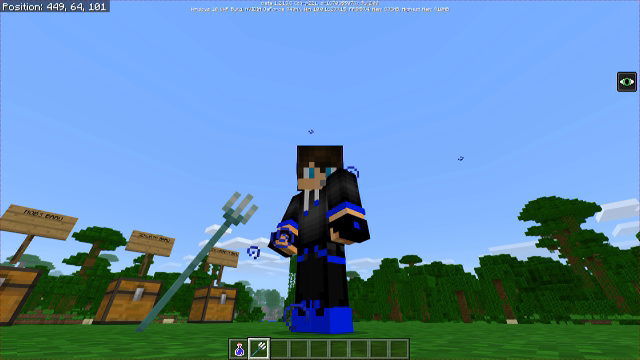
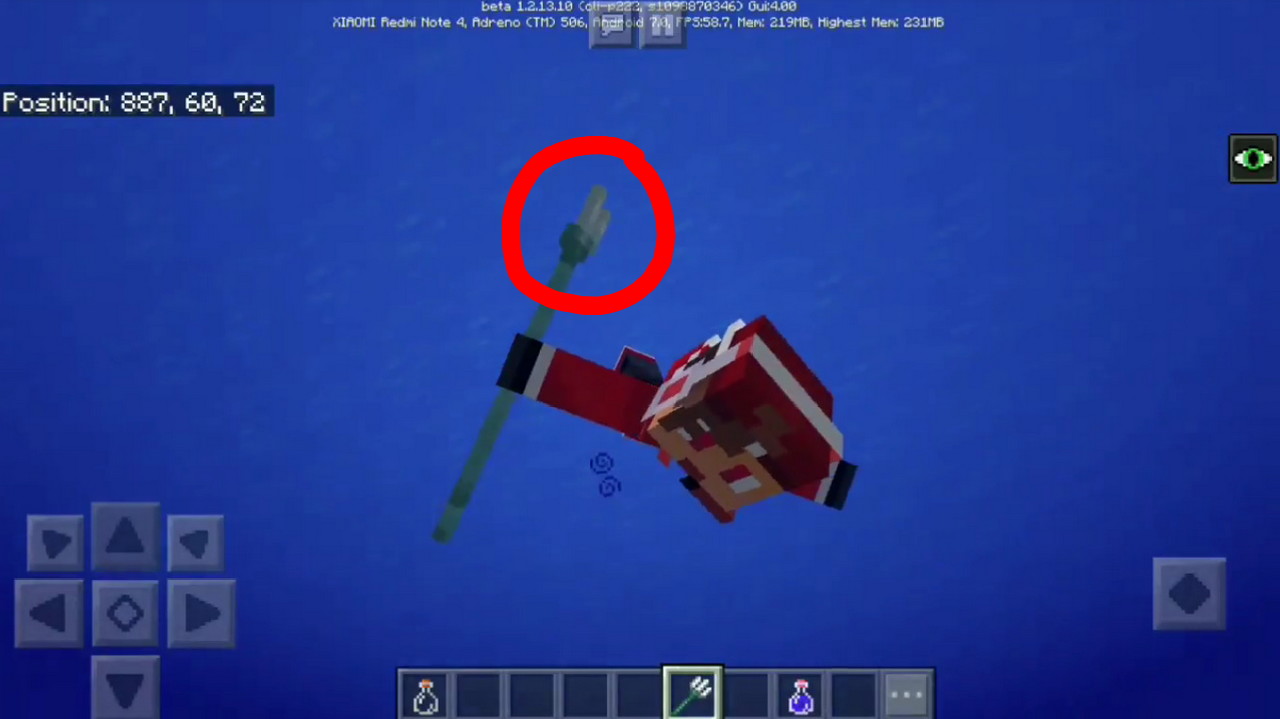
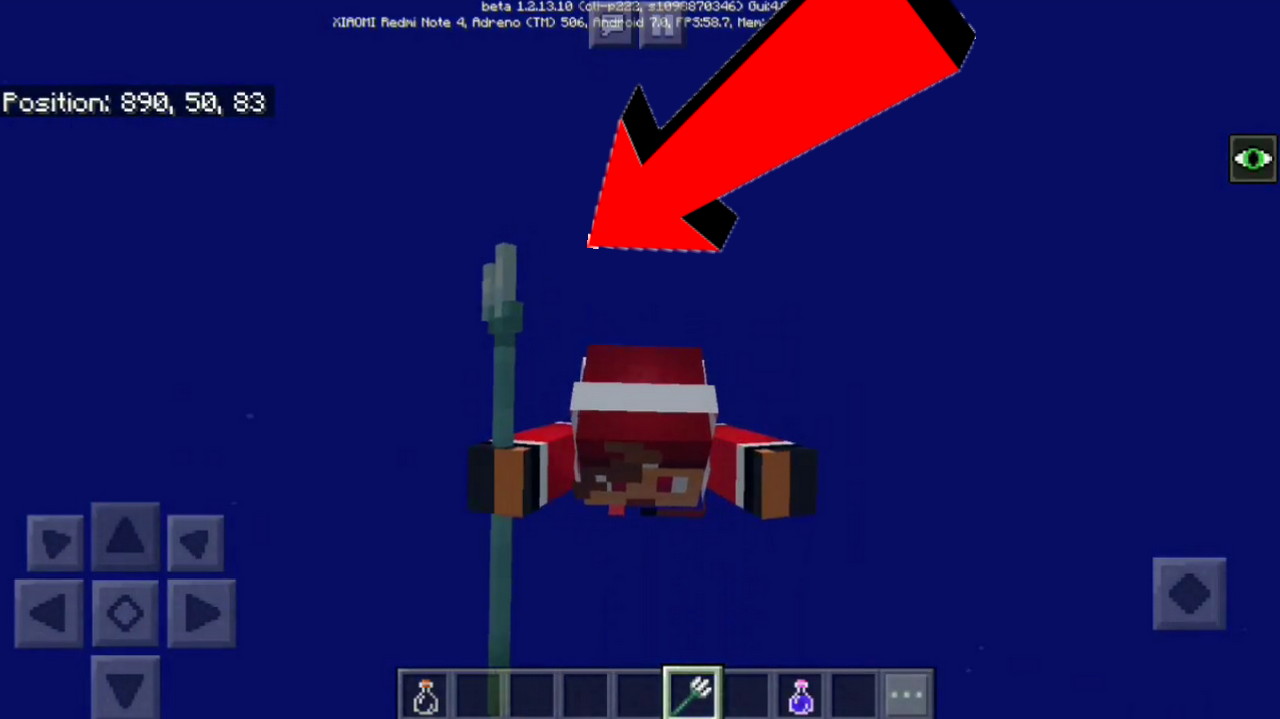










Penetrateintoa stoneblockHead Part penetrating into solid block
Issue : Penetrate into
stoneblockSystem : Windows 10 Education, Version 1709
MC Ver : 1.5.1.2
When i go to a cave, and then i fly in the cave.. and this happen. My head penetrate into a stone block..
~ Sorry For My Bad English
Issue : Penetrate into every solid block
System : Windows 10 Education, Version 1709
MC Ver : 1.5.1.2
When i go to a cave, and then i fly in the cave.. and this happen. My head penetrate into a stone block..
~ Sorry For My Bad English
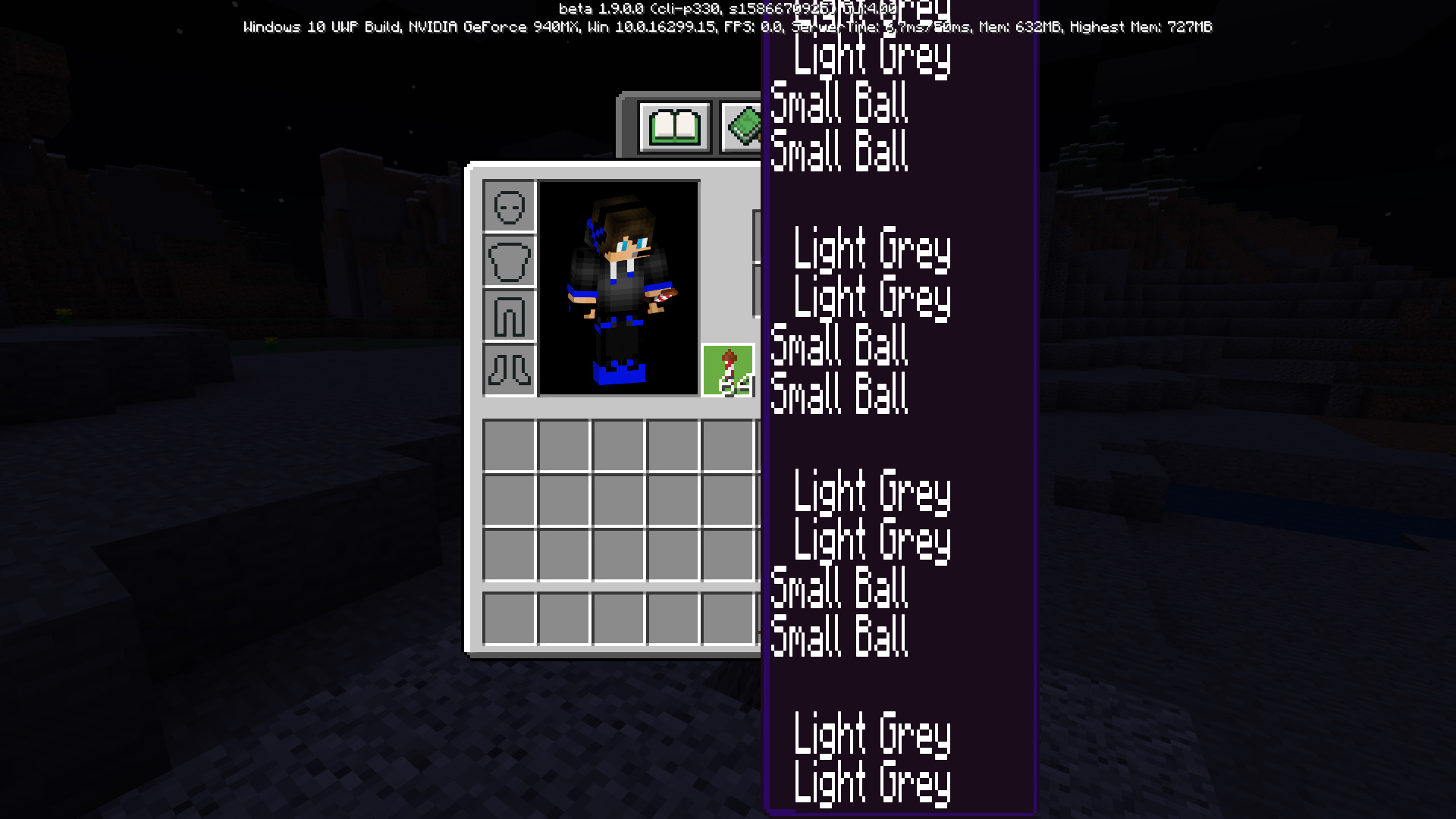
HugeFireworksExplosionTextBig Fireworks Text
Bug : Fireworks Explosion Text is very weird because its become
huge! Not Like NormalVersion : 1.9.0.0 Beta
System : Windows 10 Education
Version System : 10.0.16299 Build 16299
The text of fireworks compotition is
very hugeand weird.. doesnt like normal ( in PE version )for detail information, you can check the picture below :
Bug : Fireworks Explosion Text is very weird because its become big! Not Like Normal
Version : 1.9.0.0 Beta
System : Windows 10 Education
Version System : 10.0.16299 Build 16299
The text of fireworks compotition is big and weird.. doesnt like normal ( in PE version )
for detail information, you can check the picture below :
False VillageCoordinateLocate Command Gives you incorrect Coordinate
Bug : False Village Coordinate
Version : Latest Bedrock Beta 1.11.0.1
System : Android 8.1.0
Operating System : ColorOS - Processor "Eight Core"
Using : OPPO F7
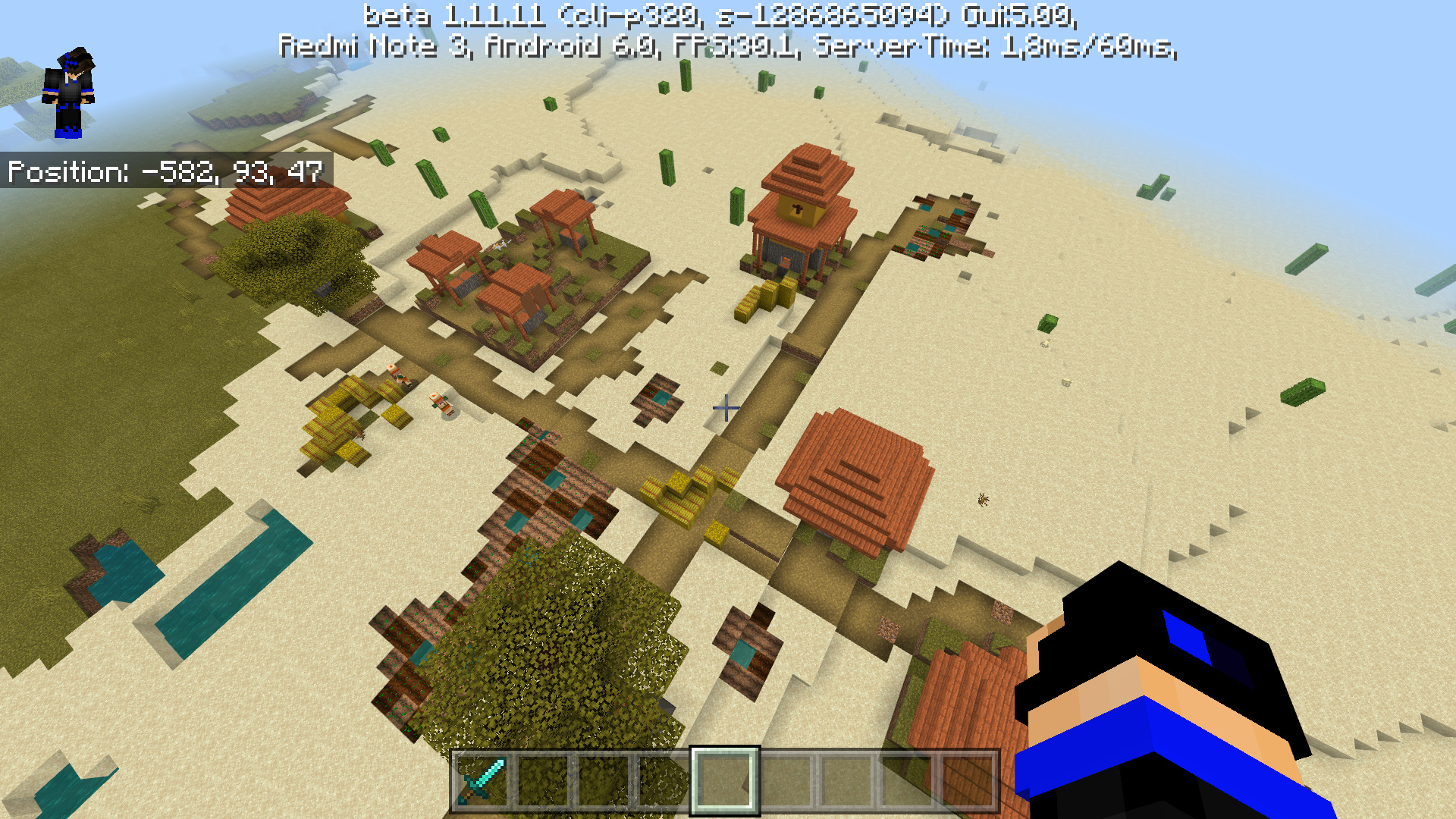
Im trying to find nearest village using "/locate village" and then im using teleport command "/tp x y z" and when i reach the coordinate of the village. Suddenly, There is no village at the coordinate instead of 1 Desert Temple that generate
Im really confuse, is this a bug or a feature? i think to get the desert temples you need to type commad "/locate temple"
*Additional : This bug appear in some world in my device. i have no idea.. (Other world seem working finely) but yeah, i can reproduce the bug in 2 different seed.
Proof : You can see below this thread
*Unfortunely the world has been deleted.. and i forgot the seed
Bug : False Village Coordinate
Version : Latest Bedrock Beta 1.11.0.1
System : Android 8.1.0
Operating System : ColorOS - Processor "Eight Core"
Using : OPPO F7
Im trying to find nearest village using "/locate village" and then im using teleport command "/tp x y z" and when i reach the coordinate of the village. Suddenly, There is no village at the coordinate instead of 1 Desert Temple that generate
Im really confuse, is this a bug or a feature? i think to get the desert temples you need to type commad "/locate temple"
*Additional : This bug appear in some world in my device. i have no idea.. (Other world seem working finely) but yeah, i can reproduce the bug in 2 different seed.
Proof : You can see below this thread
*Unfortunely the world has been deleted.. and i forgot the seed
Bug : False Village Coordinate
Version : Latest Bedrock Beta 1.11.0.1
System : Android 8.1.0
Operating System : ColorOS - Processor "Eight Core"
Using : OPPO F7
Im trying to find nearest village using "/locate village" and then im using teleport command "/tp x y z" and when i reach the coordinate of the village. Suddenly, There is no village at the coordinate instead of 1 Desert Temple that generate
Im really confuse, is this a bug or a feature? i think to get the desert temples you need to type commad "/locate temple" and then at different seed, when i moved to the nearest coordinate its bring me to the mountain. Which is there is no any village or structure that generate nearby
*Additional : This bug appear in some world in my device. i have no idea.. (Other world seem working finely) but yeah, i can reproduce the bug in 2 different seed.
Proof : You can see below this thread
Bug : False Village Coordinate
Version : Latest Bedrock Beta 1.11.0.1
System : Android 8.1.0
Operating System : ColorOS - Processor "Eight Core"
Using : OPPO F7
Im trying to find nearest village using "/locate village" and then im using teleport command "/tp x y z" and when i reach the coordinate of the village. Suddenly, There is no village at the coordinate instead of 1 Desert Temple that generate
Im really confuse, is this a bug or a feature? i think to get the desert temples you need to type commad "/locate temple" and then at different seed, when i moved to the nearest coordinate its bring me to the mountain. Which is there is no any village or structure that generate nearby
*Additional : This bug appear in some world in my device. i have no idea.. (Other world seem working finely) but yeah, i can reproduce the bug in 2 different seed.
Proof : You can see below this thread
Im trying to find nearest village using "/locate village" and then im using teleport command "/tp x y z" and when i reach the coordinate of the village. Suddenly, There is no village at the coordinate instead of 1 Desert Temple that generate
Im really confuse, is this a bug or a feature? i think to get the desert temples you need to type commad "/locate temple" and then at different seed, when i moved to the nearest coordinate its bring me to the mountain. Which is there is no any village or structure that generate nearby
*Additional : This bug appear in some world in my device. i have no idea.. (Other world seem working finely) but yeah, i can reproduce the bug in 2 different seed.
Proof : You can see below this thread
Im trying to find nearest village using "/locate village" and then im using teleport command "/tp x y z" and when i reach the coordinate of the village. Suddenly, There is no village at the coordinate instead of 1 Desert Temple that generate
Im really confuse, is this a bug or a feature? i think to get the desert temples you need to type commad "/locate temple" and then at different seed, when i moved to the nearest coordinate its bring me to the mountain. Which is there is no any village or structure that generate nearby
*Additional : This bug appear in some world in my device. i have no idea.. (Other world seem working finely) but yeah, i can reproduce the bug in 2 different seed.
Proof : You can see below this thread
UPDATED
When i try to find any nearest object using /locate command. it gives false coordinate, i try to update and even change the Minecraft Version from Beta to Official but its still gives the issue on my phone. I have no idea, is this bug is just appear on my phone or what? because when i try it on Windows Version.. its working fine.
TO REPRODUCE :
1. Make any worlds. This bugs appear at almost any worlds on my phone
2. Try to find any near objects using /locate commandEXPECTED RESULT
1. It gives me actuall coordinate of the nearest object
2. When i teleport to the coordinate, its gives actual locationACTUAL RESULT :
1. It gives me false coordinate
2. When i teleport to the given coordinate, the actual object not foundThis bugs still appear even from beta 1.11.. so please re-open this thread
When Making Resource pack, with a little tweak on start_screen.json.. The Resource pack wont load because some false error that say
in the Image below:When Making Resource pack, with a little tweak on start_screen.json.. The Resource pack wont load because some false error that say :
ui/start_screen.json: Unable to parse UI JSON file with stack:
- Line 1152, Column 2
Missing ',' or ']' in array declarationI have no idea what should i do to fix this issue
When Making Resource pack, with a little tweak on start_screen.json.. The Resource pack wont load because some false error that say :
ui/start_screen.json: Unable to parse UI JSON file with stack:
- Line 1152, Column 2
Missing ',' or ']' in array declarationI have no idea what should i do to fix this issue
When Making Resource pack, with a little tweak on start_screen.json.. The Resource pack wont load because some false error that say :
ui/start_screen.json: Unable to parse UI JSON file with stack:
- Line 1152, Column 2
Missing ',' or ']' in array declarationI have no idea what should i do to fix this issue, i have been adding "," but sill got error... i refresh the pack, but still doesnt fixed.
Android Device :
Oppo F7 128 GB Internal Storage
Color OS 5.2.1 Android 8.1.0
Processor eight core Ram 6GB
Windows Device :
Asus A456U Windows Education
Windows 1903-H1 OS 19013
Ram 8 GB with Intel Core i5
Nvidia Geforce 940MX
This is critical bug that makes default or Standard skinpack doesnt work for multiplayer (Tested on server, world, and realm with 2 devices) With this bug, you can only use skin that came from persone skinpack. So if you use "Steve" and "Alex" that's from default skinpack, the skin is just invisible as you can in the video below :
https://www.youtube.com/watch?v=QRzl11g0k4Q
*The video is up to 60mb, so i cant post it here...
*Fixing the thread from BDS --> Minecraft Bedrock
When you use Vanilla Skin Pack a.k.a Standard Skin Pack, your skin will invisible on Multiplayer. This bug not appear at the first beta 1.14.0.1 but then soon appear at version 1.14.0.9+ and then affected the Official Version 1.14.0+ Since the latest Minecraft Official Version is based on Minecraft 1.14.0.9+ Beta. This bug will broke the server...
For example, last game i play Murder Mystery using vanilla skin (Not skin from persona) The murder cant see me even i really behind he/she.
STEP TO REPRODUCE :
1. Install Fresh Minecraft and open the game Dont click login (it will make the games loaded skin from vanilla skinpack)
2. Make a world with Multiplayer permission (We going to use same wifi method)
3. When its already in game, connect your minecraft from other device and join the Multiplayer world via LANSTEP TO REPRODUCE : Method 2
1. Open Minecraft and Login with New XboX account that doesnt have Cloud Save Skin (So there's no skin at skin editor or persona skinpack and make the game loaded the default Steve/Alex skin from vanilla or Standard Skinpack)
2. Play some server that doesnt have "Auto Replace Skin" and play some minigames in that server using Default Vanilla Steve/Alex.E
xpected Result:
1. Other players cansee me clearly using Steve/Alex skin that comes from Vanilla skinpack
- Vanilla skinpack is in game skinpack that located in C:\Windows\Program Files\WindowsApps*MinecraftUWPFolder*\data\skin_packs\vanilla
A
ctual Result:
1. Other players cant see my skin and just can see "running particles" when i run.Actual Footage At Multiple Perspective :
https://www.youtube.com/watch?v=QRzl11g0k4Q
When i see at the "options.txt" that located on "C:\Users\User\AppData\local\packages\Microsoft.MinecraftUWP_8wekyb3d8bbwe\LocalState\games\com.mojang\minecraftpe"the config is like this :
game_skintypefull:c18e65aa-7b21-4637-9b63-8ad63622ef01_Steve
game_lastcustomskinnew:Standard.Dummy
game_recentskin1:c18e65aa-7b21-4637-9b63-8ad63622ef01_Steve
game_recentskin2:
game_recentskin3:*I've been made previous thread but its seem MCPE Mod doesnt understand what i meant. So i made a new one. Hope its really clear and i will provide some attachment.
When you use Vanilla Skin Pack a.k.a Standard Skin Pack, your skin will invisible on Multiplayer. This bug not appear at the first beta 1.14.0.1 but then soon appear at version 1.14.0.9+ and then affected the Official Version 1.14.0+ Since the latest Minecraft Official Version is based on Minecraft 1.14.0.9+ Beta. This bug will broke the server...
For example, last game i play Murder Mystery using vanilla skin (Not skin from persona) The murder cant see me even i really behind he/she.
STEP TO REPRODUCE :
1. Install Fresh Minecraft and open the game Dont click login (it will make the games loaded skin from vanilla skinpack)
2. Make a world with Multiplayer permission (We going to use same wifi method)
3. When its already in game, connect your minecraft from other device and join the Multiplayer world via LANSTEP TO REPRODUCE : Method 2
1. Open Minecraft and Login with New XboX account that doesnt have Cloud Save Skin (So there's no skin at skin editor or persona skinpack and make the game loaded the default Steve/Alex skin from vanilla or Standard Skinpack)
2. Play some server that doesnt have "Auto Replace Skin" and play some minigames in that server using Default Vanilla Steve/Alex.EXPECTED RESULT :
1. Other players can my skin
- Vanilla skinpack is in game skinpack that located in C:\Windows\Program Files\WindowsApps*MinecraftUWPFolder*\data\skin_packs\vanilla
ACTUAL RESULT :
1. Other players cant see my skin and just can see "running particles" when i run.Actual Footage At Multiple Perspective :
https://www.youtube.com/watch?v=QRzl11g0k4QWhen i see at the "options.txt" that located on
-C:\Users\User\AppData\local\packages\Microsoft.MinecraftUWP_8wekyb3d8bbwe\LocalState\games\com.mojang\minecraftpe"
the config is like this :
game_skintypefull:c18e65aa-7b21-4637-9b63-8ad63622ef01_Steve
game_lastcustomskinnew:Standard.Dummy
game_recentskin1:c18e65aa-7b21-4637-9b63-8ad63622ef01_Steve
game_recentskin2:
game_recentskin3:*I've been made previous thread but its seem MCPE Mod doesnt understand what i meant. So i made a new one. Hope its really clear and i will provide some attachment.
When you use Vanilla Skin Pack a.k.a Standard Skin Pack, your skin will invisible on Multiplayer. This bug not appear at the first beta 1.14.0.1 but then soon appear at version 1.14.0.9+ and then affected the Official Version 1.14.0+ Since the latest Minecraft Official Version is based on Minecraft 1.14.0.9+ Beta. This bug will broke the server...
For example, last game i play Murder Mystery using vanilla skin (Not skin from persona) The murder cant see me even i really behind he/she.
STEP TO REPRODUCE :
1. Install Fresh Minecraft and open the game Dont click login (it will make the games loaded skin from vanilla skinpack)
2. Make a world with Multiplayer permission (We going to use same wifi method)
3. When its already in game, connect your minecraft from other device and join the Multiplayer world via LANSTEP TO REPRODUCE : Method 2
1. Open Minecraft and Login with New XboX account that doesnt have Cloud Save Skin (So there's no skin at skin editor or persona skinpack and make the game loaded the default Steve/Alex skin from vanilla or Standard Skinpack)
2. Play some server that doesnt have "Auto Replace Skin" and play some minigames in that server using Default Vanilla Steve/Alex.EXPECTED RESULT :
1. Other players can my skin
- Vanilla skinpack is in game skinpack that located in C:\Windows\Program Files\WindowsApps*MinecraftUWPFolder*\data\skin_packs\vanilla
ACTUAL RESULT :
1. Other players cant see my skin and just can see "running particles" when i run.Actual Footage At Multiple Perspective :
https://www.youtube.com/watch?v=QRzl11g0k4QWhen i see at the "options.txt" that located on
-C:\Users\User\AppData\local\packages\Microsoft.MinecraftUWP_8wekyb3d8bbwe\LocalState\games\com.mojang\minecraftpe"
the config is like this :
game_skintypefull:c18e65aa-7b21-4637-9b63-8ad63622ef01_Steve
game_lastcustomskinnew:Standard.Dummy
game_recentskin1:c18e65aa-7b21-4637-9b63-8ad63622ef01_Steve
game_recentskin2:
game_recentskin3:*I've been made previous thread but its seem MCPE Mod doesnt understand what i meant. So i made a new one. Hope its really clear and i will provide some attachment.
When you use Vanilla Skin Pack a.k.a Standard Skin Pack, your skin will invisible on Multiplayer. This bug not appear at the first beta 1.14.0.1 but then soon appear at version 1.14.0.9+ and then affected the Official Version 1.14.0+ Since the latest Minecraft Official Version is based on Minecraft 1.14.0.9+ Beta. This bug will broke the server...
For example, last game i play Murder Mystery using vanilla skin (Not skin from persona) The murder cant see me even i really behind he/she.
STEP TO REPRODUCE :
1. Install Fresh Minecraft and open the game Dont click login (it will make the games loaded skin from vanilla skinpack)
2. Make a world with Multiplayer permission (We going to use same wifi method)
3. When its already in game, connect your minecraft from other device and join the Multiplayer world via LANSTEP TO REPRODUCE : Method 2
1. Open Minecraft and Login with New XboX account that doesnt have Cloud Save Skin (So there's no skin at skin editor or persona skinpack and make the game loaded the default Steve/Alex skin from vanilla or Standard Skinpack)
2. Play some server that doesnt have "Auto Replace Skin" and play some minigames in that server using Default Vanilla Steve/Alex.EXPECTED RESULT :
1. Other players can my skin
- Vanilla skinpack is in game skinpack that located in C:\Windows\Program Files\WindowsApps*MinecraftUWPFolder*\data\skin_packs\vanilla
ACTUAL RESULT :
1. Other players cant see my skin and just can see "running particles" when i run.Actual Footage At Multiple Perspective :
https://www.youtube.com/watch?v=QRzl11g0k4QWhen i see at the "options.txt" that located on
- C:\Users\User\AppData\local\packages\Microsoft.MinecraftUWP_8wekyb3d8bbwe\LocalState\games\com.mojang\minecraftpe"
the config is like this :
game_skintypefull:c18e65aa-7b21-4637-9b63-8ad63622ef01_Steve
game_lastcustomskinnew:Standard.Dummy
game_recentskin1:c18e65aa-7b21-4637-9b63-8ad63622ef01_Steve
game_recentskin2:
game_recentskin3:*I've been made previous thread but its seem MCPE Mod doesnt understand what i meant. So i made a new one. Hope its really clear and i will provide some attachment.
When you use Vanilla Skin Pack a.k.a Standard Skin Pack, your skin will invisible on Multiplayer. This bug not appear at the first beta 1.14.0.1 but then soon appear at version 1.14.0.9+ and then affected the Official Version 1.14.0+ Since the latest Minecraft Official Version is based on Minecraft 1.14.0.9+ Beta. This bug will broke the server...
For example, last game i play Murder Mystery using vanilla skin (Not skin from persona) The murder cant see me even i really behind he/she.
STEP TO REPRODUCE :
1. Install Fresh Minecraft and open the game Dont click login (it will make the games loaded skin from vanilla skinpack)
2. Make a world with Multiplayer permission (We going to use same wifi method)
3. When its already in game, connect your minecraft from other device and join the Multiplayer world via LANSTEP TO REPRODUCE : Method 2
1. Open Minecraft and Login with New XboX account that doesnt have Cloud Save Skin (So there's no skin at skin editor or persona skinpack and make the game loaded the default Steve/Alex skin from vanilla or Standard Skinpack)
2. Play some server that doesnt have "Auto Replace Skin" and play some minigames in that server using Default Vanilla Steve/Alex.EXPECTED RESULT :
1. Other players can my skin
- Vanilla skinpack is in game skinpack that located in C:\Windows\Program Files\WindowsApps*MinecraftUWPFolder*\data\skin_packs\vanilla
ACTUAL RESULT :
1. Other players cant see my skin and just can see "running particles" when i run.Actual Footage At Multiple Perspective :
https://www.youtube.com/watch?v=QRzl11g0k4QWhen i see at the "options.txt" that located on
- C:\Users\User\AppData\local\packages\Microsoft.MinecraftUWP_8wekyb3d8bbwe\LocalState\games\com.mojang\minecraftpe"
the config is like this :game_skintypefull:c18e65aa-7b21-4637-9b63-8ad63622ef01_Steve
game_lastcustomskinnew:Standard.Dummy
game_recentskin1:c18e65aa-7b21-4637-9b63-8ad63622ef01_Steve
game_recentskin2:
game_recentskin3:*I've been made previous thread but its seem MCPE Mod doesnt understand what i meant. So i made a new one. Hope its really clear and i will provide some attachment.
When you use Vanilla Skin Pack a.k.a Standard Skin Pack, your skin will invisible on Multiplayer. This bug not appear at the first beta 1.14.0.1 but then soon appear at version 1.14.0.9+ and then affected the Official Version 1.14.0+ Since the latest Minecraft Official Version is based on Minecraft 1.14.0.9+ Beta. This bug will broke the server...
For example, last game i play Murder Mystery using vanilla skin (Not skin from persona) The murder cant see me even i really behind he/she.
STEP TO REPRODUCE :
1. Install Fresh Minecraft and open the game Dont click login (it will make the games loaded skin from vanilla skinpack)
2. Make a world with Multiplayer permission (We going to use same wifi method)
3. When its already in game, connect your minecraft from other device and join the Multiplayer world via LANSTEP TO REPRODUCE : Method 2
1. Open Minecraft and Login with New XboX account that doesnt have Cloud Save Skin (So there's no skin at skin editor or persona skinpack and make the game loaded the default Steve/Alex skin from vanilla or Standard Skinpack)
2. Play some server that doesnt have "Auto Replace Skin" and play some minigames in that server using Default Vanilla Steve/Alex.EXPECTED RESULT :
1. Other players can my skin
- Vanilla skinpack is in game skinpack that located in C:\Windows\Program Files\WindowsApps*MinecraftUWPFolder*\data\skin_packs\vanilla
ACTUAL RESULT :
1. Other players cant see my skin and just can see "running particles" when i run.Actual Footage At Multiple Perspective :
https://www.youtube.com/watch?v=QRzl11g0k4QWhen i see at the "options.txt" that located on
- C:\Users\User\AppData\local\packages\Microsoft.MinecraftUWP_8wekyb3d8bbwe\LocalState\games\com.mojang\minecraftpe" -
the config is like this :
- game_skintypefull:c18e65aa-7b21-4637-9b63-8ad63622ef01_Steve
game_lastcustomskinnew:Standard.Dummy
game_recentskin1:c18e65aa-7b21-4637-9b63-8ad63622ef01_Steve
game_recentskin2:
game_recentskin3:*I've been made previous thread but its seem MCPE Mod doesnt understand what i meant. So i made a new one. Hope its really clear and i will provide some attachment.
When you use Vanilla Skin Pack a.k.a Standard Skin Pack, your skin will invisible on Multiplayer. This bug not appear at the first beta 1.14.0.1 but then soon appear at version 1.14.0.9+ and then affected the Official Version 1.14.0+ Since the latest Minecraft Official Version is based on Minecraft 1.14.0.9+ Beta. This bug will broke the server...
For example, last game i play Murder Mystery using vanilla skin (Not skin from persona) The murder cant see me even i really behind he/she.
STEP TO REPRODUCE :
1. Install Fresh Minecraft and open the game Dont click login (it will make the games loaded skin from vanilla skinpack)
2. Make a world with Multiplayer permission (We going to use same wifi method)
3. When its already in game, connect your minecraft from other device and join the Multiplayer world via LANSTEP TO REPRODUCE : Method 2
1. Open Minecraft and Login with New XboX account that doesnt have Cloud Save Skin (So there's no skin at skin editor or persona skinpack and make the game loaded the default Steve/Alex skin from vanilla or Standard Skinpack)
2. Play some server that doesnt have "Auto Replace Skin" and play some minigames in that server using Default Vanilla Steve/Alex.EXPECTED RESULT :
1. Other players can my skin
- Vanilla skinpack is in game skinpack that located in C:\Windows\Program Files\WindowsApps*MinecraftUWPFolder*\data\skin_packs\vanilla
ACTUAL RESULT :
1. Other players cant see my skin and just can see "running particles" when i run.Actual Footage At Multiple Perspective :
https://www.youtube.com/watch?v=QRzl11g0k4QWhen i see at the "options.txt" that located on
- C:\Users\User\AppData\local\packages\Microsoft.MinecraftUWP_8wekyb3d8bbwe\LocalState\games\com.mojang\minecraftpe"
-the config is like this :
- game_skintypefull:c18e65aa-7b21-4637-9b63-8ad63622ef01_Steve
game_lastcustomskinnew:Standard.Dummy
game_recentskin1:c18e65aa-7b21-4637-9b63-8ad63622ef01_Steve
game_recentskin2:
game_recentskin3:*I've been made previous thread but its seem MCPE Mod doesnt understand what i meant. So i made a new one. Hope its really clear and i will provide some attachment.
When you use Vanilla Skin Pack a.k.a Standard Skin Pack, your skin will invisible on Multiplayer. This bug not appear at the first beta 1.14.0.1 but then soon appear at version 1.14.0.9+ and then affected the Official Version 1.14.0+ Since the latest Minecraft Official Version is based on Minecraft 1.14.0.9+ Beta. This bug will broke the server...
For example, last game i play Murder Mystery using vanilla skin (Not skin from persona) The murder cant see me even i really behind he/she.
STEP TO REPRODUCE :
1. Install Fresh Minecraft and open the game. Dont click login (it will make the games loaded skin from vanilla skinpack)
2. Make a world with Multiplayer permission (We going to use same wifi method)
3. When its already in game, connect your minecraft from other device and join the Multiplayer world via LANSTEP TO REPRODUCE : Method 2
1. Open Minecraft and Login with New XboX account that doesnt have Cloud Save Skin (So there's no skin at skin editor or persona skinpack and make the game loaded the default Steve/Alex skin from vanilla or Standard Skinpack)
2. Play some server that doesnt have "Auto Replace Skin" and play some minigames in that server using Default Vanilla Steve/Alex.EXPECTED RESULT :
1. Other players can my skin
- Vanilla skinpack is in game skinpack that located in C:\Windows\Program Files\WindowsApps*MinecraftUWPFolder*\data\skin_packs\vanilla
ACTUAL RESULT :
1. Other players cant see my skin and just can see "running particles" when i run.Actual Footage At Multiple Perspective :
https://www.youtube.com/watch?v=QRzl11g0k4QWhen i see at the "options.txt" that located on
- C:\Users\User\AppData\local\packages\Microsoft.MinecraftUWP_8wekyb3d8bbwe\LocalState\games\com.mojang\minecraftpe"
the config is like this :
- game_skintypefull:c18e65aa-7b21-4637-9b63-8ad63622ef01_Steve
game_lastcustomskinnew:Standard.Dummy
game_recentskin1:c18e65aa-7b21-4637-9b63-8ad63622ef01_Steve
game_recentskin2:
game_recentskin3:*I've been made previous thread but its seem MCPE Mod doesnt understand what i meant. So i made a new one. Hope its really clear and i will provide some attachment.
When you use Vanilla Skin Pack a.k.a Standard Skin Pack, your skin will invisible on Multiplayer. This bug not appear at the first beta 1.14.0.1 but then soon appear at version 1.14.0.9+ and then affected the Official Version 1.14.0+ Since the latest Minecraft Official Version is based on Minecraft 1.14.0.9+ Beta. This bug will broke the server...
For example, last game i play Murder Mystery using vanilla skin (Not skin from persona) The murder cant see me even i really behind he/she.
STEP TO REPRODUCE :
1. Install Fresh Minecraft and open the game. Dont click login (it will make the games loaded skin from vanilla skinpack)
2. Make a world with Multiplayer permission (We going to use same wifi method)
3. When its already in game, connect your minecraft from other device and join the Multiplayer world via LANSTEP TO REPRODUCE : Method 2
1. Open Minecraft and Login with New XboX account that doesnt have Cloud Save Skin (So there's no skin at skin editor or persona skinpack and make the game loaded the default Steve/Alex skin from vanilla or Standard Skinpack)2. Play some server that doesnt have "Auto Replace Skin"and play some minigames in that server using Default Vanilla Steve/Alex.EXPECTED RESULT :
1. Other players can my skin
- Vanilla skinpack is in game skinpack that located in C:\Windows\Program Files\WindowsApps*MinecraftUWPFolder*\data\skin_packs\vanilla
ACTUAL RESULT :
1. Other players cant see my skin and just can see "running particles" when i run.Actual Footage At Multiple Perspective :
https://www.youtube.com/watch?v=QRzl11g0k4QWhen i see at the "options.txt" that located on
- C:\Users\User\AppData\local\packages\Microsoft.MinecraftUWP_8wekyb3d8bbwe\LocalState\games\com.mojang\minecraftpe"
the config is like this :
- game_skintypefull:c18e65aa-7b21-4637-9b63-8ad63622ef01_Steve
game_lastcustomskinnew:Standard.Dummy
game_recentskin1:c18e65aa-7b21-4637-9b63-8ad63622ef01_Steve
game_recentskin2:
game_recentskin3:*I've been made previous thread but its seem MCPE Mod doesnt understand what i meant. So i made a new one. Hope its really clear and i will provide some attachment.
When you use Vanilla Skin Pack a.k.a Standard Skin Pack, your skin will invisible on Multiplayer. This bug not appear at the first beta 1.14.0.1 but then soon appear at version 1.14.0.9+ and then affected the Official Version 1.14.0+ Since the latest Minecraft Official Version is based on Minecraft 1.14.0.9+ Beta. This bug will broke the server...
For example, last game i play Murder Mystery using vanilla skin (Not skin from persona) The murder cant see me even i really behind he/she.
STEP TO REPRODUCE :
1. Install Fresh Minecraft and open the game. Dont click login (it will make the games loaded skin from vanilla skinpack)
2. Make a world with Multiplayer permission (We going to use same wifi method)
3. When its already in game, connect your minecraft from other device and join the Multiplayer world via LANSTEP TO REPRODUCE : Method 2
1. Open Minecraft and Login with New XboX account that doesnt have Cloud Save Skin (So there's no skin at skin editor or persona skinpack and make the game loaded the default Steve/Alex skin from vanilla or Standard Skinpack)
2. Play some server that doesnt have Auto Replace Skin and play some minigames in that server using Default Vanilla Steve/Alex.EXPECTED RESULT :
1. Other players can my skin
- Vanilla skinpack is in game skinpack that located in C:\Windows\Program Files\WindowsApps*MinecraftUWPFolder*\data\skin_packs\vanilla
ACTUAL RESULT :
1. Other players cant see my skin and just can see "running particles" when i run.Actual Footage At Multiple Perspective :
https://www.youtube.com/watch?v=QRzl11g0k4QWhen i see at the "options.txt" that located on
- C:\Users\User\AppData\local\packages\Microsoft.MinecraftUWP_8wekyb3d8bbwe\LocalState\games\com.mojang\minecraftpe"
the config is like this :
- game_skintypefull:c18e65aa-7b21-4637-9b63-8ad63622ef01_Steve
game_lastcustomskinnew:Standard.Dummy
game_recentskin1:c18e65aa-7b21-4637-9b63-8ad63622ef01_Steve
game_recentskin2:
game_recentskin3:*I've been made previous thread but its seem MCPE Mod doesnt understand what i meant. So i made a new one. Hope its really clear and i will provide some attachment.
When you use Vanilla Skin Pack a.k.a Standard Skin Pack, your skin will invisible on Multiplayer. This bug not appear at the first beta 1.14.0.1 but then soon appear at version 1.14.0.9+ and then affected the Official Version 1.14.0+ Since the latest Minecraft Official Version is based on Minecraft 1.14.0.9+ Beta. This bug will broke the server...
For example, last game i play Murder Mystery using vanilla skin (Not skin from persona) The murder cant see me even i really behind he/she.
STEP TO REPRODUCE :
1. Install Fresh Minecraft and open the game. Dont click login (it will make the games loaded skin from vanilla skinpack)
2. Make a world with Multiplayer permission (We going to use same wifi method)
3. When its already in game, connect your minecraft from other device and join the Multiplayer world via LANSTEP TO REPRODUCE : Method 2
1. Open Minecraft and Login with New XboX account that doesnt have Cloud Save Skin (So there's no skin at skin editor or persona skinpack and make the game loaded the default Steve/Alex skin from vanilla or Standard Skinpack)
2. Play some server that doesnt have Auto Replace Skin and play some minigames in that server using Default Vanilla Steve/Alex.EXPECTED RESULT :
1. Other players can see my skin
- Vanilla skinpack is in game skinpack that located in C:\Windows\Program Files\WindowsApps*MinecraftUWPFolder*\data\skin_packs\vanilla
ACTUAL RESULT :
1. Other players cant see my skin and just can see "running particles" when i run.Actual Footage At Multiple Perspective :
https://www.youtube.com/watch?v=QRzl11g0k4QWhen i see at the "options.txt" that located on
- C:\Users\User\AppData\local\packages\Microsoft.MinecraftUWP_8wekyb3d8bbwe\LocalState\games\com.mojang\minecraftpe"
the config is like this :
- game_skintypefull:c18e65aa-7b21-4637-9b63-8ad63622ef01_Steve
game_lastcustomskinnew:Standard.Dummy
game_recentskin1:c18e65aa-7b21-4637-9b63-8ad63622ef01_Steve
game_recentskin2:
game_recentskin3:*I've been made previous thread but its seem MCPE Mod doesnt understand what i meant. So i made a new one. Hope its really clear and i will provide some attachment.
When you use Vanilla Skin Pack a.k.a Standard Skin Pack, your skin will invisible on Multiplayer. This bug not appear at the first beta 1.14.0.1 but then soon appear at version 1.14.0.9+ and then affected the Official Version 1.14.0+ Since the latest Minecraft Official Version is based on Minecraft 1.14.0.9+ Beta. This bug will broke the server...
For example, last game i play Murder Mystery using vanilla skin (Not skin from persona) The murder cant see me even i really behind he/she.
STEP TO REPRODUCE :
1. Install Fresh Minecraft and open the game. Dont click login (it will make the games loaded skin from vanilla skinpack)
2. Make a world with Multiplayer permission (We going to use same wifi method)
3. When its already in game, connect your minecraft from other device and join the Multiplayer world via LANSTEP TO REPRODUCE : Method 2
1. Open Minecraft and Login with New XboX account that doesnt have Cloud Save Skin (So there's no skin at skin editor or persona skinpack and make the game loaded the default Steve/Alex skin from vanilla or Standard Skinpack)
2. Play some server that doesnt have Auto Replace Skin and play some minigames in that server using Default Vanilla Steve/Alex.EXPECTED RESULT :
1. Other players can see my skin
- Vanilla skinpack is in game skinpack that located in C:\Windows\Program Files\WindowsApps
*MinecraftUWPFolder*\data\skin_packs\vanillaACTUAL RESULT :
1. Other players cant see my skin and just can see "running particles" when i run.Actual Footage At Multiple Perspective :
https://www.youtube.com/watch?v=QRzl11g0k4QWhen i see at the "options.txt" that located on
- C:\Users\User\AppData\local\packages\Microsoft.MinecraftUWP_8wekyb3d8bbwe\LocalState\games\com.mojang\minecraftpe"
the config is like this :
- game_skintypefull:c18e65aa-7b21-4637-9b63-8ad63622ef01_Steve
game_lastcustomskinnew:Standard.Dummy
game_recentskin1:c18e65aa-7b21-4637-9b63-8ad63622ef01_Steve
game_recentskin2:
game_recentskin3:*I've been made previous thread but its seem MCPE Mod doesnt understand what i meant. So i made a new one. Hope its really clear and i will provide some attachment.
When you use Vanilla Skin Pack a.k.a Standard Skin Pack, your skin will invisible on Multiplayer. This bug not appear at the first beta 1.14.0.1 but then soon appear at version 1.14.0.9+ and then affected the Official Version 1.14.0+ Since the latest Minecraft Official Version is based on Minecraft 1.14.0.9+ Beta. This bug will broke the server...
For example, last game i play Murder Mystery using vanilla skin (Not skin from persona) The murder cant see me even i really behind he/she.
STEP TO REPRODUCE :
1. Install Fresh Minecraft and open the game. Dont click login (it will make the games loaded skin from vanilla skinpack)
2. Make a world with Multiplayer permission (We going to use same wifi method)
3. When its already in game, connect your minecraft from other device and join the Multiplayer world via LANSTEP TO REPRODUCE : Method 2
1. Open Minecraft and Login with New XboX account that doesnt have Cloud Save Skin (So there's no skin at skin editor or persona skinpack and make the game loaded the default Steve/Alex skin from vanilla or Standard Skinpack)
2. Play some server that doesnt have Auto Replace Skin and play some minigames in that server using Default Vanilla Steve/Alex.EXPECTED RESULT :
1. Other players can see my skin
- Vanilla skinpack is in game skinpack that located in C:\Windows\Program Files\WindowsApps\MinecraftUWPFolder\data\skin_packs\vanilla
ACTUAL RESULT :
1. Other players cant see my skin and just can see "running particles" when i run.Actual Footage At Multiple Perspective :
https://www.youtube.com/watch?v=QRzl11g0k4QWhen i see at the "options.txt" that located on
- C:\Users\User\AppData\local\packages\Microsoft.MinecraftUWP_8wekyb3d8bbwe\LocalState\games\com.mojang\minecraftpe"
the config is like this :
- game_skintypefull:c18e65aa-7b21-4637-9b63-8ad63622ef01_Steve
game_lastcustomskinnew:Standard.Dummy
game_recentskin1:c18e65aa-7b21-4637-9b63-8ad63622ef01_Steve
game_recentskin2:
game_recentskin3:*I've been made previous thread but its seem MCPE Mod doesnt understand what i meant. So i made a new one. Hope its really clear and i will provide some attachment.
When you use Vanilla Skin Pack a.k.a Standard Skin Pack, your skin will invisible on Multiplayer. This bug not appear at the first beta 1.14.0.1 but then soon appear at version 1.14.0.9+ and then affected the Official Version 1.14.0+ Since the latest Minecraft Official Version is based on Minecraft 1.14.0.9+ Beta. This bug will broke the server...
For example, last game i play Murder Mystery using vanilla skin (Not skin from persona) The murder cant see me even i really behind he/she.
STEP TO REPRODUCE :
1. Install Fresh Minecraft and open the game. Dont click login (it will make the games loaded skin from vanilla skinpack)
2. Make a world with Multiplayer permission (We going to use same wifi method)
3. When its already in game, connect your minecraft from other device and join the Multiplayer world via LANSTEP TO REPRODUCE : Method 2
1. Open Minecraft and Login with New XboX account that doesnt have Cloud Save Skin (So there's no skin at skin editor or persona skinpack and make the game loaded the default Steve/Alex skin from vanilla or Standard Skinpack)
2. Play some server that doesnt have Auto Replace Skin and play some minigames in that server using Default Vanilla Steve/Alex.EXPECTED RESULT :
1. Other players can see my skin
- Vanilla skinpack is in game skinpack that located in C:\Windows\Program Files\WindowsApps\Mi
necraftUWPFolder\data\skin_packs\vanillaACTUAL RESULT :
1. Other players cant see my skin and just can see "running particles" when i run.Actual Footage At Multiple Perspective :
https://www.youtube.com/watch?v=QRzl11g0k4QWhen i see at the "options.txt" that located on
- C:\Users\User\AppData\local\packages\Microsoft.MinecraftUWP_8wekyb3d8bbwe\LocalState\games\com.mojang\minecraftpe"
the config is like this :
- game_skintypefull:c18e65aa-7b21-4637-9b63-8ad63622ef01_Steve
game_lastcustomskinnew:Standard.Dummy
game_recentskin1:c18e65aa-7b21-4637-9b63-8ad63622ef01_Steve
game_recentskin2:
game_recentskin3:*I've been made previous thread but its seem MCPE Mod doesnt understand what i meant. So i made a new one. Hope its really clear and i will provide some attachment.
When you use Vanilla Skin Pack a.k.a Standard Skin Pack, your skin will invisible on Multiplayer. This bug not appear at the first beta 1.14.0.1 but then soon appear at version 1.14.0.9+ and then affected the Official Version 1.14.0+ Since the latest Minecraft Official Version is based on Minecraft 1.14.0.9+ Beta. This bug will broke the server...
For example, last game i play Murder Mystery using vanilla skin (Not skin from persona) The murder cant see me even i really behind he/she.
STEP TO REPRODUCE :
1. Install Fresh Minecraft and open the game. Dont click login (it will make the games loaded skin from vanilla skinpack)
2. Make a world with Multiplayer permission (We going to use same wifi method)
3. When its already in game, connect your minecraft from other device and join the Multiplayer world via LANSTEP TO REPRODUCE : Method 2
1. Open Minecraft and Login with New XboX account that doesnt have Cloud Save Skin (So there's no skin at skin editor or persona skinpack and make the game loaded the default Steve/Alex skin from vanilla or Standard Skinpack)
2. Play some server that doesnt have Auto Replace Skin and play some minigames in that server using Default Vanilla Steve/Alex.EXPECTED RESULT :
1. Other players can see my skin
- Vanilla skinpack is in game skinpack that located in C:\Windows\Program Files\WindowsApps\Microsoft.MinecraftUWP_8wekyb3d8bbwe\data\skin_packs\vanilla
ACTUAL RESULT :
1. Other players cant see my skin and just can see "running particles" when i run.Actual Footage At Multiple Perspective :
https://www.youtube.com/watch?v=QRzl11g0k4QWhen i see at the "options.txt" that located on
- C:\Users\User\AppData\local\packages\Microsoft.MinecraftUWP_8wekyb3d8bbwe\LocalState\games\com.mojang\minecraftpe"
the config is like this :
- game_skintypefull:c18e65aa-7b21-4637-9b63-8ad63622ef01_Steve
game_lastcustomskinnew:Standard.Dummy
game_recentskin1:c18e65aa-7b21-4637-9b63-8ad63622ef01_Steve
game_recentskin2:
game_recentskin3:*I've been made previous thread but its seem MCPE Mod doesnt understand what i meant. So i made a new one. Hope its really clear and i will provide some attachment.
When you use Vanilla Skin Pack a.k.a Standard Skin Pack, your skin will invisible on Multiplayer. This bug not appear at the first beta 1.14.0.1 but then soon appear at version 1.14.0.9+ and then affected the Official Version 1.14.0+ Since the latest Minecraft Official Version is based on Minecraft 1.14.0.9+ Beta. This bug will broke the server...
For example, last game i play Murder Mystery using vanilla skin (Not skin from persona) The murder cant see me even i really behind he/she.
STEP TO REPRODUCE :
1. Install Fresh Minecraft and open the game. Dont click login (it will make the games loaded skin from vanilla skinpack)
2. Make a world with Multiplayer permission (We going to use same wifi method)
3. When its already in game, connect your minecraft from other device and join the Multiplayer world via LANSTEP TO REPRODUCE : Method 2
1. Open Minecraft and Login with New XboX account that doesnt have Cloud Save Skin (So there's no skin at skin editor or persona skinpack and make the game loaded the default Steve/Alex skin from vanilla or Standard Skinpack)
2. Play some server that doesnt have Auto Replace Skin and play some minigames in that server using Default Vanilla Steve/Alex.EXPECTED RESULT :
1. Other players can see my skin
- Vanilla skinpack is in game skinpack that located in C:\Windows\Program Files\WindowsApps\Microsoft.MinecraftUWP_8wekyb3d8bbwe\data\skin_packs\vanilla
ACTUAL RESULT :
1. Other players cant see my skin and just can see "running particles" when i run.Actual Footage At Multiple Perspective :
https://www.youtube.com/watch?v=QRzl11g0k4QWhen i see at the "options.txt" that located on
- C:\Users\User\AppData\local\packages\Microsoft.MinecraftUWP_8wekyb3d8bbwe\LocalState\games\com.mojang\minecraftpe"
the config is like this :
- game_skintypefull:c18e65aa-7b21-4637-9b63-8ad63622ef01_Steve
game_lastcustomskinnew:Standard.Dummy
game_recentskin1:c18e65aa-7b21-4637-9b63-8ad63622ef01_Steve
game_recentskin2:
game_recentskin3:*I've been made previous thread but its seem MCPE Mod doesnt understand what i meant. So i made a new one. Hope its really clear and i will provide some attachment.
- Previous thread : https://bugs.mojang.com/browse/MCPE-57539
When you use Vanilla Skin Pack a.k.a Standard Skin Pack, your skin will invisible on Multiplayer. This bug not appear at the first beta 1.14.0.1 but then soon appear at version 1.14.0.9+ and then affected the Official Version 1.14.0+ Since the latest Minecraft Official Version is based on Minecraft 1.14.0.9+ Beta. This bug will broke the server...
For example, last game i play Murder Mystery using vanilla skin (Not skin from persona) The murder cant see me even i really behind he/she.
STEP TO REPRODUCE :
1. Install Fresh Minecraft and open the game. Dont click login (it will make the games loaded skin from vanilla skinpack)
2. Make a world with Multiplayer permission (We going to use same wifi method)
3. When its already in game, connect your minecraft from other device and join the Multiplayer world via LANSTEP TO REPRODUCE : Method 2
1. Open Minecraft and Login with New XboX account that doesnt have Cloud Save Skin (So there's no skin at skin editor or persona skinpack and make the game loaded the default Steve/Alex skin from vanilla or Standard Skinpack)
2. Play some server that doesnt have Auto Replace Skin and play some minigames in that server using Default Vanilla Steve/Alex.EXPECTED RESULT :
1. Other players can see my skin
- Vanilla skinpack is in game skinpack that located in C:\Windows\Program Files\WindowsApps\Microsoft.MinecraftUWP_8wekyb3d8bbwe\data\skin_packs\vanilla
ACTUAL RESULT :
1. Other players cant see my skin and just can see "running particles" when i run.Actual Footage At Multiple Perspective :
https://www.youtube.com/watch?v=QRzl11g0k4QWhen i see at the "options.txt" that located on
- C:\Users\User\AppData\local\packages\Microsoft.MinecraftUWP_8wekyb3d8bbwe\LocalState\games\com.mojang\minecraftpe"
the config is like this :
- game_skintypefull:c18e65aa-7b21-4637-9b63-8ad63622ef01_Steve
game_lastcustomskinnew:Standard.Dummy
game_recentskin1:c18e65aa-7b21-4637-9b63-8ad63622ef01_Steve
game_recentskin2:
game_recentskin3:Device Used to test this bug :
- Android Device :
Oppo F7 128 GB Internal Storage,
Color OS 5.2.1 Android 8.1.0,
Processor eight core Ram 6GB,
- Windows Device :
Asus A456U Windows Education
Windows 1903-H1 OS 19013
Ram 8 GB with Intel Core i5
Nvidia Geforce 940MX*I've been made previous thread but its seem MCPE Mod doesnt understand what i meant. So i made a new one. Hope its really clear and i will provide some attachment.
- Previous thread : https://bugs.mojang.com/browse/MCPE-57539
When you use Vanilla Skin Pack a.k.a Standard Skin Pack, your skin will invisible on Multiplayer. This bug not appear at the first beta 1.14.0.1 but then soon appear at version 1.14.0.9+ and then affected the Official Version 1.14.0+ Since the latest Minecraft Official Version is based on Minecraft 1.14.0.9+ Beta. This bug will broke the server
...For example, last game i play Murder Mystery using vanilla skin (Not skin from persona) The murder cant see me even i really behind he/she.
STEP TO REPRODUCE :
1. Install Fresh Minecraft and open the game. Dont click login (it will make the games loaded skin from vanilla skinpack)
2. Make a world with Multiplayer permission (We going to use same wifi method)
3. When its already in game, connect your minecraft from other device and join the Multiplayer world via LANSTEP TO REPRODUCE : Method 2
1. Open Minecraft and Login with New XboX account that doesnt have Cloud Save Skin (So there's no skin at skin editor or persona skinpack and make the game loaded the default Steve/Alex skin from vanilla or Standard Skinpack)
2. Play some server that doesnt have Auto Replace Skin and play some minigames in that server using Default Vanilla Steve/Alex.EXPECTED RESULT :
1. Other players can see my skin
- Vanilla skinpack is in game skinpack that located in C:\Windows\Program Files\WindowsApps\Microsoft.MinecraftUWP_8wekyb3d8bbwe\data\skin_packs\vanilla
ACTUAL RESULT :
1. Other players cant see my skinand just can see"running particles" when i run.Actual Footage At Multiple Perspective :
https://www.youtube.com/watch?v=QRzl11g0k4QWhen i see at the "options.txt" that located on
- C:\Users\User\AppData\local\packages\Microsoft.MinecraftUWP_8wekyb3d8bbwe\LocalState\games\com.mojang\minecraftpe"
the config is like this :
- game_skintypefull:c18e65aa-7b21-4637-9b63-8ad63622ef01_Steve
game_lastcustomskinnew:Standard.Dummy
game_recentskin1:c18e65aa-7b21-4637-9b63-8ad63622ef01_Steve
game_recentskin2:
game_recentskin3:Device
Used to test this bug :
- Android Device :
Oppo F7 128 GB Internal Storage,
Color OS 5.2.1 Android 8.1.0,
Processoreightcore Ram 6GB,
- Windows Device :
Asus A456U Windows Education
Windows 1903-H1 OS 19013
Ram 8 GB with Intel Core i5
Nvidia Geforce 940MX*I've been made previous thread but its seem M
CPE Moddoesnt understand what i meant. So i made a new one. Hope its really clear and i will provide some attachment.
- Previous thread : https://bugs.mojang.com/browse/MCPE-57539
When you use Vanilla Skin Pack a.k.a Standard Skin Pack, your skin will invisible on Multiplayer. This bug not appear at the first beta 1.14.0.1 but then soon appear at version 1.14.0.9+ and then affected the Official Version 1.14.0+ Since the latest Minecraft Official Version is based on Minecraft 1.14.0.9+ Beta. This bug will broke the servers and realms.
For example, last game i play Murder Mystery using vanilla skin (Not skin from persona) The murder cant see me even i really behind he/she.
STEP TO REPRODUCE :
1. Install Fresh Minecraft and open the game. Dont click login (it will make the games loaded skin from vanilla skinpack)
2. Make a world with Multiplayer permission (We going to use same wifi method)
3. When its already in game, connect your minecraft from other device and join the Multiplayer world via LANSTEP TO REPRODUCE : Method 2
1. Open Minecraft and Login with New XboX account that doesnt have Cloud Save Skin (So there's no skin at skin editor or persona skinpack and make the game loaded the default Steve/Alex skin from vanilla or Standard Skinpack)
2. Play some server that doesnt have Auto Replace Skin and play some minigames in that server using Default Vanilla Steve/Alex.EXPECTED RESULT :
1. Other players can see my skin
- Vanilla skinpack is in game skinpack that located in C:\Windows\Program Files\WindowsApps\Microsoft.MinecraftUWP_8wekyb3d8bbwe\data\skin_packs\vanilla
ACTUAL RESULT :
1. Other players cant see my skin except "running particles" when i run.Actual Footage At Multiple Perspective :
https://www.youtube.com/watch?v=QRzl11g0k4QWhen i see at the "options.txt" that located on
- C:\Users\User\AppData\local\packages\Microsoft.MinecraftUWP_8wekyb3d8bbwe\LocalState\games\com.mojang\minecraftpe"
The config is like this :
- game_skintypefull:c18e65aa-7b21-4637-9b63-8ad63622ef01_Steve
game_lastcustomskinnew:Standard.Dummy
game_recentskin1:c18e65aa-7b21-4637-9b63-8ad63622ef01_Steve
game_recentskin2:
game_recentskin3:Device used to test this bug :
- Android Device :
Oppo F7 128 GB Internal Storage,
Color OS 5.2.1 Android 8.1.0,
Processor Eight Core Ram 6GB,
- Windows Device :
Asus A456U Windows Education
Windows 1903-H1 OS 19013
Ram 8 GB with Intel Core i5
Nvidia Geforce 940MX*I've been made previous thread but its seem Moderator doesnt understand what i meant. So i made a new one. Hope its really clear and i will provide some attachment.
- Previous thread : https://bugs.mojang.com/browse/MCPE-57539
When you use Vanilla Skin Pack a.k.a Standard Skin Pack, your skin will invisible on Multiplayer. This bug not appear at the first beta 1.14.0.1 but then soon appear at version 1.14.0.9+ and then affected the Official Version 1.14.0+ Since the latest Minecraft Official Version is based on Minecraft 1.14.0.9+ Beta. This bug will broke the servers and realms.
For example, last game i play Murder Mystery using vanilla skin (Not skin from persona) The murder cant seeme even i really behind he/she.STEP TO REPRODUCE :
1. Install Fresh Minecraft and open the game. Dont click login (it will make the games loaded skin from vanilla skinpack)
2. Make a world with Multiplayer permission (We going to use same wifi method)
3. When its already in game, connect your minecraft from other device and join the Multiplayer world via LANSTEP TO REPRODUCE : Method 2
1. Open Minecraft and Login with New XboX account that doesnt have Cloud Save Skin (So there's no skin at skin editor or persona skinpack and make the game loaded the default Steve/Alex skin from vanilla or Standard Skinpack)
2. Play some server that doesnt have Auto Replace Skin and play some minigames in that server using Default Vanilla Steve/Alex.EXPECTED RESULT :
1. Other players can see my skin
- Vanilla skinpack is in game skinpack that located in C:\Windows\Program Files\WindowsApps\Microsoft.MinecraftUWP_8wekyb3d8bbwe\data\skin_packs\vanilla
ACTUAL RESULT :
1. Other players cant see my skin except "running particles" when i run.Actual Footage At Multiple Perspective :
https://www.youtube.com/watch?v=QRzl11g0k4QWhen i see at the "options.txt" that located on
- C:\Users\User\AppData\local\packages\Microsoft.MinecraftUWP_8wekyb3d8bbwe\LocalState\games\com.mojang\minecraftpe"
The config is like this :
- game_skintypefull:c18e65aa-7b21-4637-9b63-8ad63622ef01_Steve
game_lastcustomskinnew:Standard.Dummy
game_recentskin1:c18e65aa-7b21-4637-9b63-8ad63622ef01_Steve
game_recentskin2:
game_recentskin3:Device used to test this bug :
- Android Device :
Oppo F7 128 GB Internal Storage,
Color OS 5.2.1 Android 8.1.0,
Processor Eight Core Ram 6GB,
- Windows Device :
Asus A456U Windows Education
Windows 1903-H1 OS 19013
Ram 8 GB with Intel Core i5
Nvidia Geforce 940MX*I've been made previous thread but its seem Moderator doesnt understand what i meant. So i made a new one. Hope its really clear and i will provide some attachment.
- Previous thread : https://bugs.mojang.com/browse/MCPE-57539
When you use Vanilla Skin Pack a.k.a Standard Skin Pack, your skin will invisible on Multiplayer. This bug not appear at the first beta 1.14.0.1 but then soon appear at version 1.14.0.9+ and then affected the Official Version 1.14.0+ Since the latest Minecraft Official Version is based on Minecraft 1.14.0.9+ Beta. This bug will broke the servers and realms.
1.15 Note : The bug still exist, i will post new documentation later. ( Tested on the same device )
For example, last game i play Murder Mystery using vanilla skin (Not skin from persona) The murder cant see me even i really behind he/she.
STEP TO REPRODUCE :
1. Install Fresh Minecraft and open the game. Dont click login (it will make the games loaded skin from vanilla skinpack)
2. Make a world with Multiplayer permission (We going to use same wifi method)
3. When its already in game, connect your minecraft from other device and join the Multiplayer world via LANSTEP TO REPRODUCE : Method 2
1. Open Minecraft and Login with New XboX account that doesnt have Cloud Save Skin (So there's no skin at skin editor or persona skinpack and make the game loaded the default Steve/Alex skin from vanilla or Standard Skinpack)
2. Play some server that doesnt have Auto Replace Skin and play some minigames in that server using Default Vanilla Steve/Alex.EXPECTED RESULT :
1. Other players can see my skin
- Vanilla skinpack is in game skinpack that located in C:\Windows\Program Files\WindowsApps\Microsoft.MinecraftUWP_8wekyb3d8bbwe\data\skin_packs\vanilla
ACTUAL RESULT :
1. Other players cant see my skin except "running particles" when i run.Actual Footage At Multiple Perspective :
https://www.youtube.com/watch?v=QRzl11g0k4QWhen i see at the "options.txt" that located on
- C:\Users\User\AppData\local\packages\Microsoft.MinecraftUWP_8wekyb3d8bbwe\LocalState\games\com.mojang\minecraftpe"
The config is like this :
- game_skintypefull:c18e65aa-7b21-4637-9b63-8ad63622ef01_Steve
game_lastcustomskinnew:Standard.Dummy
game_recentskin1:c18e65aa-7b21-4637-9b63-8ad63622ef01_Steve
game_recentskin2:
game_recentskin3:Device used to test this bug :
- Android Device :
Oppo F7 128 GB Internal Storage,
Color OS 5.2.1 Android 8.1.0,
Processor Eight Core Ram 6GB,
- Windows Device :
Asus A456U Windows Education
Windows 1903-H1 OS 19013
Ram 8 GB with Intel Core i5
Nvidia Geforce 940MX*I've been made previous thread but its seem Moderator doesnt understand what i meant. So i made a new one. Hope its really clear and i will provide some attachment.
- Previous thread : https://bugs.mojang.com/browse/MCPE-57539
When you use Vanilla Skin Pack a.k.a Standard Skin Pack, your skin will invisible on Multiplayer. This bug not appear at the first beta 1.14.0.1 but then soon appear at version 1.14.0.9+ and then affected the Official Version 1.14.0+ Since the latest Minecraft Official Version is based on Minecraft 1.14.0.9+ Beta. This bug will broke the servers and realms.
1.15 Note : The bug still exist, i will post new documentation later. ( Tested on the same device )
For example, last game i play Murder Mystery using vanilla skin (Not skin from persona) The murder cant see me even i really behind he/she.
STEP TO REPRODUCE :
1. Install Fresh Minecraft and open the game. Dont click login (it will make the games loaded skin from vanilla skinpack)
2. Make a world with Multiplayer permission (We going to use same wifi method)
3. When its already in game, connect your minecraft from other device and join the Multiplayer world via LANSTEP TO REPRODUCE : Method 2
1. Open Minecraft and Login with New XboX account that doesnt have Cloud Save Skin (So there's no skin at skin editor or persona skinpack and make the game loaded the default Steve/Alex skin from vanilla or Standard Skinpack)
2. Play some server that doesnt have Auto Replace Skin and play some minigames in that server using Default Vanilla Steve/Alex.EXPECTED RESULT :
1. Other players can see my skin
- Vanilla skinpack is in game skinpack that located in C:\Windows\Program Files\WindowsApps\Microsoft.MinecraftUWP_8wekyb3d8bbwe\data\skin_packs\vanilla
ACTUAL RESULT :
1. Other players cant see my skin except "running particles" when i run.Actual Footage At Multiple Perspective :
https://www.youtube.com/watch?v=QRzl11g0k4QWhen i see at the "options.txt" that located on
- C:\Users\User\AppData\local\packages\Microsoft.MinecraftUWP_8wekyb3d8bbwe\LocalState\games\com.mojang\minecraftpe"
The config is like this :
- game_skintypefull:c18e65aa-7b21-4637-9b63-8ad63622ef01_Steve
game_lastcustomskinnew:Standard.Dummy
game_recentskin1:c18e65aa-7b21-4637-9b63-8ad63622ef01_Steve
game_recentskin2:
game_recentskin3:Device used to test this bug :
- Android Device :
Oppo F7 128 GB Internal Storage,
Color OS 5.2.1 Android 8.1.0,
Processor Eight Core Ram 6GB,
- Windows Device :
Asus A456U Windows Education
Windows 1903-H1 OS 19013
Ram 8 GB with Intel Core i5
Nvidia Geforce 940MX*I've been made previous thread but its seem Moderator doesnt understand what i meant. So i made a new one. Hope its really clear and i will provide some attachment.
- Previous thread : https://bugs.mojang.com/browse/MCPE-57539
When you use Vanilla Skin Pack a.k.a Standard Skin Pack, your skin will invisible on Multiplayer. This bug not appear at the first beta 1.14.0.1 but then soon appear at version 1.14.0.9+ and then affected the Official Version 1.14.0+ Since the latest Minecraft Official Version is based on Minecraft 1.14.0.9+ Beta. This bug will broke the servers and realms.
1.15 Note : The bug still exist, i will post new documentation later. ( Tested on the same device )
For example, last game i play Murder Mystery using vanilla skin (Not skin from persona) The murder cant see me even i really behind he/she.
STEP TO REPRODUCE :
1. Install Fresh Minecraft and open the game. Dont click login (it will make the games loaded skin from vanilla skinpack)
2. Make a world with Multiplayer permission (We going to use same wifi method)
3. When its already in game, connect your minecraft from other device and join the Multiplayer world via LANSTEP TO REPRODUCE : Method 2
1. Open Minecraft and Login with New XboX account that doesnt have Cloud Save Skin (So there's no skin at skin editor or persona skinpack and make the game loaded the default Steve/Alex skin from vanilla or Standard Skinpack)
2. Play some server that doesnt have Auto Replace Skin and play some minigames in that server using Default Vanilla Steve/Alex.STEP TO REPRODUCE : Method 3
1. Go to directory "C:/Users/Name/AppData/Local/packages/Minecraft UWP Folder/localstate/games/com.mojang/minecraftpe/
2. Open options.txt file and find for "gameskintypefull"
3. Change it to "c18e65aa-7b21-4637-9b63-8ad63622ef01_Alex" or "c18e65aa-7b21-4637-9b63-8ad63622ef01_Steve"
4. Play via LAN with other devicesEXPECTED RESULT :
1. Other players can see my skin
- Vanilla skinpack is in game skinpack that located in C:\Windows\Program Files\WindowsApps\Microsoft.MinecraftUWP_8wekyb3d8bbwe\data\skin_packs\vanilla
ACTUAL RESULT :
1. Other players cant see my skin except "running particles" when i run.Actual Footage At Multiple Perspective :
https://www.youtube.com/watch?v=QRzl11g0k4QWhen i see at the "options.txt" that located on
- C:\Users\User\AppData\local\packages\Microsoft.MinecraftUWP_8wekyb3d8bbwe\LocalState\games\com.mojang\minecraftpe"
The config is like this :
- game_skintypefull:c18e65aa-7b21-4637-9b63-8ad63622ef01_Steve
game_lastcustomskinnew:Standard.Dummy
game_recentskin1:c18e65aa-7b21-4637-9b63-8ad63622ef01_Steve
game_recentskin2:
game_recentskin3:Device used to test this bug :
- Android Device :
Oppo F7 128 GB Internal Storage,
Color OS 5.2.1 Android 8.1.0,
Processor Eight Core Ram 6GB,
- Windows Device :
Asus A456U Windows Education
Windows 1903-H1 OS 19013
Ram 8 GB with Intel Core i5
Nvidia Geforce 940MX*I've been made previous thread but its seem Moderator doesnt understand what i meant. So i made a new one. Hope its really clear and i will provide some attachment.
- Previous thread : https://bugs.mojang.com/browse/MCPE-57539
When you use Vanilla Skin Pack a.k.a Standard Skin Pack, your skin will invisible on Multiplayer. This bug not appear at the first beta 1.14.0.1 but then soon appear at version 1.14.0.9+ and then affected the Official Version 1.14.0+ Since the latest Minecraft Official Version is based on Minecraft 1.14.0.9+ Beta. This bug will broke the servers and realms.
1.15 Note : The bug still exist, i will post new documentation later. ( Tested on the same device )
1.16 Note : Its seems the bug will never be fixed

For example, last game i play Murder Mystery using vanilla skin (Not skin from persona) The murder cant see me even i really behind he/she.
STEP TO REPRODUCE :
1. Install Fresh Minecraft and open the game. Dont click login (it will make the games loaded skin from vanilla skinpack)
2. Make a world with Multiplayer permission (We going to use same wifi method)
3. When its already in game, connect your minecraft from other device and join the Multiplayer world via LANSTEP TO REPRODUCE : Method 2
1. Open Minecraft and Login with New XboX account that doesnt have Cloud Save Skin (So there's no skin at skin editor or persona skinpack and make the game loaded the default Steve/Alex skin from vanilla or Standard Skinpack)
2. Play some server that doesnt have Auto Replace Skin and play some minigames in that server using Default Vanilla Steve/Alex.STEP TO REPRODUCE : Method 3
1. Go to directory "C:/Users/Name/AppData/Local/packages/Minecraft UWP Folder/localstate/games/com.mojang/minecraftpe/
2. Open options.txt file and find for "gameskintypefull"
3. Change it to "c18e65aa-7b21-4637-9b63-8ad63622ef01_Alex" or "c18e65aa-7b21-4637-9b63-8ad63622ef01_Steve"
4. Play via LAN with other devicesEXPECTED RESULT :
1. Other players can see my skin
- Vanilla skinpack is in game skinpack that located in C:\Windows\Program Files\WindowsApps\Microsoft.MinecraftUWP_8wekyb3d8bbwe\data\skin_packs\vanilla
ACTUAL RESULT :
1. Other players cant see my skin except "running particles" when i run.Actual Footage At Multiple Perspective :
https://www.youtube.com/watch?v=QRzl11g0k4QWhen i see at the "options.txt" that located on
- C:\Users\User\AppData\local\packages\Microsoft.MinecraftUWP_8wekyb3d8bbwe\LocalState\games\com.mojang\minecraftpe"
The config is like this :
- game_skintypefull:c18e65aa-7b21-4637-9b63-8ad63622ef01_Steve
game_lastcustomskinnew:Standard.Dummy
game_recentskin1:c18e65aa-7b21-4637-9b63-8ad63622ef01_Steve
game_recentskin2:
game_recentskin3:Device used to test this bug :
- Android Device :
Oppo F7 128 GB Internal Storage,
Color OS 5.2.1 Android 8.1.0,
Processor Eight Core Ram 6GB,
- Windows Device :
Asus A456U Windows Education
Windows 1903-H1 OS 19013
Ram 8 GB with Intel Core i5
Nvidia Geforce 940MX*I've been made previous thread but its seem Moderator doesnt understand what i meant. So i made a new one. Hope its really clear and i will provide some attachment.
- Previous thread : https://bugs.mojang.com/browse/MCPE-57539
Vanillaa.k.a StandardSkin Pack Doesnt Work For Multiplayer
Thank you for your report!
However, We're already tracking this issue at MCPE-54465
If you haven't already, you might like to make use of the search feature to see if the issue has already been mentioned.Quick Links:
📓 Issue Guidelines – 💬 Community Support – 📧 Customer Support – 📖 Game Wiki
The bug is exist long time since 1.14 official version. I've never seen its going to be fixed, so i create a new tickets in order there's no one who reported it. When i made skinpack via texture pack using render_controller, i cant merge 2 geometries into 1. In 1.14 beta and earlier than that, you can merge 2 Geometries by adding ":", here's the example :
- "geometry.male2:geometry.male1": {*
And then visualizing it via entity.json :
{ "default": "geometry.male1", "cape": "geometry.cape" }
{
"geometry":Its turn out that the Geometry doesnt loaded and make the skin Invisible. At first i think there's some changes inside the Minecraft environment, so i decide to define it once again at the entity.json like this :
{ "default": "geometry.male1:male2", "cape": "geometry.cape" }
{
"geometry":The result was still the same as before. The skins turns out blank and invisible. Already tested when using Custom Entities, the Geometry of defined entity doesnt load up and make the Entity was also invisible. Hope this one gets fixed because its really helpfull when making base geometry and adding Mobs variant geometry inside of it with just merging 2 geometries.
At the end, i need to separate the geometry and made the geometry independent to make it work. As you can see at the Attachment there's some skin that visualiz
aand not Invisible (Because the Geometry already separated and Independent) while the Invisible one exist because as i tell earliear that the Geometry was merged with another.STEP TO REPRODUCE :
1. Make merged geometry with ":" to merge.
2. Define the geometry throug entity.json
3. Define it using render_controller
4. Apply the Resource_pack.EXPECTED RESULT :
1. The skin appear
2. The Geometry LoadedREALITY :
1. The skin become Invisible
2. The Geometry doesnt loadedThe bug is exist long time since 1.14 official version. I've never seen its going to be fixed, so i create a new tickets in order there's no one who reported it. When i made skinpack via texture pack using render_controller, i cant merge 2 geometries into 1. In 1.14 beta and earlier than that, you can merge 2 Geometries by adding ":", here's the example :
- "geometry.male2:geometry.male1": {*
And then visualizing it via entity.json :
{ "default": "geometry.male1", "cape": "geometry.cape" }
{
"geometry":Its turn out that the Geometry doesnt loaded and make the skin Invisible. At first i think there's some changes inside the Minecraft environment, so i decide to define it once again at the entity.json like this :
{ "default": "geometry.male1:male2", "cape": "geometry.cape" }
{
"geometry":The result was still the same as before. The skins turns out blank and invisible. Already tested when using Custom Entities, the Geometry of defined entity doesnt load up and make the Entity was also invisible. Hope this one gets fixed because its really helpfull when making base geometry and adding Mobs variant geometry inside of it with just merging 2 geometries.
At the end, i need to separate the geometry and made the geometry independent to make it work. As you can see at the Attachment there's some skin that visualize and not Invisible (Because the Geometry already separated and Independent) while the Invisible one exist because as i tell earlier that the Geometry was merged with another.
STEP TO REPRODUCE :
1. Make merged geometry with ":" to merge.
2. Define the geometry throug entity.json
3. Define it using render_controller
4. Apply the Resource_pack.EXPECTED RESULT :
1. The skin appear
2. The Geometry LoadedREALITY :
1. The skin become Invisible
2. The Geometry doesnt loaded
The bug is exist long time since 1.14 official version. I've never seen its going to be fixed, so i create a new ticket
sin order there's no one who reported it. When i made skinpack via texture pack using render_controller, i cant merge 2 geometries into 1. In 1.14 beta and earlier than that, you can merge 2 Geometries by adding ":", here's the example :
- "geometry.male2:geometry.male1": {*
And then visualizing it via entity.json :
{ "default": "geometry.male1", "cape": "geometry.cape" }
{
"geometry":Its turn out that the Geometry doesnt loaded and make the skin Invisible. At first i think there's some changes inside the Minecraft environment, so i decide to define it once again at the entity.json like this :
{ "default": "geometry.male1:male2", "cape": "geometry.cape" }
{
"geometry":The result was still the same as before. The skins turns out blank and invisible. Already tested when using Custom Entities, the Geometry of defined entity doesnt load up and make the Entity was also invisible. Hope this one gets fixed because its really helpfull when making base geometry and adding Mobs variant geometry inside of it with just merging 2 geometries.
At the end, i need to separate the geometry and made the geometry independent to make it work. As you can see at the Attachment there's some skin that visualize and not Invisible (Because the Geometry already separated and Independent) while the Invisible one exist because as i tell earlier that the Geometry was merged with another.
STEP TO REPRODUCE :
1. Make merged geometry with ":" to merge.
2. Define the geometry throug entity.json
3. Define it using render_controller
4. Apply the Resource_pack.EXPECTED RESULT :
1. The skin appear
2. The Geometry LoadedREALITY :
1. The skin become Invisible
2. The Geometry doesnt loaded
Bug1.PNG
The bug is exist long time since 1.14 official version. I've never seen its going to be fixed, so i create a new ticket in order there's no one who reported it. When i made skinpack via texture pack using render_controller, i cant merge 2 geometries into 1. In 1.14 beta and earlier than that, you can merge 2 Geometries by adding ":", here's the example :
- "geometry.male2:geometry.male1": {*
And then visualizing it via entity.json :
{ "default": "geometry.male1", "cape": "geometry.cape" }
{
"geometry":Its turn out that the Geometry doesnt loaded and make the skin Invisible. At first i think there's some changes inside the Minecraft environment, so i decide to define it once again at the entity.json like this :
{ "default": "geometry.male1:geometry.male2", "cape": "geometry.cape" }
{
"geometry":The result was still the same as before. The skins turns out blank and invisible. Already tested when using Custom Entities, the Geometry of defined entity doesnt load up and make the Entity was also invisible. Hope this one gets fixed because its really helpfull when making base geometry and adding Mobs variant geometry inside of it with just merging 2 geometries.
At the end, i need to separate the geometry and made the geometry independent to make it work. As you can see at the Attachment there's some skin that visualize and not Invisible (Because the Geometry already separated and Independent) while the Invisible one exist because as i tell earlier that the Geometry was merged with another.
STEP TO REPRODUCE :
1. Make merged geometry with ":" to merge.
2. Define the geometry throug entity.json
3. Define it using render_controller
4. Apply the Resource_pack.EXPECTED RESULT :
1. The skin appear
2. The Geometry LoadedREALITY :
1. The skin become Invisible
2. The Geometry doesnt loaded
The bug is exist long time since 1.14 official version. I've never seen its going to be fixed, so i create a new ticket in order there's no one who reported it. When i made skinpack via texture pack using render_controller, i cant merge 2 geometries into 1. In 1.14 beta and earlier than that, you can merge 2 Geometries by adding ":", here's the example :
- "geometry.male2:geometry.male1": {*
And then visualizing it via entity.json :
{ "default": "geometry.male1", "cape": "geometry.cape" }
{
"geometry":Its turn out that the Geometry doesnt loaded and make the skin Invisible. At first i think there's some changes inside the Minecraft environment, so i decide to define it once again at the entity.json like this :
{ "default": "geometry.male1:geometry.male2", "cape": "geometry.cape" }
{
"geometry":The result was still the same as before. The skins turns out blank and invisible. Already tested when using Custom Entities, the Geometry of defined entity doesnt load up and make the Entity was also invisible. Hope this one gets fixed because its really helpfull when making base geometry and adding Mobs variant geometry inside of it with just merging 2 geometries.
At the end, i need to separate the geometry and made the geometry independent to make it work. As you can see at the Attachment there's some skin that visualize and not Invisible (Because the Geometry already separated and Independent) while the Invisible one exist because as i tell earlier that the Geometry was merged with another.
STEP TO REPRODUCE :
1. Make merged geometry with ":" to merge.
2. Define the geometry throug entity.json
3. Define it using render_controller
4. Apply the Resource_pack.EXPECTED RESULT :
1. The skin appear
2. The Geometry LoadedREALITY :
1. The skin become Invisible
2. The Geometry doesnt loadedUPDATE :
On the latest version, the merged geometry skin will only can be seen by the owner and others cant see that. Its also
The bug is exist long time since 1.14 official version. I've never seen its going to be fixed, so i create a new ticket in order there's no one who reported it. When i made skinpack via texture pack using render_controller, i cant merge 2 geometries into 1. In 1.14 beta and earlier than that, you can merge 2 Geometries by adding ":", here's the example :
- "geometry.male2:geometry.male1": {*
And then visualizing it via entity.json :
{ "default": "geometry.male1", "cape": "geometry.cape" }
{
"geometry":Its turn out that the Geometry doesnt loaded and make the skin Invisible. At first i think there's some changes inside the Minecraft environment, so i decide to define it once again at the entity.json like this :
{ "default": "geometry.male1:geometry.male2", "cape": "geometry.cape" }
{
"geometry":The result was still the same as before. The skins turns out blank and invisible. Already tested when using Custom Entities, the Geometry of defined entity doesnt load up and make the Entity was also invisible. Hope this one gets fixed because its really helpfull when making base geometry and adding Mobs variant geometry inside of it with just merging 2 geometries.
At the end, i need to separate the geometry and made the geometry independent to make it work. As you can see at the Attachment there's some skin that visualize and not Invisible (Because the Geometry already separated and Independent) while the Invisible one exist because as i tell earlier that the Geometry was merged with another.
STEP TO REPRODUCE :
1. Make merged geometry with ":" to merge.
2. Define the geometry throug entity.json
3. Define it using render_controller
4. Apply the Resource_pack.EXPECTED RESULT :
1. The skin appear
2. The Geometry LoadedREALITY :
1. The skin become Invisible
2. The Geometry doesnt loadedUPDATE :
On the latest version, the merged geometry skin will only can be seen by the owner and others cant see that.Its alsoThe bug is exist long time since 1.14 official version. I've never seen its going to be fixed, so i create a new ticket in order there's no one who reported it. When i made skinpack via texture pack using render_controller, i cant merge 2 geometries into 1. In 1.14 beta and earlier than that, you can merge 2 Geometries by adding ":", here's the example :
- "geometry.male2:geometry.male1": {*
And then visualizing it via entity.json :
{ "default": "geometry.male1", "cape": "geometry.cape" }
{
"geometry":Its turn out that the Geometry doesnt loaded and make the skin Invisible. At first i think there's some changes inside the Minecraft environment, so i decide to define it once again at the entity.json like this :
{ "default": "geometry.male1:geometry.male2", "cape": "geometry.cape" }
{
"geometry":
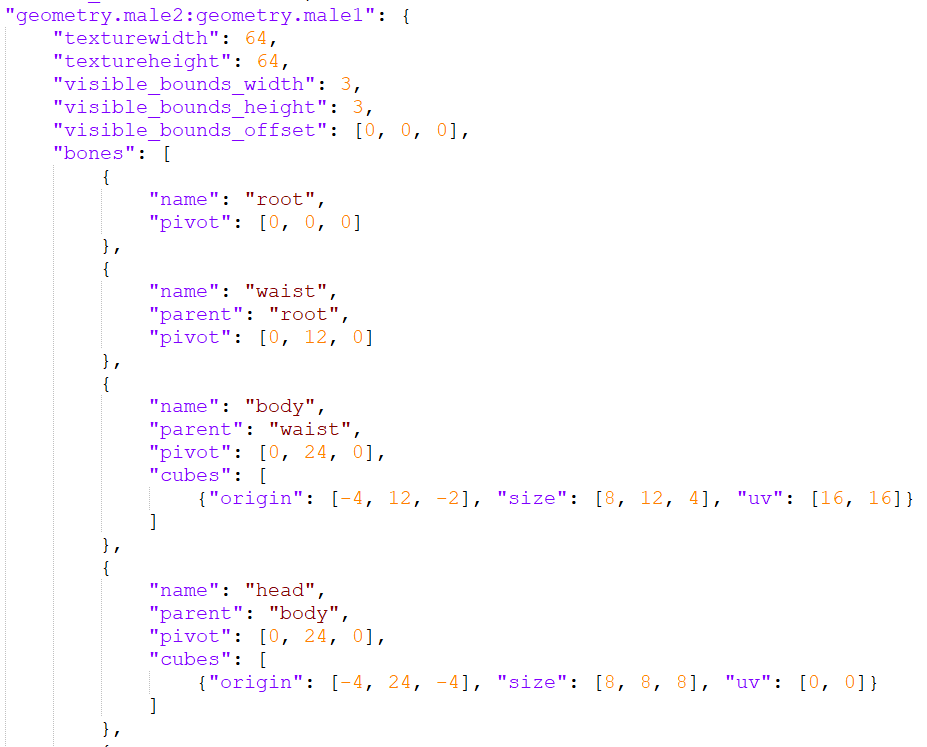
The result was still the same as before. The skins turns out blank and invisible. Already tested when using Custom Entities, the Geometry of defined entity doesnt load up and make the Entity was also invisible. Hope this one gets fixed because its really helpfull when making base geometry and adding Mobs variant geometry inside of it with just merging 2 geometries.
At the end, i need to separate the geometry and made the geometry independent to make it work. As you can see at the Attachment there's some skin that visualize and not Invisible (Because the Geometry already separated and Independent) while the Invisible one exist because as i tell earlier that the Geometry was merged with another.
STEP TO REPRODUCE :
1. Make merged geometry with ":" to merge.
2. Define the geometry throug entity.json
3. Define it using render_controller
4. Apply the Resource_pack.EXPECTED RESULT :
1. The skin appear
2. The Geometry LoadedREALITY :
1. The skin become Invisible
2. The Geometry doesnt loadedUPDATE :
On the latest version, the merged geometry skin will only can be seen by the owner and others cant see that.
The bug is exist long time since 1.14 official version. I've never seen its going to be fixed, so i create a new ticket in order there's no one who reported it. When i made skinpack via texture pack using render_controller, i cant merge 2 geometries into 1. In 1.14 beta and earlier than that, you can merge 2 Geometries by adding ":", here's the example :
- "geometry.male2:geometry.male1": {*
And then visualizing it via entity.json :
{ "default": "geometry.male1", "cape": "geometry.cape" }
{
"geometry":
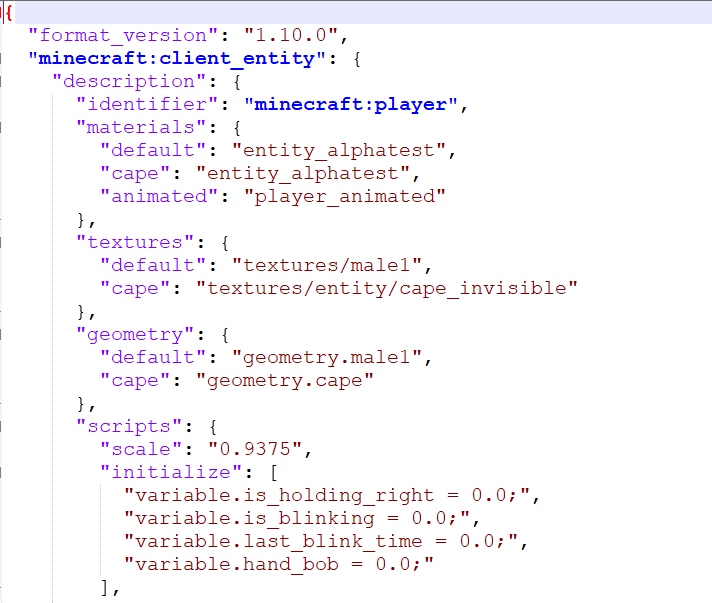
Its turn out that the Geometry doesnt loaded and make the skin Invisible. At first i think there's some changes inside the Minecraft environment, so i decide to define it once again at the entity.json like this :
{ "default": "geometry.male1:geometry.male2", "cape": "geometry.cape" }
{
"geometry":
The result was still the same as before. The skins turns out blank and invisible. Already tested when using Custom Entities, the Geometry of defined entity doesnt load up and make the Entity was also invisible. Hope this one gets fixed because its really helpfull when making base geometry and adding Mobs variant geometry inside of it with just merging 2 geometries.

At the end, i need to separate the geometry and made the geometry independent to make it work. As you can see at the Attachment there's some skin that visualize and not Invisible (Because the Geometry already separated and Independent) while the Invisible one exist because as i tell earlier that the Geometry was merged with another.
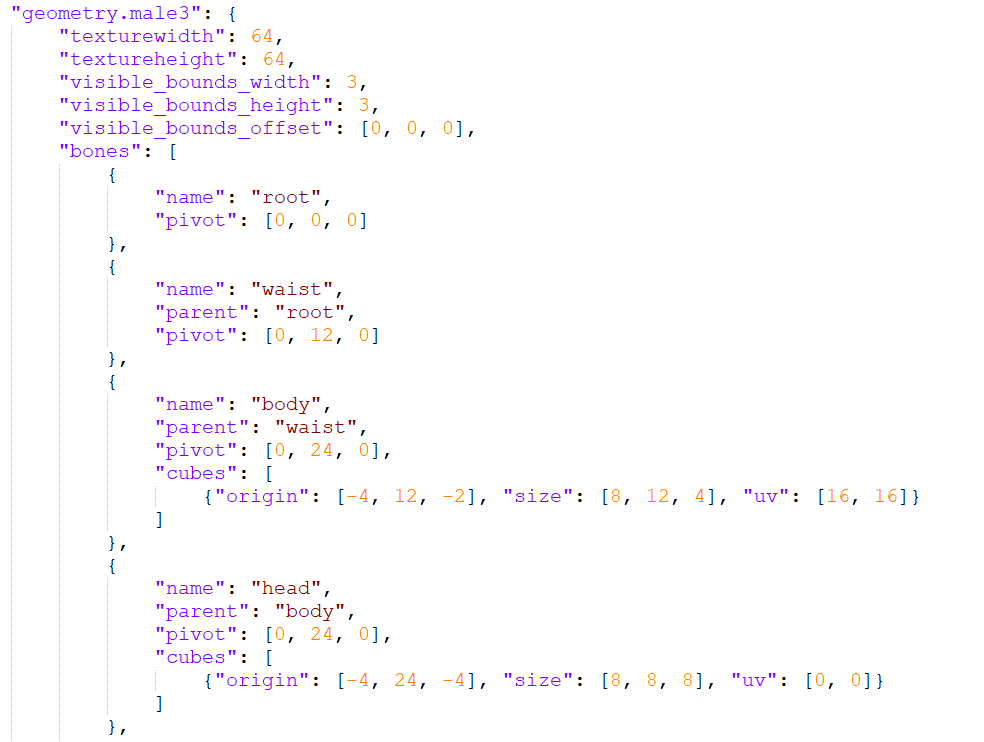
STEP TO REPRODUCE :
1. Make merged geometry with ":" to merge.
2. Define the geometry throug entity.json
3. Define it using render_controller
4. Apply the Resource_pack.EXPECTED RESULT :
1. The skin appear
2. The Geometry LoadedREALITY :
1. The skin become Invisible
2. The Geometry doesnt loadedUPDATE :
On the latest version, the merged geometry skin will only can be seen by the owner and others cant see that. Here's the the skin from each perspective
- Owner Perspective
Merging 2 Geometries make the Entity/SkintextureInvisible
The bug is exist long time since 1.14 official version. I've never seen its going to be fixed, so i create a new ticket in order there's no one who reported it. When i made skinpack via texture pack using render_controller, i cant merge 2 geometries into 1. In 1.14 beta and earlier than that, you can merge 2 Geometries by adding ":", here's the example :
- "geometry.male2:geometry.male1": {*
And then visualizing it via entity.json :
{ "default": "geometry.male1", "cape": "geometry.cape" }
{
"geometry":
Its turn out that the Geometry doesnt loaded and make the skin Invisible. At first i think there's some changes inside the Minecraft environment, so i decide to define it once again at the entity.json like this :
{ "default": "geometry.male1:geometry.male2", "cape": "geometry.cape" }
{
"geometry":
The result was still the same as before. The skins turns out blank and invisible. Already tested when using Custom Entities, the Geometry of defined entity doesnt load up and make the Entity was also invisible. Hope this one gets fixed because its really helpfull when making base geometry and adding Mobs variant geometry inside of it with just merging 2 geometries.
At the end, i need to separate the geometry and made the geometry independent to make it work. As you can see at the Attachment there's some skin that visualize and not Invisible (Because the Geometry already separated and Independent) while the Invisible one exist because as i tell earlier that the Geometry was merged with another.
STEP TO REPRODUCE :
1. Make merged geometry with ":" to merge.
2. Define the geometry throug entity.json
3. Define it using render_controller
4. Apply the Resource_pack.EXPECTED RESULT :
1. The skin appear
2. The Geometry LoadedREALITY :
1. The skin become Invisible
2. The Geometry doesnt loadedUPDATE :
On the latest version, the merged geometry skin will only can be seen by the owner and others cant see that. Here's the the skin from each perspective
- Owner Perspective
The bug is exist long time since 1.14 official version. I've never seen its going to be fixed, so i create a new ticket in order there's no one who reported it. When i made skinpack via texture pack using render_controller, i cant merge 2 geometries into 1. In 1.14 beta and earlier than that, you can merge 2 Geometries by adding ":", here's the example :
- "geometry.male2:geometry.male1": {*
And then visualizing it via entity.json :
{ "default": "geometry.male1", "cape": "geometry.cape" }
{
"geometry":
Its turn out that the Geometry doesnt loaded and make the skin Invisible. At first i think there's some changes inside the Minecraft environment, so i decide to define it once again at the entity.json like this :
{ "default": "geometry.male1:geometry.male2", "cape": "geometry.cape" }
{
"geometry":
The result was still the same as before. The skins turns out blank and invisible. Already tested when using Custom Entities, the Geometry of defined entity doesnt load up and make the Entity was also invisible. Hope this one gets fixed because its really helpfull when making base geometry and adding Mobs variant geometry inside of it with just merging 2 geometries.
At the end, i need to separate the geometry and made the geometry independent to make it work. As you can see at the Attachment there's some skin that visualize and not Invisible (Because the Geometry already separated and Independent) while the Invisible one exist because as i tell earlier that the Geometry was merged with another.
STEP TO REPRODUCE :
1. Make merged geometry with ":" to merge.
2. Define the geometry throug entity.json
3. Define it using render_controller
4. Apply the Resource_pack.EXPECTED RESULT :
1. The skin appear
2. The Geometry LoadedREALITY :
1. The skin become Invisible
2. The Geometry doesnt loadedUPDATE :
On the latest version, the merged geometry skin will only can be seen by the owner and others cant see that. Here's the the skin from each perspective
- Owner Perspective
The bug is exist long time since 1.14 official version. I've never seen its going to be fixed, so i create a new ticket in order there's no one who reported it. When i made skinpack via texture pack using render_controller, i cant merge 2 geometries into 1. In 1.14 beta and earlier than that, you can merge 2 Geometries by adding ":", here's the example :
- "geometry.male2:geometry.male1": {*
And then visualizing it via entity.json :
{ "default": "geometry.male1", "cape": "geometry.cape" }
{
"geometry":
Its turn out that the Geometry doesnt loaded and make the skin Invisible. At first i think there's some changes inside the Minecraft environment, so i decide to define it once again at the entity.json like this :
{ "default": "geometry.male1:geometry.male2", "cape": "geometry.cape" }
{
"geometry":
The result was still the same as before. The skins turns out blank and invisible. Already tested when using Custom Entities, the Geometry of defined entity doesnt load up and make the Entity was also invisible. Hope this one gets fixed because its really helpfull when making base geometry and adding Mobs variant geometry inside of it with just merging 2 geometries.
At the end, i need to separate the geometry and made the geometry independent to make it work. As you can see at the Attachment there's some skin that visualize and not Invisible (Because the Geometry already separated and Independent) while the Invisible one exist because as i tell earlier that the Geometry was merged with another.
STEP TO REPRODUCE :
1. Make merged geometry with ":" to merge.
2. Define the geometry throug entity.json
3. Define it using render_controller
4. Apply the Resource_pack.EXPECTED RESULT :
1. The skin appear
2. The Geometry LoadedREALITY :
1. The skin become Invisible
2. The Geometry doesnt loadedUPDATE :
On the latest version, the merged geometry skin will only can be seen by the owner and others cant see that. Here's the the skin from each perspective
- Owner Perspective
The merged geometry Resource Pack seems fine and its appear perfectly
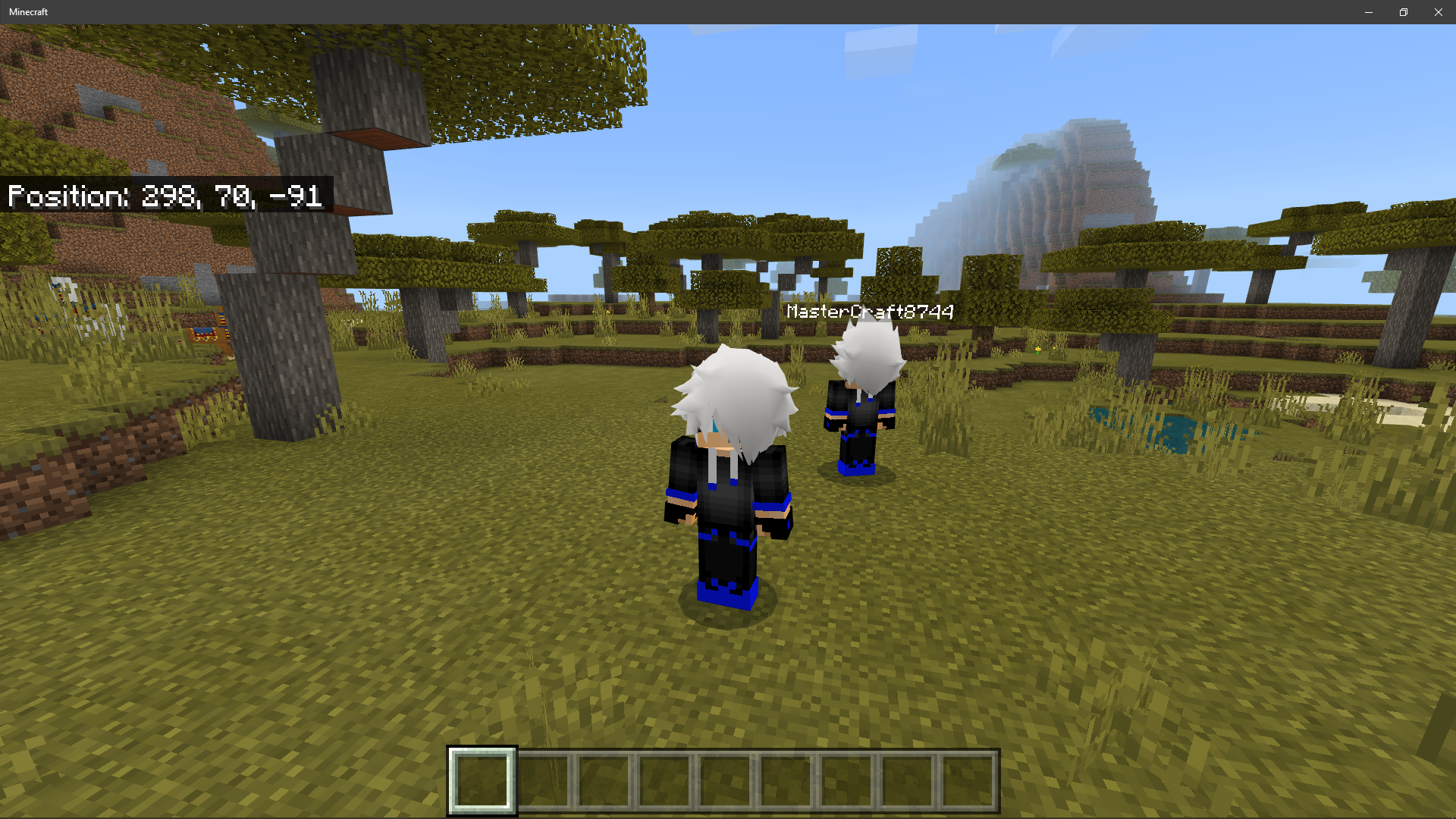
Yet, while on the Persona Editor.. The Player Render Controller doesnt work and make the Persona showing the Loading button.
The bug is exist long time since 1.14 official version. I've never seen its going to be fixed, so i create a new ticket in order there's no one who reported it. When i made skinpack via texture pack using render_controller, i cant merge 2 geometries into 1. In 1.14 beta and earlier than that, you can merge 2 Geometries by adding ":", here's the example :
- "geometry.male2:geometry.male1": {*
And then visualizing it via entity.json :
{ "default": "geometry.male1", "cape": "geometry.cape" }
{
"geometry":
Its turn out that the Geometry doesnt loaded and make the skin Invisible. At first i think there's some changes inside the Minecraft environment, so i decide to define it once again at the entity.json like this :
{ "default": "geometry.male1:geometry.male2", "cape": "geometry.cape" }
{
"geometry":
The result was still the same as before. The skins turns out blank and invisible. Already tested when using Custom Entities, the Geometry of defined entity doesnt load up and make the Entity was also invisible. Hope this one gets fixed because its really helpfull when making base geometry and adding Mobs variant geometry inside of it with just merging 2 geometries.
At the end, i need to separate the geometry and made the geometry independent to make it work. As you can see at the Attachment there's some skin that visualize and not Invisible (Because the Geometry already separated and Independent) while the Invisible one exist because as i tell earlier that the Geometry was merged with another.
STEP TO REPRODUCE :
1. Make merged geometry with ":" to merge.
2. Define the geometry throug entity.json
3. Define it using render_controller
4. Apply the Resource_pack.EXPECTED RESULT :
1. The skin appear
2. The Geometry LoadedREALITY :
1. The skin become Invisible
2. The Geometry doesnt loadedUPDATE :
On the latest version, the merged geometry skin will only can be seen by the owner and others cant see that. Here's the the skin from each perspective
- Owner Perspective
The merged geometry Resource Pack seems fine and its appear perfectly
Yet, while on the Persona Editor.. The Player Render Controller doesnt work and make the Persona showing the Loading button.
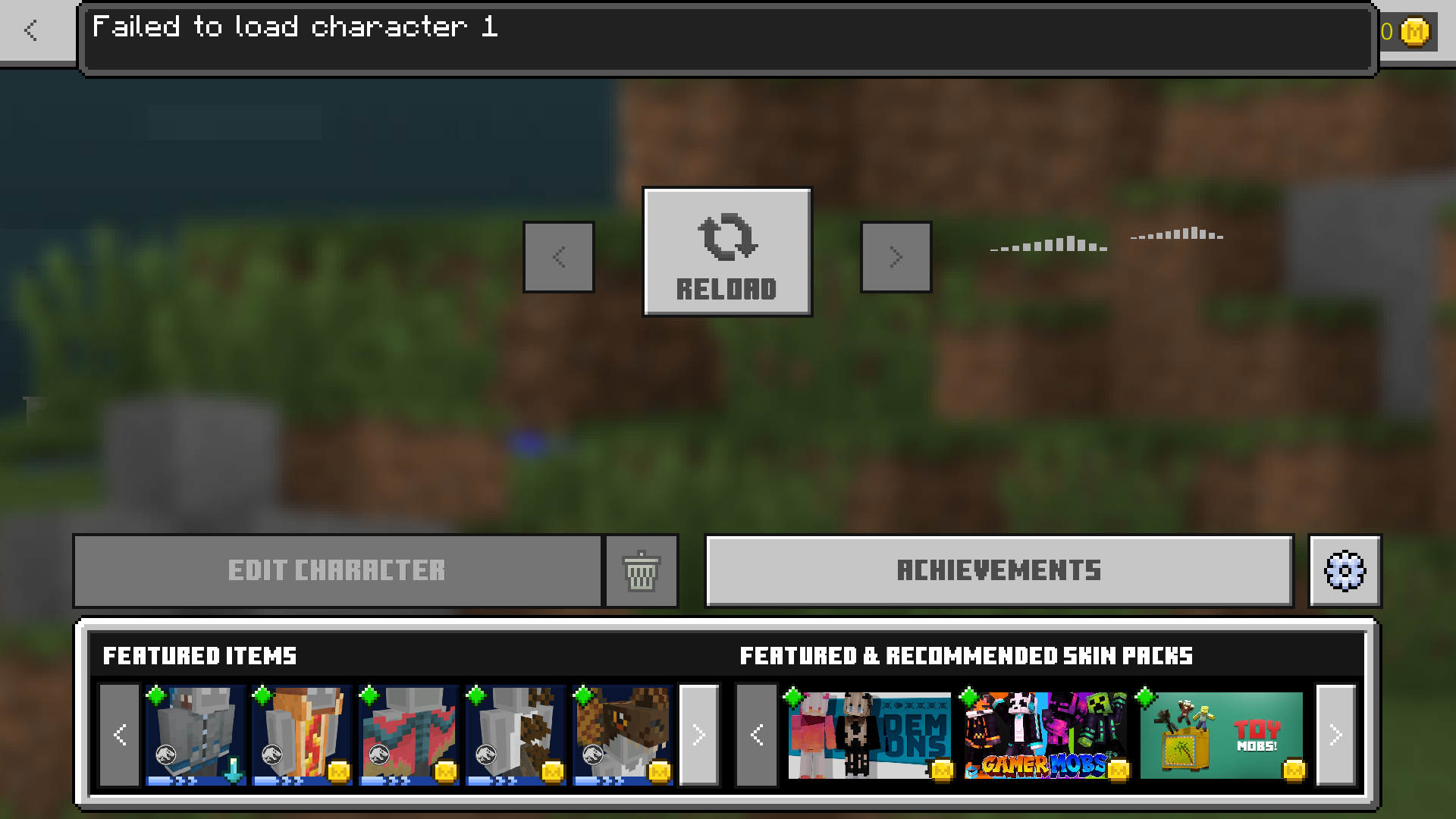
- Other Player Perspective
The Merged Custom Geometry Reource-Pack doesnt load up
The bug is exist long time since 1.14 official version. I've never seen its going to be fixed, so i create a new ticket in order there's no one who reported it. When i made skinpack via texture pack using render_controller, i cant merge 2 geometries into 1. In 1.14 beta and earlier than that, you can merge 2 Geometries by adding ":", here's the example :
- "geometry.male2:geometry.male1": {*
And then visualizing it via entity.json :
{ "default": "geometry.male1", "cape": "geometry.cape" }
{
"geometry":
Its turn out that the Geometry doesnt loaded and make the skin Invisible. At first i think there's some changes inside the Minecraft environment, so i decide to define it once again at the entity.json like this :
{ "default": "geometry.male1:geometry.male2", "cape": "geometry.cape" }
{
"geometry":
The result was still the same as before. The skins turns out blank and invisible. Already tested when using Custom Entities, the Geometry of defined entity doesnt load up and make the Entity was also invisible. Hope this one gets fixed because its really helpfull when making base geometry and adding Mobs variant geometry inside of it with just merging 2 geometries.
At the end, i need to separate the geometry and made the geometry independent to make it work. As you can see at the Attachment there's some skin that visualize and not Invisible (Because the Geometry already separated and Independent) while the Invisible one exist because as i tell earlier that the Geometry was merged with another.
STEP TO REPRODUCE :
1. Make merged geometry with ":" to merge.
2. Define the geometry throug entity.json
3. Define it using render_controller
4. Apply the Resource_pack.EXPECTED RESULT :
1. The skin appear
2. The Geometry LoadedREALITY :
1. The skin become Invisible
2. The Geometry doesnt loadedUPDATE :
On the latest version, the merged geometry skin will only can be seen by the owner and others cant see that. Here's the the skin from each perspective
- Owner Perspective
The merged geometry Resource Pack seems fine and its appear perfectly
Yet, while on the Persona Editor.. The Player Render Controller doesnt work and make the Persona showing the Loading button.
- Other Player Perspective
The Merged Custom Geometry Reource-Pack doesnt load upThe bug is exist long time since 1.14 official version. I've never seen its going to be fixed, so i create a new ticket in order there's no one who reported it. When i made skinpack via texture pack using render_controller, i cant merge 2 geometries into 1. In 1.14 beta and earlier than that, you can merge 2 Geometries by adding ":", here's the example :
- "geometry.male2:geometry.male1": {*
And then visualizing it via entity.json :
{ "default": "geometry.male1", "cape": "geometry.cape" }
{
"geometry":
Its turn out that the Geometry doesnt loaded and make the skin Invisible. At first i think there's some changes inside the Minecraft environment, so i decide to define it once again at the entity.json like this :
{ "default": "geometry.male1:geometry.male2", "cape": "geometry.cape" }
{
"geometry":
The result was still the same as before. The skins turns out blank and invisible. Already tested when using Custom Entities, the Geometry of defined entity doesnt load up and make the Entity was also invisible. Hope this one gets fixed because its really helpfull when making base geometry and adding Mobs variant geometry inside of it with just merging 2 geometries.
At the end, i need to separate the geometry and made the geometry independent to make it work. As you can see at the Attachment there's some skin that visualize and not Invisible (Because the Geometry already separated and Independent) while the Invisible one exist because as i tell earlier that the Geometry was merged with another.
STEP TO REPRODUCE :
1. Make merged geometry with ":" to merge.
2. Define the geometry throug entity.json
3. Define it using render_controller
4. Apply the Resource_pack.EXPECTED RESULT :
1. The skin appear
2. The Geometry LoadedREALITY :
1. The skin become Invisible
2. The Geometry doesnt loadedUPDATE :
On the latest version, the merged geometry skin will only can be seen by the owner and others cant see that. Here's the the skin from each perspective
- Owner Perspective
The merged geometry Resource Pack seems fine and its appear perfectlyYet, while on the Persona Editor.. The Player Render Controller doesnt work and make the Persona showing the Loading button.
- Other Player Perspective
The Merged Custom Geometry Reource-Pack doesnt load up
The bug is exist long time since 1.14 official version. I've never seen its going to be fixed, so i create a new ticket in order there's no one who reported it. When i made skinpack via texture pack using render_controller, i cant merge 2 geometries into 1. In 1.14 beta and earlier than that, you can merge 2 Geometries by adding ":", here's the example :
- "geometry.male2:geometry.male1": {*
And then visualizing it via entity.json :
{ "default": "geometry.male1", "cape": "geometry.cape" }
{
"geometry":
Its turn out that the Geometry doesnt loaded and make the skin Invisible. At first i think there's some changes inside the Minecraft environment, so i decide to define it once again at the entity.json like this :
{ "default": "geometry.male1:geometry.male2", "cape": "geometry.cape" }
{
"geometry":
The result was still the same as before. The skins turns out blank and invisible. Already tested when using Custom Entities, the Geometry of defined entity doesnt load up and make the Entity was also invisible. Hope this one gets fixed because its really helpfull when making base geometry and adding Mobs variant geometry inside of it with just merging 2 geometries.
At the end, i need to separate the geometry and made the geometry independent to make it work. As you can see at the Attachment there's some skin that visualize and not Invisible (Because the Geometry already separated and Independent) while the Invisible one exist because as i tell earlier that the Geometry was merged with another.
STEP TO REPRODUCE :
1. Make merged geometry with ":" to merge.
2. Define the geometry throug entity.json
3. Define it using render_controller
4. Apply the Resource_pack.EXPECTED RESULT :
1. The skin appear
2. The Geometry LoadedREALITY :
1. The skin become Invisible
2. The Geometry doesnt loadedUPDATE :
On the latest version, the merged geometry skin will only can be seen by the owner and others cant see that. Here's the the skin from each perspective
- Owner Perspective
The merged geometry Resource Pack seems fine and its appear perfectlyYet, while on the Persona Editor.. The Player Render Controller doesnt work and make the Persona showing the Loading button.
- Other Player Perspective
The Merged Custom Geometry Reource-Pack doesnt load upThe bug is exist long time since 1.14 official version. I've never seen its going to be fixed, so i create a new ticket in order there's no one who reported it. When i made skinpack via texture pack using render_controller, i cant merge 2 geometries into 1. In 1.14 beta and earlier than that, you can merge 2 Geometries by adding ":", here's the example :
- "geometry.male2:geometry.male1": {*
And then visualizing it via entity.json :
{ "default": "geometry.male1", "cape": "geometry.cape" }
{
"geometry":
Its turn out that the Geometry doesnt loaded and make the skin Invisible. At first i think there's some changes inside the Minecraft environment, so i decide to define it once again at the entity.json like this :
{ "default": "geometry.male1:geometry.male2", "cape": "geometry.cape" }
{
"geometry":
The result was still the same as before. The skins turns out blank and invisible. Already tested when using Custom Entities, the Geometry of defined entity doesnt load up and make the Entity was also invisible. Hope this one gets fixed because its really helpfull when making base geometry and adding Mobs variant geometry inside of it with just merging 2 geometries.
At the end, i need to separate the geometry and made the geometry independent to make it work. As you can see at the Attachment there's some skin that visualize and not Invisible (Because the Geometry already separated and Independent) while the Invisible one exist because as i tell earlier that the Geometry was merged with another.
STEP TO REPRODUCE :
1. Make merged geometry with ":" to merge.
2. Define the geometry throug entity.json
3. Define it using render_controller
4. Apply the Resource_pack.EXPECTED RESULT :
1. The skin appear
2. The Geometry LoadedREALITY :
1. The skin become Invisible
2. The Geometry doesnt loadedUPDATE :
On the latest version, the merged geometry skin will only can be seen by the owner and others cant see that. Here's the the skin from each perspective
- Owner Perspective
The merged geometry Resource Pack seems fine and its appear perfectly
Yet, while on the Persona Editor.. The Player Render Controller doesnt work and make the Persona showing the Loading button.
- Other Player Perspective
The Merged Custom Geometry Reource-Pack doesnt load up even though its sharing and using the same Resource-Packs.

The pack that used on the testing is : MCWig : Anime With some edits
Tested using Minecraft version : 1.16.20 Official & 1.16 Beta
The bug is exist long time since 1.14 official version. I've never seen its going to be fixed, so i create a new ticket in order there's no one who reported it. When i made skinpack via texture pack using render_controller, i cant merge 2 geometries into 1. In 1.14 beta and earlier than that, you can merge 2 Geometries by adding ":", here's the example :
- "geometry.male2:geometry.male1": {*
And then visualizing it via entity.json :
{ "default": "geometry.male1", "cape": "geometry.cape" }
{
"geometry":
Its turn out that the Geometry doesnt loaded and make the skin Invisible. At first i think there's some changes inside the Minecraft environment, so i decide to define it once again at the entity.json like this :
{ "default": "geometry.male1:geometry.male2", "cape": "geometry.cape" }
{
"geometry":
The result was still the same as before. The skins turns out blank and invisible. Already tested when using Custom Entities, the Geometry of defined entity doesnt load up and make the Entity was also invisible. Hope this one gets fixed because its really helpfull when making base geometry and adding Mobs variant geometry inside of it with just merging 2 geometries.
At the end, i need to separate the geometry and made the geometry independent to make it work. As you can see at the Attachment there's some skin that visualize and not Invisible (Because the Geometry already separated and Independent) while the Invisible one exist because as i tell earlier that the Geometry was merged with another.
STEP TO REPRODUCE :
1. Make merged geometry with ":" to merge.
2. Define the geometry throug entity.json
3. Define it using render_controller
4. Apply the Resource_pack.EXPECTED RESULT :
1. The skin appear
2. The Geometry LoadedREALITY :
1. The skin become Invisible
2. The Geometry doesnt loadedUPDATE :
On the latest version, the merged geometry skin will only can be seen by the owner and others cant see that. Here's the the skinfrom each perspective
- Owner Perspective
The merged geometry Resource Pack seems fine and its appear perfectly
Yet, while on the Persona Editor.. The Player Render Controller doesnt work and make the Persona showing the Loading button.
- Other Player Perspective
The Merged Custom Geometry Reource-Pack doesnt load up even though its sharing and using the same Resource-Packs.
The pack that used on the testing is : MCWig : Anime With some edits
Tested using Minecraft version : 1.16.20 Official & 1.16 BetaThe bug is exist long time since 1.14 official version. I've never seen its going to be fixed, so i create a new ticket in order there's no one who reported it. When i made skinpack via texture pack using render_controller, i cant merge 2 geometries into 1. In 1.14 beta and earlier than that, you can merge 2 Geometries by adding ":", here's the example :
- "geometry.male2:geometry.male1": {*
And then visualizing it via entity.json :
{ "default": "geometry.male1", "cape": "geometry.cape" }
{
"geometry":
Its turn out that the Geometry doesnt loaded and make the skin Invisible. At first i think there's some changes inside the Minecraft environment, so i decide to define it once again at the entity.json like this :
{ "default": "geometry.male1:geometry.male2", "cape": "geometry.cape" }
{
"geometry":
The result was still the same as before. The skins turns out blank and invisible. Already tested when using Custom Entities, the Geometry of defined entity doesnt load up and make the Entity was also invisible. Hope this one gets fixed because its really helpfull when making base geometry and adding Mobs variant geometry inside of it with just merging 2 geometries.
At the end, i need to separate the geometry and made the geometry independent to make it work. As you can see at the Attachment there's some skin that visualize and not Invisible (Because the Geometry already separated and Independent) while the Invisible one exist because as i tell earlier that the Geometry was merged with another.
STEP TO REPRODUCE :
1. Make merged geometry with ":" to merge.
2. Define the geometry throug entity.json
3. Define it using render_controller
4. Apply the Resource_pack.EXPECTED RESULT :
1. The skin appear
2. The Geometry LoadedREALITY :
1. The skin become Invisible
2. The Geometry doesnt loadedUPDATE :
On the latest version, the merged geometry skin will only can be seen by the owner and others cant see that. Here's the taken example from each perspective
- Owner Perspective (Device 1)
The merged geometry Resource Pack seems fine and its appear perfectly
Yet, while on the Persona Editor.. The Player Render Controller doesnt work and make the Persona showing the Loading button.
- Other Player Perspective (Device 2)
The Merged Custom Geometry Reource-Pack doesnt load up even though its sharing and using the same Resource-Packs.
The pack that used on the testing is : MCWig : Anime With some edits
Tested using Minecraft version : 1.16.20 Official & 1.16 Beta
The bug is exist long time since 1.14 official version. I've never seen its going to be fixed, so i create a new ticket in order there's no one who reported it. When i made skinpack via texture pack using render_controller, i cant merge 2 geometries into 1. In 1.14 beta and earlier than that, you can merge 2 Geometries by adding ":", here's the example :
- "geometry.male2:geometry.male1": {*
And then visualizing it via entity.json :
{ "default": "geometry.male1", "cape": "geometry.cape" }
{
"geometry":
Its turn out that the Geometry doesnt loaded and make the skin Invisible. At first i think there's some changes inside the Minecraft environment, so i decide to define it once again at the entity.json like this :
{ "default": "geometry.male1:geometry.male2", "cape": "geometry.cape" }
{
"geometry":
The result was still the same as before. The skins turns out blank and invisible. Already tested when using Custom Entities, the Geometry of defined entity doesnt load up and make the Entity was also invisible. Hope this one gets fixed because its really helpfull when making base geometry and adding Mobs variant geometry inside of it with just merging 2 geometries.
At the end, i need to separate the geometry and made the geometry independent to make it work. As you can see at the Attachment there's some skin that visualize and not Invisible (Because the Geometry already separated and Independent) while the Invisible one exist because as i tell earlier that the Geometry was merged with another.
STEP TO REPRODUCE :
1. Make merged geometry with ":" to merge.
2. Define the geometry throug entity.json
3. Define it using render_controller
4. Apply the Resource_pack.EXPECTED RESULT :
1. The skin appear
2. The Geometry LoadedREALITY :
1. The skin become Invisible
2. The Geometry doesnt loadedUPDATE :
On the latest version, the merged geometry skin will only can be seen by the owner and others cant see that. Here's the taken example from each perspective
- Owner Perspective (Device 1)
The merged geometry Resource Pack seems fine and its appear perfectly
Yet, while on the Persona Editor.. The Player Render Controller doesnt work and make the Persona showing the Loading button.
- Other Player Perspective (Device 2)
The Merged Custom Geometry Reource-Pack doesnt load up even though its sharing and using the same Resource-Packs.
The pack that used on the testing is : MCWig
:AnimeWith some edits
Tested using Minecraft version : 1.16.20 Official & 1.16 BetaThe bug is exist long time since 1.14 official version. I've never seen its going to be fixed, so i create a new ticket in order there's no one who reported it. When i made skinpack via texture pack using render_controller, i cant merge 2 geometries into 1. In 1.14 beta and earlier than that, you can merge 2 Geometries by adding ":", here's the example :
- "geometry.male2:geometry.male1": {*
And then visualizing it via entity.json :
{ "default": "geometry.male1", "cape": "geometry.cape" }
{
"geometry":
Its turn out that the Geometry doesnt loaded and make the skin Invisible. At first i think there's some changes inside the Minecraft environment, so i decide to define it once again at the entity.json like this :
{ "default": "geometry.male1:geometry.male2", "cape": "geometry.cape" }
{
"geometry":
The result was still the same as before. The skins turns out blank and invisible. Already tested when using Custom Entities, the Geometry of defined entity doesnt load up and make the Entity was also invisible. Hope this one gets fixed because its really helpfull when making base geometry and adding Mobs variant geometry inside of it with just merging 2 geometries.
At the end, i need to separate the geometry and made the geometry independent to make it work. As you can see at the Attachment there's some skin that visualize and not Invisible (Because the Geometry already separated and Independent) while the Invisible one exist because as i tell earlier that the Geometry was merged with another.
STEP TO REPRODUCE :
1. Make merged geometry with ":" to merge.
2. Define the geometry throug entity.json
3. Define it using render_controller
4. Apply the Resource_pack.EXPECTED RESULT :
1. The skin appear
2. The Geometry LoadedREALITY :
1. The skin become Invisible
2. The Geometry doesnt loadedUPDATE :
On the latest version, the merged geometry skin will only can be seen by the owner and others cant see that. Here's the taken example from each perspective
- Owner Perspective (Device 1)
The merged geometry Resource Pack seems fine and its appear perfectly
Yet, while on the Persona Editor.. The Player Render Controller doesnt work and make the Persona showing the Loading button.
- Other Player Perspective (Device 2)
The Merged Custom Geometry Reource-Pack doesnt load up even though its sharing and using the same Resource-Packs.
The pack that used on the testing is : MCWig - Anime (With some edits)
Tested using Minecraft version : 1.16.20 Official & 1.16 Beta
Merging 2 Geometriesmake the Entity/Skin InvisibleMerging 2 Geometry make the Entity/Skin Invisible
The bug is exist long time since 1.14 official version. I've never seen its going to be fixed, so i create a new ticket in order there's no one who reported it. When i made skinpack via texture pack using render_controller, i cant merge 2 geometries into 1. In 1.14 beta and earlier than that, you can merge 2 Geometries by adding ":", here's the example :
- "geometry.male2:geometry.male1": {*
And then visualizing it via entity.json :
{ "default": "geometry.male1", "cape": "geometry.cape" }
{
"geometry":
Its turn out that the Geometry doesnt loaded and make the skin Invisible. At first i think there's some changes inside the Minecraft environment, so i decide to define it once again at the entity.json like this :
{ "default": "geometry.male1:geometry.male2", "cape": "geometry.cape" }
{
"geometry":
The result was still the same as before. The skins turns out blank and invisible. Already tested when using Custom Entities, the Geometry of defined entity doesnt load up and make the Entity was also invisible. Hope this one gets fixed because its really helpfull when making base geometry and adding Mobs variant geometry inside of it with just merging 2 geometries.
At the end, i need to separate the geometry and made the geometry independent to make it work. As you can see at the Attachment there's some skin that visualize and not Invisible (Because the Geometry already separated and Independent) while the Invisible one exist because as i tell earlier that the Geometry was merged with another.
STEP TO REPRODUCE :
1. Make merged geometry with ":" to merge.
2. Define the geometry throug entity.json
3. Define it using render_controller
4. Apply the Resource_pack.EXPECTED RESULT :
1. The skin appear
2. The Geometry Loaded
REALITY:
1. The skin become Invisible
2. The Geometry doesnt loaded
UPDATE:
On the latest version, the merged geometry skin will only can be seen by the owner and others cant see that. Here's the taken example from each perspective
- Owner Perspective (Device 1)
The merged geometry Resource Pack seems fine and its appear perfectly
Yet, while on the Persona Editor.. The Player Render Controller doesnt work and make the Persona showing the Loading button.
- Other Player Perspective (Device 2)
The Merged Custom Geometry Reource-Pack doesnt load up even though its sharing and using the same Resource-Packs.
The pack that used on the testing is : MCWig - Anime (With some edits)
Tested using Minecraft version : 1.16.20 Official & 1.16 Beta>Summary :
The bug is exist long time since 1.14 official version. I've never seen its going to be fixed, so i create a new ticket in order there's no one who reported it. When i made skinpack via texture pack using render_controller, i cant merge 2 geometries into 1. In 1.14 beta and earlier than that, you can merge 2 Geometries by adding ":"{color:red*>Step To Reproduce*
1. Make merged geometry with ":" to merge.
2. Define the geometry throug entity.json
3. Define it using render_controller
4. Apply the Resource_pack.
>Expected Result :**
1. The skin appear
2. The Geometry Loaded*>Observer Result :
- "geometry.male2:geometry.male1": {*
And then visualizing it via entity.json :
{ "default": "geometry.male1", "cape": "geometry.cape" }
{
"geometry":
Its turn out that the Geometry doesnt loaded and make the skin Invisible. At first i think there's some changes inside the Minecraft environment, so i decide to define it once again at the entity.json like this :
{ "default": "geometry.male1:geometry.male2", "cape": "geometry.cape" }
{
"geometry":
The result was still the same as before. The skins turns out blank and invisible. Already tested when using Custom Entities, the Geometry of defined entity doesnt load up and make the Entity was also invisible. Hope this one gets fixed because its really helpfull when making base geometry and adding Mobs variant geometry inside of it with just merging 2 geometries.
At the end, i need to separate the geometry and made the geometry independent to make it work. As you can see at the Attachment there's some skin that visualize and not Invisible (Because the Geometry already separated and Independent) while the Invisible one exist because as i tell earlier that the Geometry was merged with another.
>Reality Result :
1. The skin become Invisible
2. The Geometry doesnt loaded>Issue Update :
On the latest version, the merged geometry skin will only can be seen by the owner and others cant see that. Here's the taken example from each perspective
- Owner Perspective (Device 1)
The merged geometry Resource Pack seems fine and its appear perfectly
Yet, while on the Persona Editor.. The Player Render Controller doesnt work and make the Persona showing the Loading button.
- Other Player Perspective (Device 2)
The Merged Custom Geometry Reource-Pack doesnt load up even though its sharing and using the same Resource-Packs.
The pack that used on the testing is : MCWig - Anime (With some edits)
Tested using Minecraft version : 1.16.20 Official & 1.16 Beta
>Summary :
The bug is exist long time since 1.14 official version. I've never seen its going to be fixed, so i create a new ticket in order there's no one who reported it. When i made skinpack via texture pack using render_controller, i cant merge 2 geometries into 1. In 1.14 beta and earlier than that, you can merge 2 Geometries by adding ":"{color:red*>Step To Reproduce*
1. Make merged geometry with ":" to merge.
2. Define the geometry throug entity.json
3. Define it using render_controller
4. Apply the Resource_pack.
>Expected Result :**
1. The skin appear
2. The Geometry Loaded
*>ObserverResult :
- "geometry.male2:geometry.male1": {*
And then visualizing it via entity.json :
{ "default": "geometry.male1", "cape": "geometry.cape" }
{
"geometry":
Its turn out that the Geometry doesnt loaded and make the skin Invisible. At first i think there's some changes inside the Minecraft environment, so i decide to define it once again at the entity.json like this :
{ "default": "geometry.male1:geometry.male2", "cape": "geometry.cape" }
{
"geometry":
The result was still the same as before. The skins turns out blank and invisible. Already tested when using Custom Entities, the Geometry of defined entity doesnt load up and make the Entity was also invisible. Hope this one gets fixed because its really helpfull when making base geometry and adding Mobs variant geometry inside of it with just merging 2 geometries.
At the end, i need to separate the geometry and made the geometry independent to make it work. As you can see at the Attachment there's some skin that visualize and not Invisible (Because the Geometry already separated and Independent) while the Invisible one exist because as i tell earlier that the Geometry was merged with another.
>Reality Result :
1. The skin become Invisible
2. The Geometry doesnt loaded>Issue Update :
On the latest version, the merged geometry skin will only can be seen by the owner and others cant see that. Here's the taken example from each perspective
- Owner Perspective (Device 1)
The merged geometry Resource Pack seems fine and its appear perfectly
Yet, while on the Persona Editor.. The Player Render Controller doesnt work and make the Persona showing the Loading button.
- Other Player Perspective (Device 2)
The Merged Custom Geometry Reource-Pack doesnt load up even though its sharing and using the same Resource-Packs.
The pack that used on the testing is : MCWig - Anime (With some edits)
Tested using Minecraft version : 1.16.20 Official & 1.16 Beta>Summary :
The bug is exist long time since 1.14 official version. I've never seen its going to be fixed, so i create a new ticket in order there's no one who reported it. When i made skinpack via texture pack using render_controller, i cant merge 2 geometries into 1. In 1.14 beta and earlier than that, you can merge 2 Geometries by adding ":"{color:red*>Step To Reproduce*
1. Make merged geometry with ":" to merge.
2. Define the geometry throug entity.json
3. Define it using render_controller
4. Apply the Resource_pack.
>Expected Result :**
1. The skin appear
2. The Geometry Loaded>Observed Result :
- "geometry.male2:geometry.male1": {*
And then visualizing it via entity.json :
{ "default": "geometry.male1", "cape": "geometry.cape" }
{
"geometry":
Its turn out that the Geometry doesnt loaded and make the skin Invisible. At first i think there's some changes inside the Minecraft environment, so i decide to define it once again at the entity.json like this :
{ "default": "geometry.male1:geometry.male2", "cape": "geometry.cape" }
{
"geometry":
The result was still the same as before. The skins turns out blank and invisible. Already tested when using Custom Entities, the Geometry of defined entity doesnt load up and make the Entity was also invisible. Hope this one gets fixed because its really helpfull when making base geometry and adding Mobs variant geometry inside of it with just merging 2 geometries.
At the end, i need to separate the geometry and made the geometry independent to make it work. As you can see at the Attachment there's some skin that visualize and not Invisible (Because the Geometry already separated and Independent) while the Invisible one exist because as i tell earlier that the Geometry was merged with another.
>Reality Result :
1. The skin become Invisible
2. The Geometry doesnt loaded>Issue Update :
On the latest version, the merged geometry skin will only can be seen by the owner and others cant see that. Here's the taken example from each perspective
- Owner Perspective (Device 1)
The merged geometry Resource Pack seems fine and its appear perfectly
Yet, while on the Persona Editor.. The Player Render Controller doesnt work and make the Persona showing the Loading button.
- Other Player Perspective (Device 2)
The Merged Custom Geometry Reource-Pack doesnt load up even though its sharing and using the same Resource-Packs.
The pack that used on the testing is : MCWig - Anime (With some edits)
Tested using Minecraft version : 1.16.20 Official & 1.16 Beta
>Summary :
The bug is exist long time since 1.14 official version. I've never seen its going to be fixed, so i create a new ticket in order there's no one who reported it. When i made skinpack via texture pack using render_controller, i cant merge 2 geometries into 1. In 1.14 beta and earlier than that, you can merge 2 Geometries by adding ":"{color:red*>Step To Reproduce*
1. Make merged geometry with ":" to merge.
2. Define the geometry throug entity.json
3. Define it using render_controller
4. Apply the Resource_pack.
>Expected Result :**
1. The skin appear
2. The Geometry Loaded>Observed Result :
- "geometry.male2:geometry.male1": {*
And then visualizing it via entity.json :
{ "default": "geometry.male1", "cape": "geometry.cape" }
{
"geometry":
Its turn out that the Geometry doesnt loaded and make the skin Invisible. At first i think there's some changes inside the Minecraft environment, so i decide to define it once again at the entity.json like this :
{ "default": "geometry.male1:geometry.male2", "cape": "geometry.cape" }
{
"geometry":
The result was still the same as before. The skins turns out blank and invisible. Already tested when using Custom Entities, the Geometry of defined entity doesnt load up and make the Entity was also invisible. Hope this one gets fixed because its really helpfull when making base geometry and adding Mobs variant geometry inside of it with just merging 2 geometries.
At the end, i need to separate the geometry and made the geometry independent to make it work. As you can see at the Attachment there's some skin that visualize and not Invisible (Because the Geometry already separated and Independent) while the Invisible one exist because as i tell earlier that the Geometry was merged with another.
>Reality Result :
1. The skin become Invisible
2. The Geometry doesnt loaded>Issue Update :
On the latest version, the merged geometry skin will only can be seen by the owner and others cant see that. Here's the taken example from each perspective
- Owner Perspective (Device 1)
The merged geometry Resource Pack seems fine and its appear perfectly
Yet, while on the Persona Editor.. The Player Render Controller doesnt work and make the Persona showing the Loading button.
- Other Player Perspective (Device 2)
The Merged Custom Geometry Reource-Pack doesnt load up even though its sharing and using the same Resource-Packs.
The pack that used on the testing is : MCWig - Anime (With some edits)
Tested using Minecraft version : 1.16.20 Official & 1.16 Beta>Summary :
The bug is exist long time since 1.14 official version. I've never seen its going to be fixed, so i create a new ticket in order there's no one who reported it. When i made skinpack via texture pack using render_controller, i cant merge 2 geometries into 1. In 1.14 beta and earlier than that, you can merge 2 Geometries by adding ":">Step To Reproduce
1. Make merged geometry with ":" to merge.
2. Define the geometry throug entity.json
3. Define it using render_controller
4. Apply the Resource_pack.>Expected Result :
1. The skin appear
2. The Geometry Loaded>Observed Result :
- "geometry.male2:geometry.male1": {*
And then visualizing it via entity.json :
{ "default": "geometry.male1", "cape": "geometry.cape" }
{
"geometry":
Its turn out that the Geometry doesnt loaded and make the skin Invisible. At first i think there's some changes inside the Minecraft environment, so i decide to define it once again at the entity.json like this :
{ "default": "geometry.male1:geometry.male2", "cape": "geometry.cape" }
{
"geometry":
The result was still the same as before. The skins turns out blank and invisible. Already tested when using Custom Entities, the Geometry of defined entity doesnt load up and make the Entity was also invisible. Hope this one gets fixed because its really helpfull when making base geometry and adding Mobs variant geometry inside of it with just merging 2 geometries.
At the end, i need to separate the geometry and made the geometry independent to make it work. As you can see at the Attachment there's some skin that visualize and not Invisible (Because the Geometry already separated and Independent) while the Invisible one exist because as i tell earlier that the Geometry was merged with another.
>Reality Result :
1. The skin become Invisible
2. The Geometry doesnt loaded>Issue Update :
On the latest version, the merged geometry skin will only can be seen by the owner and others cant see that. Here's the taken example from each perspective
- Owner Perspective (Device 1)
The merged geometry Resource Pack seems fine and its appear perfectly
Yet, while on the Persona Editor.. The Player Render Controller doesnt work and make the Persona showing the Loading button.
- Other Player Perspective (Device 2)
The Merged Custom Geometry Reource-Pack doesnt load up even though its sharing and using the same Resource-Packs.
The pack that used on the testing is : MCWig - Anime (With some edits)
Tested using Minecraft version : 1.16.20 Official & 1.16 Beta
>Summary :
The bug is exist long time since 1.14 official version. I've never seen its going to be fixed, so i create a new ticket in order there's no one who reported it. When i made skinpack via texture pack using render_controller, i cant merge 2 geometries into 1. In 1.14 beta and earlier than that, you can merge 2 Geometries by adding":">Step To Reproduce
1. Make merged geometry with ":" to merge.
2. Define the geometry throug entity.json
3. Define it using render_controller
4. Apply the Resource_pack.>Expected Result :
1. The skin appear
2. The Geometry Loaded>Observed Result :
- "geometry.male2:geometry.male1": {*
And then visualizing it via entity.json :
{ "default": "geometry.male1", "cape": "geometry.cape" }
{
"geometry":
Its turn out that the Geometry doesnt loaded and make the skin Invisible. At first i think there's some changes inside the Minecraft environment, so i decide to define it once again at the entity.json like this :
{ "default": "geometry.male1:geometry.male2", "cape": "geometry.cape" }
{
"geometry":
The result was still the same as before. The skins turns out blank and invisible. Already tested when using Custom Entities, the Geometry of defined entity doesnt load up and make the Entity was also invisible. Hope this one gets fixed because its really helpfull when making base geometry and adding Mobs variant geometry inside of it with just merging 2 geometries.
At the end, i need to separate the geometry and made the geometry independent to make it work. As you can see at the Attachment there's some skin that visualize and not Invisible (Because the Geometry already separated and Independent) while the Invisible one exist because as i tell earlier that the Geometry was merged with another.
>Reality Result :
1. The skin become Invisible
2. The Geometry doesnt loaded>Issue Update :
On the latest version, the merged geometry skin will only can be seen by the owner and others cant see that. Here's the taken example from each perspective
- Owner Perspective (Device 1)
The merged geometry Resource Pack seems fine and its appear perfectly
Yet, while on the Persona Editor.. The Player Render Controller doesnt work and make the Persona showing the Loading button.
- Other Player Perspective (Device 2)
The Merged Custom Geometry Reource-Pack doesnt load up even though its sharing and using the same Resource-Packs.
The pack that used on the testing is : MCWig - Anime (With some edits)
Tested using Minecraft version : 1.16.20 Official & 1.16 Beta>Summary :
The bug is exist long time since 1.14 official version. I've never seen its going to be fixed, so i create a new ticket in order there's no one who reported it. When i made skinpack via texture pack using render_controller, i cant merge 2 geometries into 1. In 1.14 beta and earlier than that, you can merge 2 Geometries by adding ":" symbol.>Step To Reproduce
1. Make merged geometry with ":" to merge.
2. Define the geometry throug entity.json
3. Define it using render_controller
4. Apply the Resource_pack.>Expected Result :
1. The skin appear
2. The Geometry Loaded>Observed Result :
The first thing i do is to make 2 Geometry codes and then at the one of them, im adding the ":" symbol. So the identifier name will be like this :* "geometry.male2:geometry.male1": {*And then visualizing it via entity.json :
    {
      "geometry": {
        "default": "geometry.male1",
        "cape": "geometry.cape"
      }
Its turn out that the Geometry doesnt loaded and make the skin Invisible. At first i think there's some changes inside the Minecraft environment, so i decide to define it once again at the entity.json like this :
    {
      "geometry": {
        "default": "geometry.male1:geometry.male2",
        "cape": "geometry.cape"
      }
The result was still the same as before. The skins turns out blank and invisible. Already tested when using Custom Entities, the Geometry of defined entity doesnt load up and make the Entity was also invisible. Hope this one gets fixed because its really helpfull when making base geometry and adding Mobs variant geometry inside of it with just merging 2 geometries.
At the end, i need to separate the geometry and made the geometry independent to make it work. As you can see at the Attachment there's some skin that visualize and not Invisible (Because the Geometry already separated and Independent) while the Invisible one exist because as i tell earlier that the Geometry was merged with another.
>Reality Result :
1. The skin become Invisible
2. The Geometry doesnt loaded>Issue Update :
On the latest version, the merged geometry skin will only can be seen by the owner and others cant see that. Here's the taken example from each perspective
- Owner Perspective (Device 1)
The merged geometry Resource Pack seems fine and its appear perfectly
Yet, while on the Persona Editor.. The Player Render Controller doesnt work and make the Persona showing the Loading button.
- Other Player Perspective (Device 2)
The Merged Custom Geometry Reource-Pack doesnt load up even though its sharing and using the same Resource-Packs.
The pack that used on the testing is : MCWig - Anime (With some edits)
Tested using Minecraft version : 1.16.20 Official & 1.16 Beta
Merging2Geometrymakethe Entity/Skin InvisibleMerging Multiple Geometry Make Skin Invisible
Merging Multiple GeometryMake Skin InvisibleMerging Multiple Geometry Doesnt Load Properly
Oh the latest beta : 1.16.200. There's new problem, Unicode doesnt work on Add-On. Usually Minecraft use ASCII or UTF-8 but most of my addon use UTF-16 to prevent code stealing.. even though its easy to decode it but worth to try.
#Part1 - UTF16 Word
On UTF16, every alphabet dechipered as Unicode values. for example :
a = +0061 or \u0061
In Earlier version : 1.16.100.59, the unicode add-on still working finely until the 1.16.200 comes.. It breaks most of my geometry model that based on UTF-16 and it wont load even though there's no problem on the content log.#Part 2 - Unicode Removal
Alright, i've been discovered this by taking a few hour to discover. First, because the unicode doesnt work on the latest beta, im just doing some test to do some decoding (revert back to utf-8). I just only decode the render_controllers because its the first thing i thaught "why the model isnt loaded and its just appear blank". Doing some decode on that, works greatly! my entity model back to appear as intended.Actually i have more than 1 addon, so.. im testing it on another add-on. Im curious if that would just affect one of my addon, but its seems not. On my second add-on, the entity model was also appear blank. Then im doing some decode again on the render_controllers.., weirdly its still not appear. My second thaught that comes in my mind is to change all the geometry file to utf-8. After taking some time, my add-on finally works again!
#Part 3 - Conclusion
Latest beta struggle to dechiper unicode, as the result its producing blank entity model (it can affect on behaviour too). As the conclusion, unicode doesnt works really well on the latest beta.>Step To Reproduce
~ Put some unicode somewhere on Addon-files (geometry,render_controller) to see better result
~ load the unicoded pack into Minecraft>Expected Result
~ Add-On component got loaded
~ Geometry based entity appear as intended
>Actual Result
~ Geometry based model NOT loaded and appear blank
~ Add-On component NOT working as it should
Note :{ You can test it with my Add-On that based on Unicode : here
Oh the latest beta : 1.16.200. There's new problem, Unicode doesnt work on Add-On. Usually Minecraft use ASCII or UTF-8 but most of my addon use UTF-16 to prevent code stealing.. even though its easy to decode it but worth to try.
#Part1 - UTF16 Word
On UTF16, every alphabet dechipered as Unicode values. for example :
a = +0061 or \u0061
In Earlier version : 1.16.100.59, the unicode add-on still working finely until the 1.16.200 comes.. It breaks most of my geometry model that based on UTF-16 and it wont load even though there's no problem on the content log.#Part 2 - Unicode Removal
Alright, i've been discovered this by taking a few hour to discover. First, because the unicode doesnt work on the latest beta, im just doing some test to do some decoding (revert back to utf-8). I just only decode the render_controllers because its the first thing i thaught "why the model isnt loaded and its just appear blank". Doing some decode on that, works greatly! my entity model back to appear as intended.Actually i have more than 1 addon, so.. im testing it on another add-on. Im curious if that would just affect one of my addon, but its seems not. On my second add-on, the entity model was also appear blank. Then im doing some decode again on the render_controllers.., weirdly its still not appear. My second thaught that comes in my mind is to change all the geometry file to utf-8. After taking some time, my add-on finally works again!
#Part 3 - Conclusion
Latest beta struggle to dechiper unicode, as the result its producing blank entity model (it can affect on behaviour too). As the conclusion, unicode doesnt works really well on the latest beta.>Step To Reproduce
~ Put some unicode somewhere on Addon-files (geometry,render_controller) to see better result
~ load the unicoded pack into Minecraft>Expected Result
~ Add-On component got loaded
~ Geometry based entity appear as intended
>Actual Result
~ Geometry based model NOT loaded and appear blank
~ Add-On component NOT working as it should
Note :{ You can test it with my Add-On that based on Unicode : here
*Update 1.16.200.57 *
Unicode still not loaded and its causing Skeletal Hierarchy Index that was missing or not readed because of Unicode that doesnt being readed by the game.
Oh the latest beta : 1.16.200. There's new problem, Unicode doesnt work on Add-On. Usually Minecraft use ASCII or UTF-8 but most of my addon use UTF-16 to prevent code stealing.. even though its easy to decode it but worth to try.
#Part1 - UTF16 Word
On UTF16, every alphabet dechipered as Unicode values. for example :
a = +0061 or \u0061
In Earlier version : 1.16.100.59, the unicode add-on still working finely until the 1.16.200 comes.. It breaks most of my geometry model that based on UTF-16 and it wont load even though there's no problem on the content log.#Part 2 - Unicode Removal
Alright, i've been discovered this by taking a few hour to discover. First, because the unicode doesnt work on the latest beta, im just doing some test to do some decoding (revert back to utf-8). I just only decode the render_controllers because its the first thing i thaught "why the model isnt loaded and its just appear blank". Doing some decode on that, works greatly! my entity model back to appear as intended.Actually i have more than 1 addon, so.. im testing it on another add-on. Im curious if that would just affect one of my addon, but its seems not. On my second add-on, the entity model was also appear blank. Then im doing some decode again on the render_controllers.., weirdly its still not appear. My second thaught that comes in my mind is to change all the geometry file to utf-8. After taking some time, my add-on finally works again!
#Part 3 - Conclusion
Latest beta struggle to dechiper unicode, as the result its producing blank entity model (it can affect on behaviour too). As the conclusion, unicode doesnt works really well on the latest beta.>Step To Reproduce
~ Put some unicode somewhere on Addon-files (geometry,render_controller) to see better result
~ load the unicoded pack into Minecraft>Expected Result
~ Add-On component got loaded
~ Geometry based entity appear as intended
>Actual Result
~ Geometry based model NOT loaded and appear blank
~ Add-On component NOT working as it should
Note :{ You can test it with my Add-On that based on Unicode : here
*Update 1.16.200.57 *
Unicode still not loaded and its causing Skeletal Hierarchy Index that was missing or not readed because of Unicode that doesnt being readed by the game.Oh the latest beta : 1.16.200. There's new problem, Unicode doesnt work on Add-On. Usually Minecraft use ASCII or UTF-8 but most of my addon use UTF-16 to prevent code stealing.. even though its easy to decode it but worth to try.
#Part1 - UTF16 Word
On UTF16, every alphabet dechipered as Unicode values. for example :
a = +0061 or \u0061
In Earlier version : 1.16.100.59, the unicode add-on still working finely until the 1.16.200 comes.. It breaks most of my geometry model that based on UTF-16 and it wont load even though there's no problem on the content log.#Part 2 - Unicode Removal
Alright, i've been discovered this by taking a few hour to discover. First, because the unicode doesnt work on the latest beta, im just doing some test to do some decoding (revert back to utf-8). I just only decode the render_controllers because its the first thing i thaught "why the model isnt loaded and its just appear blank". Doing some decode on that, works greatly! my entity model back to appear as intended.Actually i have more than 1 addon, so.. im testing it on another add-on. Im curious if that would just affect one of my addon, but its seems not. On my second add-on, the entity model was also appear blank. Then im doing some decode again on the render_controllers.., weirdly its still not appear. My second thaught that comes in my mind is to change all the geometry file to utf-8. After taking some time, my add-on finally works again!
#Part 3 - Conclusion
Latest beta struggle to dechiper unicode, as the result its producing blank entity model (it can affect on behaviour too). As the conclusion, unicode doesnt works really well on the latest beta.>Step To Reproduce
~ Put some unicode somewhere on Addon-files (geometry,render_controller) to see better result
~ load the unicoded pack into Minecraft>Expected Result
~ Add-On component got loaded
~ Geometry based entity appear as intended
>Actual Result
~ Geometry based model NOT loaded and appear blank
~ Add-On component NOT working as it should
Note :{ You can test it with my Add-On that based on Unicode : here
Update 1.16.200.57
Unicode still not loaded and its causing Skeletal Hierarchy Index that was missing or not readed because of Unicode that doesnt being readed by the game.
Oh the latest beta : 1.16.200. There's new problem, Unicode doesnt work on Add-On. Usually Minecraft use ASCII or UTF-8 but most of my addon use UTF-16 to prevent code stealing.. even though its easy to decode it but worth to try.
#Part1 - UTF16 Word
On UTF16, every alphabet dechipered as Unicode values. for example :
a = +0061 or \u0061
In Earlier version : 1.16.100.59, the unicode add-on still working finely until the 1.16.200 comes.. It breaks most of my geometry model that based on UTF-16 and it wont load even though there's no problem on the content log.#Part 2 - Unicode Removal
Alright, i've been discovered this by taking a few hour to discover. First, because the unicode doesnt work on the latest beta, im just doing some test to do some decoding (revert back to utf-8). I just only decode the render_controllers because its the first thing i thaught "why the model isnt loaded and its just appear blank". Doing some decode on that, works greatly! my entity model back to appear as intended.Actually i have more than 1 addon, so.. im testing it on another add-on. Im curious if that would just affect one of my addon, but its seems not. On my second add-on, the entity model was also appear blank. Then im doing some decode again on the render_controllers.., weirdly its still not appear. My second thaught that comes in my mind is to change all the geometry file to utf-8. After taking some time, my add-on finally works again!
#Part 3 - Conclusion
Latest beta struggle to dechiper unicode, as the result its producing blank entity model (it can affect on behaviour too). As the conclusion, unicode doesnt works really well on the latest beta.>Step To Reproduce
~ Put some unicode somewhere on Addon-files (geometry,render_controller) to see better result
~ load the unicoded pack into Minecraft>Expected Result
~ Add-On component got loaded
~ Geometry based entity appear as intended
>Actual Result
~ Geometry based model NOT loaded and appear blank
~ Add-On component NOT working as it should
Note :{ You can test it with my Add-On that based on Unicode : here
Update 1.16.200.57
Unicode still not loaded and its causing Skeletal Hierarchy Index that was missing or not readed because of Unicode that doesnt being readed by the game.
O
hthe latest beta : 1.16.200. There's new problem, Unicode doesnt work on Add-On. Usually Minecraft use ASCII or UTF-8 but most of my addon use UTF-16 to prevent code stealing.. even though its easy to decode it but worth to try.#Part1 - UTF16 Word
On UTF16, every alphabet dechipered as Unicode values. for example :
a = +0061 or \u0061
In Earlier version : 1.16.100.59, the unicode add-on still working finely until the 1.16.200 comes.. It breaks most of my geometry model that based on UTF-16 and it wont load even though there's no problem on the content log.#Part 2 - Unicode Removal
Alright, i've been discovered this by taking a few hour to discover. First, because the unicode doesnt work on the latest beta, im just doing some test to do some decoding (revert back to utf-8). I just only decode the render_controllers because its the first thing i thaught "why the model isnt loaded and its just appear blank". Doing some decode on that, works greatly! my entity model back to appear as intended.Actually i have more than 1 addon, so.. im testing it on another add-on. Im curious if that would just affect one of my addon, but its seems not. On my second add-on, the entity model was also appear blank. Then im doing some decode again on the render_controllers.., weirdly its still not appear. My second thaught that comes in my mind is to change all the geometry file to utf-8. After taking some time, my add-on finally works again!
#Part 3 - Conclusion
Latest beta struggle to dechiper unicode, as the result its producing blank entity model (it can affect on behaviour too). As the conclusion, unicode doesnt works really well on the latest beta.>Step To Reproduce
~ Put some unicode somewhere on Addon-files (geometry,render_controller) to see better result
~ load the unicoded pack into Minecraft>Expected Result
~ Add-On component got loaded
~ Geometry based entity appear as intended
>Actual Result
~ Geometry based model NOT loaded and appear blank
~ Add-On component NOT working as it should
Note :{ You can test it with my Add-On that based on Unicode : here
Update 1.16.200.57
Unicode still not loaded and its causing Skeletal Hierarchy Index that was missing or not readed because of Unicode that doesnt being readed by the game.
On the latest beta : 1.16.200. There's new problem, Unicode doesnt work on Add-On. Usually Minecraft use ASCII or UTF-8 but most of my addon use UTF-16 to prevent code stealing.. even though its easy to decode it but worth to try.
#Part1 - UTF16 Word
On UTF16, every alphabet dechipered as Unicode values. for example :
a = +0061 or \u0061
In Earlier version : 1.16.100.59, the unicode add-on still working finely until the 1.16.200 comes.. It breaks most of my geometry model that based on UTF-16 and it wont load even though there's no problem on the content log.#Part 2 - Unicode Removal
Alright, i've been discovered this by taking a few hour to discover. First, because the unicode doesnt work on the latest beta, im just doing some test to do some decoding (revert back to utf-8). I just only decode the render_controllers because its the first thing i thaught "why the model isnt loaded and its just appear blank". Doing some decode on that, works greatly! my entity model back to appear as intended.Actually i have more than 1 addon, so.. im testing it on another add-on. Im curious if that would just affect one of my addon, but its seems not. On my second add-on, the entity model was also appear blank. Then im doing some decode again on the render_controllers.., weirdly its still not appear. My second thaught that comes in my mind is to change all the geometry file to utf-8. After taking some time, my add-on finally works again!
#Part 3 - Conclusion
Latest beta struggle to dechiper unicode, as the result its producing blank entity model (it can affect on behaviour too). As the conclusion, unicode doesnt works really well on the latest beta.>Step To Reproduce
~ Put some unicode somewhere on Addon-files (geometry,render_controller) to see better result
~ load the unicoded pack into Minecraft>Expected Result
~ Add-On component got loaded
~ Geometry based entity appear as intended
>Actual Result
~ Geometry based model NOT loaded and appear blank
~ Add-On component NOT working as it should
Note :{ You can test it with my Add-On that based on Unicode : here
Update 1.16.200.57
Unicode still not loaded and its causing Skeletal Hierarchy Index that was missing or not readed because of Unicode that doesnt being readed by the game.
On the latest beta : 1.16.200. There's new problem, Unicode doesnt work on Add-On. Usually Minecraft use ASCII or UTF-8 but most of my addon use UTF-16 to prevent code stealing.. even though its easy to decode it but worth to try.
#Part1 - UTF16 Word
On UTF16, every alphabet dechipered as Unicode values. for example :
a = +0061 or \u0061
In Earlier version : 1.16.100.59, the unicode add-on still working finely until the 1.16.200 comes.. It breaks most of my geometry model that based on UTF-16 and it wont load even though there's no problem on the content log.#Part 2 - Unicode Removal
Alright, i've been discovered this by taking a few hour to discover. First, because the unicode doesnt work on the latest beta, im just doing some test to do some decoding (revert back to utf-8). I just only decode the render_controllers because its the first thing i thaught "why the model isnt loaded and its just appear blank". Doing some decode on that, works greatly! my entity model back to appear as intended.Actually i have more than 1 addon, so.. im testing it on another add-on. Im curious if that would just affect one of my addon, but its seems not. On my second add-on, the entity model was also appear blank. Then im doing some decode again on the render_controllers.., weirdly its still not appear. My second thaught that comes in my mind is to change all the geometry file to utf-8. After taking some time, my add-on finally works again!
#Part 3 - Conclusion
Latest beta struggle to dechiper unicode, as the result its producing blank entity model (it can affect on behaviour too). As the conclusion, unicode doesnt works really well on the latest beta.>Step To Reproduce
~ Put some unicode somewhere on Addon-files (geometry,render_controller) to see better result
~load the unicoded pack into Minecraft>Expected Result
~ Add-On component got loaded
~ Geometry based entity appear as intended
>Actual Result
~ Geometry based model NOT loaded and appear blank
~ Add-On component NOT working as it should
Note
:{You can test it with my Add-On that based on Unicode : hereUpdate 1.16.200.57
Unicode still not loaded and its causing Skeletal Hierarchy Index that was missing or not readed because of Unicode that doesnt being readed by the game.
> Summary
On the latest beta : 1.16.200. There's new problem, Unicode doesnt work on Add-On. Usually Minecraft use ASCII or UTF-8 but most of my addon use UTF-16 to prevent code stealing.. even though its easy to decode it but worth to try.
On UTF16, every alphabet dechipered as Unicode values. for example :
a = +0061 or \u0061
In Earlier version : 1.16.100.59, the unicode add-on still working finely until the 1.16.200 comes.. It breaks most of my geometry model that based on UTF-16 and it wont load even though there's no problem on the content log.>Step To Reproduce
~ Put some unicode somewhere on Addon-files (geometry,render_controller) to see better result
~ load the unicoded pack into Minecraft>Expected Result
~ Add-On component got loaded
~ Geometry based entity appear as intended
> Observed Result
Alright, i've been discovered this by taking a few hour to discover. First, because the unicode doesnt work on the latest beta, im just doing some test to do some decoding (revert back to utf-8). I just only decode the render_controllers because its the first thing i thaught "why the model isnt loaded and its just appear blank". Doing some decode on that, works greatly! my entity model back to appear as intended.Actually i have more than 1 addon, so.. im testing it on another add-on. Im curious if that would just affect one of my addon, but its seems not. On my second add-on, the entity model was also appear blank. Then im doing some decode again on the render_controllers.., weirdly its still not appear. My second thaught that comes in my mind is to change all the geometry file to utf-8. After taking some time, my add-on finally works again!
>Actual Result
~ Geometry based model NOT loaded and appear blank
~ Add-On component NOT working as it should
Note :{
You can test it with my Add-On that based on Unicode : here* >Update 1.16.200.57*
Unicode still not loaded and its causing Skeletal Hierarchy Index that was missing or not readed because of Unicode that doesnt being readed by the game.
> Summary
On the latest beta : 1.16.200. There's new problem, Unicode doesnt work on Add-On. Usually Minecraft use ASCII or UTF-8 but most of my addon use UTF-16 to prevent code stealing.. even though its easy to decode it but worth to try.
On UTF16, every alphabet dechipered as Unicode values. for example :
a = +0061 or \u0061
In Earlier version : 1.16.100.59, the unicode add-on still working finely until the 1.16.200 comes.. It breaks most of my geometry model that based on UTF-16 and it wont load even though there's no problem on the content log.>Step To Reproduce
~ Put some unicode somewhere on Addon-files (geometry,render_controller) to see better result
~ load the unicoded pack into Minecraft>Expected Result
~ Add-On component got loaded
~ Geometry based entity appear as intended
> Observed Result
Alright, i've been discovered this by taking a few hour to discover. First, because the unicode doesnt work on the latest beta, im just doing some test to do some decoding (revert back to utf-8). I just only decode the render_controllers because its the first thing i thaught "why the model isnt loaded and its just appear blank". Doing some decode on that, works greatly! my entity model back to appear as intended.Actually i have more than 1 addon, so.. im testing it on another add-on. Im curious if that would just affect one of my addon, but its seems not. On my second add-on, the entity model was also appear blank. Then im doing some decode again on the render_controllers.., weirdly its still not appear. My second thaught that comes in my mind is to change all the geometry file to utf-8. After taking some time, my add-on finally works again!
>Actual Result
~ Geometry based model NOT loaded and appear blank
~ Add-On component NOT working as it should
Note :{
You can test it with my Add-On that based on Unicode : here* >Update 1.16.200.57*
Unicode still not loadedand its causing Skeletal Hierarchy Index that was missingor not readed because of Unicode that doesnt being readed by the game.
> Summary
On the latest beta : 1.16.200. There's new problem, Unicode doesnt work on Add-On. Usually Minecraft use ASCII or UTF-8 but most of my addon use UTF-16 to prevent code stealing.. even though its easy to decode it but worth to try.
On UTF16, every alphabet dechipered as Unicode values. for example :
a = +0061 or \u0061
In Earlier version : 1.16.100.59, the unicode add-on still working finely until the 1.16.200 comes.. It breaks most of my geometry model that based on UTF-16 and it wont load even though there's no problem on the content log.>Step To Reproduce
~ Put some unicode somewhere on Addon-files (geometry,render_controller) to see better result
~ load the unicoded pack into Minecraft>Expected Result
~ Add-On component got loaded
~ Geometry based entity appear as intended
> Observed Result
Alright, i've been discovered this by taking a few hour to discover. First, because the unicode doesnt work on the latest beta, im just doing some test to do some decoding (revert back to utf-8). I just only decode the render_controllers because its the first thing i thaught "why the model isnt loaded and its just appear blank". Doing some decode on that, works greatly! my entity model back to appear as intended.Actually i have more than 1 addon, so.. im testing it on another add-on. Im curious if that would just affect one of my addon, but its seems not. On my second add-on, the entity model was also appear blank. Then im doing some decode again on the render_controllers.., weirdly its still not appear. My second thaught that comes in my mind is to change all the geometry file to utf-8. After taking some time, my add-on finally works again!
>Actual Result
~ Geometry based model NOT loaded and appear blank
~ Add-On component NOT working as it should
Note :{
You can test it with my Add-On that based on Unicode : here>Update 1.16.200.57 :
On the latest beta, the error now showed up at the Content log as the result of Unicode still NOT being loaded in this version and its causing Skeletal Hierarchy Index that was missing.
> Summary
On the latest beta : 1.16.200. There's new problem, Unicode doesnt work on Add-On. Usually Minecraft use ASCII or UTF-8 but most of my addon use UTF-16 to prevent code stealing.. even though its easy to decode it but worth to try.
On UTF16, every alphabet dechipered as Unicode values. for example :
a = +0061 or \u0061
In Earlier version : 1.16.100.59, the unicode add-on still working finely until the 1.16.200 comes.. It breaks most of my geometry model that based on UTF-16 and it wont load even though there's no problem on the content log.>Step To Reproduce
~Put some unicode somewhere on Addon-files(geometry,render_controller) to see better result
~loadtheunicoded pack into Minecraft>Expected Result
~ Add-On component got loaded
~ Geometry based entity appear as intended
> Observed Result
Alright, i've been discovered this by taking a few hour to discover. First, because the unicode doesnt work on the latest beta, im just doing some test to do some decoding (revert back to utf-8). I just only decode the render_controllers because its the first thing i thaught "why the model isnt loaded and its just appear blank". Doing some decode on that, works greatly! my entity model back to appear as intended.Actually i have more than 1 addon, so.. im testing it on another add-on. Im curious if that would just affect one of my addon, but its seems not. On my second add-on, the entity model was also appear blank. Then im doing some decode again on the render_controllers.., weirdly its still not appear. My second thaught that comes in my mind is to change all the geometry file to utf-8. After taking some time, my add-on finally works again!
>Actual Result
~ Geometry based model NOT loaded and appear blank
~ Add-On component NOT working as it should
Note :{
You can test it with my Add-On that based on Unicode : here>Update 1.16.200.57 :
On the latest beta, the error now showed up at the Content log as the result of Unicode still NOT being loaded in this version and its causing Skeletal Hierarchy Index that was missing.
> Summary
On the latest beta : 1.16.200. There's new problem, Unicode doesnt work on Add-On. Usually Minecraft use ASCII or UTF-8 but most of my addon use UTF-16 to prevent code stealing.. even though its easy to decode it but worth to try.
On UTF16, every alphabet dechipered as Unicode values. for example :
a = +0061 or \u0061
In Earlier version : 1.16.100.59, the unicode add-on still working finely until the 1.16.200 comes.. It breaks most of my geometry model that based on UTF-16 and it wont load even though there's no problem on the content log.>Step To Reproduce
~ Convert any .json files to Unicode using this converter
~ Save it and repack the Addon to .mcpack
~ load the unicoded pack into Minecraft
~ Set the pack at the global resources for better result (for Texture Pack)>Expected Result
~ Add-On component got loaded
~ Geometry based entity appear as intended
> Observed Result
Alright, i've been discovered this by taking a few hour to discover. First, because the unicode doesnt work on the latest beta, im just doing some test to do some decoding (revert back to utf-8). I just only decode the render_controllers because its the first thing i thaught "why the model isnt loaded and its just appear blank". Doing some decode on that, works greatly! my entity model back to appear as intended.Actually i have more than 1 addon, so.. im testing it on another add-on. Im curious if that would just affect one of my addon, but its seems not. On my second add-on, the entity model was also appear blank. Then im doing some decode again on the render_controllers.., weirdly its still not appear. My second thaught that comes in my mind is to change all the geometry file to utf-8. After taking some time, my add-on finally works again!
>Actual Result
~ Geometry based model NOT loaded and appear blank
~ Add-On component NOT working as it should
Note :{
You can test it with my Add-On that based on Unicode : here>Update 1.16.200.57 :
On the latest beta, the error now showed up at the Content log as the result of Unicode still NOT being loaded in this version and its causing Skeletal Hierarchy Index that was missing.
> Summary
On the latest beta : 1.16.200. There's new problem, Unicode doesnt work on Add-On. Usually Minecraft use ASCII or UTF-8 but most of my addon use UTF-16 to prevent code stealing.. even though its easy to decode it but worth to try.
On UTF16, every alphabet dechipered as Unicode values. for example :
a = +0061 or \u0061
In Earlier version : 1.16.100.59, the unicode add-on still working finely until the 1.16.200 comes.. It breaks most of my geometry model that based on UTF-16 and it wont load even though there's no problem on the content log.>Step To Reproduce
~ Convert any .json files to Unicode using this converter
~ Save it and repack the Addon to .mcpack
~ load the unicoded pack into Minecraft
~ Set the pack at the global resources for better result (for Texture Pack)>Expected Result
~ Add-On component got loaded
~ Geometry based entity appear as intended
> Observed Result
Alright, i've been discovered this by taking a few hour to discover. First, because the unicode doesnt work on the latest beta, im just doing some test to do some decoding (revert back to utf-8). I just only decode the render_controllers because its the first thing i thaught "why the model isnt loaded and its just appear blank". Doing some decode on that, works greatly! my entity model back to appear as intended.Actually i have more than 1 addon, so.. im testing it on another add-on. Im curious if that would just affect one of my addon, but its seems not. On my second add-on, the entity model was also appear blank. Then im doing some decode again on the render_controllers.., weirdly its still not appear. My second thaught that comes in my mind is to change all the geometry file to utf-8. After taking some time, my add-on finally works again!
>Actual Result
~ Geometry based model NOT loaded and appear blank
~ Add-On component NOT working as it should
Note :{
You can test it with my Add-On that based on Unicode : here>Update 1.16.200.57 :
On the latest beta, the error now showed up at the Content log as the result of Unicode still NOT being loaded in this version and its causing Skeletal Hierarchy Index that was missing.
> Summary
On the latest beta : 1.16.200. There's new problem, Unicode doesnt work on Add-On. Usually Minecraft use ASCII or UTF-8 but most of my addon use UTF-16 to prevent code stealing.. even though its easy to decode it but worth to try.
On UTF16, every alphabet dechipered as Unicode values. for example :
a = +0061 or \u0061
In Earlier version : 1.16.100.59, the unicode add-on still working finely until the 1.16.200 comes.. It breaks most of my geometry model that based on UTF-16 and it wont load even though there's no problem on the content log.>Step To Reproduce
~ Convert any .json files to Unicode using this converter
~ Save it and repack the Addon to .mcpack
~ load the unicoded pack into Minecraft
~ Set the pack at the global resources for better result (for Texture Pack)>Expected Result
~ Add-On component got loaded
~ Geometry based entity appear as intended>Actual Result
~ Geometry based model NOT loaded and appear blank
~ Add-On component NOT working as it should
Note :{
You can test it with my Add-On that based on Unicode : here>Update 1.16.200.57 :
On the latest beta, the error now showed up at the Content log as the result of Unicode still NOT being loaded in this version and its causing Skeletal Hierarchy Index that was missing.
> Summary
On the latest beta : 1.16.200. There's new problem, Unicode doesnt work on Add-On. Usually Minecraft use ASCII or UTF-8 but most of my addon use UTF-16 to prevent code stealing.. even though its easy to decode it but worth to try.
On UTF16, every alphabet dechipered as Unicode values. for example :
a = +0061 or \u0061
In Earlier version : 1.16.100.59, the unicode add-on still working finely until the 1.16.200 comes.. It breaks most of my geometry model that based on UTF-16 and it wont load even though there's no problem on the content log.>Step To Reproduce
~ Convert any .json files to Unicode using this converter
~ Save it and repack the Addon to .mcpack
~ load the unicoded pack into Minecraft
~ Set the pack at the global resources for better result (for Texture Pack)>Expected Result
~ Add-On component got loaded
~ Geometry based entity appear as intended>Actual Result
~ Geometry based model NOT loaded and appear blank
~ Add-On component NOT working as it should
Note :{
You can test it with my Add-On that based on Unicode : here>Update 1.16.200.57 :
On the latest beta, the error now showed up at the Content log as the result of Unicode still NOT being loaded in this version and its causing Skeletal Hierarchy Index that was missing.
> Summary
On the latest beta : 1.16.200. There's new problem, Unicode doesnt work on Add-On. Usually Minecraft use ASCII or UTF-8 but most of my addon use UTF-16 to prevent code stealing.. even though its easy to decode it but worth to try.
On UTF16, every alphabet dechipered as Unicode values. for example :
a = +0061 or \u0061
In Earlier version : 1.16.100.59, the unicode add-on still working finely until the 1.16.200 comes.. It breaks most of my geometry model that based on UTF-16 and it wont load even though there's no problem on the content log.>Step To Reproduce
~ Convert any .json files to Unicode using this converter
~ Save it and repack the Addon to .mcpack
~ load the unicoded pack into Minecraft
~ Set the pack at the global resources for better result (for Texture Pack)>Expected Result
~ Add-On component got loaded
~ Geometry based entity appear as intended>Actual Result
~ Geometry based model NOT loaded and appear blank
~ Add-On component NOT working as it shouldNote :{
You can test it with my Add-On that based on Unicode : here>Update 1.16.200.57 :
On the latest beta, the error now showed up at the Content log as the result of Unicode still NOT being loaded in this version and its causing Skeletal Hierarchy Index that was missing.
> Summary
On the latest beta : 1.16.200. There's new problem, Unicode doesnt work on Add-On. Usually Minecraft use ASCII or UTF-8 but most of my addon use UTF-16 to prevent code stealing.. even though its easy to decode it but worth to try.
On UTF16, every alphabet dechipered as Unicode values. for example :
a = +0061 or \u0061
In Earlier version : 1.16.100.59, the unicode add-on still working finely until the 1.16.200 comes.. It breaks most of my geometry model that based on UTF-16 and it wont load even though there's no problem on the content log.>Step To Reproduce
~ Convert any .json files to Unicode using this converter
~ Save it and repack the Addon to .mcpack
~ load the unicoded pack into Minecraft
~ Set the pack at the global resources for better result (for Texture Pack)>Expected Result
~ Add-On component got loaded
~ Geometry based entity appear as intended
>Actual Result
~ Geometry based model NOT loaded and appear blank
~ Add-On component NOT working as it should
>Update 1.16.200.57 :
On the latest beta, the error now showed up at the Content log as the result of Unicode still NOT being loaded in this version and its causing Skeletal Hierarchy Index that was missing.
> Summary
On the latest beta : 1.16.200. There's new problem, Unicode doesnt work on Add-On. Usually Minecraft use ASCII or UTF-8 but most of my addon use UTF-16 to prevent code stealing.. even though its easy to decode it but worth to try.
On UTF16, every alphabet dechipered as Unicode values. for example :
a = +0061 or \u0061
In Earlier version : 1.16.100.59, the unicode add-on still working finely until the 1.16.200 comes.. It breaks most of my geometry model that based on UTF-16 and it wont load even though there's no problem on the content log.>Step To Reproduce
~ Convert any .json files to Unicode using this converter
~ Save it and repack the Addon to .mcpack
~ load the unicoded pack into Minecraft
~ Set the pack at the global resources for better result (for Texture Pack)>Expected Result
~ Add-On component got loaded
~ Geometry based entity appear as intended
>Actual Result
~ Geometry based model NOT loaded and appear blank
~ Add-On component NOT working as it should
>Update 1.16.200.57 :
On the latest beta, the error now showed up at the Content log as the result of Unicode still NOT being loaded in this version and its causing Skeletal Hierarchy Index that was missing.
Summary :
On the latest beta : 1.16.200. There's new problem, Unicode doesnt work on Add-On. Usually Minecraft use ASCII or UTF-8 but most of my addon use UTF-16 to prevent code stealing.. even though its easy to decode it but worth to try.
On UTF16, every alphabet dechipered as Unicode values. for example :
a = +0061 or \u0061
In Earlier version : 1.16.100.59, the unicode add-on still working finely until the 1.16.200 comes.. It breaks most of my geometry model that based on UTF-16 and it wont load even though there's no problem on the content log.Step To Reproduce :
~ Convert any .json files to Unicode using this converter
~ Save it and repack the Addon to .mcpack
~ load the unicoded pack into Minecraft
~ Set the pack at the global resources for better result (for Texture Pack)Expected Result :
~ Add-On component got loaded
~ Geometry based entity appear as intended
Actual Result ;
~ Geometry based model NOT loaded and appear blank
~ Add-On component NOT working as it should
Update 1.16.200.57 :
Content Log now showing : "Skeletal Hierarchy Index that was missing."
Summary :
On the latest beta : 1.16.200. There's new problem, Unicode doesnt work on Add-On. Usually Minecraft use ASCII or UTF-8 but most of my addon use UTF-16 to prevent code stealing.. even though its easy to decode it but worth to try.
On UTF16, every alphabet dechipered as Unicode values. for example :
a = +0061 or \u0061
In Earlier version : 1.16.100.59, the unicode add-on still working finely until the 1.16.200 comes.. It breaks most of my geometry model that based on UTF-16 and it wont load even though there's no problem on the content log.Step To Reproduce :
~ Convert any .json files to Unicode using this converter
~ Save it and repack the Addon to .mcpack
~ load the unicoded pack into Minecraft
~ Set the pack at the global resources for better result (for Texture Pack)Expected Result :
~ Add-On component got loaded
~ Geometry based entity appear as intended
Actual Result ;
~ Geometry based model NOT loaded and appear blank
~ Add-On component NOT working as it should
Update 1.16.200.57 :
Content Log now showing : "Skeletal Hierarchy Index that was missing."
Summary :
On the latest beta : 1.16.200. There's new problem, Unicode doesnt work on Add-On. Usually Minecraft use ASCII or UTF-8 but most of my addon use UTF-16 to prevent code stealing.. even though its easy to decode it but worth to try.
On UTF16, every alphabet dechipered as Unicode values. for example :
a = +0061 or \u0061
In Earlier version : 1.16.100.59, the unicode add-on still working finely until the 1.16.200 comes.. It breaks most of my geometry model that based on UTF-16 and it wont load even though there's no problem on the content log.Step To Reproduce :
~ Convert any .json files to Unicode using this converter
~ Save it and repack the Addon to .mcpack
~ load the unicoded pack into Minecraft
~ Set the pack at the global resources for better result (for Texture Pack)Expected Result :
~ Add-On component got loaded
~ Geometry based entity appear as intended
Actual Result ;
~ Geometry based model NOT loaded and appear blank
~ Add-On component NOT working as it should
Update 1.16.200.57 :
Content Log now showing : "Skeletal Hierarchy Index that was missing."
Summary :
On the latest beta : 1.16.200. There's new problem, Unicode doesnt work on Add-On. Usually Minecraft use ASCII or UTF-8 but most of my addon use UTF-16 to prevent code stealing.. even though its easy to decode it but worth to try.
On UTF16, every alphabet dechipered as Unicode values. for example :
a = +0061 or \u0061
In Earlier version : 1.16.100.59, the unicode add-on still working finely until the 1.16.200 comes.. It breaks most of my geometry model that based on UTF-16 and it wont load even though there's no problem on the content log.Step To Reproduce :
~ Convert any .json files to Unicode using thisconverter
~Save it and repack the Addon to .mcpack
~load the unicoded pack into Minecraft
~Set the pack at the global resources for better result (for Texture Pack)Expected Result :
~Add-On component got loaded~ Geometry based entity appear as intended
Actual Result ;
~Geometry based model NOT loaded and appear blank~Add-On component NOT working as it should
Update 1.16.200.57 :
Content Log now showing : "Skeletal Hierarchy Index that was missing."
Summary :
On the latest beta : 1.16.200. There's new problem, Unicode doesnt work on Add-On. Usually Minecraft use ASCII or UTF-8 but most of my addon use UTF-16 to prevent code stealing.. even though its easy to decode it but worth to try.
On UTF16, every alphabet dechipered as Unicode values. for example :
a = +0061 or \u0061
In Earlier version : 1.16.100.59, the unicode add-on still working finely until the 1.16.200 comes.. It breaks most of my geometry model that based on UTF-16 and it wont load even though there's no problem on the content log.Step To Reproduce :
1. Download any Addon
2. Unpack the Addon using Winrar, Zip, or 7z
3. Convert any .json files to Unicode using this converter
4. Save it and repack the Addon to .mcpack
5. load the unicoded pack into Minecraft
6. Set the pack at the global resources for better result (for Texture Pack)Expected Result :
Add-On component got loaded
Actual Result ;
Geometry based model NOT loaded and appear blank
Update 1.16.200.57 :
Content Log now showing : "Skeletal Hierarchy Index that was missing."
Summary :
On the latest beta : 1.16.200. There's new problem, Unicode doesnt work on Add-On. Usually Minecraft use ASCII or UTF-8 but most of my addon use UTF-16 to prevent code stealing.. even though its easy to decode it but worth to try.
On UTF16, every alphabet dechipered as Unicode values. for example :
a = +0061 or \u0061
In Earlier version : 1.16.100.59, the unicode add-on still working finely until the 1.16.200 comes.. It breaks most of my geometry model that based on UTF-16 and it wont load even though there's no problem on the content log.Step To Reproduce :
1. Download any Addon
2. Unpack the Addon using Winrar, Zip, or 7z
3. Convert any .json files to Unicode using this converter
4. Save it and repack the Addon to .mcpack
5. load the unicoded pack into Minecraft
6. Set the pack at the global resources for better result (for Texture Pack)Expected Result :
Actual Result ;
Update 1.16.200.57 :
Content Log now showing : "Skeletal Hierarchy Index that was missing."
Summary :
On the latest beta : 1.16.200. There's new problem, Unicode doesnt work on Add-On. Usually Minecraft use ASCII or UTF-8 but most of my addon use UTF-16 to prevent code stealing.. even though its easy to decode it but worth to try.
On UTF16, every alphabet dechipered as Unicode values. for example :
a = +0061 or \u0061
In Earlier version : 1.16.100.59, the unicode add-on still working finely until the 1.16.200 comes.. It breaks most of my geometry model that based on UTF-16 and it wont load even though there's no problem on the content log.Step To Reproduce :
1. Download any Addon
2. Unpack the Addon using Winrar, Zip, or 7z
3. Convert any .json files to Unicode using this converter
4. Save it and repack the Addon to .mcpack
5. load the unicoded pack into Minecraft
6. Set the pack at the global resources for better result (for Texture Pack)Expected Result :
Actual Result ;
Update 1.16.200.57 :
Content Log now showing : "Skeletal Hierarchy Index that was missing."
Summary :
On the latest beta : 1.16.200. There's new problem, Unicode doesnt work on Add-On. Usually Minecraft use ASCII or UTF-8 but most of my addon use UTF-16 to prevent code stealing.. even though its easy to decode it but worth to try.
On UTF16, every alphabet dechipered as Unicode values. for example :
a = +0061 or \u0061
In Earlier version : 1.16.100.59, the unicode add-on still working finely until the 1.16.200 comes.. It breaks most of my geometry model that based on UTF-16 and it wont load even though there's no problem on the content log.Step To Reproduce :
1. Download any Addon
2. Unpack the Addon using Winrar, Zip, or 7z
3. Convert any .json files to Unicode using this converter
4. Save it and repack the Addon to .mcpack
5. load the unicoded pack into Minecraft
6. Set the pack at the global resources for better result (for Texture Pack)Expected Result :
Actual Result ;
Update 1.16.200.57 :
Content Log now showing : "Skeletal Hierarchy Index that was missing."
Summary :
On the latest beta : 1.16.200. There's new problem, Unicode doesnt work on Add-On. Usually Minecraft use ASCII or UTF-8 but most of my addon use UTF-16 to prevent code stealing.. even though its easy to decode it but worth to try.
On UTF16, every alphabet dechipered as Unicode values. for example :
a = +0061 or \u0061
In Earlier version : 1.16.100.59, the unicode add-on still working finely until the 1.16.200 comes.. It breaks most of my geometry model that based on UTF-16 and it wont load even though there's no problem on the content log.Step To Reproduce :
1. Download any Addon
2. Unpack the Addon using Winrar, Zip, or 7z
3. Convert any .json files to Unicode using this converter
4. Save it and repack the Addon to .mcpack
5. load the unicoded pack into Minecraft
6. Set the pack at the global resources for better result (for Texture Pack)Expected Result :
Actual Result ;
Update 1.16.200.57 :
Content Log now showing : "Skeletal Hierarchy Index that was missing."
Summary :
On the latest beta : 1.16.200. There's new problem, Unicode doesnt work on Add-On. Usually Minecraft use ASCII or UTF-8 but most of my addon use UTF-16 to prevent code stealing.. even though its easy to decode it but worth to try.
On UTF16, every alphabet dechipered as Unicode values. for example :
a = +0061 or \u0061
In Earlier version : 1.16.100.59, the unicode add-on still working finely until the 1.16.200 comes.. It breaks most of my geometry model that based on UTF-16 and it wont load even though there's no problem on the content log.Step To Reproduce :
1. Download any Addon
2. Unpack the Addon using Winrar, Zip, or 7z
3. Convert any .json files to Unicode using this converter
4. Save it and repack the Addon to .mcpack
5. load the unicoded pack into Minecraft
6. Set the pack at the global resources for better result (for Texture Pack)Expected Result :
Actual Result ;
Update 1.16.200.57 :
Content Log now showing : "Skeletal Hierarchy Index that was missing."
Summary :
On the latest beta : 1.16.200. There's new problem, Unicode doesnt work on Add-On. Usually Minecraft use ASCII or UTF-8 but most of my addon use UTF-16 to prevent code stealing.. even though its easy to decode its but worth to try.
On UTF16, every alphabet dechipered as Unicode values. for example :
a = +0061 or \u0061
In Earlier version : 1.16.100.59, the unicode add-on still working finely until the 1.16.200 comes.. It breaks most of my geometry model that based on UTF-16 and it wont load even though there's no problem on the content log.Step To Reproduce :
1. Download any Addon
2. Unpack the Addon using Winrar, Zip, or 7z
3. Convert any .json files to Unicode using this converter
4. Save it and repack the Addon to .mcpack
5. load the unicoded pack into Minecraft
6. Set the pack at the global resources for better result (for Texture Pack)Expected Result :
Actual Result ;
Update 1.16.200.57 :
Content Log now showing : "Skeletal Hierarchy Index that was missing."
Summary :
On the latest beta :1.16.200. There's new problem, Unicode doesnt work on Add-On. Usually Minecraft use ASCII or UTF-8 but most of my addon use UTF-16 to prevent code stealing.. even though its easy to decode its but worth to try.
On UTF16, every alphabet dechipered as Unicode values. for example :
a = +0061 or \u0061
In Earlier version : 1.16.100.59, the unicode add-on still working finely until the 1.16.200 comes.. It breaks most of my geometry model that based on UTF-16 and it wont load even though there's no problem on the content log.Step To Reproduce :
1. Download any Addon
2. Unpack the Addon using Winrar, Zip, or 7z
3. Convert any .json files to Unicode using this converter
4. Save it and repack the Addon to .mcpack
5. load the unicoded pack into Minecraft
6. Set the pack at the global resources for better result (for Texture Pack)Expected Result :
Actual Result ;
Update 1.16.200.57 :
Content Log now showing : "Skeletal Hierarchy Index that was missing."
Summary :
On the latest beta : 1.16.200. There's new problem, Unicode doesnt work on Add-On. Usually Minecraft use ASCII or UTF-8 but most of my addon use UTF-16 to prevent code stealing.. even though its easy to decode its but worth to try.
On UTF16, every alphabet dechipered as Unicode values. for example :
a = +0061 or \u0061
In Earlier version : 1.16.100.59, the unicode add-on still working finely until the 1.16.200 comes.. It breaks most of my geometry model that based on UTF-16 and it wont load even though there's no problem on the content log.Step To Reproduce :
1. Download any Addon
2. Unpack the Addon using Winrar, Zip, or 7z
3. Convert any .json files to Unicode using this converter
4. Save it and repack the Addon to .mcpack
5. load the unicoded pack into Minecraft
6. Set the pack at the global resources for better result (for Texture Pack)Expected Result :
Actual Result ;
Update 1.16.200.57 :
Content Log now showing : "Skeletal Hierarchy Index that was missing."
Summary :
On the latest beta : 1.16.200. There's new problem, Unicode doesnt work on Add-On. Usually Minecraft use ASCII or UTF-8 but most of my addon use UTF-16 to prevent code stealing.. even though its easy to decode itsbut worthtotry.
On UTF16, every alphabet dechipered as Unicode values. for example :
a = +0061 or \u0061
In Earlier version : 1.16.100.59, the unicode add-on still working finely until the 1.16.200 comes.. It breaks most of my geometry model that based on UTF-16 and it wont load even though there's no problem on the content log.Step To Reproduce :
1. Download any Addon
2. Unpack the Addon using Winrar, Zip, or 7z
3. Convert any .json files to Unicode using this converter
4. Save it and repack the Addon to .mcpack
5. load the unicoded pack into Minecraft
6. Set the pack at the global resources for better result (for Texture Pack)Expected Result :
Actual Result ;
Update 1.16.200.57 :
Content Log now showing : "Skeletal Hierarchy Index that was missing."
Summary :
On the latest beta : 1.16.200. There's new problem, Unicode doesnt work on Add-On. Usually Minecraft use ASCII or UTF-8 but most of my addon use UTF-16 to prevent code stealing.. even though its easy to decode it, but worth a try.
On UTF16, every alphabet dechipered as Unicode values. for example :
a = +0061 or \u0061
In Earlier version : 1.16.100.59, the unicode add-on still working finely until the 1.16.200 comes.. It breaks most of my geometry model that based on UTF-16 and it wont load even though there's no problem on the content log.Step To Reproduce :
1. Download any Addon
2. Unpack the Addon using Winrar, Zip, or 7z
3. Convert any .json files to Unicode using this converter
4. Save it and repack the Addon to .mcpack
5. load the unicoded pack into Minecraft
6. Set the pack at the global resources for better result (for Texture Pack)Expected Result :
Actual Result ;
Update 1.16.200.57 :
Content Log now showing : "Skeletal Hierarchy Index that was missing."
Summary :
On the latest beta : 1.16.200. There's new problem, Unicode doesnt work on Add-On. Usually Minecraft useASCII or UTF-8 but most of my addon use UTF-16 to prevent code stealing.. even though its easy to decode it, but worth a try.On UTF16, every alphabet dechipered asUnicode values. for example :
a = +0061 or \u0061In Earlier version : 1.16.100.59, the unicode add-on still working finely until the 1.16.200comes.. It breaks most of my geometry model that based on UTF-16 and it wont load even though there's no problem on the content log.Step To Reproduce :
1. Download any Addon
2. Unpack the Addon using Winrar, Zip, or 7z
3. Convert any .json files to Unicode using this converter
4. Save it and repack the Addon to .mcpack
5. load the unicoded pack into Minecraft
6. Set the pack at the global resources for better result (for Texture Pack)Expected Result :
Actual Result ;
Update 1.16.200.57 :
Content Log now showing : "Skeletal Hierarchy Index that was missing."
Summary :
On the latest beta : 1.16.200. There's new problem, Unicode doesnt work on Add-On. Usually Minecraft use ASCII or UTF-8 but most of my addon use UTF-16 to prevent code stealing.. even though its easy to decode it, but worth a try.
On UTF16, every alphabet dechipered as Unicode values. for example :
a = +0061 or \u0061
In Earlier version : 1.16.100.59, the unicode add-on still working finely until the 1.16.200 comes.. It breaks most of my geometry model that based on UTF-16 and it wont load even though there's no problem on the content log.Step To Reproduce :
1. Download any Addon
2. Unpack the Addon using Winrar, Zip, or 7z
3. Convert any .json files to Unicode using this converter
4. Save it and repack the Addon to .mcpack
5. load the unicoded pack into Minecraft
6. Set the pack at the global resources for better result (for Texture Pack)Expected Result :
Actual Result ;
Update 1.16.200.57 :
Content Log now showing : "Skeletal Hierarchy Index that was missing."
Unicode DoesntWork On Add-On(UTF-16)Unicode Doesnt Load (UTF-16)
Havent you tried this following workaround? MCPE-36190
On the latest Beta version, there's yet another bug that will makes custom capes that achieved using Resource pack will going to be flipped 180 degree horizontally.
> Steps to Reproduce:
- Import any custom capes Resource Pack
Switch to Owned CustomSkin- Add any Minecraft Skin
> Expected Result:
Capes will NOT flipped and works as default> Actual Result:
The Capes being Flipped 180 degree Horizontally as can be seen at the Attachment.> Note:
Havent tested it yet on Official Version, The Thread will soonly Updated if its persisted.Introduction :
Importing custom capes resource-pack and applied it. The Capes will flipped when using Steve Model Custom skin (geometry.humanoid.custom) as shown at the Preview. Capes flipped horizontally (Opposite as Normal).Steps to Reproduce :
- Import any custom capes Resource Pack.
- Apply at Global Resource Pack.
- Now open Persona editor and switch tab to custom skin.
- Add any Minecraft Skins
- Choose steve-armed model (geometry.humanoid.custom)
- Make Any world and open it
- Now start moving and see the capes being flipped.
Expected Result :
Actual Result :
The Capes being Flipped 180 degree Horizontally as can be seen at the Attachment.
Introduction :
Importing custom capes resource-pack and applied it. The Capes will flipped when using Steve Model Custom skin (geometry.humanoid.custom) as shown at the Preview. Capes flipped horizontally (Opposite as Normal).Steps to Reproduce :
- Import any custom capes Resource Pack.
- Apply at Global Resource Pack.
- Now open Persona editor and switch tab to custom skin.
- Add any Minecraft Skins
- Choose steve-armed model (geometry.humanoid.custom)
- Make Any world and open it
- Now start moving and see the capes being flipped.
Expected Result :
Actual Result :
The Capes being Flipped 180 degree Horizontally as can be seen at the Attachment.Introduction :
Importing custom capes resource-pack and applied it. The Capes will flipped when using Steve Model Custom skin (geometry.humanoid.custom) as shown at the Preview. Capes flipped horizontally (Opposite as Normal).Steps to Reproduce :
- Import any custom capes Resource Pack.
- Apply at Global Resource Pack.
- Now open Persona editor and switch tab to custom skin.
- Add any Minecraft Skins
- Choose steve-armed model (geometry.humanoid.custom)
- Make Any world and open it
- Now start moving and see the capes being flipped.
Expected Result :
Actual Result :
Capes Texture Pack HorizontallyFlipped While UsingOwnedSkinCustom Capes Flipped When Using Custom Skin
Introduction :
Importing custom capes resource-pack and applied it. The Capes will flipped when using Steve Model Custom skin (geometry.humanoid.custom) as shown at the Preview. Capes flipped horizontally (Opposite as Normal).Steps to Reproduce :
- Import any custom capes Resource Pack.
- Apply at Global Resource Pack.
- Now open Persona editor and switch tab to custom skin.
- Add any Minecraft Skins
- Choose steve-armed model (geometry.humanoid.custom)
- Make Any world and open it
- Now start moving and see the capes being flipped.
Expected Result :
Actual Result :
Introduction :
Importing custom capes resource-pack and applied it. The Capes will flipped when using Steve Model Custom skin (geometry.humanoid.custom) as shown at the Preview. Capes flipped horizontally (Opposite as Normal).Steps to Reproduce :
- Import any custom capes Resource Pack.
- Apply at Global Resource Pack.
- Now open Persona editor and switch tab to custom skin.
- Add any Minecraft Skins
- Choose steve-armed model (geometry.humanoid.custom)
- Make Any world and open it
- Now start moving and see the capes being flipped.
Expected Result :
Actual Result :
Introduction :
Importing custom capes resource-pack and applied it. The Capes will flipped when using Steve Model Custom skin (geometry.humanoid.custom) as shown at the Preview. Capes flipped horizontally (Opposite as Normal).Steps to Reproduce :
- Import any custom capes Resource Pack.
- Apply at Global Resource Pack.
- Now open Persona editor and switch tab to custom skin.
- Add any Minecraft Skins
- Choose steve-armed model (geometry.humanoid.custom)
- Make Any world and open it
- Now start moving and see the capes being flipped.
Expected Result :
Actual Result :
**Footage : https://youtu.be/UzATxDWIxiM
Custom Capes FlippedWhen Using Custom Skin
Custom CapesFlippedFlipped Custom Capes
Introduction :
Importing custom capes resource-pack and applied it. The Capes will flipped when using Steve Model Custom skin (geometry.humanoid.custom) as shown at the Preview. Capes flipped horizontally (Opposite as Normal).Steps to Reproduce :
- Import any custom capes Resource Pack.
- Apply at Global Resource Pack.
Now open Persona editor and switch tab to custom skin.Add any Minecraft SkinsChoose steve-armed model (geometry.humanoid.custom)- Make Any world and open it
Now start moving and see the capes being flipped.Expected Result :
Actual Result :
*
*Footage : https://youtu.be/UzATxDWIxiMIntroduction :
Importing custom capes resource-pack and applied it. The Capes will flipped when using Steve Model Custom skin (geometry.humanoid.custom) as shown at the Preview. Capes flipped horizontally (Opposite as Normal).Steps to Reproduce :
- Import any custom capes Resource Pack or s_final.mcpack file from the attachment.
- Apply at Global or World Resource Pack.
- Choose any variant from the texture slider (Doesnt matter)
- Now open Persona editor and switch tab to custom skin.
- Add any custom Minecraft Skins
- Choose steve-armed model (geometry.humanoid.custom) [Choose the 'right' model after importing]
- Make Any world and open it
- Now start moving and see the capes being flipped.
Expected Result :
Actual Result :
*{}Footage{*} : https://youtu.be/UzATxDWIxiM
Introduction :
Importing custom capes resource-pack and applied it. The Capes will flipped when using Steve Model Custom skin (geometry.humanoid.custom) as shown at the Preview. Capes flipped horizontally (Opposite as Normal).Steps to Reproduce :
- Import any custom capes Resource Pack or s_final.mcpack file from the attachment.
- Apply at Global or World Resource Pack.
Choose any variant from the texture slider (Doesnt matter)Now open Persona editor and switch tab to custom skin.Add any custom Minecraft Skins- Choose steve-armed model (geometry.humanoid.custom)
[Choosethe 'right' model after importing]- Make Any world and open it
- Now start moving and see the capes being flipped.
Expected Result :
Actual Result :
*{}Footage{*} : https://youtu.be/UzATxDWIxiM
Introduction :
Importing custom capes resource-pack and applied it. The Capes will flipped when using Custom Skin with Steve Model (geometry.humanoid.custom) as shown at the Preview. Capes flipped horizontally (Opposite as Normal).Steps to Reproduce :
- Import any custom capes Resource Pack or s_final.mcpack file from the attachment.
- Apply at Global or World Resource Pack.
- Choose any variant from the texture slider (Doesnt matter)
- Now open Persona editor and switch tab to custom skin.
- Add any custom Minecraft Skins
- Choose steve-armed model (geometry.humanoid.custom / choose the "right" model after importing)
- Make Any world and open it
- Now start moving and see the capes being flipped.
Expected Result :
Actual Result :
Footage : https://youtu.be/UzATxDWIxiM

Introduction :
Importing custom capes resource-pack and applied it. The Capes will flipped when using Custom Skin with Steve Model (geometry.humanoid.custom) as shown at the Preview. Capes flipped horizontally (Opposite as Normal).Steps to Reproduce :
- Import any custom capes Resource Pack or s_final.mcpack file from the attachment.
- Apply at Global or World Resource Pack.
- Choose any variant from the texture slider (Doesnt matter)
- Now open Persona editor and switch tab to custom skin.
- Add any custom Minecraft Skins
- Choose steve-armed model (geometry.humanoid.custom / choose the "right" model after importing)
- Make Any world and open it
- Now start moving and see the capes being flipped.
Expected Result :
Actual Result :
Footage : https://youtu.be/UzATxDWIxiM
Introduction
Importing custom capes resource-pack and applied it. The Capes will flipped when using Custom Skin with Steve Model (geometry.humanoid.custom) as shown at the Preview. Capes flipped horizontally (Opposite as Normal).
Steps to Reproduce :
- Import any custom capes Resource Pack or s_final.mcpack file from the attachment.
- Apply at Global or World Resource Pack.
- Choose any variant from the texture slider (Doesnt matter)
- Now open Persona editor and switch tab to custom skin.
- Add any custom Minecraft Skins
- Choose steve-armed model (geometry.humanoid.custom / choose the "right" model after importing)
- Make Any world and open it
- Now start moving and see the capes being flipped.
Expected Result :
Actual Result :
Footage : https://youtu.be/UzATxDWIxiM
Introduction
Importing custom capes resource-pack and applied it. The Capes will flipped when using Custom Skin with Steve Model (geometry.humanoid.custom) as shown at the Preview. Capes flipped horizontally (Opposite as Normal).
Steps to Reproduce :
- Import any custom capes Resource Pack or s_final.mcpack file from the attachment.
- Apply at Global or World Resource Pack.
- Choose any variant from the texture slider (Doesnt matter)
- Now open Persona editor and switch tab to custom skin.
- Add any custom Minecraft Skins
- Choose steve-armed model (geometry.humanoid.custom / choose the "right" model after importing)
- Make Any world and open it
- Now start moving and see the capes being flipped.
Expected Result :
Actual Result :
Footage : https://youtu.be/UzATxDWIxiM
Introduction
Using Custom Cape resource-pack with Custom Skins Steve-armed model
geometry.humanoid.customWill make the capes flipped 180-degree horizontally as being opposite as normal.
Step to Reproduce
- Import any custom capes Resource Pack or s_final.mcpack file from the attachment.
- Apply at Global or World Resource Pack.
- Choose any variant from the texture slider (Doesnt matter)
- Now open Persona editor and switch tab to custom skin.
- Add any custom Minecraft Skins
- Choose steve-armed model (geometry.humanoid.custom / choose the "right" model after importing)
- Make Any world and open it
- Now start moving and see the capes being flipped.
Expected Result
Actual Result
Footage : https://youtu.be/UzATxDWIxiM
- Introduction
In the latest Minecraft Beta 1.16.220.52.. There's no Cave Generation. All the caves entrance replaced with flat surfaces. Already trying different Worlds and Seeds, but none of them have any Cave Entrances (Cave Holes).
*Problematic*
Try to use Seeds : -1755544431
Teleport to this Coordinate : (109, 70, 658)
and see the difference between the cave generation from the previous beta and latest beta.
You can see the Preview from the attachment.
- Expected Result
- Actual Result
- Introduction
In the latest Minecraft Beta 1.16.220.52.. There's no Cave Generation. All the caves entrance replaced with flat surfaces. Already trying different Worlds and Seeds, but none of them have any Cave Entrances (Cave Holes).
- Problematic
Try to use Seeds : -1755544431
Teleport to this Coordinate : (109, 70, 658)
and see the difference between the cave generation from the previous beta and latest beta.
You can see the Preview from the attachment.
- Expected Result
- Actual Result
Introduction
In the latest Minecraft Beta 1.16.220.52.. There's no Cave Generation. All the caves entrance replaced with flat surfaces. Already trying different Worlds and Seeds, but none of them have any Cave Entrances (Cave Holes).Problematic
Try to use Seeds : -1755544431
Teleport to this Coordinate : (109, 70, 658)
and see the difference between the cave generation from the previous beta and latest beta.
You can see the Preview from the attachment.Expected Result
Actual Result
Introduction
In the latest Minecraft Beta 1.16.220.52.. There's no Cave Generation. All the caves entrance replaced with flat surfaces. Already trying different Worlds and Seeds, but none of them have any Cave Entrances (Cave Holes).Xray pic shows that, there's no cave being generated under
Problematic
Try to use Seeds : -1755544431
Teleport to this Coordinate : (109, 70, 658)
and see the difference between the cave generation from the previous beta and latest beta.
You can see the Preview from the attachment.Expected Result
Actual Result
Introduction
In the latest Minecraft Beta 1.16.220.52.. There's no Cave Generation. All the caves entrance replaced with flat surfaces. Already trying different Worlds and Seeds, but none of them have any Cave Entrances (Cave Holes).Xray pic shows that, there's no cave being generated under
Problematic
Try to use Seeds : -1755544431
Teleport to this Coordinate : (109, 70, 658)
and see the difference between the cave generation from the previous beta and latest beta.
You can see the Preview from the attachment.Expected Result
Actual Result
Introduction
In the latest Minecraft Beta 1.16.220.52.. There's no Cave Generation. All the caves entrance replaced with flat surfaces. Already trying different Worlds and Seeds, but none of them have any Cave Entrances (Cave Holes).Problematic
Try to use Seeds: -1755544431
Teleport to this Coordinate : (109, 70, 658)
and see the difference between the cave generation from the previous beta and latest beta.
You can see the Preview from the attachment.Expected Result
Actual Result
Introduction
In the latest Minecraft Beta 1.16.220.52.. There's no Cave Generation. All the caves entrance replaced with flat surfaces. Already trying different Worlds and Seeds, but none of them have any Cave Entrances (Cave Holes).Problematic
Try to use this Seed : -1755544431
Teleport to this Coordinate : (109, 70, 658)
and see the difference between the cave generation from the previous beta and latest beta.
You can see the Preview from the attachment.Expected Result
Actual Result
Introduction
In the latest Minecraft Beta 1.16.220.52.. There's no Cave Generation. All the caves entrance replaced with flat surfaces. Already trying different Worlds and Seeds, but none of them have any Cave Entrances (Cave Holes).Problematic
Try to use this Seed : -1755544431
Teleport to this Coordinate : (109, 70, 658)
and see the difference between the cave generation from the previous beta and latest beta.
You can see the Preview from the attachment.Expected Result
Actual Result
Introduction
In the latest Minecraft Beta 1.16.220.52.. There's no Cave Generation. All the caves entrance replaced with flat surfaces. Already trying different Worlds and Seeds, but none of them have any Cave Entrances (Cave Holes).Problematic
Try to use this Seed : -1755544431
Teleport to this Coordinate : (109, 70, 658)
and see the difference between the cave generation from the previous beta and latest beta.
You can see the Preview from the attachment.Step to Reproduce
1. Make a new world and the latest beta (1.16.220.52)
2. Go to mentioned Coordinate
3. Again, make a new world on previous beta (1.16.220.51)
4. Got to the same Coordinate
5. See the differenceExpected Result
Actual Result
Introduction
In the latest Minecraft Beta 1.16.220.52.. There's no Cave Generation. All the caves entrance replaced with flat surfaces. Already trying different Worlds and Seeds, but none of them have any Cave Entrances (Cave Holes).Problematic
Try to use this Seed : -1755544431
Teleport to this Coordinate : (109, 70, 658)
and see the difference between the cave generation from the previous beta and latest beta.
You can see the Preview from the attachment.Step to Reproduce
1. Make a new world and the latest beta (1.16.220.52)
2. Go to mentioned Coordinate
3. Again, make a new world on previous beta (1.16.220.51)
4. Gotto the same Coordinate
5. See the differenceExpected Result
Actual Result
Introduction
In the latest Minecraft Beta 1.16.220.52.. There's no Cave Generation. All the caves entrance replaced with flat surfaces. Already trying different Worlds and Seeds, but none of them have any Cave Entrances (Cave Holes).Problematic
Try to use this Seed : -1755544431
Teleport to this Coordinate : (109, 70, 658)
and see the difference between the cave generation from the previous beta and latest beta.
You can see the Preview from the attachment.Step to Reproduce
1. Make a new world and the latest beta (1.16.220.52)
2. Go to mentioned Coordinate
3. Again, make a new world on previous beta (1.16.220.51)
4. Go to the same Coordinate
5. See the differenceExpected Result
Actual Result
Introduction
In the latest Minecraft Beta 1.16.220.52.. There's no Cave Generation. All the caves entrance replaced with flat surfaces. Already trying different Worlds and Seeds, but none of them have any Cave Entrances (Cave Holes).Problematic
Try to use this Seed : -1755544431
Teleport to this Coordinate : (109, 70, 658)
and see the difference between the cave generation from the previous beta and latest beta.
You can see the Preview from the attachment.Step to Reproduce
1. Make a new world and the latest beta (1.16.220.52)
2. Go to mentioned Coordinate
3. Again, make a new world on previous beta (1.16.220.51)
4. Go to the same Coordinate
5. See the differenceExpected Result
Actual Result
Introduction
In the latest Minecraft Beta 1.16.220.52.. There's no Cave Generation. All the caves entrance replaced with flat surfaces. Already trying different Worlds and Seeds, but none of them have any Cave Entrances (Cave Holes).Problematic
Try to use this Seed : -1755544431
Teleport to this Coordinate : (109, 70, 658)
and see the difference between the cave generation from the previous beta and latest beta.
You can see the Preview from the attachment.Step to Reproduce
1. Make a new world and the latest beta (1.16.220.52)
2. Go to mentioned Coordinate
3. Again, make a new world on previous beta (1.16.220.51)
4. Go to the same Coordinate
5. See the differenceExpected Result
Actual Result
Introduction
In the latest Minecraft Beta 1.16.220.52.. There's no Cave Generation. All the caves entrance replaced with flat surfaces. Already trying different Worlds and Seeds, but none of them have any Cave Entrances (Cave Holes).Problematic
Try to use this Seed : -1755544431
Teleport to this Coordinate : (109, 70, 658)
and see the difference between the cave generation from the previous beta and latest beta.
You can see the Preview from the attachment.Step to Reproduce
1. Make a new world and the latest beta (1.16.220.52)
2. Go to mentioned Coordinate
3. Again, make a new world on previous beta (1.16.220.51)
4. Go to the same Coordinate
5. See the differenceExpected Result
Actual Result
Introduction
In the latest Minecraft Beta 1.16.220.52.. There's no Cave Generation. All the caves entrance replaced with flat surfaces. Already trying different Worlds and Seeds, but none of them have any Cave Entrances (Cave Holes).Problematic
Try to use this Seed : -1755544431
Teleport to this Coordinate : (109, 70, 658)
and see the difference between the cave generation from the previous beta and latest beta.
You can see the Preview from the attachment.Step to Reproduce
1. Make a new worldandthe latest beta (1.16.220.52)
2. Go to mentioned Coordinate
3. Again, make a new world on previous beta (1.16.220.51)
4. Go to the same Coordinate
5. See the differenceExpected Result
Actual Result
Introduction
In the latest Minecraft Beta 1.16.220.52.. There's no Cave Generation. All the caves entrance replaced with flat surfaces. Already trying different Worlds and Seeds, but none of them have any Cave Entrances (Cave Holes).Problematic
Try to use this Seed : -1755544431
Teleport to this Coordinate : (109, 70, 658)
and see the difference between the cave generation from the previous beta and latest beta.
You can see the Preview from the attachment.Step to Reproduce
1. Make a new world on the latest beta (1.16.220.52)
2. Go to mentioned Coordinate
3. Again, make a new world on previous beta (1.16.220.51)
4. Go to the same Coordinate
5. See the differenceExpected Result
Actual Result
Introduction
In the latest Minecraft Beta 1.16.220.52.. There's no Cave Generation. All the caves entrance replaced with flat surfaces. Already trying different Worlds and Seeds, but none of them have any Cave Entrances (Cave Holes).Problematic
Try to use this Seed : -1755544431
Teleport to this Coordinate : (109, 70, 658)
and see the difference between the cave generation from the previous beta and latest beta.
You can see the Preview from the attachment.Step to Reproduce
1. Make a new world on the latest beta (1.16.220.52)
2. Go to mentioned Coordinate
3. Again, make a new world on previous beta (1.16.220.51)
4. Go to the same Coordinate
5. See the differenceExpected Result
Actual Result
**Footage : https://youtu.be/uwA-EsWfnIo
**Twitter Thread : https://twitter.com/craft_874/status/1373169856577605632
Introduction
In the latest Minecraft Beta 1.16.220.52.. There's no Cave Generation. All the caves entrance replaced with flat surfaces. Already trying different Worlds and Seeds, but none of them have any Cave Entrances (Cave Holes).Problematic
Try to use this Seed : -1755544431
Teleport to this Coordinate : (109, 70, 658)
and see the difference between the cave generation from the previous beta and latest beta.
You can see the Preview from the attachment.Step to Reproduce
1. Make a new world on the latest beta (1.16.220.52)
2. Go to mentioned Coordinate
3. Again, make a new world on previous beta (1.16.220.51)
4. Go to the same Coordinate
5. See the differenceExpected Result
Actual Result
**Footage: https://youtu.be/uwA-EsWfnIo
**Twitter Thread : https://twitter.com/craft_874/status/1373169856577605632Introduction
In the latest Minecraft Beta 1.16.220.52.. There's no Cave Generation. All the caves entrance replaced with flat surfaces. Already trying different Worlds and Seeds, but none of them have any Cave Entrances (Cave Holes).Problematic
Try to use this Seed : -1755544431
Teleport to this Coordinate : (109, 70, 658)
and see the difference between the cave generation from the previous beta and latest beta.
You can see the Preview from the attachment.Step to Reproduce
1. Make a new world on the latest beta (1.16.220.52)
2. Go to mentioned Coordinate
3. Again, make a new world on previous beta (1.16.220.51)
4. Go to the same Coordinate
5. See the differenceExpected Result
Actual Result
**Footage : https://youtu.be/uwA-EsWfnIo
**Twitter Thread : https://twitter.com/craft_874/status/1373169856577605632

>Introduction<
Hi!
Recently i have been buying Battle & Beast 2 Skin Pack, inside of it, there's baby ghast skin. The skins only consist of head-part. This skins has "Enable_Attables" attribute set to false, so i have testing it in-game.
>Problematic<
When holding items, only bow that affected. The bow is the only working item that being hidden other than other item is still showing. Upon lookup on Microsoft Docs, its should be:
Entity DocumentationThis determines if the entity can equip attachables when this is set to true. This allows the entity to render armor and weapons.
[Entity Documentation|https://docs.microsoft.com/en-us/minecraft/creator/reference/content/entityreference/examples/cliententitydocumenation/cliententitydocumentationintroduction]
>Expected Result<
Any item will not be rendered
>Actual Result<
Only Bow that are not rendered
>Introduction<
Hi!
Recently i have been buying Battle & Beast 2 Skin Pack, inside of it, there's baby ghast skin. The skins only consist of head-part. This skins has "Enable_Attables" attribute set to false, so i have testing it in-game.
>Problematic<
When holding items, only bow that affected. The bow is the only working item that being hidden other than other item is still showing. Upon lookup on Microsoft Docs, its should be:
Entity DocumentationThis determines if the entity can equip attachables when this is set to true. This allows the entity to render armor and weapons.
>Expected Result<
Any item will not be rendered
>Actual Result<
Only Bow that are not rendered
>Introduction<
Hi!
Recently i have been buying Battle & Beast 2 Skin Pack, inside of it, there's baby ghast skin. The skins only consist of head-part. This skins has "Enable_Attables" attribute set to false, so i have testing it in-game.
>Problematic<
When holding items, only bow that affected. The bow is the only working item that being hidden other than other item is still showing. Upon lookup on Microsoft Docs, its should be:
Entity DocumentationThis determines if the entity can equip attachables when this is set to true. This allows the entity to render armor and weapons.
>Expected Result<
Any item will not be rendered
>Actual Result<
Only Bow that are not rendered
>Introduction<Hi!
Recently i have been buying Battle & Beast 2 Skin Pack, inside of it, there's baby ghast skin. The skins only consist of head-part. This skins has "Enable_Attables" attribute set to false, so i have testing it in-game.
>Problematic<When holding items, only bow that affected. The bow is the only working item that being hidden other than other item is still showing. Upon lookup on Microsoft Docs, its should be:
Entity DocumentationThis determines if the entity can equip attachables when this is set to true. This allows the entity to render armor and weapons.
>Expected Result<Any item will not be rendered
>Actual Result<Only Bow that are not rendered
Introduction
Recently i have been buying Battle & Beast 2 Skin Pack, inside of it, there's baby ghast skin. The skins only consist of head-part. This skins has "Enable_Attables" attribute set to false, so i have testing it in-game.
Problematic
When holding items, only bow that affected. The bow is the only working item that being hidden other than other item is still showing. Upon lookup on Microsoft Docs, its should be:
Entity DocumentationThis determines if the entity can equip attachables when this is set to true. This allows the entity to render armor and weapons.
Expected Result
(x)Any item will not be rendered
Actual Result
(/)Only Bow that are not rendered
Introduction
Recently i have been buying Battle & Beast 2 Skin Pack, inside of it, there's baby ghast skin. The skins only consist of head-part. This skins has "Enable_Attables" attribute set to false, so i have testing it in-game.
Problematic
When holding items, only bow that affected. The bow is the only working item that being hidden other than other item is still showing. Upon lookup on Microsoft Docs, its should be:
Entity DocumentationThis determines if the entity can equip attachables when this is set to true. This allows the entity to render armor and weapons.
Expected Result
(x)Any item will not be rendered
Actual Result
(/)Only Bow that are not rendered
Introduction
Recently i have been buying Battle & Beast 2 Skin Pack, inside of it, there's baby ghast skin. The skins only consist of head-part. This skins has "Enable_Attables" attribute set to false, so i have testing it in-game.
Problematic
When holding items, only bow that affected. The bow is the only working item that being hidden other than other item is still showing. Upon lookup on Microsoft Docs, its should be:
Entity DocumentationThis determines if the entity can equip attachables when this is set to true. This allows the entity to render armor and weapons.
Expected Result
Actual Result
Introduction
Recently i have been buying Battle & Beast 2 Skin Pack, inside of it, there's baby ghast skin. The skins only consist of head-part. This skins has "Enable_Attables" attribute set to false, so i have testing it in-game.
Problematic
When holding items, only bow that affected. The bow is the only working item that being hidden other than other item is still showing. Upon lookup on Microsoft Docs, its should be:
Entity DocumentationThis determines if the entity can equip attachables when this is set to true. This allows the entity to render armor and weapons.
Expected Result
Actual Result
Introduction
Recently i have been buying Battle & Beast 2 Skin Pack, inside of it, there's baby ghast skin. The skins only consist of head-part. This skins has "Enable_Attables" attribute set to false, so i have testing it in-game.
Problematic
When holding items, only bow that affected. The bow is the only working item that being hidden other than other item is still showing. Upon lookup on Microsoft Docs, its should be:
Entity DocumentationThis determines if the entity can equip attachables when this is set to true. This allows the entity to render armor and weapons.
Expected Result
Actual Result
Introduction
Recently i have been buying Battle & Beast 2 Skin Pack, inside of it, there's baby ghast skin. The skins only consist of head-part. This skins has "Enable_Attables" attribute set to false, so i have testing it in-game.
Problematic
When holding items, only bow that affected. The bow is the only working item that being hidden other than other item is still showing. Upon lookup on Microsoft Docs, its should be:
Entity DocumentationThis determines if the entity can equip attachables when this is set to true. This allows the entity to render armor and weapons.
Expected Result
Actual Result
Introduction
Recently i have been buying Battle & Beast 2 Skin Pack, inside of it, there's baby ghast skin. The skins only consist of head-part. This skins has "Enable_Attables" attribute set to false, so i have testing it in-game.
Problematic
When holding items, only bow that affected. The bow is the only working item that being hidden other than other item is still showing. Upon lookup on Microsoft Docs, its should be:
Entity DocumentationThis determines if the entity can equip attachables when this is set to true. This allows the entity to render armor and weapons.
Step to Reproduce
- Buy Battle & Beast 2 Skin Pack
- Use Baby Ghast Skin
- Get Bow and any other item
- Look closely at Skin Hand
Expected Result
Actual Result
Introduction
Recently i have been buying Battle & Beast 2 Skin Pack, inside of it, there's baby ghast skin. The skins only consist of head-part. This skins has "Enable_Attables" attribute set to false, so i have testing it in-game.
Problematic
When holding items, only bow that affected. The bow is the only working item that being hidden other than other item is still showing. Upon lookup on Microsoft Docs, its should be:
Entity DocumentationThis determines if the entity can equip attachables when this is set to true. This allows the entity to render armor and weapons.
Step to Reproduce
- Buy Battle & Beast 2 Skin
Pack- Use Baby Ghast Skin
- Get Bow and any other item
- Look closely at Skin Hand
Expected Result
Actual Result
Introduction
Recently i have been buying Battle & Beast 2 Skin Pack, inside of it, there's baby ghast skin. The skins only consist of head-part. This skins has "Enable_Attables" attribute set to false, so i have testing it in-game.
Problematic
When holding items, only bow that affected. The bow is the only working item that being hidden other than other item is still showing. Upon lookup on Microsoft Docs, its should be:
Entity DocumentationThis determines if the entity can equip attachables when this is set to true. This allows the entity to render armor and weapons.
Step to Reproduce
- Buy Battle & Beast 2 Skin Pack
- Use Baby Ghast Skin
- Get Bow and any other item
- Look closely at Skin Hand
Expected Result
Actual Result
Introduction
Recently i have been buying Battle & Beast 2 Skin Pack, inside of it, there's baby ghast skin. The skins only consist of head-part. This skins has "Enable_Attables" attribute set to false, so i have testing it in-game.
Problematic
When holding items, only bow that affected. The bow is the only working item that being hidden
other than other item is stillshowing. Upon lookup on Microsoft Docs, its should be:Entity DocumentationThis determines if the entity can equip attachables when this is set to true. This allows the entity to render armor and weapons.
Step to Reproduce
- Buy Battle & Beast 2 Skin Pack
- Use Baby Ghast Skin
- Get Bow and any other item
- Look closely at Skin Hand
Expected Result
Actual Result
Introduction
Recently i have been buying Battle & Beast 2 Skin Pack, inside of it, there's baby ghast skin. The skins only consist of head-part. This skins has "Enable_Attables" attribute set to false, so i have testing it in-game.
Problematic
When holding items, only bow that affected. The bow is the only working item that being hidden, Other items is still can be seen by the owner and other player (Multiplayer). Upon lookup on Microsoft Docs, its should be:
Entity DocumentationThis determines if the entity can equip attachables when this is set to true. This allows the entity to render armor and weapons.
Step to Reproduce
- Buy Battle & Beast 2 Skin Pack
- Use Baby Ghast Skin
- Get Bow and any other item
- Look closely at Skin Hand
Expected Result
Actual Result
Introduction
Recently i have been buying Battle & Beast 2 Skin Pack, inside of it, there's baby ghast skin. The skins only consist of head-part. This skins has "Enable_Attables" attribute set to false, so i have testing it in-game.
Problematic
When holding items, only bow that affected. The bow is the only working item that being hidden, Other items is still can be seen by the owner and other player (Multiplayer). Upon lookup on Microsoft Docs, its should be:
Entity DocumentationThis determines if the entity can equip attachables when this is set to true. This allows the entity to render armor and weapons.
Advanced
Upon further testing, i've concluded that the game assigned default render controllers into the game skins with identifier: minecraft:player.[skinpack_uuid].[skins_localization_name] wich its not correct. Skinpack should be rendered independently without the game automaticly assign player render_controllers.
Step to Reproduce
- Buy Battle & Beast 2 Skin Pack
- Use Baby Ghast Skin
- Get Bow and any other item
- Look closely at Skin Hand
Expected Result
Actual Result
Introduction
Recently i have been buying Battle & Beast 2 Skin Pack, inside of it, there's baby ghast skin. The skins only consist of head-part. This skins has "Enable_Attables" attribute set to false, so i have testing it in-game.
Problematic
When holding items, only bow that affected. The bow is the only working item that being hidden, Other items is still can be seen by the owner and other player (Multiplayer). Upon lookup on Microsoft Docs, its should be:
Entity DocumentationThis determines if the entity can equip attachables when this is set to true. This allows the entity to render armor and weapons.
Advanced
Upon further testing, i've concluded that the game assigned default render controllers into the game skins with identifier: minecraft:player.[skinpack_uuid].[skins_localization_name] wich its not correct. Skinpack should be rendered independently without the game automaticly assign player render_controllers.
Step to Reproduce
- Buy Battle & Beast 2 Skin Pack
- Use Baby Ghast Skin
- Get Bow and any other item
- Look closely at Skin Hand
Expected Result
Actual Result
Introduction
Recently i have been buying Battle & Beast 2 Skin Pack, inside of it, there's baby ghast skin. The skins only consist of head-part. This skins has "Enable_Attables" attribute set to false, so i have testing it in-game.
Problematic
When holding items, only bow that affected. The bow is the only working item that being hidden, Other items is still can be seen by the owner and other player (Multiplayer). Upon lookup on Microsoft Docs, its should be:
Entity DocumentationThis determines if the entity can equip attachables when this is set to true. This allows the entity to render armor and weapons.
Advanced
Upon further testing, i've concluded that the game assigned default render controllers into the game skins with identifier:
minecraft:player.[skinpack_uuid].[skins_localization_name]wich its not correct. Skinpack should be rendered independently without the game automaticly assign player render_controllers.
Step to Reproduce
- Buy Battle & Beast 2 Skin Pack
- Use Baby Ghast Skin
- Get Bow and any other item
- Look closely at Skin Hand
Expected Result
Actual Result

Introduction
Recently i have been buying Battle & Beast 2 Skin Pack, inside of it, there's baby ghast skin. The skins only consist of head-part. This skins has "Enable_Attachables" attribute set to false, so i have testing it in-game.
Problematic
When holding items, only bow that affected. The bow is the only working item that being hidden, Other items is still can be seen by the owner and other player (Multiplayer). Upon lookup on Microsoft Docs, its should be:
Entity DocumentationThis determines if the entity can equip attachables when this is set to true. This allows the entity to render armor and weapons.
Advanced
Upon further testing, i've concluded that the game assigned default render controllers into the game skins with identifier:
minecraft:player.0.[skinpack_uuid].[skins_localization_name]wich it's not correct. Skinpack should be rendered independently without the game automaticly assign player render_controllers.
Step to Reproduce
- Buy Battle & Beast 2 Skin Pack
- Use Baby Ghast Skin
- Get Bow and any other item
- Look closely at Skin Hand
Expected Result
Actual Result
Introduction
Recently i have been buying Battle & Beast 2 Skin Pack, inside of it, there's baby ghast skin. The skins only consist of head-part. This skins has "Enable_Attachables" attribute set to false, so i have testing it in-game.
Problematic
When holding items, only bow that affected. The bow is the only working item that being hidden, Other items is still can be seen by the owner and other player (Multiplayer). Upon lookup on Microsoft Docs, its should be:
Entity DocumentationThis determines if the entity can equip attachables when this is set to true. This allows the entity to render armor and weapons.
Advanced
Upon further testing, i've concluded that the game assigned default render controllers into the game skins with identifier:
minecraft:player.0.[skinpack_uuid].[skins_localization_name]wich it's not correct. Skinpack should be rendered independently without the game automaticly assign player render_controllers.
Step to Reproduce
- Buy Battle & Beast 2 Skin Pack
- Use Baby Ghast Skin
- Get Bow and any other item
- Look closely at Skin Hand
Expected Result
Actual Result
Introduction
Recently i have been buying Battle & Beast 2 Skin Pack, inside of it, there's baby ghast skin. The skins only consist of head-part. This skins has "Enable_Attachables" attribute set to false, so i have testing it in-game.
Problematic
When holding items, only bow that affected. The bow is the only working item that being hidden, Other items is still can be seen by the owner and other player (Multiplayer). Upon lookup on Microsoft Docs, its should be:
Entity DocumentationThis determines if the entity can equip attachables when this is set to true. This allows the entity to render armor and weapons.
Advanced
Upon further testing, i've concluded that the game assigned default render controllers into the game skins with identifier:
minecraft:player.0.[skinpack_uuid].[skins_localization_name]wich it's not correct. Skinpack should be rendered independently without the game automaticly assign player render_controllers.
Step to Reproduce
- Buy Battle & Beast 2 Skin Pack
- Use Baby Ghast Skin
- Get Bow and any other item
- Look closely at Skin Hand
Step to Reproduce v2
- Import Bug.mcpack from attachment
- Equip the skin from the Skinpack
- Create or go to any World
- Provide any weapon and bow to Inventory
- Compare any item with bow when equipped
Expected Result
Actual Result
Introduction
Recently i have been buying Battle & Beast 2 Skin Pack, inside of it, there's baby ghast skin. The skins only consist of head-part. This skins has "Enable_Attachables" attribute set to false, so i have testing it in-game.
Problematic
When holding items, only bow that affected. The bow is the only working item that being hidden, Other items is still can be seen by the owner and other player (Multiplayer). Upon lookup on Microsoft Docs, its should be:
Entity DocumentationThis determines if the entity can equip attachables when this is set to true. This allows the entity to render armor and weapons.
Advanced
Upon further testing, i've concluded that the game assigned default render controllers into the game skins with identifier:
minecraft:player.0.[skinpack_uuid].[skins_localization_name]wich it's not correct. Skinpack should be rendered independently without the game automaticly assign player render_controllers.
Step to Reproduce
- Buy Battle & Beast 2 Skin Pack
- Use Baby Ghast Skin
- Get Bow and any other item
- Look closely at Skin Hand
Step to Reproduce v2
- Import Bug.mcpack from attachment
- Equip the skin from the Skinpack
- Create or go to any World
- Provide any weapon and bow to Inventory
- Compare any item with bow when equipped
Expected Result
Actual Result
Introduction
Recently i have been buying Battle & Beast 2 Skin Pack, inside of it, there's baby ghast skin. The skins only consist of head-part. This skins has "Enable_Attachables" attribute set to false, so i have testing it in-game.
Problematic
When holding items, only bow that affected. The bow is the only working item that being hidden, Other items is still can be seen by the owner and other player (Multiplayer). Upon lookup on Microsoft Docs, its should be:
Entity DocumentationThis determines if the entity can equip attachables when this is set to true. This allows the entity to render armor and weapons.
Advanced
Upon further testing, i've concluded that the game assigned default render controllers into the game skins with identifier:
minecraft:player.0.[skinpack_uuid].[skins_localization_name]wich it's not correct. Skinpack should be rendered independently without the game automaticly assign player render_controllers.
Step to Reproduce
- Buy Battle & Beast 2 Skin Pack
- Use Baby Ghast Skin
- Get Bow and any other item
- Look closely at Skin Hand
Step to Reproduce v2
- Import Bug.mcpack from attachment
- Equip the skin from the Skinpack
- Create or go to any World
- Provide any weapon and bow to Inventory
- Compare any item with bow when equipped
Expected Result
Actual Result
user-806ac: We appreciate you trying to help, but please don't use our formats and message texts to make yourself look like an official helper or moderator. We have very specific rules we follow for when and how we resolve a ticket, and your suggestions aren't always compatible with them and can be confusing to the reporter. It's fine if you want to suggest them, just don't make it look like it's official.
@user-806ac Please don't use mod/helper messages, those can only be used if your a helper or above.
No
its Also happening on Minecraft 1.4.4 Official and 1.6.0.1 Beta Windows 10 Version
The Texture Pack is removed by its self, and you need to re-do it for aplying the texture pack
Minecraft Bedrock and Java is Different, so dont make the difference between them as bug
Its not a bug, Minecraft have randomizer spawn mob with adult and baby size
Can u attach some screenshot? its work as intended in my device, if u want to see all clearly.. you can use nightvision
Some items need to open crafting table to see the recipe, Work as intended
I Also Notice that
Maybe that just a visual glitch, but can u join the server while the server popup in LAN Game?
Check your connection speed
Heres the seed : 1814475246 (Actually Another World)
Coordinates : 2177, 88, 1647
14976 100 15020
Anothe Seed : 713705554
Coordinate : 986, 76, 764
The Conclusion is.. Mostly New Village Spawning at the border between 2 biomes that makes this bug appears
Change the account in the playstore app.. (Choose the account that you has been bought minecraft)
Increase your particle render distance..
Can confirm, This bug cause the zombie kill the villagers while they inside the house
Possibly duplicate **
MCPE-42342https://bugs.mojang.com/browse/MCPE-42342Can you attach some screenshot about the issue?
Maybe its from your device... Its works well on my device with ram 8Gigs. However, You need to optimize your Phone and the Minecraft to fix this. Its depend on your specification
Yes i can reproduce this bug.. But this time after i moved to the nearest village coordinate.. its bring me to the mountain which there is no any village nearby. You can see additional screenshot at the thread
Please use english language, otherwise the dev wll not see it
Please use english language, otherwise the dev wll not see it
Please give more details, photo or video may needed on this case.
Its already reported by another user. Mojang still fixing it right now...
Can confirm, caused by lags or freeze on the recent beta. Tested on another device OPPO F7
There's already new version 2.00 .. please try it. It Might fix your issue
I can barely see the bees inside. Work as intended
Can confirm, this was caused because of GUI/UI Bugs from MCPE 1.4.0.1 - 1.4.0.9 Beta. By the way, Bedrock official version actually a beta version 1.4.0.9. So that's why you got this bug
Using internet cables might be categorize as Data Cellular. Try to change your multiplayer option from Wifi to Data Cell at the settings
please provide some step to reproduce this bug...
Thank you for your report!
However, We're already tracking this issue at MCPE-60270
If you haven't already, you might like to make use of the search feature to see if the issue has already been mentioned.
Quick Links:
📓 Issue Guidelines – 💬 Community Support – 📧 Customer Support – 📖 Game Wiki
Please use English language, otherwise the moderator doesnt understand the reported issue. Also please add step to reproduce the issue or provide some screenshot or video regarding the issue.
Please use English language, otherwise the moderator doesnt understand the reported issue. Also please add step to reproduce the issue or provide some screenshot or video regarding the issue.
Thank you for your report!
However, We're already tracking this issue at MCPE-60270
If you haven't already, you might like to make use of the search feature to see if the issue has already been mentioned.
Quick Links:
📓 Issue Guidelines – 💬 Community Support – 📧 Customer Support – 📖 Game Wiki
please add step to reproduce the issue or provide some screenshot or video regarding the issue.
Please use English language, otherwise the moderator doesnt understand the reported issue. Also please add step to reproduce the issue or provide some screenshot or video regarding the issue.
Please provide clear step to reproduce this issue.
Thank you for your report!
However, We're already tracking this issue at MCPE-54465
If you haven't already, you might like to make use of the search feature to see if the issue has already been mentioned.
Quick Links:
📓 Issue Guidelines – 💬 Community Support – 📧 Customer Support – 📖 Game Wiki
Please use English language, otherwise the moderator doesnt understand the reported issue. Also please add step to reproduce the issue or provide some screenshot or video regarding the issue.
please add step to reproduce the issue or provide some screenshot or video regarding the issue.
The reason bug is behaving like this is because the bees will remember their own nest. When bees go back to the old nest and then they not found the nest/hive. the bees will find a new one.
Try to update your Minecraft into 1.14.1 Hotfix update and test if this issue still persist. Tested on Minecraft 1.14.1, this issue already not exist.
Tested on Minecraft 1.14.1 Hotfix update with Windows 10 1903 OS 19013, this feature is working as intended. Perhaps try to Re-open the game.
This issue sometimes appear also on my device, the solution to fix this is login into xbox account on both device and then try to invite via ingame friend.
Sugar canes and cactus are slow to grow and its a current feature of Minecraft. See these two comparison of each version (1.14.2.50 Beta and 1.14.1.5) Tested with 4096 tick. If the sugarcanes grow slower at some version, there would be some impact such as delay when the sugarcanes are growing, whatever its on certain tick.. See the comparison here : Comparison
Thank you for your report!
DUPLICATE : MCPE-60463
Quick Links:
📓 Issue Guidelines – 💬 Community Support – 📧 Customer Support – 📖 Game Wiki
Thank you for your report!
DUPLICATE: MCPE-60481
Quick Links:
📓 Issue Guidelines – 💬 Community Support – 📧 Customer Support – 📖 Game Wiki
Try to update your Minecraft into 1.14.1 Hotfix update and test if this issue still persist or not.
please add step to reproduce the issue or provide some screenshot or video regarding the issue.
Thank you for your report!
However, We're already tracking this issue at MCPE-60270
If you haven't already, you might like to make use of the search feature to see if the issue has already been mentioned.
Quick Links:
📓 Issue Guidelines – 💬 Community Support – 📧 Customer Support – 📖 Game Wiki
Try to update your android version .. if cant, you can do some rooting and changing Android OS and Firmware.
Thank you for your report!
DUPLICATE: MCPE-59699
Quick Links:
📓 Issue Guidelines – 💬 Community Support – 📧 Customer Support – 📖 Game Wiki
Thank you for your report!
DUPLICATE: MCPE-59699
Quick Links:
📓 Issue Guidelines – 💬 Community Support – 📧 Customer Support – 📖 Game Wiki
Thank you for your report!
DUPLICATE: MCPE-59699
Quick Links:
📓 Issue Guidelines – 💬 Community Support – 📧 Customer Support – 📖 Game Wiki
Thank you for your report!
DUPLICATE: MCPE-59699
Quick Links:
📓 Issue Guidelines – 💬 Community Support – 📧 Customer Support – 📖 Game Wiki
Thank you for your report!
DUPLICATE: MCPE-59699
Quick Links:
📓 Issue Guidelines – 💬 Community Support – 📧 Customer Support – 📖 Game Wiki
Thank you for your report!
DUPLICATE: MCPE-59699
Quick Links:
📓 Issue Guidelines – 💬 Community Support – 📧 Customer Support – 📖 Game Wiki
Thank you for your report!
DUPLICATE: MCPE-59699
Quick Links:
📓 Issue Guidelines – 💬 Community Support – 📧 Customer Support – 📖 Game Wiki
Thank you for your report!
DUPLICATE: MCPE-59699
Quick Links:
📓 Issue Guidelines – 💬 Community Support – 📧 Customer Support – 📖 Game Wiki
Can confirm this,
STEP TO REPRODUCE:
1. Create wolrd or import world from Version 1.12 that contain beds and etc
2. Load the world on newest version
EXPECTED RESULT:
1. Any beds color should be visible and functional
ACTUAL RESULT:
1. The beds become invisible and sometime can be functional but mostly just crashed the game
Please use English language, otherwise the moderator doesnt understand the reported issue. Also please add step to reproduce the issue or provide some screenshot or video regarding the issue.
Thank you for your report!
However. the issue about turtle didnt lay eggs already tracked at MCPE-59043
and we're already discussed about villagers dissapearing at MCPE-60463
If you haven't already, you might like to make use of the search feature to see if the issue has already been mentioned.
Quick Links:
📓 Issue Guidelines – 💬 Community Support – 📧 Customer Support – 📖 Game Wiki
Thank you for your report!
However, We're already tracking this issue at MCPE-59043
If you haven't already, you might like to make use of the search feature to see if the issue has already been mentioned.
Quick Links:
📓 Issue Guidelines – 💬 Community Support – 📧 Customer Support – 📖 Game Wiki
Thank you for your report!
However, We're already tracking this issue at MCPE-59043
If you haven't already, you might like to make use of the search feature to see if the issue has already been mentioned.
Quick Links:
📓 Issue Guidelines – 💬 Community Support – 📧 Customer Support – 📖 Game Wiki
Thank you for your report!
However, We're already tracking this issue at MCPE-59043
If you haven't already, you might like to make use of the search feature to see if the issue has already been mentioned.
Quick Links:
📓 Issue Guidelines – 💬 Community Support – 📧 Customer Support – 📖 Game Wiki
Thank you for your report!
However, We're already tracking this issue at MCPE-59043
If you haven't already, you might like to make use of the search feature to see if the issue has already been mentioned.
Quick Links:
📓 Issue Guidelines – 💬 Community Support – 📧 Customer Support – 📖 Game Wiki
Thank you for your report!
However, We're already tracking this issue at MCPE-59043
If you haven't already, you might like to make use of the search feature to see if the issue has already been mentioned.
Quick Links:
📓 Issue Guidelines – 💬 Community Support – 📧 Customer Support – 📖 Game Wiki
It depends on the Computer or Phone specification. Need High-End PC or Computer to load such world. If you think you have good enough Computer, try to lower chunk and disabling view bobbing will help little.
Thank you for your report!
However, We're already tracking this issue at MCPE-60479
If you haven't already, you might like to make use of the search feature to see if the issue has already been mentioned.
Quick Links:
📓 Issue Guidelines – 💬 Community Support – 📧 Customer Support – 📖 Game Wiki
Please use English language, otherwise the moderator doesnt understand the reported issue. Also please add step to reproduce the issue or provide some screenshot or video regarding the issue.
Thank you for your report!
However, We're already tracking this issue at MCPE-60270
If you haven't already, you might like to make use of the search feature to see if the issue has already been mentioned.
Quick Links:
📓 Issue Guidelines – 💬 Community Support – 📧 Customer Support – 📖 Game Wiki
Yes, but i will attach "Original" Vanilla skinpack here..
Added new method
Confirmed, i get this unreasonable high ping even thought my internet is runly fast.
Some addon uses 1.12 format. Make sure to check the format, Minecraft just only load 1.10.0 and 1.8.0 format.
Im not quite understand, when you sign in back its mean you already logged in basicly... Needed more detailed information, Attaching screenshot would help more.
I think the image is already clear and in high res
I noticed that too, it was weird seeing them especially for baby one. The legs isnt synced and just moving entity with legs moving independently.
The Minecraft you are using is barely OLD. Please Update Your Minecraft to see if this still happen. Latest Version :
Yep, they need to re-encode the packs into UTF-8 (Default) just to make it works @Jonathan Hanzel
Thank you for your report!
However, We're already tracking this issue at
REALMS-6075If you haven't already, you might like to make use of the search feature to see if the issue has already been mentioned.
Quick Links:
📓 Issue Guidelines – 💬 Community Support – 📧 Customer Support – 📖 Game Wiki
Minecraft LAN Multiplayer has been removed. For now its only possible through the same wifi network that requires router or 3 Device (1 as Hotspot)
@Imposter thanks for the suggestion, but i just help addressing duplicate issues and cant make any changes beyond that.
Havent you tried this following workaround? MCPE-36190
Havent you tried this following workaround? MCPE-36190
Havent you tried this following workaround? MCPE-36190
Havent you tried this following workaround? MCPE-36190
Havent you tried this following workaround? MCPE-36190
Havent you tried this following workaround? MCPE-36190
Havent you tried this following workaround? MCPE-36190
It Could be cause by :
MCPE-101202@Skaijie it has the same Symtom as
MCPE-71243andMCPE-101202. IfMCPE-101202was fixed, it will automaticly fixed this issue andMCPE-71243Its already fixed at the latest Version. Please close this @Mega_Spud
Well its true but i will leave it as a bug for now @EVGENSYPERPRO
This bug still happen on the Latest 1.17.30.4 Official Version. The marketplace just shows loading bar with Errror Code : L-404. Tested in Minecraft Windows 10
Hi!
I also stumble accros thi bug, whereas the Persona Skins only shows as Alex or Steve on Multiplayer Server. Tested with 2 devices that has different xbox acc. However, this not happen if the user copied premium_cache assets into another device, upon doing that, the persona skin was able to render properly but the problem, its still not showing on other player.
-Kanzai
1) You probably didnt set the storage yet, wich mean your world is still saved in Application not in your Internal Storage
2) New Minecraft files located inside Android/data/com.mojang.minecraftpe/games/com.mojang/MinecraftWorlds
Probably can be resolved as 'Working as Intended'