 REALMS-1129
Realms does not upload if datapack is present (File name too long)
Short description:
Uploading a single-player world with datapack causes realms uploader to dysfunction.
Steps to reproduce:
- Step 1
Create a brand new world through the singeplayer menu and load the world by joining it. - Step 2
Enter the *\AppData\Roaming\.minecraft\saves[worldname]\datapacks directory
- Step 3
Unpack your datapack folder in my case this datapack. - Step 4
In the Realms menu click the wrench to configure realm. - Step 5
Select Reset realm, click on upload world select our newly created world [worldname] with the datapack unpacked.
Expected result:
Prepares your world for uploading and then procedures to upload it to the realms server.
Actual result:
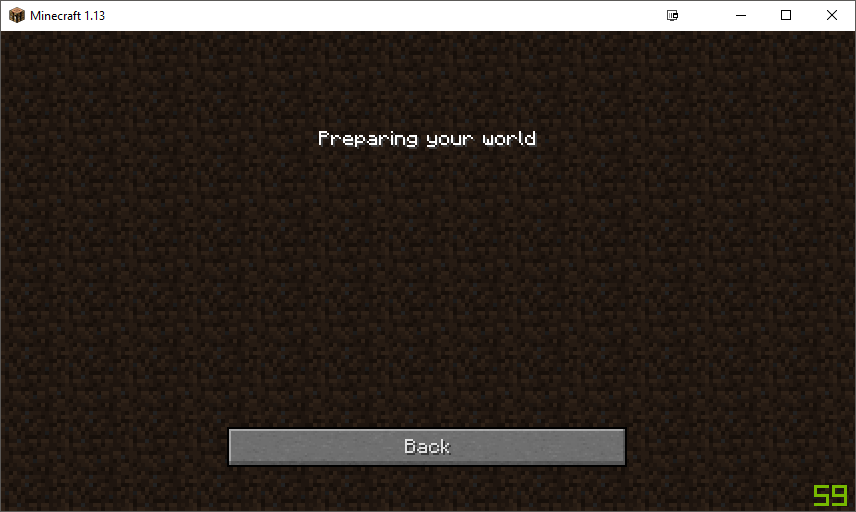
Gets stuck on Preparing your world... animation and never gets further.
Environment
Client Settings:
Minecraft 1.13, Java version 10.0.1
System settings:
OS: Windows 10 Pro
Processor: i7-4790K
GPU: GTX1070ti
Memory: 16 GiB
System type: 64-bit
Linked Issues


Created Issue:
Realms does not upload if datapack is present
Short description:
Uploading a single-player world with datapack causes realms uploader to dysfunction.Steps to reproduce:
- Step 1
Create a brand new world through the singeplayer menu and load the world by joining it.- Step 2
Enter the *\AppData\Roaming\.minecraft\saves[worldname]\datapacks
- Step 3
Unpack your datapack folder in my case this datapack.- Step 4
In the Realms menu click the wrench to configure realm.- Step 5
Select Reset realm, click on upload world select our newly created world [worldname] with the datapack unpacked.Expected result:
Prepares your world for uploading and then procedures to upload it to the realms server.Actual result:
Gets stuck on Preparing your world... animation and never gets further.
Client Settings:
Minecraft 1.13, Java version 10.0.1System settings: Windows 10 Pro
Environment
Client Settings:
Minecraft 1.13, Java version 10.0.1System settings: Windows 10 Pro
Attachments1
Short description:
Uploading a single-player world with datapack causes realms uploader to dysfunction.Steps to reproduce:
- Step 1
Create a brand new world through the singeplayer menu and load the world by joining it.- Step 2
Enter the *\AppData\Roaming\.minecraft\saves[worldname]\datapacks directory
- Step 3
Unpack your datapack folder in my case this datapack.- Step 4
In the Realms menu click the wrench to configure realm.- Step 5
Select Reset realm, click on upload world select our newly created world [worldname] with the datapack unpacked.Expected result:
Prepares your world for uploading and then procedures to upload it to the realms server.Actual result:
Gets stuck on Preparing your world... animation and never gets further.
Client Settings:
Minecraft 1.13, Java version 10.0.1System settings: Windows 10 Pro
Short description:
Uploading a single-player world with datapack causes realms uploader to dysfunction.Steps to reproduce:
- Step 1
Create a brand new world through the singeplayer menu and load the world by joining it.- Step 2
Enter the *\AppData\Roaming\.minecraft\saves[worldname]\datapacks directory
- Step 3
Unpack your datapack folder in my case this datapack.- Step 4
In the Realms menu click the wrench to configure realm.- Step 5
Select Reset realm, click on upload world select our newly created world [worldname] with the datapack unpacked.Expected result:
Prepares your world for uploading and then procedures to upload it to the realms server.Actual result:
Gets stuck on Preparing your world... animation and never gets further.
Client Settings:
Minecraft 1.13, Java version 10.0.1System settings: Windows 10 Pro
Short description:
Uploading a single-player world with datapack causes realms uploader to dysfunction.Steps to reproduce:
- Step 1
Create a brand new world through the singeplayer menu and load the world by joining it.- Step 2
Enter the *\AppData\Roaming\.minecraft\saves[worldname]\datapacks directory
- Step 3
Unpack your datapack folder in my case this datapack.- Step 4
In the Realms menu click the wrench to configure realm.- Step 5
Select Reset realm, click on upload world select our newly created world [worldname] with the datapack unpacked.Expected result:
Prepares your world for uploading and then procedures to upload it to the realms server.Actual result:
Gets stuck on Preparing your world... animation and never gets further.
Client Settings:
Minecraft 1.13, Java version 10.0.1System settings:
OS: Windows 10 Pro
**
Processor: i7-4790K
Memory: 16 GiB
System type: 64-bit
Client Settings:
Minecraft 1.13, Java version 10.0.1System settings:
OS: Windows 10 Pro
**
Processor: i7-4790K
Memory: 16 GiB
System type: 64-bitClient Settings:
Minecraft 1.13, Java version 10.0.1System settings:
OS: Windows 10 Pro
Processor: i7-4790K
GPU: GTX1070ti
Memory: 16 GiB
System type: 64-bit

Realms does not upload if datapack is present (File name too long)
duplicates
It this still an issue in 1.13 ? If so, does REALMS-1129 describe this issue?
Reading through the logs as the upload takes place leaves me with this error message:
<log4j:Message><![CDATA[[STDERR]: java.lang.RuntimeException: file name 'world/datapacks/bac_advancements/data/blazeandcave/advancements/adventure/the_great_blocky_reef.json' is too long ( > 100 bytes)]]></log4j:Message> </log4j:Event>
This leaves me to believe there is a build in restriction to file name lengths which is enforced on realms server and not on regular servers. I edited all the file names and it worked without problem.
Same data pack and error as
REALMS-1128