 Adam
Adam
- addgame
- addgame
- America/New_York
- Yes
- No
 MC-9391
![[Mojang] Nathan Adams](../../../data/assets/gravatar/dinnerbone.png)
 Low
Low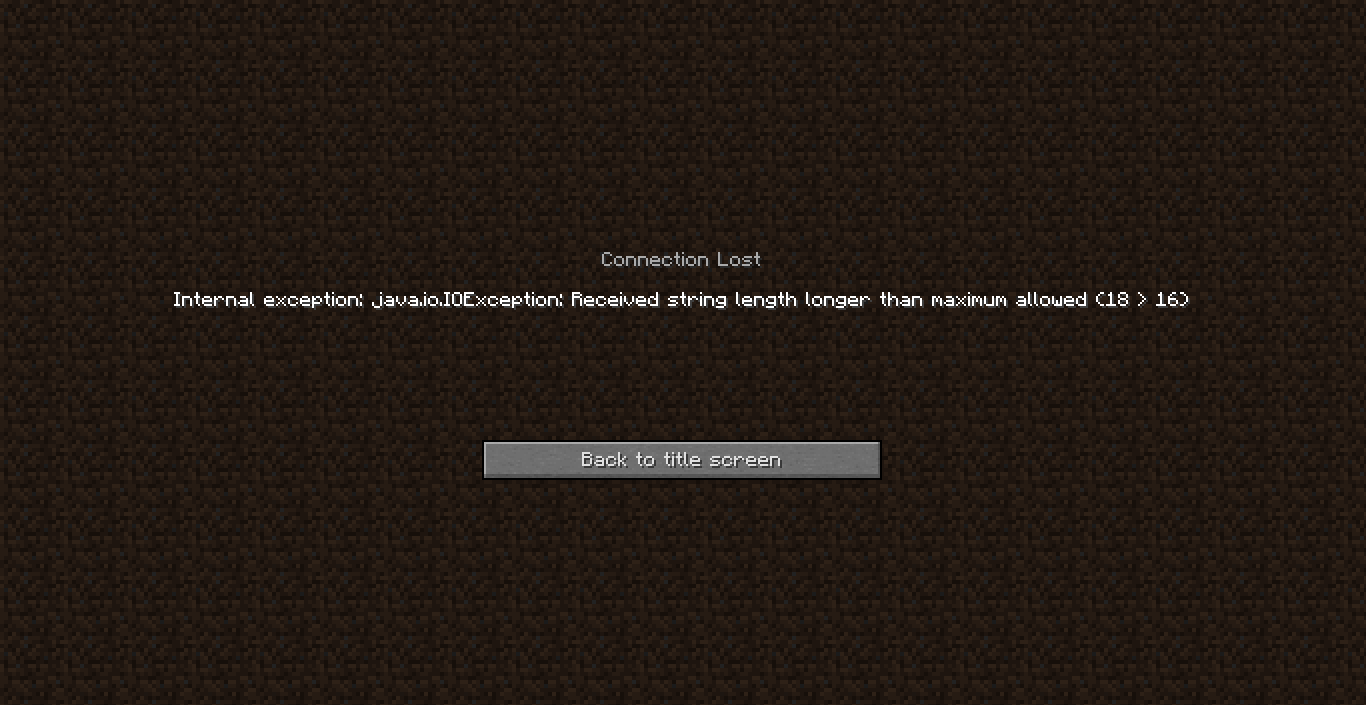



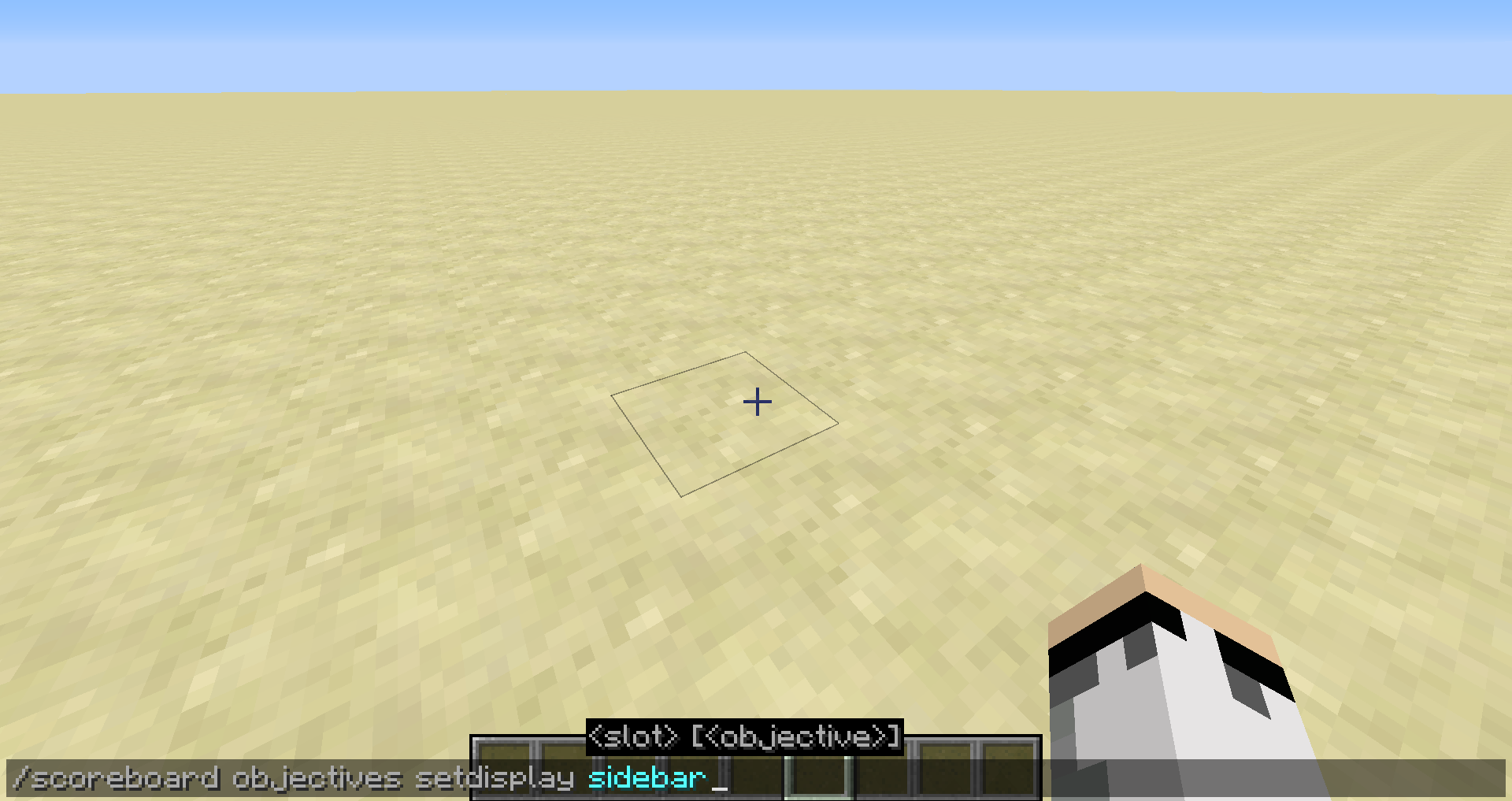

I created the team 'lobby' for a game I am making.
I typed in this command in a command block:
/scoreboard teams join lobby @p [-1103,52,450,2] (for some reason you can't see the brackets)
I expected this command to add a person who is at the coordinates -1103 52 450 and in a range of 2 to the team lobby.
I activated this command block and the server kicked everybody on it.
The screenshot attached shows what showed up on everybody's screen when we were kicked.
We then could not join and that screen kept on showing up every time we tried to join the server.
I looked in the server log and it added "@p [-1103,52,450,2] " to the team lobby.
I deleted the scoreboard.dat and we could join again.
I ran the command block again and the same thing happened.
I then tried with the command:
/scoreboard teams join lobby @p [-1103,52,450]
This time it added the person closest to those coordinates as I expected.
This seems to occur every time the @p and all its arguments total up to more than 16 characters and other then that, it works as intended.
I created the team 'lobby' for a game I am making.
I typed in this command in a command block:
/scoreboard teams join lobby @p[-1103,52,450,2]
I expected this command to add a person who is at the coordinates -1103 52 450 and in a range of 2 to the team lobby.
I activated this command block and the server kicked everybody on it.
The screenshot attached shows what showed up on everybody's screen when we were kicked.
We then could not join and that screen kept on showing up every time we tried to join the server.
I looked in the server log and it added "@p[-1103,52,450,2]" to the team lobby.
I deleted the scoreboard.dat and we could join again.
I ran the command block again and the same thing happened.
I then tried with the command:
/scoreboard teams join lobby @p[-1103,52,450]
This time it added the person closest to those coordinates as I expected.
This seems to occur every time the @p and all its arguments total up to more than 16 characters and other then that, it works as intended.
Ev
I created the team 'lobby' for a game I am making.
I typed in this command in a command block:
/scoreboard teams join lobby @p[-1103,52,450,2]
I expected this command to add a person who is at the coordinates -1103 52 450 and in a range of 2 to the team lobby.
I activated this command block and the server kicked everybody on it.
The screenshot attached shows what showed up on everybody's screen when we were kicked.
We then could not join and that screen kept on showing up every time we tried to join the server.
I looked in the server log and it added "@p[-1103,52,450,2]" to the team lobby.
I deleted the scoreboard.dat and we could join again.
I ran the command block again and the same thing happened.
I then tried with the command:
/scoreboard teams join lobby @p[-1103,52,450]
This time it added the person closest to those coordinates as I expected.
This seems to occur every time the @p and all its arguments total up to more than 16 characters and other then that, it works as intended.
Even using:
@p [x=-1103,y=52,z=450,r=2] does not work it only increases the number on the screen when we get kicked from 18 to 26.
I created the team 'lobby' for a game I am making.
I typed in this command in a command block:
/scoreboard teams join lobby @p[-1103,52,450,2]
I expected this command to add a person who is at the coordinates -1103 52 450 and in a range of 2 to the team lobby.
I activated this command block and the server kicked everybody on it.
The screenshot attached shows what showed up on everybody's screen when we were kicked.
We then could not join and that screen kept on showing up every time we tried to join the server.
I looked in the server log and it added "@p[-1103,52,450,2]" to the team lobby.
I deleted the scoreboard.dat and we could join again.
I ran the command block again and the same thing happened.
I then tried with the command:
/scoreboard teams join lobby @p[-1103,52,450]
This time it added the person closest to those coordinates as I expected.
This seems to occur every time the @p and all its arguments total up to more than 16 characters and other then that, it works as intended.
Even using:
@p [x=-1103,y=52,z=450,r=2] does not work it only increases the number on the screen when we get kicked from 18 to 26.I created the team 'lobby' for a game I am making.
I typed in this command in a command block:
/scoreboard teams join lobby @p[-1103,52,450,2]
I expected this command to add a person who is at the coordinates -1103 52 450 and in a range of 2 to the team lobby.
I activated this command block and the server kicked everybody on it.
The screenshot attached shows what showed up on everybody's screen when we were kicked.
We then could not join and that screen kept on showing up every time we tried to join the server.
I looked in the server log and it added "@p[-1103,52,450,2]" to the team lobby.
I deleted the scoreboard.dat and we could join again.
I ran the command block again and the same thing happened.
I then tried with the command:
/scoreboard teams join lobby @p[-1103,52,450]
This time it added the person closest to those coordinates as I expected.
This seems to occur every time the @p and all its arguments total up to more than 16 characters and other then that, it works as intended.
Even using:
@p[x=-1103,y=52,z=450,r=2] does not work it only increases the number on the screen when we get kicked from 18 to 26.
I created the team 'lobby' for a game I am making.
I typed in this command in a command block:
/scoreboard teams join lobby @p[-1103,52,450,2]
I expected this command to add a person who is at the coordinates -1103 52 450 and in a range of 2 to the team lobby.
I activated this command block and the server kicked everybody on it.
The screenshot attached shows what showed up on everybody's screen when we were kicked.
We then could not join and that screen kept on showing up every time we tried to join the server.
I looked in the server log and it added "@p[-1103,52,450,2]" to the team lobby.
I deleted the scoreboard.dat and we could join again.
I ran the command block again and the same thing happened.
I then tried with the command:
/scoreboard teams join lobby @p[-1103,52,450]
This time it added the person closest to those coordinates as I expected.
This seems to occur every time the @p and all its arguments total up to more than 16 characters and other then that, it works as intended.
Even using:
@p[x=-1103,y=52,z=450,r=2] does not work it only increases the number on the screen when we get kicked from 18 to 26.
The same happens with:
/scoreboard teams join lobby @a [c=1x=-1103,y=52,z=450,r=2]
I created the team 'lobby' for a game I am making.
I typed in this command in a command block:
/scoreboard teams join lobby @p[-1103,52,450,2]
I expected this command to add a person who is at the coordinates -1103 52 450 and in a range of 2 to the team lobby.
I activated this command block and the server kicked everybody on it.
The screenshot attached shows what showed up on everybody's screen when we were kicked.
We then could not join and that screen kept on showing up every time we tried to join the server.
I looked in the server log and it added "@p[-1103,52,450,2]" to the team lobby.
I deleted the scoreboard.dat and we could join again.
I ran the command block again and the same thing happened.
I then tried with the command:
/scoreboard teams join lobby @p[-1103,52,450]
This time it added the person closest to those coordinates as I expected.
This seems to occur every time the @p and all its arguments total up to more than 16 characters and other then that, it works as intended.
Even using:
@p[x=-1103,y=52,z=450,r=2] does not work it only increases the number on the screen when we get kicked from 18 to 26.
The same happens with:
/scoreboard teams join lobby @a [c=1x=-1103,y=52,z=450,r=2]I created the team 'lobby' for a game I am making.
I typed in this command in a command block:
/scoreboard teams join lobby @p[-1103,52,450,2]
I expected this command to add a person who is at the coordinates -1103 52 450 and in a range of 2 to the team lobby.
I activated this command block and the server kicked everybody on it.
The screenshot attached shows what showed up on everybody's screen when we were kicked.
We then could not join and that screen kept on showing up every time we tried to join the server.
I looked in the server log and it added "@p[-1103,52,450,2]" to the team lobby.
I deleted the scoreboard.dat and we could join again.
I ran the command block again and the same thing happened.
I then tried with the command:
/scoreboard teams join lobby @p[-1103,52,450]
This time it added the person closest to those coordinates as I expected.
This seems to occur every time the @p and all its arguments total up to more than 16 characters and other then that, it works as intended.
Even using:
@p[x=-1103,y=52,z=450,r=2] does not work it only increases the number on the screen when we get kicked from 18 to 26.
The same happens with:
/scoreboard teams join lobby @a[c=1x=-1103,y=52,z=450,r=2]
I created the team 'lobby' for a game I am making.
I typed in this command in a command block:
/scoreboard teams join lobby @p[-1103,52,450,2]
I expected this command to add a person who is at the coordinates -1103 52 450 and in a range of 2 to the team lobby.
I activated this command block and the server kicked everybody on it.
The screenshot attached shows what showed up on everybody's screen when we were kicked.
We then could not join and that screen kept on showing up every time we tried to join the server.
I looked in the server log and it added "@p[-1103,52,450,2]" to the team lobby.
I deleted the scoreboard.dat and we could join again.
I ran the command block again and the same thing happened.
I then tried with the command:
/scoreboard teams join lobby @p[-1103,52,450]
This time it added the person closest to those coordinates as I expected.
This seems to occur every time the @p and all its arguments total up to more than 16 characters and other then that, it works as intended.
Even using:
@p[x=-1103,y=52,z=450,r=2] does not work it only increases the number on the screen when we get kicked from 18 to 26.
The same happens with:
/scoreboard teams join lobby @a[c=1,x=-1103,y=52,z=450,r=2]
I created the team 'lobby' for a game I am making.
I typed in this command in a command block:
/scoreboard teams join lobby @p[-1103,52,450,2]
I expected this command to add a person who is at the coordinates -1103 52 450 and in a range of 2 to the team lobby.
I activated this command block and the server kicked everybody on it.
The screenshot attached shows what showed up on everybody's screen when we were kicked.
We then could not join and that screen kept on showing up every time we tried to join the server.
I looked in the server log and it added "@p[-1103,52,450,2]" to the team lobby.
I deleted the scoreboard.dat and we could join again.
I ran the command block again and the same thing happened.
I then tried with the command:
/scoreboard teams join lobby @p[-1103,52,450]
This time it added the person closest to those coordinates as I expected.
This seems to occur every time the @p and all its arguments total up to more than 16 characters and other then that, it works as intended.
Even using:
@p[x=-1103,y=52,z=450,r=2] does not work it only increases the number on the screen when we get kicked from 18 to 26.
The same happens with:
/scoreboard teams join lobby @a[c=1,x=-1103,y=52,z=450,r=2]
The command block does work when there is somebody at the specified location.
I created the team 'lobby' for a game I am making.
I typed in this command in a command block:
/scoreboard teams join lobby @p[-1103,52,450,2]
I expected this command to add a person who is at the coordinates -1103 52 450 and in a range of 2 to the team lobby.
I activated this command block and the server kicked everybody on it.
The screenshot attached shows what showed up on everybody's screen when we were kicked.
We then could not join and that screen kept on showing up every time we tried to join the server.
I looked in the server log and it added "@p[-1103,52,450,2]" to the team lobby.
I deleted the scoreboard.dat and we could join again.
I ran the command block again and the same thing happened.
I then tried with the command:
/scoreboard teams join lobby @p[-1103,52,450]
This time it added the person closest to those coordinates as I expected.
This seems to occur every time the @p and all its arguments total up to more than 16 characters and other then that, it works as intended.
Even using:
@p[x=-1103,y=52,z=450,r=2] does not work it only increases the number on the screen when we get kicked from 18 to 26.
The same happens with:
/scoreboard teams join lobby @a[c=1,x=-1103,y=52,z=450,r=2]
The command block does work when there is somebody at the specified location.I created the team 'lobby' for a game I am making.
I typed in this command in a command block:
/scoreboard teams join lobby @p[-1103,52,450,2]
I expected this command to add a person who is at the coordinates -1103 52 450 and in a range of 2 to the team lobby.
I activated this command block and the server kicked everybody on it.
The screenshot attached shows what showed up on everybody's screen when we were kicked.
We then could not join and that screen kept on showing up every time we tried to join the server.
I looked in the server log and it added "@p[-1103,52,450,2]" to the team lobby.
I deleted the scoreboard.dat and we could join again.
I ran the command block again and the same thing happened.
I then tried with the command:
/scoreboard teams join lobby @p[-1103,52,450]
This time it added the person closest to those coordinates as I expected.
This seems to occur every time the @p and all its arguments total up to more than 16 characters and there is no person at the specified location and other then that, it works as intended.
Even using:
@p[x=-1103,y=52,z=450,r=2] does not work it only increases the number on the screen when we get kicked from 18 to 26.
The same happens with:
/scoreboard teams join lobby @a[c=1,x=-1103,y=52,z=450,r=2]
2017-11-15_12.33.31.png
When attempting to use item tags in advancements
in a data pack (suchas trying to detect picking up any type of sapling), the game gives an error to the client that tried to load the data pack (as shown in the image) but the server logs contain no such error and stops loadingdata packs (including vanilla) as shown below.Only vanilla currently loaded:
16.05 14:27:53 [Server] INFO [14:27:53] [Server thread/INFO]: [Addgame: Reloading!]
16.05 14:27:53 [Server] INFO [14:27:53] [Server thread/INFO]: Reloading ResourceManager: Default
16.05 14:27:53 [Server] INFO [14:27:53] [Server thread/INFO]: Loaded 523 recipes
16.05 14:27:53 [Server] INFO [14:27:53] [Server thread/INFO]: Loaded 570 advancementsAbove is the expected result.
16.05 14:28:05 [Server] INFO [14:28:05] [Server thread/INFO]: [Addgame: Enabled data pack [file/ioe]]
16.05 14:28:05 [Server] INFO [14:28:05] [Server thread/INFO]: Reloading ResourceManager: Default, ioe
16.05 14:28:05 [Server] INFO [14:28:05] [Server thread/INFO]: Loaded 523 recipes
16.05 14:28:05 [Server] INFO [14:28:05] [Server thread/INFO]: Loaded 17 custom command functionsAbove is after enabling the data pack. It stops loading data without an error message and does not load any advancements.
16.05 14:28:14 [Server] INFO [14:28:14] [Server thread/INFO]: [Addgame: Disabled data pack [file/ioe]]
16.05 14:28:14 [Server] INFO [14:28:14] [Server thread/INFO]: Reloading ResourceManager: Default
16.05 14:28:14 [Server] INFO [14:28:14] [Server thread/INFO]: Loaded 523 recipes
16.05 14:28:14 [Server] INFO [14:28:14] [Server thread/INFO]: Loaded 570 advancementsOnce again the expected result is given after disabling the data pack.
This error means no advancements at all get loaded (including vanilla ones).
The file that causes this error has been attached. No other custom advancements are in the data pack.
If the "#" sign is removed from in front of "minecraft:saplings", the game will correctly give an error that "minecraft:saplings" is not an item but still load all other advancements.
When attempting to use item tags in data pack advancements by prefixing "#" before an item name (which is the incorrect way to reference tags), the game gives a vague and uncertain error to the client that tried to load the data pack (as shown in the image) but the server logs contain no such error and the server stops loading all advancements (including vanilla and other data packs) as shown below.
Only vanilla currently loaded:
16.05 14:27:53 [Server] INFO [14:27:53] [Server thread/INFO]: [Addgame: Reloading!]
16.05 14:27:53 [Server] INFO [14:27:53] [Server thread/INFO]: Reloading ResourceManager: Default
16.05 14:27:53 [Server] INFO [14:27:53] [Server thread/INFO]: Loaded 523 recipes
16.05 14:27:53 [Server] INFO [14:27:53] [Server thread/INFO]: Loaded 570 advancementsAbove is the expected result.
16.05 14:28:05 [Server] INFO [14:28:05] [Server thread/INFO]: [Addgame: Enabled data pack [file/ioe]]
16.05 14:28:05 [Server] INFO [14:28:05] [Server thread/INFO]: Reloading ResourceManager: Default, ioe
16.05 14:28:05 [Server] INFO [14:28:05] [Server thread/INFO]: Loaded 523 recipes
16.05 14:28:05 [Server] INFO [14:28:05] [Server thread/INFO]: Loaded 17 custom command functionsAbove is after enabling the data pack. It stops loading data without an error message and does not load any advancements.
16.05 14:28:14 [Server] INFO [14:28:14] [Server thread/INFO]: [Addgame: Disabled data pack [file/ioe]]
16.05 14:28:14 [Server] INFO [14:28:14] [Server thread/INFO]: Reloading ResourceManager: Default
16.05 14:28:14 [Server] INFO [14:28:14] [Server thread/INFO]: Loaded 523 recipes
16.05 14:28:14 [Server] INFO [14:28:14] [Server thread/INFO]: Loaded 570 advancementsOnce again the expected result is given after disabling the data pack.
This error means no advancements at all get loaded (including vanilla ones).
The file that causes this error has been attached. No other custom advancements are in the data pack.
If the "#" sign is removed from in front of "minecraft:saplings", the game will correctly give an error that "minecraft:saplings" is not an item but still load all other advancements. This given and logged error should also be applied to the version with the "#" prefix.
Attempting to Use Item Tags in One Advancement Stops All Advancements From LoadingNon [a-z0-9_.-] Character in One Advancement Cause
Non [a-z0-9_.-]Character inOneAdvancementCauseNon [a-z0-9_.-] character in one advancement causes ALL advancements to not load
When attempting to use item tags in data pack advancements by prefixing "#" before an item name (which is the incorrect way to reference tags), the game gives a vague and uncertain error to the client that tried to load the data pack (as shown in the image) but the server logs contain no such error and the server stops loading all advancements (including vanilla and other data packs) as shown below.
Only vanilla currently loaded:
16.05 14:27:53 [Server] INFO [14:27:53] [Server thread/INFO]: [Addgame: Reloading!]
16.05 14:27:53 [Server] INFO [14:27:53] [Server thread/INFO]: Reloading ResourceManager: Default
16.05 14:27:53 [Server] INFO [14:27:53] [Server thread/INFO]: Loaded 523 recipes
16.05 14:27:53 [Server] INFO [14:27:53] [Server thread/INFO]: Loaded 570 advancementsAbove is the expected result.
16.05 14:28:05 [Server] INFO [14:28:05] [Server thread/INFO]: [Addgame: Enabled data pack [file/ioe]]
16.05 14:28:05 [Server] INFO [14:28:05] [Server thread/INFO]: Reloading ResourceManager: Default, ioe
16.05 14:28:05 [Server] INFO [14:28:05] [Server thread/INFO]: Loaded 523 recipes
16.05 14:28:05 [Server] INFO [14:28:05] [Server thread/INFO]: Loaded 17 custom command functionsAbove is after enabling the data pack. It stops loading data without an error message and does not load any advancements.
16.05 14:28:14 [Server] INFO [14:28:14] [Server thread/INFO]: [Addgame: Disabled data pack [file/ioe]]
16.05 14:28:14 [Server] INFO [14:28:14] [Server thread/INFO]: Reloading ResourceManager: Default
16.05 14:28:14 [Server] INFO [14:28:14] [Server thread/INFO]: Loaded 523 recipes
16.05 14:28:14 [Server] INFO [14:28:14] [Server thread/INFO]: Loaded 570 advancementsOnce again the expected result is given after disabling the data pack.
This error means no advancements at all get loaded (including vanilla ones).
The file that causes this error has been attached. No other custom advancements are in the data pack.
If the "#" sign is removed from in front of "minecraft:saplings", the game will correctly give an error that "minecraft:saplings" is not an item but still load all other advancements. This given and logged error should also be applied to the version with the "#" prefix.
When attempting to use any Non [a-z0-9_.-] character in any singular advancement causes all advancements to not load (even advancements from ALL other datapacks). If a world is attempted to be opened with one such advancement, the server will crash and give an error. Otherwise, just reloading the server after adding the error-causing advancement gives no helpful error message to either the client or server.
Only vanilla currently loaded:
16.05 14:27:53 [Server] INFO [14:27:53] [Server thread/INFO]: [Addgame: Reloading!]
16.05 14:27:53 [Server] INFO [14:27:53] [Server thread/INFO]: Reloading ResourceManager: Default
16.05 14:27:53 [Server] INFO [14:27:53] [Server thread/INFO]: Loaded 523 recipes
16.05 14:27:53 [Server] INFO [14:27:53] [Server thread/INFO]: Loaded 570 advancementsAbove is the expected result.
16.05 14:28:05 [Server] INFO [14:28:05] [Server thread/INFO]: [Addgame: Enabled data pack [file/ioe]]
16.05 14:28:05 [Server] INFO [14:28:05] [Server thread/INFO]: Reloading ResourceManager: Default, ioe
16.05 14:28:05 [Server] INFO [14:28:05] [Server thread/INFO]: Loaded 523 recipes
16.05 14:28:05 [Server] INFO [14:28:05] [Server thread/INFO]: Loaded 17 custom command functionsAbove is after enabling the data pack. It stops loading data without an error message and does not load any advancements.
16.05 14:28:14 [Server] INFO [14:28:14] [Server thread/INFO]: [Addgame: Disabled data pack [file/ioe]]
16.05 14:28:14 [Server] INFO [14:28:14] [Server thread/INFO]: Reloading ResourceManager: Default
16.05 14:28:14 [Server] INFO [14:28:14] [Server thread/INFO]: Loaded 523 recipes
16.05 14:28:14 [Server] INFO [14:28:14] [Server thread/INFO]: Loaded 570 advancementsOnce again the expected result is given after disabling the data pack.
This error means no advancements at all get loaded (including vanilla ones).
The file that causes this error has been attached. No other custom advancements are in the data pack.
If the "#" sign is removed from in front of "minecraft:saplings", the game will correctly give an error that "minecraft:saplings" is not an item but still load all other advancements. This given and logged error should also be applied to the version with the "#" prefix.
When attempting to use any Non [a-z0-9_.-] character in any singular advancement causes all advancements to not load (even advancements from ALL other datapacks). If a world is attempted to be opened with one such advancement, the server will crash and give an error. Otherwise, just reloading the server after adding the error-causing advancement gives no helpful error message to either the client or server.
Only vanilla currently loaded:
16.05 14:27:53 [Server] INFO [14:27:53] [Server thread/INFO]: [Addgame: Reloading!]
16.05 14:27:53 [Server] INFO [14:27:53] [Server thread/INFO]: Reloading ResourceManager: Default
16.05 14:27:53 [Server] INFO [14:27:53] [Server thread/INFO]: Loaded 523 recipes
16.05 14:27:53 [Server] INFO [14:27:53] [Server thread/INFO]: Loaded 570 advancementsAbove is the expected result.
16.05 14:28:05 [Server] INFO [14:28:05] [Server thread/INFO]: [Addgame: Enabled data pack [file/ioe]]
16.05 14:28:05 [Server] INFO [14:28:05] [Server thread/INFO]: Reloading ResourceManager: Default, ioe
16.05 14:28:05 [Server] INFO [14:28:05] [Server thread/INFO]: Loaded 523 recipes
16.05 14:28:05 [Server] INFO [14:28:05] [Server thread/INFO]: Loaded 17 custom command functionsAbove is after enabling the data pack. It stops loading data without an error message and does not load any advancements.
16.05 14:28:14 [Server] INFO [14:28:14] [Server thread/INFO]: [Addgame: Disabled data pack [file/ioe]]
16.05 14:28:14 [Server] INFO [14:28:14] [Server thread/INFO]: Reloading ResourceManager: Default
16.05 14:28:14 [Server] INFO [14:28:14] [Server thread/INFO]: Loaded 523 recipes
16.05 14:28:14 [Server] INFO [14:28:14] [Server thread/INFO]: Loaded 570 advancementsOnce again the expected result is given after disabling the data pack.
This error means no advancements at all get loaded (including vanilla ones).The file that causes this error has been attached. No other custom advancements are in the data pack.
If the "#" sign is removed from in front of "minecraft:saplings", the game will correctly give an error that "minecraft:saplings" is not an item but still load all other advancements. This given and logged error should also be applied to the version with the "#" prefix.When attempting to use any Non [a-z0-9_.-] character in any singular advancement causes all advancements to not load (even advancements from ALL other datapacks). If a world is attempted to be opened with one such advancement, the server will crash and give an error. Otherwise, just reloading the server after adding the error-causing advancement gives no helpful error message to either the client or server.
The below text and image demonstrate the lack of error message and also the fact that no advancements at all load (as indicated by server logs).
Only vanilla currently loaded:
16.05 14:27:53 [Server] INFO [14:27:53] [Server thread/INFO]: [Addgame: Reloading!]
16.05 14:27:53 [Server] INFO [14:27:53] [Server thread/INFO]: Reloading ResourceManager: Default
16.05 14:27:53 [Server] INFO [14:27:53] [Server thread/INFO]: Loaded 523 recipes
16.05 14:27:53 [Server] INFO [14:27:53] [Server thread/INFO]: Loaded 570 advancementsAbove is the expected result.
16.05 14:28:05 [Server] INFO [14:28:05] [Server thread/INFO]: [Addgame: Enabled data pack [file/ioe]]
16.05 14:28:05 [Server] INFO [14:28:05] [Server thread/INFO]: Reloading ResourceManager: Default, ioe
16.05 14:28:05 [Server] INFO [14:28:05] [Server thread/INFO]: Loaded 523 recipes
16.05 14:28:05 [Server] INFO [14:28:05] [Server thread/INFO]: Loaded 17 custom command functionsAbove is after enabling the data pack. It stops loading data without an error message and does not load any advancements.
16.05 14:28:14 [Server] INFO [14:28:14] [Server thread/INFO]: [Addgame: Disabled data pack [file/ioe]]
16.05 14:28:14 [Server] INFO [14:28:14] [Server thread/INFO]: Reloading ResourceManager: Default
16.05 14:28:14 [Server] INFO [14:28:14] [Server thread/INFO]: Loaded 523 recipes
16.05 14:28:14 [Server] INFO [14:28:14] [Server thread/INFO]: Loaded 570 advancementsOnce again the expected result is given after disabling the data pack.
The file that causes this error has been attached. No other custom advancements are in the data pack.
For this specific case, if the "#" sign is removed from in front of "minecraft:saplings", the game will correctly give an error that "minecraft:saplings" is not an item but still load all other advancements. This given and logged error should also be applied to the version with the "#" prefix.
Non [a-z0-9_.-] character anywhere in one advancement causes ALL advancements to not load
When attempting to use any Non [a-z0-9_.-] character anywhere in any singular advancement (including in the title or description) causes all advancements to not load (even advancements from ALL other datapacks). If a world is attempted to be opened with one such advancement, the server will crash and give an error. Otherwise, just reloading the server after adding the error-causing advancement gives no helpful error message to either the client or server.
The below text and image demonstrate the lack of error message and also the fact that no advancements at all load (as indicated by server logs).
Only vanilla currently loaded:
16.05 14:27:53 [Server] INFO [14:27:53] [Server thread/INFO]: [Addgame: Reloading!]
16.05 14:27:53 [Server] INFO [14:27:53] [Server thread/INFO]: Reloading ResourceManager: Default
16.05 14:27:53 [Server] INFO [14:27:53] [Server thread/INFO]: Loaded 523 recipes
16.05 14:27:53 [Server] INFO [14:27:53] [Server thread/INFO]: Loaded 570 advancementsAbove is the expected result.
16.05 14:28:05 [Server] INFO [14:28:05] [Server thread/INFO]: [Addgame: Enabled data pack [file/ioe]]
16.05 14:28:05 [Server] INFO [14:28:05] [Server thread/INFO]: Reloading ResourceManager: Default, ioe
16.05 14:28:05 [Server] INFO [14:28:05] [Server thread/INFO]: Loaded 523 recipes
16.05 14:28:05 [Server] INFO [14:28:05] [Server thread/INFO]: Loaded 17 custom command functionsAbove is after enabling the data pack. It stops loading data without an error message and does not load any advancements.
16.05 14:28:14 [Server] INFO [14:28:14] [Server thread/INFO]: [Addgame: Disabled data pack [file/ioe]]
16.05 14:28:14 [Server] INFO [14:28:14] [Server thread/INFO]: Reloading ResourceManager: Default
16.05 14:28:14 [Server] INFO [14:28:14] [Server thread/INFO]: Loaded 523 recipes
16.05 14:28:14 [Server] INFO [14:28:14] [Server thread/INFO]: Loaded 570 advancementsOnce again the expected result is given after disabling the data pack.
The file that causes this error has been attached. No other custom advancements are in the data pack.
For this specific case, if the "#" sign is removed from in front of "minecraft:saplings", the game will correctly give an error that "minecraft:saplings" is not an item but still load all other advancements. This given and logged error should also be applied to the version with the "#" prefix.
When attempting to use any Non [a-z0-9_.-] character anywhere in any singular advancement (including in the title or description) causes all advancements to not load (even advancements from ALL other datapacks). If a world is attempted to be opened with one such advancement, the server will crash and give an error. Otherwise, just reloading the server after adding the error-causing advancement gives no helpful error message to either the client or server.
The below text and image demonstrate the lack of error message and also the fact that no advancements at all load (as indicated by server logs).
Only vanilla currently loaded:
16.05 14:27:53 [Server] INFO [14:27:53] [Server thread/INFO]: [Addgame: Reloading!]
16.05 14:27:53 [Server] INFO [14:27:53] [Server thread/INFO]: Reloading ResourceManager: Default
16.05 14:27:53 [Server] INFO [14:27:53] [Server thread/INFO]: Loaded 523 recipes
16.05 14:27:53 [Server] INFO [14:27:53] [Server thread/INFO]: Loaded 570 advancementsAbove is the expected result.
16.05 14:28:05 [Server] INFO [14:28:05] [Server thread/INFO]: [Addgame: Enabled data pack [file/ioe]]
16.05 14:28:05 [Server] INFO [14:28:05] [Server thread/INFO]: Reloading ResourceManager: Default, ioe
16.05 14:28:05 [Server] INFO [14:28:05] [Server thread/INFO]: Loaded 523 recipes
16.05 14:28:05 [Server] INFO [14:28:05] [Server thread/INFO]: Loaded 17 custom command functionsAbove is after enabling the data pack. It stops loading data without an error message and does not load any advancements.
16.05 14:28:14 [Server] INFO [14:28:14] [Server thread/INFO]: [Addgame: Disabled data pack [file/ioe]]
16.05 14:28:14 [Server] INFO [14:28:14] [Server thread/INFO]: Reloading ResourceManager: Default
16.05 14:28:14 [Server] INFO [14:28:14] [Server thread/INFO]: Loaded 523 recipes
16.05 14:28:14 [Server] INFO [14:28:14] [Server thread/INFO]: Loaded 570 advancementsOnce again the expected result is given after disabling the data pack.
The file that causes this error has been attached. No other custom advancements are in the data pack.
For this specific case, if the "#" sign is removed from in front of "minecraft:saplings", the game will correctly give an error that "minecraft:saplings" is not an item but still load all other advancements. This given and logged error should also be applied to the version with the "#" prefix.When attempting to use any Non [a-z0-9_.-] character anywhere in any singular advancement (including in the title or description) causes all advancements to not load (even advancements from ALL other datapacks). If a world is attempted to be opened with one such advancement, the server will crash and give an error. Otherwise, just reloading the server after adding the error-causing advancement gives no helpful error message to either the client or server.
The below text and image demonstrate the lack of error message and also the fact that no advancements at all load (as indicated by server logs).
Only vanilla currently loaded:
16.05 14:27:53 [Server] INFO [14:27:53] [Server thread/INFO]: [Addgame: Reloading!]
16.05 14:27:53 [Server] INFO [14:27:53] [Server thread/INFO]: Reloading ResourceManager: Default
16.05 14:27:53 [Server] INFO [14:27:53] [Server thread/INFO]: Loaded 523 recipes
16.05 14:27:53 [Server] INFO [14:27:53] [Server thread/INFO]: Loaded 570 advancementsAbove is the expected result.
16.05 14:28:05 [Server] INFO [14:28:05] [Server thread/INFO]: [Addgame: Enabled data pack [file/ioe]]
16.05 14:28:05 [Server] INFO [14:28:05] [Server thread/INFO]: Reloading ResourceManager: Default, ioe
16.05 14:28:05 [Server] INFO [14:28:05] [Server thread/INFO]: Loaded 523 recipes
16.05 14:28:05 [Server] INFO [14:28:05] [Server thread/INFO]: Loaded 17 custom command functionsAbove is after enabling the data pack. It stops loading data without an error message and does not load any advancements.
16.05 14:28:14 [Server] INFO [14:28:14] [Server thread/INFO]: [Addgame: Disabled data pack [file/ioe]]
16.05 14:28:14 [Server] INFO [14:28:14] [Server thread/INFO]: Reloading ResourceManager: Default
16.05 14:28:14 [Server] INFO [14:28:14] [Server thread/INFO]: Loaded 523 recipes
16.05 14:28:14 [Server] INFO [14:28:14] [Server thread/INFO]: Loaded 570 advancementsOnce again the expected result is given after disabling the data pack.
The file that causes this error has been attached. No other custom advancements are in the data pack.
Using one of the attached root files (the one with #minecraft:saplings), if the "#" sign is removed from in front of "minecraft:saplings", the game will correctly give an error that "minecraft:saplings" is not an item but still load all other advancements. This given and logged error should also be applied to the version with the "#" prefix.
The other attached file demonstrates that an advancement with "#" in the description causes the same error.
NOTE: As of 1.13-pre8 this error no longer occurs if the Non [a-z0-9_.-] character is in either the title or description.When attempting to use any Non [a-z0-9_.-] character anywhere in any singular advancement (including in the title or description) causes all advancements to not load (even advancements from ALL other datapacks). If a world is attempted to be opened with one such advancement, the server will crash and give an error. Otherwise, just reloading the server after adding the error-causing advancement gives no helpful error message to either the client or server.
The below text and image demonstrate the lack of error message and also the fact that no advancements at all load (as indicated by server logs).
Only vanilla currently loaded:
16.05 14:27:53 [Server] INFO [14:27:53] [Server thread/INFO]: [Addgame: Reloading!]
16.05 14:27:53 [Server] INFO [14:27:53] [Server thread/INFO]: Reloading ResourceManager: Default
16.05 14:27:53 [Server] INFO [14:27:53] [Server thread/INFO]: Loaded 523 recipes
16.05 14:27:53 [Server] INFO [14:27:53] [Server thread/INFO]: Loaded 570 advancementsAbove is the expected result.
16.05 14:28:05 [Server] INFO [14:28:05] [Server thread/INFO]: [Addgame: Enabled data pack [file/ioe]]
16.05 14:28:05 [Server] INFO [14:28:05] [Server thread/INFO]: Reloading ResourceManager: Default, ioe
16.05 14:28:05 [Server] INFO [14:28:05] [Server thread/INFO]: Loaded 523 recipes
16.05 14:28:05 [Server] INFO [14:28:05] [Server thread/INFO]: Loaded 17 custom command functionsAbove is after enabling the data pack. It stops loading data without an error message and does not load any advancements.
16.05 14:28:14 [Server] INFO [14:28:14] [Server thread/INFO]: [Addgame: Disabled data pack [file/ioe]]
16.05 14:28:14 [Server] INFO [14:28:14] [Server thread/INFO]: Reloading ResourceManager: Default
16.05 14:28:14 [Server] INFO [14:28:14] [Server thread/INFO]: Loaded 523 recipes
16.05 14:28:14 [Server] INFO [14:28:14] [Server thread/INFO]: Loaded 570 advancementsOnce again the expected result is given after disabling the data pack.
The file that causes this error has been attached. No other custom advancements are in the data pack.
Using one of the attached root files (the one with #minecraft:saplings), if the "#" sign is removed from in front of "minecraft:saplings", the game will correctly give an error that "minecraft:saplings" is not an item but still load all other advancements. This given and logged error should also be applied to the version with the "#" prefix.
The other attached file demonstrates that an advancement with "#" in the description causes the same error.
NOTE: As of 1.13-pre8 this error no longer occurs if the Non [a-z0-9_.-] character is in either the title or description.When attempting to use any Non [a-z0-9_.-] character
anywhere in any singular advancement (including in the title or description)causesalladvancements to not load (even advancements fromALLother datapacks).If a world is attempted to be opened with one such advancement, the server will crash and give an error. Otherwise, just reloading the server after adding the error-causing advancement gives no helpful error message to either the client or server.The below text
and image demonstrate the lack of error message and alsothe fact that no advancements at all load(as indicated by server logs).
Only vanillacurrentlyloaded:16.05 14:27:53 [Server] INFO [14:27:53] [Server thread/INFO]: [Addgame: Reloading!]
16.05 14:27:53 [Server] INFO [14:27:53] [Server thread/INFO]: Reloading ResourceManager: Default
16.05 14:27:53 [Server] INFO [14:27:53] [Server thread/INFO]: Loaded 523 recipes
16.05 14:27:53 [Server] INFO [14:27:53] [Server thread/INFO]: Loaded 570 advancementsAbove is the expected result.
16.05 14:28:05 [Server] INFO [14:28:05] [Server thread/INFO]: [Addgame: Enabled data pack [file/ioe]]
16.05 14:28:05 [Server] INFO [14:28:05] [Server thread/INFO]: Reloading ResourceManager: Default, ioe
16.05 14:28:05 [Server] INFO [14:28:05] [Server thread/INFO]: Loaded 523 recipes
16.05 14:28:05 [Server] INFO [14:28:05] [Server thread/INFO]: Loaded 17 custom command functionsAbove is after enabling the data pack. It stops loading data without an error message and does not load any advancements.
16.05 14:28:14 [Server] INFO [14:28:14] [Server thread/INFO]: [Addgame: Disabled data pack [file/ioe]]
16.05 14:28:14 [Server] INFO [14:28:14] [Server thread/INFO]: Reloading ResourceManager: Default
16.05 14:28:14 [Server] INFO [14:28:14] [Server thread/INFO]: Loaded 523 recipes
16.05 14:28:14 [Server] INFO [14:28:14] [Server thread/INFO]: Loaded 570 advancementsOnce again the expected result is given after disabling the data pack.
The file that causes this error has been attached. No other custom advancements are in the data pack.
Using one of the attached root files (the one with #minecraft:saplings), if the "#" sign is removed from in front of "minecraft:saplings", the game will correctly give an error that "minecraft:saplings" is not an item but still load all other advancements. This given and logged error should also be applied to the version with the "#" prefix.
The other attached file demonstrates that an advancement with "#"in the description causes the same error.When attempting to use any Non [a-z0-9_.-] character in any of many places for a singular advancement causes ALL advancements to not load (even all advancements from all other datapacks). Additionally there is never any error message indicating that something went wrong on either the client or server. An example root advancement that causes this issue has been attached.
(Note: before 19w11a you could get an error message to appear if you loaded a world that had such an advancement loaded - the server would crash and the game output would tell you what went wrong — the attached image and crash report show how the game responded before 19w11a)The below text from the server log demonstrates the fact that no advancements at all load.
Beginning with only vanilla loaded:
16.05 14:27:53 [Server] INFO [14:27:53] [Server thread/INFO]: [Addgame: Reloading!]
16.05 14:27:53 [Server] INFO [14:27:53] [Server thread/INFO]: Reloading ResourceManager: Default
16.05 14:27:53 [Server] INFO [14:27:53] [Server thread/INFO]: Loaded 523 recipes
16.05 14:27:53 [Server] INFO [14:27:53] [Server thread/INFO]: Loaded 570 advancementsAbove is the expected result. Note the number of advancements loaded appears.
16.05 14:28:05 [Server] INFO [14:28:05] [Server thread/INFO]: [Addgame: Enabled data pack [file/ioe]]
16.05 14:28:05 [Server] INFO [14:28:05] [Server thread/INFO]: Reloading ResourceManager: Default, ioe
16.05 14:28:05 [Server] INFO [14:28:05] [Server thread/INFO]: Loaded 523 recipes
16.05 14:28:05 [Server] INFO [14:28:05] [Server thread/INFO]: Loaded 17 custom command functionsAbove is after enabling the data pack with the attached advancement. It stops loading data without an error message and does not load any advancements (as can be seen by the lack of message saying how many advancement were loaded).
16.05 14:28:14 [Server] INFO [14:28:14] [Server thread/INFO]: [Addgame: Disabled data pack [file/ioe]]
16.05 14:28:14 [Server] INFO [14:28:14] [Server thread/INFO]: Reloading ResourceManager: Default
16.05 14:28:14 [Server] INFO [14:28:14] [Server thread/INFO]: Loaded 523 recipes
16.05 14:28:14 [Server] INFO [14:28:14] [Server thread/INFO]: Loaded 570 advancementsOnce again the expected result is given after disabling the data pack.
Non [a-z0-9_.-] characteranywherein one advancement causes ALL advancements to not loadNon [a-z0-9_.-] character in one advancement causes ALL advancements to not load with no error message
When attempting to use any Non [a-z0-9_.-] character in any of many places for a singular advancement causes ALL advancements to not load (even all advancements from all other datapacks). Additionally there is never any error message indicating that something went wrong on either the client or server. An example root advancement that causes this issue has been attached.
(Note: before 19w11a you could get an error message to appear if you loaded a world that had such an advancement loaded - the server would crash and the game output would tell you what went wrong — the attached image and crash report show how the game responded before 19w11a)If the Non [a-z0-9_.-] character appears in one of these then the error occurs (not necessarily an exhaustive list):
- Trigger values
- Item names (in both icon and criteria)
- Background value
- Reward function names
The below text from the server log demonstrates the fact that no advancements at all load.
Beginning with only vanilla loaded:
16.05 14:27:53 [Server] INFO [14:27:53] [Server thread/INFO]: [Addgame: Reloading!]
16.05 14:27:53 [Server] INFO [14:27:53] [Server thread/INFO]: Reloading ResourceManager: Default
16.05 14:27:53 [Server] INFO [14:27:53] [Server thread/INFO]: Loaded 523 recipes
16.05 14:27:53 [Server] INFO [14:27:53] [Server thread/INFO]: Loaded 570 advancementsAbove is the expected result. Note the number of advancements loaded appears.
16.05 14:28:05 [Server] INFO [14:28:05] [Server thread/INFO]: [Addgame: Enabled data pack [file/ioe]]
16.05 14:28:05 [Server] INFO [14:28:05] [Server thread/INFO]: Reloading ResourceManager: Default, ioe
16.05 14:28:05 [Server] INFO [14:28:05] [Server thread/INFO]: Loaded 523 recipes
16.05 14:28:05 [Server] INFO [14:28:05] [Server thread/INFO]: Loaded 17 custom command functionsAbove is after enabling the data pack with the attached advancement. It stops loading data without an error message and does not load any advancements (as can be seen by the lack of message saying how many advancement were loaded).
16.05 14:28:14 [Server] INFO [14:28:14] [Server thread/INFO]: [Addgame: Disabled data pack [file/ioe]]
16.05 14:28:14 [Server] INFO [14:28:14] [Server thread/INFO]: Reloading ResourceManager: Default
16.05 14:28:14 [Server] INFO [14:28:14] [Server thread/INFO]: Loaded 523 recipes
16.05 14:28:14 [Server] INFO [14:28:14] [Server thread/INFO]: Loaded 570 advancementsOnce again the expected result is given after disabling the data pack.
When attempting to use any Non [a-z0-9_.-] character in any of many places for a singular advancement causes ALL advancements to not load (even all advancements from all other datapacks). Additionally there is never any error message indicating that something went wrong on either the client or server. An example root advancement that causes this issue has been attached.
(Note: before 19w11a you could get an error message to appear if you loaded a world that had such an advancement loaded - the server would crash and the game output would tell you what went wrong — the attached image and crash report show how the game responded before 19w11a)If the Non [a-z0-9_.-] character appears in one of these then the error occurs (not necessarily an exhaustive list):
- Trigger values
- Item names (in both icon and criteria)
- Background value
- Reward function names
The below text from the server log demonstrates the fact that no advancements at all load.Beginning with only vanilla loaded:
16.05 14:27:53 [Server] INFO [14:27:53] [Server thread/INFO]: [Addgame: Reloading!]
16.05 14:27:53 [Server] INFO [14:27:53] [Server thread/INFO]: Reloading ResourceManager: Default
16.05 14:27:53 [Server] INFO [14:27:53] [Server thread/INFO]: Loaded 523 recipes
16.05 14:27:53 [Server] INFO [14:27:53] [Server thread/INFO]: Loaded 570 advancementsAbove is the expected result. Note the number of advancements loaded appears.
16.05 14:28:05 [Server] INFO [14:28:05] [Server thread/INFO]: [Addgame: Enabled data pack [file/ioe]]
16.05 14:28:05 [Server] INFO [14:28:05] [Server thread/INFO]: Reloading ResourceManager: Default, ioe
16.05 14:28:05 [Server] INFO [14:28:05] [Server thread/INFO]: Loaded 523 recipes
16.05 14:28:05 [Server] INFO [14:28:05] [Server thread/INFO]: Loaded 17 custom command functionsAbove is after enabling the data pack with the attached advancement. It stops loading data without an error message and does not load any advancements (as can be seen by the lack of message saying how many advancement were loaded).
16.05 14:28:14 [Server] INFO [14:28:14] [Server thread/INFO]: [Addgame: Disabled data pack [file/ioe]]
16.05 14:28:14 [Server] INFO [14:28:14] [Server thread/INFO]: Reloading ResourceManager: Default
16.05 14:28:14 [Server] INFO [14:28:14] [Server thread/INFO]: Loaded 523 recipes
16.05 14:28:14 [Server] INFO [14:28:14] [Server thread/INFO]: Loaded 570 advancementsOnce again the expected result is given after disabling the data pack.
When attempting to use any Non [a-z0-9_.-] character in any of many places for a singular advancement causes ALL advancements to not load (even all advancements from all other datapacks). Additionally there is never any error message indicating that something went wrong on either the client or server. An example root advancement that causes this issue has been attached.
(Note: before 19w11a you could get an error message to appear if you loaded a world that had such an advancement loaded - the server would crash and the game output would tell you what went wrong — the attached image and crash report show how the game responded before 19w11a)If the Non [a-z0-9_.-] character appears in one of these then the error occurs (not necessarily an exhaustive list):
- Trigger values
- Item names (in both icon and criteria)
- Background value
- Reward function names
If the character appears in one of these then the error does not occur:
- Text components (ex: title and description)
- Key names
- Non-string values
- Value of "frame"
If a value is invalid but does not contain a Non [a-z0-9_.-] character then an error message is given describing the issue.
The below text from the server log demonstrates the fact that no advancements at all load.
Beginning with only vanilla loaded:
16.05 14:27:53 [Server] INFO [14:27:53] [Server thread/INFO]: [Addgame: Reloading!]
16.05 14:27:53 [Server] INFO [14:27:53] [Server thread/INFO]: Reloading ResourceManager: Default
16.05 14:27:53 [Server] INFO [14:27:53] [Server thread/INFO]: Loaded 523 recipes
16.05 14:27:53 [Server] INFO [14:27:53] [Server thread/INFO]: Loaded 570 advancementsAbove is the expected result. Note the number of advancements loaded appears.
16.05 14:28:05 [Server] INFO [14:28:05] [Server thread/INFO]: [Addgame: Enabled data pack [file/ioe]]
16.05 14:28:05 [Server] INFO [14:28:05] [Server thread/INFO]: Reloading ResourceManager: Default, ioe
16.05 14:28:05 [Server] INFO [14:28:05] [Server thread/INFO]: Loaded 523 recipes
16.05 14:28:05 [Server] INFO [14:28:05] [Server thread/INFO]: Loaded 17 custom command functionsAbove is after enabling the data pack with the attached advancement. It stops loading data without an error message and does not load any advancements (as can be seen by the lack of message saying how many advancement were loaded).
16.05 14:28:14 [Server] INFO [14:28:14] [Server thread/INFO]: [Addgame: Disabled data pack [file/ioe]]
16.05 14:28:14 [Server] INFO [14:28:14] [Server thread/INFO]: Reloading ResourceManager: Default
16.05 14:28:14 [Server] INFO [14:28:14] [Server thread/INFO]: Loaded 523 recipes
16.05 14:28:14 [Server] INFO [14:28:14] [Server thread/INFO]: Loaded 570 advancementsOnce again the expected result is given after disabling the data pack.
I see burning particles when I smelt things in the snapshot. Do you have particles off by chance?
I had the same problem but I found a specific reason. I typed it in like this: /summon Zombie 1447 56 651 {ActiveEffects:[0:
{Id:14,Amplifier:0,Duration:1000,Ambient:0}]} and it worked but when I typed 'Id:14' in with a lowercase i, it would cause my game to crash and every time I tried to join the game it would crash.
I had the same bug with making a crafting bench.
This is not a bug. This occurs because when skeletons spawn naturally, their NBT data says they are holding a bow. If you were to edit the command to have the skeleton be geared with a bow, they would attack by shooting as normal.
This is intended. This is to make them look like Acai (or something like that) trees like what are in real savannas.
This is more of a feature request than a bug. The command is literally saying to make a dog with owner '@p' not the closest player. Mojang has not added capability to use the @'s in NBT data.
I cant get this to happen. What object specifically did you try to spawn in because there cannot be spaces in a name or it wont work.
There still is a bug though I'm not sure if it has been otherwise reported but it will let you spawn in a mob with the ActiveEffects Id with a lowercase i even though that causes the game to crash.
This is a copy of
MC-45009.Any other information?
According to the crash report you were on a CraftBukkit server when this happened. Does this only happen to you on that server or other Bukkit servers? If not and it happens on vanilla servers as well, you should attach a crash report of this bug occurring when you are on a vanilla sever.
Works as Intended. Took some searching with correct keywords but copies MC-3263.
Is this on a Vanilla server?
You have created another blank issue for the same bug report if you can even call it that. Copies MC-45924 which is your own report. It almost seems like this account was made to be a trolling account if you check the history for this person.
Relates to
MC-44467. Was this a world generated in 14w04b?Is there a pressure plate or any other not full block at the exact coordinates? If so, then that is the problem and set spawnpoints up one block. (I had this problem too when I was making a redstone minigame.)
This seems to be a Java bug not a Minecraft bug as this is (as far as I can tell) a Java error report.
Is your Java updated to the most recent version?
You can no longer use number ID's for give commands. You must instead use: /give @p minecraft:command_block. This was done to make steps towards the Plugin API.
Duplicates
MC-50288. This is caused by the recent switch to using UUID's instead of player names.Redstone updates occur two blocks around any redstone related item turned on, placed, or broken unlike block updates which only occur adjacently. It has been like this for a while and it doesn't seem like it will be changed anytime soon.
Not sure if this is the issue, but are you using any resource pack?
Similar thing also happens when a rail is pushed into the middle of a mob. Using the setup shown in the accompanying picture (2014-07-13_14.57.00.png), pushing or pulling the rail will crash the game with the attached crash report (crash-2014-07-13_15.00.20-server.txt). Happens with any mob i have tried.
(On a side note: My guess is that it has to do with the minecraft:piston_extension block replacing the actual piston and the extension does not have the data that is being requested that an actual piston would have.)
The problem is not the game; rather, it is the command is incorrect. The /summon command has parameters: /summon <EntityName> [x] [y] [z] [dataTag] so you must put coordinates before you are allowed to use a data tag. Also, the item names are case sensitive so instead of using "Nether_Star", use "nether_star". Hope this helps!
Is this a vanilla server?
Duplicates
MC-45458.The issue is the rails and because of that, this duplicates
MC-61795.(Also, there is a button to attach files so you don't need to post the crash report in a comment.)
The comparator is functioning properly. Since the input to the side is greater than the input to the back, no signal is transmitted.
I can't seem to get this to happen. Is there a valid player at the location you specified when you activate the command. Also, did you misspell something possibly?
I know it sounds like a stupid question, but is there an objective called defense and spelled that way too?
Seems to be fixed in 14w29a!
The problem seems to be that the client does not know that the state of the hopper has changed, not that it is non-responsive. The hopper still functions as expected. The hopper can be updated if a block is directly placed on the hopper. (Meaning the hopper is the block clicked on to place the block)
Duplicate of
MC-68783.The barrier image you normally see floating is a particle and if your particles in your video settings are at Minimal, the barrier particles will not show up.
Invalid. This is a modded problem and not vanilla as you said. This bug tracker is only for purely vanilla bugs.
I found the testfor command worked if you changed the
to
(Notice the 's' after each number to indicate "short")
This is very closely related to
MC-121982This bug is fixed in 17w47a.
Thank you for helping me with this but the issue is not that this is the incorrect way to use tags in advancements but instead that it causes a catastrophic failure of all advancements to not be loaded with no error message indicating what went wrong when it probably should gracefully fail and hopefully continue loading advancements at least from outside the pack.
Affects 1.13-pre2
Affects 1.13-pre3
Affects 1.13-pre4
The error that causes all advancements to fail to load still occurs and gives unhelpful error messages when reloading if a Non [a-z0-9_.-] character is anywhere in the advancement except the title or description. For example this error occurs if one of the invalid characters is in one of the names of the triggers, item names, or resource locations but will not cause an error in the title, description, or criteria names.
Confirmed for 19w11a
Confirmed for 19w11b
The same issue occurs with the minecraft.custom:minecraft.damage_dealt_resisted objective.
Also this is confirmed for 19w11b.
Confirmed for 19w12a
Fixed in 19w12a
Confirmed for 19w12a
Confirmed for 19w12b
Confirmed for 19w12b
This bug is still fixed although not marked as such.
Confirmed for 19w13a
Confirmed for 19w14a
Confirmed for 19w14a
Confirmed for 19w14b
Confirmed for 19w14b. Also could it be added to the bug report that this also occurs with the minecraft.custom:minecraft.damage_dealt_resisted objective?
Confirmed for 1.14 Pre-Release 2
Confirmed for 1.14 Pre-Release 2
Confirmed for 1.14 Pre-Release 3
Confirmed for 1.14 Pre-Release 3
Confirmed for 1.14.2
Confirmed for 1.14.3 Pre-Release 2
Confirmed for 1.14.3 Pre-Release 2
Confirmed for 1.14.3 Pre-Release 4
Confirmed for 1.14.3
Confirmed for 1.14.4 Pre-Release 2
Confirmed for 1.14.4 Pre-Release 2
Confirmed for 1.14.4
Confirmed for 1.14.4
Confirmed for 19w37a
Confirmed for 19w37a
Confirmed for 19w42a
Confirmed for 19w42a
Confirmed for 19w44a
Confirmed for 19w44a
Confirmed for 19w45a
Confirmed for 19w45b
Confirmed for 1.15 Pre-Release 2
Confirmed for 1.15
Confirmed for 1.15.1
Confirmed for 1.15.2 Pre-Release 1
Confirmed for 20w06a
Confirmed for 20w07a
Confirmed for 20w10a
Confirmed for 20w12a
Confirmed for 20w13b
Confirmed for 20w14a
Confirmed for 20w15a
Confirmed for 20w16a
Confirmed for 20w17a
Confirmed for 20w18a
Confirmed for 20w21a
Confirmed for 1.16 Pre-Release 6
Confirmed for 1.16.1