 AM71113363
- AM71113363
- JIRAUSER566292
- Europe/Stockholm
- Yes
- No
 MCPE-109286




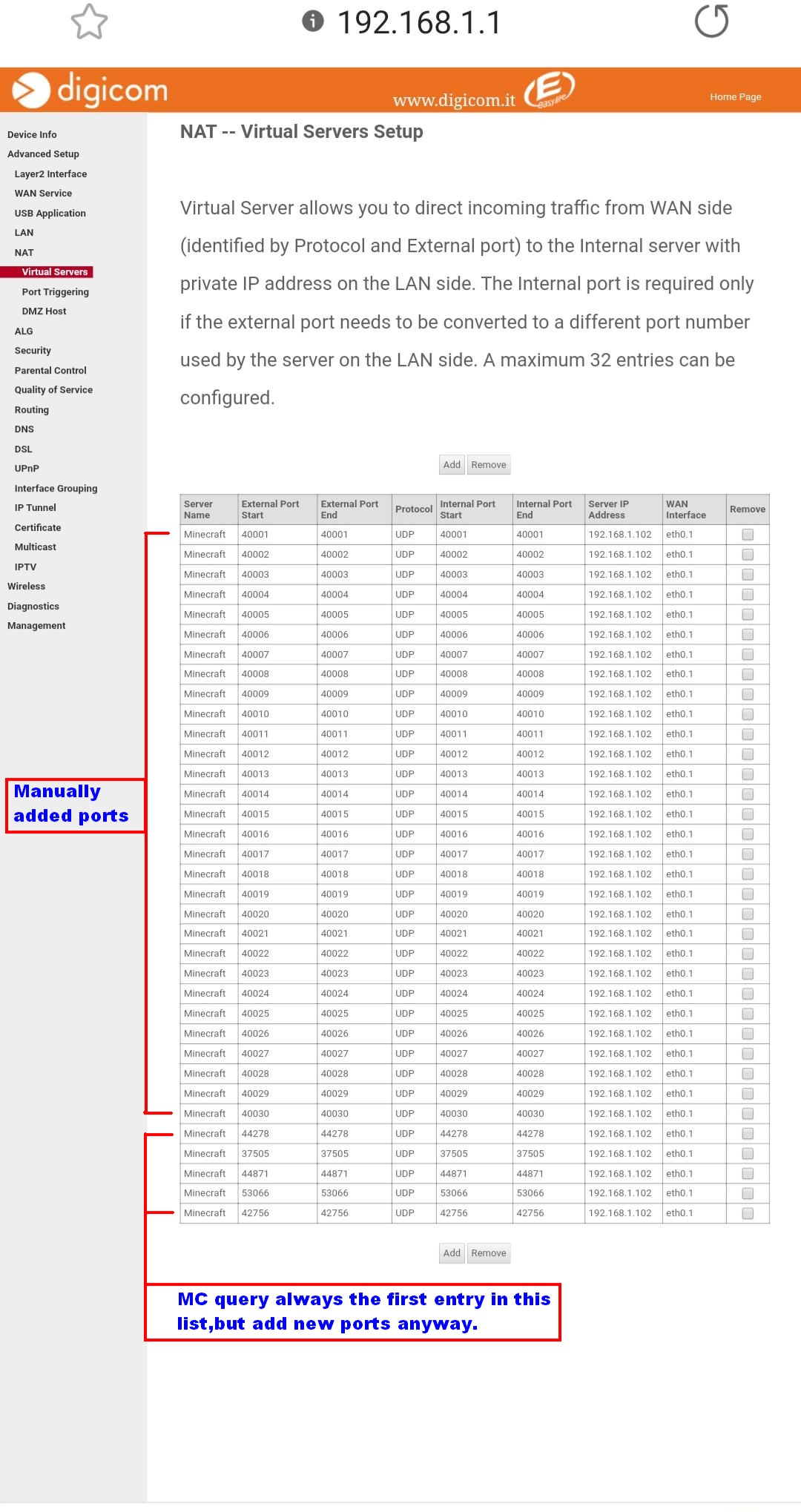



Sometimes I play with my friends using { portForwarding UDP/19132 on my router}.When my friends[ MCPE_1.16.40 ] try to connect with my server will popup msg[ server is full{below the screenshot}],,,and it doesn't show currentPlayers+pingStatus.
I installed a previous MCPE version,and it works just fine.
We can still play minecraft if we install the same previous MCPE version.
#QUESTION:
Do I have to forward other ports? [ tell me, I'm listening]
Do I have to enable UPNP? [default=disabled, maybe MCPE is using UPNP to open custom ports]
PS: For a moment I thought maybe the server was not responding to Client requests, then I turn on PC build a Simple_MCPE_SERVER using gcc, just replying to clients,nothing more.
1 Try: Server[PC>>Router] Reply to Clients[Phone using mobile Data connection].
Resuls: it shows current players+ping status.[I know fake players].
2 Try: Let the Server receive packets, but don't reply to them.
Result: Ofcourse no info for players+ping[isn't replying].
then I try to connect just to see if I get the same MSG for a non responding Server, but NOOOO, I get[ Unable to Connect..ecc].
Thank You.
Sometimes I play with my friends using { portForwarding UDP/19132 on my router}.When my friends[ MCPE_1.16.40 ] try to connect with my server will popup msg[ server is full{below the screenshot}],,,and it doesn't show currentPlayers+pingStatus.
I installed a previous MCPE version,and it works just fine.
We can still play minecraft if we install the same previous MCPE version.
#QUESTION:
Do I have to forward other ports? [ tell me, I'm listening]
Do I have to enable UPNP? [default=disabled, maybe MCPE is using UPNP to open custom ports]
PS: For a moment I thought maybe the server was not responding to Client requests, then I turn on PC build a Simple_MCPE_SERVER using gcc, just replying to clients,nothing more.
1 Try: Server[PC>>Router] Reply to Clients[Phone using mobile Data connection].
Resul
s: it shows current players+ping status.[I know fake players].2 Try: Let the Server receive packets, but don't reply to them.
Result: Ofcourse no info for players+ping[isn't replying].
then I try to connect just to see if I get the same MSG for a non responding Server, but NOOOO, I get[ Unable to Connect..ecc].
Thank You.
Sometimes I play with my friends using { portForwarding UDP/19132 on my router}.When my friends[ MCPE_1.16.40 ] try to connect with my server will popup msg[ server is full{below the screenshot}],,,and it doesn't show currentPlayers+pingStatus.
I installed a previous MCPE version,and it works just fine.
We can still play minecraft if we install the same previous MCPE version.
#QUESTION:
Do I have to forward other ports? [ tell me, I'm listening]
Do I have to enable UPNP? [default=disabled, maybe MCPE is using UPNP to open custom ports]
PS: For a moment I thought maybe the server was not responding to Client requests, then I turn on PC build a Simple_MCPE_SERVER using gcc, just replying to clients,nothing more.
1 Try: Server[PC>>Router] Reply to Clients[Phone using mobile Data connection].
Result: it shows current players+ping status.[I know fake players].
2 Try: Let the Server receive packets, but don't reply to them.
Result: Ofcourse no info for players+ping[isn't replying].
then I try to connect just to see if I get the same MSG for a non responding Server, but NOOOO, I get[ Unable to Connect..ecc].
Thank You.
Multiplayer Connection - Port Forwarding [ RESOLVED ]
I just made a ProxyServer.exe and using my PC as a bridge.
After capturing all traffic packets, I noticed that MCPE_1.16.40 server sends to the client two random Port Numbers.
While the server was running, I forwarded these 2 ports, and I was able to connect(+19132=default).
So, how it works!?!!!
forward all the ports ( 19100 - 65000) max=65535
and you have to be friend with the Player hosting the Server, because the server must be in the friends tab not in the external server tab.
I'm not sure if you need a invite from the server,because at this point I already received the invitation.
THANKS MOJANG.
Screenshot_20201104-100021_Minecraft.jpg
Sometimes I play with my friends using { portForwarding UDP/19132 on my router}.When my friends[ MCPE_1.16.40 ] try to connect with my server will popup msg[ server is full{below the screenshot}],,,and it doesn't show currentPlayers+pingStatus.
I installed a previous MCPE version,and it works just fine.
We can still play minecraft if we install the same previous MCPE version.
#QUESTION:
Do I have to forward other ports? [ tell me, I'm listening]
Do I have to enable UPNP? [default=disabled, maybe MCPE is using UPNP to open custom ports]
PS: For a moment I thought maybe the server was not responding to Client requests, then I turn on PC build a Simple_MCPE_SERVER using gcc, just replying to clients,nothing more.
1 Try: Server[PC>>Router] Reply to Clients[Phone using mobile Data connection].
Result: it shows current players+ping status.[I know fake players].
2 Try: Let the Server receive packets, but don't reply to them.
Result: Ofcourse no info for players+ping[isn't replying].
then I try to connect just to see if I get the same MSG for a non responding Server, but NOOOO, I get[ Unable to Connect..ecc].
Thank You.
Set static IP:
portForwarding TCP/UDP 19100-65535
you can use the other way.
Open folder: games/com.mojang/resource_packs
now create folders in chain.
vanilla_music/sounds/music/game/records/
in the folder records put the songs you like, but you have to rename them: cat.ogg,blocks.ogg 13.ogg,11.ogg,mall.ogg,mellohi.ogg,far.ogg,wait.ogg,strad.ogg,ward.ogg,chirp.ogg and pigstep_master.ogg.
in the folder: games/com.mojang/resource_packs/vanilla_music
create a file "manifest.json" with the content{ see the screenshot }
PS: I renamed manifest.json.txt because my phone doesn't open json files.

A hack for free.
take your friend's phone , zip the folder 'games" and send it to your phone.
Rename your folder "games" : example "games_".
Unzip the friend's "games" folder.
now you can play with his account for about 1-2 days.
For MCPE_1.16.40
Set MCPE memory to sdcard(not to app memory).
Download Toolbox and login to Xbox and then exit.
Copy the folder "games" for backup.
Use LuckyPatcher to remove licence verification of MC.
Uninstall MC and use LuckyPatcher to install the modified MC.
Unistall Toolbox & LuckyPatcher, replace the folder games with
the "games" that we saved as backup.
DONE.
PS: if you logOut, MCPE will use your phone browser to login.
Who wants to save their worlds that MCPE saved in App Memory.
Search on google "Minecraft Pocket Edition World Exporter"
or visit "tikolu.net"
PS: You can use REALMS, upload world,switch memory,download(backup) world.
if you care more your "worlds" than playing MC,,,than wait for the next release.
SORRY: I can't reply more than 1 or 2 times,because this is not a forum.
Login With Toolbox doesn't change anything,.
You must remove MC licence with luckypatcher.
You need Toolbox just once, because toolbox creates the "xal" folder +content necessary to login.
You don't need toolbox if you copy "xal"+content folder from another phone.
PS: I'm currently playing MC with this method.
Phone change POWER MODE when the battery is low.
This mean that: phone must follow some steps to stop an App.
Maybe your phone "thinks" :
Browser>>is a system App>>notifyApp>>wait>>StopApp.
MC>>its not a system App>>just stop it.
RESULT: your world is corrupted.
SOLUTION: create a new world.
If you played while it was charging,maybe your device overheated,and maybe something inside is broken.
if you can play other games,then, I am 100% wrong.
Did you try cleaning MC cartrige pins?
Maybe its a choise and not a BUG.
You can still listen Minecraft music tracks.
Search google "C418"
confirm 1.16.40 (its internet speed problem)
You have to wait for [Marketplace] to update.
to test tick delay on command_blocks.
repeat,tick=40 /tp @p ~ ~3 ~
try to login with a browser.
or Logout & Login with XBOX App.
Try with another phone if you can play MC with your account.
if it doesn' work then you have account problems.
For account problems contact: https://mobile.twitter.com/MojangSupport
Ok.
did you try that with a "Music Disc"?
New MCPE versions comes with new features and new settings.
I can complain for something that changes gameplay.
Not everything that is different from the previous version is considered a BUG.
Make a bigger farm.
for each entity MC calculates Movement & Collisions.
if there is space between entities the "collision"=0
less things to calculate, less lag will produce.
disable App: Android System WebView
the right adr is: sisu.live.com
Can you place blocks around the piston?? YES
The piston is able to push the blocks?? YES
Whats the problem?? <<what it looks like>>
Loooooooooooooooool.
Check if your Nintendo Switch is Updated.
latest update version: 10.2.0 (15/09/2020)
Sometimes unistalling doesn't mean "delete all data settings"
This it doesn't have to do with your XBOX account.
Any Device have "Factory Reset"
I know it is drastic, and it is not your fault.
If you don't want to make this step, then wait for the next beta.
Save data,files,accounts,ecc...
Factory Reset.
the player that have spawn problem:
test 1>> put a bed,sleep(just to set spawn point). jump into the void.
result: the player will spawn near the bed.
test 2 >> break the bed and jump into the void.
result: the player will receive the MSG(your bed is broken) and will spawn at world spawn point.
if (test 1) & (test 2) == true,,then the problem is the player hosting the server,because is the server that saves player settings.
This is a default behaviour.
if you put 1 glass of water in a bucket(full of water), then will drop 1 glass of water.
Use App XBOX to remove your brother from friends.(lol)
restart router.(this will change you external IP)
Open MC " Xbox One brother" then exit and turn it off.
Start your MC with your Xbox One.
PS: I have the same problem with android.
Minecraft changed the way how to play with others.
BEFORE: I shared my IP, and anybody could join my world.
NOW: you have to be friends to play in multiplayer.
THE PROBLEM:
the friends tab will show your friends(online) and any XboxOne connected to the same network.
Result: Same player two different settings.
You are looking in the wrong direction.
EXAMPLE: You have 20 chests and you want to check them all just to make a quick "refresh" whats inside.
open chest 1 >> move cursor to [x] and close it.
open the next chest, popup the GUI,,,guess what??!!
the cursor is at the same position [x].
PS: Try to open 20 chests and move the mouse each time.
can you share the world seed, I would like to make a skyblock server.
PS: this issue number -1 is a copy of this.
I know, I found a world with just a block to build, but it was with Achievments disabled.
I am able to create a "creative" world with achivments,but it' a lot of work to do with command blocks.
Connection [1]=Router [2]=WiFi-Extender.
ME & MyFriends= age >16
X= age ~10
If I connect to [2] = I have static IP ( same thing for X)
we cant both connect to [2],because we cant have same IP.
I connect to [2] to play with my friends.(everything ok)
Then I leave the game a go somewhere.
If X (no login) connects to [2], my friends can join X world.
PROBLEM:
I dont want "myfriends" chat with him/her.
PS: before we could play with
sameIP but different external port.
(info) X is able to connect with [2],because X login with my 2nd account,so I can join X world when I'm not home. Then X SignOut from my 2nd account.
Connection [1]=Router [2]=WiFi-Extender.
ME & MyFriends= age >16
X= age ~10
If I connect to [2] = I have static IP ( same thing for X)
we cant both connect to [2],because we cant have same IP.
I connect to [2] to play with my friends.(everything ok)
Then I leave the game a go somewhere.
If X (no login) connects to [2], my friends can join X world.
PROBLEM:
I dont want "myfriends" chat with him/her.
PS: before we could play with two static IP but different external port.
(info) X is able to connect with [2],because X login with my 2nd account,so I can join X world when I'm not home. Then X SignOut from my 2nd account.
Connection [1]=Router [2]=WiFi-Extender.
ME & MyFriends= age >16
X= age ~10
If I connect to [2] = I have static IP ( same thing for X)
we cant both connect to [2],because we cant have same IP.
I connect to [2] to play with my friends.(everything ok)
Then I leave the game a go somewhere.
If X (no login) connects to [2], my friends can join X world.
PROBLEM:
I dont want "myfriends" chat with him/her.
PS: before we could play with two static IP but different external port.
(info) X is able to connect with [2],because X login with my 2nd account,so I can join X world when I'm not home. Then X SignOut from my 2nd account.
I'll wait for the next release.
Thanks you.
It doesn't matter, I have try all the options,.
difficulty,cheats,ecc, I Toggle all the options, but doesn't change anything.
I even jump to the void,before changing to creative.
I have this world since MCPE_v0.14.2.
With this world I played only with the official MCPE(no mod).
I
can't eat in Survival.(I dont use resource pack)Expected behaviour:
The player should be able to eat.
case: When is playing Survival.
case: When changes>Survival to Creative then back to Survival.
As far as I know, there is no command that prevents a player in Survival from eating.
Steps to reproduce:
DWORD ret=STATUS_OK;
while(1)
{
createNewWorld("Survival","NO_CHEATS");
ret=createNewHouse();
ret=createNewFarm();
ret=createArmorAndEcc();if(ret==I_CANT_EAT)
{ MSG("GOOD JOB..YOU FOUND A BUG"); break; }
__sleep(1DAY);
}
I'll wait for the next release.
Thanks you.
That is the point!! It stay always full.
And if I am with 1 heart, I cant heal because I cant eat.
(1) repeat, delay>0, need redstone.
(2)(3)(4) chain always active,unconditional.
After executing all commands the last chainBlock will become false, and should power off the first repeatBlock.But for some reasons even if the redstone dust is powered the repeatBlock stops executing commands,or it works with random delay value.
if I use a lever,then all it works perfectly.
I'll wait for the next release.
Thanks you
check if exist "xal" folder + content.
games/com.mojang/xal/
before playing open (MarketPlace) just to see if the connection is made.
Maybe this is not the problem, anyway, you can try it.
set xbox one static IP
set router port forwarding (19100-65535 TCP/UDP) to your xbox one ("static") IP.
PS:on some routers you can set a static IP for each device,so you dont have to change xbox one connection settings.
Restart game and enter End Portal.
PS: I was in survival with achievements and I thought( this is not possible,I'm stuck here).
I dont know, restarting fixed the game. (PS4)
The Player hosting the server must be connectet to the router with open ports TCP/UDP range(19100-65535)
/kill @e[type=armor_stand,name=TheName,c=1]
it is more secure than
/kill @e [name=TheName]
use /scoreboard instead of comparator,repeater,redstone..ecc.
LG G7 android 9 MCPE_v1.16.40
I used 4 command_block(1Repeat+3Chain)
purpose: /tp ME to each player one by one.
(tp to firstPlayer,wait 4 seconds tp to nextPlayer)
Just a simple way to controll players.
I had problems with redstone.
(1) /tp @a[name=AM7] @p[scores=
{spy=1},c=1]
(2) /execute @a[name=AM7] ~ ~ ~ scoreboard players set @p[name=!AM7,r=4,scores=
{spy=1},c=1] spy 2
(3) scoreboard players set @a[scores=
{spy=2}] spy 3
(4) scoreboard players set @a[scores=
{spy=!3}] spy 1
(1) = reapeat command_block with delay 50,60,70(its pause)
//settings
reset /scoreboard players set @a[name=!AM7] spy 1
PS: you must create a scoreboard first and give your self invisibity effect ,,,eccc.
"invite" is visible only when you connect with WiFi.
Try: make a HotSpot with another phone.
it doesn't matter : survival / creative
always lag when flying over water.
me:
/survival with elytra, I can slow down but not stop.
/creative fly,stop,slow down,,you can control load chunks.
The App is fine, is the conncection that creates this problems.
Turn off your Router,, wait about 30 seconds and turn it on.
PS: turn off firewall, nobody it's gonna attack you because you have dynamic IP, static IP cost more than 50$
You should post a video not a screenshot, I think.
I already resolved this :
The wither did not destroy the blocks around him,
I think you're using some behaviour pack.
You can't Login to Xbox because it is not supported.
PS: My Samsung S3 4.4.2 is waiting for BlockLauncher to update.
😔
no just 2 command blocks,,, Natural Generation is off.
/gamemode s @p
/gamemode c @p
Server create "creative" world with cheats.
put 2 command blocks
change to survival with cheats off.
no other default settings are changed.
while PVP, I am with 1 heart and my health doesnt change.
I wait about 10 min but nothing,still 1 heart. (difficulty=normal)
is this a bug,or how much I have to wait?
thank you
if you reply.thank you very much.
This happens only during gameplay.
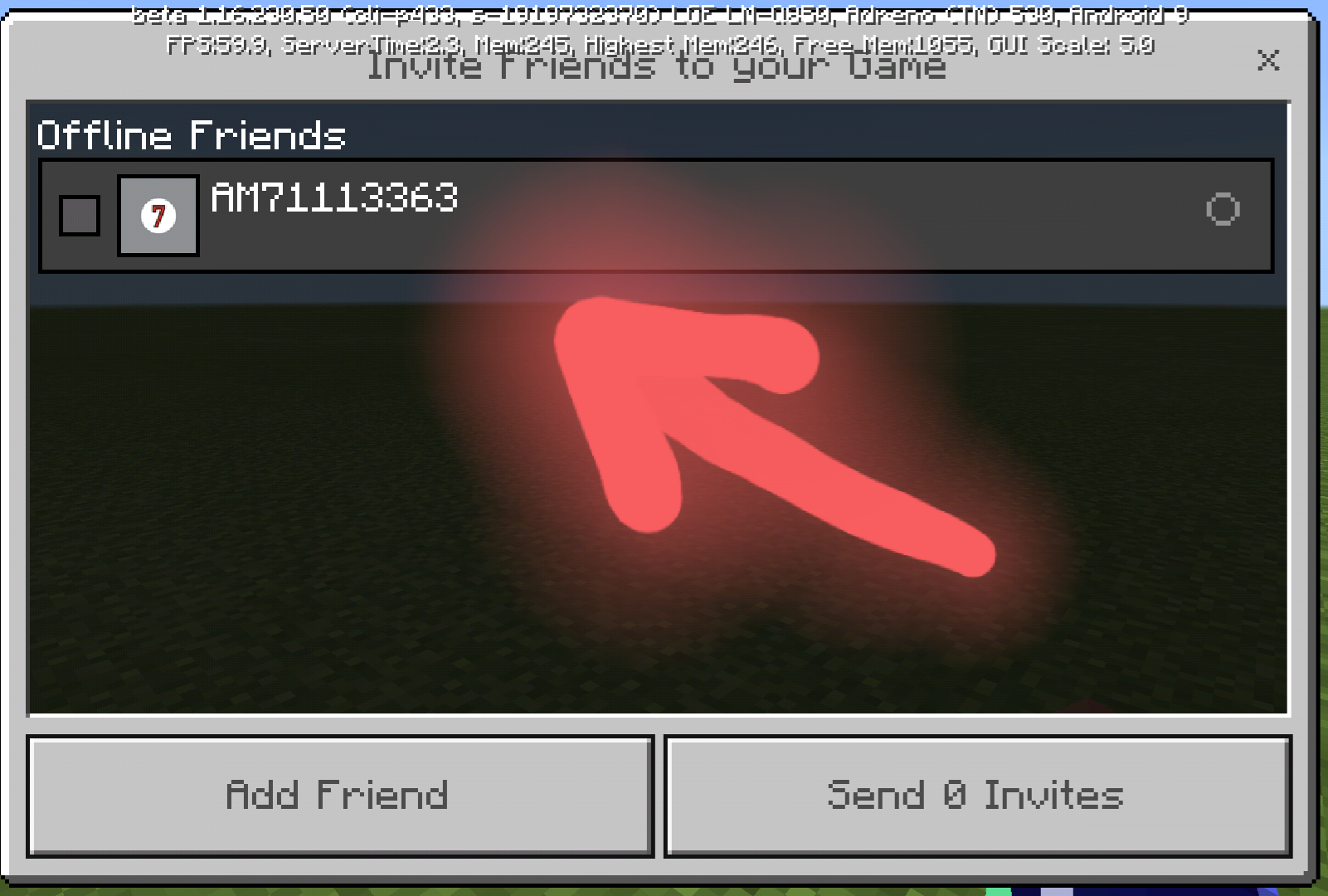
After Add-Friend operation, it add an extra string(" -") to the player name.
If I leave the game,then the Player Name is right.
With MCPE_1.16.200.57 I have to restart the App.
#At least v1.16.210.53 the button [ Add Friend ] it's working.
You can do a test. Create a new world. then
/fill block ~ ~ ~ ~10 ~10 ~10 tnt 0
explode 1 tnt.
if you can move around while tnt exploding, then your PC is good.
I just tested[ 4GB RAM ]
command_block SelfDestroy:
/setblock ~ ~ ~ air 0
1. run C:\Windows\system32\ctfmon.exe
2. restart PC.
Enter the server, leave on your inventory just 1 item.
Turn off your Router or unplug the LAN cable, and wait.
case 1: App crashing = the problem is your PS4.
case 2: popup ("Server disconnected"") = the problem is the server.
PS: sometimes you loose items,, and ,,sometimes you duplicate them.
This is not a Bug, this is how it works.
case 1: you look a mob and you want to hit it.
case 2: you look a mob but you don't want to hit it.
How MC supposed to know what you want to do.
To remove "black chunks" , just don't use slabs.
The holes: One of your Friends used command_block.
/clone ~ ~ ~ ~8 ~8 ~8 ~ ~-8 ~
those are "barrier" blocks.
Maybe its a bug, but that I can doit with any MC version that can run /give @p barrier 1
PS: create a world in creative, put some barrier blocks, change to survival and than fly, sail,ecc.
take screenshot and report it.
Maybe you have to Enable UPNP service on your Router.
Search on PlayStore[ upnp discover ] to check if the service is enabled.
GPU overheat.
Check PC Cooling System.
5 min ago xbox web page didn't load,
next time use your phone browser to view your xbox profile(just google "xbox login".
if the page doesn,t load or it takes more than 5 sec,then your connection is fine, its just XBOX server connection have a little lag.
PS: now it works🥳
This kind of things on Android can be resolved by updating GooglePlayServices.
Update your iPad firmware.
Maybe its not a bug,but I did it 3x with the same result.
Placing blocks under,(trying to update the area),but nothing.
Then it disappears, after 15-20 seconds.
Maybe its not a bug,but I did it 3x with the same result.
Placing blocks under,(trying to update the area),but nothing.
Then it disappears, after 15-20 seconds.
Steps to Reproduce: watch the video.
Observed Result: the water remain there for more than 10 seconds.
Expected Result: the water should go away.
Steps to reproduce
- Place a water source.
- Allow flowing water to spread from the source over a large area and downward dozens of blocks into the void.
- Eliminate the source water.
Observed Result
The
water remain there for more than 10 seconds.Expected Result
The water should go away.
Maybe its not a bug,but I did it 3x with the same result.
Placing blocks under,(trying to update the area),but nothing.
Then it disappears, after 15-20 seconds.
Steps to Reproduce: watch the video.
Maybe its not a bug,but I did it 3x with the same result.
Placing blocks under,(trying to update the area),but nothing.
Then it disappears, after 15-20 seconds.
Steps to Reproduce:
watch the video.
OR
Go to the End.
Find a place at least 10 block above ground.
put a water bucket, destroy the water stream with any block.
Look if the water goes away.
Observed Result: the water remain there for more than 10 seconds.
Expected Result: the water should go away.
Maybe its not a bug,but I did it 3x with the same result.
Placing blocks under,(trying to update the area),but nothing.
Then it disappears, after 15-20 seconds.
Steps to Reproduce:
watch the video.
OR
Go to the End.
Find a place at least 10 block above ground.
put a water bucket, destroy the water stream with any block.
Look if the water goes away.
Observed Result: the water remain there for more than 10 seconds.
Expected Result: the water should go away.
LG G7 Android 9 4GB RAM
When "Save" & "Load" have the same Y-offset the Structure Block GUI doesn't exit when executing "Load" command.
TEST: 1.Save with Y-offset =-1 (Default)
2.Load with Y-offset (-4,-3,-2) the GUI will exit.
3.Load with Y-offset(-1,0,1,2) the GUI remains.
TEST: 1.Save with Y-offset = 0
2.Load with Y-offset (-3,-2,-1) the GUI will exit.
3.Load with Y-offset(0,1,2,3) the GUI remains.
UPDATE:
structure_block includes it self in "Saved Structure", which causes this bug.
workaround:
when saving the structure, change XYZ offset in order to exclude the structure_block from the Saved Area.
Same behavior can be found in MC-164402
Steps to Reproduce:
1.Put a redstone block
.or lever(active state)2.Place a line of powered rails.(stop when the redstone signal doesn't reach the rail)
3.Add 2 extra powered rails(which are off).
4.Put a repeater next to last "off" rail facing the rail.
[REDSTONE][ON][ON].......[ON][OFF][OFF][<REPEATER]
Observed Result:
Updating the area by PUT/DESTROY block near to the ON-rails will activate the 2 extra rails.
Or leave and enter the world,you'll find the 2 rails powered.
Breaking one of the ON-rails while 2 rails are ON, will toggle 2 ON-rails to OFF.
NOTE:
MCPE 1.16.40 doesn't have this issue.
Steps to Reproduce:
1.Put a redstone block or lever(active state)
2.Place a line of powered rails.(stop when the redstone signal doesn't reach the rail)
3.Add 2 extra powered rails(which are off).
4.Put a repeater next to last "off" rail facing the rail.
schematic
{
[REDSTONE][ON][ON].......[ON][OFF][OFF][<REPEATER]
}
Observed Result:
Updating the area by PUT/DESTROY block near to the ON-rails will activate the 2 extra rails.
Or leave and enter the world,you'll find the 2 rails powered.
Breaking one of the ON-rails while 2 rails are ON, will toggle 2 ON-rails to OFF.
Expected Results: This shouldn't happen.
NOTE:
MCPE 1.16.40 doesn't have this issue.
Powered RailsRails powered by an Unpowered-Repeater.
Steps to Reproduce:
1.Put a redstone block or lever(active state)
2.Place a line of powered rails.(stop when the redstone signal doesn't reach the rail)
3.Add 2 extra powered rails(which are off).
4.Put a repeater next to last "off" rail facing the rail.
schematic
{
[REDSTONE][ON][ON].......[ON][OFF][OFF][<REPEATER]
}
Observed Result:
Updating the area by PUT/DESTROY block near to the ON-rails will activate the 2 extra rails.
Or leave and enter the world,you'll find the 2 rails powered.
Breaking one of the ON-rails while 2 rails are ON, will toggle 2 ON-rails to OFF.
Expected Results: This shouldn't happen.
[affected items]
repeater.
comparator.
observer.
tripwire hook.
trapped chest.
NOTE:
MCPE 1.16.40 doesn't have this issue.
Rails powered by an Unpowered-Repeater.Rails powered by an Unpowered-Source.
Steps to Reproduce:
1.Put a redstone block or lever(active state)
2.Place a line of powered rails.(stop when the redstone signal doesn't reach the rail)
3.Add 2 extra powered rails(which are off).
4.Put a repeater next to last "off" rail facing the rail.
schematic
{
[REDSTONE][ON][ON].......[ON][OFF][OFF][<REPEATER]
}
Observed Result:
Updating the area by PUT/DESTROY block near to the ON-rails will activate the 2 extra rails.
Or leave and enter the world,you'll find the 2 rails powered.
Breaking one of the ON-rails while 2 rails are ON, will toggle 2 ON-rails to OFF.
Expected Results: This shouldn't happen.
[affected items]
repeater.
comparator.
observer.
tripwire hook.
trapped chest.
jukebox.
NOTE:
MCPE 1.16.40 doesn't have this issue.
Steps to Reproduce:
1.Put a redstone block or lever(active state)
2.Place a line of powered rails.(stop when the redstone signal doesn't reach the rail)
3.Add 2 extra powered rails(which are off).
4.Put a repeater next to last "off" rail facing the rail.
schematic
{
[REDSTONE][ON][ON].......[ON][OFF][OFF][<REPEATER]
}
Observed Result:
Updating the area by PUT/DESTROY block near to the ON-rails will activate the 2 extra rails.
Or leave and enter the world,you'll find the 2 rails powered.
Breaking one of the ON-rails while 2 rails are ON, will toggle 2 ON-rails to OFF.
Expected Results: This shouldn't happen.
[affected items]
repeater.
comparator.
observer.
tripwire hook.
trapped chest.
jukebox.
NOTE:
MCPE 1.16.40 doesn't have this issue.
Steps to Reproduce:
1.Put a redstone block or lever(active state)
2.Place a line of powered rails.(stop when the redstone signal doesn't reach the rail)
3.Add 2 extra powered rails(which are off).
4.Put a repeater next to last "off" rail facing the rail.
schematic
{
[REDSTONE][ON][ON].......[ON][OFF][OFF][<REPEATER]
}
Observed Result:
Updating the area by PUT/DESTROY block near to the ON-rails will activate the 2 extra rails.
Or leave and enter the world,you'll find the 2 rails powered.
Breaking one of the ON-rails while 2 rails are ON, will toggle 2 ON-rails to OFF.
Expected Results: This shouldn't happen.
[affected items]
repeater.
comparator.
observer.
tripwire hook.
trapped chest.
jukebox.
daylight detector.
target.
NOTE:
MCPE 1.16.40 doesn't have this issue.
Me: on cellphone data internet.
Me: not friend with player "Mojang"
On my friend's tab I can join "Mojang"'s world named "Minecraft"
How this is possible, I'm using cellphone internet,but I have a friend on my LAN(which is not my friend).
PS: Reading changelog{ "bugFixed":"OK","!bugFixed":"NONE"}
Is thispossible?MCPE_v1.16.100.04 - How is it possible?
Sometimes after teleporting a couple of TNT, when I enter the Portal where the dragon egg is, it doesnt tp me to overworld but at spawnpoint in END.
Sometime Tp TNT produces the TP_SOUND,sometimes not.[^Sound.mp4]
,
,
Test:
Phone [A] Android 9 with telecommunication company [
C1].Phone [B] Android 9 with telecommunication company [
C2].GamePlay:
Phone [R] connected to router.
Phone [A]&[B] using mobile data internet.
All phones(NoLogin) running an very old version of MCPE(1.0.4).
With MCPE_v1.0.4 I had no problem with multiplayer.
Observed result:
Now(yesterday) Phone [A] can join [R]'s world, but Phone [B] thaf belongs to a different "company" receives the MSG(connect with WiFi to play with your friends).
How,,,an old MCPE version shows a new "msg" that belongs to new versions of MCPE.
NOTE:
It doesn't matter if this issue=>invalid,resolved,,ecc..
Just inform "The Team" for this test, maybe they are looking in the wrong direction.(No Offence)
Thank You.
Test:
Phone [A] Android 9 with telecommunication company [windtre].
Phone [B] Android 9 with telecommunication company [iliad].
GamePlay:
Phone [R] connected to router.
Phone [A]&[B] using mobile data internet.
All phones(NoLogin) running an very old version of MCPE(1.0.4).
With MCPE_v1.0.4 I had no problem with multiplayer.
Observed result:
Now(yesterday) Phone [A] can join [R]'s world, but Phone [B] thaf belongs to a different "company" receives the MSG(connect with WiFi to play with your friends).
How,,,an old MCPE version shows a new "msg" that belongs to new versions of MCPE.
NOTE:
It doesn't matter if this issue=>invalid,resolved,,ecc..
Just inform "The Team" for this test, maybe they are looking in the wrong direction.(No Offence)
Thank You.
The Reason Why MultiplayerHave BugsThe Reason Why Multiplayer Doesn't Work With Mobile Data Internet
The Reason Why Multiplayer Doesn't Work With Mobile Data InternetMCPE affected by SIM Card Companies.
Sorry ,, I cant do this TEST with the current MCPE version.
Only Phone [A] is mine.
I just wanted to help.
MY POINT OF VIEW:
if you have and old PC and you play the same game with the same version,and suddenly you get a MSG(insert CD) when you know that your PC supports only floppy disks.
Phone [B] using another phone as hotspot can join [R]'s world.
IF_YOU_DIDNT_NOTICED: Changing the SIM Card(changing operator) will fix the "problem".
PS:Why MCPE cares which SIM Card I'm using??!!!!
I miss GOOD OLD DAYS, create server > share IP > anyone could join your server.
What's the point of adding new features if you can't leave home.
[@Kanzai] The version is old,but the MSG is new.
MCPE shouldn't be affected by SIM Card company.
PS: The latest version on PlayStore is 1.16.101(watch the screenshot)
Steps to Reproduce:
Connect your phone to a Router without internet connection,or remove the internet cable.
Just to be safe I LogOut when I was connected to internet.
Start MCPE and open a random world.
Observed Results:
Popup MSG(you must have an internet connection)[watch the screenshot]
When I press [OK] or back the App freezes.
Expected Results:
If I'm LogOut,why MCPE wants to call home.
test: I used MobileDataInternet just to make [MarketPlace] button animated,then switched to WiFi(The router without internet),,,and nothing changed.
NOTE:
I didn't try with MCPE_v1.16.101
If I play without MobileDataInternet&WiFi the game works normaly(+already known bugs).
Steps to Reproduce:
Connect your phone to a Router without internet connection,or remove the internet cable.
Just to be safe I LogOut when I was connected to internet.
Start MCPE and open a random world(Multiplayer ON).
Observed Results:
Popup MSG(you must have an internet connection)[watch the screenshot]
When I press [OK] or back the App freezes.
Expected Results:
If I'm LogOut,why MCPE wants to call home.
test: I used MobileDataInternet just to make [MarketPlace] button animated,then switched to WiFi(The router without internet),,,and nothing changed.
NOTE:
I didn't try with MCPE_v1.16.101
If I play without MobileDataInternet&WiFi the game works normaly(+already known bugs).
I dont think this issue is a duplicate of MCPE-101291.
This problem occurs only if you're connected to a router without internet connection.
PS: If you still think I'm wrong update the description of MCPE-101291
Steps to Reproduce:
Connect your phone to a Router without internet connection,or remove the internet cable.
Just to be safe I LogOut when I was connected to internet.
Start MCPE and { edit world settings, change global settings,ecc}
Observed Results:
The App freezes and then crashes.
[ crashes because while is freezed I try to press BACK button,but MCPE it's no responding. If I dont do nothing the App doesn't crash and doesn't exit the freeze state ]
Expected Results:
If I'm not signed to Xbox >> MCPE have no reason to call home.
NOTE:
Please don't say CRASHES are logged automatically.
The App is crashing because there is no internet.
#DEVS_ONLY
R = Router with no internet.
P = Phone hotspot with data disabled.
Ping(R) using gethostbyname returns (Error) after 15 seconds.
Ping(P) using gethostbyname returns (Error) after ~1 second.
#workaround
Ping( gateway:53)(timeout_socket) sendto a DNS packet.
With v1.16.210.51 it creates the world but in the end shows a MSG like in MCPE-101291, and then freeze,nothing.I cant press [OK], can exit only by pressing [HOME] button.
This problem doesnt occur if you use another phone as HotSpot with Mobile Data DISABLED.
I know that This is a game bug tracker.
When I open an issue(mine+others), the "details" are viewed in two diff models.
NOTE:
Samsung Internet Browser - v13.0.1.64
For a user it doesn't matter if you reply to his issue,all it matters if you have read it or not.
IF_I_WAS_YOU: After reading an issue,let [BOT] Arisa comment(Thank you for your report!).
This way a user knows that his issue has been read.
I don't know,but I have this bad feeling,that:
FACEBOOK it's gonna buy MCPE.
NOTE:
MCPE using UPNP service to query the router without a reason.
UPNP is used for 2 things:
1. opening ports.(but MCPE it doesn't send open port requests,I have to open ports manually)
2. get personal information stored inside router(account,password,ecc...)
MCPE want to know: Where I live,Who are my friends,ecc...
#to me this sounds like FACEBOOK.
HELLLLLOOOOWWWW, anybody HERE....here(echo)....ere(echo)....re(echo).....r(echo)
🤣
I forgot The issue can be PRIVATE only if are personal information it it.
PERSONAL INFORMATION:
I live in Rome(Italy).
1.Place a piston at Y=1 facing down.(no blocks at Y=0)
2.Use lever||button||RedstoneBlock to activate the piston.
result: the piston doesn't move.
1.Place a piston at Y=1 facing down.(no blocks at Y=0)
2.Use lever||button||RedstoneBlock to activate the piston.
result: the pistondoesn'tmove.Steps to Reproduce:
1. Place a piston at Y=1 facing down.(no blocks at Y=0).
2.Use a lever or a button or a RedstoneBlock to activate the piston.
Observed Results:
The piston doesn't move.
Expected Results:The piston should move.
HOW I PLAY ON MCPE-BETAs
no resource or behaviour packs.
create a flat world-creative-cheatsON
FOUND a "bug"
go to settings/app/mcpe delete CACHE+DATA
delete folder "games"
create a flat world-creative
try to reproduce the "BUG"
report the bug( screenshot if can be reproduced or video if it happens randomly).
When an external server refuses the connection,MCPE keeps on trying to connect to the server.
NOTE:
I can press CANCEL, but is MCPE that should STOP pinging and not waiting for CONNECTION_TIMEOUT.
PS: to be CLEAR: I don't expect anyone to repeat it.(not this issue and not the other issues reported by me)
Steps to Reproduce:
1. Connect to an external server with a MCPE version diff from yours
2.Wait for MSG from server(obsolete server/client)
Observed Results:
MCPE keeps on sending CONNECT_PINGS to the server which ignores all the pings because he already answered.
Expected Results:
MCPE should return to MAIN GUI,instead of waiting for CONNECTION_TIMEOUT.
I've made a SELF-BAN.
Next release I'll try if MCPE accepts a BAN as a responce.
foto:
https://mobile.twitter.com/AM71113363/status/1333740635199856640
Current Settings:
Phone [A] static IP: 192.168.1.8
Phone [B] static IP: 192.168.1.9
Router:
RULE_A: forward(19100-65535) ports to 192.168.1.8
RULE_B: forward(19100-65535) ports to 192.168.1.9
When Phone [A] runs as Server, have to change Router Settings:
- RULE_A : ACTIVE
- RULE_B : DEACTIVE
When Phone [B] runs as Server,have to change Router Settings:
- RULE_A : DEACTIVE
- RULE_B : ACTIVE
observed result
whenever Phone [A] or P
layer[B] wants to play as Server have to change Router Settings or at least check if his RULE is active.
NOTE:
I could included this issue to
MCPE-109286,buthere[ 1 ticket = 1 issue ]
Current Settings:
Phone [A] static IP: 192.168.1.8
Phone [B] static IP: 192.168.1.9
Router:
RULE_A: forward(19100-65535) ports to 192.168.1.8
RULE_B: forward(19100-65535) ports to 192.168.1.9
When Phone [A] runs as Server, have to change Router Settings:
- RULE_A : ACTIVE
- RULE_B : DEACTIVE
When Phone [B] runs as Server,have to change Router Settings:
- RULE_A : DEACTIVE
- RULE_B : ACTIVE
observed result
whenever Phone [A] or Phone [B] wants to play as Server have to change Router Settings or at least check if his RULE is active.
NOTE:
I could included this issue to
MCPE-109286,buthere[ 1 ticket = 1 issue ]
ME & MyFriend not connected to the same WiFi
I can join my friend's world in [FRIENDS TAB], but at the same time if I add his IP:PORT to external server list >> I can't join his world.
NOTE:
With this limitation I can't use Port-Triggering to switch RULE_A/B
Current settings:
Phone [A] static IP: 192.168.1.8
Router:Forward (19100-65535) ports to 192.168.1.8
Phone [A] friends can join Phone [A] world.
Phone [B] friends can't join Phone [B] world, because they are connected to the same WiFi and
Router can't forward the same ports to two diff IP at the same time.
NOTE:
Before: I could run up to 4 servers at the same time without problems.
Current settings:
Phone [A] static IP: 192.168.1.8
Router:Forward (19100-65535) ports to 192.168.1.8
Phone [A] friends can join Phone [A] world.
Phone [B] friends can't join Phone [B] world, because they are connected to the same WiFi and
Router can't forward the same ports to two diff IP at the same time.
NOTE:
Before: I could run up to 4 servers at the same time without problems.
Phone [A] IP 192.168.1.4 Running Server
Phone [B] IP 192.168.1.5 Running Server
Phone [C] IP 192.168.1.6 Running Server
Phone [D] IP 192.168.1.7 Running Server
Router:
ExtPort IntPort IP
20001 19132 192.168.1.4
20002 19132 192.168.1.5
20003 19132 192.168.1.6
20004 19132 192.168.1.7
SHARE_MY_EXTERNAL_IP or HOSTNAME
SkyBlock Server : MyIp:20001
PvP Server: MyIp:20002
Creative Server: MyIp:20003
Survival Server: MyIp:20004
I've received the Email of 1 comment on this issue which is now deleted.
Responce:
This is the default protocol used by Apps to open ports.
All clients should use the protocol correctly,
NOBODY IS ABOVE THE RULES
#TEST:
forward all ports( 44443 and down)(44445 and up) to another ip,
and let the Router with only 1 port available=44444.
MCPE Request: //new request
WANPPPConnection:1#AddAnyPortMapping
ROUTER responce:
offers port 44444 (because its only one available)
And MCPE decline the offer.I've read the RFC(its a client choice), but
SOMEHOW
MCPE wants to perform:(no matter what)
WANPPPConnection:1#AddPortMapping
if this fails(because is used by another App),
MCPE doesnt allow to play with friends(not local network).
NOTE:
I dont understand why MCPE wants to use diff ports??!!
Well,I can accept it,but "The Router" is mine and I dont want that:
Playing 4 times each day for 1 month = 120 opened ports.
There is a BUG with XmlParser that MCPE uses.
MCPE Request:
WANPPPConnection:1#GetGenericPortMappingEntry (0)
ROUTER responce:
<NewRemoteHost></NewRemoteHost>
<NewExternalPort>47693</NewExternalPort>
<NewInternalPort>47693</NewInternalPort>
<NewIternalClient>192.168.1.243</NewInternalClient>
<NewEnabled>1</NewEnabled>
<NewPortMappingDescription>Minecraft</NewPortMappingDescription>
<NewLeaseDuration>0</NewLeaseDuration>
NOTE:
SomeHow MCPE doesnt detect his own NAME.
Maybe: Not parsing Xml data correctly.
workaroud:
Enable UPNP services(on most recent Routers is DISABLED)
observed results:
MCPE opening ports but not deleting them or at leat not using the same ports.
SECURITY: I've a got an ATTACK and I checked the IP:
Was not an IP from: Minecraft,Mojang or Microsoft.
NOTE:
This issue = [resolved] if a Player doesn't care about SECURITY.
+Affects all the devices that need portforwarding in order to play as Server.
NOTE: I've sent a MSG to @MojangSupport(20/11/2020), but they did not answered.
PS: I really appreciate this behaviour😤
#SOLUTION
if you have (Xbox One/Windows 10/Android)
and you want others(not only friends) to join your Server.
Click here if you have a 32Bit PC & You know how PortForwarding Works https://github.com/AM71113363/RouterConfig-MCPE-Server
#tested with v1.16.210.50 (win7 32Bit)
;
Even if the Import Fails, MarketPlace downloaded your music pack.
NOTE:
before "music pack" was a big ZIP file, and "import" was unzipping progress.
now: "music pack" is not compressed and Marketplace can skip "import"(unzip).
/clone LodestoneissueCompass non linking to Cloned Lodestone
- fresh OS install (if possible)(or Reset ecc...)
- disable PC wifi network card(even if you're not connected to WiFi)
- use LAN cable to connect PC with the Router
- disconnect all devices connected to the Router(phone,TV,ecc..)
- update your PC software & restart PC
- update drivers & restart PC
- install or update Minecraft & restart PC.
- Play Minecraft using LAN cable.
#I have win10 PC(I dont play MC) , but sometimes using LAN cable can make a diff.
#There is only one solution(workaround).
/home add @p ~ ~ ~ [home name]
/home del @p [home name]
/home list @p
#Yep,I know this is too much to ask.😔
#Disable or Unistall Antivirus.
workaround
if MStore is reading registry > change registry value
if MStore is querying GPU driver, then can be done with DLL injection.
or Buy USB 3.0 external GPU(+external power supply) if your PC supports USB 3.0
#I think this issue will be "Resolved" as duplicate. 🤭
Android v1.16.210.53 it works, I didnt try with 1.16.201
I just downloaded, i wait for 15 seconds( speed 45 Mbps).
The progress bar show only "0", when the goes away I checked the folder games the music was there.
![[MCPE Mod] Auldrick](../../../data/avatars/users/10122.svg)
AM71113363: When you respond, please add your response in a new comment instead of replacing a previous comment or overwriting the bug description.
When you replace information, it makes it harder for people reading the report later to understand what happened. We like to keep the history of the report so that future players with the same issue can find it in a search, and also so the staff can see when we might have handled a report incorrectly.
Note: I'm not asking you to go back and undo all those edits you've done in this and other reports. What's done is done, I just want you to stop doing it in the future.
AM71113363 Please stop adding irrelevant or "instructional" comments to other reporter's tickets only to delete them later. Deleting comments makes the thread confusing.
Thank You. 🥳
Ok.
Steps to Reproduce: watch the video.
Observed Result: the water remain there for more than 10 seconds.
Expected Result: the water should go away.
ok,thanks
is OFF. (Default)
I just rename it to not confuse with the old video.
Sorry, i use BETA only with the default settings, even if it works I'm not gonna change the settings.
NOTE:
I report only if something strange happens more then 3 times.
I posted the 2nd video just to prove that was not a single case.
with previous versions [Loading chunks] = BLUE SCREEN.
NEW_FEATURE: if you want to play with others you have to be friends.
RESPONCE: All the Versions that don't have NEW_FEATURE.
ok, I'm "STOP" commenting other issues.
NOTE: I deleted my comments if
#test_2 doesn't involve waterlogged structure blocks.
I fixed.
Yes, but with _v1.16.220.50 happens only the first time after restarting MC.
I found the same behavior when I installed mcpe_v1.0.
I guess I was wrong, this works as intended.
this is already fixed.
It happened only after the first login.
MCPE_1.16.230.50_beta.
Thanks for Mouse & Keyboard Support.
🥳🥳🥳🥳🥳🥳🥳🥳
This issue does not occur in the latest version.
OK, Close it as incomplete
This issue doesn't occur in MCPE_v1.16.230.54
I dont know, because the Animation hasn't changed yet.
The current animation is "Super Mario" style.
When the Animation will change, I will update this report.
Some my previous reports are related to this bug, but they were resolved as (invalid,cant reproduce,ignored,etc).
When I found this bug, I didn't consider TIME.
I will try to reproduce this BUG, if this is still an issue in the latest version, I will add Steps to reproduce to this report.
NOTE: this bug has nothing to do with MCPE version, but how MICROSOFT SERVERS work(not MCPE servers but Servers that handle hotmail.com, xbox.com,,etc).
ANYAWAY,like I said I didn't consider the TIME that servers need to update THE PLAYERS DATA.
This issue doesn't occur in the latest version.
🥳🥳🥳🥳
This issue doesn't occur in the latest version.
This issue occurs when A User does not Enable UPNP Services for Security reasons.
The Issue remains because MC doesn't follow the UPNP rules when opening ports.
NOTE:
I have set up an UPNP server to feed all upnp error codes, but MC ignores them all.
#There is 1 case where this is a BIG problem:
if MC chooses a port which is already in use, then nobody can join the game.
Good point "end portal texture/particles"
IF THEY ARE NOT STARS, then
this thread is invalid.
fixed, I cant reproduce it in the latest release.
NOTE:
When trying to reproduce this I've noticed that sometimes the dropped item turns black.
I dont want to make another thread about this, at least is not invisible.
Since the default delay is 0 "Execute on First Tick" is pointless.
the "Execute on First Tick" would matter if the delay > 0
This thread is based on the fact that when a Kicked Player accepts the invite,
the Server refuses the connection with the REASON:
{ YOU NEED AN INVITE TO PLAY IN THIS WORLD }(or similar).
NOTE:
I wouldn't create this thread if the Server -> REASON -> You have been kicked(or similar).
I thought that the "-" was part of the username, and reported it, thinking that this was some kind of error in the XML parser.
Yes, in the version 1.18.1.02.
Note:
I didn't updated yet,.
Yes, in the version 1.18.1.02.
Note:
I didn't updated yet.
I've noticed -> Works As Intended
Really??!!!!
So, ME that I've build a city with structure_blocks with random names with the conviction that setting the structure SAVED TO MEMORY will be deleted after reloading the world,,,it means that those structures will stick FOREVER to my world, since I can't remember all the structure names,I can't use /structure delete
Is fixed, Thanks.