 ArkovMC
- ArkovMC
- arkovmc
- Europe/Stockholm
- Yes
- No
 MCPE-8868


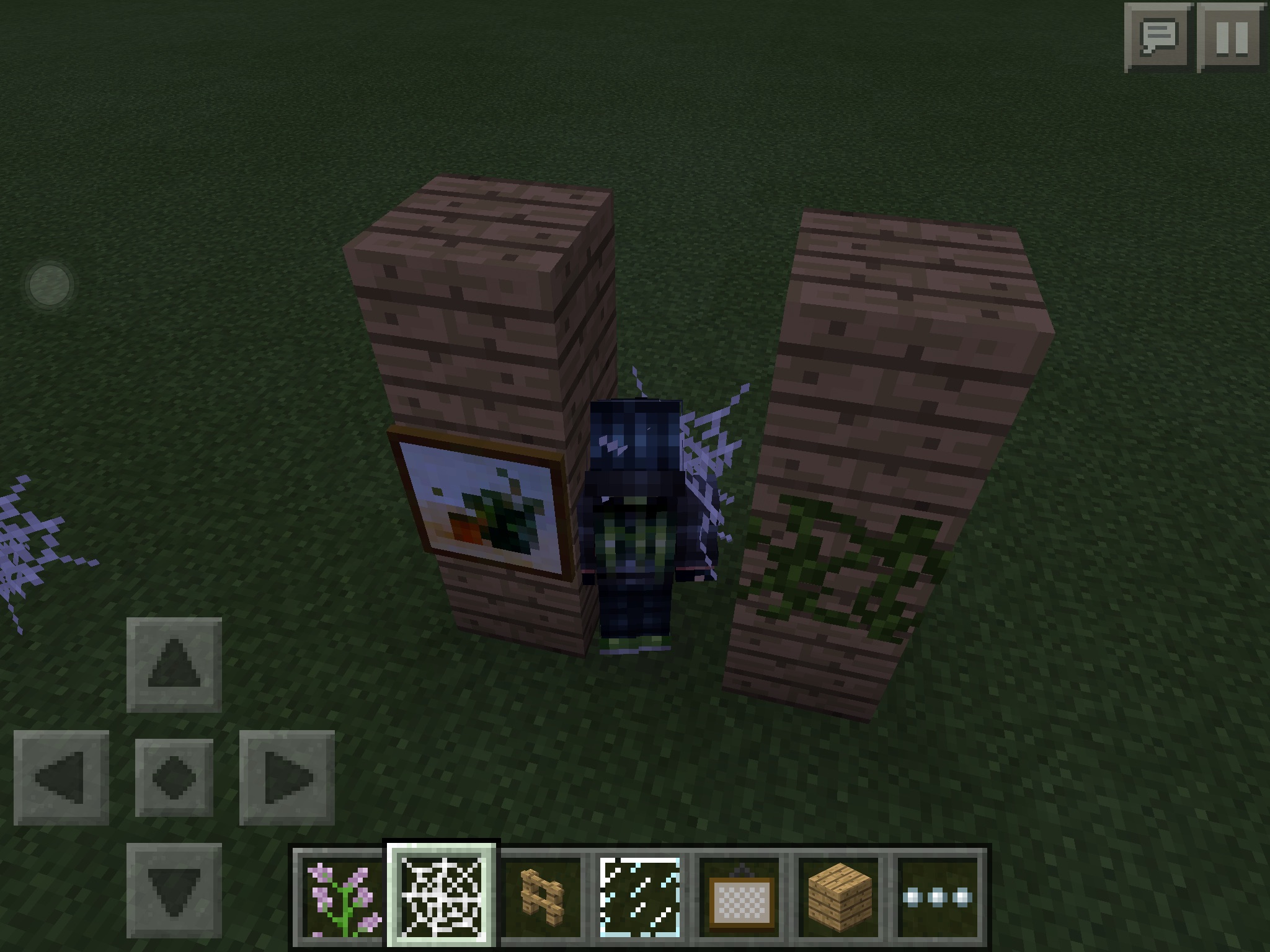


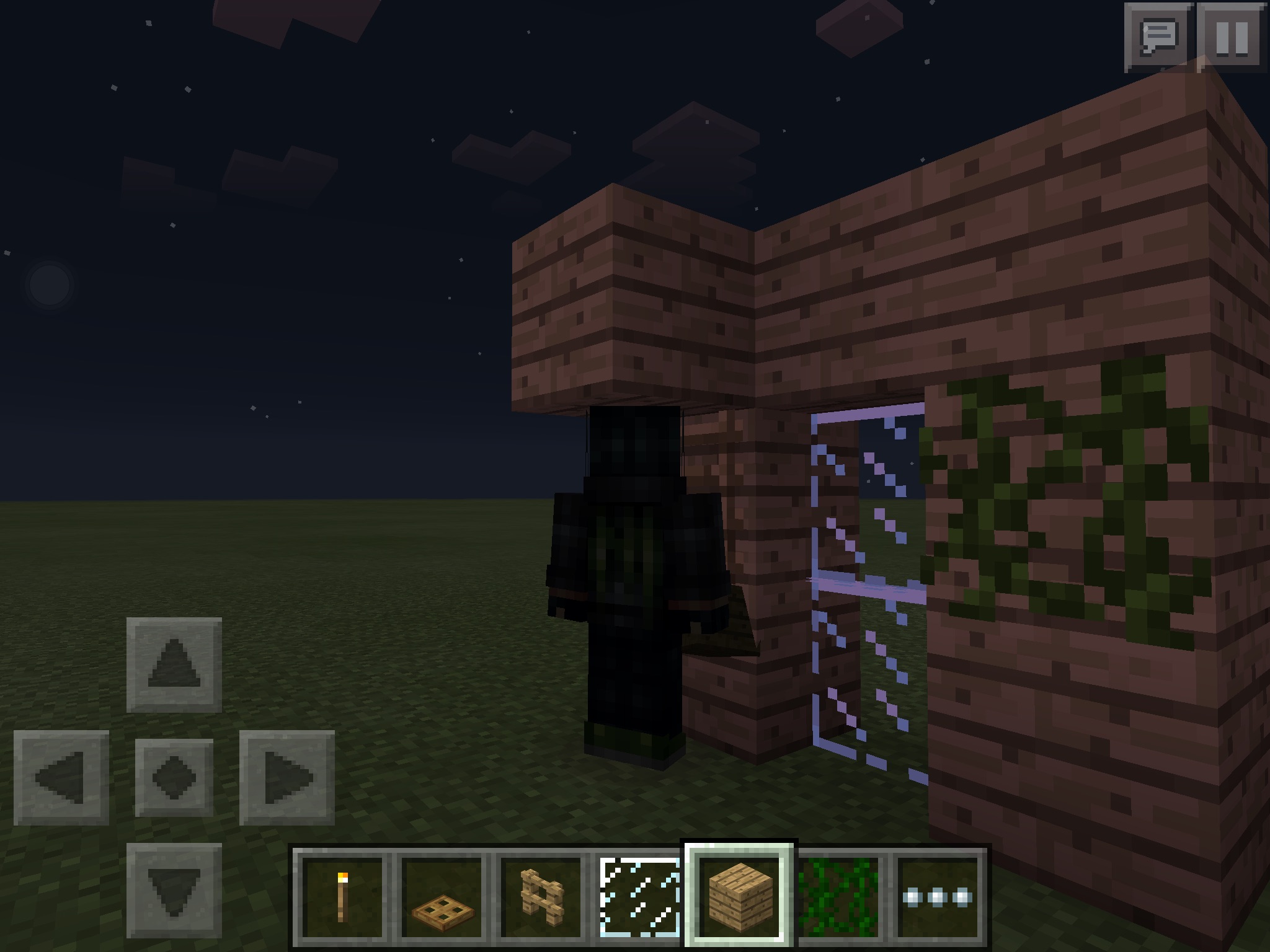

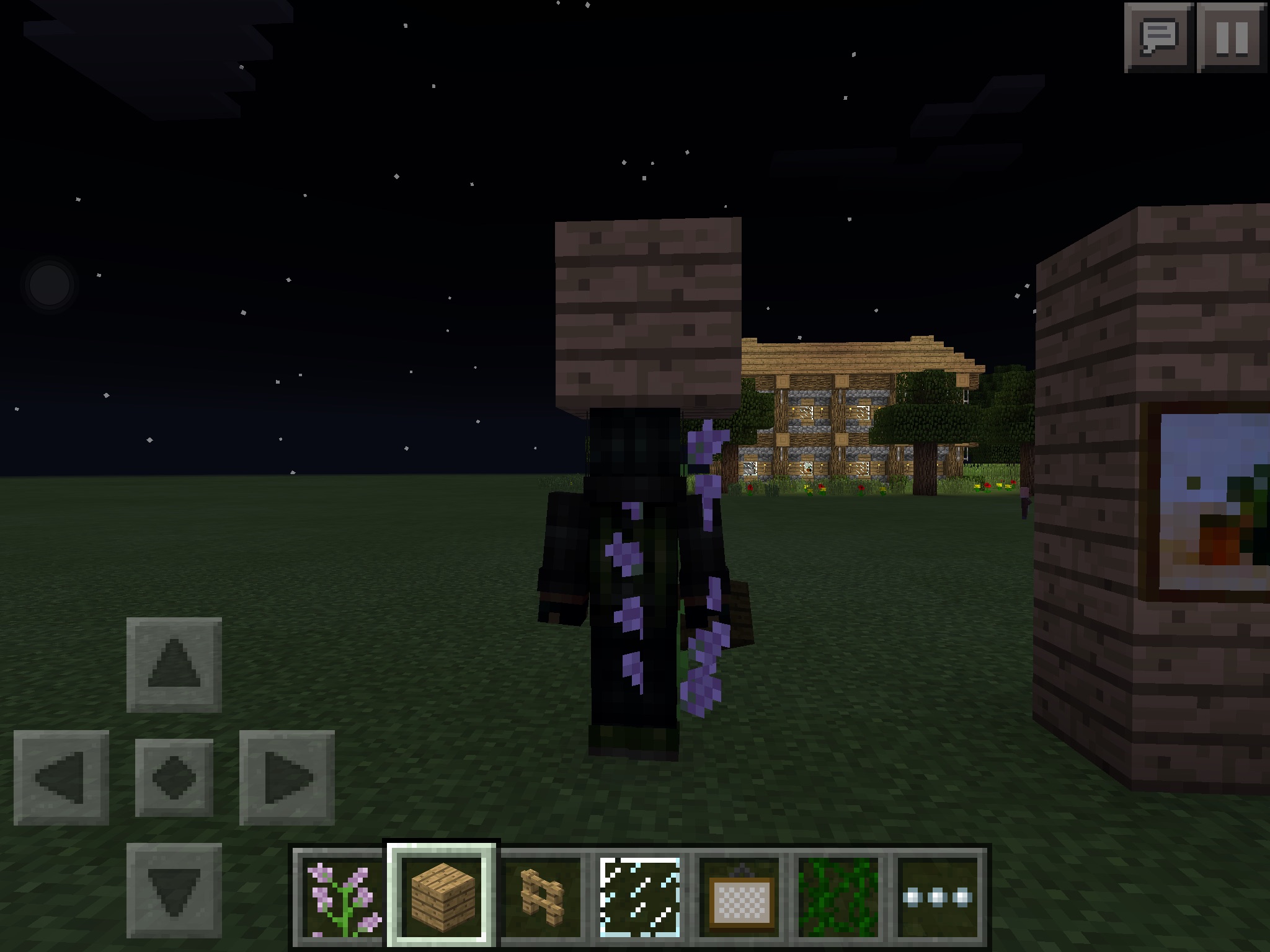




Door'sTextureDoor's texture has issue.
The player texture gets very dark after stand next to the following object:
- Door
- Torch
- Fence
- Fence Gate
- Trapdoor
- Vine
- Ladder
- Glass
- Iron Bar
- Double Tall Grass/Flower
- Spider Web
The player texture gets very dark after stand next to the following object:
- Door
- Torch
- Fence
- Fence Gate
- Trapdoor
- Vine
- Ladder
- Glass
- Iron Bar
- Double Tall Grass/Flower
- Spider Web
P/S: This can happen to mob too, 2 blocks or 1 block tall. Still, I have not tested it.
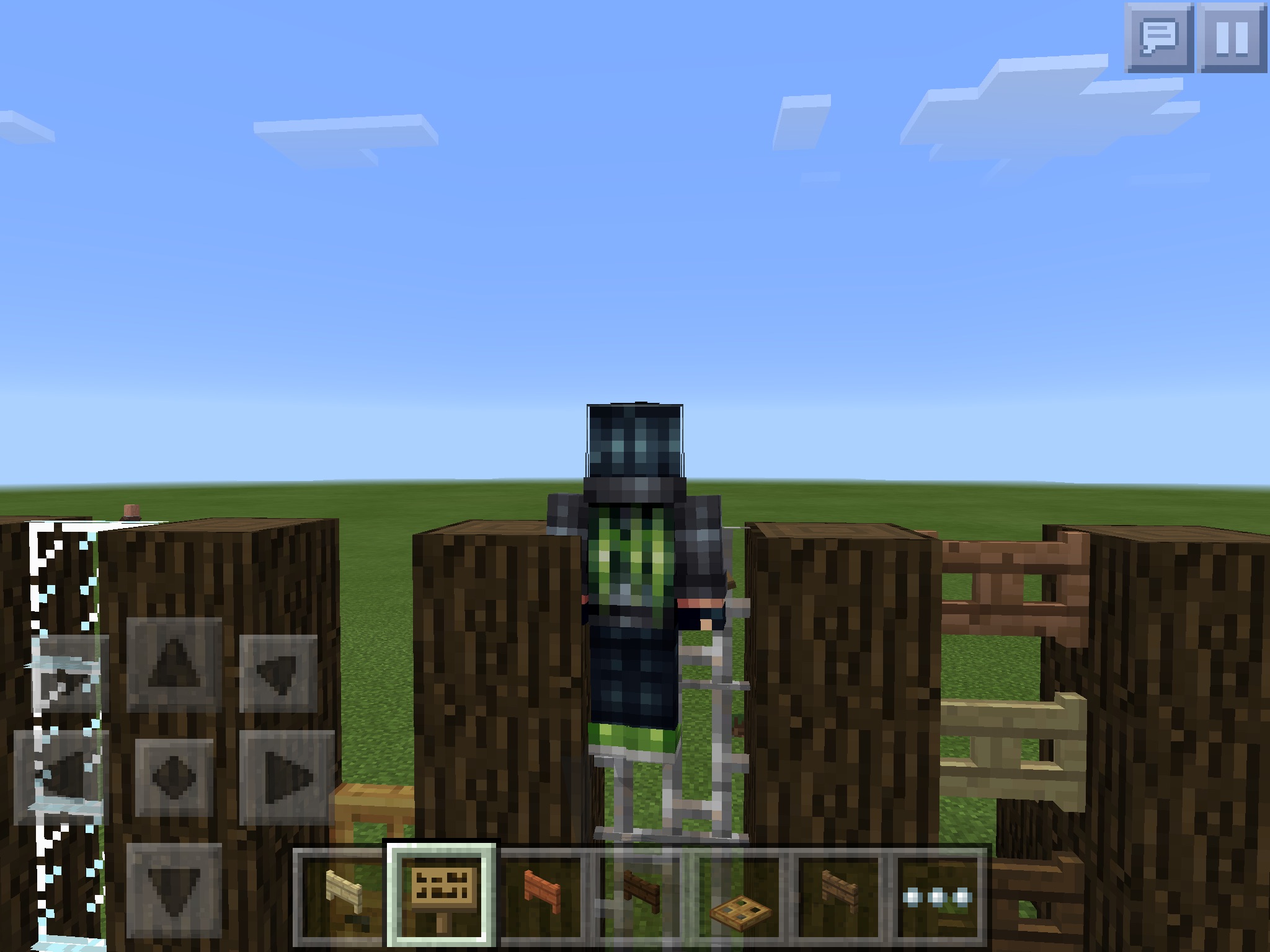
The method is very simple.
First, put the Dark Oak Log to the sides, then put the fence at the middle, the fence will work like a ladder.
This will also work with:
+Any fences type
+Anyfence gates type
+Iron bar
+Door
+Glass pane
This only work with Dark Oak LogThe method is very simple.
First, put the Dark Oak Log to the sides, then put the fence at the middle, the fence will work like a ladder.
This will also work with:
+All type of fence
+All type of fence gate
+Iron bar
+Door
+Glass pane
This only work with Dark Oak Log
The method is very simple.
First, put the Dark Oak Log to the sides, then put the fence at the middle, the fence will work like a ladder.
This will also work with:
+ All type of fence
+ All type of fence gate
+ Iron bar
+ Door
+ Glass pane
This only work with Dark Oak Log
Confirmed in 0.11.1
Work with all type of fence and fence gate, glass pane, door, iron bar, wall.
I have been playing hunger games in multiplayer or fighting mob.
When I don't hold the Dpad(Moving), it is easy to choose from each slot to another.
But when I start holdinhthe Dpad(Moving), it is hard to select a slot as I have to click like 2 - 3 times to select another slot, after a while, it start doing normal (I am still holding the Dpad) for a moment, until it start glitchy again.Basically, it will hard to select slot while moving
(Moving helps you dodge stuff).I have been playing hunger games in multiplayer or fighting mob.
*When I don't hold the Dpad, it is easy to choose from each slot to another.
*When I start holding the Dpad, it is hard to select a slot as I have to click like 2 - 3 times to select another slot, after a while, it start doing normal (I am still holding the Dpad) for a moment, until it start glitchy again.Basically, it will be hard to select slot while moving.
I have been playing hunger games in multiplayer or fighting mob.
*When I don't hold the Dpad, it is easy to choose from each slot to another.
*When I start holding the Dpad, it is hard to select a slot as I have to click like 2 - 3 times to select another slot, after a while, it start doing normal (I am still holding the Dpad) for a moment, until it start glitchy again.Basically, it will be hard to select slot while moving.
Here is the problem
Here
is the problemHere's the problem:
- When I don't hold on anywhere on the screen surface, I can tap and select any quick slot normally.
- When I hold on anywhere on the screen surface (such as the DPad or looking around), it is glitchy to tap and select any quick slot. It took me about 2 - 3 taps select another slot.
Here's the problem:
- When I don't hold on any
where on the screen surface, I can tap and select any quick slot normally.- When I hold on any
where on the screen surface (such as the DPad or looking around), it is glitchy to tap and select any quick slot. It took me about 2 - 3 taps select another slot.Here's the problem:
- When I don't hold on any place on the screen surface, I can tap and select any quick slot normally.
- When I hold on any place on the screen surface (such as the DPad or looking around), it is glitchy to tap and select any quick slot. It took me about 2 - 3 taps select another slot.
Here's the problem:
- Wh
en I don't hold on any place on the screen surface, I can tap and select any quick slot normally.- When I
hold on any place on the screen surface (such as the DPad or looking around), it is glitchy to tap and select any quick slot. It took me about 2 - 3 taps select another slot.
- While holding Diagonal Movement button on DPad, it takes you 2 - 4 times to switch between slots.
- While looking around, it also takes you 2 - 4 times to switch between slots
- When I was playing lbsg, the slots sometimes automatically and rapidly switch between each others.
Hitting a foe while sprinting breaks your sprinting streak.
Further explanation
While you are sprinting, successfully hit any mob or player make you walk again.Confirmed on my iPad Mini tablet. 0.12.1 Full Release
Further explanation
While you are sprinting, successfully hit any mob or player make you walk again.
- Confirmed on my iPad Mini tablet. 0.12.1 Full Release
Further explanation
While you are sprinting, successfully hit any mob or player make you walk again.
- Confirmed on my iPad Mini tablet. 0.12.1 Full Release
Further explanation
While you are sprinting, successfully hit any mob or player make you walk again.Confirmed on my iPad Mini tablet. 0.12.1 Full Release
Further explanation
While you are sprinting, successfully hit any mob or player make you walk again.
Why is this a bug?
On PC, you will not slow down (Ctrl + Forward) when hit a player while sprinting.
Step to reproduce
1. Start sprinting and hold your sprint.
2. Hit a mob or player.
3. Check out if you are still sprinting.Confirmed on my iPad Mini tablet. 0.12.1 Full Release
Further explanation
While you are sprinting, successfully hit any mob or player make you walk again.
Why is this a bug?
On PC, you will not slow down (Ctrl + Forward) when hit a player while sprinting.
Have not tried Forward + Forward, if the result is different from Ctrl + Forward, this may also be PC sprinting exploit. (Sprinting never breaks)
Step to reproduce
1. Start sprinting and hold your sprint.
2. Hit a mob or player.
3. Check out if you are still sprinting.Confirmed on my iPad Mini tablet. 0.12.1 Full Release
Further explanation
While you are sprinting, successfully hit any mob or player make you walk again.
Why is this a bug?
On PC, you will not slow down (Ctrl + Forward) when hit a player while sprinting.
Have not tried Forward + Forward, if the result is different from Ctrl + Forward, this may also be PC sprinting exploit. (Sprinting never breaks)
Step to reproduce
1. Start sprinting and hold your sprint.
2. Hit a mob or player.
3. Check out if you are still sprinting.Confirmed on my iPad Mini tablet. 0.12.1 Full Release
Further explanation
While you are sprinting, successfully hit any mob or player make you walk again.
Why is this a bug?
- On PC, you will not slow down (Ctrl + Forward) when hit a player while sprinting.
- Have not tried Forward + Forward, if the result is different from Ctrl + Forward, this may also be PC sprinting exploit. (Sprinting never breaks)
Step to reproduce
1. Start sprinting and hold your sprint.
2. Hit a mob or player.
3. Check out if you are still sprinting.Confirmed on my iPad Mini tablet. 0.12.1 Full Release
Further explanation
While you are sprinting, successfully hit any mob or player make you walk again.
Why is this a bug?
- On PC, you will not slow down (Ctrl + Forward) when hit a player while sprinting.
- Have not tried Forward + Forward, if the result is different from Ctrl + Forward, this may also be PC sprinting exploit. (Sprinting never breaks)
Step to reproduce
1. Start sprinting and hold your sprint.
2. Hit a mob or player.
3. Check out if you are still sprinting.Confirmed on my iPad Mini tablet. 0.12.1 Full Release
Further explanation
While you are sprinting, successfully hit any mob or player make you walk again.
Why is this a bug?
On PC, you will not slow down (Ctrl + Forward) when hit a player while sprinting.
Have not tried Forward + Forward, if the result is different from Ctrl + Forward, this may also be PC sprinting exploit. (Sprinting never breaks)
Step to reproduce
1. Start sprinting and hold your sprint.
2. Hit a mob or player.
3. Check out if you are still sprinting.Confirmed on my iPad Mini tablet. 0.12.1 Full Release
Further explanation
While you are sprinting, successfully hit any mob or player make you walk again.
Why is this a bug?
On PC, you will not slow down (Ctrl + Forward) when hit a player while sprinting.
Have not tried Forward + Forward, if the result is different from Ctrl + Forward, this may also be PC sprinting exploit. (Sprinting never breaks)Step to reproduce
1. Start sprinting and hold your sprint.
2. Hit a mob or player.
3. Check out if you are still sprinting.Confirmed on my iPad Mini tablet. 0.12.1 Full Release
Further explanation
While you are sprinting, successfully hit any mob or player make you walk again.
Why is this a bug?
On PC, you will not slow down (Ctrl + Forward) when hit a player while sprinting.
Have not tried Forward + Forward, if the result is different from Ctrl + Forward, this may also be PC sprinting exploit. (Sprinting never breaks)
_This could however be wrong. Check and test it base on this http://minecraft.gamepedia.com/Sprinting _
Step to reproduce
1. Start sprinting and hold your sprint.
2. Hit a mob or player.
3. Check out if you are still sprinting.Confirmed on my iPad Mini tablet. 0.12.1 Full Release
Further explanation
While you are sprinting, successfully hit any mob or player make you walk again.
Why is this a bug?
On PC, you will not slow down (Ctrl + Forward) when hit a player while sprinting.
Have not tried Forward + Forward, if the result is different from Ctrl + Forward, this may also be PC sprinting exploit. (Sprinting never breaks)
_This could however be wrong. Check and testit base on thishttp://minecraft.gamepedia.com/Sprinting _
Step to reproduce
1. Start sprinting and hold your sprint.
2. Hit a mob or player.
3. Check out if you are still sprinting.Confirmed on my iPad Mini tablet. 0.12.1 Full Release
Further explanation
While you are sprinting, successfully hit any mob or player make you walk again.
Why is this a bug?
On PC, you will not slow down (Ctrl + Forward) when hit a player while sprinting.
Have not tried Forward + Forward, if the result is different from Ctrl + Forward, this may also be PC sprinting exploit. (Sprinting never breaks)
_This could however be wrong. Check and test: http://minecraft.gamepedia.com/Sprinting _
Step to reproduce
1. Start sprinting and hold your sprint.
2. Hit a mob or player.
3. Check out if you are still sprinting.Confirmed on my iPad Mini tablet. 0.12.1 Full Release
Further explanation
While you are sprinting, successfully hit any mob or player make you walk again.
Why is this a bug?
On PC, you will not slow down (Ctrl + Forward) when hit a player while sprinting.
Have not tried Forward + Forward, if the result is different from Ctrl + Forward, this may also be PC sprinting exploit. (Sprinting never breaks)_This could however be wrong. Check and test:http://minecraft.gamepedia.com/Sprinting _
Step to reproduce
1. Start sprinting and hold your sprint.
2. Hit a mob or player.
3. Check out if you are still sprinting.Confirmed on my iPad Mini tablet. 0.12.1 Full Release
Further explanation
While you are sprinting, successfully hit any mob or player make you walk again.
Why is this a bug?
On PC, you will not slow down (Ctrl + Forward) when hit a player while sprinting.
Have not tried Forward + Forward, if the result is different from Ctrl + Forward, this may also be PC sprinting exploit. (Sprinting never breaks)
This could however be wrong. Check and test: http://minecraft.gamepedia.com/Sprinting
Step to reproduce
1. Start sprinting and hold your sprint.
2. Hit a mob or player.
3. Check out if you are still sprinting.Confirmed on my iPad Mini tablet. 0.12.1 Full Release
Confirmed on iPad Mini and iPad 2. iOS 8
Still affects 0.11.1
Work with all kind of fence, fence gate, door, iron bar, wall, glass pane...
Confirmed on iPad Mini iOS 8.1 0.12.1
On PC, holding Ctrl and Forward makes you sprint, and hitting anything WILL NOT break your sprinting.
Need to be checked, again.
Status: Unconfirmed.
I tried it in my local server, and you DO slow down (A.K.A. sprinting breaks) when hit a playing while sprinting.
Confirmed on servers
iPad Mini - 0.12.1
Even though it wasn't a bug, you should be able to sleep during rain.
I mean, they should fix this by adding that feature.