 Brodend
- Blockmaster200
- JIRAUSER616716
- Europe/Stockholm
- Yes
- No
 MC-269985
 MCPE-184249MCPE-185917

Even if the player hits an enemy with the mace, the player will hit the ground and take fall damage after being launched upwards.
Steps to Reproduce:
1. Get a mace with level 3 wind burst enchantment
2. Hit an entity and knock yourself at least 4 blocks up
3. Hit the groundObserved Results:
The player takes fall damage based on the peak of when they are knocked upward.Expected Results:
Normal Mace and Wind Charge mechanics of reducing fall damage would mean the player should land safely.
Yes, sorry I didn't say so I assumed it wouldn't be a problem.
Grass dies under partial, transparent blocks such as fences, button,
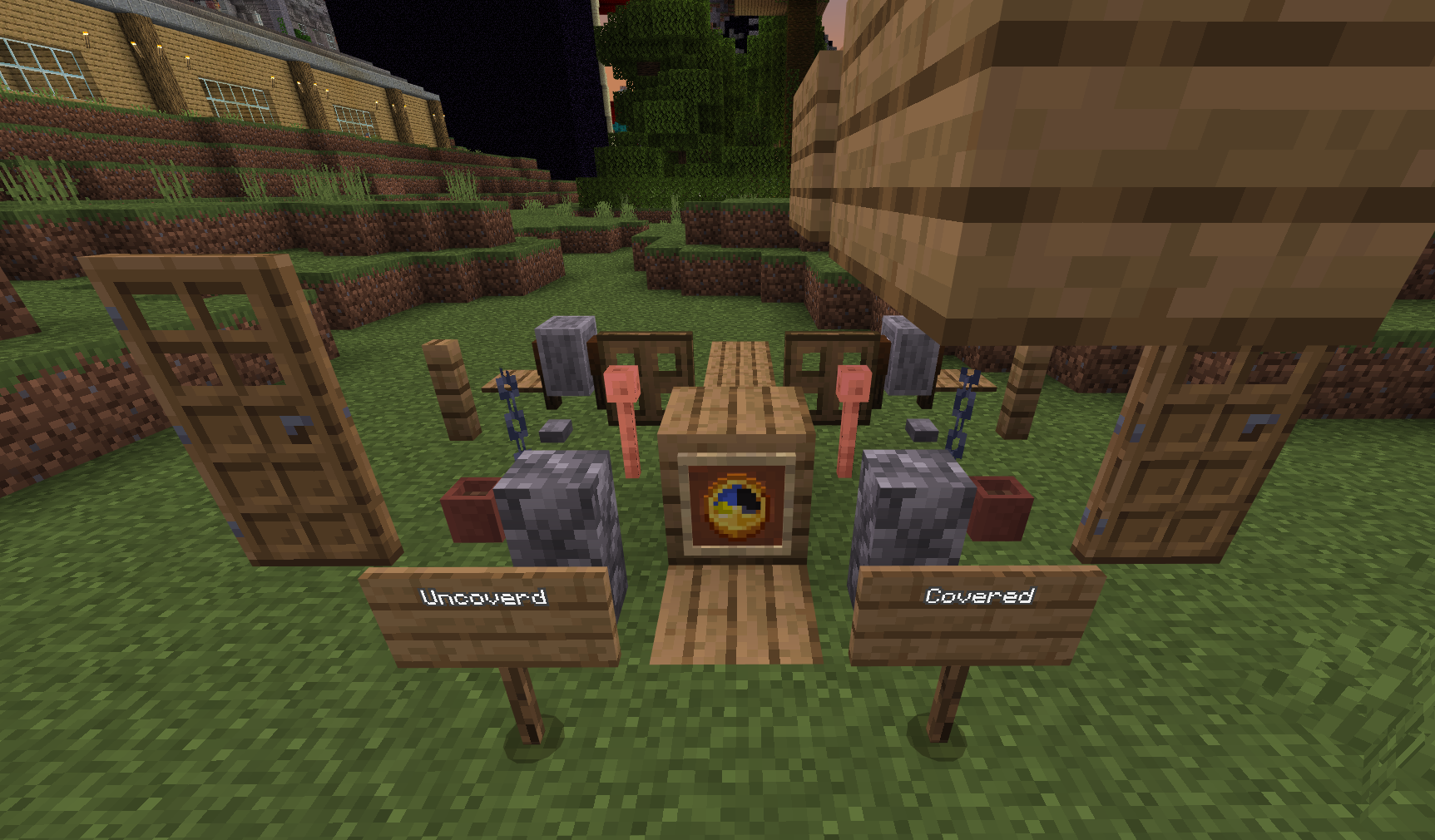
trapdoors, ect. when the grass should be able to grow underneath.Grass dies under partial, transparent blocks such as fences, buttons, anvils, ect. when the grass should be able to grow underneath. The grass only dies when in a low light level, and will only grow back in light. While the grass growing back in light makes sense, the grass should not die when these blocks are placed on top.
Grass dies underfences, buttons, trapdoorsGrass dies under buttons and fences in low light levels
Grass dies under partial, transparent blocks such as fences, buttons, anvils, ect. when the grass should be able to grow underneath. The grass only dies when in a low light level and when a block is above ir, and will only grow back in light. While the grass growing back in light makes sense, the grass should not die when these blocks are placed on top.
Grass dies under partial, transparent blocks such as fences, buttons, anvils, ect. when the grass should be able to grow underneath. The grass only dies when in a low light level and when a block is above i
r, and will only grow back in light. While the grass growing back in light makes sense, the grass should not die when these blocks are placed on top.Grass dies under partial, transparent blocks such as fences, buttons, anvils, ect. when the grass should be able to grow underneath. The grass only dies when in a low light level and when a block is above it, and will only grow back in light. While the grass growing back in light makes sense, the grass should not die when these blocks are placed on top.
Grass dies under partial, transparent blocks such as fences, buttons,
anvils, ect. when the grass should be able to grow underneath. The grassonly dies whenin a low light level and when a block is above it,andwill only grow back in light. While the grass growing back in light makes sense, the grass should not die when these blocks are placed on top.Grass dies under partial, transparent blocks such as fences, buttons, grindstones, pots, trapdoors, doors chains, etc. when the grass should be able to grow underneath. The grass dies in a low light level and when a block is above it, it will only grow back in light. While the grass growing back in light makes sense, the grass should not die when these blocks are placed on top.
Grass dies under partial, transparent blocks such as fences, buttons, grindstones, pots, trapdoors, doors chains, etc. when the grass should be able to grow underneath. The grass dies in a low light level and when a block is above it, it will only grow back in light. While the grass growing back in light makes sense, the grass should not die when these blocks are placed on top.
Current list of blocks: Fence, Trapdoor, Door, Sign, Wall, Plant pot,
Grass dies under partial, transparent blocks such as fences, buttons, grindstones, pots, trapdoors, doors chains, etc. when the grass should be able to grow underneath. The grass dies in a low light level and when a block is above it, it will only grow back in light. While the grass growing back in light makes sense, the grass should not die when these blocks are placed on top.
Current list of blocks: Fence, Trapdoor, Door, Sign, Wall, Plant pot, lightning rod, anvil, structure void, chain, button, grindstone,
Grass dies under partial, transparent blocks such as fences, buttons, grindstones, pots, trapdoors, doors chains, etc. when the grass should be able to grow underneath. The grass dies in a low light level and when a block is above it, it will only grow back in light. While the grass growing back in light makes sense, the grass should not die when these blocks are placed on top.
Current list of blocks: Fence, Trapdoor, Door, Sign, Wall, Plant pot, lightning rod, anvil, structure void, chain, button, grindstone, and pressure plate.
Grassdies under buttons and fences in low light levelsGrass growing and dying does not behave as intended
Grass dies under partial, transparent blocks such as fences, buttons, grindstones, pots, trapdoors, doors chains, etc. when the grass should be able to grow underneath. The grass dies in a low light level and when a block is above it, it will only grow back in light. While the grass growing back in light makes sense, the grass should not die when these blocks are placed on top.
Current list of blocks: Fence, Trapdoor, Door, Sign, Wall, Plant pot, lightning rod, anvil, structure void, chain, button, grindstone, and pressure plate.Grass dies under partial, transparent blocks such as fences, buttons, grindstones, pots, trapdoors, doors chains, etc. when the grass should be able to grow underneath. The grass dies in a low light level and when a block is above it, it will only grow back in light. While the grass growing back in light makes sense, the grass should not die when these blocks are placed on top.
Some partial blocks just kill grass no matter the light level, while on Java edition they don't, such as the anvil.
Current list of blocks: Fence, Trapdoor, Door, Sign, Wall, Plant pot, lightning rod, anvil, structure void, chain, button, grindstone, and pressure plate.
When saving a structure, using a command block or a
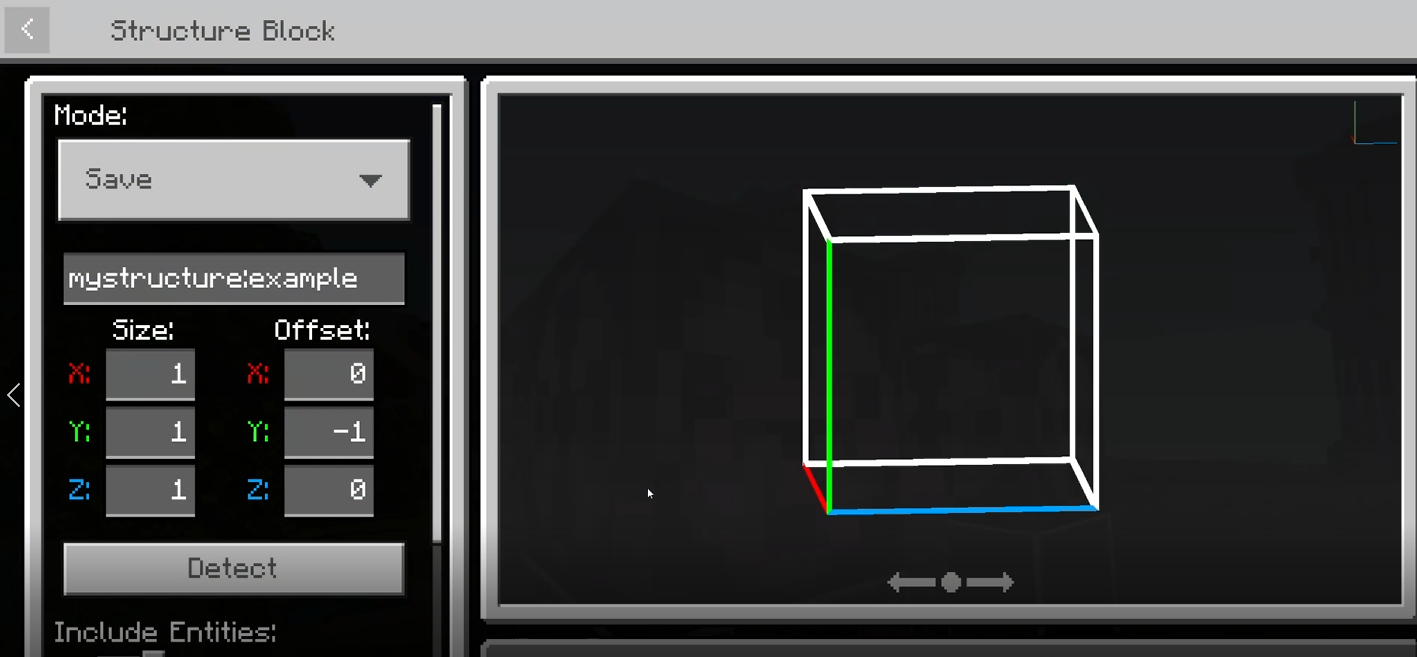
redstone link to a structure block does notwork. When reloading the world, the structure will not exist.When saving a structure, using a command block or a Redstone link to a structure block does not save it permanently. When reloading the world, the structure will not exist. The structure WILL save if the player manually clicks save in the structure block. When changing the setting on a structure block from load to save and vice versa, it will also completely break and must be replaced. (image with text)
Structures cannot be saved via commands or redstone.Structures cannot be saved via commands or redstone powering a structure block
Minecraft 8_21_2024 10_59_02 PM.png
When saving a structure, using a command block or a Redstone link to a structure block does not save it permanently. When reloading the world, the structure will not exist. The structure WILL save if the player manually clicks save in the structure block.
Steps to Reproduce:
1. Use the /structure save command to save a 1x1 area with no blocks
2. Leave the world
3. Rejoin and try to load the structure
Observed Results:
The structure does not exist
Expected Results:
The structure loads.
When saving a structure, using a command block or a Redstone link to a structure block does not save it permanently. When reloading the world, the structure will not exist. The structure WILL save if the player manually clicks save in the structure block.
Steps to Reproduce:
1. Use the /structure save command to save a 1x1 areawith no blocks
2. Leave the world
3. Rejoin and try to load the structure
Observed Results:
The structure does not exist
Expected Results:
The structure loads.
When saving a structure, using a command block or a Redstone link to a structure block does not save it permanently. When reloading the world, the structure will not exist. The structure WILL save if the player manually clicks save in the structure block.
Steps to Reproduce:
1. Use the /structuresavecommand to save a 1x1 area
2. Leave the world
3. Rejoin and try to load the structure
Observed Results:
The structure does not exist
Expected Results:
The structure loads.When saving a structure, using a command block or a Redstone link to a structure block does not save it permanently. When reloading the world, the structure will not exist. The structure WILL save if the player manually clicks save in the structure block.
Steps to Reproduce:
1. Use the /structure command to save a 1x1 area OR place a redstone block on a structure block to save a 1 x 1 area
2. Leave the world
3. Rejoin and try to load the structure
Observed Results:
The structure does not exist
Expected Results:
The structure loads.
When saving a structure, using a command block or a Redstone link to a structure block does not save it permanently. When reloading the world, the structure will not exist. The structure WILL save if the player manually clicks save in the structure block.
Steps to Reproduce:
1. Use the /structure command to save a 1x1 area ORplace a redstone block on astructure block to save a 1x1 area
2. Leavetheworld
3.Rejoin and try to load the structure
Observed Results:
The structure does not exist
Expected Results:
The structure loads.When saving a structure, using a command block or a Redstone link to a structure block does not save it permanently. When reloading the world, the structure will not exist. The structure WILL save if the player manually clicks save in the structure block.
Steps to Reproduce:
1. Use the /structure command to save a 1x1 area OR activate structure block using Redstone to save a 1x1 area
2. Load the structure and notice it loads properly
3. Leave the world
4. Rejoin and try to load the structure
Observed Results:
The structure does not exist
Expected Results:
The structure loads.
It's misspelled in the behavior files for the default behavior packs, in skeleton.json.