 Paul Bühne
- Cactusman
- cactusman
- Europe/Stockholm
- Yes
- No
 MC-151492
 MCL-22853
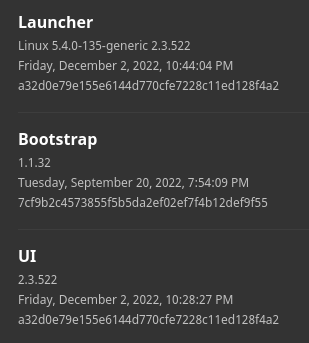

I wanted to play Java Edition 1.16.5, so I created a new installation for the java game. Trying to change the version of the installation did not work, It stayed "Latest release (1.19.3)". I tried switching to the Launcher beta, reinstalled the launcher (twice), no change. So I tried deleting the installation. Button did not work. First, it just did nothing. Through many restarts, these buttons changed behavior. The installation button in the "Play" menu does not work either.
What I expected to happen was...:
I should be able to change installation versions and click the edit and delete button, use buttons in general.What actually happened was...:
The buttons either did not work at all, the clicks went through and triggered other clickable objects or they could be clicked, but launcher state did not change.Steps to Reproduce:
1. Start the launcher
2. Try click a button
3. fail
I wanted to play Java Edition 1.16.5, so I created a new installation for the java game. Trying to change the version of the installation did not work, It stayed "Latest release (1.19.3)". I tried switching to the Launcher beta, reinstalled the launcher (twice), no change. So I tried deleting the installation. Button did not work. First, it just did nothing. Through many restarts, these buttons changed behavior. The installation button in the "Play" menu does not work either.
What I expected to happen was...:
I should be able to change installation versions and click the edit and delete button, use buttons in general.What actually happened was...:
The buttons either did not work at all, the clicks went through and triggered other clickable objects or they could be clicked, but launcher state did not change.Steps to Reproduce:
1. Start the launcher
2. Try click a button
3. fail
EDIT: added a desktop recording
I wanted to play Java Edition 1.16.5, so I created a new installation for the java game. Trying to change the version of the installation did not work, It stayed "Latest release (1.19.3)". I tried switching to the Launcher beta, reinstalled the launcher (twice), no change. So I tried deleting the installation. Button did not work. First, it just did nothing. Through many restarts, these buttons changed behavior. The installation button in the "Play" menu does not work either.
What I expected to happen was...:
I should be able to change installation versions and click the edit and delete button, use buttons in general.What actually happened was...:
The buttons either did not work at all, the clicks went through and triggered other clickable objects or they could be clicked, but launcher state did not change.Steps to Reproduce:
1. Start the launcher
2. Try click a button
3. fail
EDIT:
added a desktop recordingI wanted to play Java Edition 1.16.5, so I created a new installation for the java game. Trying to change the version of the installation did not work, It stayed "Latest release (1.19.3)". I tried switching to the Launcher beta, reinstalled the launcher (twice), no change. So I tried deleting the installation. Button did not work. First, it just did nothing. Through many restarts, these buttons changed behavior. The installation button in the "Play" menu does not work either.
What I expected to happen was...:
I should be able to change installation versions and click the edit and delete button, use buttons in general.What actually happened was...:
The buttons either did not work at all, the clicks went through and triggered other clickable objects or they could be clicked, but launcher state did not change.Steps to Reproduce:
1. Start the launcher
2. Try click a button
3. fail
EDIT: note that I cut the video between launcher starting minecraft
I wanted to play Java Edition 1.16.5, so I created a new installation for the java game. Trying to change the version of the installation did not work, It stayed "Latest release (1.19.3)". I tried switching to the Launcher beta, reinstalled the launcher (twice), no change. So I tried deleting the installation. Button did not work. First, it just did nothing. Through many restarts, these buttons changed behavior. The installation button in the "Play" menu does not work either.
What I expected to happen was...:
I should be able to change installation versions and click the edit and delete button, use buttons in general.What actually happened was...:
The buttons either did not work at all, the clicks went through and triggered other clickable objects or they could be clicked, but launcher state did not change.Steps to Reproduce:
1. Start the launcher
2. Try click a button
3. fail
EDIT: note that I cut the video between launcher
starting minecraftI wanted to play Java Edition 1.16.5, so I created a new installation for the java game. Trying to change the version of the installation did not work, It stayed "Latest release (1.19.3)". I tried switching to the Launcher beta, reinstalled the launcher (twice), no change. So I tried deleting the installation. Button did not work. First, it just did nothing. Through many restarts, these buttons changed behavior. The installation button in the "Play" menu does not work either.
What I expected to happen was...:
I should be able to change installation versions and click the edit and delete button, use buttons in general.What actually happened was...:
The buttons either did not work at all, the clicks went through and triggered other clickable objects or they could be clicked, but launcher state did not change.Steps to Reproduce:
1. Start the launcher
2. Try click a button
3. fail
EDIT: note that I cut the video between launcher and game, because the window created
I wanted to play Java Edition 1.16.5, so I created a new installation for the java game. Trying to change the version of the installation did not work, It stayed "Latest release (1.19.3)". I tried switching to the Launcher beta, reinstalled the launcher (twice), no change. So I tried deleting the installation. Button did not work. First, it just did nothing. Through many restarts, these buttons changed behavior. The installation button in the "Play" menu does not work either.
What I expected to happen was...:
I should be able to change installation versions and click the edit and delete button, use buttons in general.What actually happened was...:
The buttons either did not work at all, the clicks went through and triggered other clickable objects or they could be clicked, but launcher state did not change.Steps to Reproduce:
1. Start the launcher
2. Try click a button
3. fail
EDIT: note that I cut the video between launcher and game, because the window created
I wanted to play Java Edition 1.16.5, so I created a new installation for the java game. Trying to change the version of the installation did not work, It stayed "Latest release (1.19.3)". I tried switching to the Launcher beta, reinstalled the launcher (twice), no change. So I tried deleting the installation. Button did not work. First, it just did nothing. Through many restarts, these buttons changed behavior. The installation button in the "Play" menu does not work either.
What I expected to happen was...:
I should be able to change installation versions and click the edit and delete button, use buttons in general.What actually happened was...:
The buttons either did not work at all, the clicks went through and triggered other clickable objects or they could be clicked, but launcher state did not change.Steps to Reproduce:
1. Start the launcher
2. Try click a button
3. fail
EDIT: note that I cut the video between launcher and game, because the minecraft take a few seconds before rendering to its window and it instead shows part of whatever is in the top left corner of my desktop. In the video this was part of a chat and I prefer to that here and it does not have any value to this issue.
I wanted to play Java Edition 1.16.5, so I created a new installation for the java game. Trying to change the version of the installation did not work, It stayed "Latest release (1.19.3)". I tried switching to the Launcher beta, reinstalled the launcher (twice), no change. So I tried deleting the installation. Button did not work. First, it just did nothing. Through many restarts, these buttons changed behavior. The installation button in the "Play" menu does not work either.
What I expected to happen was...:
I should be able to change installation versions and click the edit and delete button, use buttons in general.What actually happened was...:
The buttons either did not work at all, the clicks went through and triggered other clickable objects or they could be clicked, but launcher state did not change.Steps to Reproduce:
1. Start the launcher
2. Try click a button
3. fail
EDIT: note that I cut the video between launcher and game, because the minecraft take a few seconds before rendering to its window and it instead shows part of whatever is in the top left corner of my desktop. In the video this was part of a chat and I prefer to that here and it does not have any value to this issue.
I wanted to play Java Edition 1.16.5, so I created a new installation for the java game. Trying to change the version of the installation did not work, It stayed "Latest release (1.19.3)". I tried switching to the Launcher beta, reinstalled the launcher (twice), no change. So I tried deleting the installation. Button did not work. First, it just did nothing. Through many restarts, these buttons changed behavior. The installation button in the "Play" menu does not work either.
What I expected to happen was...:
I should be able to change installation versions and click the edit and delete button, use buttons in general.What actually happened was...:
The buttons either did not work at all, the clicks went through and triggered other clickable objects or they could be clicked, but launcher state did not change.Steps to Reproduce:
1. Start the launcher
2. Try click a button
3. fail
EDIT: Video was too large for upload here, it's in my Google Drive: https://bit.ly/3DiReH2
note that I cut the video between launcher and game, because the minecraft take a few seconds before rendering to its window and it instead shows part of whatever is in the top left corner of my desktop. In the video this was part of a chat and I prefer to that here and it does not have any value to this issue.
I'm able to teleport myself to Y = -500! This is weird because I can't teleport back and it is impossible to save and close the world or minecraft. Please fix this annoying bug
Uploaded the launcher_log file and added a link to the video in cloud storage. Hope this helps
I just tried the same thing on my laptop (powered by an arch linux flavor). Same exact bug. This might not be specific to Linux Mint but rather common to the linux variant of the launcher in general