 Noel andersen
- Creepervsdog
- creepervsdog
- Europe/Stockholm
- Yes
- No
 MCL-243
![[Mojang] Nathan Adams](../../../data/assets/gravatar/dinnerbone.png)
 MC-33829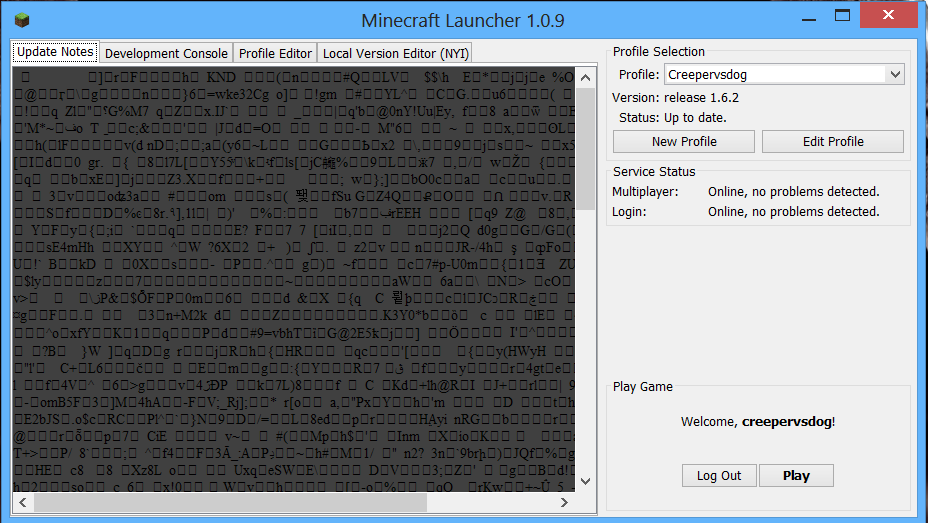
This bug is a glitch in the minecraft dev 0.71 where random code shows up in place of the update notes.
What I expected to happen was that the launcher would show the regular update notes for 1.5.2.
What actually happened was that it showed random code which usually shows when trying to open a .exe file.
Steps to Reproduce:
1. Open the new minecraft dev application (might just be a glitch, will see what happens)
(ok, it doesn't show on 0.7 or earlier)
This bug is a glitch in the minecraft dev 0.71 where random code shows up in place of the update notes.
What I expected to happen was that the launcher would show the regular update notes
for 1.5.2.What actually happened was that it showed random code which usually shows when trying to open a .exe file.
Steps to Reproduce:
1. Open the new minecraft dev application (might just be a glitch, will see what happens)
(ok, it doesn't show on 0.7 or earlier)This bug is a glitch in the minecraft dev 0.71 where random code shows up in place of the update notes.
What I expected to happen was that the launcher would show the regular update notes that are shown when the launcher shows before.
What actually happened was that it showed random code which usually shows when trying to open a .exe file while using a mac. (I have a picture under l.tiff).
Steps to Reproduce:
1. Open the new minecraft dev application (might just be a glitch, will see what happens)
(ok, it doesn't show on 0.7 or earlier)
This bug is a glitch in the minecraft dev 0.71 where random code shows up in place of the update notes.
What I expected to happen was that the launcher would show the regular update notes that are shown when the launcher shows before.
What actually happened was that it showed random code which usually shows when trying to open a .exe file while using a mac. (I have a picture under
l.tiff).Steps to Reproduce:
1. Open the new minecraft dev application (might just be a glitch, will see what happens)
(ok, it doesn't show on 0.7 or earlier)This bug is a glitch in the minecraft dev 0.71 where random code shows up in place of the update notes.
What I expected to happen was that the launcher would show the regular update notes that are shown when the launcher shows before.
What actually happened was that it showed random code which usually shows when trying to open a .exe file while using a mac. (I have a picture under random text.jpg).
Steps to Reproduce:
1. Open the new minecraft dev application (might just be a glitch, will see what happens)
(ok, it doesn't show on 0.7 or earlier)
This bug is a glitch in the minecraft dev 0.71 and 0.7.2 where random code shows up in place of the update notes.
What I expected to happen was that the launcher would show the regular update notes that are shown when the launcher shows before.
What actually happened was that it showed random code which usually shows when trying to open a .exe file while using a mac. (I have a picture under random text.jpg).
Steps to Reproduce:
1. Open the new minecraft dev application (might just be a glitch, will see what happens)
(ok, it doesn't show on 0.7 or earlier)
Mac os x 10.6.8
Mac, Windows (not confermed on linux)
This bug is a glitch in the minecraft dev 0.71 and 0.7.2 where random code shows up in place of the update notes.
What I expected to happen was that the launcher would show the regular update notes that are shown when the launcher shows before.
What actually happened was that it showed random code which usually shows when trying to open a .exe file while using a mac. (I have a picture under random text.jpg).
Steps to Reproduce:
1. Open the new minecraft dev application (mightjust be a glitch, will see what happens)
(ok, it doesn't show on 0.7 or earlier)This bug is a glitch in the minecraft dev 0.71 and 0.7.2 where random code shows up in place of the update notes.
What I expected to happen was that the launcher would show the regular update notes that are shown when the launcher shows before.
What actually happened was that it showed random code which usually shows when trying to open a .exe file while using a mac. (I have a picture under random text.jpg).
Steps to Reproduce:
1. Open the new minecraft dev application (Might work for some and not for others)
(ok, it doesn't show on 0.7 or earlier)
Mac, Windows (not conf
ermed on linux)Mac, Windows (not confirmed on linux)
This bug is a glitch in the minecraft dev 0.71 and 0.7.2 where random code shows up in place of the update notes.
What I expected to happen was that the launcher would show the regular update notes that are shown when the launcher shows before.
What actually happened was that it showed random code which usually shows when trying to open a .exe file while using a mac. (I have a picture under random text.jpg).
Steps to Reproduce:
1. Open the new minecraft dev application (Might work for some and not for others)
(ok, it doesn't show on 0.7 or earlier)This bug is a glitch in the minecraft dev 0.71 and 0.7.2 where random code shows up in place of the update notes.
What I expected to happen was that the launcher would show the regular update notes that are shown when the launcher shows before.
What actually happened was that it showed random code which usually shows when trying to open a .exe file while using a mac. (I have a picture under random text.jpg).
Steps to Reproduce:
1. Open the new minecraft dev application (Works at random)
(Still need confirmation on linux)
This bug is a glitch in the minecraft dev 0.71 and 0.7.2 where random code shows up in place of the update notes.
What I expected to happen was that the launcher would show the regular update notes that are shown when the launcher shows before.
What actually happened was that it showed random code which usually shows when trying to open a
.exe file while using a mac. (I have a picture under random text.jpg).Steps to Reproduce:
1. Open the new minecraft dev application (Works at random)
(Still need confirmation on linux)This bug is a glitch in the minecraft dev 0.71 and 0.7.2 where random code shows up in place of the update notes.
What I expected to happen was that the launcher would show the regular update notes that are shown when the launcher shows before.
What actually happened was that it showed random code which usually shows when trying to open a one of the minecraft code files in notepad
Steps to Reproduce:
1. Open the new minecraft dev application (Works at random)
(Still need confirmation on linux)
This bug is a glitch in the minecraft dev 0.71 and 0.7.2 where random code shows up in place of the update notes.
What I expected to happen was that the launcher would show the regular update notes that are shown when the launcher shows before.
What actually happened was that it showed random code which usually shows when trying to open
aone of the minecraft code files in notepadSteps to Reproduce:
1. Open the new minecraft dev application (Works at random)
(Still need confirmation on linux)
Mac, Windows (not confirmed on linux)
All operating systems
This bug is a glitch in
the minecraftdev 0.71 and0.7.2where random code shows up in place of the update notes.What I expected to happen was that the launcher would show the regular update notes that are shown when the launcher shows before.
What actually happened was that it showed random code which usually shows when trying to open one of the minecraft code files in notepad
Steps to Reproduce:
1. Open the new minecraft dev application (Works at random)
(Still need confirmation on linux)This bug is a glitch in all Minecraft launcher versions since 0.7.1, where random code shows up in place of the update notes.
What I expected to happen was that the launcher would show the regular update notes that are shown when the launcher shows before.
What actually happened was that it showed random code which usually shows when trying to open one of the minecraft code files in notepad
Steps to Reproduce:
1. Open the new minecraft dev application (Works at random and might just be a 1 time thing)
(Still need confirmation on linux)
This bug is a glitch in all Minecraft launcher versions since 0.7.1, where random code shows up in place of the update notes.
What I expected to happen was that the launcher would show the regular update notes that are shown when the launcher shows before.
What actually happened was that it showed random code which usually shows when trying to open one of the minecraft code files in notepad
Steps to Reproduce:
1. Open thenewminecraftdev application (Works at random and might just be a 1 time thing)
(Still need confirmation on linux)This bug is a glitch in all Minecraft launcher versions since 0.7.1, where random code shows up in place of the update notes.
What I expected to happen was that the launcher would show the regular update notes that are shown when the launcher shows before.
What actually happened was that it showed random code which usually shows when trying to open one of the minecraft code files in notepad (a decompresed
Steps to Reproduce:
1. Open the minecraft launcher
(Works at random and might just be a 1 time thing)
This bug is a glitch in all Minecraft launcher versions since 0.7.1, where random code shows up in place of the update notes.
What I expected to happen was that the launcher would show the regular update notes that are shown when the launcher shows before.
What actually happened was that it showed random code which usually shows when trying to open one of the minecraft code files in notepad (a incorrectly decompressed gzip)
Steps to Reproduce:
1. Open the minecraft launcher
(Works at random and might just be a 1 time thing)
All operating systems
Mac OSX - 11-5-13
Windows -
Mac OSX - 11-5-13
Windows - 15-5-13
Mac OSX - 11-5-13
Windows - 15-5-13
Linux - 14-7-13
I was working on my adventure map, testing out with the scoreboard. When I was done, I walked a couple blocks, making the all blocks disappear. I checked my F3 mode to see if I had teleported, as there were many random pressure plates near my location. It said that I was at the same location though, and slowly falling, as if in a chunk error, or a cobweb. As this was happening, my fps was reaching slow numbers, once at 120, now at 30. As it was happening, my memory was getting packed, with it quickly going from 30% to 90% in a matter of seconds. As I reached 0 on the y- level, My game crashed, with this report:
---- Minecraft Crash Report ----
// Why is it breakingTime: 10/5/13 5:18 PM
Description: Exception in server tick loopjava.lang.OutOfMemoryError: Java heap space
at java.lang.StringCoding.set(Unknown Source)
at java.lang.StringCoding.decode(Unknown Source)
at java.lang.String.<init>(Unknown Source)
at java.util.jar.Attributes.read(Unknown Source)
at java.util.jar.Manifest.read(Unknown Source)
at java.util.jar.Manifest.<init>(Unknown Source)
at java.util.jar.JarFile.getManifestFromReference(Unknown Source)
at java.util.jar.JarFile.getInputStream(Unknown Source)
at sun.misc.URLClassPath$JarLoader$2.getInputStream(Unknown Source)
at sun.misc.Resource.cachedInputStream(Unknown Source)
at sun.misc.Resource.getByteBuffer(Unknown Source)
at java.net.URLClassLoader.defineClass(Unknown Source)
at java.net.URLClassLoader.access$100(Unknown Source)
at java.net.URLClassLoader$1.run(Unknown Source)
at java.net.URLClassLoader$1.run(Unknown Source)
at java.security.AccessController.doPrivileged(Native Method)
at java.net.URLClassLoader.findClass(Unknown Source)
at java.lang.ClassLoader.loadClass(Unknown Source)
at sun.misc.Launcher$AppClassLoader.loadClass(Unknown Source)
at java.lang.ClassLoader.loadClass(Unknown Source)
at km.c(SourceFile:80)
at kl.<init>(SourceFile:28)
at kk.a(SourceFile:209)
at kk.d(SourceFile:343)
at jh.d(SourceFile:217)
at kv.a(SourceFile:274)
at gs.a(SourceFile:136)
at eb.b(SourceFile:63)
at kv.e(SourceFile:69)
at ky.b(SourceFile:40)
at box.b(SourceFile:83)
at net.minecraft.server.MinecraftServer.u(SourceFile:494)A detailed walkthrough of the error, its code path and all known details is as follows:
---------------------------------------------------------------------------------------– System Details –
Details:
Minecraft Version: 13w39b
Operating System: Windows 8 (x86) version 6.2
Java Version: 1.7.0_25, Oracle Corporation
Java VM Version: Java HotSpot(TM) Client VM (mixed mode), Oracle Corporation
Memory: 9865648 bytes (9 MB) / 518979584 bytes (494 MB) up to 518979584 bytes (494 MB)
JVM Flags: 2 total; -XX:HeapDumpPath=MojangTricksIntelDriversForPerformance_javaw.exe_minecraft.exe.heapdump -Xmx512M
AABB Pool Size: 634201 (35515256 bytes; 33 MB) allocated, 634201 (35515256 bytes; 33 MB) used
IntCache: cache: 0, tcache: 0, allocated: 12, tallocated: 102
Profiler Position: N/A (disabled)
Vec3 Pool Size: 633 (35448 bytes; 0 MB) allocated, 633 (35448 bytes; 0 MB) used
Player Count: 1 / 8; [kq['creepervsdog'/274, l='F3AR official 0.0.1', x=6597.95, y=0.02461, z=302956.79]]
Type: Integrated Server (map_client.txt)
Is Modded: Probably not. Jar signature remains and both client + server brands are untouched.It only happens on this world, and no matter what I do, the bug duplicates.

I hate this game. (World gen crash)
Yeah, it only shows the error when it uses the 0.71 update. Doesn't affect gameplay though.
I still have a picture of it under l.tiff.
It might still be a 1 time glitch for most of you, but for me it happens every time, with no strange message in the console. And the launcher is 0.7.1. Don't know why it is 0.7 for windows users.
Might be just a coincidence.
Still happens to me every time
Proof that the bug still persists (11-7-13)
It still happens to me every time, so i don't know if it is decompressed.