Launcher not showing update notes / showing garbage
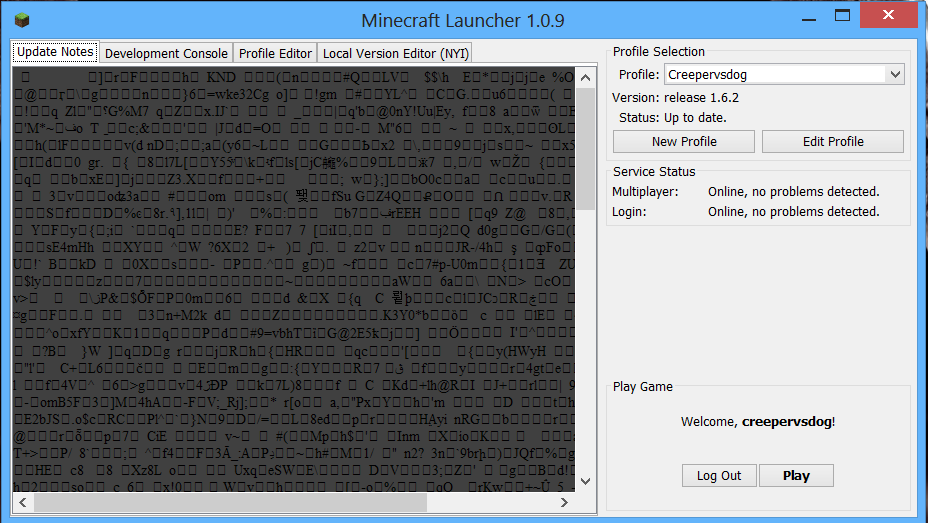
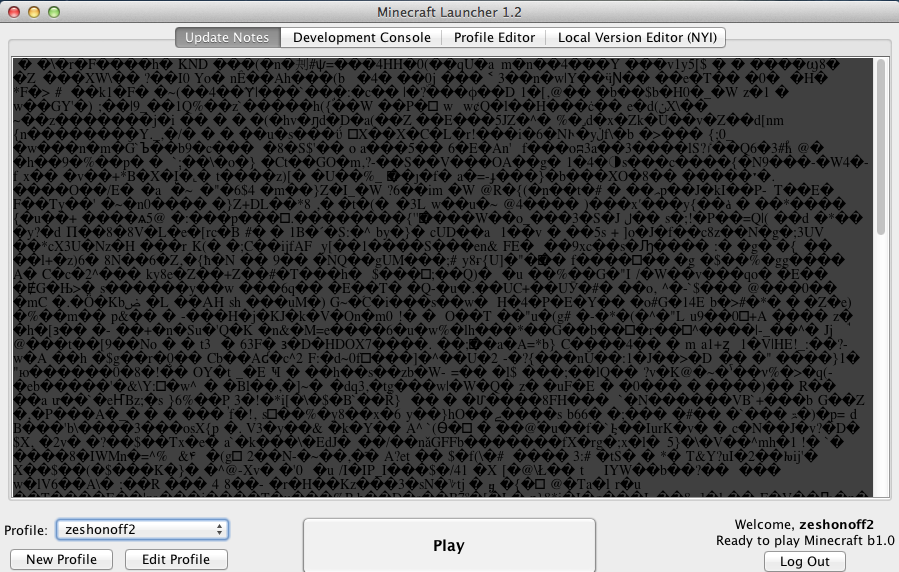
This bug is a glitch in all Minecraft launcher versions since 0.7.1, where random code shows up in place of the update notes.
What I expected to happen was that the launcher would show the regular update notes that are shown when the launcher shows before.
What actually happened was that it showed random code which usually shows when trying to open one of the minecraft code files in notepad (a incorrectly decompressed gzip)
Steps to Reproduce:
1. Open the minecraft launcher
(Works at random and might just be a 1 time thing)
Environment
Mac OSX - 11-5-13
Windows - 15-5-13
Linux - 14-7-13
Linked Issues
is duplicated by17
 MCL-250launcher displays random text DuplicateMCL-317Start Menu ProblemDuplicateMCL-357Ummm......What is thisDuplicateMCL-399screen wil have random carictorsDuplicateMCL-475 Strange pictureDuplicateMCL-591Odd message appears randomly on the new launcher.DuplicateMCL-871blocky textDuplicateMCL-908The 'Update Notes' tab corrupt?DuplicateMCL-956Weird characters when opening launcherDuplicateMCL-1006Launcher sometimes is not decompressing received HTML content properlyDuplicateMCL-1077Launcher errorDuplicateMCL-1143Update notes errorDuplicateMCL-1315Launcher Crash when load "Patch Notes"DuplicateMCL-1386Update Notes tab bugged outDuplicateMCL-1409Random string in update noteDuplicateMCL-1442Weird Characters in update notes when starting up launcherDuplicateMCL-1449Weird "code" stuff on old launcherDuplicate



Created Issue:
Launcher not showing update notes
This bug is a glitch in the minecraft dev 0.71 where random code shows up in place of the update notes.
What I expected to happen was that the launcher would show the regular update notes for 1.5.2.
What actually happened was that it showed random code which usually shows when trying to open a .exe file.
Steps to Reproduce:
1. Open the new minecraft dev application (might just be a glitch, will see what happens)Environment
Mac os x 10.6.8
Linked Issues
is duplicated by1
Attachments1
l.tiff
- Unresolved
- Open
- Minecraft - Public
- Unconfirmed
- 13w19a 13w21a
 MC-15462 → MCL-242MCL-242 →
  TRASH-852TRASH-852 → MCL-243
Trashed the double post
is cloned by
is cloned by
This bug is a glitch in the minecraft dev 0.71 where random code shows up in place of the update notes.
What I expected to happen was that the launcher would show the regular update notes for 1.5.2.
What actually happened was that it showed random code which usually shows when trying to open a .exe file.
Steps to Reproduce:
1. Open the new minecraft dev application (might just be a glitch, will see what happens)
(ok, it doesn't show on 0.7 or earlier)
This bug is a glitch in the minecraft dev 0.71 where random code shows up in place of the update notes.
What I expected to happen was that the launcher would show the regular update notes
for 1.5.2.What actually happened was that it showed random code which usually shows when trying to open a .exe file.
Steps to Reproduce:
1. Open the new minecraft dev application (might just be a glitch, will see what happens)
(ok, it doesn't show on 0.7 or earlier)This bug is a glitch in the minecraft dev 0.71 where random code shows up in place of the update notes.
What I expected to happen was that the launcher would show the regular update notes that are shown when the launcher shows before.
What actually happened was that it showed random code which usually shows when trying to open a .exe file while using a mac. (I have a picture under l.tiff).
Steps to Reproduce:
1. Open the new minecraft dev application (might just be a glitch, will see what happens)
(ok, it doesn't show on 0.7 or earlier)
is duplicated by
Windows screenshot
This bug is a glitch in the minecraft dev 0.71 where random code shows up in place of the update notes.
What I expected to happen was that the launcher would show the regular update notes that are shown when the launcher shows before.
What actually happened was that it showed random code which usually shows when trying to open a .exe file while using a mac. (I have a picture under
l.tiff).Steps to Reproduce:
1. Open the new minecraft dev application (might just be a glitch, will see what happens)
(ok, it doesn't show on 0.7 or earlier)This bug is a glitch in the minecraft dev 0.71 where random code shows up in place of the update notes.
What I expected to happen was that the launcher would show the regular update notes that are shown when the launcher shows before.
What actually happened was that it showed random code which usually shows when trying to open a .exe file while using a mac. (I have a picture under random text.jpg).
Steps to Reproduce:
1. Open the new minecraft dev application (might just be a glitch, will see what happens)
(ok, it doesn't show on 0.7 or earlier)
This bug is a glitch in the minecraft dev 0.71 and 0.7.2 where random code shows up in place of the update notes.
What I expected to happen was that the launcher would show the regular update notes that are shown when the launcher shows before.
What actually happened was that it showed random code which usually shows when trying to open a .exe file while using a mac. (I have a picture under random text.jpg).
Steps to Reproduce:
1. Open the new minecraft dev application (might just be a glitch, will see what happens)
(ok, it doesn't show on 0.7 or earlier)
Mac os x 10.6.8
Mac, Windows (not confermed on linux)
This bug is a glitch in the minecraft dev 0.71 and 0.7.2 where random code shows up in place of the update notes.
What I expected to happen was that the launcher would show the regular update notes that are shown when the launcher shows before.
What actually happened was that it showed random code which usually shows when trying to open a .exe file while using a mac. (I have a picture under random text.jpg).
Steps to Reproduce:
1. Open the new minecraft dev application (mightjust be a glitch, will see what happens)
(ok, it doesn't show on 0.7 or earlier)This bug is a glitch in the minecraft dev 0.71 and 0.7.2 where random code shows up in place of the update notes.
What I expected to happen was that the launcher would show the regular update notes that are shown when the launcher shows before.
What actually happened was that it showed random code which usually shows when trying to open a .exe file while using a mac. (I have a picture under random text.jpg).
Steps to Reproduce:
1. Open the new minecraft dev application (Might work for some and not for others)
(ok, it doesn't show on 0.7 or earlier)
is duplicated by
Mac, Windows (not conf
ermed on linux)Mac, Windows (not confirmed on linux)
is duplicated by
Launcher not showing update notes / showing garbage
is duplicated by
is duplicated by
This bug is a glitch in the minecraft dev 0.71 and 0.7.2 where random code shows up in place of the update notes.
What I expected to happen was that the launcher would show the regular update notes that are shown when the launcher shows before.
What actually happened was that it showed random code which usually shows when trying to open a .exe file while using a mac. (I have a picture under random text.jpg).
Steps to Reproduce:
1. Open the new minecraft dev application (Might work for some and not for others)
(ok, it doesn't show on 0.7 or earlier)This bug is a glitch in the minecraft dev 0.71 and 0.7.2 where random code shows up in place of the update notes.
What I expected to happen was that the launcher would show the regular update notes that are shown when the launcher shows before.
What actually happened was that it showed random code which usually shows when trying to open a .exe file while using a mac. (I have a picture under random text.jpg).
Steps to Reproduce:
1. Open the new minecraft dev application (Works at random)
(Still need confirmation on linux)
This bug is a glitch in the minecraft dev 0.71 and 0.7.2 where random code shows up in place of the update notes.
What I expected to happen was that the launcher would show the regular update notes that are shown when the launcher shows before.
What actually happened was that it showed random code which usually shows when trying to open a
.exe file while using a mac. (I have a picture under random text.jpg).Steps to Reproduce:
1. Open the new minecraft dev application (Works at random)
(Still need confirmation on linux)This bug is a glitch in the minecraft dev 0.71 and 0.7.2 where random code shows up in place of the update notes.
What I expected to happen was that the launcher would show the regular update notes that are shown when the launcher shows before.
What actually happened was that it showed random code which usually shows when trying to open a one of the minecraft code files in notepad
Steps to Reproduce:
1. Open the new minecraft dev application (Works at random)
(Still need confirmation on linux)
This bug is a glitch in the minecraft dev 0.71 and 0.7.2 where random code shows up in place of the update notes.
What I expected to happen was that the launcher would show the regular update notes that are shown when the launcher shows before.
What actually happened was that it showed random code which usually shows when trying to open
aone of the minecraft code files in notepadSteps to Reproduce:
1. Open the new minecraft dev application (Works at random)
(Still need confirmation on linux)
Mac, Windows (not confirmed on linux)
All operating systems
is duplicated by
is duplicated by
is duplicated by
This bug is a glitch in
the minecraftdev 0.71 and0.7.2where random code shows up in place of the update notes.What I expected to happen was that the launcher would show the regular update notes that are shown when the launcher shows before.
What actually happened was that it showed random code which usually shows when trying to open one of the minecraft code files in notepad
Steps to Reproduce:
1. Open the new minecraft dev application (Works at random)
(Still need confirmation on linux)This bug is a glitch in all Minecraft launcher versions since 0.7.1, where random code shows up in place of the update notes.
What I expected to happen was that the launcher would show the regular update notes that are shown when the launcher shows before.
What actually happened was that it showed random code which usually shows when trying to open one of the minecraft code files in notepad
Steps to Reproduce:
1. Open the new minecraft dev application (Works at random and might just be a 1 time thing)
(Still need confirmation on linux)
is duplicated by
is duplicated by
is duplicated by
is duplicated by
This bug is a glitch in all Minecraft launcher versions since 0.7.1, where random code shows up in place of the update notes.
What I expected to happen was that the launcher would show the regular update notes that are shown when the launcher shows before.
What actually happened was that it showed random code which usually shows when trying to open one of the minecraft code files in notepad
Steps to Reproduce:
1. Open thenewminecraftdev application (Works at random and might just be a 1 time thing)
(Still need confirmation on linux)This bug is a glitch in all Minecraft launcher versions since 0.7.1, where random code shows up in place of the update notes.
What I expected to happen was that the launcher would show the regular update notes that are shown when the launcher shows before.
What actually happened was that it showed random code which usually shows when trying to open one of the minecraft code files in notepad (a decompresed
Steps to Reproduce:
1. Open the minecraft launcher
(Works at random and might just be a 1 time thing)
This bug is a glitch in all Minecraft launcher versions since 0.7.1, where random code shows up in place of the update notes.
What I expected to happen was that the launcher would show the regular update notes that are shown when the launcher shows before.
What actually happened was that it showed random code which usually shows when trying to open one of the minecraft code files in notepad (a incorrectly decompressed gzip)
Steps to Reproduce:
1. Open the minecraft launcher
(Works at random and might just be a 1 time thing)
All operating systems
Mac OSX - 11-5-13
Windows -
Mac OSX - 11-5-13
Windows - 15-5-13
Mac OSX - 11-5-13
Windows - 15-5-13
Linux - 14-7-13
is duplicated by
is duplicated by
relates to
is duplicated by
is duplicated by
is duplicated by
![[Mojang] Nathan Adams](../../../data/assets/gravatar/dinnerbone.png) [Mojang] Nathan Adams
[Mojang] Nathan Adams Duplicate of MCL-243, please use the search function to see if your bug has already been submitted.
Duplicate of MCL-243, please use the search function to see if your bug has already been submitted.
![[Mod] Torabi](../../../data/assets/gravatar/torabi.png)
Duplicate of MCL-243.
Duplicate of MCL-243.
Duplicate of MCL-243, please use the search function to see if your bug has already been submitted. Currently over 52% of tickets are being resolved as duplicate.
Duplicate of MCL-243, please use the search function to see if your bug has already been submitted. Currently over 52% of tickets are being resolved as duplicate.
If redirecting the address using the hosts file makes the Minecraft launcher responsive, then obviously the problem is with the renderer, and possibly the page getting mangled at some point. I actually can't load the page in my browser right now, so I'm not sure.
If the host file workaround works for Anthony Mojica, I think this is probably just a combination of MCL-243 and MCL-226. Fixing either one should fix the problem, though ideally they'd both be fixed.
Duplicate of MCL-243, please use the search function to see if your bug has already been submitted. Currently over 53% of tickets are being resolved as duplicate.
Does it always do that?
I'm guessing it is some sort of a transport error thus showing you the contents of an invalid compressed response from a tumblers httpserver.
Yeah, it only shows the error when it uses the 0.71 update. Doesn't affect gameplay though.
I still have a picture of it under l.tiff.
I can confirm this happening in Windows as well.
Confirmed just happened to me.
Edit: Nothing to see in console:
It might still be a 1 time glitch for most of you, but for me it happens every time, with no strange message in the console. And the launcher is 0.7.1. Don't know why it is 0.7 for windows users.
@Noel The 0.7.2 launcher seems to fix it, can you try the new version and see if it still occurs?Nevermind, replicated just now.
Saw this once in 0.81, restarting the launcher fixed it.
Nothing to see in the console:
As the "garbage bug" happened, the Delta time to compare resources was quite high compared to the "normal" view:
Might be just a coincidence.
Still happens to me every time
Proof that the bug still persists (11-7-13)
Confirmed on Linux.
Launcher 1.0.10 (through bootstrap 5) started on linux...
Current time is Jul 14, 2013 5:28:36 PM
System.getProperty('os.name') == 'Linux'
System.getProperty('os.version') == '2.6.32-358.11.1.el6.x86_64'
System.getProperty('os.arch') == 'amd64'
System.getProperty('java.version') == '1.7.0_25'
System.getProperty('java.vendor') == 'Oracle Corporation'
System.getProperty('sun.arch.data.model') == '64'
Just happened again to me today.
Launcher 1.0.10 (through bootstrap 5) started on windows...
Current time is Jul 14, 2013 5:02:37 PM
System.getProperty('os.name') == 'Windows 7'
System.getProperty('os.version') == '6.1'
System.getProperty('os.arch') == 'amd64'
System.getProperty('java.version') == '1.7.0_25'
System.getProperty('java.vendor') == 'Oracle Corporation'
System.getProperty('sun.arch.data.model') == '64'
Loaded 2 profile(s); selected '(Default)'
This only happened to me once, but never happened again! (Running Windows 8)
Confirmed to still appear on 1.1.2.
Simplifying what Grum just said, what you are seeing is raw HTML code used to display the Update Notes. That much I can tell you.
Liam: Actually, raw HTML looks like <html>, <head>, etc and is much more human readable, this is an incorrectly decompressed gzip.
It still happens to me every time, so i don't know if it is decompressed.
I see this happen on occasion. The old launcher had an issue with this as well, it's not just the new launcher.
This just happened to me in 1.1.4, however I can't duplicate it. Has anyone else been able to?
And again in 1.2. This time I got a screenshot, I've added it to the list.
Windows 7 Home Premium 64-bit
java 7 update 21
It happened for me before 1.2, now it doesn't happens (for me).
im one of the duplicates, by the way. because it REALLY bugs me, makes me think minecraft will crash
Oh, pardon me for that goof up. I'll see if I can find a temporary solution to this issue (as soon as I figure out how to read Java).
Is this still a concern in the current Launcher version 1.3.9 or later? If so, please update the affected versions in order to best aid Mojang ensuring bugs are still valid in the latest releases/pre-releases.
Fixed but only when you have javaFX (you're java 7 or higher, or have manually installed it)