 danegraphics
- danegraphics
- danegraphics
- America/Havana
- Yes
- No
 MC-98780
 MCL-23853
 WEB-6743
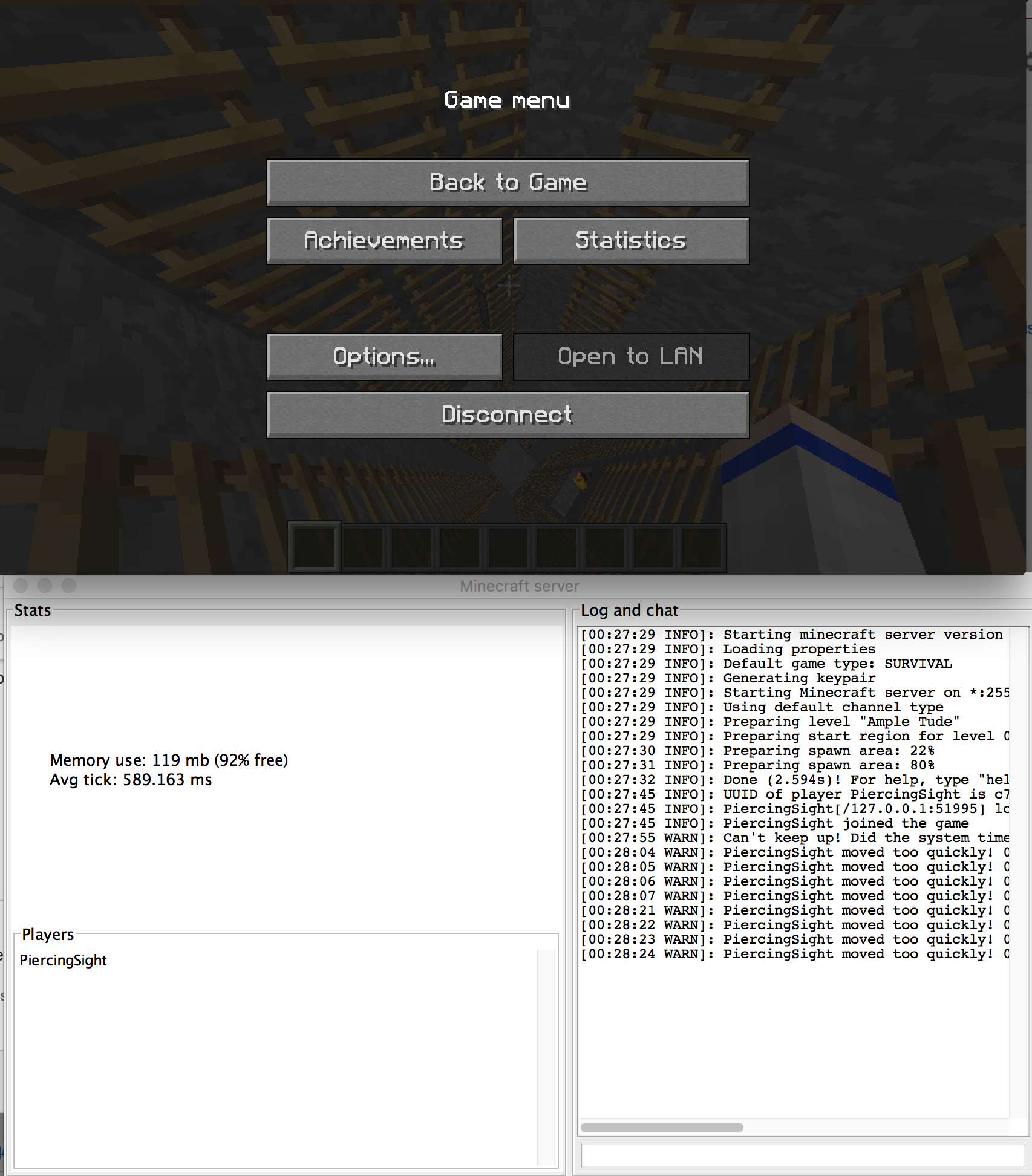



A massive amount of tick lag when moving vertically in the server. Whether falling or flying in creative mode, vertical movement causes massive lag spikes that can reach an avg tick of 600ms or more. This causes the server to repeatedly say "Can't keep up!" — and "Player moved too quickly!" when falling — before eventually crashing.
Crash log, server log and screenshot
from same test. I initiate it by flying up and dropping down in a 3x3 tunnel from the surface to diamond level repeatedly. (This is an amplified world)A massive amount of tick lag when moving vertically in the server. Whether falling or flying in creative mode, vertical movement causes massive lag spikes that can reach an avg tick of 600ms or more. This causes the server to repeatedly say "Can't keep up!" — and "Player moved too quickly!" when falling — before eventually crashing.
Crash log, server log and screenshot are from the same test. This occurs every time. I initiate it by flying up and dropping down in a 3x3 tunnel from the surface to diamond level repeatedly. (This is an amplified world)
Everytime I click "Feedback Login" on the feedback page, it just takes me to a page saying I've been logged out of my microsoft account.
Even if I try to log in to my microsoft account elsewhere, it just keeps booting me out.
Attached is a screenshot of the page it takes me to.
—
Note that the workaround described in WEB-6665 is incredibly janky.
It required me to reset my password even though I was using my correct microsoft password that works everywhere else.
The fact that it was not accepting my correct password may give a hint as to what the actual issue was.
Everytime I click "Feedback Login" on the feedback page, it just takes me to a page saying I've been logged out of my microsoft account.
Even if I try to log in to my microsoft account elsewhere, it just keeps booting me out.
Attached is a screenshot of the page it takes me to.
—
Note that the workaround described in WEB-6665 is
incredibly janky.It required me to reset my password even though I was using my correct microsoft password that works everywhere else.
The fact that it was not accepting my correct password may give a hint as to what the actual issue was.
Everytime I click "Feedback Login" on the feedback page, it just takes me to a page saying I've been logged out of my microsoft account.
Even if I try to log in to my microsoft account elsewhere, it just keeps booting me out.
Attached is a screenshot of the page it takes me to.
—
Note that the workaround described in WEB-6665 is also problematic.
It required me to reset my password even though I was using my correct microsoft password that works everywhere else.
The fact that it was not accepting my correct password may give a hint as to what the actual issue was.
Everytime I click "Feedback Login" on the feedback page, it just takes me to a page saying I've been logged out of my microsoft account.
Even if I try to log in to my microsoft account elsewhere, it just keeps booting me out.
Attached is a screenshot of the page it takes me to.
—
Note that the workaround described in WEB-6665 is also problematic.
It required me to reset my password even though I was using my correct microsoft password that I verified works everywhere else.
The fact that it was not accepting my correct password may give a hint as to what the actual issue was.
Items placed directly into bundles do not unlock recipes or advancements.
—
How to test:
- Open a chest that has two of an item that would unlock a recipe or an advancement.
- Place one item directly into a bundle in your inventory. No unlock will happen (though it should).
- Place the other item directly into your inventory. It will now unlock.
Items you can test with are paper (in many loot chests) for recipes and obsidian (in many loot chests) for the "Ice Bucket Challenge" advancement.
—
Why this is a bug:
One would expect that – because you can place items directly into a bundle in the inventory, and pluck items directly out for use (unlike a shulker box where you cannot do either) – placing an item in a bundle in your inventory would unlock recipes and advancements.
With shulker boxes, it is understandable that unlocking wouldn't happen. You can't place items directly into them. They are a separate chest that you have to place down outside your inventory to open.
However, with how freely bundles can be used as inventory slots, I would consider their contents to be inventory and to unlock recipes and advancements as inventory does.
Items placed directly into bundles do not unlock recipes or advancements.
—
How to test:
- Open a chest that has two of an item that would unlock a recipe or an advancement.
- Place one item directly into a bundle in your inventory. No unlock will happen (though it should).
- Place the other item directly into your inventory. It will now unlock.
Items you can test with are paper (in many loot chests) for recipes and obsidian (in many loot chests) for the "Ice Bucket Challenge" advancement.
—
Why this is a bug:
One would expect that – because you can place items directly into a bundle in the inventory, and pluck items directly out for use (unlike a shulker box where you cannot do either) – placing an item in a bundle in your inventory would unlock recipes and advancements.
With shulker boxes, it is understandable that unlocking wouldn't happen. You can't place items directly into them. They are a separate chest that you have to place down outside your inventory to open. And in order to use any items in a shulker box, they need to pass through your inventory before you can use them or craft anything with them.
However, with how freely bundles can be used as inventory slots, I would consider their contents to be inventory and to unlock recipes and advancements as inventory does. If I'm gathering the items for a recipe, I can place them directly in a bundle, and then pull them out to craft with them without the items touching my inventory, despite my possessing them.
Items placed directly into bundles do not unlock recipes or advancements.
—
How to test:
- Open a chest that has two of an item that would unlock a recipe or an advancement.
- Place one item directly into a bundle in your inventory. No unlock will happen (though it should).
- Place the other item directly into your inventory. It will now unlock.
Items you can test with are paper (in many loot chests) for recipes and obsidian (in many loot chests) for the "Ice Bucket Challenge" advancement.
—
Why this is a bug:
One would expect that – because you can place items directly into a bundle in the inventory, and pluck items directly out for use (unlike a shulker box where you cannot do either) – placing an item in a bundle in your inventory would unlock recipes and advancements.
With shulker boxes, it is understandable that unlocking wouldn't happen. You can't place items directly into them. They are a separate chest that you have to place down outside your inventory to open. And in order to use any items in a shulker box, they need to pass through your inventory before you can use them or craft anything with them.
However, with how freely bundles can be used as inventory slots, I would consider their contents to be inventory and to unlock recipes and advancements as inventory does. If I'm gathering the items for a recipe, I can place them directly in a bundle, and then pull them out to craft with them without the items touching my inventory,
despite my possessing them.Items placed directly into bundles do not unlock recipes or advancements.
—
How to test:
- Open a chest that has two of an item that would unlock a recipe or an advancement.
- Place one item directly into a bundle in your inventory. No unlock will happen (though it should).
- Place the other item directly into your inventory. It will now unlock.
Items you can test with are paper (in many loot chests) for recipes and obsidian (in many loot chests) for the "Ice Bucket Challenge" advancement.
—
Why this is a bug:
One would expect that – because you can place items directly into a bundle in the inventory, and pluck items directly out for use (unlike a shulker box where you cannot do either) – placing an item in a bundle in your inventory would unlock recipes and advancements.
With shulker boxes, it is understandable that unlocking wouldn't happen. You can't place items directly into them. They are a separate chest that you have to place down outside your inventory to open. And in order to use any items in a shulker box, they need to pass through your inventory before you can use them or craft anything with them.
However, with how freely bundles can be used as inventory slots, I would consider their contents to be inventory and to unlock recipes and advancements as inventory does. If I'm gathering the items for a recipe, I can place them directly in a bundle, and then pull them out to craft with them without the items touching my inventory, and the recipe would not be unlocked even though I gathered all the ingredients and have them ready to use.
Items placed directly into bundles do not unlock recipes or advancements.
—
How to test:
- Open a chest that has two of an item that would unlock a recipe or an advancement.
- Place one item directly into a bundle in your inventory. No unlock will happen (though it should).
- Place the other item directly into your inventory. It will now unlock.
Items you can test with are paper (in many loot chests) for recipes and obsidian (in many loot chests) for the "Ice Bucket Challenge" advancement.
—
Why this is a bug:
One would expect that – because you can place items directly into a bundle in the inventory, and pluck items directly out for use (unlike a shulker box where you cannot do either) – placing an item in a bundle in your inventory would unlock recipes and advancements.
With shulker boxes, it is understandable that unlocking wouldn't happen. You can't place items directly into them. They are a separate chest that you have to place down outside your inventory to open. And in order to use any items in a shulker box, they need to pass through your inventory before you can use them or craft anything with them.
However, with how freely bundles can be used as inventory slots, I would consider their contents to be inventory and to unlock recipes and advancements as inventory does. If I'm gathering the items for a recipe, I can place them directly in a bundle, and then pull them out to craft with them without the items touching my inventory, and the recipe would not be unlocked even though I gathered all the ingredients and have them ready to use.
With natural use of the bundles, a player can unintentionally miss out on many advancements and recipes that they rightfully should have unlocked.

danegraphics, I think what you're seeing is MC-98994.
![[Mod] turbo](../../../data/avatars/users/92867.png)
danegraphics: This ticket has already been resolved as working as intended, which means this is not considered a bug and won't be fixed. Please do not leave a comment on this ticket.
This appears to be the cause of
MC-93631as any block that requires a block to be under it breaks when the piston retracts.What Roy Sajima said. I believe the key to fixing this is in MC-94003.
Confirmed 1.9
In 1.9, I have found that exiting the world, and then reloading it can sometimes fix the problem. Sometimes the problem is small and sometimes it is major. I recently had a time where a huge central portion of chunks would never render, and the chunks that wouldn't render would rotate with my position around the center.
I attempted refreshing the render of the chunks, changing video settings, etc, but nothing worked except closing out of the world and loading it back up. From what I can find it doesn't look like a rendering issue so much as it is a chunk loading issue. When the chunks are loaded into the cache, they must be corrupted by something that causes them to act up when being rendered or causes them to not be able to render at all.
Another (maybe) possible clue: When I am looking at a non-rendering chunk, my central pointer still activates the box outlining the blocks in the chunk, however, when I looked at the position of the outlining box, it was misaligned with the visible blocks. Either all the blocks that I was looking at were equally positioned tall grass, or the entire chunk was attempting to render in a misaligned position. If the latter, that could cause huge problems. If the position of a chunk is loaded as being different then where it should render, then that would cause chunks to cease rendering at incorrect times, such as when the chunk isn't entirely out of view (though it is calculated to be because its loaded position is incorrect). I think it is unlikely, but it may be possible. I'll observe closer and experiment more the next time it happens.
Quick snippet of info in case it helps: What I have observed by watching the memory usage is that the lag is accompanied by an unexplained ~40mb spike in memory usage.
When 1 player is on the server and the server is functioning properly, memory hovers around 70mb. At the same time the lag occurs, the memory usage of the server shoots up to about 110mb for no known reason. If there is a way to track what is using the memory, it may be possible to identify what is causing the issue (or at least something else that the issue is causing to use a bunch of memory).
On a side note, the lag and memory usage problem only occurs when a player is on the server. Without any players, memory hovers at 45mb and Avg tick at 0.25-0.5ms.
Also:
Using /kill @e[type=!Player] doesn't stop the lag, nor does it reduce the memory spike. BUT if I do /kill @e and then click respawn, the server lag goes completely away and so does the memory spike. However, it doesn't happen when I just type /kill @e. If I fire /kill @e and I die, then the lag continues and will continue until I click respawn. The moment I finish respawning, the memory returns to normal and the accompanying lag ceases immediately.I've discovered that this is because respawning changes the player location. In my server, going beyond about 510m in the x direction causes the memory and lag spike. I'll test a bit more off server to see if any lag happens there as well. I'll then test in a different world and using different entities and spawners and such to see what happens.After testing, there are no mobs that cause any significant lag. When looking in the direction of the lag, I found out that the further and more often I pushed between the edges, then farther out the edge moved.
And so it seems that it is the terrain generation in certain locations that causes significant lag in the server. I have a hunch that it is more significant when this terrain generation is combined with trying to communicate the not yet generated chunks to the client, but that's just a hunch. Once the chunks have been generated, there is little to no lag.
I may attempt using a terrain pregeneration program to pregenerate all of the close by terrain and then see if the lag ever returns.
Hope this helps. I'll continue experimenting to see what I can find.
I apologize. Is there a way to disable that?
"I'm surprised I'm the first to mention this for 1.9 stable release"
My comment was about the 1.9 stable release. It is also a problem in the 1.9.1 pre-3 that I tested.
However, when it comes to the usage of resources, the lag comes well before any memory is full. I play with 2GB memory or the server, but it was only using 130MB and the lag was still there. It is processing resources that are getting used up by what appears to be an extremely inefficient algorithm in terrain generation. If there is an inefficient algorithm in pigman pathfinding, I have not encountered it myself.
TLDR - Some functions are working way too hard to accomplish certain tasks and they are causing lag.
This issue is specifically for servers, and does not necessarily have to do with the entities as terrain generation is also playing a part in this lag. Each issue should probably be separated into their own bugs, but this bug just says "server lag" with no specifically named cause, so the two known causes end up mentioned here: Terrain generation and entity path finding. I'm unsure what the protocol is for such a situation.
There were two things causing lag. We never specified which if them is the focus of this bug so this bug report took the reaponsibility of both. Those two thigs are 1- Pathfinding issues and 2- Terrain generation.
So until both of those (and perhaps other undiscovered causes) are fixed, it would be best to keep this bug report open, or to split up each cause into its own bug report and move all the votes and watches from this one to those.
Considering there is still lag despite the pathfinding being fixed, what is the cause of the lag when it comes to this bug? Should this bug be closed while there are still massive lag from any cause?
For me, no matter how many of whatever creature there is in the world, they don't create lag for me, however loading chunks creates tons of lag. Not even necessarily generating the chunks, but just the server trying to send the data to the client creates intense amounts of lag on the server unrelated to memory issues. Can anyone else confirm this issue for me? I've gotten it on every 1.9 server I've run.
>Anyone with the problem, can you post an affected map?
For me it's on any and all maps when chunks are being loaded. There is no specific map that has the issue, for me.
Sometimes the server chokes on the chunks and will stop all other processes just to load chunks causing the Avg tick to shoot up to 200+ms causing a lot of the "server can't keep up" errors. I could have thousands of mobs and there won't be any issues. I can run tons of command blocks no problem. But the moment I move my client causing it to ask for chunks, the server chokes up massively and seems to dedicate the entirety of its processing to the task while at the same time not being able to accomplish the task. Amplified terrain is especially bad at this, jumping the Avg tick up to 600+ms.
I have an odd feeling this may be related to the chunk loading/rendering bug in the client, but I'm not sure.
TLDR - The only thing I've found that consistently causes unreasonable lag is chunk loading.
Possibly. I find this note really interesting: "In 15w37a and subsequently 1.9, this method was removed."
That may very well be exactly what is causing the problems. If that gets patched and fixes this problem, that would be fantastic.
^
Can this please get assigned soon? It is still a massive problem.
Oh, I thought the lag in this ticket was described as lag in general. In that case, can we get someone assigned to
MC-98994? Because my server is unplayable until that's fixed. Thanks.Yay! You're the best, Mobius!
I'm pretty sure this is a different problem from
MC-133841. Not a duplicate.That issue is about not being able to paste the character into the text of the book (as far as I understand). This one is about the Title and Author fields specifically ignoring the character and not formatting anything.
It's possible these have the same cause, but they are separate side-effects of the issue and both need to be tracked, not just one. Otherwise you may fix that issue but not this one.
A note just in case the issue marked as a duplicate of this ticket is ignored:
Once this issue is fixed, please make sure that it also resolves
MC-200226so that formatting also successfully applies to Titles and Authors in books, not just the text of the book.If it does not, then please reopen
MC-200226.Can confirm in 1.18.2.
Attached image of command locating a different biome than the one I was right above.
@ampolive - You were right. They work perfectly fine in vanilla. Though I suspect it's because simulation distance can't be set below the max render distance of the dolphins (which is 5 chunks, far below all other mobs for some reason?).
It may occur on modded servers because the simulation distance can be set below the max render distance of dolphins. So those values may actually be tied together.
I imagine that's the reason dolphins don't render beyond 5 chunks regardless of settings?
This bug is happening again.
Just happened in MacOS 13.5.
Can confirm in 1.20.1.
When I saw it happen I laughed so hard.
VillagerBread.mov
Note that the workaround described in WEB-6665 is incredibly janky.
It required me to reset my password even though I was using my correct microsoft password that works everywhere else.
The fact that it was not accepting my correct password may give a hint as to what the actual issue was.
@Zgajak - Thank you. This allows older versions to start now, but they are still visually buggy. Specifically, the inverted colors issue has not been resolved by this.
Again, probably a result of the java version used to run the pre-1.6 versions of the game.
Can confirm that this also applies to Elytra, which will make shuffling sounds when modified.
Can confirm for 1.20.4.
I think the problem with trying to fix this is that damage values pull double duty. Not only do they measure the damage of the item, they also serve as the means of letting map makers create new items. This means that "Unbreakable: 1b" is pulling double duty as well, which is a problem when one may not want both fulfilled.
So an unbreakable item's damage value must be assumed to be perfectly stable, regardless of what a player attempts to do with it.
But on the other hand, if someone wants to make certain items (say all swords) unbreakable through a datapack, and wants the players to be able to do everything else normally, such as combining enchantments with other items regardless of the other item's damage, they should be able to do so and have the resulting item remain unbreakable.
So somehow, custom items remaining stable, and combining items with enchantments in anvils, need to be segregated.
Perhaps this could be a solution:
This would allow map makers to continue to use their items as is without needing to worry about changing too much (1b would just be taken as an int of 1), and would allow future map makers and especially datapack makers to allow the combining of enchanted items in anvils without worrying about damage values.
Confirmed 24w09a
However, with "minecraft:unbreakable" being changed to a component, and no longer being a boolean, we could potentially add properties to it that would allow it to combine with other items.
Things like "minecraft:unbreakable={anvil_requires_matching_damage:false}" would allow us to specify under what circumstances unbreakable items can be combined in anvils and more.
If "anvil_requires_matching_damage" is unspecified, it can disable combining completely. Setting it to true would require the damage values to be the same. Setting it to false would allow you combine items of the same type regardless of damage values.
There could even be a field to specify how it combines in anvils, either keeping the damage value of the first item, or adding the damage values together to get a new value, or something else.
I believe something like this could solve most if not all of the issues with this bug.
—
Side note: It is possible with components to now remove the "minecraft:damage" component from an item completely (though only in loot tables, through item modifiers, etc. It's not possible to do with /give or other such commands yet due to the limitations with the new syntax), and this makes the item equally unbreakable.
However, items with the damage component removed cannot be combined in anvils either (understandably), leading to the same problem as before.
But this isn't an issue if "minecraft:unbreakable" is able to be modified to allow the combining of items under specified circumstances.
@Jeremy - If that is the case, then it might be a good idea to open a new ticket and post the details of how you get that to happen in vanilla, along with video of it happening, if possible.
I don't know how else we can alert them to closed tickets that need re-opened.
Can confirm in 1.21.2
@MrMuskle - I strongly disagree with the "Works As Intended" resolution of that ticket because bundles fundamentally work as inventory.
With bundles, it is entirely possible to put an item in your inventory (in the bundle), craft using said item, and still not unlock the recipes or advancements associated with that item.
This is not the case with shulkers where there is no way to use or craft with the item without putting it in your inventory first, so this was never an issue with shulkers.
I strongly disagree with the "Works As Intended" resolution of this ticket because bundles fundamentally work as inventory.
With bundles, it is entirely possible to put an item in your inventory (in the bundle), craft using said item, and still not unlock the recipes or advancements associated with that item.
This is not the case with shulkers where there is no way to use or craft with the item without putting it in your inventory first, so this was never an issue with shulkers.