 Vidgame Doksha
- Doksha
- doksha
- America/New_York
- Yes
- No
 MC-165128
 MCD-299MCD-887MC-192557
 MCL-21845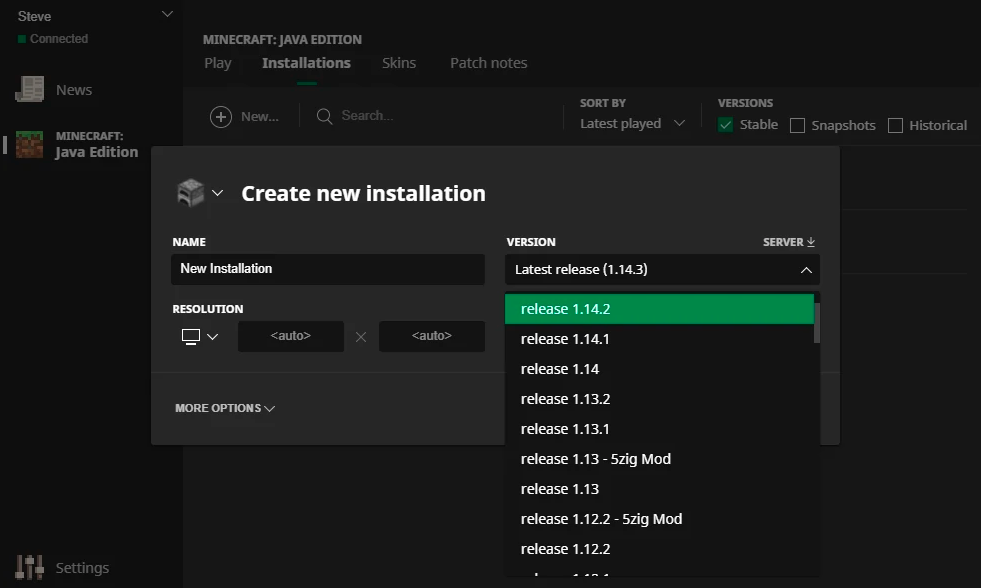

If you hotswap ( openinv ; quickswap ; close ) the firework, or if you enchant the sword / bow before the popup shows, the game will continue to show the "press < pickup > to pickup an item." or "press < openinv > to open your inventory." This is one of the most annoying bugs that technically doesn't affect anything.
Note: its not as easy to swap this quick on keyboard as the game doesnt automatically select an item when you open the inventory
When a player loads chunks quickly, the render engine will unload chunks around a seemingly random rotation point. It's clear that this is a bug with optimizing rendering only visible chunks, but it seems that it tries to cull chunks that are visible as well. This is an extremely easy bug to observe, simply go in spectator and fly straight, then start turning in one direction, this also works with any FOV (although it is a little more difficult to see with 30, it isn't really that hard.)
On the current (and many of past) windows version (at least on a decent portion of systems) when you add a new installation, the list that allows you to select which installation you want to add will always show all available releases, snapshots, and modded versions. This is different from non-bugged versions which will only show the available release/snapshot/modded versions when their respective tick marks are checked.
According to many other players, this is a feature that does exist, (I know for a fact it used to exist when the tick marks were "stable/shapshots/historical") but many players have also reported that this does not work on their systems.
The attached images shows the feaworking as intended
On the current (and many of past) windows version (at least on a decent portion of systems) when you add a new installation, the list that allows you to select which installation you want to add will always show all available releases, snapshots, and modded versions. This is different from non-bugged versions which will only show the available release/snapshot/modded versions when their respective tick marks are checked.
According to many other players, this is a feature that does exist, (I know for a fact it used to exist when the tick marks were "stable/shapshots/historical") but many players have also reported that this does not work on their systems.
The attached images shows the feaworking as intended
On the current (and many of past) windows version (at least on a decent portion of systems) when you add a new installation, the list that allows you to select which installation you want to add will always show all available releases, snapshots, and modded versions. This is different from non-bugged versions which will only show the available release/snapshot/modded versions when their respective tick marks are checked.
According to many other players, this is a feature that does exist, (I know for a fact it used to exist when the tick marks were "stable/shapshots/historical") but many players have also reported that this does not work on their systems.
The attached images shows the feature working as intended and it not working (A dev had claimed this was never a feature, Im too lazy to look around for someone who can send a screenshot of it working in the current version)
On the current (and many of past) windows version (at least on a decent portion of systems) when you add a new installation, the list that allows you to select which installation you want to add will always show all available releases, snapshots, and modded versions. This is different from non-bugged versions which will only show the available release/snapshot/modded versions when their respective tick marks are checked.
According to many other players, this is a feature that does exist, (I know for a fact it used to exist when the tick marks were "stable/shapshots/historical") but many players have also reported that this does not work on their systems.
The attached images shows the feature working as intended and it not working in the current version (A dev had claimed this was never a feature, Im too lazy to look around for someone who can send a screenshot of it working in the current version)
the number stays the same, but the game perceives it as double
mouse sensitivity
This is most likely the game having to re-render the chunks every time you turn your head, I'd say either turning down render distance or using optifine would fix this
Please classify this as "bedrock" as this is a bedrock bug not java
Please classify this as a bedrock bug as it is in bedrock (PE) not Java (PC.) The bug is most likely because the IPad 4 is an old device and apple is $h!t and likes to make you buy newer devices by messing up the drivers.
Please classify this as a bedrock bug as it is such. People working on the java platform will not be able to help you with this.
have you re-loaded the world? minecraft will sometimes not teleport ridable entities when the player dismounts. re-loading should fix this
as @Mega Charizard X said, please state your hardware (RAM, CPU) also try recording this happening with F3 up with OBS. if you want, I could add you on discord for faster communication as this is not particularly a bug with minecraft, but a bug/performance issue with your computer.
My discord is BiC#6921
This is a bedrock bug/technical issue so this should not be posted here
This also extends to other bows that use the longbow sound
this is a suggestion, not a bug. The game runs on a server (the server is on your computer in offline,) therefore the game will keep running. If you want to pause the game, you can use an external program like cheat engine to slow the game to 0
This bug still happens in the latest snapshot (22w11a)
No, the visual glitches are entirely different. I have an old video that I took of it and I can create another with F3 screen on if needed (although it happens no matter what you do, as long as you move quickly and make a turn)
The bug in the provided issue shows stationary visual glitches, this is entirely based on the player moving causing chunks to unload.
also to note, the visual glitches are much more "orderly" and happen in a single direction in an arc, not in a bunch of random chunks not rendering. The chunks will render again, but just take a bit.
https://www.mediafire.com/file/572kwlu4v2rbo6t/Minecraft+2022.03.14+-+18.46.01.01+Trim_T1_C1.mp4/file
video with pie chart (and showing that it happens in all render distances, and FOVs) https://youtu.be/4XivLs7R3Ag
Can confirm 1.18.2 (and the most recent snapshot)
Yeah, this has been a thing since beta (probably further back, but I haven't played earlier versions)
Is there an actual reason the feature was removed? Or did the devs get high and decide it would be funny to remove it? I see no reason to decouple the checkboxes and the new installation button, I really cannot think of any logical scenario where a reasonable person would remove it. I understand that this isnt a "bug" but it sure is a pointless nuisance that causes a lot of wasted time.
In case the devs need some explaining as to why you would almost never need to have them separate... when you add a new version, it is very very likely you are adding that version so you can play it. You know what happens when you add a new version? its added to the versions list, where it is bound by the checkboxes, the same checkboxes that should bound the new installations tab. If you are planning on playing a new installation, you will already have the correct boxes ticked to add it in the new installation tab. In case you don't want to play, well you are still likely adding them for a reason, and tick marks shouldnt change this.
At best this "feature" has no affect on the player (this is only the case if they are choosing the newest version), at worst it is a supreme nuisance that causes adding older versions to take multiple minutes
I just want an explanation, not a reference to a changelog that tells me what I already know.